

A Redditor reportedly ordered an AMD Ryzen 7 7800X3D and received a Ryzen 7 9800X3D, while the retailer’s invoice still listed the 7800X3D. The actionable takeaway is simple: document the mismatch and obtain written authorization from the retailer before installing or using the processor.
Wccftech reported the account based on a post attributed to Reddit user u/jackinets. Neither the Reddit post nor any retailer response has been independently verified for this article.
According to Wccftech’s account, the purchase followed an accident involving u/jackinets’ existing PC. The Redditor had reportedly been using an AMD Ryzen 5 7600 and damaged motherboard pins while installing a CPU cooler.
The Ryzen 5 7600 reportedly remained undamaged, but the motherboard problem led to a replacement purchase and an opportunity to upgrade the processor. The account says the customer ordered a Ryzen 7 7800X3D.
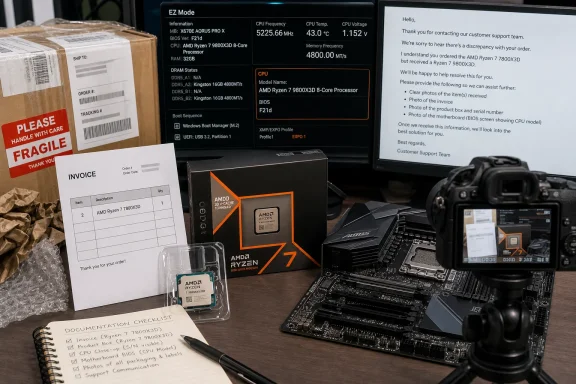
The invoice named the Ryzen 7 7800X3D, but the package reportedly contained a Ryzen 7 9800X3D. That disagreement between the transaction record and the delivered product—not an assumed performance gain or an explanation for the shipment—is the central issue.
The known sequence is narrow:
The wording matters here. The available account supports saying that the package reportedly contained a 9800X3D. It does not independently confirm every retail-box label, seal, sticker, or other package marking.
A product that appears preferable to the customer can still create administrative complications. If the invoice and serial-number records identify one model while the buyer possesses another, questions may arise during a return, warranty request, insurance claim, resale, or later support interaction.
The customer should therefore ask the retailer for a written decision rather than treating the mismatch as an automatic windfall. A short message can identify the order number, state that the invoice lists a Ryzen 7 7800X3D, explain that the shipment reportedly contained a Ryzen 7 9800X3D, and request instructions before installation.
If the retailer wants the product returned or exchanged, the buyer will have a documented procedure to follow. If it authorizes the buyer to keep and use the delivered processor, that approval should be retained with the original invoice.
The goal is not to conduct a forensic investigation. It is to preserve enough information for the retailer to compare the physical delivery with its order and fulfillment records.
The buyer should keep the original materials and avoid altering labels or discarding inserts while awaiting instructions. If the package has already been opened, that should simply be reported accurately. There is no need to stage a second unboxing or imply that the shipment remains sealed.
A concise retailer message should include:
Retail policy and applicable consumer rights can vary. The reported facts do not justify a categorical claim that the buyer must return the processor or may automatically keep it. The practical next step is to give the seller a prompt opportunity to correct or approve the discrepancy.
That procedure should be followed in order:
The update method depends on the motherboard. Some boards provide a firmware-flash feature that can operate without a recognized CPU, while others do not. The customer should follow the board manufacturer’s documented procedure rather than improvising.
If installation proceeds, the first boot should use default settings. Overclocking, automatic performance tuning, and other optional changes can wait until the processor has been identified and basic operation has been confirmed. This is not intended as a general PC-building tutorial; it is simply a way to keep the evidence clear if the already unusual transaction also produces a compatibility or startup problem.
Instead:
If the retailer requests a return, the buyer should follow its instructions regarding removal, packaging, shipping, and any required return authorization. If continued use is approved, that approval—not a Windows screenshot—is the key transaction record.
Use this single verification checklist:
That distinction is particularly relevant to WindowsForum readers. Windows troubleshooting can answer the technical question, “Which processor is running in this PC?” It cannot answer the commercial question, “Has the retailer approved this invoiced-product mismatch?”
Even perfect agreement among the physical processor, BIOS, Settings, and Task Manager does not amend the sales record. The retailer’s written authorization is what connects the delivered product to the transaction and documents the approved resolution.
The more important issue is the transaction record. The customer reportedly paid under an invoice naming a Ryzen 7 7800X3D but received a package containing a Ryzen 7 9800X3D. Until the retailer responds, there is no confirmed resolution linking the delivered processor to that invoice.
Written approval can close that gap. It can show that the retailer reviewed the discrepancy and either authorized the customer to retain the delivered product or specified another remedy. That record may become important if the customer later needs support, initiates a return, makes a warranty claim, or sells the processor with proof of purchase.
The account also illustrates why technical and administrative verification should not be conflated. BIOS and Windows evidence can strengthen the factual record by identifying installed hardware. They cannot establish return rights or compel a particular retailer response.
If the retailer authorizes the Ryzen 7 9800X3D to be kept, confirms how it will be covered, and the motherboard supports it with the appropriate BIOS, the mismatch may ultimately work in the buyer’s favor. If the retailer requests a return or exchange, the preserved packaging and photographs should make that process more orderly.
Either way, the next meaningful development is not a benchmark result or a theory about the warehouse. It is the retailer’s written response—and, only after installation is authorized, consistent identification of the processor by the motherboard firmware and Windows.
Wccftech reported the account based on a post attributed to Reddit user u/jackinets. Neither the Reddit post nor any retailer response has been independently verified for this article.
What to do now
Already installed it? Stop any overclocking or optional tuning, record the CPU identity shown by the BIOS and Windows, preserve all remaining packaging, and notify the retailer promptly and accurately that the processor has already been used.
- Photograph the processor, product packaging, shipping materials, labels, and invoice.
- Preserve the box, inserts, seals, shipping container, and other materials.
- Contact the retailer in writing and explain that the invoiced and delivered models do not match.
- Do not install the processor until the retailer responds.
- If the retailer authorizes installation, verify motherboard and BIOS support before proceeding.
- Save the retailer’s written response with the invoice and photographs.
 A Broken Motherboard Turned a Repair Into an Upgrade
According to Wccftech’s account, the purchase followed an accident involving u/jackinets’ existing PC. The Redditor had reportedly been using an AMD Ryzen 5 7600 and damaged motherboard pins while installing a CPU cooler.The Ryzen 5 7600 reportedly remained undamaged, but the motherboard problem led to a replacement purchase and an opportunity to upgrade the processor. The account says the customer ordered a Ryzen 7 7800X3D.
The invoice named the Ryzen 7 7800X3D, but the package reportedly contained a Ryzen 7 9800X3D. That disagreement between the transaction record and the delivered product—not an assumed performance gain or an explanation for the shipment—is the central issue.
The known sequence is narrow:
- The Redditor was using a Ryzen 5 7600.
- Motherboard pins were reportedly damaged during cooler installation.
- The Ryzen 5 7600 reportedly remained undamaged.
- The customer ordered a Ryzen 7 7800X3D.
- The retailer’s invoice listed the Ryzen 7 7800X3D.
- The package reportedly contained a Ryzen 7 9800X3D.
The Invoice Says 7800X3D, but the Package Reportedly Contained a 9800X3D
The similar model names do not make the processors interchangeable for transaction, support, return, or warranty purposes. The invoice records a Ryzen 7 7800X3D purchase, while the account says the shipment contained a Ryzen 7 9800X3D.The wording matters here. The available account supports saying that the package reportedly contained a 9800X3D. It does not independently confirm every retail-box label, seal, sticker, or other package marking.
| Purchase detail | Ryzen 7 7800X3D | Ryzen 7 9800X3D |
|---|---|---|
| Named on the retailer invoice | Yes | No |
| Reportedly ordered by the customer | Yes | No |
| Reportedly contained in the package | No | Yes |
| Retailer-approved outcome | Not reported | Not reported |
| Warranty and return treatment | Unknown | Unknown |
The customer should therefore ask the retailer for a written decision rather than treating the mismatch as an automatic windfall. A short message can identify the order number, state that the invoice lists a Ryzen 7 7800X3D, explain that the shipment reportedly contained a Ryzen 7 9800X3D, and request instructions before installation.
If the retailer wants the product returned or exchanged, the buyer will have a documented procedure to follow. If it authorizes the buyer to keep and use the delivered processor, that approval should be retained with the original invoice.
What is confirmed—and what remains unknown
Confirmed within Wccftech’s account of the Reddit post:
Still unknown:
- The customer reportedly ordered a Ryzen 7 7800X3D.
- The invoice listed a Ryzen 7 7800X3D.
- The package reportedly contained a Ryzen 7 9800X3D.
- The purchase followed reported motherboard-pin damage.
- The customer’s Ryzen 5 7600 reportedly survived that accident.
Nothing in the available account establishes counterfeiting, tampering, deliberate substitution, or entitlement to keep the processor.
- Why the invoiced and delivered products differed.
- At what stage any packing or fulfillment error occurred.
- Whether all packaging and product markings agreed.
- Whether the retailer will request a return or exchange.
- Whether the retailer will authorize the customer to keep the 9800X3D.
- How the retailer would document warranty or return coverage.
- Whether the replacement motherboard and its current BIOS support the delivered CPU.
Preserve the Evidence and Contact the Retailer
Before installing anything, the buyer should create a clear record of the shipment in its current condition. Useful photographs include the processor, product packaging, shipping container, labels, seals, inserts, and invoice. Images intended for public posting should conceal the customer’s address, order number, tracking details, and other personal information.The goal is not to conduct a forensic investigation. It is to preserve enough information for the retailer to compare the physical delivery with its order and fulfillment records.
The buyer should keep the original materials and avoid altering labels or discarding inserts while awaiting instructions. If the package has already been opened, that should simply be reported accurately. There is no need to stage a second unboxing or imply that the shipment remains sealed.
A concise retailer message should include:
- The order number and purchase date.
- The model named on the invoice.
- The model reportedly received.
- When the discrepancy was noticed.
- Whether the processor has been installed or used.
- Photographs of the processor, packaging, shipping label, and invoice.
- A request for written instructions.
- Confirmation that the original materials have been retained.
Retail policy and applicable consumer rights can vary. The reported facts do not justify a categorical claim that the buyer must return the processor or may automatically keep it. The practical next step is to give the seller a prompt opportunity to correct or approve the discrepancy.
If the Retailer Authorizes Installation
Retailer approval does not replace a compatibility check. Before installation, identify the exact motherboard model and hardware revision, open the manufacturer’s official support page, locate the CPU-support list, and check the required BIOS version for the Ryzen 7 9800X3D.That procedure should be followed in order:
- Read the full motherboard model and revision from the board, packaging, firmware, or purchase record.
- Open the support page for that exact model and revision.
- Open the manufacturer’s CPU-support list.
- Locate the Ryzen 7 9800X3D.
- Note the minimum BIOS version listed for support.
- Compare that requirement with the BIOS currently installed.
- If an update is required, use only the manufacturer’s instructions and firmware for that exact board.
The update method depends on the motherboard. Some boards provide a firmware-flash feature that can operate without a recognized CPU, while others do not. The customer should follow the board manufacturer’s documented procedure rather than improvising.
If installation proceeds, the first boot should use default settings. Overclocking, automatic performance tuning, and other optional changes can wait until the processor has been identified and basic operation has been confirmed. This is not intended as a general PC-building tutorial; it is simply a way to keep the evidence clear if the already unusual transaction also produces a compatibility or startup problem.
Already Installed? Follow This Separate Path
A buyer who installed the processor before recognizing the mismatch should not conceal that fact or attempt to recreate the shipment’s earlier condition.Instead:
- Return the BIOS to default settings if tuning has already been enabled.
- Avoid further benchmarking, overclocking, or optional configuration changes.
- Photograph the remaining packaging, labels, invoice, and shipping materials.
- Record the CPU identity shown by the BIOS or UEFI.
- Record the CPU identity shown in Windows.
- Contact the retailer promptly.
- State clearly that the processor has already been installed.
- Ask whether the retailer authorizes continued use or requires another resolution.
- Save the written answer.
If the retailer requests a return, the buyer should follow its instructions regarding removal, packaging, shipping, and any required return authorization. If continued use is approved, that approval—not a Windows screenshot—is the key transaction record.
Windows and BIOS Can Identify the CPU, but They Cannot Reconcile the Invoice
If the retailer authorizes installation, or if the processor was already installed, the motherboard firmware and Windows can provide supporting technical evidence.Use this single verification checklist:
- Check the CPU model displayed in the motherboard’s BIOS or UEFI.
- Record the motherboard model and installed BIOS version.
- Open Settings > System > About and capture the Processor entry under Device specifications.
- Open Task Manager > Performance > CPU and capture the CPU model shown near the top of the page.
- Compare those results with the processor’s physical markings and retained packaging.
- Save the images with the invoice and retailer correspondence.
That distinction is particularly relevant to WindowsForum readers. Windows troubleshooting can answer the technical question, “Which processor is running in this PC?” It cannot answer the commercial question, “Has the retailer approved this invoiced-product mismatch?”
Even perfect agreement among the physical processor, BIOS, Settings, and Task Manager does not amend the sales record. The retailer’s written authorization is what connects the delivered product to the transaction and documents the approved resolution.
Consumer Checklist for a Mismatched CPU Delivery
Before installation
- Verify which processor is named on the invoice.
- Photograph the processor and all relevant packaging.
- Retain the shipping container, inserts, labels, and seals.
- Contact the retailer in writing.
- Disclose whether the package has been opened.
- Do not install or use the CPU while awaiting a response.
If installation is authorized
- Identify the exact motherboard model and revision.
- Check the official CPU-support list.
- Confirm the required BIOS version.
- Follow the motherboard maker’s documented update procedure if necessary.
- Start with default BIOS settings.
- Capture the CPU identity in BIOS or UEFI.
- Capture Settings > System > About.
- Capture Task Manager > Performance > CPU.
If the CPU was already installed
- Stop optional tuning and overclocking.
- Record the CPU identity and BIOS version.
- Preserve all remaining materials.
- Notify the retailer that installation has already occurred.
- Request written instructions before continued use.
After the retailer replies
- Save the complete email or account-message thread.
- Follow any return, exchange, or shipping instructions.
- Request written confirmation of telephone instructions.
- If the retailer approves keeping the 9800X3D, retain that approval with the original 7800X3D invoice.
- Ask how future returns and warranty requests should be documented.
- Keep copies of the invoice, photographs, screenshots, and retailer decision together.
Why the Written Retailer Decision Is the Real Outcome
The unusual model swap makes an attention-grabbing PC-hardware story, but processor identification is the easy part. A motherboard and Windows can usually report the CPU that is physically installed once firmware support is in place.The more important issue is the transaction record. The customer reportedly paid under an invoice naming a Ryzen 7 7800X3D but received a package containing a Ryzen 7 9800X3D. Until the retailer responds, there is no confirmed resolution linking the delivered processor to that invoice.
Written approval can close that gap. It can show that the retailer reviewed the discrepancy and either authorized the customer to retain the delivered product or specified another remedy. That record may become important if the customer later needs support, initiates a return, makes a warranty claim, or sells the processor with proof of purchase.
The account also illustrates why technical and administrative verification should not be conflated. BIOS and Windows evidence can strengthen the factual record by identifying installed hardware. They cannot establish return rights or compel a particular retailer response.
If the retailer authorizes the Ryzen 7 9800X3D to be kept, confirms how it will be covered, and the motherboard supports it with the appropriate BIOS, the mismatch may ultimately work in the buyer’s favor. If the retailer requests a return or exchange, the preserved packaging and photographs should make that process more orderly.
Either way, the next meaningful development is not a benchmark result or a theory about the warehouse. It is the retailer’s written response—and, only after installation is authorized, consistent identification of the processor by the motherboard firmware and Windows.
References
- Primary source: Wccftech
Published: 2026-07-11T15:30:13.502522
User Gets A Surprise Upgrade As A Retailer Hands Him Ryzen 7 9800X3D Instead Of Ryzen 7 7800X3D
Redditor receives Ryzen 7 9800X3D instead of ordered Ryzen 7 7800X3D after motherboard damage, scoring a major upgrade.wccftech.com
- Related coverage: amd.com
AMD Ryzen™ 7 9800X3D Desktop Processor
Harness the ultimate gaming edge with AMD Ryzen™ 7 9800X3D Processor. Enjoy faster gaming with 2nd gen AMD 3D V-Cache™ technology for low latency.www.amd.com - Related coverage: videocardz.com