

Samsung announced Samsung Browser for Windows on March 26, 2026, bringing its mobile browser to Windows 10 and Windows 11 PCs with Samsung account sync, Galaxy device continuity, Samsung Pass autofill, and Perplexity-powered agentic AI features in supported markets. The move is not just another browser launch; it is Samsung trying to turn the browser into the connective tissue of its Galaxy ecosystem. For Windows users, the interesting part is less whether Samsung can dethrone Chrome or Edge than whether a hardware company can make the PC browser feel like a device feature rather than a standalone app.
The obvious reading is that Samsung has launched yet another Chromium-era browser into a market already dominated by Chrome, Edge, Safari, and a stubborn layer of Firefox loyalists. That makes the announcement look late, maybe even quixotic. But Samsung’s browser strategy makes more sense if the browser is seen as an ecosystem lock-in tool rather than a browser-market-share play.
Samsung already has a browser with a real audience on Android, especially on Galaxy phones where it benefits from preinstallation, device integration, and users who never felt compelled to replace it. Bringing that experience to Windows lets Samsung close one of the more obvious gaps in the Galaxy pitch: the phone may be Samsung’s, but the desktop web has mostly belonged to Google and Microsoft.
That matters because the browser is where cross-device continuity becomes visible. Photos, messages, calls, and clipboard sharing are useful, but web sessions are where many users actually feel the pain of switching devices. If Samsung can make “I was reading this on my phone and now it is on my laptop” feel routine, it gives Galaxy Book buyers one more reason not to treat their laptop as just another Windows machine.
This is also why the device requirements matter. Samsung says continuity features require Samsung Continuity Service or the Galaxy Connect app on the PC, with support tied to Galaxy Book3, Book4, Book5, and Book6 series devices at launch and expansion promised later. That is not a universal Windows browser story. It is a Galaxy-first Windows story.
The company wants the browser to behave like a roaming session layer across phone, tablet, and PC. That means revisiting a site from another device, continuing activity across screens, and making the PC feel less like a separate endpoint. In practical terms, Samsung is taking a feature Apple users have long recognized in Safari and trying to build a Galaxy equivalent for Windows.
The challenge is that Windows is not Samsung’s platform. Microsoft controls the operating system, Edge is deeply integrated, and Chrome remains the default muscle memory for much of the web. Samsung therefore has to build continuity through companion services, account sign-in, and its own apps rather than through native OS ownership.
That makes the experience vulnerable to friction. If the user needs a Samsung account, the right app, the right Galaxy Book generation, the right market, and the right browser installed on both ends, the “seamless” claim becomes conditional. Enthusiasts and IT pros know this pattern well: ecosystem features often work beautifully inside the approved rectangle and become troubleshooting exercises the moment a user steps outside it.
It also reflects a broader shift in browser design. The AI browser is becoming the industry’s new battleground because the browser sees both the user’s intent and the content needed to act on it. Search engines see queries. Operating systems see apps. Browsers see the messy middle: open tabs, saved sessions, page content, shopping flows, research trails, videos, forms, and half-finished tasks.
Perplexity is an especially telling partner because it has positioned itself around answer retrieval and web-grounded assistance rather than general-purpose chatbot theatrics. For Samsung, that provides a cleaner story than trying to make Bixby suddenly carry the weight of the modern AI era by itself. The company can say the browser assistant is not merely a voice helper; it is a context-aware browsing agent.
But “agentic AI” remains one of the most elastic phrases in technology marketing. In its strongest form, it suggests software that can pursue a goal, reason across steps, use tools, and adapt as conditions change. In many consumer products, it currently means a chatbot attached to a page with permission to summarize, search, and suggest. Samsung’s implementation will have to prove which side of that line it lives on.
A browser assistant that can compare information across tabs could be useful in exactly the way many AI features are not. Instead of asking users to move content into a chatbot manually, the assistant can work where the information already lives. That reduces the gap between browsing and synthesis.
For WindowsForum readers, the enterprise and admin implications are obvious. Imagine comparing several vendor pages, Microsoft Learn documents, release notes, and support threads without manually copying excerpts into a separate tool. Imagine asking which tab contains the driver version you saw earlier, or which support article mentioned a registry workaround. That kind of ambient recall is where browser AI becomes more than a demo.
The risk is accuracy and overconfidence. Summaries that blur version numbers, omit caveats, or confuse regional availability are not just annoying; they can send users down the wrong path. When AI moves from “summarize a recipe” to “compare security guidance” or “find the exact page I visited last week,” small errors become operational problems.
On consumer PCs, that may be enough. On managed Windows fleets, however, password and autofill features are never just conveniences. They intersect with identity providers, conditional access policies, browser management, passwordless authentication, regional data rules, and whatever security baseline the organization has already standardized.
Samsung notes that Samsung Pass availability may vary by country because of local regulations. That caveat is not boilerplate for IT departments; it is a deployment warning. A browser feature that works differently by market can become a support and compliance headache, particularly for multinational organizations trying to keep endpoint behavior consistent.
The bigger question is whether Samsung intends to court enterprise administrators or simply tolerate them. Chrome and Edge have mature management stories, policy templates, update controls, extension governance, and decades of accumulated admin familiarity. Samsung Browser for Windows may appeal to Galaxy Book users, but IT departments will ask whether it can be governed like a first-class enterprise browser.
That does not mean Samsung and Microsoft are suddenly enemies. The Galaxy Book line depends on Windows, Samsung ships Microsoft services on devices, and both companies benefit when Android phones and Windows PCs work better together. But the browser is a strategic surface, and strategic surfaces do not stay neutral for long.
For users, this can be good. Competition may force Edge, Chrome, and Samsung Browser to make AI features less clumsy and more useful. It may also pressure vendors to explain what data is processed locally, what goes to cloud services, and how browser context is used by assistants.
For admins, it means another browser with another AI layer to evaluate. A standard Windows image that once had Edge and maybe Chrome could now encounter Samsung Browser through OEM preload, user installation, or Galaxy continuity prompts. The question will not be “is this browser good?” so much as “does this browser fit our security model?”
That matters because Windows laptop differentiation is brutally hard. Intel and AMD platforms converge. OLED displays spread. AI PC branding is everywhere. Even premium hardware can feel interchangeable once users install Chrome, Office, Steam, Slack, and the same handful of utilities they use everywhere else.
Ecosystem continuity is one of the few remaining ways to make a Windows laptop feel meaningfully different. Apple proved this with the Mac and iPhone. Microsoft has tried to bridge Android and Windows through Phone Link. Samsung has an unusually strong position because it sells phones, tablets, watches, earbuds, and laptops under the same Galaxy umbrella.
Samsung Browser for Windows is therefore not just a browser. It is one tile in a larger mosaic: Samsung Account, Samsung Pass, Galaxy Connect, Samsung Cloud, Galaxy AI, and Galaxy Book hardware. Whether users like that depends on whether they see an ecosystem or a maze.
Regional rollout is normal for AI products because of language support, infrastructure, regulation, and partner agreements. But it creates confusion when marketing language travels faster than features. A user in one country may read about natural-language history search and video moment retrieval, install the browser, and discover that the headline capability is not available.
The same applies to hardware support. Samsung says continuity currently works on Galaxy Book3 through Galaxy Book6 series devices, with more devices to follow. That is a reasonable launch posture, but it also means the first impression for many Windows users may be partial functionality.
This is where Samsung must be precise. “Samsung Browser for Windows” sounds universal. “Samsung Browser for Windows with Galaxy continuity and Perplexity-powered AI in supported regions and supported device combinations” is less elegant, but closer to the truth. The gap between those two phrases is where disappointed users tend to live.
This is not unique to Samsung. Every AI browser vendor faces the same bargain: users want the assistant to understand what they are doing, but they do not necessarily want a cloud service absorbing the full texture of their browsing life. The privacy question is not whether AI can be useful. It is whether users and administrators get enough control over when context is shared, where it is processed, and how long it is retained.
Samsung’s brand may help with consumers who already trust Galaxy services. Perplexity’s involvement may help with users who see it as more answer-focused than ad-driven search. But neither brand eliminates the need for transparent controls, especially on Windows PCs that may be used for work, banking, healthcare, legal research, or internal company systems.
For managed environments, the default posture is likely caution. Admins will want policy controls to disable AI features, restrict data sharing, manage sign-in, and prevent cross-device syncing where it conflicts with company rules. Without those controls, Samsung Browser risks being treated as consumer software, no matter how polished it looks.
Samsung Browser for Windows almost certainly relies on the same web compatibility assumptions as the modern Chromium world. That means the fight is not over whether pages load. The fight is over what the browser knows about you, what it can do for you, and which company gets to mediate your daily web behavior.
Google wants Chrome to preserve its search and account dominance. Microsoft wants Edge to carry Copilot, Bing, Windows, and Microsoft 365 deeper into user workflows. Apple uses Safari as an extension of its privacy and ecosystem strategy. Samsung now wants its browser to make Galaxy devices feel more coherent across Windows.
That leaves users in a strange position. Browser choice is more plentiful than ever, but each choice increasingly means picking a services stack. The browser is no longer just a window onto the web. It is a negotiated relationship with a vendor.
But Windows users are also tired of software that arrives with a cloud account, background services, regional caveats, and “coming soon” features. The browser market is littered with products that promised reinvention and ended up as wrappers around familiar engines with a few service hooks. Samsung must show that its browser is more than Galaxy branding plus a Perplexity button.
The first audience will probably be Galaxy phone owners with Galaxy Books. That is a sensible beachhead. If the experience is smooth there, Samsung can expand outward to broader Windows hardware and more countries. If it is inconsistent even inside the Galaxy ecosystem, the broader Windows audience will not be forgiving.
The broader industry should pay attention either way. Samsung is not a minor player testing a hobby project. It is one of the world’s largest device makers saying the browser belongs inside the device ecosystem, not just the software stack. That is a strategic statement.
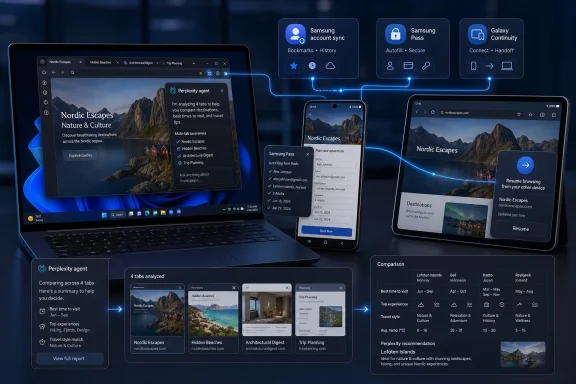 Samsung Is Not Chasing Chrome So Much as Defending Galaxy
The obvious reading is that Samsung has launched yet another Chromium-era browser into a market already dominated by Chrome, Edge, Safari, and a stubborn layer of Firefox loyalists. That makes the announcement look late, maybe even quixotic. But Samsung’s browser strategy makes more sense if the browser is seen as an ecosystem lock-in tool rather than a browser-market-share play.Samsung already has a browser with a real audience on Android, especially on Galaxy phones where it benefits from preinstallation, device integration, and users who never felt compelled to replace it. Bringing that experience to Windows lets Samsung close one of the more obvious gaps in the Galaxy pitch: the phone may be Samsung’s, but the desktop web has mostly belonged to Google and Microsoft.
That matters because the browser is where cross-device continuity becomes visible. Photos, messages, calls, and clipboard sharing are useful, but web sessions are where many users actually feel the pain of switching devices. If Samsung can make “I was reading this on my phone and now it is on my laptop” feel routine, it gives Galaxy Book buyers one more reason not to treat their laptop as just another Windows machine.
This is also why the device requirements matter. Samsung says continuity features require Samsung Continuity Service or the Galaxy Connect app on the PC, with support tied to Galaxy Book3, Book4, Book5, and Book6 series devices at launch and expansion promised later. That is not a universal Windows browser story. It is a Galaxy-first Windows story.
The Browser Becomes the New Sync Layer
For years, browser sync has meant bookmarks, passwords, tabs, and history. Samsung’s pitch begins there, with Samsung account sync for bookmarks and browsing history, plus Samsung Pass for saved personal information and autofill. Those are table stakes in 2026, but they are also the foundation for something more ambitious.The company wants the browser to behave like a roaming session layer across phone, tablet, and PC. That means revisiting a site from another device, continuing activity across screens, and making the PC feel less like a separate endpoint. In practical terms, Samsung is taking a feature Apple users have long recognized in Safari and trying to build a Galaxy equivalent for Windows.
The challenge is that Windows is not Samsung’s platform. Microsoft controls the operating system, Edge is deeply integrated, and Chrome remains the default muscle memory for much of the web. Samsung therefore has to build continuity through companion services, account sign-in, and its own apps rather than through native OS ownership.
That makes the experience vulnerable to friction. If the user needs a Samsung account, the right app, the right Galaxy Book generation, the right market, and the right browser installed on both ends, the “seamless” claim becomes conditional. Enthusiasts and IT pros know this pattern well: ecosystem features often work beautifully inside the approved rectangle and become troubleshooting exercises the moment a user steps outside it.
Perplexity Gives Samsung an AI Story That Bixby Never Could
The most conspicuous part of the announcement is the AI assistant built with Perplexity. Samsung says the assistant can understand webpage context, help create personalized outputs such as travel plans, retrieve specific moments from video content, search browser history in natural language, and summarize or compare information across multiple tabs. That is a much more ambitious pitch than “summarize this page.”It also reflects a broader shift in browser design. The AI browser is becoming the industry’s new battleground because the browser sees both the user’s intent and the content needed to act on it. Search engines see queries. Operating systems see apps. Browsers see the messy middle: open tabs, saved sessions, page content, shopping flows, research trails, videos, forms, and half-finished tasks.
Perplexity is an especially telling partner because it has positioned itself around answer retrieval and web-grounded assistance rather than general-purpose chatbot theatrics. For Samsung, that provides a cleaner story than trying to make Bixby suddenly carry the weight of the modern AI era by itself. The company can say the browser assistant is not merely a voice helper; it is a context-aware browsing agent.
But “agentic AI” remains one of the most elastic phrases in technology marketing. In its strongest form, it suggests software that can pursue a goal, reason across steps, use tools, and adapt as conditions change. In many consumer products, it currently means a chatbot attached to a page with permission to summarize, search, and suggest. Samsung’s implementation will have to prove which side of that line it lives on.
Multi-Tab Awareness Is the Feature That Could Actually Matter
The most credible AI feature in Samsung’s announcement is multi-tab awareness. Anyone who has researched a purchase, planned a trip, compared documentation, or debugged a Windows problem knows the real browser pain is not a lack of answers. It is the growing stack of tabs, each with partial context, contradictory details, and some forgotten reason it was opened in the first place.A browser assistant that can compare information across tabs could be useful in exactly the way many AI features are not. Instead of asking users to move content into a chatbot manually, the assistant can work where the information already lives. That reduces the gap between browsing and synthesis.
For WindowsForum readers, the enterprise and admin implications are obvious. Imagine comparing several vendor pages, Microsoft Learn documents, release notes, and support threads without manually copying excerpts into a separate tool. Imagine asking which tab contains the driver version you saw earlier, or which support article mentioned a registry workaround. That kind of ambient recall is where browser AI becomes more than a demo.
The risk is accuracy and overconfidence. Summaries that blur version numbers, omit caveats, or confuse regional availability are not just annoying; they can send users down the wrong path. When AI moves from “summarize a recipe” to “compare security guidance” or “find the exact page I visited last week,” small errors become operational problems.
Samsung Pass Brings Convenience and Compliance Baggage
Samsung Pass integration is another reminder that this browser is really a Galaxy services vehicle. Autofill across devices is useful, especially for users already storing logins, addresses, and profile information with Samsung. The company frames it as a secure way to save personal information and simplify sign-ins.On consumer PCs, that may be enough. On managed Windows fleets, however, password and autofill features are never just conveniences. They intersect with identity providers, conditional access policies, browser management, passwordless authentication, regional data rules, and whatever security baseline the organization has already standardized.
Samsung notes that Samsung Pass availability may vary by country because of local regulations. That caveat is not boilerplate for IT departments; it is a deployment warning. A browser feature that works differently by market can become a support and compliance headache, particularly for multinational organizations trying to keep endpoint behavior consistent.
The bigger question is whether Samsung intends to court enterprise administrators or simply tolerate them. Chrome and Edge have mature management stories, policy templates, update controls, extension governance, and decades of accumulated admin familiarity. Samsung Browser for Windows may appeal to Galaxy Book users, but IT departments will ask whether it can be governed like a first-class enterprise browser.
Windows Already Has an AI Browser, and It Is Called Edge
Samsung’s launch also lands directly in Microsoft’s territory. Edge is no longer merely Microsoft’s browser; it is one of the company’s main surfaces for Copilot, Bing, Microsoft 365, security policy, shopping tools, PDF handling, and Windows integration. Samsung is bringing a Perplexity-backed AI browser to the same platform where Microsoft has spent years pushing Edge as the default intelligent web front end.That does not mean Samsung and Microsoft are suddenly enemies. The Galaxy Book line depends on Windows, Samsung ships Microsoft services on devices, and both companies benefit when Android phones and Windows PCs work better together. But the browser is a strategic surface, and strategic surfaces do not stay neutral for long.
For users, this can be good. Competition may force Edge, Chrome, and Samsung Browser to make AI features less clumsy and more useful. It may also pressure vendors to explain what data is processed locally, what goes to cloud services, and how browser context is used by assistants.
For admins, it means another browser with another AI layer to evaluate. A standard Windows image that once had Edge and maybe Chrome could now encounter Samsung Browser through OEM preload, user installation, or Galaxy continuity prompts. The question will not be “is this browser good?” so much as “does this browser fit our security model?”
The Galaxy Book Requirement Reveals the Real Product
The launch requirement around Galaxy Book models is easy to gloss over, but it reveals the business logic. Samsung is not merely releasing a Windows app; it is strengthening the Galaxy Book value proposition. The browser is a feature of the PC as much as a piece of software running on it.That matters because Windows laptop differentiation is brutally hard. Intel and AMD platforms converge. OLED displays spread. AI PC branding is everywhere. Even premium hardware can feel interchangeable once users install Chrome, Office, Steam, Slack, and the same handful of utilities they use everywhere else.
Ecosystem continuity is one of the few remaining ways to make a Windows laptop feel meaningfully different. Apple proved this with the Mac and iPhone. Microsoft has tried to bridge Android and Windows through Phone Link. Samsung has an unusually strong position because it sells phones, tablets, watches, earbuds, and laptops under the same Galaxy umbrella.
Samsung Browser for Windows is therefore not just a browser. It is one tile in a larger mosaic: Samsung Account, Samsung Pass, Galaxy Connect, Samsung Cloud, Galaxy AI, and Galaxy Book hardware. Whether users like that depends on whether they see an ecosystem or a maze.
The Availability Story Is Still Too Narrow
Samsung says the browser is officially launched for Windows, with AI features supported in select markets. Reporting around the launch indicates that the Perplexity-powered agentic features are initially available in the United States and South Korea on Windows and Android, with broader market expansion planned. That is a major qualifier for any global audience.Regional rollout is normal for AI products because of language support, infrastructure, regulation, and partner agreements. But it creates confusion when marketing language travels faster than features. A user in one country may read about natural-language history search and video moment retrieval, install the browser, and discover that the headline capability is not available.
The same applies to hardware support. Samsung says continuity currently works on Galaxy Book3 through Galaxy Book6 series devices, with more devices to follow. That is a reasonable launch posture, but it also means the first impression for many Windows users may be partial functionality.
This is where Samsung must be precise. “Samsung Browser for Windows” sounds universal. “Samsung Browser for Windows with Galaxy continuity and Perplexity-powered AI in supported regions and supported device combinations” is less elegant, but closer to the truth. The gap between those two phrases is where disappointed users tend to live.
Agentic Browsing Raises the Stakes for Privacy
A context-aware browser assistant needs context. That is the whole point. It may need access to the current page, other open tabs, browsing history, videos, search patterns, and user prompts. The more useful it becomes, the more sensitive its inputs become.This is not unique to Samsung. Every AI browser vendor faces the same bargain: users want the assistant to understand what they are doing, but they do not necessarily want a cloud service absorbing the full texture of their browsing life. The privacy question is not whether AI can be useful. It is whether users and administrators get enough control over when context is shared, where it is processed, and how long it is retained.
Samsung’s brand may help with consumers who already trust Galaxy services. Perplexity’s involvement may help with users who see it as more answer-focused than ad-driven search. But neither brand eliminates the need for transparent controls, especially on Windows PCs that may be used for work, banking, healthcare, legal research, or internal company systems.
For managed environments, the default posture is likely caution. Admins will want policy controls to disable AI features, restrict data sharing, manage sign-in, and prevent cross-device syncing where it conflicts with company rules. Without those controls, Samsung Browser risks being treated as consumer software, no matter how polished it looks.
The Browser War Has Become a Services War
The old browser war was about rendering engines, speed, standards, and who could break whose website. The current browser war is about identity, sync, AI, commerce, and operating-system gravity. Samsung’s entry makes that shift even clearer.Samsung Browser for Windows almost certainly relies on the same web compatibility assumptions as the modern Chromium world. That means the fight is not over whether pages load. The fight is over what the browser knows about you, what it can do for you, and which company gets to mediate your daily web behavior.
Google wants Chrome to preserve its search and account dominance. Microsoft wants Edge to carry Copilot, Bing, Windows, and Microsoft 365 deeper into user workflows. Apple uses Safari as an extension of its privacy and ecosystem strategy. Samsung now wants its browser to make Galaxy devices feel more coherent across Windows.
That leaves users in a strange position. Browser choice is more plentiful than ever, but each choice increasingly means picking a services stack. The browser is no longer just a window onto the web. It is a negotiated relationship with a vendor.
Windows Users Get More Choice, but Also More Defaults to Fight
For enthusiasts, Samsung Browser for Windows is worth trying precisely because it is not coming from Microsoft or Google. It may offer a cleaner Galaxy-to-PC experience, and its AI features could be genuinely useful if Samsung executes them well. Natural-language history search and multi-tab comparison are the sort of functions that can make everyday browsing feel less chaotic.But Windows users are also tired of software that arrives with a cloud account, background services, regional caveats, and “coming soon” features. The browser market is littered with products that promised reinvention and ended up as wrappers around familiar engines with a few service hooks. Samsung must show that its browser is more than Galaxy branding plus a Perplexity button.
The first audience will probably be Galaxy phone owners with Galaxy Books. That is a sensible beachhead. If the experience is smooth there, Samsung can expand outward to broader Windows hardware and more countries. If it is inconsistent even inside the Galaxy ecosystem, the broader Windows audience will not be forgiving.
The broader industry should pay attention either way. Samsung is not a minor player testing a hobby project. It is one of the world’s largest device makers saying the browser belongs inside the device ecosystem, not just the software stack. That is a strategic statement.
The Fine Print Is Where Samsung’s Browser Will Win or Vanish
The announcement gives Samsung a credible opening, but the browser’s future will depend on execution in the unglamorous places: account reliability, policy controls, regional clarity, AI accuracy, and whether continuity feels instant rather than ceremonial. The headline is agentic AI, but the adoption story will be written by the everyday details.- Samsung Browser for Windows officially extends Samsung’s mobile browser experience to Windows PCs, with sync for bookmarks and history through a Samsung account.
- Cross-device continuity depends on Samsung Continuity Service or Galaxy Connect and is initially tied to Galaxy Book3, Galaxy Book4, Galaxy Book5, and Galaxy Book6 series devices.
- The browser’s AI assistant is built with Perplexity and is designed to understand webpage context, search history in natural language, retrieve moments from video, and compare information across tabs.
- The AI rollout is not universal at launch, with availability limited by market and expected to expand over time.
- Samsung Pass integration adds convenience for autofill and sign-ins, but enterprise users will need to examine regional availability, data handling, and management controls.
- The real competition is not just Chrome or Edge as browsers, but Google, Microsoft, and Samsung as ecosystems competing to own the user’s web context.
References
- Primary source: gadgetbridge.com
Published: 2026-06-20T14:20:17.202172
Samsung Browser for Windows with Agentic AI features announced
Samsung has unveiled the Samsung Browser for Windows, which extends its mobile surfing capabilities to PC users. www.gadgetbridge.com
- Related coverage: news.samsung.com
Samsung Takes Its Browser Beyond Mobile, Extending Agentic AI Across Devices – Samsung Global Newsroom
Seamlessly connecting the mobile and PC browsing experience while simplifying complex web tasks with new agentic AI capabilitiesnews.samsung.com
- Related coverage: samsungmobilepress.com
Samsung Takes Its Browser Beyond Mobile, Extending Agentic AI Across Devices | Samsung Mobile Press
Samsung launches Samsung Browser for Windows, bringing its mobile browser to PC with agentic AI, seamless cross-device continuity and intelligent, natural language search and summarization features.www.samsungmobilepress.com - Related coverage: sammobile.com
Galaxy Connect now supports continuity for non-Samsung Windows 11 PCs - SamMobile
Samsung has opened up the Galaxy Connect Windows 11 app to all PC vendors, so you no longer need a Galaxy Book to use its features. - SamMobilewww.sammobile.com - Related coverage: notebookcheck.net
Samsung Browser for Windows gets new agentic AI features - Notebookcheck News
Samsung has moved its browser beyond last year’s PC beta, adding Windows support, cross-device continuity, and new Perplexity-powered assistant features. www.notebookcheck.net
- Related coverage: business-standard.com
- Related coverage: gadgets360.com
- Related coverage: notebookcheck.org
Samsung Browser para Windows recibe nuevas funciones de IA agéntica - NotebookCheck.org News
Samsung ha llevado su navegador más allá de la beta para PC del año pasado, añadiendo compatibilidad con Windows, continuidad entre dispositivos y nuevas funciones de asistente impulsadas por Perplexity. www.notebookcheck.org
- Related coverage: androidauthority.com
Samsung Browser for Windows is now official, and it really wants to replace Chrome
Samsung Browser is now officially available on Windows after its beta period, complete with agentic AI features powered by Perplexity.www.androidauthority.com - Related coverage: letsdatascience.com
Samsung Releases Browser With Perplexity Assistant | Let's Data Science
Samsung officially releases Samsung Browser for Windows in 2026, graduating from beta and adding a Perplexity-powered agentic AI assistant built into the browser. The release brings cross-device continuity that preserves scroll position between Galaxy phones and supported Galaxy Book 3–6 PCs... letsdatascience.com
- Related coverage: androidcentral.com
Samsung just removed a big barrier between Galaxy phones and Windows PCs | Android Central
Samsung has updated its Galaxy Connect app to work with all x64 Windows 11 PCs.www.androidcentral.com - Related coverage: windowscentral.com
Samsung Browser finally launches on Windows — a dark horse pick for your next browser | Windows Central
Samsung Browser, once exclusive to smartphones, is now available as a desktop app with cross-device syncing.www.windowscentral.com - Related coverage: techradar.com
Samsung revives its Bixby assistant with an AI brain transplant from Perplexity | TechRadar
With One UI 8.5, Bixby gets real context, live answers, and maybe a second chancewww.techradar.com - Related coverage: tomsguide.com
Bixby is still a thing? Samsung unveils new Bixby assistant as part of One UI 8.5 beta — then deletes the whole announcement | Tom's Guide
An upgraded Bixby is apparently coming, but Samsung both is and isn't ready to reveal its AI assistant.www.tomsguide.com - Related coverage: cincodias.elpais.com
- Related coverage: omni.se
Samsung integrerar Perplexity i Galaxy AI
Samsung lägger till AI-agenten Perplexity i den kommande Galaxy S26-serien, rapporterar Engadget. AI-agenten ska aktiveras med röstkommandot ”Hey Plex” eller via telefonens sidoknapp.omni.se - Related coverage: images.samsung.com
