

Samsung’s long-running mobile browser has finally landed on Windows PCs as a beta aimed squarely at Galaxy owners — and it brings the company’s Galaxy AI assistants, cross-device session sync, and a privacy-focused dashboard to the desktop for the first time.
Samsung Internet started life as a mobile-first browser bundled with Galaxy phones and tablets. Over more than a decade it gained a reputation for strong privacy defaults, extension support on mobile, and deeper integration with Samsung services such as Samsung Account and Samsung Pass. The October 30, 2025 beta of Samsung Internet for PC marks the company’s most deliberate attempt to bring that mobile-first experience to Windows and to position the browser as a continuity and intelligence layer across devices.
The launch is region-gated: at introduction the beta is available only in the United States and South Korea, and the client supports Windows 11 and Windows 10 (version 1809 and later). Samsung is distributing the release via a staged beta program and has sign-up requirements tied to a Samsung Account for full functionality.
Samsung frames the release inside its broader “ambient AI” vision — an idea where intelligence flows seamlessly across devices so that the browser becomes more than a passive renderer of pages and instead acts as an active assistant that helps summarize, translate, and carry browsing context from phone to PC. The company’s product messaging emphasizes session continuity, synchronized credentials via Samsung Pass, and Galaxy AI helpers such as Browsing Assist.
Galaxy AI features scale particularly well on larger displays. Summaries, translations, and contextual helpers are often more valuable on a laptop where reading, note-taking, and multitasking benefit from condensed information. The cosmetic and workflow advantages of a native Samsung browser (UI cohesion, first-party sync) will be especially attractive to Samsung hardware owners, including Galaxy Book users.
At the same time, Samsung is directly challenging incumbents in the Windows browser space. Chrome and Edge already own vast mindshare; Samsung’s differentiator is continuity with Galaxy devices and integrated AI helpers. If Samsung achieves desktop-grade performance, a reliable patch cadence, and transparent AI governance, the browser could become a meaningful alternative for many consumers.
Until Samsung publishes enterprise-quality documentation and management hooks, IT teams should treat the beta as an exploratory project. Pilot in segmented environments, restrict AI features for regulated workloads, and insist on contractual assurances about data handling if adopting beyond pilot stages.
However, practical adoption hinges on several operational realities: transparent AI data handling, clear password-sync mechanics across diverse Windows hardware, an ironclad security and update cadence, and extension parity. For everyday Galaxy owners the beta is a tempting preview of a unified browsing future; for IT teams and privacy-conscious users it is a test-worthy experiment that demands careful evaluation and controlled pilots.
Samsung has taken a sensible first step by staging a limited beta in the United States and South Korea and by focusing on the continuity story. The coming months will show whether Samsung can translate mobile strengths into a full-featured, enterprise-ready desktop browser — and whether its ambient AI vision becomes a practical advantage rather than an aspirational marketing line. For now, the beta is worth watching and piloting, but not yet a universal replacement for mature desktop browsers.
Source: Windows Report Samsung Brings Its Internet Browser to Windows PCs with Galaxy AI Features
 Background / Overview
Samsung Internet started life as a mobile-first browser bundled with Galaxy phones and tablets. Over more than a decade it gained a reputation for strong privacy defaults, extension support on mobile, and deeper integration with Samsung services such as Samsung Account and Samsung Pass. The October 30, 2025 beta of Samsung Internet for PC marks the company’s most deliberate attempt to bring that mobile-first experience to Windows and to position the browser as a continuity and intelligence layer across devices.The launch is region-gated: at introduction the beta is available only in the United States and South Korea, and the client supports Windows 11 and Windows 10 (version 1809 and later). Samsung is distributing the release via a staged beta program and has sign-up requirements tied to a Samsung Account for full functionality.
Samsung frames the release inside its broader “ambient AI” vision — an idea where intelligence flows seamlessly across devices so that the browser becomes more than a passive renderer of pages and instead acts as an active assistant that helps summarize, translate, and carry browsing context from phone to PC. The company’s product messaging emphasizes session continuity, synchronized credentials via Samsung Pass, and Galaxy AI helpers such as Browsing Assist.
What’s in the beta: key features and experience
Samsung’s PC beta focuses on three headline areas: continuity, Galaxy AI assistance, and privacy controls. Each is a direct extension of the mobile browser’s strengths, adjusted for desktop workflows.Cross-device continuity (the Galaxy tie-in)
- Bookmarks, browsing history, and open tabs can sync between Galaxy phones/tablets and Windows PCs when users sign into the same Samsung Account. This is the central continuity story Samsung is promoting: pick up reading on the S24 Ultra and resume exactly where you left off on the laptop.
- Session handoff prompts appear to encourage users to “pick up where you left off,” reducing friction when switching devices.
- Samsung Pass integration is advertised to provide password autofill and sign-in continuity across devices, though Samsung’s messaging and early tests indicate that full password-vault parity with mobile may be staged and dependent on hardware security elements. That means password sync is promised, but practical parity across arbitrary Windows hardware may not be immediate.
Galaxy AI — Browsing Assist and helpers
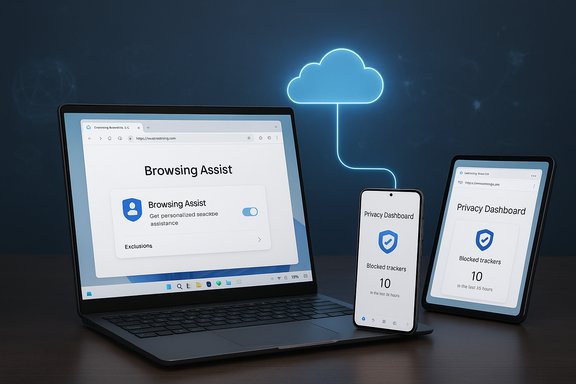
- Browsing Assist is the marquee Galaxy AI feature on PC: it can summarize long web pages into concise overviews, perform inline translations, and surface contextual highlights and quick actions to speed research workflows. These helpers are designed for information-heavy tasks where a condensed view of content saves time.
- The underlying processing for richer summarization and translation is implemented as a hybrid cloud model — some UI interactions run locally, but heavier inference is processed on Samsung’s servers. That improves capability but has privacy implications because page content may be routed to Samsung’s cloud for processing.
Privacy features and defaults
- Smart Anti-Tracking is enabled by default to block third-party trackers and reduce cross-site profiling. Samsung brings the privacy defaults it built on mobile to the PC client.
- A Privacy Dashboard gives real-time visibility into blocked trackers and lets users control protections on a per-site basis. This visibility is part of Samsung’s pitch that the browser is privacy-forward by default.
- The beta also bundles standard privacy conveniences such as incognito mode and ad-blocking support, mirroring the mobile experience.
Technical foundation and platform coverage
- Samsung Internet for PC is Chromium-based, which gives it broad web compatibility and a pathway to Chrome-style extensions — though extension parity and behavior are subject to Samsung’s implementation and permission model.
- The beta includes builds for x86/x64 and ARM Windows devices and targets both Windows 11 and Windows 10 (version 1809 and above). That wide architecture support suggests Samsung wants to cover Galaxy Book devices and a broad set of Windows hardware from day one.
Why this matters to Windows users and Galaxy owners
For users who already live in Samsung’s ecosystem, the PC beta solves a practical pain point: maintaining a single, continuous browsing state across phone and PC without relying on third-party sign-ins. Samsung’s first-party approach to continuity — bookmarks, tabs, history, and (eventually) passwords — presents a compelling reason for Galaxy owners to test a native Samsung client on Windows.Galaxy AI features scale particularly well on larger displays. Summaries, translations, and contextual helpers are often more valuable on a laptop where reading, note-taking, and multitasking benefit from condensed information. The cosmetic and workflow advantages of a native Samsung browser (UI cohesion, first-party sync) will be especially attractive to Samsung hardware owners, including Galaxy Book users.
At the same time, Samsung is directly challenging incumbents in the Windows browser space. Chrome and Edge already own vast mindshare; Samsung’s differentiator is continuity with Galaxy devices and integrated AI helpers. If Samsung achieves desktop-grade performance, a reliable patch cadence, and transparent AI governance, the browser could become a meaningful alternative for many consumers.
Strengths: what Samsung gets right early
- Clear continuity vision. Samsung is solving a real user problem: moving browsing state and work between phone and PC with minimal friction. This consumer value proposition is simple and easy to communicate.
- AI features that fit the use case. Summarization and inline translation are practical helpers, not novelty features. On larger screens they can speed workflows and reduce tab bloat.
- Privacy-by-default posture. Carrying Smart Anti-Tracking and a visible Privacy Dashboard from mobile to PC gives Samsung a good privacy narrative at launch. Many users will appreciate blockers enabled out of the box.
- Chromium compatibility. Building on Chromium gives the browser an easier path to rendering compatibility and potential extension support — crucial for real-world website compatibility.
- Platform breadth. Early support for Windows on ARM alongside x86/x64 increases the potential user base and shows Samsung is considering modern Windows hardware diversity.
Risks and unanswered questions — what to watch closely
- Password sync parity and hardware dependencies. Samsung Pass promises password autofill on PC, but parity with mobile depends on secure hardware primitives like Knox and secure elements that Windows machines typically lack. Early reports and Samsung’s own caveats indicate full password vault parity may be staged across beta updates. Enterprises and privacy-conscious users should treat password sync as provisional until Samsung documents the exact mechanics.
- AI data handling and cloud processing. While Galaxy AI enhances productivity, heavier inference runs on Samsung’s cloud services. That means web page content (or metadata) may be routed to Samsung servers for summarization and translation. This hybrid model improves capability but raises legitimate privacy and compliance questions for businesses and users dealing with sensitive content. Organizations need documented data governance before deploying AI features broadly.
- Update cadence and security patching. A desktop browser requires a rapid and transparent security patch cadence. Samsung’s ability to keep up with Chromium security updates and push timely patches on Windows will be decisive in trust and enterprise adoption. Early Windows experiments from Samsung in 2023 had rough edges; the company must demonstrate consistent maintenance at desktop scale.
- Extension and web-compat parity. Chromium lineage helps, but real-world extension and website compatibility depend on Samsung’s implementation. Users expect a mature ecosystem for extensions — anything less than near-parity with Chrome/Edge will limit adoption.
- Regional rollout and enterprise readiness. The initial beta is limited to the U.S. and Korea, which constrains enterprise testing globally. IT teams should be cautious about rolling this out widely until Samsung publishes hardened policy controls, enterprise documentation, and telemetry governance.
- Windows 10 support considerations. The Windows 10 compatibility claim (v1809+) is technically accurate, but Windows 10’s support window and security posture should factor into adoption decisions; organizations running older Windows 10 builds must evaluate OS-level risk before adding new browsers. Treat Windows 10 installs without current security updates as higher risk when adding networked software.
How to evaluate the beta (practical steps for users and IT teams)
- Sign up for the beta through the official Samsung enrollment channel and provision a test fleet or a set of lab machines rather than rolling out company-wide.
- Test continuity features using a non-critical Samsung Account with a Galaxy phone and a Windows PC to confirm bookmarks, tabs, and history sync. Validate the “pick up where you left off” flow across several content types (news articles, forms, long-form research).
- Validate Samsung Pass behavior on representative Windows hardware. Check whether saved credentials sync, how autofill behaves, and whether any features require Samsung Knox or a hardware-backed secure element. Document gaps.
- Exercise Galaxy AI features with sample pages containing public and private content. Observe what data is sent to Samsung for processing and whether the UI communicates why and where content is processed. If content reaches Samsung’s cloud, confirm retention policies and whether you can opt out. Flag any noncompliant flows for enterprise governance review.
- Run extension compatibility tests with the set of add-ons your teams rely on. Record any functional gaps or permission mismatches.
- Monitor update behavior and patch cadence for at least 30–60 days. Ensure the browser receives timely security fixes and confirm whether Samsung’s update channel is compatible with your endpoint management tools.
- For organizations with regulatory constraints, demand clear documentation from Samsung about telemetry, AI processing, data residency, and logging before approving the browser for production use.
The enterprise angle: cautious curiosity
Samsung’s Windows browser will initially attract consumer Galaxy users and enthusiasts. Enterprises should remain cautious but curious. The technology addresses a legitimate productivity use case — cross-device continuity and AI assistance — but the practical requirements for enterprise adoption are strict: documented security controls, clear AI governance, reliable patching, and ways to manage telemetry and updates centrally.Until Samsung publishes enterprise-quality documentation and management hooks, IT teams should treat the beta as an exploratory project. Pilot in segmented environments, restrict AI features for regulated workloads, and insist on contractual assurances about data handling if adopting beyond pilot stages.
How Samsung’s move fits the broader browser and AI landscape
Samsung is not the first to bring AI features into browsers, but its strategy differs by tightly coupling AI to a first-party device ecosystem. Companies such as Microsoft and Google are integrating AI into their browsers and products with different privacy and enterprise controls; Samsung’s advantage is continuity with Galaxy devices and a consumer-focused narrative that combines privacy defaults with AI helpers. The success of this approach will hinge on execution — the reliability of cross-device sync, the transparency of AI processing, and the company’s ability to operate a desktop-grade browser security lifecycle.Quick checklist for everyday users considering the beta
- Are you a Galaxy device owner who wants bookmarks/tabs to move between phone and PC? If so, this beta is worth trying.
- Do you rely on a large set of Chrome extensions for daily work? Test extension compatibility before switching.
- Do you store sensitive passwords in Samsung Pass? Verify how Samsung Pass behaves on your specific Windows hardware; parity is not guaranteed at launch.
- Are you concerned about content routed to cloud AI services? Treat Galaxy AI features as potentially involving cloud processing until Samsung documents otherwise.
Notable quotes and positioning
Samsung describes this beta as “unlocking a more connected experience across mobile and PC, while setting the stage for more intelligent browsing experiences to come.” That internal framing captures the product’s two-fold goal: establish first-party continuity for Galaxy users and seed a future where the browser acts as an ambient AI assistant across devices. The quote encapsulates Samsung’s intent — but it is also aspirational: the beta demonstrates early functionality rather than a finished ambient-AI platform.Conclusions and takeaways
Samsung Internet for PC (Beta) is a strategically significant release for Samsung and a practical offering for Galaxy users who want a seamless browsing life across devices. The beta’s combination of cross-device sync, Galaxy AI browsing helpers, and privacy-forward defaults creates a coherent product proposition that will be compelling for many consumers.However, practical adoption hinges on several operational realities: transparent AI data handling, clear password-sync mechanics across diverse Windows hardware, an ironclad security and update cadence, and extension parity. For everyday Galaxy owners the beta is a tempting preview of a unified browsing future; for IT teams and privacy-conscious users it is a test-worthy experiment that demands careful evaluation and controlled pilots.
Samsung has taken a sensible first step by staging a limited beta in the United States and South Korea and by focusing on the continuity story. The coming months will show whether Samsung can translate mobile strengths into a full-featured, enterprise-ready desktop browser — and whether its ambient AI vision becomes a practical advantage rather than an aspirational marketing line. For now, the beta is worth watching and piloting, but not yet a universal replacement for mature desktop browsers.
Source: Windows Report Samsung Brings Its Internet Browser to Windows PCs with Galaxy AI Features
