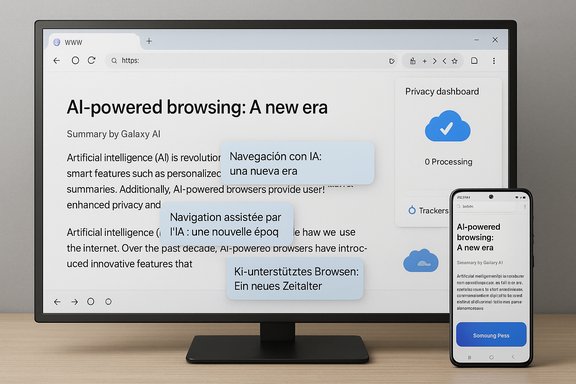
Samsung has quietly moved one of its best‑kept mobile software secrets onto the desktop: the company has opened a limited beta of Samsung Internet for PC, bringing the mobile browser's privacy tooling, cross‑device sync and Galaxy AI helpers to Windows 11 and Windows 10 PCs in an initial roll‑out limited to the United States and South Korea. The beta promises bookmarks, open tabs, browsing history and (staged) password sync via Samsung Pass, a Chromium‑based rendering foundation with access to Chrome‑style extensions, and a suite of AI features Samsung calls Browsing Assist that summarize and translate pages when you sign in with a Samsung Account. Early distribution is deliberately gated to gather feedback before a broader release.
Samsung Internet has been a staple on Galaxy phones for more than a decade, evolving from a default Android browser into a privacy‑forward, feature‑rich option that many Galaxy owners prefer. The mobile browser built a reputation for granular anti‑tracking, ad‑blocking support and UI customizations long before AI features became mainstream on phones. Samsung's decision to bring that engine to Windows is clearly strategic: it aims to reduce friction for users who split time between Galaxy devices and Windows PCs, and to extend Galaxy AI functionality to larger screens where summarization, translation and context helpers can be more useful. Samsung’s official announcement frames the PC beta as the first step toward an “ambient AI” browsing experience that learns user needs across devices while keeping personal data protected. The company says the PC client will sync browsing data and Samsung Pass credentials when users sign in to the same Samsung Account, and it highlights privacy‑first defaults such as Smart Anti‑Tracking and a Privacy Dashboard to make that protection visible to users. The public press release and regional newsroom pages confirm the initial beta launch date and region restrictions.
For consumers who live inside Samsung’s ecosystem and value cross‑device sync, the PC beta is worth testing in a non‑critical environment. For enterprises and privacy‑sensitive users, the prudent approach is a measured pilot and a demand for explicit documentation on data flows and telemetry. Samsung’s PC browser could become a meaningful new option on Windows — perhaps even the default for many Galaxy users — but that outcome depends on execution and transparency in the months ahead.
Source: Windows Central Samsung finally brings popular Internet browser app to Windows PCs — exclusive beta sign up available now
 Background
Samsung Internet has been a staple on Galaxy phones for more than a decade, evolving from a default Android browser into a privacy‑forward, feature‑rich option that many Galaxy owners prefer. The mobile browser built a reputation for granular anti‑tracking, ad‑blocking support and UI customizations long before AI features became mainstream on phones. Samsung's decision to bring that engine to Windows is clearly strategic: it aims to reduce friction for users who split time between Galaxy devices and Windows PCs, and to extend Galaxy AI functionality to larger screens where summarization, translation and context helpers can be more useful. Samsung’s official announcement frames the PC beta as the first step toward an “ambient AI” browsing experience that learns user needs across devices while keeping personal data protected. The company says the PC client will sync browsing data and Samsung Pass credentials when users sign in to the same Samsung Account, and it highlights privacy‑first defaults such as Smart Anti‑Tracking and a Privacy Dashboard to make that protection visible to users. The public press release and regional newsroom pages confirm the initial beta launch date and region restrictions. What Samsung Internet for PC actually brings today
Core features (what you can expect in the beta)
- Cross‑device sync: Bookmarks, browsing history and open tabs can sync between Galaxy phones/tablets and a Windows PC when signed into the same Samsung Account. This is the core continuity story Samsung is selling.
- Samsung Pass integration: Samsung Pass is presented as the credential bridge for autofill and saved passwords across devices, although full parity with mobile (especially hardware‑backed secure storage) is explicitly staged in early builds. Treat password sync as a beta feature until Samsung publishes a compatibility matrix.
- Galaxy AI — Browsing Assist: In‑browser tools to auto‑summarize long pages, translate text inline and surface contextual actions without leaving the page. These helpers are delivered when users sign into their Samsung Account and can route heavier inference to Samsung cloud services.
- Privacy and tracking protections: Smart Anti‑Tracking enabled by default and a Privacy Dashboard that reports blocked trackers and lets users tune protections on a per‑site basis. The intent is to carry over the mobile browser’s privacy posture to desktop.
- Extension support: Because the PC client is built on Chromium/Blink, Samsung intends to support Chrome‑style extensions (Chrome Web Store), though real‑world compatibility and permission models are being refined in the beta.
- UI and UX adjustments: The browser adopts Samsung’s One UI aesthetics — rounded corners, tab overview animations and a sidebar for quick AI or continuity actions — while providing a familiar desktop navigation model. Early previews highlight a visually polished but animation‑heavy tab overview that blurs the background.
Platform support and distribution
- Supported OS: Windows 11 and Windows 10 (version 1809 and later) at launch. Samsung also advertises builds for x86/x64 and ARM architectures.
- Initial availability: United States and South Korea only during the beta, beginning October 30, 2025, with wider roll‑outs promised in the coming months. Samsung is using a sign‑up and Microsoft Store approach (where applicable) to control distribution.
Why this matters to Windows users (and why Samsung is doing it)
Samsung Internet for PC is more than a browser re‑skin: it’s a continuity play that strengthens Samsung’s ecosystem and a tactical step into the crowded Chromium browser market. For Galaxy owners who prefer Samsung Internet on their phones, the PC client removes the friction of switching to Chrome or Edge on desktops.- Ecosystem lock‑in with convenience: Syncing tabs, bookmarks and saved credentials makes a Samsung‑centric workflow feel seamless across devices, reducing the incentive to adopt competing desktop browsers.
- A new vector for Galaxy AI: Browsers are natural places for lightweight AI helpers — summarization, translation and context are high‑value on larger screens. Samsung can leverage cross‑device signals to tailor those experiences better than third‑party extensions can.
- Privacy positioning: By importing Smart Anti‑Tracking and a Privacy Dashboard from mobile, Samsung is trying to appeal to privacy‑conscious users who may distrust the telemetry of other Chromium browsers — albeit with some necessary transparency about cloud processing for AI features.
Technical foundation and the important caveats
Built on Chromium and Blink
Samsung Internet for PC uses the Chromium open‑source foundation and the Blink rendering engine, the same underlying tech used by Chrome, Edge and many other desktop browsers. That gives the browser broad web compatibility and a plausible path to supporting Chrome Web Store extensions. However, being Chromium‑based does not automatically guarantee extension parity, performance equivalence or identical security patch cadence. Samsung must operate its own update and patching process for the Windows client.AI processing and data flow — what’s confirmed, what’s open
Samsung’s public materials and early hands‑on coverage make one technical detail explicit: a portion of the heavy inference for features like page summarization and advanced translation runs in Samsung’s cloud services rather than entirely on‑device. That hybrid approach improves capability but routes page content through Samsung servers, which has privacy and compliance implications for some users and organizations. Samsung’s press materials emphasize privacy protections and account‑gated functionality, but the enterprise and security communities are likely to ask for more precise documentation on what data leaves a device, how long it is retained, what controls users have, and how to opt out of cloud processing if required.Passwords, secure vault parity and hardware roots of trust
Samsung Pass on mobile often uses hardware security (secure elements, Knox) that may not exist on generic PCs. Early Samsung messaging and community reporting indicate password‑vault parity may be staged in the beta, meaning some Samsung Pass features that rely on device‑level secure hardware might not be available immediately on all Windows machines. For organizations that require hardware‑backed credential storage, this is an important limitation to validate before adopting the PC client for critical workflows.Update cadence and security patching
Chromium receives frequent security and compatibility updates. For a trustworthy desktop browser, Samsung must demonstrate an aggressive and transparent patch cadence on Windows. The company’s prior Microsoft Store experiment in 2023 — a storefront listing that briefly appeared and was pulled — showed that early desktop builds can expose rough edges; this staged beta appears aimed at fixing those issues before wide distribution. Until Samsung publishes clear update policies and an enterprise management story, risk‑sensitive deployments should treat the beta as preview software.Early impressions and test‑drive checklist
Early hands‑on reports and community testing indicate the beta is promising but has rough edges; performance and extension behavior are the top areas to watch in the months ahead.Common early‑beta observations
- Some testers reported higher CPU usage and less smooth scrolling than expected in desktop contexts; GPU acceleration and hardware offload maturity are likely areas Samsung will tighten.
- Extension installs and permissions were functional in principle but inconsistent in early builds; some Chrome Web Store buttons appear disabled for certain extensions while Samsung tunes the Windows extension APIs.
- The UI is visually polished and faithful to One UI, but heavy animations and tab overview effects may annoy users who prefer minimalism.
Conservative test plan (recommended)
- Back up existing browser data and export bookmarks before importing the beta profile.
- Enroll a small test group (5–20 non‑critical users) rather than a whole team.
- Verify Samsung Pass behavior on representative hardware, noting whether hardware‑backed keys are used.
- Test the extension set critical to your workflows and log compatibility issues.
- Evaluate AI features behind a company firewall or for compliance‑sensitive content to determine whether cloud processing is acceptable.
- Monitor resource utilization and rendering behavior across your most common sites.
Privacy, governance and enterprise considerations
Samsung positions the PC browser as privacy‑minded by default, but several governance questions remain open for enterprises and privacy‑sensitive users.- Data routing for Galaxy AI: Because page summarization and some translation flows may route content to Samsung cloud services, compliance teams should demand documentation on retention, redaction and deletion policies for any content processed outside a device. Samsung’s press release signals a hybrid model; it does not publish exhaustive governance documentation in the initial announcement. This is a red flag for high‑privacy use cases until further detail is provided.
- Telemetry and diagnostics: Enterprises need clarity on what telemetry the browser collects by default, what is stored in Samsung accounts, and what can be disabled by policy. The beta will likely refine these controls, but organizations should hold out for formal enterprise documentation and Group Policy / MDM guidance.
- Password management trust: Samsung Pass parity depends on secure hardware availability. Until Samsung publishes an explicit compatibility matrix, IT teams should treat password sync as provisional and prefer established enterprise password managers for corporate credentials.
Competitive context — where Samsung Internet for PC fits in the browser landscape
The PC browser market is crowded and dominated by a handful of Chromium‑based incumbents that already offer cross‑device sync and extension ecosystems. Samsung’s differentiators are clear:- Galaxy continuity: Native sync with Galaxy phones, session hand‑off and Samsung Pass autofill form a sticky value proposition for users who live in Samsung’s ecosystem.
- Galaxy AI integration: On‑page summarization and translation tied to a Samsung Account are practical features that feel more integrated than add‑ons or extensions.
- Privacy defaults: Smart Anti‑Tracking and a Privacy Dashboard mirror what made Samsung Internet attractive on mobile, and put the browser in the same competitive set as privacy‑focused Chromium forks.
Practical guidance for interested users
- If you use a Galaxy phone and want seamless tab/bookmark continuity, join the beta if you are in the United States or South Korea and you understand the risks of preview software. Use the official Samsung beta sign‑up channels or the Microsoft Store where it’s available.
- Export bookmarks and back up passwords before installing the beta. If you rely on hardware‑backed credential storage on mobile, test Samsung Pass behavior thoroughly on your PC hardware.
- For enterprise administrators: run a controlled pilot, request Samsung’s enterprise documentation, and validate conditional access, telemetry controls and MDM policies before broader deployment.
Strengths and notable risks — a balanced assessment
Notable strengths
- Continuity for Galaxy users: Syncing tabs, bookmarks and (eventually) full password parity is genuinely useful for users who span mobile and desktop.
- Integrated AI helpers: Browsing Assist can save time for research and multilingual reading right in the browser. When polished, these tools will yield real productivity gains on larger screens.
- Privacy‑first defaults: Smart Anti‑Tracking and a visible Privacy Dashboard bring transparency and immediate benefits to privacy‑minded users.
Principal risks
- Cloud routing of page content for AI: Hybrid on‑device/cloud AI increases capability but raises compliance and privacy questions for sensitive content. Organizations and individuals should proceed with caution until Samsung publishes clear governance.
- Extension parity and performance: Chromium lineage helps but does not guarantee desktop‑grade performance or complete extension compatibility out of the box; early reports flag CPU/scrolling issues and inconsistent extension behavior.
- Password sync hardware limitations: Samsung Pass parity may be limited by the lack of secure elements on generic Windows hardware; treat password sync as a staged capability and validate before relying on it.
What to watch next
- Published enterprise documentation from Samsung covering telemetry, data retention and AI processing guarantees.
- A clearer extension compatibility statement and a robust Chromium security‑patch cadence from Samsung for Windows clients.
- Expansion of the beta to additional regions and the timing of when Samsung will claim full parity for Samsung Pass and other credential features.
- Independent security audits or third‑party analyses that confirm the privacy claims Samsung makes for its cloud‑assisted AI features.
Conclusion
Samsung Internet for PC is a logical and strategically significant move: it closes a practical continuity gap for Galaxy owners and brings Galaxy AI helpers to the desktop in a way that makes sense for routine browsing tasks. The initial beta is deliberately scoped and region‑gated, reflecting Samsung’s recognition that desktop browsers require desktop‑grade performance, extension reliability and enterprise readiness. Early reviews and community reports suggest the fundamentals are in place — Chromium compatibility, Samsung Pass integration and privacy tooling — but real‑world adoption will depend on Samsung resolving performance quirks, clarifying AI data governance and proving password vault parity across the diverse landscape of Windows hardware.For consumers who live inside Samsung’s ecosystem and value cross‑device sync, the PC beta is worth testing in a non‑critical environment. For enterprises and privacy‑sensitive users, the prudent approach is a measured pilot and a demand for explicit documentation on data flows and telemetry. Samsung’s PC browser could become a meaningful new option on Windows — perhaps even the default for many Galaxy users — but that outcome depends on execution and transparency in the months ahead.
Source: Windows Central Samsung finally brings popular Internet browser app to Windows PCs — exclusive beta sign up available now