

Samsung’s long-running mobile browser has finally stepped onto Windows desktops in an officially staged beta, bringing cross-device sync, Galaxy AI helpers, and Samsung Pass credential continuity to Windows 11 and Windows 10 PCs in a move that reframes the browser as a centerpiece of Samsung’s broader Galaxy ecosystem rather than just a mobile convenience. This launch — announced by Samsung and confirmed across major tech outlets — is deliberate, region-gated and explicitly positioned as the first step toward an ambient AI browsing future.
Samsung Internet began life as a mobile-first browser bundled with Galaxy devices more than a decade ago. Over the years it built a reputation for privacy-minded defaults, tight integration with Samsung services, and an evolving set of AI-driven helpers on phones. The October 30, 2025 beta brings that lineage to Windows, marking the first broadly public PC release after a brief in-and-out Microsoft Store listing in 2023. Samsung frames the PC client as a continuity layer: a way to keep bookmarks, open tabs and credentials synchronized across phones, tablets and PCs while surfacing Galaxy AI features like Browsing Assist for on-the-fly webpage summarization and translation. This launch is confirmed directly by Samsung’s press channels and corroborated by independent reporting. Samsung’s official announcement sets out the headline: a beta for Windows 11 and Windows 10 (version 1809 and later) available initially in the United States and South Korea, with broader expansion planned.
Key features included in the initial beta:
What Browsing Assist does in the beta:
Caveat and verification: Samsung’s public materials and support guidance show that some Galaxy AI behaviors rely on a hybrid of local and cloud processing and may require a Samsung Account and network access to operate at full capability. That implies organizations should evaluate data flows before enabling Browsing Assist for regulated or sensitive workflows. The Samsung support pages and the company’s press notes indicate that features like Summarize and Translate have device-language and network dependencies.
Early reports from prior Microsoft Store testing in 2023 revealed rough edges: extension incompatibilities and performance regressions were flagged. Samsung’s more cautious 2025 beta rollout reads like a learning response to those lessons. The company will need to prove desktop-level polish quickly to retain testers and drive word-of-mouth.
Practical advice for power users:
Samsung’s strongest play is to compete not directly for Chrome’s mass market share, but for a niche of Galaxy-loyal users and privacy‑oriented customers who value cross-device continuity and AI helpers. If Samsung nails the three hard technical things — password vault parity, transparent AI data governance, and desktop-grade performance — the company could carve out a meaningful user base among Android and Galaxy enthusiasts. Otherwise, the browser risks being an alternative used by a subset of loyalists and early adopters. Multiple outlets and early community reactions echo this tempered optimism.
Source: WebProNews Samsung’s Browser Leap: Galaxy AI Hits Windows Desktops
 Background / Overview
Samsung Internet began life as a mobile-first browser bundled with Galaxy devices more than a decade ago. Over the years it built a reputation for privacy-minded defaults, tight integration with Samsung services, and an evolving set of AI-driven helpers on phones. The October 30, 2025 beta brings that lineage to Windows, marking the first broadly public PC release after a brief in-and-out Microsoft Store listing in 2023. Samsung frames the PC client as a continuity layer: a way to keep bookmarks, open tabs and credentials synchronized across phones, tablets and PCs while surfacing Galaxy AI features like Browsing Assist for on-the-fly webpage summarization and translation. This launch is confirmed directly by Samsung’s press channels and corroborated by independent reporting. Samsung’s official announcement sets out the headline: a beta for Windows 11 and Windows 10 (version 1809 and later) available initially in the United States and South Korea, with broader expansion planned. What the PC beta ships today
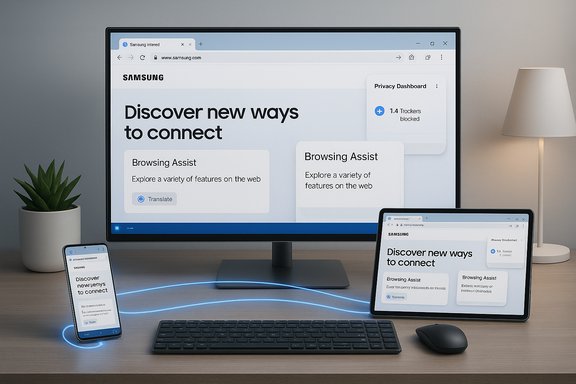
The Windows beta is not a skin — it brings several first-party services and features that are meaningful for Galaxy users and worth dissecting for Windows professionals and privacy-minded adopters alike.Key features included in the initial beta:
- Cross-device sync of bookmarks, browsing history, and open tabs when signed into the same Samsung Account.
- Samsung Pass integration for autofill and saved credentials (staged parity; some password vault behaviors may be phased in over subsequent updates).
- Galaxy AI — Browsing Assist: on-page summarization, inline translation and contextual highlights designed to speed research and multilingual browsing.
- Privacy-first defaults including Smart Anti‑Tracking and a Privacy Dashboard that reports blocked trackers in real time.
- Chromium foundation for compatibility with modern web standards and potential access to Chrome-style extensions, while noting extension parity and update cadence remain beta-era questions.
Technical baseline and system requirements
Samsung’s documentation and press release list the supported platforms and minimum expectations:- Supported OS: Windows 11 and Windows 10 (version 1809 and later).
- Architectures: x86/x64 and Windows on ARM devices are supported in the initial beta channel.
Deep dive: Galaxy AI and Browsing Assist
Galaxy AI is the differentiator Samsung is betting on to make its browser valuable beyond simple continuity. The PC beta surfaces Browsing Assist features familiar to Galaxy phone users — but adapted for larger screens and desktop workflows.What Browsing Assist does in the beta:
- Summarize long pages into concise bullet points, reducing the time needed to triage long-form content.
- Translate inline across multiple languages, enabling quick comprehension without leaving a page.
- Contextual helpers that highlight key sentences, surface definitions, and propose follow-up actions or searches.
Caveat and verification: Samsung’s public materials and support guidance show that some Galaxy AI behaviors rely on a hybrid of local and cloud processing and may require a Samsung Account and network access to operate at full capability. That implies organizations should evaluate data flows before enabling Browsing Assist for regulated or sensitive workflows. The Samsung support pages and the company’s press notes indicate that features like Summarize and Translate have device-language and network dependencies.
Privacy and security: what Samsung promises — and what to verify
Samsung positions privacy as a cornerstone of the PC client: Smart Anti‑Tracking is enabled by default and a Privacy Dashboard surfaces what the browser blocks in real time. Those are strong design choices if they remain effective in practice, because defaults matter more than optional settings for broad user protection. Samsung’s press release explicitly touts this privacy-first posture. At the same time, the beta raises three immediate questions that matter to security teams and privacy advocates:- Where does AI processing occur?
- If page content is sent to cloud endpoints for summarization or translation, that introduces telemetry and data retention risks. Samsung’s materials suggest networked processing is part of the model, and early reporting treats cloud-assisted inference as the likely architecture. Until Samsung publishes explicit processing and retention policies for Galaxy AI in the PC client, treat AI helpers as cloud‑assisted.
- How are credentials protected on Windows?
- Samsung Pass has historically depended on device hardware security (e.g., Knox, secure elements) on Galaxy devices. Transplanting full parity to generic Windows hardware requires careful engineering to avoid weakening credential protection. Early beta notes and tester reports indicate password‑vault parity may be staged; enterprises should not assume immediate feature equality with mobile.
- Patch cadence and Chromium security updates
- The Windows client uses Chromium under the hood. Rapid ingestion of upstream Chromium security fixes is essential for any browser to remain secure. Samsung must demonstrate a predictable update cadence and transparent security patching for Windows clients to be trustable at scale. Independent coverage highlights this as a gating concern for adoption beyond early enthusiasts.
- Install the beta only on non‑production machines or in a controlled test environment.
- Verify whether Browsing Assist transmits page content off device and examine retention and deletion policies.
- Test Samsung Pass parity carefully; do not delete live credentials during early trials.
- Validate extension behavior and sandboxing for any essential productivity or security plugins.
Ecosystem play: why Samsung is building a desktop browser
This is not merely an engineering exercise; it’s a strategic ecosystem move. Samsung is trying to make the browser the connective tissue of a unified Galaxy experience on Windows. Several strategic motives are visible:- Locking in Galaxy users by removing friction when moving between phone and PC (tabs, bookmarks, passwords). For many Galaxy owners, the convenience of a native Samsung browser on Windows is a compelling reason to adopt.
- Extending Galaxy AI beyond phones to PCs, where AI helpers can be more useful for productivity tasks.
- Differentiation vs. Chrome and Edge: Samsung’s privacy-first defaults and built-in AI helpers create a unique positioning that, if executed well, could attract a segment of users dissatisfied with incumbent browsers’ privacy or AI strategies.
Compatibility, extension support, and performance expectations
Because the Windows client uses the Chromium engine, Samsung has a pragmatic path to broad site compatibility and access to the Chrome extension ecosystem in principle. But a Chromium base is only the baseline: extension parity, GPU acceleration, multi‑monitor behavior, smooth scrolling, and a predictable update cadence are the practical hurdles that decide whether a browser becomes a daily driver for power users.Early reports from prior Microsoft Store testing in 2023 revealed rough edges: extension incompatibilities and performance regressions were flagged. Samsung’s more cautious 2025 beta rollout reads like a learning response to those lessons. The company will need to prove desktop-level polish quickly to retain testers and drive word-of-mouth.
Practical advice for power users:
- Test the exact extensions you rely on and verify behavior on the beta build.
- Measure GPU and compositor performance with your typical workloads (video, scrolling-heavy pages, dev tools).
- Validate multi-monitor and high-refresh-rate behaviors if you use advanced display hardware.
Market potential and competitive landscape
Chrome remains dominant on desktop, and Edge — backed by Microsoft and tightly integrated into Windows — is a powerful incumbent. Convincing users to switch browsers at scale requires one of the following: superior performance, a unique and sticky feature set, better privacy defaults, or deep platform integration.Samsung’s strongest play is to compete not directly for Chrome’s mass market share, but for a niche of Galaxy-loyal users and privacy‑oriented customers who value cross-device continuity and AI helpers. If Samsung nails the three hard technical things — password vault parity, transparent AI data governance, and desktop-grade performance — the company could carve out a meaningful user base among Android and Galaxy enthusiasts. Otherwise, the browser risks being an alternative used by a subset of loyalists and early adopters. Multiple outlets and early community reactions echo this tempered optimism.
Enterprise angle: what IT teams should evaluate
Enterprises will not adopt a new browser lightly. The PC beta exposes a set of enterprise-specific considerations:- Management and policy controls: Will Samsung provide group policy templates or an enterprise distribution channel? Enterprises need manageable deployment and telemetry control. This remained an open question at beta launch.
- Credential vault security: How will Samsung Pass integrate with corporate SSO, hardware-backed keys, and enterprise password managers? Early materials indicate Samsung Pass is part of the sync story but that full parity could be staged. This is a gating factor for corporate rollout.
- Data residency and AI compliance: If Browsing Assist sends content to cloud endpoints for summarization, companies in regulated industries will need documented processing locations and retention policies before switching on AI features. Samsung has signaled this is a cloud-enabled feature set; explicit enterprise controls will be required.
- Supported OS posture: With Windows 10 support ended on October 14, 2025, enterprises should prioritize Windows 11 for new deployments to remain on supported platforms; any Windows 10 deployment should be part of a documented ESU plan.
- Pilot the browser in a controlled lab with representative applications and sites.
- Validate Samsung Pass behavior against your SSO and password policies.
- Demand written AI processing and retention policies from Samsung before enabling Browsing Assist broadly.
- Confirm patch cadence and verify Chromium security fix ingestion policy.
Early feedback and known issues
Beta reporting and community threads show early praise for the concept and performance on modern hardware, but they also flag recurring themes:- Sync delays and staged password parity: Some testers report occasional sync delays or missing password vault features in early builds; Samsung appears to be phasing parity over beta updates.
- Extension compatibility: Not all Chrome extensions behave identically in early builds; testers should verify critical add-ons.
- AI transparency: Users want clear controls for when pages are transmitted for summarization and how long results are retained. Samsung’s support pages and community threads emphasize the need for clear documentation.
Future horizons: what Samsung could add next
If Samsung successfully stabilizes the PC client, several logical expansions could sharpen the product’s appeal:- Deeper enterprise features: Group policy templates, centralized telemetry control, and enterprise support channels.
- Local-first AI modes: On‑device summarization and translation (where feasible) to reduce cloud exposure for sensitive use cases. Samsung already supports on-device translation in some mobile contexts, suggesting a roadmap exists.
- Closer integration with wearables and smart home devices: session continuity across phones, laptops, tablets and Galaxy wearables could create a very sticky multi-device environment.
- Broader platform rollout: a global, non-region-gated release and pre-installation on Galaxy Book laptops would significantly increase reach. Samsung’s press notes hint at broader expansion in 2026.
Strengths, risks and final assessment
Strengths- Clear continuity story: Syncing tabs, bookmarks and credentials across Galaxy devices addresses a practical user need that has historically pushed many users toward Chrome or Edge.
- AI-driven productivity: Browsing Assist has real utility on larger displays and can accelerate everyday research and reading.
- Privacy-first defaults: Smart Anti‑Tracking and a visible Privacy Dashboard help Samsung make a positive claim about user protection by default.
- Credential parity and security model: Samsung Pass on Windows needs to match mobile hardware-backed protections; until parity is verifiably implemented, this is a major adoption hurdle.
- AI data handling: Cloud-assisted summarization and translation create compliance and privacy concerns; enterprises and privacy-focused consumers will require transparent policies and controls.
- Desktop polish and extension parity: A Chromium base isn’t enough — Samsung must prove smooth rendering, multi-monitor behavior and extension reliability at desktop scale.
How to test the beta safely (practical, sequential steps)
- Update / verify OS:
- Confirm you’re on Windows 11 or Windows 10 version 1809+ (note that Windows 10 reached end of support on October 14, 2025).
- Join Samsung’s beta program via the official signup channels and prefer the Microsoft Store installation where available.
- Install on an isolated test machine or VM; export bookmarks and back up any passwords before attempting migration.
- Verify Samsung Pass behavior for non-production accounts; do not delete live credentials during testing.
- Test Browsing Assist on non-sensitive pages and confirm whether content is processed locally or uploaded (record response headers/traffic if your testing team can).
- Validate essential extensions and GPU/scrolling performance for your workflows.
Conclusion
Samsung’s Windows beta for Samsung Internet is a calculated, ecosystem-first release that shifts the browser from a mobile utility into a potential cross-device hub for Galaxy customers. The core proposition — continuity, AI helpers, and privacy defaults — is strong on paper and supported by both Samsung’s official materials and widespread tech coverage. Execution is the critical variable. The product will live or die on Samsung’s ability to:- Deliver secure, verifiable password-sync parity without weakening credential protection;
- Provide transparent AI processing, retention and deletion policies;
- Maintain desktop-grade performance, extension compatibility, and a predictable security update cadence; and
- Offer enterprise-friendly management and policy controls.
Source: WebProNews Samsung’s Browser Leap: Galaxy AI Hits Windows Desktops
