

Samsung has issued a major refresh of its SSD utility: Samsung Magician reaches version 9.0 (9.0.0.910) with a reworked interface, customizable widgets, and a trimmed-down home screen that removes banner ads — an update that is available now from Samsung’s official download center.
Samsung Magician is the vendor-supplied management utility for Samsung consumer SSDs and removable storage. The tool has long been the central place for users to check SMART health, run performance benchmarks, apply Samsung-specific optimizations, perform secure erase, and, crucially, update firmware when Samsung issues fixes or performance improvements. The software is distributed and maintained through Samsung’s consumer storage channels and the official Magician download pages. For many users, Magician is the easiest way to keep Samsung drives up to date and to access device-specific features not exposed by generic utilities. Over the years Samsung has tied firmware delivery and certain drive validations to Magician, so the app plays a direct role in device maintenance workflows. That centrality makes changes to the app — UI, telemetry, or platform requirements — consequential for both everyday users and IT administrators.
For individual users: upgrade for convenience but back up first and test the app’s behavior on your machine. For IT pros and system administrators: treat this as a new client release that should be validated in pilot rings; maintain firmware-ISO fallback workflows for high-risk systems.
Samsung’s official download pages and the new 9.0 installers are live in the company’s distribution center; consult those downloads and the included installation guide for the definitive package details and the exact installer filenames before proceeding.
Conclusion
Magician 9.0 refreshes a long-standing utility with a modern skin, widget-driven dashboards, and a tidied home screen — changes that matter to anyone who uses Samsung SSDs as primary storage. The functional improvements are welcome, but the core operational rules remain the same: backup, test, and verify firmware operations in a controlled environment. Where Magician fits into your maintenance workflow depends on whether convenience outweighs the incremental platform and stability risks for your setup.
Source: Neowin Samsung Magician gets big update to version 9.0 with reworked UI, widgets, and more
 Background
Samsung Magician is the vendor-supplied management utility for Samsung consumer SSDs and removable storage. The tool has long been the central place for users to check SMART health, run performance benchmarks, apply Samsung-specific optimizations, perform secure erase, and, crucially, update firmware when Samsung issues fixes or performance improvements. The software is distributed and maintained through Samsung’s consumer storage channels and the official Magician download pages. For many users, Magician is the easiest way to keep Samsung drives up to date and to access device-specific features not exposed by generic utilities. Over the years Samsung has tied firmware delivery and certain drive validations to Magician, so the app plays a direct role in device maintenance workflows. That centrality makes changes to the app — UI, telemetry, or platform requirements — consequential for both everyday users and IT administrators. What changed in Samsung Magician 9.0 (overview)
Samsung’s 9.0 release is notable for four headline items:- A full-step version bump to Samsung Magician 9.0 (9.0.0.910) and new official installers (Windows .exe and macOS .pkg) and an installation guide uploaded to Samsung’s download servers.
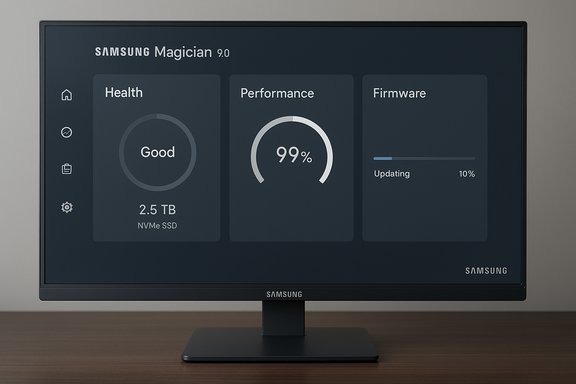
- A reworked user interface that moves away from the previous bright-blue branding toward a more muted, modern palette and layout, with screenshots and first impressions showing cleaner surfaces and updated navigation.
- Customizable home-screen widgets — users can add, remove and rearrange widgets to create a personalized dashboard so the app behaves more like a lightweight system dashboard than a static utility.
- Banner ads removed from the home screen (they remain in other parts of the app), resulting in a less cluttered initial view.
Background / Overview: Why Magician matters to Windows and macOS users
Samsung Magician is more than a convenience tool — it is often the recommended channel for Samsung firmware updates, and some firmware delivery mechanisms are integrated with the app (and with Samsung’s firmware ISO process). For users who rely on Samsung drives for performance-sensitive tasks, keeping firmware current is an operational necessity. Because of that, Magician’s reliability, platform coverage, and security posture directly affect drive maintenance practices. Historically the app has been Windows-first but later expanded to include macOS and Android tooling for portable SSDs. Samsung’s consumer storage pages still list Magician as the primary software for SSD maintenance and emphasize the usual preconditions for firmware updates (backup data, close running apps, don’t power off during updates). That guidance remains unchanged and is emphasized in Samsung’s documentation.Installation and system requirements — what’s different in 9.0
The Samsung download listings and product pages for current SSDs show the new 9.0 installers for both Windows and macOS, plus a short installation guide. The Windows build includes a standard 64-bit Windows installer, and macOS gets a .pkg installer for the user-facing Magician client. Key platform points to note:- Windows: Windows 10 and Windows 11 are still supported by the new Magician 9.0 installers (Windows 7/8 legacy compatibility appears in some catalog metadata but practical support and testing are focused on Windows 10/11). If you are running Windows 10, the app will install and operate, but Microsoft’s product lifecycle and vendor testing vary by build, so patching and driver interactions should be validated before large-scale rollouts.
- macOS: the minimum macOS requirement has been raised — Magician’s macOS client now expects macOS Catalina (10.15) or newer; older macOS targets (High Sierra) are no longer the minimum for this release. That reflects a platform update in the macOS installer listings.
- Linux: there is no first-party Linux GUI client; Linux remains unsupported for the Magician GUI and focal workflows like firmware updates have traditionally required other methods. Samsung’s consumer pages still list Magician as a Windows/macOS/Android-focused toolset.
Deep dive: UI, widgets and the new home experience
Modernized interface and layout
The visible redesign moves the app toward a more contemporary look: less saturated blues, greater emphasis on neutral dark-gray backgrounds, clearer typographic hierarchy, and a modular layout that positions widgets and drive tiles more like dashboard cards. The rework attempts to reduce visual noise and improve scanability for busy users managing multiple drives. Early screenshots and hands-on posts highlight the cleaner home screen as the most immediate change.Widget customization — a meaningful UX shift
The widget system is the release’s most tangible functional change. Magician 9.0 introduces a small widget framework that lets users:- Add or remove widgets on the Magician home screen.
- Rearrange and pin the widgets to create personalized dashboards (for example, separate “Performance,” “Health,” or “Firmware” layouts).
- Tailor the glanceable data presented at launch so the UI surfaces what matters to the user first.
Ads: decluttering vs. lingering ad placements
One notable policy/UX change is the removal of banner ads from the home screen, making the initial landing view far cleaner. That said, ads have not been eliminated entirely — desktop and user reports indicate promotional content is still present in side menus and deeper within the application’s navigation. The effect is a less distracting primary view, but ad content remains a part of the app’s non-critical surfaces.Compatibility and device support
Samsung has not added new device support in this release; the Magician 9.0 build notes and distributor entries list the same families of consumer SSDs and portable drives already supported in previous releases. The new version’s model compatibility covers the breadth of Samsung’s consumer SSD line, but the release is not a vehicle to add newly announced hardware support in this iteration. If you expect Magician to add very-new models, verify device compatibility on Samsung’s product pages before upgrading.Risks, caveats and community reports
No major release is purely cosmetic. There are several operational caveats and real-world risks users should weigh before upgrading:- Firmware updates and their failure modes remain the highest operational risk. Firmware installation can be disruptive if interrupted; Samsung’s guidance to back up data remains mandatory. Community reports have periodically called out firmware update failures, false counterfeit warnings, and occasional drive-detection quirks — issues that underline why cautious rollouts and backups are essential.
- App stability has historically fluctuated across Magician versions. Community threads over recent years have documented cases where Magician stalls while scanning drives or suffers UI visibility issues on certain hardware combinations. Those threads predate 9.0, but they are a reminder: a utility that needs to enumerate NVMe controllers and interact with low-level drivers can be sensitive to system configuration. Test the new client on a non-critical machine before deploying widely.
- Ads and telemetry. The visible removal of home-screen banner ads is welcome, but the app still contains promotional surfaces and likely communicates diagnostic metadata as part of normal operation (Samsung’s Magician privacy and GDPR documentation describes data handling tied to the software). Organizations with strict telemetry policies should review Magician’s privacy statements and consider offline firmware ISO methods for constrained environments.
- macOS requirement changes may force older Macs to delay update or use alternative paths for firmware updates. Mac users who cannot upgrade to Catalina or newer should plan for alternative maintenance workflows.
Verification and sources (how this was checked)
The new Magician artifacts and documentation appear on Samsung’s official distribution channels: device support pages and download listings were updated with Magician 9.0 installers and a 9.0 installation guide. Independent coverage that captured early screenshots and first-look details confirmed the UI redesign, the widget additions, and the home-screen ad removal. Stationed packaging and third-party download catalogs also reflected the new 9.0.0.910 build number shortly after the files were posted to Samsung’s download center. These items were cross-checked against Samsung’s consumer storage pages and tech coverage. Where public documentation is explicit (installer filenames, system minimums), official distribution listings were used. Where experiential details (UI tone, ad placement, widget behavior) are descriptive, trusted tech coverage and hands-on reports were used to confirm the observable changes. When the exact behavior could not be verified outside hands-on use (for example, server-gated feature toggles or staged rollouts), that limitation is flagged in the analysis.Practical recommendations
If you run Samsung SSDs and are considering Magician 9.0, here’s a risk-aware checklist to follow:- Backup first. Always create a verified backup of any drive you plan to update. Firmware updates should never be applied to a single, un-backed-up copy of irreplaceable data.
- Read the installer notes. Download the appropriate installer (Windows or macOS) from Samsung’s official support/download page and review the installation guide PDF before running the update. Verify the file signature where possible.
- Test on a non-critical machine. Install Magician 9.0 on a test workstation with a representative Samsung drive to confirm scan/detection, widget behavior, and firmware-update flow before upgrading production systems.
- Prefer ISO firmware for high-risk environments. If you manage many endpoints or can’t tolerate the risk of GUI-driven updates, use Samsung’s published firmware ISO images and the established offline update processes where available.
- Review privacy and telemetry settings. If you administer devices in managed environments, verify what diagnostic data the app collects and whether group policies or device policies are needed to control telemetry. Samsung’s Magician documentation and GDPR notice discuss data handling specifics.
Strengths and immediate wins
- Cleaner first impression: Removing the home-screen banner ads and modernizing the UI makes the app less noisy and more professional-looking for daily maintenance tasks.
- Dashboard-style workflow: Widget customization is a clear productivity win for power users who monitor several drives or prefer a concise drive-status dashboard.
- Official support continuity: Samsung continues to distribute Magician through its official channels and has posted new installers and documentation, so the update is fully sanctioned and supported.
Weaknesses and ongoing concerns
- Stability variability: Magician’s history of intermittent issues on certain hardware combinations means the upgrade is not risk-free; community reports show recurring corner cases. Test first.
- Partial ad retention: While the home screen is cleaner, promotional material remains embedded elsewhere in the app — a partial, not wholesale, retreat from in-app marketing.
- Platform friction: Raising the macOS minimum leaves some older Macs behind; organizations with mixed macOS fleets should plan accordingly.
Final verdict
Samsung Magician 9.0 is a meaningful aesthetic and UX refresh that modernizes the app’s first impression and introduces genuinely useful personalization via widgets. For users who rely on Magician for firmware and drive health tasks, the cleaner home screen and dashboard-oriented widgets will speed routine checks. However, the update does not remove all advertising, and longstanding stability caveats around firmware updates and drive detection persist in community reporting, so cautious rollout and robust backups are required.For individual users: upgrade for convenience but back up first and test the app’s behavior on your machine. For IT pros and system administrators: treat this as a new client release that should be validated in pilot rings; maintain firmware-ISO fallback workflows for high-risk systems.
Samsung’s official download pages and the new 9.0 installers are live in the company’s distribution center; consult those downloads and the included installation guide for the definitive package details and the exact installer filenames before proceeding.
Conclusion
Magician 9.0 refreshes a long-standing utility with a modern skin, widget-driven dashboards, and a tidied home screen — changes that matter to anyone who uses Samsung SSDs as primary storage. The functional improvements are welcome, but the core operational rules remain the same: backup, test, and verify firmware operations in a controlled environment. Where Magician fits into your maintenance workflow depends on whether convenience outweighs the incremental platform and stability risks for your setup.
Source: Neowin Samsung Magician gets big update to version 9.0 with reworked UI, widgets, and more


