

Windows 11 arrived with bold promises — a modern UI, new workflows, and an AI-driven future — but 2025 exposed a stubborn truth: a major release can’t coast on vision alone. Instead, everyday reliability and performance matter more than ever. Over the last 18 months users, IT teams and gamers have reported recurring regressions, baffling UI glitches, and awkwardly timed AI pushes that create friction rather than delight. The five problems below — and a practical, engineering-first roadmap for each — are what Microsoft needs to prioritize if Windows 11 is to regain confidence and momentum in 2026.
Windows 11’s lifecycle in 2024–2025 produced mixed outcomes. Microsoft shipped significant feature work while simultaneously fielding a steady stream of stability and UX regressions that affected core scenarios: File Explorer, gaming, update reliability, and the user’s perception of control over the OS. Community feedback is loud and consistent: users want faster, more reliable fundamentals before additional layers of AI or promotional experiences are added to the OS. That sentiment has been echoed across forums, long‑form community threads and the public commentary around the Windows 11 servicing cadence.
Two structural facts matter for context and urgency:
(That said, claims that Valve will immediately “steal” PC market share are speculative and should be treated cautiously — Microsoft still has deep hardware and developer relationships. However, the migration risk is real enough to require prompt corrective action.
Why do such regressions persist? The pattern points to a pipeline problem: faster release cycles and complex feature interactions without sufficiently broad, realistic testing coverage produces high‑visibility regressions.
The path forward is not glamorous: it’s engineering work, governance reform, and better communication. Execute that plan, and Windows 11 stops being a platform that divides opinion and instead becomes the dependable foundation millions expect. Fail to do so, and Windows risks losing goodwill that is, in many places, already fraying. The opportunity is there — Microsoft must choose stability first, then bet on the long-term payoff of its AI vision.
Source: TechRadar https://www.techradar.com/computing...1-that-i-really-hope-microsoft-fixes-in-2026/
 Background / Overview
Windows 11’s lifecycle in 2024–2025 produced mixed outcomes. Microsoft shipped significant feature work while simultaneously fielding a steady stream of stability and UX regressions that affected core scenarios: File Explorer, gaming, update reliability, and the user’s perception of control over the OS. Community feedback is loud and consistent: users want faster, more reliable fundamentals before additional layers of AI or promotional experiences are added to the OS. That sentiment has been echoed across forums, long‑form community threads and the public commentary around the Windows 11 servicing cadence.Two structural facts matter for context and urgency:
- Microsoft ended mainstream support for Windows 10 on October 14, 2025, and provided a consumer Extended Security Updates (ESU) bridge running through October 13, 2026. That gives many users time — but also raises stakes for any Windows 11 missteps that could push frustrated users to delay migration or explore alternatives.
- Microsoft has signaled renewed focus on AI integration across Windows, while simultaneously introducing telemetry to capture performance issues in Insider builds. This dual track — more AI features and more diagnostic telemetry — is not inherently bad, but execution and timing are crucial.
1. Fix overall sluggishness in Windows 11
What users are seeing
The most consistent complaint is simple: Windows 11 feels sluggish in everyday interactions. File Explorer lags when opening folders or when invoking the right‑click menu, search results can be slow, and some title‑bar and window animations introduce milliseconds of delay that accumulate into a noticeable, frustrating experience. Community reports and test builds confirm these symptoms. Microsoft has acknowledged the problem and rolled out additional telemetry in the Insider channels to capture and triage performance logs when users file feedback, an important first step toward data‑driven fixes.Why it matters
Perceived speed is a core measure of quality. Users compare Windows 11 to Windows 10 and to other modern platforms; when a next‑generation OS feels slower in day‑to‑day tasks, that undermines trust in the platform and drives users toward workarounds or alternate platforms.Concrete fixes Microsoft must implement (short and long term)
- Prioritize UI responsiveness as a measurable SLO (service-level objective). Target sub‑100ms interactions for common UI operations (open Start, right‑click context menu, open File Explorer tab).
- Expand targeted telemetry but respect privacy: collect minimum necessary traces only when a user explicitly files performance feedback; publish the schema so third parties can independently validate claims.
- Rebalance resource scheduling: investigate and tune the User Interaction‑Aware CPU Power Management controls and foreground‑task prioritization to ensure UI threads never starve.
- Rework File Explorer’s hot paths: reduce blocking I/O on the UI thread, cache metadata aggressively, and review OneDrive integrations that worsen cold starts. Community reports point to cloud integrations as a key friction point.
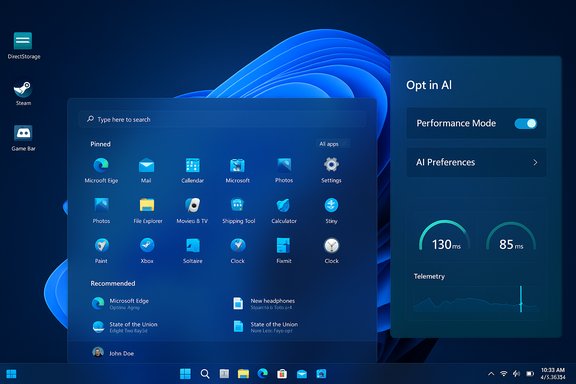
- Deliver a visible “Performance Mode” toggle for consumers and a hardened “Performance profile” for enterprise imaging — a mode that restricts background telemetry, reduces visual effects, and favors snappy foreground interaction.
Short checklist for 2026 milestones (numbered)
- Roll out a targeted File Explorer performance patch in H1 2026 with measurable latency reductions.
- Publish performance SLOs and the telemetry schema by Q2 2026 so customers and partners can verify progress.
- Deliver a power/performance toggle and a “classic” UI mode by Q3 2026 for users who prioritize responsiveness over newer UI flourishes.
2. Fix gaming on Windows 11
The problem set
Gaming suffered several regressions tied to major updates and driver interaction problems. The 24H2/22H2 era exposed issues where Windows updates inadvertently enabled internal GPU debugging features or interacted poorly with Auto HDR/DirectStorage, producing stutters, crashes and black screens for some titles. Hardware vendors and game developers frequently pushed driver fixes and patches to mitigate symptoms, but the root cause remained an OS‑level coordination problem. DirectStorage, promised as a major I/O improvement for PC games, is not yet a universal win. Adoption is fragmentary and some titles — as community threads indicate — have reported texture streaming and stuttering when DirectStorage or related DLL replacements are enabled. The feature’s promise is real but the ecosystem and compatibility story needs much more polish.Why Microsoft must treat this as an existential platform issue
Gaming is a flagship vertical for Windows. If SteamOS and Valve’s living‑room strategy gain momentum because Windows 11 feels flaky for gamers, Microsoft risks defections and a long-term reputation hit among a vocal, influential audience.(That said, claims that Valve will immediately “steal” PC market share are speculative and should be treated cautiously — Microsoft still has deep hardware and developer relationships. However, the migration risk is real enough to require prompt corrective action.
How to fix gaming — practical program
- Harden compatibility testing across the entire update pipeline. Any OS change touching display stack, scheduler, or I/O must pass a game‑compatibility gate that runs real-world workloads on a matrix of top titles, anti‑cheat middleware (Vanguard, Easy Anti‑Cheat), and drivers from NVIDIA/AMD/Intel. Public incidents show these gaps are real.
- Make DirectStorage adoption simpler: ship the runtime as a backward‑compatible, validated component in Windows that game devs can adopt without bespoke DLL swaps. Provide a compatibility profiler and a “DirectStorage validator” tool for developers to identify streaming edge cases.
- Strengthen coordination with GPU vendors: require driver teams to sign off on display‑stack changes in the servicing pipeline; accelerate OEM driver certification for shipping hardware so hotfixes can arrive faster when needed.
- Deliver a “Gaming Mode 2.0”: beyond background process suppression, include telemetry‑opt‑in for gaming—performance dashboards, an auto‑rollback mechanism (Known Issue Rollback / KIR) and an easily accessible troubleshooting hub in the Game Bar.
- Fund a cross‑company compatibility lab with Valve and major publishers to stress‑test Windows updates on living room, handheld, and desktop form factors.
Tactical short-term steps
- Rework the update rollout process to block devices with detected game compatibility problems until a fix is published (compatibility holds worked before and can be extended).
- Publish a DirectStorage interoperability timeline and validation guide for studios in Q1 2026.
- Expand Gaming Copilot and Game Bar troubleshooting with clear privacy controls and performance-focused defaults.
3. A new QA strategy is vital
Evidence of QA breakdowns
2025 delivered a catalog of odd regressions: partial UI languages showing at once, invisible login buttons, Task Manager instances that remained after closing and leaked resources, and dark‑mode flashes when opening folders. These are not fringe bugs — they hit core workflows.Why do such regressions persist? The pattern points to a pipeline problem: faster release cycles and complex feature interactions without sufficiently broad, realistic testing coverage produces high‑visibility regressions.
The right QA posture for 2026
- Shift from feature‑first to quality‑first: core OS behaviors should have higher release gates than low‑risk, additive features. Establish an explicit “no ship” threshold for regressions that affect productivity (File Explorer, Start, login, Taskbar).
- Improve automated regression detection: invest in UI automation that runs across thousands of real user traces and enterprise profiles, including accessibility scenarios, non‑English language packs, and low‑latency gaming paths.
- Expand the Insider program’s diversity: recruit enterprise admins, gamers, and accessibility specialists into targeted rings to surface the precise set of issues that matter in production.
- Publicly disclose a “regression transparency report” for major cumulative updates: what regressions were fixed, what new regressions were introduced, and active mitigations (example: Known Issue Rollback IDs).
- Create a rapid incident response team with cross‑functional ownership (kernel, graphics, Store, OneDrive, etc. to triage and ship KIRs faster.
Concrete governance and process changes
- Require a regression blast radius analysis for any proposed change that touches UI, the update stack, or boot path.
- Expand static analysis and fuzzing for new WinUI and COM surfaces.
- Run continuous, real‑world compatibility tests (games, Office suites, developer tools) as part of the merge policy for servicing branches.
- Keep a robust, tested rollback path to roll forward fixes in 48–72 hours for critical regressions.
4. Stop talking about AI; start listening to Windows 11 users
The context and the complaint
Microsoft’s AI investments (Copilot, Copilot Vision, Click to Do, and other AI Actions) are bold and strategic. The company has repeatedly explained Windows 11 as the “home for AI on the PC.” That message resonates with enterprise and investor audiences. At the same time, a broad subset of consumers feel overwhelmed by continuous AI placements and nudges inside the OS, especially when fundamentals remain imperfect. The community sentiment is loud: fix core quality before layering on more opinionated AI experiences.The right way to introduce AI features
- Make AI features modular and opt‑in: treat Copilot and associated AI experiences like installable, updatable modules that users can add if they want them.
- Adopt privacy‑first defaults: AI features that require screen content or personal data should default to off, with clear, granular controls and audit logs for what was processed and why.
- Provide a “Classic Mode” toggle for users who prefer a non‑AI, minimal UI. That gives both sides what they want without forcing a single narrative on every user.
- Improve messaging and transparency: proactively communicate roadmaps and quality plans (bug lists, timelines) so users see that Microsoft is balancing innovation with stability.
Why this matters
Over‑promising AI as the defining benefit of the OS while basic file operations lag undermines credibility. Consumers will tolerate AI if it adds immediate, measurable value, not as a persistent advertisement for cloud services that also require additional accounts or subscriptions.5. Get rid of the annoying adverts and promotional nudges
The friction
Windows contains many promotional elements: Start menu recommendations, OneDrive upsells, Game Pass push notifications, and occasional ads for Microsoft services. For a paid OS, these prompts feel increasingly incongruous — especially when users have already paid for the platform or will pay for premium business features. Community threads have repeatedly flagged these promotional nudges as a top annoyance.Practical policy changes
- Reduce ambient promotional density: no more full‑screen or system‑level promotions that mimic error dialogs or essential notices.
- Give power users and enterprises a true ad‑free switch: a single, discoverable setting in Settings > Privacy & Security > Personalized experiences that suppresses promotional content OS‑wide.
- Make Store/Game Pass recommendations contextual and clearly labeled as promotions. Provide a simple “don’t show again” option that respects the user’s preference persistently, even across updates.
- For OEMs: offer explicit choices for ad placement and an option for an ad‑lite SKU to be shipped to enterprise customers and pro users.
What Microsoft is doing well — and why that complicates the narrative
Before concluding, it’s important to recognize Windows 11’s real technical strengths. The OS delivered modern UX features (Snap layouts, virtual desktops, file tabs), elevated platform security guidance (TPM/Virtualization‑based security) and a deep, cross‑device productivity integration strategy. These are meaningful advances — but they’re being overshadowed by surface‑level regressions and poor timing for AI pushes. The tradeoff is clear: wins in long‑term architecture and security are valuable, but users judge the OS on daily reliability.Recommendations: a 2026 engineering roadmap (prioritized)
- Fix the fundamentals first (Q1–Q2 2026)
- File Explorer latency patch, context‑menu responsiveness fix, and systemic search speed improvements. Publish measurable latency reductions.
- Patch the most damaging gaming regressions and extend compatibility holds until verification.
- QA and release governance overhaul (Q1–Q3 2026)
- New regression policy, external compatibility lab, and faster KIR deliveries.
- Publish a monthly “regression transparency” note for major cumulative releases.
- Gaming renaissance (Q2 2026)
- DirectStorage maturity plan, developer validation tools, and tighter vendor driver sign‑offs.
- Publish a clear timeline with studio partners.
- AI restraint and modularization (Q2–Q4 2026)
- Make Copilot and AI Actions modular and opt‑in; bake privacy‑first defaults into every AI surface. Provide a “Classic Mode” for users who want a minimal OS.
- Promotional cleanup (Q1–Q2 2026)
- Implement an OS‑level “ad‑lite” preference and clarify the difference between promotions and system notifications.
Unverifiable or speculative claims — cautionary notes
- Predictions that users will migrate en masse to Valve’s SteamOS are plausible but speculative. Market shifts of that scale require months or years of developer support, hardware momentum, and ecosystem readiness; they are worth watching but are not imminent certainties.
- Some community reports about specific title regressions or device‑specific BSOD patterns are real for those affected, but root causes often require vendor trace logs to verify precisely. Community evidence is valuable for triage but must be confirmed with reproducible telemetry and driver dumps before concluding root cause.
Conclusion
Windows 11’s story in 2025 is a cautionary lesson in balancing ambition with discipline. The OS has clear technical strengths and a defensible strategic direction, but in 2026 Microsoft must demonstrate that it can deliver reliable fundamentals at scale while continuing to innovate. That means prioritizing responsiveness, hardening gaming and update pipelines, rebuilding QA governance, offering choice around AI, and trimming promotional friction.The path forward is not glamorous: it’s engineering work, governance reform, and better communication. Execute that plan, and Windows 11 stops being a platform that divides opinion and instead becomes the dependable foundation millions expect. Fail to do so, and Windows risks losing goodwill that is, in many places, already fraying. The opportunity is there — Microsoft must choose stability first, then bet on the long-term payoff of its AI vision.
Source: TechRadar https://www.techradar.com/computing...1-that-i-really-hope-microsoft-fixes-in-2026/
