

Overview
For most of its life, Windows 11 has been criticized less for any single catastrophic flaw than for the accumulation of small frustrations. Users have complained about inconsistent interfaces, sluggish shell behavior, AI features appearing where nobody asked for them, updates that felt disruptive, and setup flows that looked more like product marketing than operating system onboarding. Microsoft appears to have heard that message, and the 2026 roadmap looks like an admission that polish matters again.
That context matters because Windows has spent the past several years in a strange position. On paper, the platform gained security improvements, design updates, and deeper AI integration. In practice, many users experienced the changes as a series of trade-offs: more services, more prompts, more web-based UI layers, and more friction in places where old versions of Windows were still simpler. The current promise is not just about new features; it is about undoing some of the design drift that made Windows 11 feel heavier than it should.
Microsoft’s own communications this year suggest a company-wide shift toward stability, predictability, and user control. Pavan Davuluri, who leads Windows + Devices, has been tied to the broader message that Windows must become more reliable and less disruptive. At the same time, Microsoft has been previewing recovery tooling, more gradual update behavior, and a quieter operating system experience. That combination makes the 18-item fix list more credible than a typical vaporware roadmap, because it fits a larger strategic reset already visible in Microsoft’s recent messaging.
It is also worth noting that Microsoft is not promising a single giant Windows 11 redesign. Instead, the plan is to drip improvements through monthly releases, with a pace of roughly two to three changes per update. That is a smarter way to manage trust. It lowers the risk of a single huge release going wrong, and it gives Microsoft a chance to show progress in smaller, more verifiable steps. If the company can sustain that cadence, the optics alone will be a win.
For users, the real question is not whether Microsoft can announce fixes. It is whether those fixes arrive in a form that genuinely changes the daily feel of Windows 11. The best case is a platform that behaves more like a mature desktop OS again and less like a moving demo for Microsoft’s broader ecosystem. The worst case is another year of incremental promises that improve screenshots more than real workflows.
Taskbar and Start menu: the return of basic control
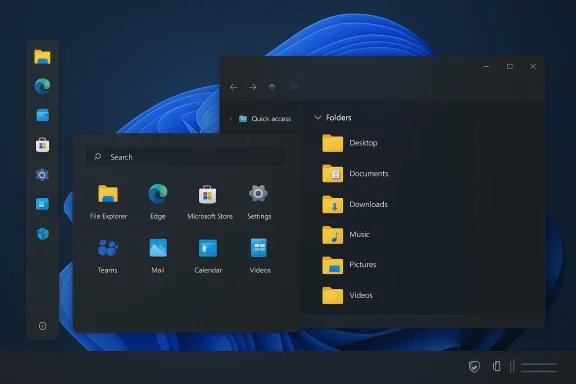
The most visible shift in the 2026 list is the restoration of Taskbar flexibility. Microsoft is reportedly bringing back the ability to move the taskbar to the top, left, or right side of the screen, and it is also working on resizing options closer to the compact behavior users remember from earlier versions of Windows. That may sound modest, but it has outsized symbolic value because it reverses one of the platform’s most stubbornly unpopular design decisions.
Why this matters
Vertical monitor users, multi-display setups, and power users have been complaining about Taskbar rigidity for years. The issue is not only convenience; it is workflow efficiency. A movable taskbar is the kind of feature that makes an OS feel like it belongs to the user rather than to a committee of interface rules.
The Start menu changes are arguably even more important. Microsoft is moving parts of the Start experience away from React-based components toward native WinUI, which should reduce lag and make the interface feel more immediate. The company is also giving users more control over recommendations and tuning search so installed apps and system components get priority over random web suggestions. That is a strong signal that Microsoft has finally noticed how often Windows Search gets in its own way.
- Movable taskbar support should improve ergonomics.
- Taskbar resizing may help smaller screens and dense desktops.
- Native Start menu components should reduce perceived lag.
- More control over recommendations should reduce clutter.
- Search ranking changes may make Win-key usage more predictable.
The competitive angle here is subtle but real. Microsoft is not competing with macOS or Linux on one killer feature; it is competing on trust in basic interactions. If the Taskbar and Start menu feel snappier and less opinionated, that will matter more than a flashy visual refresh. People forgive a lot when the shell gets out of the way.
Copilot, AI, and the new limits of ambition
One of the biggest signals in the roadmap is that Copilot is being scaled back in some places, not just expanded everywhere. Microsoft has reportedly removed unnecessary Copilot entry points from apps like Notepad, Photos, Snipping Tool, and File Explorer, focusing the AI experience on scenarios where it actually adds value. That is less a retreat than a correction. The company appears to be acknowledging that ubiquity is not the same as usefulness.
The significance of being optional
This shift matters because Windows 11’s AI push has often felt intrusive to mainstream users who simply wanted a text editor, a screenshot tool, or a file browser. A quieter Copilot strategy suggests Microsoft is trying to turn AI from a branding layer into a utility layer. That distinction is crucial if the company wants the feature to survive beyond early adopters and enterprise trials.
The change also reflects a broader reality in desktop software: people tolerate AI when it solves a problem and resent it when it adds friction. Microsoft still clearly believes in AI as a platform direction, but the new message is that AI should be intentional, not ornamental. That is a healthier position for Windows because it protects the platform from looking like it is chasing a trend at the expense of usability.
- Copilot entry points are being reduced in some first-party apps.
- AI is being repositioned as contextual rather than omnipresent.
- Narrator and accessibility scenarios remain an important AI use case.
- Copilot is still present, but less aggressively surfaced.
- User tolerance will depend on whether the remaining AI tools actually help.
For enterprise IT, this could be especially important. Companies often resist features that arrive preloaded and unavoidable, especially when they affect security, support, and user training. A more restrained Copilot may be easier to justify in managed environments, where IT administrators need predictability more than novelty. That could make Microsoft’s AI story more sustainable in the long run.
Windows Update, setup, and the case for less friction
Microsoft seems to have accepted that Windows Update has become part of the brand problem. The company is promising more user control, including the ability to pause updates for longer periods, and it is moving toward a simpler monthly reboot model. That is a direct response to years of complaints about forced restarts, surprise installs, and the sense that the OS sometimes acts before the user has had a chance to think.
From annoyance to predictability
The real value here is not just fewer prompts. It is the possibility of a more predictable maintenance model, where security and reliability updates are bundled into a cadence that users can understand. A predictable rhythm is a strategic asset, especially when Windows is installed on everything from home PCs to enterprise fleets and gaming handhelds.
Microsoft is also taking aim at the out-of-box experience. Setup is being streamlined with fewer steps, less clutter, and a faster path to the desktop. More importantly, the company is reportedly working on ways to reduce the mandatory Microsoft account pressure that has been one of Windows 11’s most criticized onboarding behaviors. That is a smart move because setup is the first impression, and first impressions shape trust.
- Fewer setup steps should shorten onboarding time.
- Reduced rebooting during OOBE should improve the new-PC experience.
- More update control should help cautious users and IT departments.
- Microsoft account pressure appears to be easing, at least in direction.
- Monthly cadence could make patch behavior easier to explain.
The enterprise-versus-consumer split is especially relevant here. Consumer users want updates to be less disruptive, while IT admins want them to be more manageable and more measurable. Microsoft’s challenge is to serve both groups without returning to the old model of surprise-and-hope. If the company gets this right, it will improve not just convenience but confidence.
File Explorer, system responsiveness, and the end of “feels slow”
A lot of Windows 11’s reputation problems are not caused by dramatic failures. They come from the feel of the system: sluggish context switching, UI flicker, delayed shells, and basic tasks that should be instant but sometimes are not. Microsoft’s promised fixes to File Explorer and broader responsiveness are therefore more important than they might look on paper.
Performance is a feature
File Explorer is being tuned for faster launches, smoother navigation, and fewer visual artifacts. Microsoft has already improved launch speed by preloading parts of Explorer in the background, and the next wave is supposed to reduce flicker and make interactions more consistent. That sounds incremental, but Explorer is one of the places where every second of delay gets multiplied because it is used constantly.
Microsoft is also addressing system performance more broadly, including lower baseline RAM usage. That matters because memory pressure in modern Windows feels especially wasteful when many users are on midrange or aging hardware. If Windows 11 becomes lighter at idle and more responsive under load, the effect will be noticed immediately, even if the underlying engineering is invisible.
- Faster Explorer startup improves everyday navigation.
- Smoother UI transitions reduce the feeling of lag.
- Lower idle RAM usage can help multitasking.
- Better responsiveness benefits both old and new PCs.
- Small shell fixes often create the biggest perception changes.
There is also a hardware-market implication here. When an operating system feels bloated, it effectively raises the floor for recommended hardware. By slimming the platform, Microsoft can extend the life of modest machines and reduce the sense that Windows 11 is demanding more than it should. That is good for consumers and useful for OEMs who still need Windows to run well across a wide price range.
Dark mode, Settings, and the death of visual inconsistency
One of the most persistent annoyances in Windows 11 is that it often looks modern right up until it does not. Legacy dialogs, property boxes, and system windows still jump back to light mode even when dark mode is enabled. Microsoft is now trying to fix that patchwork, and the work is overdue.
Why consistency matters more than style
Dark mode support is not just an aesthetic preference. It is a proxy for design coherence. When the Run dialog, account prompts, file properties, Registry Editor, and other system UI elements ignore the theme, users are reminded that Windows 11 is still a layered product built across different eras of Microsoft design.
That same logic applies to the Settings app and other first-party surfaces. Microsoft has spent years migrating control-panel functionality and modernizing interfaces, but the work only matters if the result feels complete rather than stitched together. The more consistent the OS looks, the more credible Microsoft’s “modern Windows” story becomes.
- Better dark mode coverage improves polish.
- Theme consistency reduces cognitive friction.
- Fixing legacy dialogs helps the whole OS feel more unified.
- Modern Settings behavior reinforces Microsoft’s platform direction.
- The user notices completeness even when they cannot name it.
A lot of Windows criticism comes from users feeling that the OS is unfinished in small ways. That is hard to capture in a spec sheet, but easy to feel in daily use. Dark mode inconsistency is one of the most visible examples, which is why fixing it can have an outsized reputational impact.
Connectivity, Bluetooth, and the reliability layer
Microsoft is also promising improvements to Bluetooth, USB reliability, camera behavior, and microphone stability. These are the kinds of fixes that users only talk about when they fail, which is exactly why they matter so much. A desktop OS is judged not only by what it can do, but by how often it quietly gets out of the way.
Why the boring stuff is critical
Bluetooth disconnects and pairing failures have long been some of the most irritating Windows issues because they break trust in peripheral hardware. The same is true for camera and microphone instability, especially now that hybrid work, calling apps, and streaming workflows are normal parts of home and office computing. Reliability here is not glamorous, but it is foundational.
The fact that Microsoft is also improving audio behavior and shared-device scenarios suggests the company is paying attention to the way people actually use PCs in 2026. Users increasingly expect a laptop to behave like a converged communication device. When a headset, webcam, or Bluetooth speaker misbehaves, the entire machine feels less capable than its hardware specifications suggest.
- Bluetooth fixes should reduce random disconnects.
- Pairing improvements matter for both consumer and enterprise use.
- Camera and microphone stabilization supports meetings and calls.
- USB reliability affects everything from docks to storage devices.
- Audio consistency is a basic requirement for modern PCs.
This area is especially important for Windows on ARM, mobile PCs, and compact devices like gaming handhelds and ultraportables. These systems depend heavily on dependable wireless and peripheral support. If Microsoft can tighten the reliability layer, it will help the platform compete better against devices that are often judged more by “it just works” than by raw benchmarks.
Native apps, developer signaling, and why Microsoft is changing course
One of the more revealing promises in the list is Microsoft’s move toward 100% native first-party apps for Windows 11. That implies a reduction in WebView2-heavy wrappers and a renewed emphasis on native performance. It is a quiet but meaningful admission that Microsoft’s web-first app strategy has not always served the platform well.
Why native matters again
Native apps matter because they tend to feel faster, integrate better with OS conventions, and consume fewer resources. Microsoft does not need every product team to reinvent the wheel, but it does need its own apps to set a better example. If the company wants developers to care about Windows frameworks again, it has to demonstrate that native development is still a first-class path.
That has implications beyond aesthetics. When first-party apps are native, they reinforce the argument that Windows itself is worth optimizing for. When they are web wrappers, they subtly suggest the OS is merely a container. The shift toward native apps therefore represents a platform credibility play as much as a technical improvement.
- Native apps should reduce overhead and latency.
- Better integration improves the feel of Windows.
- Microsoft can model good development practices for others.
- Web wrappers are easier to ship but weaker as a signal.
- Developer trust often follows the quality of first-party software.
This also helps explain why Microsoft is simultaneously refining the development and insider ecosystems. The company wants feedback loops that are faster, more transparent, and more tightly connected to shipping behavior. If its own app teams are building natively and its test pipelines are clearer, that creates a more coherent development culture around Windows.
Feedback Hub, Feature Flags, and the insider-to-production pipeline
Microsoft is also working on the machinery around Windows, not just the UI people touch every day. The Feature Flags system, improved Feedback Hub, and broader Windows Insider refinements are meant to make experimentation more transparent and less dependent on unofficial tools like ViVeTool. That is an important cultural shift for the platform.
Opening the hood without breaking the car
Giving testers a built-in way to toggle experimental features sounds niche, but it reflects a more mature relationship between Microsoft and the enthusiast community. Instead of hiding every preview behind obscure tricks, the company is acknowledging that advanced users want visibility into what is being tested and why.
The Feedback Hub redesign matters for the same reason. If Microsoft wants better bug reports, it needs a reporting flow that feels less like filing paperwork and more like participating in a feedback loop. That may not excite casual users, but it can dramatically improve the quality of signals Microsoft receives before changes go broad.
Sequentially, the model appears to be:
- Test more visibly in Insider builds.
- Let advanced users inspect or toggle features.
- Make feedback submission easier and faster.
- Use those signals to refine monthly rollouts.
- Ship to production with fewer surprises.
That is the kind of systems thinking Windows has often lacked in the past. A better pipeline from experimentation to shipping can reduce the number of features that arrive half-baked. In a world where trust is fragile, the process may matter as much as the outcome.
Strengths and Opportunities
Microsoft’s 2026 Windows 11 plan has real strengths, and they go beyond the number 18. The biggest opportunity is to convert a long period of user frustration into visible momentum. If Microsoft can keep monthly updates meaningful without making them disruptive, it can rebuild confidence in Windows as a dependable everyday platform.
- The roadmap targets the exact pain points users complain about most.
- Small monthly improvements are easier to trust than one giant overhaul.
- Better shell performance can reshape perceptions quickly.
- More control over updates could reduce user resentment.
- Native first-party apps could improve the platform’s credibility.
- Stronger dark mode consistency would make Windows feel more finished.
- Reliability fixes help both consumers and enterprise administrators.
Risks and Concerns
The biggest risk is that Microsoft spreads itself too thin. Eighteen promised improvements sound ambitious, but ambition can turn into disappointment if priorities drift, deadlines slip, or some fixes only reach Insiders while the public waits. The company also risks overcorrecting: reducing Copilot clutter is good, but it must not become a retreat from useful innovation.
- Monthly rollouts could fragment the user experience.
- Some features may take longer than Microsoft implies.
- Enterprise and consumer needs may still diverge.
- Native app migration can take significant engineering time.
- UI polish may improve while deeper reliability issues persist.
- Copilot simplification could be uneven across apps.
- User trust may not recover if updates remain unpredictable.
Looking Ahead
What happens next will tell us whether this is a real turning point or just a better-organized patch cycle. The first major indicator will be whether the March and April 2026 wave of changes feels tangible to ordinary users, not just enthusiasts reading build notes. The second will be whether Microsoft continues to speak in the language of control, restraint, and stability rather than in the language of feature volume.
There is also a larger strategic question hanging over all of this: whether Microsoft is trying to make Windows 11 a more durable platform for the end of the Windows 10 era. With support deadlines and version transitions forcing upgrades across the ecosystem, Microsoft cannot afford a reputation for instability. A calmer Windows 11 is not only a product improvement; it is a business necessity.
- Watch for the first monthly update wave to see which fixes are real.
- Watch the Taskbar and Start menu changes for signs of deeper UI reform.
- Watch update behavior to see whether control actually improves.
- Watch whether Copilot becomes useful by being less visible.
- Watch for native app rollouts as a signal of platform discipline.
Microsoft’s 2026 Windows 11 promise is compelling precisely because it is so unglamorous. There is no single headline feature that will dominate the conversation for months, but there may be a hundred small reasons for users to feel better about Windows by year’s end. If that happens, the most important change will not be a new capability at all; it will be the return of confidence that the operating system is finally working with its users instead of around them.