

Samsung’s S Pen button remains useful in 2026, but its best tricks now depend heavily on which Galaxy phone or tablet you own, because newer Ultra phones dropped Bluetooth-based remote controls while many tablets and older Notes still support them. BGR’s recent tour of S Pen button shortcuts is a good reminder that Samsung’s stylus has always been more than a plastic pointer. It is also a reminder that Samsung has quietly split the S Pen into two products: one for writing, and one for remote control. That distinction matters more than the marketing does.
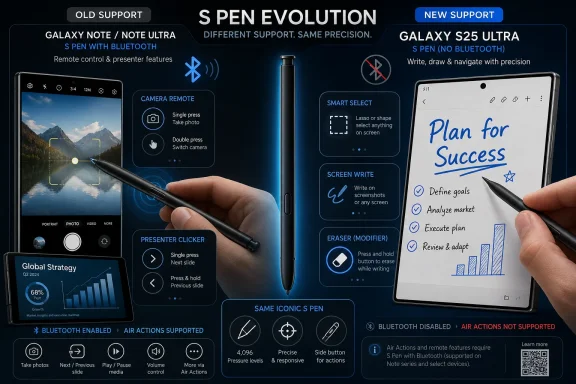
The S Pen button used to be easy to explain. Press it near the screen and Samsung’s Air Command menu appeared; press it in a supported app and you could erase, select, or trigger a context-specific action. Then Samsung added Bluetooth Low Energy to the Galaxy Note 9 era of the pen, turning the stylus into a remote shutter, presentation clicker, media controller, and gesture wand.
That made the S Pen feel like a miniature peripheral rather than a mere input tool. It was one of the few smartphone accessories that justified its own silo because it could do things a finger could not. For Galaxy Note loyalists, the button became the difference between a stylus that was merely precise and one that was genuinely ambient.
But the modern S Pen story is no longer that clean. Samsung’s own support material says the Galaxy S25 Ultra S Pen does not support Bluetooth Low Energy, pairing, charging, or remote features such as Air Actions. Samsung’s S Pen compatibility documentation also lists a growing set of pens and devices where Air Actions are not supported, including the Galaxy S25 Ultra S Pen and several FE and Fold-oriented pens.
That makes any “cool things to do with the S Pen button” guide more complicated than it looks. Some tricks work almost everywhere. Some work only when the pen is close enough to the digitizer to be detected. Some require a Bluetooth-enabled S Pen on a device that still exposes the Air Actions software stack. The button did not become useless, but Samsung made it conditional.
That sounds minor until you use it. Remote camera control is one of those features that feels gimmicky in a keynote and indispensable at a family event, a conference booth, a repair bench, or a classroom. It turns the S Pen into a tiny remote, which is exactly the sort of low-friction utility that makes bundled hardware feel earned.
BGR’s framing lands because these are not power-user fantasies. They are everyday shortcuts hidden behind a button most owners rarely think about. If Samsung’s pitch for the Ultra line is that it is the phone for people who do more, the S Pen shutter was one of the cleanest demonstrations of that idea.
The problem is that this is precisely the category of feature Samsung has been retreating from on some recent devices. On the Galaxy S25 Ultra, Samsung removed Bluetooth support from the included S Pen. The pen can still write, hover, select, and invoke screen-proximate actions, but it cannot serve as the same remote controller that older Ultra and Note owners remember.
That is not a footnote. It changes the value proposition. A button that once worked across the room becomes a button that mostly works when the pen is near the display.
They were not entirely wrong. Air gestures often lived in the awkward space between useful automation and party trick. The phone already has a touchscreen, voice commands, Bluetooth earbuds, smartwatches, and other ways to trigger actions. A motion-sensing pen was never going to become the default control surface for most users.
But Air Actions gave the S Pen ambition. They made the stylus part of Samsung’s broader experiment in alternative interfaces, the same instinct that produced Edge Panels, DeX, pop-up windows, split-screen multitasking, and deep customization through Good Lock. Samsung’s Android identity has never been minimalism; it has been option density.
That is why the loss of Bluetooth support stings for longtime users even if Samsung can point to low usage. A feature can be niche and still be strategically important. The S Pen was supposed to be the Ultra line’s weird advantage, the thing no iPhone or Pixel could convincingly clone without changing shape.
Removing the remote layer makes the S Pen easier to justify as a writing tool but harder to defend as a flagship differentiator. It becomes less “computer in your pocket” and more “nice stylus included.”
This is where the S Pen button remains strongest. When the pen is touching or hovering above the screen, the button can reduce tool-switching friction. You do not need to open a toolbar, tap an eraser icon, erase a word, and then reselect the pen. You can hold the button, correct the mark, and continue writing.
For note-takers, students, field technicians, and meeting-heavy professionals, that matters more than flashy gestures. The most valuable input features are often the ones that disappear into muscle memory. A stylus button that becomes an eraser is not exciting, but it is efficient.
Samsung deserves credit for preserving that core interaction even as it pares back Bluetooth features on some devices. The danger is not that the S Pen button has no function. The danger is that Samsung’s messaging lets users assume every S Pen button does the same thing, when the actual behavior now depends on a matrix of device, pen, app, and setting.
That confusion is avoidable. Samsung has enough product lines already; it does not need the S Pen to become another compatibility puzzle.
Smart Select is especially useful because phones are still bad at grabbing exactly what you want. Screenshots capture too much. Copy-and-paste fails in images, apps, PDFs, and protected views. A stylus that can lasso a region, extract text, annotate a snippet, or preserve a visual reference gives users a more desktop-like sense of control.
That is why the S Pen remains relevant even in the age of AI summarizers and voice assistants. AI can interpret content, but the user still needs a precise way to say this part, not that part. The stylus is a pointing device with intent.
For WindowsForum readers, the analogy is obvious. A mouse is not valuable because it is futuristic; it is valuable because it makes selection precise and repeatable. The S Pen, at its best, brings that same logic to a glass slab that otherwise wants every interaction to be a broad thumb gesture.
The button enhances that precision by making the pen modal. It can be a pen, selector, eraser, command trigger, or shortcut launcher depending on context. That is old-school computing logic, and it remains useful precisely because mobile interfaces often hide too much behind taps and swipes.
This is where Samsung’s naming works against it. “S Pen” sounds like one accessory family, but the actual capabilities vary widely. There are built-in Ultra pens, tablet pens, FE tablet pens, Fold edition pens, Creator Edition pens, and the S Pen Pro. Some support Bluetooth. Some do not. Some charge inside a device. Some never pair at all.
Samsung’s official support pages acknowledge these distinctions, but consumers rarely read compatibility matrices before trying a button. They press the pen, expect the cool thing they saw online, and discover that the same brand name does not guarantee the same feature set.
That is a classic ecosystem problem. The more Samsung expands the S Pen across phones, tablets, foldables, and creator accessories, the more it needs a clearer capability badge. “S Pen included” is no longer enough. Users need to know whether it supports writing only, hover features, Air Command, Bluetooth remote controls, Air Actions, or app-specific button shortcuts.
Microsoft learned a version of this lesson with Surface Pen generations, keyboard covers, charging docks, and Windows Hello cameras. Accessory ecosystems can be powerful, but only when customers understand what works where. Otherwise, the accessory becomes another support burden.
Samsung’s likely argument is practical. If only a small fraction of users relied on Bluetooth S Pen features, removing the radio, battery, charging hardware, and software complexity may have looked like an easy optimization. Fewer parts can mean less cost, less internal space consumed, fewer support issues, and one less component to fail.
That reasoning is defensible in a spreadsheet. It is less satisfying in a flagship story. Ultra phones are not bought only for median behavior; they are bought because they promise excess. The 100x zoom, huge display, integrated stylus, advanced multitasking, and maximum storage options all serve the same identity: this is the Samsung phone for people who want the whole toolbox.
When Samsung removes a niche tool from that box, it risks flattening the Ultra identity. The company may be right that most owners never used Air Actions. But the people who did were often the same people who could explain why the Ultra deserved to exist as a distinct device.
That matters in a market where phone hardware has become increasingly homogeneous. If every premium slab has a great display, fast chip, good camera, long update policy, and AI features, the strange extras become more valuable, not less.
That distinction helps explain why S Pen button features can feel more important on Samsung’s tablets. The larger canvas makes tool-switching more frequent and more annoying. Holding the button to erase, selecting objects, annotating screenshots, and navigating creative apps all feel closer to the workflow of a Wacom tablet or Surface device.
BGR mentions the Galaxy Tab S9 FE as a note-taking device, and that is the right context for many users. Students and professionals do not need the S Pen to be magical. They need it to be reliable, low-latency, easy to carry, and fast enough to switch from writing to correcting without breaking concentration.
The tablet market also gives Samsung more room to compete against Apple. The Apple Pencil is strong, but Samsung’s advantage is bundling and integration. Many Galaxy Tabs include an S Pen in the box, while Apple often sells Pencil hardware separately. For buyers comparing total cost, that matters.
But again, capability clarity matters. Some tablet S Pens do not support Air Actions. Some higher-end models and older devices may support features that cheaper or newer ones omit. If Samsung wants the S Pen to be a reason to buy Galaxy tablets, it needs to make the tiers legible.
The opposite may be true. AI tools need high-quality user intent, and the S Pen is an intent-capture device. Circling a region, highlighting a passage, marking up a photo, or writing a handwritten note gives the system a more precise signal than a vague command.
The S Pen button could become more important in this world, not less. Imagine pressing it to capture a region for AI explanation, holding it to invoke contextual translation, double-clicking it to summarize selected notes, or using it as a mode switch between ink and AI selection. Those features do not require the pen to be a party-trick remote; they require Samsung to treat the stylus as a serious command surface.
That is where the current split feels short-sighted. If Samsung trims S Pen hardware just as AI makes precision input more valuable, it may be saving pennies while weakening a differentiator. The company does not need every pen to include every sensor, but it does need a forward-looking story for why the button still exists.
A button is a promise. It tells the user there is a hidden layer of control waiting to be discovered. If that layer is inconsistent, the promise breaks.
Vendors often remove these features when telemetry says few people use them. Sometimes they are right. Sometimes the feature was poorly taught, poorly surfaced, or valuable mainly to the exact users who drive reputation and word-of-mouth.
The S Pen button sits in that same category. It is not essential to basic phone use, but it makes the device feel more capable. It rewards exploration. It gives a user the sense that the hardware has depth.
That is the kind of thing Samsung used to excel at. The company’s best devices were not always elegant, but they were generous. They gave users features before everyone knew what to do with them. Some failed. Some became table stakes. Some remained beloved by a niche.
The risk for Samsung is that chasing simplification makes Galaxy devices feel less Samsung-like. A cleaner product line is good. A less distinctive flagship is not.
 Samsung’s Tiny Button Has Become a Product Strategy
The S Pen button used to be easy to explain. Press it near the screen and Samsung’s Air Command menu appeared; press it in a supported app and you could erase, select, or trigger a context-specific action. Then Samsung added Bluetooth Low Energy to the Galaxy Note 9 era of the pen, turning the stylus into a remote shutter, presentation clicker, media controller, and gesture wand.That made the S Pen feel like a miniature peripheral rather than a mere input tool. It was one of the few smartphone accessories that justified its own silo because it could do things a finger could not. For Galaxy Note loyalists, the button became the difference between a stylus that was merely precise and one that was genuinely ambient.
But the modern S Pen story is no longer that clean. Samsung’s own support material says the Galaxy S25 Ultra S Pen does not support Bluetooth Low Energy, pairing, charging, or remote features such as Air Actions. Samsung’s S Pen compatibility documentation also lists a growing set of pens and devices where Air Actions are not supported, including the Galaxy S25 Ultra S Pen and several FE and Fold-oriented pens.
That makes any “cool things to do with the S Pen button” guide more complicated than it looks. Some tricks work almost everywhere. Some work only when the pen is close enough to the digitizer to be detected. Some require a Bluetooth-enabled S Pen on a device that still exposes the Air Actions software stack. The button did not become useless, but Samsung made it conditional.
The Remote Shutter Was the Feature Everyone Understood
The most obvious S Pen button trick is also the one that best explains why the Bluetooth era mattered. On supported Galaxy phones, the button could act as a remote camera shutter. Prop the phone against a wall, step back, press the pen, and take the shot without racing a timer or waving at the screen.That sounds minor until you use it. Remote camera control is one of those features that feels gimmicky in a keynote and indispensable at a family event, a conference booth, a repair bench, or a classroom. It turns the S Pen into a tiny remote, which is exactly the sort of low-friction utility that makes bundled hardware feel earned.
BGR’s framing lands because these are not power-user fantasies. They are everyday shortcuts hidden behind a button most owners rarely think about. If Samsung’s pitch for the Ultra line is that it is the phone for people who do more, the S Pen shutter was one of the cleanest demonstrations of that idea.
The problem is that this is precisely the category of feature Samsung has been retreating from on some recent devices. On the Galaxy S25 Ultra, Samsung removed Bluetooth support from the included S Pen. The pen can still write, hover, select, and invoke screen-proximate actions, but it cannot serve as the same remote controller that older Ultra and Note owners remember.
That is not a footnote. It changes the value proposition. A button that once worked across the room becomes a button that mostly works when the pen is near the display.
Air Actions Were Weird, But They Gave the S Pen Ambition
Air Actions were always more divisive than the remote shutter. Samsung let users wave or gesture with the S Pen to control certain apps, with button presses and motion commands mapped to functions such as media playback, camera switching, gallery navigation, and presentation control. Critics dismissed the feature as classic Samsung excess: clever, demonstrable, and easy to forget.They were not entirely wrong. Air gestures often lived in the awkward space between useful automation and party trick. The phone already has a touchscreen, voice commands, Bluetooth earbuds, smartwatches, and other ways to trigger actions. A motion-sensing pen was never going to become the default control surface for most users.
But Air Actions gave the S Pen ambition. They made the stylus part of Samsung’s broader experiment in alternative interfaces, the same instinct that produced Edge Panels, DeX, pop-up windows, split-screen multitasking, and deep customization through Good Lock. Samsung’s Android identity has never been minimalism; it has been option density.
That is why the loss of Bluetooth support stings for longtime users even if Samsung can point to low usage. A feature can be niche and still be strategically important. The S Pen was supposed to be the Ultra line’s weird advantage, the thing no iPhone or Pixel could convincingly clone without changing shape.
Removing the remote layer makes the S Pen easier to justify as a writing tool but harder to defend as a flagship differentiator. It becomes less “computer in your pocket” and more “nice stylus included.”
The Eraser Trick Shows the Button Still Has a Job
Not every S Pen button feature needs Bluetooth. In Samsung Notes and other stylus-aware apps, pressing the side button can quickly switch behavior, often acting like an eraser or selection modifier depending on context. That is the sort of interaction that makes sense to anyone who has used a drawing tablet.This is where the S Pen button remains strongest. When the pen is touching or hovering above the screen, the button can reduce tool-switching friction. You do not need to open a toolbar, tap an eraser icon, erase a word, and then reselect the pen. You can hold the button, correct the mark, and continue writing.
For note-takers, students, field technicians, and meeting-heavy professionals, that matters more than flashy gestures. The most valuable input features are often the ones that disappear into muscle memory. A stylus button that becomes an eraser is not exciting, but it is efficient.
Samsung deserves credit for preserving that core interaction even as it pares back Bluetooth features on some devices. The danger is not that the S Pen button has no function. The danger is that Samsung’s messaging lets users assume every S Pen button does the same thing, when the actual behavior now depends on a matrix of device, pen, app, and setting.
That confusion is avoidable. Samsung has enough product lines already; it does not need the S Pen to become another compatibility puzzle.
Smart Select Is the S Pen’s Most Underrated Windows-Like Trick
The S Pen’s button-driven shortcuts also point to something Windows users understand instinctively: selection is power. Smart Select, screen writing, translation, magnification, and quick note capture are not glamorous features, but they turn the display into a workspace rather than a passive surface.Smart Select is especially useful because phones are still bad at grabbing exactly what you want. Screenshots capture too much. Copy-and-paste fails in images, apps, PDFs, and protected views. A stylus that can lasso a region, extract text, annotate a snippet, or preserve a visual reference gives users a more desktop-like sense of control.
That is why the S Pen remains relevant even in the age of AI summarizers and voice assistants. AI can interpret content, but the user still needs a precise way to say this part, not that part. The stylus is a pointing device with intent.
For WindowsForum readers, the analogy is obvious. A mouse is not valuable because it is futuristic; it is valuable because it makes selection precise and repeatable. The S Pen, at its best, brings that same logic to a glass slab that otherwise wants every interaction to be a broad thumb gesture.
The button enhances that precision by making the pen modal. It can be a pen, selector, eraser, command trigger, or shortcut launcher depending on context. That is old-school computing logic, and it remains useful precisely because mobile interfaces often hide too much behind taps and swipes.
Samsung’s Compatibility Story Is Now the Weak Link
The awkward part of BGR’s guide is not the tips themselves. It is that the article’s premise collides with Samsung’s shifting hardware choices. A reader with an older Galaxy Note or S Ultra may recognize the remote camera and Air Actions behavior. A Galaxy S25 Ultra owner may go looking for the same settings and find that Samsung removed the underlying Bluetooth support.This is where Samsung’s naming works against it. “S Pen” sounds like one accessory family, but the actual capabilities vary widely. There are built-in Ultra pens, tablet pens, FE tablet pens, Fold edition pens, Creator Edition pens, and the S Pen Pro. Some support Bluetooth. Some do not. Some charge inside a device. Some never pair at all.
Samsung’s official support pages acknowledge these distinctions, but consumers rarely read compatibility matrices before trying a button. They press the pen, expect the cool thing they saw online, and discover that the same brand name does not guarantee the same feature set.
That is a classic ecosystem problem. The more Samsung expands the S Pen across phones, tablets, foldables, and creator accessories, the more it needs a clearer capability badge. “S Pen included” is no longer enough. Users need to know whether it supports writing only, hover features, Air Command, Bluetooth remote controls, Air Actions, or app-specific button shortcuts.
Microsoft learned a version of this lesson with Surface Pen generations, keyboard covers, charging docks, and Windows Hello cameras. Accessory ecosystems can be powerful, but only when customers understand what works where. Otherwise, the accessory becomes another support burden.
The Galaxy S25 Ultra Made the Trade-Off Visible
Samsung’s decision to ship the Galaxy S25 Ultra without Bluetooth S Pen support made this debate unavoidable. The company’s support documentation is blunt: no Bluetooth Low Energy, no pairing, no charging, and no Air Actions on that pen. Reports at the time also noted that older remote features, including camera control and gesture shortcuts, were absent.Samsung’s likely argument is practical. If only a small fraction of users relied on Bluetooth S Pen features, removing the radio, battery, charging hardware, and software complexity may have looked like an easy optimization. Fewer parts can mean less cost, less internal space consumed, fewer support issues, and one less component to fail.
That reasoning is defensible in a spreadsheet. It is less satisfying in a flagship story. Ultra phones are not bought only for median behavior; they are bought because they promise excess. The 100x zoom, huge display, integrated stylus, advanced multitasking, and maximum storage options all serve the same identity: this is the Samsung phone for people who want the whole toolbox.
When Samsung removes a niche tool from that box, it risks flattening the Ultra identity. The company may be right that most owners never used Air Actions. But the people who did were often the same people who could explain why the Ultra deserved to exist as a distinct device.
That matters in a market where phone hardware has become increasingly homogeneous. If every premium slab has a great display, fast chip, good camera, long update policy, and AI features, the strange extras become more valuable, not less.
Tablets Make the S Pen Feel More Essential Than Phones Do
The S Pen’s future may be stronger on tablets than on phones. A Galaxy Tab has enough screen real estate to make handwriting, sketching, PDF markup, split-screen research, and presentation work feel natural. On a phone, the S Pen is a precision tool. On a tablet, it is often the primary input method.That distinction helps explain why S Pen button features can feel more important on Samsung’s tablets. The larger canvas makes tool-switching more frequent and more annoying. Holding the button to erase, selecting objects, annotating screenshots, and navigating creative apps all feel closer to the workflow of a Wacom tablet or Surface device.
BGR mentions the Galaxy Tab S9 FE as a note-taking device, and that is the right context for many users. Students and professionals do not need the S Pen to be magical. They need it to be reliable, low-latency, easy to carry, and fast enough to switch from writing to correcting without breaking concentration.
The tablet market also gives Samsung more room to compete against Apple. The Apple Pencil is strong, but Samsung’s advantage is bundling and integration. Many Galaxy Tabs include an S Pen in the box, while Apple often sells Pencil hardware separately. For buyers comparing total cost, that matters.
But again, capability clarity matters. Some tablet S Pens do not support Air Actions. Some higher-end models and older devices may support features that cheaper or newer ones omit. If Samsung wants the S Pen to be a reason to buy Galaxy tablets, it needs to make the tiers legible.
AI Has Not Replaced the Stylus — It Has Raised the Bar
Samsung, like every other phone maker, now talks constantly about AI. Galaxy AI can summarize, translate, edit photos, reformat notes, and surface actions that used to require manual effort. It would be easy to assume that this makes a stylus less important.The opposite may be true. AI tools need high-quality user intent, and the S Pen is an intent-capture device. Circling a region, highlighting a passage, marking up a photo, or writing a handwritten note gives the system a more precise signal than a vague command.
The S Pen button could become more important in this world, not less. Imagine pressing it to capture a region for AI explanation, holding it to invoke contextual translation, double-clicking it to summarize selected notes, or using it as a mode switch between ink and AI selection. Those features do not require the pen to be a party-trick remote; they require Samsung to treat the stylus as a serious command surface.
That is where the current split feels short-sighted. If Samsung trims S Pen hardware just as AI makes precision input more valuable, it may be saving pennies while weakening a differentiator. The company does not need every pen to include every sensor, but it does need a forward-looking story for why the button still exists.
A button is a promise. It tells the user there is a hidden layer of control waiting to be discovered. If that layer is inconsistent, the promise breaks.
Windows Users Know This Pattern Too Well
The S Pen debate should feel familiar to Windows veterans. PC history is full of underused buttons, ports, gestures, and modes that power users loved and mainstream buyers ignored. Think of dedicated ThinkPad buttons, programmable mouse keys, Surface Pen shortcuts, media keys, keyboard backlight toggles, and hardware switches for cameras or radios.Vendors often remove these features when telemetry says few people use them. Sometimes they are right. Sometimes the feature was poorly taught, poorly surfaced, or valuable mainly to the exact users who drive reputation and word-of-mouth.
The S Pen button sits in that same category. It is not essential to basic phone use, but it makes the device feel more capable. It rewards exploration. It gives a user the sense that the hardware has depth.
That is the kind of thing Samsung used to excel at. The company’s best devices were not always elegant, but they were generous. They gave users features before everyone knew what to do with them. Some failed. Some became table stakes. Some remained beloved by a niche.
The risk for Samsung is that chasing simplification makes Galaxy devices feel less Samsung-like. A cleaner product line is good. A less distinctive flagship is not.
The S Pen Button Still Has Four Jobs Worth Remembering
The practical lesson from BGR’s piece is not that every Galaxy owner should memorize a hidden menu. It is that the S Pen button remains useful, but users should first check what their particular device and pen actually support. Once that expectation is set, the button still has a few concrete jobs that justify its existence.- The S Pen button can still speed up writing and drawing by acting as a quick modifier for erasing, selecting, or invoking app-specific tools when the pen is near the screen.
- On supported Bluetooth S Pen devices, the button can work as a remote camera shutter, which remains one of the most practical stylus tricks Samsung has ever shipped.
- Air Actions and remote gestures are not universal S Pen features, and owners of newer devices such as the Galaxy S25 Ultra should not assume those controls are available.
- Smart Select, Screen Write, and related Air Command tools are often more useful than flashy gestures because they make capture, annotation, and extraction faster.
- Samsung needs clearer S Pen capability labels because the same stylus brand now covers multiple hardware tiers with meaningfully different features.
- The S Pen’s future value may depend less on remote-control gimmicks and more on becoming a precise trigger for AI, note-taking, selection, and productivity workflows.
References
- Primary source: bgr.com
Published: Sun, 05 Jul 2026 01:48:55 GMT
Loading…
www.bgr.com - Related coverage: techradar.com
Loading…
www.techradar.com - Related coverage: androidcentral.com
Loading…
www.androidcentral.com - Related coverage: tomsguide.com
Samsung Galaxy Z Fold 8 may skip this major Galaxy S26 Ultra upgrade — and its foldable screen is to blame | Tom's Guide
A new leak claims Samsung won't bring the Privacy Display to its upcoming foldable lineup.www.tomsguide.com - Related coverage: macrumors.com
Loading…
www.macrumors.com - Related coverage: samsung.com
Loading…
www.samsung.com
- Related coverage: gadgets360.com
- Related coverage: gadgets.beebom.com
Samsung Galaxy S26 Ultra S Pen: New Features, Limitations and More | Beebom Gadgets
Galaxy S26 Ultra S Pen guide. Why you can no longer insert the stylus blindly and the Bluetooth controls are missing.gadgets.beebom.com - Related coverage: news.samsung.com
[Galaxy Unpacked 2026] A First Look at the Galaxy S26 Series: Samsung’s Most Intuitive AI Phone Yet – Samsung Global Newsroom
On February 25, Samsung Electronics unveiled the Galaxy S26 series at Galaxy Unpacked 2026news.samsung.com
- Related coverage: los40.com
El lápiz táctil de Samsung vuelve al interior del modelo Ultra, pero el regreso no está libre de cambios | Dispositivos | LOS40
El S Pen sigue vivo, pero hay letra pequeña.los40.com - Related coverage: cincodias.elpais.com
- Related coverage: ashgabattimes.com
Loading…
ashgabattimes.com