

SAS is now offering a turnkey, managed version of its Viya analytics platform on Microsoft Azure — SAS Viya Essentials — a packaged deployment aimed at getting organizations up and running with analytics and AI faster, with predefined architectures, managed operations, and a guaranteed uptime SLA.
SAS Viya Essentials is presented as a standardized, managed instance of the SAS Viya platform running entirely on Microsoft Azure and operated under SAS Managed Cloud Services. The offering centers on four predefined architecture profiles — including configurations for SAS Visual Analytics, SAS Visual Statistics, and a broader Viya deployment — intended to remove the time and complexity usually associated with designing and standing up analytics platforms. SAS quotes a 99.5% uptime guarantee for the service and emphasizes lower upfront cost and lower operational burden through fixed-cost packaging and dedicated support teams. This release is part of an extended commercial and technology partnership between SAS and Microsoft; their relationship includes additional integrations such as SAS Viya Copilot (an AI assistant built on Microsoft Azure AI Foundry), SAS Viya Workbench (a cloud coding environment available via the Microsoft Marketplace), and SAS Decision Builder (a workload integrated into Microsoft Fabric). Several of these features are described as private or public previews at launch.
The offering’s strengths are speed, managed operations, and integration with Microsoft’s ecosystem; the primary risks are vendor lock-in, unclear long-term cost dynamics without explicit pricing exposure, and the need for careful shared-responsibility planning for security and governance. Customers should insist on concrete contractual commitments around data portability, compliance evidence, pricing transparency, and operational runbooks before moving production workloads.
Before committing, teams should validate the service-level details, run a realistic pilot, and require contractual protections for data portability and operational transparency. Technical and security teams should also map out the shared responsibilities and ensure Azure best practices (identity hygiene, private networking, and data protection workflows) are adopted as part of the managed deployment. These steps will help convert the promise of faster analytics into dependable, governed production outcomes.
Source: Techzine Global SAS offers Viya Essentials on Microsoft Azure
 Background / Overview
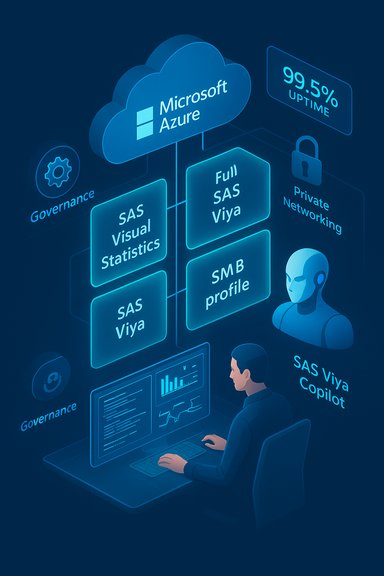
SAS Viya Essentials is presented as a standardized, managed instance of the SAS Viya platform running entirely on Microsoft Azure and operated under SAS Managed Cloud Services. The offering centers on four predefined architecture profiles — including configurations for SAS Visual Analytics, SAS Visual Statistics, and a broader Viya deployment — intended to remove the time and complexity usually associated with designing and standing up analytics platforms. SAS quotes a 99.5% uptime guarantee for the service and emphasizes lower upfront cost and lower operational burden through fixed-cost packaging and dedicated support teams. This release is part of an extended commercial and technology partnership between SAS and Microsoft; their relationship includes additional integrations such as SAS Viya Copilot (an AI assistant built on Microsoft Azure AI Foundry), SAS Viya Workbench (a cloud coding environment available via the Microsoft Marketplace), and SAS Decision Builder (a workload integrated into Microsoft Fabric). Several of these features are described as private or public previews at launch. What SAS Viya Essentials includes
Four predefined architecture profiles
- SAS Visual Analytics profile for dashboarding, reporting and governed self-service analytics.
- SAS Visual Statistics profile targeting advanced analytics and statistical modeling workloads.
- Full SAS Viya profile for cloud-native data and AI workloads.
- (Fourth profile) a smaller, out‑of‑the‑box configuration targeted at SMBs or lightweight use cases.
Managed operations and SLA
- The environment runs fully on Azure and is managed by SAS Managed Cloud Services.
- SAS guarantees 99.5% uptime under the managed offering.
- SAS advertises fixed costs and dedicated support teams intended to reduce surprises and offload the operational burden from customer IT teams.
Integrated and adjacent services
- SAS Viya Copilot — an AI-powered assistant integrated with Azure AI Foundry, currently in private preview and designed to provide code assistance and accelerate model pipeline development.
- SAS Viya Workbench — developer-friendly coding environment (supports SAS, Python, R; available via Microsoft Marketplace).
- SAS Decision Builder — a decisioning workload integrated into Microsoft Fabric, made available as a public preview to help operationalize AI models.
Why SAS is packaging Viya this way
SAS frames Viya Essentials as an answer to two common enterprise pain points:- The lengthy, expensive, and expertise-heavy process of deploying enterprise analytics platforms.
- The operational complexity of maintaining availability, security, and upgrades for analytics stacks.
How this fits in the SAS–Microsoft collaboration
The Viya Essentials launch is an extension of a multi-year collaboration. SAS and Microsoft have been aligning product integrations and go-to-market approaches — now formalized as a five-year extension in their partnership — with several tangible integrations:- Azure AI Foundry is the backbone for SAS Viya Copilot integration.
- Microsoft Marketplace distribution for Viya Workbench.
- Microsoft Fabric as a host for SAS Decision Builder, enabling closer coupling between SAS decisioning and Microsoft’s analytics fabric.
Strengths — where Viya Essentials genuinely helps
- Speed to value. Standardized architecture profiles dramatically shorten the deployment lifecycle. Customers can pick a profile and start working instead of building bespoke infrastructure and complex security policies from scratch.
- Operational offload. SAS Managed Cloud Services handles day-to-day platform operations, patching, and monitoring — removing much of the operational lift from internal IT teams and potentially lowering the need for specialized in-house platform engineers.
- Predictability and SLAs. The 99.5% uptime commitment provides customers with a clear operational baseline; combined with fixed-cost positioning, this helps finance teams forecast ongoing spend more easily. However, see the pricing caveats below.
- Enterprise-grade integration. Native workbench tooling, an AI copilot, and Fabric integrations mean that Viya Essentials is not just a siloed application — it plugs into existing developer workflows and Microsoft’s analytics tooling. This lowers friction for teams that already use VS Code, Jupyter, or Microsoft Fabric constructs.
- Backed by a long-standing vendor. SAS brings more than five decades of analytics experience, and packaging Viya as a managed offering can be an attractive option for organizations that prioritize stability and vendor accountability.
Risks, caveats, and what to verify before you sign
While Viya Essentials is attractive for many scenarios, there are important trade-offs and risks that organizations must evaluate.1) Vendor lock‑in and data gravity
Running a managed SAS Viya instance on Azure under a SAS-managed subscription increases data gravity. Moving analytics workloads — and the associated large datasets, models, and operational pipelines — to another vendor or back on‑premises can be complex and costly. Planning for exit and portability is essential.2) Customization limits vs. standardized profiles
The whole point of the product is standardization. If your organization requires heavy architectural customization, unusual security controls, or bespoke integrations, the predefined profiles may either not fit or become expensive to modify. Evaluate whether the bundled profiles meet your data governance, latency, and integration requirements before committing.3) Cost transparency and long-term economics
SAS markets Viya Essentials as a fixed-cost option, but the press materials do not publish detailed pricing or a clear TCO model. Organizations must request sample contracts, long-term pricing scenarios (including storage, egress, and Azure-managed resource costs), and change-of-service pricing to avoid surprises. The lack of publicly posted price lists means procurement teams should insist on scenario modeling.4) Shared responsibility and security
Even when a vendor manages the platform, customers retain responsibilities for data access, identity, governance and certain aspects of security posture. Enterprises should validate the shared-responsibility model, required customer controls (for example, identity, network segmentation), and how incident response is handled. The typical Azure best practices — Entra RBAC, Private Link, Defender for Storage, least-privilege SAS use, and pipeline quarantine patterns — remain essential even with a managed service. These are common operational guardrails for analytics on Azure and should be baked into any contract and onboarding plan.5) SLA nuance and operational realities
A 99.5% uptime SLA is meaningful, but it does not eliminate performance variability or localized outages. Understand the SLA’s scope (which components are covered), measurement windows, credits, and the provider’s historical incident responsiveness. Ask for runbooks and service-level playbooks that describe failover, backup, and recovery.6) Model governance and AI risk
SAS Viya Copilot and other AI features accelerate development, but they also introduce model governance challenges: provenance, explainability, audit trails, and human-in-the-loop controls. If Copilot or automated pipelines generate code or models, require traceability and review gates before production deployment. The vendor’s AI assistants are powerful, but they are not a substitute for governance.Practical checklist before purchasing or piloting Viya Essentials
- Request the full service definition and SLA document. Confirm precisely what the 99.5% covers and how credits or remediation are calculated.
- Insist on a sample TCO that includes Azure infrastructure costs (compute, storage, networking) plus SAS managed fees for 1, 3 and 5-year horizons. Demand explicit egress and backup scenarios.
- Validate data locality and compliance: identify which Azure regions the service will run in, and confirm compliance certifications for your industry (HIPAA, SOC, ISO, etc.. Ask for evidence of compliance mappings.
- Confirm the shared-responsibility model: which identity, network, and data controls remain the customer’s responsibility. Map those to your internal security controls (least privilege, Private Link, Defender integration).
- Run a small pilot using real data, production-like queries, and representative model training jobs. Measure performance, concurrency, backups, and the operational overhead for integrations (e.g., CI/CD for models).
Implementation considerations and migration strategy
- Use the pilot to test full workflows: ingestion → feature engineering → model training → deployment → monitoring. This confirms that the Viya Essentials profile supports every step.
- Standardize on identity: prefer managed identities and restrict long-lived SAS tokens. Misissued keys or permissive SAS tokens remain one of the most common sources of cloud data compromise.
- Establish a provisioning and de‑provisioning cadence for tenant and workspace resources, tied to cost‑controls and tagging. This helps to detect orphaned storage and reduce surprise charges.
- Build observability: ensure logs, metrics, and audit trails are available to your SIEM (or security team) and that you can extract usage metrics for model and data governance.
- Insist on exit-runbooks and data-export procedures before production cutover. Plan for staged exports and validations in case you need to migrate workloads later.
Use cases that align well with Viya Essentials
- Organizations seeking a quick, secure managed analytics environment for dashboarding, reporting, and moderately sized model training where rapid time-to-value and predictable operations are priorities.
- Departments without large platform teams that need SAS-specific capabilities (statistical models, regulated analytics workflows) but prefer to avoid building an in-house cloud platform.
- Teams that already use Microsoft Azure and Microsoft Fabric and want native integrations with Microsoft tooling and marketplaces.
- Organizations with extreme customization needs, highly sensitive data requiring unusual on‑prem controls, or those that require cost-optimized hyperscale model training with very specific infrastructure choices.
How Viya Essentials compares to alternative approaches
- DIY on Azure: Building Viya directly on Azure gives maximum customization but requires platform engineers, longer timelines, and ongoing ops burden.
- SAS on other clouds (AWS, GCP): The managed nature of Viya Essentials on Azure specifically favors customers that have standardized on Microsoft clouds. SAS has previously supported marketplaces and deployments on other clouds — choose depending on your cloud strategy.
- SaaS analytics alternatives: Pure SaaS analytics platforms may be cheaper for very small teams but often lack SAS’s advanced analytics and statistical tooling. Viya Essentials targets customers who need SAS-specific capabilities without full platform engineering lift.
Final assessment — who should consider Viya Essentials
SAS Viya Essentials is a sensible offering for organizations that want:- a fast path to trusted analytics on Azure,
- vendor-managed operations to reduce IT staffing pressure,
- and the specific analytics capabilities that SAS has historically delivered.
The offering’s strengths are speed, managed operations, and integration with Microsoft’s ecosystem; the primary risks are vendor lock-in, unclear long-term cost dynamics without explicit pricing exposure, and the need for careful shared-responsibility planning for security and governance. Customers should insist on concrete contractual commitments around data portability, compliance evidence, pricing transparency, and operational runbooks before moving production workloads.
Conclusion
SAS Viya Essentials packages a recognizable corporate playbook for 2020s enterprise software: productize a proven platform, standardize deployment options, run operations as a managed service, and lean on a hyperscaler partnership to accelerate adoption. For many organizations that have struggled to deploy analytics platforms quickly, this will be an attractive plug-and-play option. However, the value will depend heavily on the details — pricing transparency, shared-responsibility clarity, and the ability to meet an organization’s compliance and customization needs.Before committing, teams should validate the service-level details, run a realistic pilot, and require contractual protections for data portability and operational transparency. Technical and security teams should also map out the shared responsibilities and ensure Azure best practices (identity hygiene, private networking, and data protection workflows) are adopted as part of the managed deployment. These steps will help convert the promise of faster analytics into dependable, governed production outcomes.
Source: Techzine Global SAS offers Viya Essentials on Microsoft Azure
