

Microsoft’s Secure Boot certificate deadline is real, but the dramatic framing circulating online needs a little correction: this is not a sudden emergency that will break Windows in eight weeks, and it is not a blanket “security upgrade” every user must manually install. What Microsoft has actually confirmed is a staged transition away from 2011 Secure Boot certificates that begin expiring in June 2026, with updated 2023 certificates already being distributed to supported devices through Windows Update and related firmware paths. The important part is not panic, but preparation: devices that miss the migration will not stop booting, yet they will gradually lose the ability to receive new early-boot security protections.
Secure Boot has always been one of those Windows security features that users rarely think about until something goes wrong. It lives below the level of everyday apps and settings, inside the UEFI firmware and boot chain, where it helps ensure a PC only launches trusted code at startup. That makes it one of the most important controls against bootkits, rootkits, and other low-level malware that tries to infect a machine before the operating system is fully loaded.
The current story is about certificate aging, not a flaw in Secure Boot itself. Microsoft’s original Secure Boot certificates, issued in 2011, are reaching the end of their validity window in 2026, and Microsoft has spent the last couple of years rolling out replacement certificates signed in 2023. The company’s support documents say these newer certificates were included in cumulative updates beginning on May 13, 2025, with broader delivery continuing through Windows Update and OEM firmware updates.
That distinction matters because certificate expiration does not mean devices instantly become unusable. Microsoft says systems that fail to receive the updated certificates will continue to start normally and keep receiving regular Windows updates, but they will no longer be able to receive new protections for the early boot process. In practical terms, the machine still runs, but the security perimeter around startup begins to weaken over time.
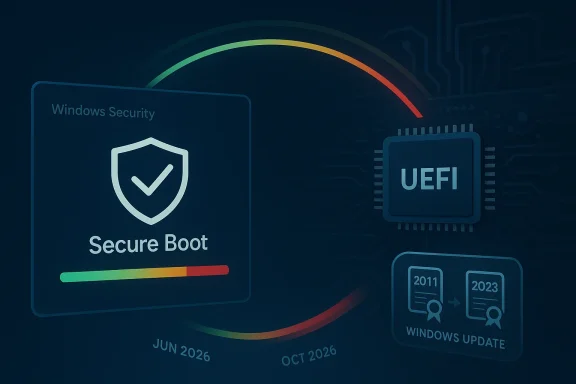
There is also a second reason this issue has become more visible now: Microsoft has started surfacing certificate status directly in the Windows Security app. Starting in April 2026, users can see a green, yellow, or red Secure Boot badge that indicates whether a device is fully updated, partially updated, or needs immediate attention. That makes the transition less abstract and turns a hidden firmware problem into something ordinary users can actually inspect.
That means the risk is not an immediate failure, but a narrowing of the security envelope. As Microsoft explains, once the older certificates age out, affected devices can still boot and operate normally, but they lose the ability to receive fresh boot-chain mitigations, revocation updates, and other protections for emerging vulnerabilities. In cybersecurity, that is often how the slide begins: not with a loud failure, but with a quiet reduction in resilience. Quietly is the key word here.
This is also why the transition has enterprise implications beyond consumer PCs. Business devices often rely on tightly managed images, custom bootloaders, virtualization stacks, and endpoint controls that assume Secure Boot remains fully functional. If a fleet lags behind the certificate migration, the issue becomes operational, not just technical.
This staggered approach is deliberate. It gives Microsoft and OEMs time to manage the diversity of Windows hardware, from recent laptops to older business desktops and specialty systems. It also reduces the chance that a single blocked update path creates a massive support incident. Still, staggered does not mean optional. Devices need the newer certificates before the old ones expire if they are to stay fully protected.
For some readers, the word “deadline” may suggest a dramatic switch-off moment. In reality, it is more like a slow erosion point. The protections fade first in the least visible layer of the system, and only later does the lack of upkeep become obvious. That is exactly the kind of security maintenance gap attackers love to exploit.
The story is less comfortable for older consumer PCs, especially those that have fallen behind on cumulative updates or are no longer fully supported. These systems may still work perfectly well for everyday tasks, but that does not mean they are being maintained at the firmware trust level Microsoft now expects. On such devices, users may need to rely on OEM firmware updates, a system upgrade, or, in some cases, an extended support path if one is available for their configuration.
This is where the issue becomes a governance problem as much as a security one. Managed desktops, kiosks, point-of-sale terminals, industrial systems, and virtual desktops all have different maintenance cycles, and some of them are notoriously slow to change. The longer those systems remain on old certificates, the more likely they are to become exceptions that security teams must track manually.
That caveat is important because firmware updates are not as uniform as standard Windows patches. OEM BIOS and UEFI layers differ widely across vendors, and some systems require specific vendor packages to complete the trust-chain transition. So while Windows Update may handle much of the work, some machines will still need one more step from the PC maker or the IT department. That extra step is where delays tend to happen.
That visibility should improve compliance, but it may also create anxiety if users see a color they do not understand. Microsoft’s documentation tries to soften that by explaining that some Secure Boot warnings are unrelated to certificates, including cases where Secure Boot is simply turned off. The challenge is educational: the badge helps only if users know how to interpret it correctly.
The second casualty is trust in adjacent security features. Microsoft notes that some scenarios, including hardening around BitLocker and third-party bootloaders, can be affected when Secure Boot trust is not current. That does not mean these features instantly fail, but it does mean their assurance model becomes weaker. In security engineering, “weaker assurance” is often just a polite way of saying “more fragile.”
The broader lesson is that the boot environment matters precisely because users do not see it. Security failures at this layer can persist across reinstalls, survive some cleanup tools, and complicate incident response. That is why Microsoft is pushing this transition long before the certificates fully expire. Waiting until the last minute is not a strategy here.
Older home systems are the real edge case. If a PC is running Windows 10 without recent updates or depends on a manufacturer that no longer supports its firmware, the certificate path may not complete cleanly. In those cases, the user may need to weigh the cost of continued maintenance against the value of upgrading hardware altogether. That is a frustrating but familiar Windows lifecycle decision.
Organizations should assume they have at least some machines that will not update automatically. Specialty hardware, offline systems, imaging workflows, and devices without diagnostic data can all fall outside the smoothest rollout path. That is why a manual exception list, not optimism, is the correct management tool.
This is also a reminder that security infrastructure has a shelf life. A feature can be designed well and still require maintenance years later, because the cryptographic and operational assumptions around it change. That is one reason Microsoft is adding clearer status visibility now rather than waiting for the expiration to become visible only through support calls.
The downside is that when platform security becomes more visible, users also become more aware of how much depends on vendors and OEMs doing the right thing on time. That can be reassuring in the short term and annoying in the long term. Still, visible maintenance is preferable to hidden decay.
For consumers, the most important thing to watch is whether ordinary Windows Update behavior is enough or whether a device needs a vendor firmware package to finish the job. For businesses, the real test will be inventory coverage and exception management. The certificate expiration timeline is broad enough that no one should be surprised, but tight enough that procrastination will still create avoidable risk.
Source: PhoneWorld Hurry Up! Microsoft Sets Urgent Deadline for Windows Security Upgrade - PhoneWorld
 Overview
Secure Boot has always been one of those Windows security features that users rarely think about until something goes wrong. It lives below the level of everyday apps and settings, inside the UEFI firmware and boot chain, where it helps ensure a PC only launches trusted code at startup. That makes it one of the most important controls against bootkits, rootkits, and other low-level malware that tries to infect a machine before the operating system is fully loaded.The current story is about certificate aging, not a flaw in Secure Boot itself. Microsoft’s original Secure Boot certificates, issued in 2011, are reaching the end of their validity window in 2026, and Microsoft has spent the last couple of years rolling out replacement certificates signed in 2023. The company’s support documents say these newer certificates were included in cumulative updates beginning on May 13, 2025, with broader delivery continuing through Windows Update and OEM firmware updates.
That distinction matters because certificate expiration does not mean devices instantly become unusable. Microsoft says systems that fail to receive the updated certificates will continue to start normally and keep receiving regular Windows updates, but they will no longer be able to receive new protections for the early boot process. In practical terms, the machine still runs, but the security perimeter around startup begins to weaken over time.
There is also a second reason this issue has become more visible now: Microsoft has started surfacing certificate status directly in the Windows Security app. Starting in April 2026, users can see a green, yellow, or red Secure Boot badge that indicates whether a device is fully updated, partially updated, or needs immediate attention. That makes the transition less abstract and turns a hidden firmware problem into something ordinary users can actually inspect.
How Secure Boot Actually Works
Secure Boot is best understood as a trust chain. When a PC powers on, firmware checks whether key boot components are signed with trusted certificates before allowing them to run. If the signatures match, the boot process continues; if not, the firmware can block tampered code from loading. This is why Secure Boot is so effective against pre-OS threats, which are among the hardest kinds of malware to detect and remove.The role of certificates
The certificates are not the security feature by themselves; they are the cryptographic credentials Secure Boot depends on. Microsoft’s documentation lists the 2011-era certificates as the ones now expiring, including the Microsoft Corporation KEK CA 2011, Microsoft Windows Production PCA 2011, and Microsoft Corporation UEFI CA 2011. These certificates are used to validate boot loaders and firmware-level components, and once they expire, they can no longer be used to sign new trusted updates.That means the risk is not an immediate failure, but a narrowing of the security envelope. As Microsoft explains, once the older certificates age out, affected devices can still boot and operate normally, but they lose the ability to receive fresh boot-chain mitigations, revocation updates, and other protections for emerging vulnerabilities. In cybersecurity, that is often how the slide begins: not with a loud failure, but with a quiet reduction in resilience. Quietly is the key word here.
Why this matters more than it sounds
A modern Windows PC is protected by many layers, but the boot chain is foundational. If an attacker can compromise firmware or boot components, they may gain persistence that survives normal antivirus cleanup and even some reinstall attempts. That is why Microsoft is treating the certificate rollover as a major platform-maintenance event rather than a routine patch cycle.This is also why the transition has enterprise implications beyond consumer PCs. Business devices often rely on tightly managed images, custom bootloaders, virtualization stacks, and endpoint controls that assume Secure Boot remains fully functional. If a fleet lags behind the certificate migration, the issue becomes operational, not just technical.
Why 2026 Is the Real Deadline
The headlines often simplify the timeline into “eight weeks,” but Microsoft’s official guidance is more nuanced. The Secure Boot certificates begin expiring in June 2026, and Microsoft has said they will expire fully by October 2026 depending on the specific certificate. That gives the rollout a window, but it is not a window anyone should treat casually.June first, then a longer tail
Microsoft’s support pages make clear that June 2026 is the first meaningful inflection point. That is when some of the current certificates start expiring, which is also why Microsoft has begun surfacing more urgent messaging in Windows Security and support channels. The October 2026 date appears in documentation for some certificate classes, which means the full transition is staggered rather than tied to a single day.This staggered approach is deliberate. It gives Microsoft and OEMs time to manage the diversity of Windows hardware, from recent laptops to older business desktops and specialty systems. It also reduces the chance that a single blocked update path creates a massive support incident. Still, staggered does not mean optional. Devices need the newer certificates before the old ones expire if they are to stay fully protected.
What “expiration” really means
An expiring certificate does not delete Secure Boot from the machine or prevent Windows from loading. Instead, it limits the firmware’s trust relationship with future updates. That is why Microsoft says standard Windows updates will continue to install even on devices that miss the cutoff, yet the early boot pipeline will stop receiving new security protections. That distinction is crucial because it means the machine can appear healthy while becoming progressively more exposed underneath.For some readers, the word “deadline” may suggest a dramatic switch-off moment. In reality, it is more like a slow erosion point. The protections fade first in the least visible layer of the system, and only later does the lack of upkeep become obvious. That is exactly the kind of security maintenance gap attackers love to exploit.
Who Needs to Act Now
Most users with modern, supported Windows 10 or Windows 11 systems are likely already covered, especially if the device continues to receive regular updates from Microsoft. Microsoft says the updated 2023 certificates are being delivered automatically to a “significant portion” of supported devices, particularly those that get normal cumulative updates or participate in certain managed deployment channels.Consumer devices
For home users, the main question is whether the PC is still supported and up to date. A relatively new laptop or desktop purchased in the last couple of years is very likely already on the right path, especially if Windows Update is active and no unusual firmware restrictions exist. Microsoft also notes that Windows 11 and Windows 10 Home, Pro, and Education devices that receive updates directly from Microsoft typically get the new certificates through regular update channels.The story is less comfortable for older consumer PCs, especially those that have fallen behind on cumulative updates or are no longer fully supported. These systems may still work perfectly well for everyday tasks, but that does not mean they are being maintained at the firmware trust level Microsoft now expects. On such devices, users may need to rely on OEM firmware updates, a system upgrade, or, in some cases, an extended support path if one is available for their configuration.
Business and managed fleets
Enterprise devices are a different matter because support is not just about whether a PC can update itself. Microsoft says organizations with IT-managed systems are responsible for ensuring their fleets receive the certificates through documented deployment methods, especially if diagnostic data is not being shared and automatic rollout paths are limited. In other words, enterprise administrators cannot assume the problem will sort itself out.This is where the issue becomes a governance problem as much as a security one. Managed desktops, kiosks, point-of-sale terminals, industrial systems, and virtual desktops all have different maintenance cycles, and some of them are notoriously slow to change. The longer those systems remain on old certificates, the more likely they are to become exceptions that security teams must track manually.
How Microsoft Is Rolling Out the Fix
Microsoft is not asking users to download a standalone patch and manually import certificates on every machine. Instead, the company is using Windows Update, firmware updates, and managed deployment channels to move the ecosystem to the 2023 trust chain. That is the right strategy for a problem this deep in the platform, because it keeps the update process aligned with the device’s actual boot configuration.Automatic versus manual paths
For most supported devices, the rollout should feel automatic. Microsoft says the updated certificates were included in cumulative updates beginning in May 2025, and eligible systems with the right diagnostics and rollout settings may receive additional coverage through controlled feature deployment. However, Microsoft also cautions that these automated updates are an assist, not a guarantee.That caveat is important because firmware updates are not as uniform as standard Windows patches. OEM BIOS and UEFI layers differ widely across vendors, and some systems require specific vendor packages to complete the trust-chain transition. So while Windows Update may handle much of the work, some machines will still need one more step from the PC maker or the IT department. That extra step is where delays tend to happen.
The Windows Security app status badges
Microsoft’s new Secure Boot status display inside Windows Security is a smart move because it gives users a visual cue instead of burying the state in firmware menus. The app now uses a green, yellow, or red badge under Device security > Secure Boot to indicate status. Green means the device is fully updated, yellow means some updates are missing or need attention, and red signals a state that requires immediate action.That visibility should improve compliance, but it may also create anxiety if users see a color they do not understand. Microsoft’s documentation tries to soften that by explaining that some Secure Boot warnings are unrelated to certificates, including cases where Secure Boot is simply turned off. The challenge is educational: the badge helps only if users know how to interpret it correctly.
What Happens If You Ignore It
A lot of users will be tempted to dismiss this as “one more Microsoft security notice,” especially because their computers will continue to boot. That would be a mistake. Microsoft says devices that miss the certificate update will still operate, but they will no longer receive new protections for vulnerabilities affecting the Windows boot process. Over time, that means the machine becomes less capable of defending itself against newly discovered threats.The practical security loss
The first casualty is not the desktop experience but the boot chain. Updates to Windows Boot Manager, Secure Boot databases, revocation lists, and boot-level mitigations can no longer be reliably delivered in the same way. That creates an opening for future vulnerabilities to persist longer on the device, especially if attackers target the startup sequence rather than the live operating system.The second casualty is trust in adjacent security features. Microsoft notes that some scenarios, including hardening around BitLocker and third-party bootloaders, can be affected when Secure Boot trust is not current. That does not mean these features instantly fail, but it does mean their assurance model becomes weaker. In security engineering, “weaker assurance” is often just a polite way of saying “more fragile.”
Malware and bootkit exposure
If Secure Boot is disabled or the trust chain is stale, devices are more exposed to boot-level malware, including bootkits. Microsoft is blunt about this in its FAQ: systems with Secure Boot disabled do not receive the new certificate protections and remain vulnerable because Secure Boot enforcement is absent. That is the sort of risk that rarely shows up in casual usage until a machine is already compromised.The broader lesson is that the boot environment matters precisely because users do not see it. Security failures at this layer can persist across reinstalls, survive some cleanup tools, and complicate incident response. That is why Microsoft is pushing this transition long before the certificates fully expire. Waiting until the last minute is not a strategy here.
Consumer Impact Versus Enterprise Impact
Consumers and organizations face the same underlying certificate issue, but the practical consequences differ. For consumers, the main concern is whether a personal PC will keep receiving the updated certificates automatically and whether the Windows Security app shows a healthy status. For organizations, the issue expands into inventory, change management, and fleet-wide compliance.What home users should expect
Most home users should not need to panic or buy a new PC just because of this certificate cycle. If the device is supported and current, Microsoft’s rollout should handle the transition with minimal user intervention. The simplest advice is still the best: keep Windows Update on, install OEM firmware updates when offered, and check the Secure Boot status in Windows Security.Older home systems are the real edge case. If a PC is running Windows 10 without recent updates or depends on a manufacturer that no longer supports its firmware, the certificate path may not complete cleanly. In those cases, the user may need to weigh the cost of continued maintenance against the value of upgrading hardware altogether. That is a frustrating but familiar Windows lifecycle decision.
What IT departments need to do
For enterprises, the certificate rollover should be handled like a platform migration, not a routine patch. Microsoft provides guidance for managed devices, including inventory collection, deployment assistance, and documentation tailored to business fleets and Windows 365 Cloud PCs. The fact that Microsoft has separate guidance for managed environments shows how seriously it treats the operational complexity.Organizations should assume they have at least some machines that will not update automatically. Specialty hardware, offline systems, imaging workflows, and devices without diagnostic data can all fall outside the smoothest rollout path. That is why a manual exception list, not optimism, is the correct management tool.
The Bigger Industry Meaning
This Secure Boot transition is part of a wider industry trend: the operating system, firmware, and cloud management layers are becoming more tightly coordinated. Microsoft is not just patching Windows; it is managing the lifecycle of trust across the entire boot chain. That reflects the reality of modern attack surfaces, where endpoint security increasingly depends on what happens before the desktop appears.A preview of future lifecycle issues
The 2011-to-2023 certificate shift is the first major expiration event of its kind, which is why it has drawn so much attention. But it will not be the last time platform trust needs renewal. Firmware certificates, code-signing chains, and hardware-rooted security mechanisms all age out eventually, and vendors will need more disciplined renewal processes as the installed base grows older.This is also a reminder that security infrastructure has a shelf life. A feature can be designed well and still require maintenance years later, because the cryptographic and operational assumptions around it change. That is one reason Microsoft is adding clearer status visibility now rather than waiting for the expiration to become visible only through support calls.
Competitive implications
For Microsoft’s ecosystem, the upside is obvious: tighter control of firmware trust reinforces Windows as a secure, managed platform for both consumers and businesses. For rivals, especially alternative desktop operating systems and device vendors, the message is less about any single product and more about the burden of lifecycle management. In the age of persistent threats, trust chains are a competitive feature, not just an engineering detail.The downside is that when platform security becomes more visible, users also become more aware of how much depends on vendors and OEMs doing the right thing on time. That can be reassuring in the short term and annoying in the long term. Still, visible maintenance is preferable to hidden decay.
Strengths and Opportunities
Microsoft’s handling of the Secure Boot transition has several strengths, and they matter because this is exactly the kind of issue that can become messy if users are left guessing. The company has started the rollout early, built multiple delivery paths, and given administrators enough documentation to treat the certificate change as a managed lifecycle event rather than a fire drill. The new Windows Security status badges also make the issue easier to understand at a glance.- Early rollout reduces the chance of a last-minute scramble.
- Automatic delivery through Windows Update will cover many supported devices.
- Clear status badges make the problem more visible to end users.
- Managed deployment guidance helps enterprises handle fleets at scale.
- Firmware alignment keeps the fix close to the actual trust layer.
- Broader boot security improves resilience against bootkits and rootkits.
- Lifecycle discipline sets a precedent for future certificate renewals.
Risks and Concerns
The biggest risk is not that Windows will suddenly stop working, but that users and IT teams will underestimate the importance of the change because normal operation continues. That kind of false reassurance is dangerous in security, especially when the weak point sits below the operating system. Older PCs, unsupported firmware, and unmanaged fleets are all likely to be the places where the transition gets stuck.- Hidden exposure may persist even when the PC appears fine.
- Older hardware could miss the automatic update path.
- OEM firmware delays may block completion on some systems.
- Enterprise exceptions can complicate fleet-wide compliance.
- User confusion may arise from the new color-coded status system.
- Boot-level threats become harder to mitigate if certificates lapse.
- Support burden may increase as expiration dates approach.
What to Watch Next
The next few months will tell us whether Microsoft’s rollout strategy is as smooth in practice as it looks on paper. The key signals will be how quickly devices begin showing green Secure Boot status in Windows Security, how often yellow and red statuses appear on older hardware, and whether OEMs keep pace with the firmware side of the transition. Microsoft has also indicated that more improvements and alerts will arrive around May 2026, which suggests the company is still tuning the user-facing side of the process.For consumers, the most important thing to watch is whether ordinary Windows Update behavior is enough or whether a device needs a vendor firmware package to finish the job. For businesses, the real test will be inventory coverage and exception management. The certificate expiration timeline is broad enough that no one should be surprised, but tight enough that procrastination will still create avoidable risk.
- May 2026 alerts and UI refinements in Windows Security.
- June 2026 expiration onset for the first wave of 2011 certificates.
- OEM firmware updates that may be required on some systems.
- Enterprise inventory reports showing which devices remain unupdated.
- Windows 10 support posture on older machines that may not fully transition.
Source: PhoneWorld Hurry Up! Microsoft Sets Urgent Deadline for Windows Security Upgrade - PhoneWorld
Last edited:
