

On July 10, 2026, Microsoft confirmed it had paused the Secure Boot 2023 certificate rollout on some Windows 11 PCs after identifying device and firmware combinations that could block installation or cause trouble, while HP linked failures on some systems to BitLocker recovery screens and certificates that do not apply correctly. The pause is not evidence that Secure Boot has failed; it is evidence that Microsoft cannot safely modernize the Windows boot-trust chain without cooperation from firmware that it does not control. Most affected PCs will continue booting and receiving ordinary Windows updates, but systems stranded on older certificates will gradually lose access to future boot-level protections. This is a deferred security problem, not an immediate Windows outage.
Windows Latest first reported the expanded warning after spotting Microsoft’s updated support documentation. The crucial distinction is that Windows Update is not simply failing at random: Microsoft says it has deliberately stopped sending the certificate update to configurations where compatibility checks indicate that applying it could be riskier than temporarily withholding it.
That distinction matters because users confronting a yellow warning, an incomplete Secure Boot status, or an unexpected BitLocker prompt may be tempted to disable Secure Boot or force firmware changes. Microsoft’s guidance is the opposite: leave Secure Boot enabled, inspect the status Windows reports, and wait for a supported firmware path from the PC manufacturer where one is required.
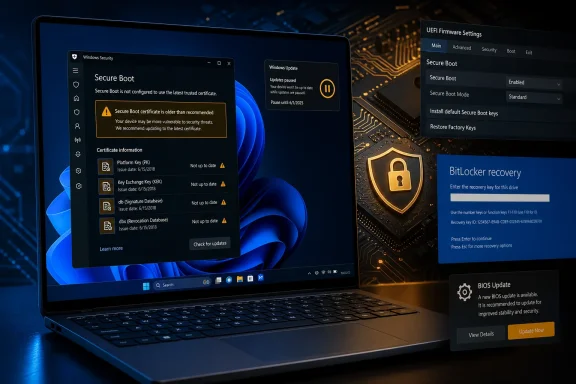
Microsoft’s new Windows Security message is unusually candid: “Devices in this group are affected by a known issue.” The expanded alert says certificate updates are temporarily paused while Microsoft and its partners work toward a supported resolution, directing users to their device manufacturers for assistance.
The paradox is deliberate. Secure Boot is intended to prevent untrusted code from running before Windows, yet changing the certificates underpinning that protection requires Windows to write new trust information into one of the most hardware-dependent parts of a PC. If Microsoft applies the wrong change to firmware that mishandles it, the attempted security improvement can interfere with startup, trigger BitLocker recovery, or leave the certificate migration incomplete.
Microsoft therefore worked with PC manufacturers to identify devices and firmware configurations where the update could cause trouble. Windows Update can then avoid offering Secure Boot 2023 to those systems until an OEM firmware update or another supported resolution is available.
This is safer than treating every Windows 11 PC as interchangeable. Two laptops may run the same operating system and receive the same monthly updates while using entirely different UEFI implementations, Secure Boot databases, firmware update mechanisms, recovery environments, and BitLocker behavior.
Microsoft told Windows Latest that most PCs have already received the new certificates automatically through Windows Update. The pause concerns a subset of machines where eligibility cannot yet be established safely, not the Windows 11 population as a whole.
The more important change is visibility. Instead of merely telling a user that Secure Boot is enabled, Windows Security can now explain that the certificate update has been paused because of a known issue. That turns what previously looked like a vague or silent failure into a classified compatibility state.
Users can check under Windows Security > Device security > Secure Boot. If the status reads “Secure Boot is on and certificates are applied,” the migration has succeeded and no further action is required.
A device that reports only that Secure Boot is on may require closer inspection. Secure Boot being enabled and Secure Boot having the current certificates are related conditions, but they are not the same condition.
The mechanism depends on databases stored and enforced by firmware. These include trusted signing information and the Secure Boot DBX, or Forbidden Signature Database, which identifies boot software that is no longer trusted and should be blocked.
That is why this certificate replacement is not comparable to updating a browser certificate store or installing a Defender definition. Windows can orchestrate the process, but the final trust configuration resides in firmware designed, customized, validated, and supported by the PC manufacturer.
Certificates issued in 2011 or earlier have reached expiration, forcing Microsoft and its hardware partners to move supported systems to certificates issued in 2023. The new certificates preserve Microsoft’s ability to authorize future Windows boot components and distribute new information about vulnerable or malicious bootloaders.
Without the updated trust chain, an affected PC does not suddenly forget everything it already trusts. Secure Boot remains enabled and continues checking startup components against the information it has.
The problem emerges over time. If Microsoft discovers another compromised bootloader, a device stranded on the old trust configuration may be unable to receive or enforce the newer boot protection needed to reject it. The machine remains protected against previously known threats while becoming progressively less aligned with fully updated systems.
This is the central reason Microsoft is warning users not to disable Secure Boot. Turning it off does not solve the certificate problem; it removes the existing boot verification that still works.
It also explains why Microsoft cannot necessarily repair every device through Windows Update alone. The operating system can identify the hardware, stage changes, and deliver Microsoft-controlled components, but it cannot guarantee that every UEFI implementation will process new certificates correctly.
2023 — Microsoft issues replacement Secure Boot certificates intended to carry the Windows boot-trust chain forward.
June 2026 — The Secure Boot deadline arrives as 2011-era certificates expire; HP rolls out updated BIOS releases for many PCs in preparation.
July 10, 2026 — Windows Latest reports Microsoft’s confirmation that the rollout has been paused on some Windows 11 PCs because of known device or firmware issues.
On some systems, however, the process encountered BitLocker trouble. HP reported that PCs could become stuck at a BitLocker screen while the new Secure Boot certificates failed to install.
“Microsoft’s 2023 certificates may fail to properly apply on the computer when this BitLocker issue occurs,” HP said. That symptom joins two security mechanisms that users generally encounter only when something goes wrong: Secure Boot verifies the startup chain, while BitLocker can demand recovery when it detects a significant change to the environment protecting an encrypted Windows installation.
A BitLocker screen does not necessarily mean that files have been corrupted or that the disk has failed. It can mean that the measured or expected startup state changed enough for BitLocker to require proof that an authorized person is attempting to unlock the computer.
That may be defensible security behavior, but it is still operationally disruptive. A consumer who does not know where the recovery key is stored can be locked out of an otherwise functional PC. In an enterprise, an unexpected recovery prompt across even a small portion of a fleet can generate help-desk calls, delay logons, and interrupt remote work.
The HP case also demonstrates why a BIOS update cannot automatically be treated as a cure. Firmware is part of the remediation, but the firmware deployment itself must be tested against encryption, recovery, boot configuration, and certificate-application behavior.
Microsoft’s pause is therefore a containment measure. It reduces the chance that the Secure Boot certificate migration will be delivered to configurations already associated with trouble while Microsoft and the OEMs develop a supported path.
The company says a required firmware update might not yet be available. When one is ready, it will be distributed through the OEM’s standard update channel rather than through an improvised workaround devised by the user.
That channel may be an OEM update utility, a support application, a managed firmware deployment system, or another manufacturer-approved process. The important point is that the firmware vendor—not a generic third-party driver site—is responsible for the package and its applicability to a specific model.
That is a better failure mode than installing a security change that leaves a computer unable to start normally. It is also why manually forcing the migration can defeat the protection Microsoft has added around the rollout.
Windows Update’s decision does not mean every blocked PC is suffering from the same defect. Microsoft’s language refers to a set of devices or firmware configurations, leaving room for multiple OEM-specific causes and resolutions.
Some machines may need a firmware update that is already available. Others may need one still under development. A further group may be unable to receive a suitable firmware update because the manufacturer no longer supports the model.
This fragmentation makes the Windows Security status especially important. The message can distinguish between a temporary pause for a known issue and a more permanent hardware or firmware limitation that prevents automated updating.
For temporarily paused systems, Microsoft says the rollout can resume once the issue has been resolved. The user should not interpret the absence of Secure Boot 2023 as permission to disable Secure Boot, reset firmware keys, or experiment with unrelated BIOS settings.
For systems facing hardware or firmware limitations, the practical outcome is less reassuring. Microsoft says a PC model may no longer be supported by its manufacturer, or the OEM may no longer be able to provide the firmware changes needed to update the device’s Secure Boot trust configuration.
That turns an abstract certificate expiration into a lifecycle boundary. A Windows 11 PC may continue receiving operating-system patches while its firmware can no longer accept the trust changes required for future boot security.
That creates two security timelines on one machine. Windows itself may remain current at the operating-system level, while the pre-OS trust chain gradually falls behind.
For most home users, this difference will initially be invisible. Windows will boot, applications will run, the network will connect, and ordinary updates will install.
That normality is precisely what makes the problem easy to neglect. There may be no dramatic failure informing the owner that the PC can no longer consume the latest boot-level defense.
The effect is cumulative rather than catastrophic. Today’s boot chain can continue validating yesterday’s known-good components and rejecting yesterday’s known-bad components, but it may not be equipped to enforce tomorrow’s revocations or trust tomorrow’s replacements.
This matters because pre-OS compromise is unusually powerful. Malware or a vulnerable boot component operating before Windows security services start can potentially undermine assumptions made by the operating system later in the startup sequence.
Secure Boot is not a complete defense by itself, and updated certificates do not make firmware invulnerable. They preserve the mechanism through which Microsoft and OEMs can change what the platform trusts and revoke boot software that should no longer be accepted.
A stranded certificate configuration weakens that future response capability. The PC is not immediately defenseless, but its security posture becomes increasingly historical.
PC manufacturers decide how long a model receives BIOS and UEFI updates. They also determine how firmware packages are tested, delivered, documented, and recovered when installation goes wrong.
Microsoft can identify a risky configuration and pause the certificate update. It cannot compel an OEM to create new firmware for an aging computer, nor can it safely substitute a generic UEFI build for model-specific firmware.
Windows Latest’s veteran journalist Ed had previously found that older Windows PCs in particular were facing firmware-readiness problems ahead of the certificate deadline. That reporting points to the uncomfortable divide between nominal Windows 11 support and continuing platform support.
A PC may satisfy Windows 11’s official hardware requirements and still rely on firmware that receives infrequent maintenance. Secure Boot is officially required by Windows 11 unless that requirement was bypassed, but merely possessing the feature does not guarantee that its databases can be modernized indefinitely.
The result is a support chain with several possible breaking points. Microsoft must provide the new trust material and compatible Windows components; the OEM must provide firmware capable of accepting them; Windows Update must correctly target the device; and the installed configuration must survive the transition without triggering unrecoverable startup trouble.
If any link fails, the user sees one warning bearing Microsoft’s name even though the resolution may sit with the PC manufacturer. That creates a communications problem as much as an engineering problem.
Microsoft’s revised Windows Security messages are an improvement because they expose more of the underlying state. Yet “contact your device manufacturer” is not a resolution when a model is out of support or when the OEM has not published a clear Secure Boot page.
Enterprise customers can pressure vendors through support contracts and purchasing relationships. Consumers with older retail PCs have less leverage, particularly when the computer continues working well enough that replacing it solely for a future decline in boot protection feels disproportionate.
That is the longer-term policy question raised by Secure Boot 2023: how long should a computer advertised as Windows 11-compatible remain capable of receiving essential changes to the Windows trust chain? Microsoft’s current answer is constrained by the OEM’s firmware lifecycle, even when the Windows servicing lifecycle continues.
That requires model-level data. A fleet described only by Windows version is not granular enough because Secure Boot compatibility can differ by manufacturer, product family, firmware release, and local boot configuration.
BitLocker status is equally important. HP’s reported recovery-screen problem shows that certificate and firmware testing must include encrypted devices and must verify that recovery keys are escrowed and retrievable before any change is deployed.
Pilot groups should represent the actual hardware estate rather than a handful of new laptops. If the risk is concentrated in older firmware, testing only the newest corporate standard build will produce reassuring but incomplete results.
Admins should also avoid conflating a paused update with a failed update. A Microsoft-applied compatibility hold indicates that forcing the same operation may reproduce the problem the hold was designed to prevent.
The operational goal is not to make every warning disappear as quickly as possible. It is to move each device to Secure Boot 2023 through a vendor-supported sequence without creating boot failures, BitLocker incidents, or an untracked population of machines whose firmware can no longer be serviced.
If Windows says the update is temporarily paused because the PC is affected by a known issue, the pause is protective. Microsoft and its partners are withholding the change until a supported resolution is available.
If the message says firmware is required, the user should check the PC manufacturer’s official support mechanism. That may involve installing a BIOS update, but only one explicitly intended for the exact model.
A BitLocker recovery key should be located before any firmware operation. Even when an update is expected to install normally, firmware changes can alter the startup measurements BitLocker uses to decide whether the environment remains trusted.
Users should not download firmware from unofficial mirrors, apply a BIOS intended for a similar-looking model, clear Secure Boot keys, or disable Secure Boot simply to remove a warning. Those actions can turn a manageable compatibility hold into a boot or security problem.
Microsoft explicitly insists that Secure Boot should remain enabled when Secure Boot 2023 is unavailable. The old trust configuration still offers more protection than turning verification off.
It is also important not to treat the warning as proof that the computer is about to stop working. Microsoft says devices without the new certificates continue to boot normally, run applications, browse, connect to networks, and receive standard Windows feature and quality updates.
The concern is what the device may be unable to receive later. If a future Boot Manager protection, revocation, or other boot-related security component depends on the 2023 certificates, the machine may remain on an older defensive baseline.
Owners of unsupported models therefore face a judgment rather than an emergency. They can continue using the PC with Secure Boot enabled and ordinary Windows updates installed, while recognizing that long-term boot security may diverge from that of fully updated devices.
The company has also improved the Windows Security interface so that certificate status is not hidden behind a generic statement that Secure Boot is enabled. A meaningful status message gives users and support teams a better chance of distinguishing a secure, completed migration from an older trust configuration.
But the pause does not itself update a single blocked machine. It buys time for Microsoft and OEMs to produce and validate firmware, revise deployment targeting, or otherwise create a supported path.
For PCs whose manufacturers remain engaged, that process can end normally: the OEM releases firmware through its standard channel, the device becomes eligible, and Windows Update applies Secure Boot 2023.
For unsupported machines, there may be no equivalent ending. Microsoft’s own documentation acknowledges that the OEM may no longer support the model or may be unable to supply the firmware needed to change its Secure Boot trust configuration.
That is where the story becomes larger than one certificate rollout. Windows increasingly depends on hardware-backed security, but hardware-backed security also ties the usable security lifetime of Windows to firmware maintenance practices that vary widely between vendors and product lines.
The PC industry has traditionally marketed firmware updates as occasional maintenance. Secure Boot 2023 demonstrates that firmware has become part of the continuing Windows security service, not a static layer completed when the machine leaves the factory.
A manufacturer that ends firmware support while Windows remains serviceable is not merely withholding performance tuning or cosmetic BIOS changes. It may be closing the route through which the operating system receives future boot-trust protections.
The facts users and administrators should carry forward are concrete:
Windows Latest first reported the expanded warning after spotting Microsoft’s updated support documentation. The crucial distinction is that Windows Update is not simply failing at random: Microsoft says it has deliberately stopped sending the certificate update to configurations where compatibility checks indicate that applying it could be riskier than temporarily withholding it.
That distinction matters because users confronting a yellow warning, an incomplete Secure Boot status, or an unexpected BitLocker prompt may be tempted to disable Secure Boot or force firmware changes. Microsoft’s guidance is the opposite: leave Secure Boot enabled, inspect the status Windows reports, and wait for a supported firmware path from the PC manufacturer where one is required.
 Microsoft Is Pausing a Security Upgrade to Preserve Security
Microsoft’s new Windows Security message is unusually candid: “Devices in this group are affected by a known issue.” The expanded alert says certificate updates are temporarily paused while Microsoft and its partners work toward a supported resolution, directing users to their device manufacturers for assistance.The paradox is deliberate. Secure Boot is intended to prevent untrusted code from running before Windows, yet changing the certificates underpinning that protection requires Windows to write new trust information into one of the most hardware-dependent parts of a PC. If Microsoft applies the wrong change to firmware that mishandles it, the attempted security improvement can interfere with startup, trigger BitLocker recovery, or leave the certificate migration incomplete.
Microsoft therefore worked with PC manufacturers to identify devices and firmware configurations where the update could cause trouble. Windows Update can then avoid offering Secure Boot 2023 to those systems until an OEM firmware update or another supported resolution is available.
This is safer than treating every Windows 11 PC as interchangeable. Two laptops may run the same operating system and receive the same monthly updates while using entirely different UEFI implementations, Secure Boot databases, firmware update mechanisms, recovery environments, and BitLocker behavior.
Microsoft told Windows Latest that most PCs have already received the new certificates automatically through Windows Update. The pause concerns a subset of machines where eligibility cannot yet be established safely, not the Windows 11 population as a whole.
The more important change is visibility. Instead of merely telling a user that Secure Boot is enabled, Windows Security can now explain that the certificate update has been paused because of a known issue. That turns what previously looked like a vague or silent failure into a classified compatibility state.
Users can check under Windows Security > Device security > Secure Boot. If the status reads “Secure Boot is on and certificates are applied,” the migration has succeeded and no further action is required.
A device that reports only that Secure Boot is on may require closer inspection. Secure Boot being enabled and Secure Boot having the current certificates are related conditions, but they are not the same condition.
Secure Boot’s Trust Chain Is Only as Modern as the Firmware Beneath It
Secure Boot is a firmware-based boot chain verification mechanism. Before Windows takes control, UEFI firmware checks whether the software participating in startup is signed by a trusted authority; software that is invalid, unauthorized, or explicitly revoked can be prevented from loading.The mechanism depends on databases stored and enforced by firmware. These include trusted signing information and the Secure Boot DBX, or Forbidden Signature Database, which identifies boot software that is no longer trusted and should be blocked.
That is why this certificate replacement is not comparable to updating a browser certificate store or installing a Defender definition. Windows can orchestrate the process, but the final trust configuration resides in firmware designed, customized, validated, and supported by the PC manufacturer.
Certificates issued in 2011 or earlier have reached expiration, forcing Microsoft and its hardware partners to move supported systems to certificates issued in 2023. The new certificates preserve Microsoft’s ability to authorize future Windows boot components and distribute new information about vulnerable or malicious bootloaders.
Without the updated trust chain, an affected PC does not suddenly forget everything it already trusts. Secure Boot remains enabled and continues checking startup components against the information it has.
The problem emerges over time. If Microsoft discovers another compromised bootloader, a device stranded on the old trust configuration may be unable to receive or enforce the newer boot protection needed to reject it. The machine remains protected against previously known threats while becoming progressively less aligned with fully updated systems.
This is the central reason Microsoft is warning users not to disable Secure Boot. Turning it off does not solve the certificate problem; it removes the existing boot verification that still works.
It also explains why Microsoft cannot necessarily repair every device through Windows Update alone. The operating system can identify the hardware, stage changes, and deliver Microsoft-controlled components, but it cannot guarantee that every UEFI implementation will process new certificates correctly.
Timeline
2011 — Microsoft issues the generation of Secure Boot certificates that remained embedded across a broad range of Windows PCs and firmware configurations.2023 — Microsoft issues replacement Secure Boot certificates intended to carry the Windows boot-trust chain forward.
June 2026 — The Secure Boot deadline arrives as 2011-era certificates expire; HP rolls out updated BIOS releases for many PCs in preparation.
July 10, 2026 — Windows Latest reports Microsoft’s confirmation that the rollout has been paused on some Windows 11 PCs because of known device or firmware issues.
HP Shows How a Certificate Swap Can Become a Recovery Incident
HP is the clearest named example of why Microsoft adopted a cautious rollout. According to an HP support document reported by Windows Latest, the manufacturer began distributing an updated BIOS for many PCs ahead of the June Secure Boot deadline.On some systems, however, the process encountered BitLocker trouble. HP reported that PCs could become stuck at a BitLocker screen while the new Secure Boot certificates failed to install.
“Microsoft’s 2023 certificates may fail to properly apply on the computer when this BitLocker issue occurs,” HP said. That symptom joins two security mechanisms that users generally encounter only when something goes wrong: Secure Boot verifies the startup chain, while BitLocker can demand recovery when it detects a significant change to the environment protecting an encrypted Windows installation.
A BitLocker screen does not necessarily mean that files have been corrupted or that the disk has failed. It can mean that the measured or expected startup state changed enough for BitLocker to require proof that an authorized person is attempting to unlock the computer.
That may be defensible security behavior, but it is still operationally disruptive. A consumer who does not know where the recovery key is stored can be locked out of an otherwise functional PC. In an enterprise, an unexpected recovery prompt across even a small portion of a fleet can generate help-desk calls, delay logons, and interrupt remote work.
The HP case also demonstrates why a BIOS update cannot automatically be treated as a cure. Firmware is part of the remediation, but the firmware deployment itself must be tested against encryption, recovery, boot configuration, and certificate-application behavior.
Microsoft’s pause is therefore a containment measure. It reduces the chance that the Secure Boot certificate migration will be delivered to configurations already associated with trouble while Microsoft and the OEMs develop a supported path.
The company says a required firmware update might not yet be available. When one is ready, it will be distributed through the OEM’s standard update channel rather than through an improvised workaround devised by the user.
That channel may be an OEM update utility, a support application, a managed firmware deployment system, or another manufacturer-approved process. The important point is that the firmware vendor—not a generic third-party driver site—is responsible for the package and its applicability to a specific model.
Windows Update’s Withholding Is a Safeguard, Not Proof of Neglect
To a user, an update that never arrives can look indistinguishable from an update service that is broken. In this case, Microsoft says Windows Update may be doing exactly what it was designed to do: detecting a potential compatibility issue and refusing to send Secure Boot 2023.That is a better failure mode than installing a security change that leaves a computer unable to start normally. It is also why manually forcing the migration can defeat the protection Microsoft has added around the rollout.
Windows Update’s decision does not mean every blocked PC is suffering from the same defect. Microsoft’s language refers to a set of devices or firmware configurations, leaving room for multiple OEM-specific causes and resolutions.
Some machines may need a firmware update that is already available. Others may need one still under development. A further group may be unable to receive a suitable firmware update because the manufacturer no longer supports the model.
This fragmentation makes the Windows Security status especially important. The message can distinguish between a temporary pause for a known issue and a more permanent hardware or firmware limitation that prevents automated updating.
For temporarily paused systems, Microsoft says the rollout can resume once the issue has been resolved. The user should not interpret the absence of Secure Boot 2023 as permission to disable Secure Boot, reset firmware keys, or experiment with unrelated BIOS settings.
For systems facing hardware or firmware limitations, the practical outcome is less reassuring. Microsoft says a PC model may no longer be supported by its manufacturer, or the OEM may no longer be able to provide the firmware changes needed to update the device’s Secure Boot trust configuration.
That turns an abstract certificate expiration into a lifecycle boundary. A Windows 11 PC may continue receiving operating-system patches while its firmware can no longer accept the trust changes required for future boot security.
Unsupported Firmware Creates a Second Class of Patched PC
Microsoft’s messaging correctly emphasizes that affected computers continue to operate, but the phrase “continues to receive Windows updates” needs qualification. Monthly quality and security updates can keep arriving while boot-related protections that require the newer certificates do not.That creates two security timelines on one machine. Windows itself may remain current at the operating-system level, while the pre-OS trust chain gradually falls behind.
| What continues without Secure Boot 2023 | What no longer works or may fall behind |
|---|---|
| The device continues to start normally. | New Secure Boot and Boot Manager protections cannot be applied. |
| Windows feature, quality, and monthly security updates continue to install. | Boot-related security components requiring updated certificates may not install. |
| Apps, networking, browsing, and other everyday tasks remain unchanged. | Newly discovered malicious or vulnerable bootloaders might not be blocked. |
| Secure Boot remains enabled against previously known threats. | Some non-Microsoft components relying on Microsoft Secure Boot trust may fail to update when newer certificate entries are required. |
| The PC does not face an immediate system failure solely because Secure Boot 2023 is absent. | Long-term boot protection may gradually fall behind that of fully updated devices. |
That normality is precisely what makes the problem easy to neglect. There may be no dramatic failure informing the owner that the PC can no longer consume the latest boot-level defense.
The effect is cumulative rather than catastrophic. Today’s boot chain can continue validating yesterday’s known-good components and rejecting yesterday’s known-bad components, but it may not be equipped to enforce tomorrow’s revocations or trust tomorrow’s replacements.
This matters because pre-OS compromise is unusually powerful. Malware or a vulnerable boot component operating before Windows security services start can potentially undermine assumptions made by the operating system later in the startup sequence.
Secure Boot is not a complete defense by itself, and updated certificates do not make firmware invulnerable. They preserve the mechanism through which Microsoft and OEMs can change what the platform trusts and revoke boot software that should no longer be accepted.
A stranded certificate configuration weakens that future response capability. The PC is not immediately defenseless, but its security posture becomes increasingly historical.
The Certificate Rollout Exposes Windows’ OEM Dependency
Microsoft controls Windows Update, Windows Boot Manager, and much of the Secure Boot migration logic, but it does not own the firmware implementation on every Windows PC. That division of responsibility is the defining problem in this rollout.PC manufacturers decide how long a model receives BIOS and UEFI updates. They also determine how firmware packages are tested, delivered, documented, and recovered when installation goes wrong.
Microsoft can identify a risky configuration and pause the certificate update. It cannot compel an OEM to create new firmware for an aging computer, nor can it safely substitute a generic UEFI build for model-specific firmware.
Windows Latest’s veteran journalist Ed had previously found that older Windows PCs in particular were facing firmware-readiness problems ahead of the certificate deadline. That reporting points to the uncomfortable divide between nominal Windows 11 support and continuing platform support.
A PC may satisfy Windows 11’s official hardware requirements and still rely on firmware that receives infrequent maintenance. Secure Boot is officially required by Windows 11 unless that requirement was bypassed, but merely possessing the feature does not guarantee that its databases can be modernized indefinitely.
The result is a support chain with several possible breaking points. Microsoft must provide the new trust material and compatible Windows components; the OEM must provide firmware capable of accepting them; Windows Update must correctly target the device; and the installed configuration must survive the transition without triggering unrecoverable startup trouble.
If any link fails, the user sees one warning bearing Microsoft’s name even though the resolution may sit with the PC manufacturer. That creates a communications problem as much as an engineering problem.
Microsoft’s revised Windows Security messages are an improvement because they expose more of the underlying state. Yet “contact your device manufacturer” is not a resolution when a model is out of support or when the OEM has not published a clear Secure Boot page.
Enterprise customers can pressure vendors through support contracts and purchasing relationships. Consumers with older retail PCs have less leverage, particularly when the computer continues working well enough that replacing it solely for a future decline in boot protection feels disproportionate.
That is the longer-term policy question raised by Secure Boot 2023: how long should a computer advertised as Windows 11-compatible remain capable of receiving essential changes to the Windows trust chain? Microsoft’s current answer is constrained by the OEM’s firmware lifecycle, even when the Windows servicing lifecycle continues.
IT Departments Need Inventory Before They Need Remediation
For administrators, the wrong first move is to push firmware or certificate changes across every device at once. The correct first move is to determine which systems are fully updated, which are temporarily paused, which need available firmware, and which may be permanently blocked by an OEM support boundary.That requires model-level data. A fleet described only by Windows version is not granular enough because Secure Boot compatibility can differ by manufacturer, product family, firmware release, and local boot configuration.
BitLocker status is equally important. HP’s reported recovery-screen problem shows that certificate and firmware testing must include encrypted devices and must verify that recovery keys are escrowed and retrievable before any change is deployed.
Pilot groups should represent the actual hardware estate rather than a handful of new laptops. If the risk is concentrated in older firmware, testing only the newest corporate standard build will produce reassuring but incomplete results.
Admins should also avoid conflating a paused update with a failed update. A Microsoft-applied compatibility hold indicates that forcing the same operation may reproduce the problem the hold was designed to prevent.
The operational goal is not to make every warning disappear as quickly as possible. It is to move each device to Secure Boot 2023 through a vendor-supported sequence without creating boot failures, BitLocker incidents, or an untracked population of machines whose firmware can no longer be serviced.
Action checklist for admins
- Inventory Secure Boot status by device model, firmware version, and certificate state.
- Identify systems reporting that Secure Boot is on but the required certificates have not been applied.
- Separate known-issue pauses from hardware or firmware limitation warnings.
- Confirm BitLocker recovery keys are escrowed and retrievable before deploying BIOS or UEFI updates.
- Check each OEM’s Secure Boot support guidance and use only the manufacturer’s standard firmware channel.
- Pilot firmware and certificate changes on representative devices before broad deployment.
- Verify normal startup, successful certificate application, and the absence of unexpected BitLocker prompts after testing.
- Track models for which the OEM no longer offers the required firmware and plan risk treatment or replacement.
Consumers Should Read the Warning, Not Fight the Firmware
For an individual Windows 11 user, the immediate task is simpler: open Windows Security, select Device security, and inspect Secure Boot. The most reassuring status is “Secure Boot is on and certificates are applied.”If Windows says the update is temporarily paused because the PC is affected by a known issue, the pause is protective. Microsoft and its partners are withholding the change until a supported resolution is available.
If the message says firmware is required, the user should check the PC manufacturer’s official support mechanism. That may involve installing a BIOS update, but only one explicitly intended for the exact model.
A BitLocker recovery key should be located before any firmware operation. Even when an update is expected to install normally, firmware changes can alter the startup measurements BitLocker uses to decide whether the environment remains trusted.
Users should not download firmware from unofficial mirrors, apply a BIOS intended for a similar-looking model, clear Secure Boot keys, or disable Secure Boot simply to remove a warning. Those actions can turn a manageable compatibility hold into a boot or security problem.
Microsoft explicitly insists that Secure Boot should remain enabled when Secure Boot 2023 is unavailable. The old trust configuration still offers more protection than turning verification off.
It is also important not to treat the warning as proof that the computer is about to stop working. Microsoft says devices without the new certificates continue to boot normally, run applications, browse, connect to networks, and receive standard Windows feature and quality updates.
The concern is what the device may be unable to receive later. If a future Boot Manager protection, revocation, or other boot-related security component depends on the 2023 certificates, the machine may remain on an older defensive baseline.
Owners of unsupported models therefore face a judgment rather than an emergency. They can continue using the PC with Secure Boot enabled and ordinary Windows updates installed, while recognizing that long-term boot security may diverge from that of fully updated devices.
Microsoft’s Pause Solves the Deployment Risk, Not the Lifecycle Gap
Microsoft deserves some credit for choosing not to bulldoze through compatibility warnings. Certificate migrations at the firmware level are exactly the kind of operation where an aggressive universal rollout can create severe consequences for a comparatively small number of users.The company has also improved the Windows Security interface so that certificate status is not hidden behind a generic statement that Secure Boot is enabled. A meaningful status message gives users and support teams a better chance of distinguishing a secure, completed migration from an older trust configuration.
But the pause does not itself update a single blocked machine. It buys time for Microsoft and OEMs to produce and validate firmware, revise deployment targeting, or otherwise create a supported path.
For PCs whose manufacturers remain engaged, that process can end normally: the OEM releases firmware through its standard channel, the device becomes eligible, and Windows Update applies Secure Boot 2023.
For unsupported machines, there may be no equivalent ending. Microsoft’s own documentation acknowledges that the OEM may no longer support the model or may be unable to supply the firmware needed to change its Secure Boot trust configuration.
That is where the story becomes larger than one certificate rollout. Windows increasingly depends on hardware-backed security, but hardware-backed security also ties the usable security lifetime of Windows to firmware maintenance practices that vary widely between vendors and product lines.
The PC industry has traditionally marketed firmware updates as occasional maintenance. Secure Boot 2023 demonstrates that firmware has become part of the continuing Windows security service, not a static layer completed when the machine leaves the factory.
A manufacturer that ends firmware support while Windows remains serviceable is not merely withholding performance tuning or cosmetic BIOS changes. It may be closing the route through which the operating system receives future boot-trust protections.
The Warning Means “Wait Safely,” Not “Ignore Forever”
The practical position is narrower than either panic or dismissal. Secure Boot 2023 is important, Microsoft’s compatibility pause is justified, and an affected Windows 11 PC can still function normally while the rollout is withheld.The facts users and administrators should carry forward are concrete:
- Most eligible PCs have already received the certificates automatically through Windows Update.
- Some configurations are temporarily paused because Microsoft and OEMs identified known compatibility issues.
- HP has documented cases involving BitLocker screens and certificates that fail to apply correctly.
- Secure Boot should remain enabled even when the 2023 certificates are unavailable.
- Ordinary Windows use and monthly updates continue, but future boot protections may not.
- Firmware support from the device manufacturer may determine whether an older PC can ever complete the migration.
References
- Primary source: Windows Latest
Published: 2026-07-10T00:22:07.100150
Loading…
www.windowslatest.com - Official source: learn.microsoft.com
Update Secure Boot Certificates for Windows Devices - Windows Client | Microsoft Learn
Update your Windows devices to maintain Secure Boot protection with 2023 certificates before they expire in June 2026.learn.microsoft.com - Official source: support.microsoft.com
If you’re prevented from updating Secure Boot certificates - Microsoft Support
 support.microsoft.com
- Related coverage: windowscentral.com
Microsoft confirms Windows 11’s May 2026 update is failing to install with error 0x800f0922 and outlines a mitigation for affected PCs | Windows Central
Windows 11 May 2026 update fails on some PCs, but Microsoft has already shipped a workaround, and it's working on a permanent fix.www.windowscentral.com - Official source: cdn-dynmedia-1.microsoft.com
- Related coverage: advcloudfiles.advantech.com
- Related coverage: techradar.com
Microsoft confirms why Windows 11 updates might be weird right now, and look like they're failing — but it's nothing to worry about | TechRadar
You'll need to be patient with updates packing Secure Boot changes, thoughwww.techradar.com - Related coverage: tomshardware.com
Loading…
www.tomshardware.com - Related coverage: tomsguide.com
How to fix Windows 11's annoying shutdown bug | Tom's Guide
Learn how to fix the Windows 11 bug preventing some PCs from shutting down and why it only affects certain users.www.tomsguide.com - Related coverage: pcgamer.com
Secure Boot certificates used by anti-cheat software are set to expire in June but new ones are already in the mail | PC Gamer
You shouldn't have to worry about expired certificates if you keep your PC up-to-date.www.pcgamer.com