

Microsoft has scheduled a one-hour Secure Boot Office Hours event on its Tech Community for virtualized environments, with experts taking live comment questions about Hyper-V, Azure services, Windows 365, VMware, and related scenarios until 9:00 AM PDT. The narrow subject matter is the point: Secure Boot’s 2026 certificate transition is not just a PC maintenance chore, but a trust-chain migration that cuts across cloud images, virtual firmware, golden templates, recovery workflows, and vendor-owned platforms. Microsoft’s own support guidance frames the change as necessary to keep boot-level protections current after the 2011-era certificates begin expiring in 2026. For administrators, the event is less a webinar than a warning flare: if your fleet is virtualized, the easy answer of “Windows Update will handle it” may not be complete enough.
Secure Boot has always sounded simpler than it is. In ordinary user language, it checks that trusted code runs before Windows starts; in operational language, it is a firmware-resident chain of trust involving keys, signature databases, revocation lists, boot managers, firmware behavior, and sometimes vendor-specific update plumbing.
Microsoft’s current Secure Boot certificate transition exists because the original Microsoft Secure Boot certificates issued in 2011 are reaching the end of their planned lifetime. Microsoft’s support documentation says those certificates begin expiring in June 2026, with the Windows Production PCA 2011 certificate expiring later in October 2026. The replacements are the 2023-era authorities, including Windows UEFI CA 2023, Microsoft UEFI CA 2023, Microsoft Option ROM UEFI CA 2023, and Microsoft Corporation KEK 2K CA 2023.
That sounds like the kind of background noise administrators have been trained to ignore until Patch Tuesday does its thing. But Secure Boot certificates are not browser certificates, and a VM’s boot path is not merely an application dependency. The keys live in UEFI variables, the boot manager must be signed by an authority the firmware trusts, and revocation updates can make older boot components deliberately unbootable when Microsoft needs to block a known bypass.
Microsoft’s own phrasing is careful. Devices without the new certificates may continue to boot and may continue to receive regular Windows updates, but they may not receive future Secure Boot protections for early boot components. That distinction matters. This is not framed as a mass brick-the-fleet deadline; it is a security posture cliff, where the machines that “still work” are exactly the ones most likely to drift out of compliance invisibly.
Hyper-V Generation 2 VMs, Azure virtual machines, Azure Virtual Desktop session hosts, Windows 365 Cloud PCs, VMware VMs, and other UEFI-based virtual machines all share the same broad principle: Secure Boot depends on what the virtual firmware trusts at boot time. The difference is that administrators often clone, snapshot, seal, sysprep, and redeploy those environments in ways that can preserve old assumptions far longer than anyone intended.
A physical device fleet tends to age visibly. You know when the laptop model is old, when the BIOS update catalog is stale, or when the OEM management tool stops offering firmware. Virtual infrastructure hides age behind abstraction. A “new” VM can be born from an old gallery image, an old template, an old appliance baseline, or an old recovery ISO whose boot chain still depends on the 2011 authorities.
That is why Microsoft is inviting questions across Hyper-V, Azure offerings, Windows 365, VMware, and “other virtualization scenarios.” The risk is not that every VM will suddenly fail at the same moment. The risk is that every platform has a slightly different place where trust is anchored, a slightly different mechanism for refreshing it, and a slightly different failure mode when boot media, snapshots, or firmware variables do not line up.
Secure Boot’s security value depends on Microsoft and platform vendors being able to revoke trust in known-bad boot components. That became a more visible operational issue after CVE-2023-24932, the Secure Boot bypass associated with the BlackLotus UEFI bootkit. Microsoft’s deployment guidance for that class of mitigation has consistently emphasized staging, validation, and caution because revoking old boot managers without preparing systems can strand recovery media or boot paths that still depend on them.
In other words, the certificate refresh is the enabling work. The 2023 certificates give Microsoft and OEMs a modern trust foundation for future boot components and future revocations. Without them, a machine can sit in a strange half-state: alive, patched in the ordinary Windows sense, but unable to participate fully in the next phase of boot-level hardening.
That distinction is easy to lose in consumer coverage, where the headline becomes “Will my PC boot after June 2026?” For enterprise and cloud operators, the better question is whether a workload can survive the next Secure Boot revocation wave, the next compliance audit, the next disaster recovery exercise, or the next template refresh without discovering that the boot chain was never updated.
The dangerous assumption is that installing the latest cumulative update inside the guest is sufficient. It may be necessary, but Secure Boot state is tied to firmware variables and boot components, not only to files in the Windows directory. If a VM is repeatedly rolled back to a checkpoint, cloned from a stale template, or restored from backup into a configuration with older Secure Boot trust anchors, the administrator may be reintroducing the very state Microsoft is trying to retire.
This is where inventory becomes the unglamorous center of the story. Microsoft’s documentation points administrators toward event logs, registry signals, and Secure Boot certificate status checks. Event IDs such as 1795 and 1801 appear in Microsoft’s guidance as indicators administrators can use to determine whether remediation has applied or whether a device remains out of date.
For WindowsForum’s audience, the practical lesson is familiar: never let a platform security transition become an oral tradition. If Hyper-V hosts carry dozens or hundreds of VMs, the update state needs to be measurable. Administrators should know which VMs have Secure Boot enabled, which templates produced them, whether the 2023 certificates are present, and whether boot media used for recovery has been refreshed to match.
Azure Virtual Desktop is a good example. Microsoft’s support material tells administrators to use inventory methods and sample scripts to check Secure Boot certificate update status. That is not the language of a platform that wants customers to ignore the issue. It is the language of a platform that expects a shared responsibility model: Microsoft can update infrastructure and publish guidance, but customers still own image hygiene and rollout validation.
Windows 365 adds another wrinkle. Cloud PCs feel like managed endpoints, but they still sit at the intersection of Windows servicing, endpoint management, policy, and user productivity. A Secure Boot certificate transition that is invisible to end users can still matter to IT if a device later fails compliance checks or cannot consume future boot-level mitigations.
Azure Local and Azure Stack Hub are even more explicit about sequencing. Microsoft’s Azure Local documentation recommends separating Secure Boot updates from firmware updates and treating them as distinct maintenance steps. Azure Stack Hub guidance describes OEM firmware packages, platform hotfixes, certificate readiness checks, and in some cases additional operator action to finalize the boot manager update. That is not a casual Patch Tuesday footnote; it is a choreography.
VMware administrators need to map the same questions onto a different stack. Does the VM use UEFI firmware? Is Secure Boot enabled? What template created it? What virtual hardware version is in play? How are snapshots and clones handled? What happens when a recovery ISO, appliance tool, or older boot component is introduced into the path?
The subtle risk in VMware and other third-party environments is that responsibility can bounce between vendors. Microsoft owns Windows boot components and guidance for its certificates. VMware owns the hypervisor behavior and virtual firmware implementation. The enterprise owns the templates, images, tools, and maintenance process. When something fails, each party can be technically correct about its own layer while the administrator is left with a workload that will not boot.
This is why the Office Hours format may be more useful than a polished presentation. The hard questions are not abstract. They sound like, “What happens to linked clones?” “How do we validate a powered-off template?” “Can a VM restored from a 2024 backup regress its Secure Boot state?” “Which event log should my monitoring platform collect?” “Do I need to rebuild recovery media?” The answers will vary by stack, but the questions are exactly the right ones.
Microsoft has previously warned, in the context of Secure Boot revocations, that bootable media must be updated before older boot managers are distrusted. The same operational principle applies here. If your estate depends on old ISO files, old Windows PE images, old Configuration Manager boot images, or vendor recovery environments, those assets need to be part of the test plan.
Golden images are another trap. A well-maintained image pipeline can make this transition boring, which is the goal. A neglected one can create fresh noncompliance every morning. If the template does not carry the right state, every newly provisioned VM becomes another remediation target.
That is especially important in virtual desktop environments, where administrators may rebuild machines frequently and assume ephemerality reduces risk. Ephemerality only helps if the source is clean. If the pool is regenerated from stale media, automation becomes a vulnerability multiplier.
Microsoft says attendees should select Add to Calendar, click Attend, sign in to Tech Community if those buttons are not visible, and submit questions early. The Q&A closes at 9:00 AM PDT. The page was updated June 26, 2026, which places the event squarely in the period when the first 2011-era expirations are no longer theoretical.
There is also a quiet admission in the format: Microsoft expects many organizations to have scenario-specific questions. If this were merely “install the latest update,” there would be little need for experts covering Hyper-V, Azure offerings, Windows 365, VMware, and other virtualization stacks. The event exists because the long tail is where trouble lives.
For IT pros, that makes the comments section less of a help desk and more of a public knowledge base in progress. The best use of the event is not to ask whether Secure Boot matters. It is to bring details: platform, guest OS version, VM generation, image source, management tooling, certificate status, event logs, and the exact failure or uncertainty blocking rollout.
That partial reassurance is exactly why administrators need to resist complacency. Security transitions that do not cause immediate outages are easy to postpone, and postponed trust-chain work tends to reappear during a crisis. The machine that boots today may be the machine that cannot accept tomorrow’s revocation, cannot pass a future compliance check, or cannot use the recovery path you assumed was safe.
The enterprise problem is not one deadline but drift. A few powered-off VMs here, a stale VMware template there, an old Hyper-V lab image, an Azure Virtual Desktop custom image that missed a refresh, a disaster recovery ISO last rebuilt before the certificate migration: each is small enough to ignore alone. Together they form the shadow inventory that makes boot security hard.
Microsoft’s guidance is also deliberately cautious about firmware behavior. Secure Boot updates interact with UEFI variables, BitLocker, virtualization-based security, and vendor firmware. In higher-risk scenarios, Microsoft says administrators may encounter Secure Boot validation errors, BitLocker recovery prompts, startup hangs, or devices failing to boot. Those are not reasons to avoid the update; they are reasons to test it like a platform change.
Administrators should come prepared to ask how the guidance applies to their actual control planes. Hyper-V and VMware admins should focus on template validation, VM generation, virtual firmware state, recovery media, and snapshot behavior. Azure operators should focus on custom image refresh, host pool rollout, gallery image validation, and service-specific responsibility boundaries.
Security teams should push for monitoring guidance. If Secure Boot certificate readiness is going to be tracked at scale, it needs to land in existing tooling: Intune, Windows Autopatch, Defender, SIEM pipelines, configuration management databases, or whatever inventory platform the organization trusts. A one-time script is useful; a durable signal is better.
The most productive questions will also separate physical and virtual assumptions. In virtualized environments, “firmware update” may mean a host BIOS update, a virtual hardware compatibility setting, a cloud platform behavior, or nothing the customer can directly touch. Asking Microsoft and vendor experts to identify the layer of responsibility is not nitpicking. It is the difference between a clean rollout and a blame loop.
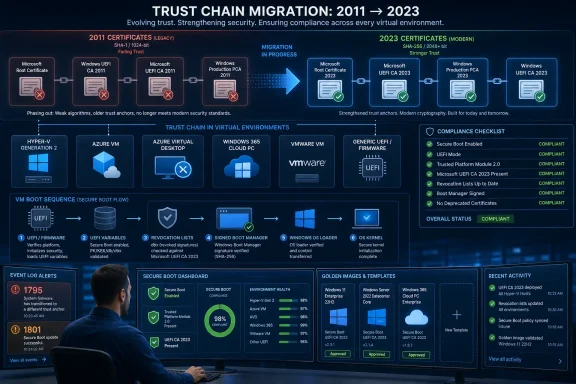 Microsoft Is Moving the Boot Trust Chain, Not Just Updating a Certificate
Secure Boot has always sounded simpler than it is. In ordinary user language, it checks that trusted code runs before Windows starts; in operational language, it is a firmware-resident chain of trust involving keys, signature databases, revocation lists, boot managers, firmware behavior, and sometimes vendor-specific update plumbing.Microsoft’s current Secure Boot certificate transition exists because the original Microsoft Secure Boot certificates issued in 2011 are reaching the end of their planned lifetime. Microsoft’s support documentation says those certificates begin expiring in June 2026, with the Windows Production PCA 2011 certificate expiring later in October 2026. The replacements are the 2023-era authorities, including Windows UEFI CA 2023, Microsoft UEFI CA 2023, Microsoft Option ROM UEFI CA 2023, and Microsoft Corporation KEK 2K CA 2023.
That sounds like the kind of background noise administrators have been trained to ignore until Patch Tuesday does its thing. But Secure Boot certificates are not browser certificates, and a VM’s boot path is not merely an application dependency. The keys live in UEFI variables, the boot manager must be signed by an authority the firmware trusts, and revocation updates can make older boot components deliberately unbootable when Microsoft needs to block a known bypass.
Microsoft’s own phrasing is careful. Devices without the new certificates may continue to boot and may continue to receive regular Windows updates, but they may not receive future Secure Boot protections for early boot components. That distinction matters. This is not framed as a mass brick-the-fleet deadline; it is a security posture cliff, where the machines that “still work” are exactly the ones most likely to drift out of compliance invisibly.
Virtual Machines Turn a Firmware Problem Into a Fleet Hygiene Problem
The Office Hours focus on virtualized environments is revealing because virtualization changes where the responsibility boundary sits. On a physical laptop, the firmware vendor, Windows Update, and the local OS are the main actors. In a virtualized estate, the firmware may be synthetic, the hardware abstraction may be owned by a hypervisor, and the image lifecycle may be governed by templates that have outlived several generations of platform guidance.Hyper-V Generation 2 VMs, Azure virtual machines, Azure Virtual Desktop session hosts, Windows 365 Cloud PCs, VMware VMs, and other UEFI-based virtual machines all share the same broad principle: Secure Boot depends on what the virtual firmware trusts at boot time. The difference is that administrators often clone, snapshot, seal, sysprep, and redeploy those environments in ways that can preserve old assumptions far longer than anyone intended.
A physical device fleet tends to age visibly. You know when the laptop model is old, when the BIOS update catalog is stale, or when the OEM management tool stops offering firmware. Virtual infrastructure hides age behind abstraction. A “new” VM can be born from an old gallery image, an old template, an old appliance baseline, or an old recovery ISO whose boot chain still depends on the 2011 authorities.
That is why Microsoft is inviting questions across Hyper-V, Azure offerings, Windows 365, VMware, and “other virtualization scenarios.” The risk is not that every VM will suddenly fail at the same moment. The risk is that every platform has a slightly different place where trust is anchored, a slightly different mechanism for refreshing it, and a slightly different failure mode when boot media, snapshots, or firmware variables do not line up.
The 2026 Deadline Is Really About Future Revocation Power
The most important sentence in Microsoft’s guidance is not the one about devices continuing to boot. It is the warning that systems without updated certificates may miss future Secure Boot protections for boot manager, Secure Boot databases, revocation lists, or fixes for new boot vulnerabilities.Secure Boot’s security value depends on Microsoft and platform vendors being able to revoke trust in known-bad boot components. That became a more visible operational issue after CVE-2023-24932, the Secure Boot bypass associated with the BlackLotus UEFI bootkit. Microsoft’s deployment guidance for that class of mitigation has consistently emphasized staging, validation, and caution because revoking old boot managers without preparing systems can strand recovery media or boot paths that still depend on them.
In other words, the certificate refresh is the enabling work. The 2023 certificates give Microsoft and OEMs a modern trust foundation for future boot components and future revocations. Without them, a machine can sit in a strange half-state: alive, patched in the ordinary Windows sense, but unable to participate fully in the next phase of boot-level hardening.
That distinction is easy to lose in consumer coverage, where the headline becomes “Will my PC boot after June 2026?” For enterprise and cloud operators, the better question is whether a workload can survive the next Secure Boot revocation wave, the next compliance audit, the next disaster recovery exercise, or the next template refresh without discovering that the boot chain was never updated.
Hyper-V Admins Have to Think Beyond the Guest OS
Hyper-V shops should treat this as more than another Windows guest update. Generation 2 virtual machines use UEFI firmware and can enforce Secure Boot, but the actual operational state depends on VM settings, template history, guest servicing, and the boot media used during maintenance.The dangerous assumption is that installing the latest cumulative update inside the guest is sufficient. It may be necessary, but Secure Boot state is tied to firmware variables and boot components, not only to files in the Windows directory. If a VM is repeatedly rolled back to a checkpoint, cloned from a stale template, or restored from backup into a configuration with older Secure Boot trust anchors, the administrator may be reintroducing the very state Microsoft is trying to retire.
This is where inventory becomes the unglamorous center of the story. Microsoft’s documentation points administrators toward event logs, registry signals, and Secure Boot certificate status checks. Event IDs such as 1795 and 1801 appear in Microsoft’s guidance as indicators administrators can use to determine whether remediation has applied or whether a device remains out of date.
For WindowsForum’s audience, the practical lesson is familiar: never let a platform security transition become an oral tradition. If Hyper-V hosts carry dozens or hundreds of VMs, the update state needs to be measurable. Administrators should know which VMs have Secure Boot enabled, which templates produced them, whether the 2023 certificates are present, and whether boot media used for recovery has been refreshed to match.
Azure Makes Some Things Easier and Some Things Less Visible
Azure changes the problem by moving more of the platform under Microsoft’s control, but it does not eliminate the administrator’s responsibility. Microsoft has separate guidance for Azure Virtual Desktop and Azure platform families because cloud-hosted Windows workloads can still expose customer-owned lifecycle decisions: custom images, host pools, session host refreshes, gallery versions, and maintenance windows.Azure Virtual Desktop is a good example. Microsoft’s support material tells administrators to use inventory methods and sample scripts to check Secure Boot certificate update status. That is not the language of a platform that wants customers to ignore the issue. It is the language of a platform that expects a shared responsibility model: Microsoft can update infrastructure and publish guidance, but customers still own image hygiene and rollout validation.
Windows 365 adds another wrinkle. Cloud PCs feel like managed endpoints, but they still sit at the intersection of Windows servicing, endpoint management, policy, and user productivity. A Secure Boot certificate transition that is invisible to end users can still matter to IT if a device later fails compliance checks or cannot consume future boot-level mitigations.
Azure Local and Azure Stack Hub are even more explicit about sequencing. Microsoft’s Azure Local documentation recommends separating Secure Boot updates from firmware updates and treating them as distinct maintenance steps. Azure Stack Hub guidance describes OEM firmware packages, platform hotfixes, certificate readiness checks, and in some cases additional operator action to finalize the boot manager update. That is not a casual Patch Tuesday footnote; it is a choreography.
VMware and Third-Party Virtualization Are Where Assumptions Go to Die
The inclusion of VMware in Microsoft’s event description is not a courtesy mention. It is an acknowledgement that a lot of Windows infrastructure runs on virtual platforms Microsoft does not fully control, and Secure Boot’s trust chain does not become irrelevant simply because the firmware is virtual.VMware administrators need to map the same questions onto a different stack. Does the VM use UEFI firmware? Is Secure Boot enabled? What template created it? What virtual hardware version is in play? How are snapshots and clones handled? What happens when a recovery ISO, appliance tool, or older boot component is introduced into the path?
The subtle risk in VMware and other third-party environments is that responsibility can bounce between vendors. Microsoft owns Windows boot components and guidance for its certificates. VMware owns the hypervisor behavior and virtual firmware implementation. The enterprise owns the templates, images, tools, and maintenance process. When something fails, each party can be technically correct about its own layer while the administrator is left with a workload that will not boot.
This is why the Office Hours format may be more useful than a polished presentation. The hard questions are not abstract. They sound like, “What happens to linked clones?” “How do we validate a powered-off template?” “Can a VM restored from a 2024 backup regress its Secure Boot state?” “Which event log should my monitoring platform collect?” “Do I need to rebuild recovery media?” The answers will vary by stack, but the questions are exactly the right ones.
The Real Blast Radius Includes Recovery Media and Golden Images
The boot chain that matters in a crisis is often not the one a server uses on a normal Tuesday. It is the one used by recovery media, deployment environments, offline servicing tools, backup restore workflows, and emergency repair processes. That is where Secure Boot transitions can surprise otherwise mature IT teams.Microsoft has previously warned, in the context of Secure Boot revocations, that bootable media must be updated before older boot managers are distrusted. The same operational principle applies here. If your estate depends on old ISO files, old Windows PE images, old Configuration Manager boot images, or vendor recovery environments, those assets need to be part of the test plan.
Golden images are another trap. A well-maintained image pipeline can make this transition boring, which is the goal. A neglected one can create fresh noncompliance every morning. If the template does not carry the right state, every newly provisioned VM becomes another remediation target.
That is especially important in virtual desktop environments, where administrators may rebuild machines frequently and assume ephemerality reduces risk. Ephemerality only helps if the source is clean. If the pool is regenerated from stale media, automation becomes a vulnerability multiplier.
Microsoft’s “No Meeting” Event Format Is Oddly Appropriate
The Tech Community event has no on-camera or meeting component; all Q&A happens in the comments. That may sound underwhelming, but it fits the subject. Secure Boot certificate migration is the kind of operational issue where searchable, written answers may be more valuable than a livestream that disappears into a recording backlog.Microsoft says attendees should select Add to Calendar, click Attend, sign in to Tech Community if those buttons are not visible, and submit questions early. The Q&A closes at 9:00 AM PDT. The page was updated June 26, 2026, which places the event squarely in the period when the first 2011-era expirations are no longer theoretical.
There is also a quiet admission in the format: Microsoft expects many organizations to have scenario-specific questions. If this were merely “install the latest update,” there would be little need for experts covering Hyper-V, Azure offerings, Windows 365, VMware, and other virtualization stacks. The event exists because the long tail is where trouble lives.
For IT pros, that makes the comments section less of a help desk and more of a public knowledge base in progress. The best use of the event is not to ask whether Secure Boot matters. It is to bring details: platform, guest OS version, VM generation, image source, management tooling, certificate status, event logs, and the exact failure or uncertainty blocking rollout.
The Comfortable Story Is Mostly True, Which Is Why It Is Dangerous
The comforting version of this story is not false. Microsoft has been delivering updated Secure Boot certificates through Windows updates for many eligible systems. Newer PCs and newer images are more likely to have the 2023 certificates already. Many devices that miss the transition will not instantly stop booting the morning after a certificate date passes.That partial reassurance is exactly why administrators need to resist complacency. Security transitions that do not cause immediate outages are easy to postpone, and postponed trust-chain work tends to reappear during a crisis. The machine that boots today may be the machine that cannot accept tomorrow’s revocation, cannot pass a future compliance check, or cannot use the recovery path you assumed was safe.
The enterprise problem is not one deadline but drift. A few powered-off VMs here, a stale VMware template there, an old Hyper-V lab image, an Azure Virtual Desktop custom image that missed a refresh, a disaster recovery ISO last rebuilt before the certificate migration: each is small enough to ignore alone. Together they form the shadow inventory that makes boot security hard.
Microsoft’s guidance is also deliberately cautious about firmware behavior. Secure Boot updates interact with UEFI variables, BitLocker, virtualization-based security, and vendor firmware. In higher-risk scenarios, Microsoft says administrators may encounter Secure Boot validation errors, BitLocker recovery prompts, startup hangs, or devices failing to boot. Those are not reasons to avoid the update; they are reasons to test it like a platform change.
Where Administrators Should Spend the Hour
The value of the Office Hours event will depend on whether participants ask implementation questions rather than broad conceptual ones. Microsoft has already published the broad concept: 2011 certificates are expiring, 2023 certificates replace them, and unsupported or unremediated systems risk losing future boot-level protection. The scarce commodity is clarity around edge cases.Administrators should come prepared to ask how the guidance applies to their actual control planes. Hyper-V and VMware admins should focus on template validation, VM generation, virtual firmware state, recovery media, and snapshot behavior. Azure operators should focus on custom image refresh, host pool rollout, gallery image validation, and service-specific responsibility boundaries.
Security teams should push for monitoring guidance. If Secure Boot certificate readiness is going to be tracked at scale, it needs to land in existing tooling: Intune, Windows Autopatch, Defender, SIEM pipelines, configuration management databases, or whatever inventory platform the organization trusts. A one-time script is useful; a durable signal is better.
The most productive questions will also separate physical and virtual assumptions. In virtualized environments, “firmware update” may mean a host BIOS update, a virtual hardware compatibility setting, a cloud platform behavior, or nothing the customer can directly touch. Asking Microsoft and vendor experts to identify the layer of responsibility is not nitpicking. It is the difference between a clean rollout and a blame loop.
The Hypervisor Era Needs Boot Security With Receipts
The practical takeaway from Microsoft’s event is that Secure Boot certificate readiness needs to become an auditable property of virtual infrastructure, not an assumption inherited from Windows Update history. That is a cultural shift as much as a technical one: boot trust has to be tracked the way organizations already track encryption, endpoint health, patch compliance, and supported OS versions.- Administrators should identify which virtual machines actually use UEFI Secure Boot before assuming the certificate transition applies uniformly across the fleet.
- Golden images, templates, gallery images, and recovery media should be validated because they can keep reintroducing old boot assumptions after individual machines are remediated.
- Hyper-V, Azure, Windows 365, VMware, and other platforms may require different evidence of readiness even when the Windows guest version looks identical.
- Systems that continue to boot after the 2011 certificates expire can still be in a weakened state if they cannot receive future Secure Boot protections.
- The best Office Hours questions will include platform details, observed event IDs or registry state, image lineage, and the exact workflow that needs confirmation.
References
- Primary source: Microsoft - Message Center
Published: 2026-07-06 10:00 PT
Loading…
aka.ms - Official source: support.microsoft.com
Windows Secure Boot certificate expiration and CA updates - Microsoft Support
 support.microsoft.com
- Official source: microsoft.com
Prepare your servers for Secure Boot certificate updates | Microsoft Windows Server Blog
The original Secure Boot certificates introduced in 2011 are approaching the end of their planned lifecycle, with expirations beginning in late June 2026.www.microsoft.com - Official source: learn.microsoft.com
Update Secure Boot Certificates for Windows Devices - Windows Client | Microsoft Learn
Update your Windows devices to maintain Secure Boot protection with 2023 certificates before they expire in June 2026.learn.microsoft.com - Related coverage: notebookcheck.net
Microsoft sets 2026 deadline for Secure Boot certificate expiration - Notebookcheck News
Microsoft has issued new guidance warning that 2011 Secure Boot certificates begin expiring in June 2026. Windows updates are rolling out 2023 replacement certificates, with some PCs requiring OEM firmware updates. www.notebookcheck.net
- Related coverage: windowslatest.com
Windows 11 Secure Boot update released to all, hours ahead of expiry
Microsoft has released Secure Boot 2023 certificates to all eligible Windows 11 and Windows 10 PC. Here's how to check if you got the update. www.windowslatest.com
- Related coverage: windowscentral.com
Microsoft warns Secure Boot certificates will expire in 2026 | Windows Central
After 15 years, the original Secure Boot certificates that keep your PC secure during boot are expiring. Here's what you need to know.www.windowscentral.com - Related coverage: tomshardware.com
Microsoft is refreshing Secure Boot certificates to plug security holes before they happen — if you bought a PC last year, you should be set | Tom's Hardware
Be sure to keep Windows 11 systems updated to get refreshed security certificates.www.tomshardware.com - Related coverage: techradar.com
Still using Windows 10? Microsoft is automatically replacing Secure Boot certificates on older PCs ahead of expiration, so you might want to update ASAP | TechRadar
Secure Boot certificate upgrades is bad news for Windows 10www.techradar.com - Related coverage: pcgamer.com
Secure Boot certificates used by anti-cheat software are set to expire in June but new ones are already in the mail | PC Gamer
You shouldn't have to worry about expired certificates if you keep your PC up-to-date.www.pcgamer.com - Related coverage: tomsguide.com
Windows 10 users warned to upgrade now or risk a ‘degraded security state’ as Microsoft ends Secure Boot support | Tom's Guide
Support for Windows 10 officially ended in October 2025, and Microsoft says devices that don’t upgrade could enter a degraded security state — leaving them vulnerable to threats. Here’s what it means for your PC and how to protect it.www.tomsguide.com - Related coverage: cisco.com
- Related coverage: uefi.org
- Related coverage: advcloudfiles.advantech.com