

Microsoft’s Secure Boot certificate rollover is no longer a theoretical housekeeping item for future IT planners; it is an active Windows security transition that now has a public-facing status check in the Windows Security app. According to Microsoft, the original Secure Boot certificates issued in 2011 begin expiring in June 2026, and devices that do not receive updated certificates can fall into a degraded boot-security state that limits future protections against boot-level threats. The good news is that supported Windows 11 systems, and Windows 10 devices covered by Microsoft’s Extended Security Updates, should receive the change automatically. The bad news is that unsupported Windows 10 PCs may not, which turns this from a routine update cycle into a real exposure window for a very large installed base.
Secure Boot has been part of the modern Windows trust chain for more than a decade. At its core, it is designed to prevent unsigned or tampered code from loading during startup, which matters because malware that embeds itself before the operating system fully initializes can evade many traditional defenses. Microsoft’s own support material frames Secure Boot as a key mechanism for blocking malicious software at startup, and the company says the current certificate set dates back to the Windows 8 era and is now approaching its expiration window.
The practical implication of certificate expiration is easy to misunderstand. This is not a switch that instantly bricks machines on a single date, and it is not the same as Secure Boot being “turned off.” Instead, the certificate chain that validates trusted boot components becomes stale, and the machine may lose the ability to accept future boot-chain protections once Microsoft begins shipping them. In Microsoft’s wording, devices that cannot receive the new certificates can enter a degraded security state, which is a subtle phrase for a meaningful loss of trust at the most sensitive stage of startup.
The timing matters because the transition spans both software updates and firmware realities. Microsoft is rolling out updated certificates through Windows Update for supported systems, but some devices also need OEM firmware changes before the new trust material can be applied cleanly. That means the problem is not merely “patch or ignore”; it is an ecosystem issue that ties together Microsoft, PC makers, and end users who may be years removed from a device’s original purchase date.
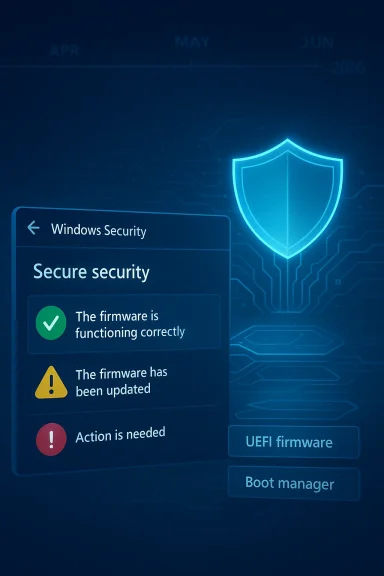
Microsoft’s April 2026 status indicator in Windows Security is therefore more than cosmetic. It is a pressure-relief valve for a rollout that could otherwise remain invisible until users encounter a warning or, worse, a protection gap. By exposing green, yellow, and red states in a familiar consumer app, Microsoft is trying to shift Secure Boot from an obscure firmware feature into a visible maintenance item with consequences users can actually act on.
That distinction matters because not every warning means failure. Microsoft explicitly notes that some Secure Boot messages may reflect non-certificate issues, including the familiar “Secure boot is off, your device may be vulnerable” message. In other words, users should not treat the new badge system as a single-purpose “certificate meter”; it is part of a broader security surface.
The rollout timeline also gives a clue about Microsoft’s internal urgency. The company says these enhancements begin in April 2026, with additional notifications and guidance arriving in May 2026. That sequencing suggests Microsoft expects a long tail of devices needing attention before the June 2026 expiration window becomes operationally relevant.
That nuance matters for enterprise planning. IT teams often prioritize outages that visibly break endpoints, but this issue is more about silent protection decay. A fleet can appear healthy, continue to log in normally, and still lose a critical layer of defense at the exact moment a boot-level exploit emerges.
The scale of the challenge is amplified by Windows 10’s broader support situation. Microsoft ended free support for mainstream Windows 10 on October 14, 2025, and only devices enrolled in Extended Security Updates remain in a supported update path. So the Secure Boot rollover is arriving just as the Windows 10 base is already fragmenting into supported, extended-supported, and unsupported groups.
There is also a subtle enterprise advantage in how Microsoft is doing this. By piggybacking the certificate rollout on monthly updates, Microsoft reduces the chance that organizations need a separate “certificate migration project” for every PC. That said, the supporting documentation shows that some devices still need a firmware update from the OEM or may be blocked by hardware limitations.
For consumers, this means the safest posture is not to hunt for a one-time certificate file. It is to stay current with Windows updates and then verify whether the Secure Boot status in Windows Security has turned green. For managed fleets, it means patch compliance and firmware inventory suddenly matter more than they did before.
For those devices, the risk is not theoretical. Boot-level malware can persist below the operating system and evade ordinary endpoint tools, which makes the Secure Boot trust chain a critical line of defense. If that line weakens, the machine may still function, but its resilience to advanced persistence attacks falls with it.
The consumer angle is emotional as much as technical. Many people think of “unsupported” as merely “no new features,” but this case shows it can also mean a measurable decline in security posture. That creates an uncomfortable reality: a perfectly usable PC can quietly drift into a category where the cost of continuing to use it is a smaller but very real increase in attack surface. That is not a binary failure; it is a risk gradient.
Users should read the text carefully and not fixate only on the color. Microsoft provides specific guidance in the status messages, including a prompt to contact the manufacturer where hardware or firmware limitations are present. That matters because the “fix” may be a BIOS or UEFI update rather than a standard Windows setting change.
A useful mental model is this: Windows Security is not just reporting a problem, it is telling you where in the trust chain the problem lives. If the app says the device is still using an old certificate, that is a servicing issue. If it says the device cannot receive required updates, that is an architectural issue. The difference determines whether the next step is Windows Update, an OEM flash utility, or a migration plan.
This also changes how help desks should think about boot-related tickets. A user reporting “something changed in Secure Boot” might no longer be talking about a BIOS misconfiguration; they may be seeing an expected certificate state that requires a specific OEM or Windows update. The support burden shifts from generic troubleshooting to version-aware triage.
Organizations should also be aware that some of these features are disabled by default on enterprise-managed Windows 10 and Windows 11 client devices and Windows Server, according to Microsoft’s support material. That means administrators may need to enable the experience themselves if they want the app-level visibility. Visibility is not automatic in every managed estate.
The real consumer risk is inertia. A lot of people still use older Windows 10 PCs for browsing, schoolwork, home office tasks, and media consumption, and those systems may continue to feel fine long after their security posture has started to erode. That gap between perceived health and actual security is exactly where boot-level threats thrive.
For people who do see yellow or red, the first instinct should not be panic. It should be to determine whether the device is still supported, whether OEM firmware updates are available, and whether an upgrade to Windows 11 is feasible. In many cases, the issue is not that the PC is doomed, but that it now needs a deliberate maintenance decision rather than passive waiting.
That matters because threat actors do not need a catastrophic failure to win. They only need a gap between a newly discovered vulnerability and the platform’s ability to receive the fix. The certificate rollover is meant to close that gap before it becomes exploitable at scale.
A second-order risk is user complacency. Because the device may appear healthy and continue to work, some users will dismiss the warning as noise, especially if the app allows warnings to be dismissed. Microsoft allows dismissal in some cases, but it also warns that doing so is not recommended when the device has not yet received the updated certificates. That warning should be taken literally.
What happens next will depend on three variables: how many devices receive the update automatically, how many need OEM firmware help, and how many unsupported Windows 10 systems remain in active use without a migration plan. The first group should barely notice the change. The second will need attention. The third is where the real risk lives.
Source: Tbreak Media Windows Secure Boot expires June 2026: check now | tbreak
 Background
Secure Boot has been part of the modern Windows trust chain for more than a decade. At its core, it is designed to prevent unsigned or tampered code from loading during startup, which matters because malware that embeds itself before the operating system fully initializes can evade many traditional defenses. Microsoft’s own support material frames Secure Boot as a key mechanism for blocking malicious software at startup, and the company says the current certificate set dates back to the Windows 8 era and is now approaching its expiration window.The practical implication of certificate expiration is easy to misunderstand. This is not a switch that instantly bricks machines on a single date, and it is not the same as Secure Boot being “turned off.” Instead, the certificate chain that validates trusted boot components becomes stale, and the machine may lose the ability to accept future boot-chain protections once Microsoft begins shipping them. In Microsoft’s wording, devices that cannot receive the new certificates can enter a degraded security state, which is a subtle phrase for a meaningful loss of trust at the most sensitive stage of startup.
The timing matters because the transition spans both software updates and firmware realities. Microsoft is rolling out updated certificates through Windows Update for supported systems, but some devices also need OEM firmware changes before the new trust material can be applied cleanly. That means the problem is not merely “patch or ignore”; it is an ecosystem issue that ties together Microsoft, PC makers, and end users who may be years removed from a device’s original purchase date.
Microsoft’s April 2026 status indicator in Windows Security is therefore more than cosmetic. It is a pressure-relief valve for a rollout that could otherwise remain invisible until users encounter a warning or, worse, a protection gap. By exposing green, yellow, and red states in a familiar consumer app, Microsoft is trying to shift Secure Boot from an obscure firmware feature into a visible maintenance item with consequences users can actually act on.
What Microsoft Actually Changed
The headline feature is a new Secure Boot status view inside the Windows Security app under Device security > Secure Boot. Microsoft says that beginning in April 2026, the app can show whether the device has received the updated Secure Boot certificates and whether action is required. The interface uses a green checkmark, yellow caution, or red stop icon depending on the device’s status.The three states explained
A fully updated device has received the required Secure Boot certificate updates and the updated boot manager. Microsoft says no action is needed in that state. A not yet updated device is still running older certificates, but the update is expected to arrive automatically through Windows Update if the hardware and firmware support it. A requires action state is more serious, because it indicates that the device cannot receive a security update for the Windows boot experience under its current configuration.That distinction matters because not every warning means failure. Microsoft explicitly notes that some Secure Boot messages may reflect non-certificate issues, including the familiar “Secure boot is off, your device may be vulnerable” message. In other words, users should not treat the new badge system as a single-purpose “certificate meter”; it is part of a broader security surface.
The rollout timeline also gives a clue about Microsoft’s internal urgency. The company says these enhancements begin in April 2026, with additional notifications and guidance arriving in May 2026. That sequencing suggests Microsoft expects a long tail of devices needing attention before the June 2026 expiration window becomes operationally relevant.
- Green means the device has the updated certificates and boot manager.
- Yellow means the device is still okay, but may need OEM or firmware action.
- Red means the device is stuck on the old trust chain and may lose future protection.
- No badge does not always mean no issue, especially on older or unmanaged systems.
Why June 2026 Matters
June 2026 is not just a calendar milestone; it is the point at which Microsoft says some of the current certificates begin expiring. The company’s documentation also notes that the current Microsoft Secure Boot certificates will begin expiring in June 2026 and would expire by October 2026, which means the risk window broadens across the second half of the year. That is a substantial runway, but it is not an indefinite one.Expiration does not mean instant shutdown
A common misconception is that expiring certificates cause systems to stop booting. Microsoft’s guidance does not say that. Instead, the consequence is a reduction in the ability to receive new boot-time protections, especially if a new vulnerability appears after the certificates have aged out. That is a security continuity problem, not an immediate power-on problem.That nuance matters for enterprise planning. IT teams often prioritize outages that visibly break endpoints, but this issue is more about silent protection decay. A fleet can appear healthy, continue to log in normally, and still lose a critical layer of defense at the exact moment a boot-level exploit emerges.
The scale of the challenge is amplified by Windows 10’s broader support situation. Microsoft ended free support for mainstream Windows 10 on October 14, 2025, and only devices enrolled in Extended Security Updates remain in a supported update path. So the Secure Boot rollover is arriving just as the Windows 10 base is already fragmenting into supported, extended-supported, and unsupported groups.
Who Is Protected Automatically
Microsoft says supported Windows 11 PCs will receive the updated Secure Boot certificates automatically through monthly Windows updates. That is the cleanest path and, for most consumers, the least disruptive one. If the hardware is modern enough and the firmware configuration is compatible, the update should simply arrive as part of routine servicing.Windows 11 and the managed path
Windows 11 has the clearest story here because it remains in mainstream support and Microsoft has engineered the rollout around that supported base. The same automatic-update promise applies to Windows 10 PCs enrolled in ESU, which keeps them on a security-servicing branch longer than standard Windows 10 installations. That creates a bifurcated world: supported systems move quietly forward, while unsupported systems accumulate security debt.There is also a subtle enterprise advantage in how Microsoft is doing this. By piggybacking the certificate rollout on monthly updates, Microsoft reduces the chance that organizations need a separate “certificate migration project” for every PC. That said, the supporting documentation shows that some devices still need a firmware update from the OEM or may be blocked by hardware limitations.
For consumers, this means the safest posture is not to hunt for a one-time certificate file. It is to stay current with Windows updates and then verify whether the Secure Boot status in Windows Security has turned green. For managed fleets, it means patch compliance and firmware inventory suddenly matter more than they did before.
- Supported Windows 11 devices are the least likely to need manual intervention.
- Windows 10 ESU devices remain on a Microsoft-serviced path.
- OEM firmware compatibility can still create exceptions.
- Routine patching is part of the fix, not separate from it.
Who Is at Risk
The greatest concern is the installed base of unsupported Windows 10 PCs. Microsoft’s own documentation and support pages make clear that after October 2025, free updates no longer flow to standard Windows 10 installations, which means many of those devices will not receive the certificate refresh needed to maintain full boot protection. That is a particularly awkward outcome because these are often the machines least likely to be refurbished, upgraded, or closely managed.The long tail of older hardware
Older systems often sit in the most difficult position: they are still useful, still bootable, and still connected, but they may lack the firmware features required to accept new certificates cleanly. Microsoft acknowledges that some devices will be unable to receive the automated Secure Boot update because of hardware or firmware limitations. That is a polite way of saying the platform itself may be the bottleneck, not just the operating system.For those devices, the risk is not theoretical. Boot-level malware can persist below the operating system and evade ordinary endpoint tools, which makes the Secure Boot trust chain a critical line of defense. If that line weakens, the machine may still function, but its resilience to advanced persistence attacks falls with it.
The consumer angle is emotional as much as technical. Many people think of “unsupported” as merely “no new features,” but this case shows it can also mean a measurable decline in security posture. That creates an uncomfortable reality: a perfectly usable PC can quietly drift into a category where the cost of continuing to use it is a smaller but very real increase in attack surface. That is not a binary failure; it is a risk gradient.
How to Check Your Status
The simplest way to check is to open Windows Security and go to Device security > Secure Boot. Microsoft says the app will show the current state using the badge system and explanatory text, and that enhancement begins rolling out in April 2026. If the device has already received the update, the app should make that visible without digging into firmware menus.What the warning text means
A yellow state generally means the system is still on an older certificate and may need additional action, often a firmware update from the device manufacturer. A red state means the machine cannot receive the necessary update under its current boot configuration, or it has reached a point where the boot security update can no longer be delivered. Microsoft also says the red state can appear as early as June 2026 if a vulnerability emerges and the device still lacks the new certificates.Users should read the text carefully and not fixate only on the color. Microsoft provides specific guidance in the status messages, including a prompt to contact the manufacturer where hardware or firmware limitations are present. That matters because the “fix” may be a BIOS or UEFI update rather than a standard Windows setting change.
A useful mental model is this: Windows Security is not just reporting a problem, it is telling you where in the trust chain the problem lives. If the app says the device is still using an old certificate, that is a servicing issue. If it says the device cannot receive required updates, that is an architectural issue. The difference determines whether the next step is Windows Update, an OEM flash utility, or a migration plan.
- Open Windows Security.
- Go to Device security.
- Open Secure Boot.
- Read the status badge and the explanatory text.
- If the badge is yellow or red, check for Windows updates and OEM firmware updates.
Enterprise Implications
For enterprises, this rollout is less about one PC and more about policy. Microsoft’s guidance for IT professionals makes clear that certificate expiration affects devices at scale, and the company has separate documentation for managed environments, servers, and organization-wide deployments. The reason is obvious: a certificate transition can succeed on paper while still leaving pockets of older firmware or disconnected endpoints behind.Fleet visibility becomes a security control
The new Windows Security status indicator is useful because it surfaces the problem earlier in the cycle. That is especially important for organizations that have remote workers, field devices, and machines that are only intermittently online. In those cases, a quiet rollout can easily stall, and the badge becomes an operational signal that the endpoint has not caught up.This also changes how help desks should think about boot-related tickets. A user reporting “something changed in Secure Boot” might no longer be talking about a BIOS misconfiguration; they may be seeing an expected certificate state that requires a specific OEM or Windows update. The support burden shifts from generic troubleshooting to version-aware triage.
Organizations should also be aware that some of these features are disabled by default on enterprise-managed Windows 10 and Windows 11 client devices and Windows Server, according to Microsoft’s support material. That means administrators may need to enable the experience themselves if they want the app-level visibility. Visibility is not automatic in every managed estate.
- Endpoint inventories need to include firmware and Secure Boot state.
- Help desks should be trained on the new status messages.
- Disconnected devices may need special attention before June 2026.
- Policy-based rollout can reduce surprises in large fleets.
Consumer Impact
For consumers, the story is simpler but not less important. If you are on Windows 11 and fully updated, there is a good chance this change will happen with little to no visible effort on your part. The right response is still to check the Secure Boot page, but most users should see a green outcome if their machine supports the automatic path.Why this feels different from ordinary patching
This issue feels unusual because it is security work happening at the boundary between firmware and the operating system. Most users do not think about their PC’s startup chain until something goes wrong, which is why Microsoft’s status badges are important. They translate an invisible trust problem into a visible consumer-facing message.The real consumer risk is inertia. A lot of people still use older Windows 10 PCs for browsing, schoolwork, home office tasks, and media consumption, and those systems may continue to feel fine long after their security posture has started to erode. That gap between perceived health and actual security is exactly where boot-level threats thrive.
For people who do see yellow or red, the first instinct should not be panic. It should be to determine whether the device is still supported, whether OEM firmware updates are available, and whether an upgrade to Windows 11 is feasible. In many cases, the issue is not that the PC is doomed, but that it now needs a deliberate maintenance decision rather than passive waiting.
The Security Threat Model
The reason Microsoft is treating certificate expiration seriously is that Secure Boot protects the earliest moments of system startup, where malware can be especially difficult to remove. Boot-level malware is persistent, stealthy, and often positioned to survive reinstallation or interfere with security tools before they even start. That is why the certificate chain matters so much.What can go wrong if the trust chain ages out
If a device cannot accept the updated Secure Boot certificates, then future boot-time protections may not be deliverable. Microsoft’s support material says this can leave the device unable to receive required updates for the Windows boot experience. In plain English, the machine may still start normally but become less capable of defending itself against future startup attacks.That matters because threat actors do not need a catastrophic failure to win. They only need a gap between a newly discovered vulnerability and the platform’s ability to receive the fix. The certificate rollover is meant to close that gap before it becomes exploitable at scale.
A second-order risk is user complacency. Because the device may appear healthy and continue to work, some users will dismiss the warning as noise, especially if the app allows warnings to be dismissed. Microsoft allows dismissal in some cases, but it also warns that doing so is not recommended when the device has not yet received the updated certificates. That warning should be taken literally.
Strengths and Opportunities
Microsoft’s approach has several strengths. It combines automatic servicing for supported devices with a visible status checker for everyone else, which is a much better user experience than leaving the issue buried in firmware documentation. It also gives IT teams a concrete signal to prioritize before the expiration window becomes urgent. The opportunity here is to turn an obscure trust-chain change into a manageable, staged migration across the Windows ecosystem.- Early visibility through the Windows Security app.
- Automatic updates for supported Windows 11 and Windows 10 ESU devices.
- Clear triage with green, yellow, and red states.
- Better fleet planning for enterprises that manage firmware carefully.
- Reduced ambiguity compared with a silent certificate rollover.
- Improved user education around the importance of Secure Boot.
- A chance to modernize older endpoints before the risk becomes operational.
Risks and Concerns
The biggest concern is the size of the unsupported Windows 10 population. Even if the transition is technically straightforward on paper, any large base of old PCs creates a long tail of machines that either cannot update or will not be maintained in time. The other concern is that users may confuse “device still boots” with “device is still protected,” which is not the same thing at all.- Unsupported Windows 10 devices may never receive the new certificates.
- OEM firmware dependencies can delay or block remediation.
- Remote and offline PCs may miss the update window.
- User dismissal of warnings can hide a real security issue.
- Older hardware may reach the end of its practical support life.
- Security debt may accumulate quietly before June 2026.
- Mixed fleet environments will be harder to manage consistently.
Looking Ahead
The next few months will tell us whether Microsoft’s rollout is mostly invisible, as intended, or whether the Windows ecosystem exposes more edge cases than expected. The company has already laid out the key milestones: April 2026 for status visibility, May 2026 for additional notifications, and June 2026 for the first major expiration pressure point. That gives users and IT teams time, but not a lot of it.What happens next will depend on three variables: how many devices receive the update automatically, how many need OEM firmware help, and how many unsupported Windows 10 systems remain in active use without a migration plan. The first group should barely notice the change. The second will need attention. The third is where the real risk lives.
- Microsoft’s status badges should become more prominent as June 2026 approaches.
- OEMs may need to issue firmware updates for older devices.
- Enterprises will likely audit Secure Boot readiness as part of endpoint hygiene.
- Unsupported Windows 10 users should face a decision: upgrade, enroll in ESU if eligible, or accept reduced boot-level protection.
- Security teams should treat yellow and red statuses as remediation queues, not cosmetic alerts.
Source: Tbreak Media Windows Secure Boot expires June 2026: check now | tbreak
