

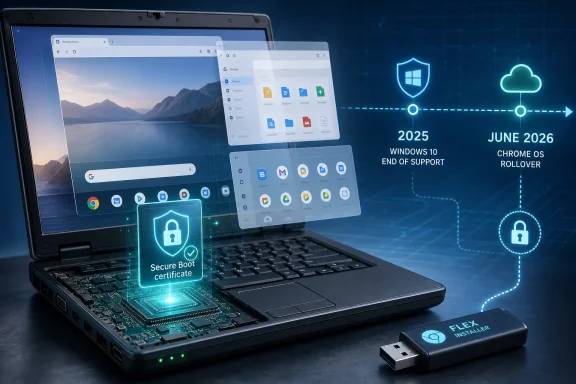
Microsoft’s Secure Boot certificate rollover begins in June 2026, just eight months after Windows 10 left mainstream support on October 14, 2025, and Google is using that timing to pitch ChromeOS Flex as a free way to keep older Windows PCs useful. The sales line is simple: if Windows 11 will not take your hardware and Windows 10 is sliding into managed obsolescence, turn the machine into something else. That “something else” is not a full Windows replacement, and Google knows it. But the pitch lands because Microsoft’s hardware cutoff has created a class of otherwise functional PCs whose weakest component is now the operating system’s future, not the processor, keyboard, or screen.
The phrase “faster, free Chromebook” is doing a lot of work. It appeals to anyone with a laptop that still turns on but groans under Windows updates, browser tabs, antivirus scans, and years of accumulated background services. It also speaks to the more political frustration around Windows 11: millions of PCs that are perfectly competent for email, banking, schoolwork, streaming, and documents cannot officially upgrade because they fall outside Microsoft’s supported hardware rules.
ChromeOS Flex is Google’s answer to that stranded-hardware problem. It is a free operating system that can be installed on many older PCs and Macs, replacing Windows or macOS with a ChromeOS-like environment built around the browser, cloud storage, web apps, and Google account sync. For users whose daily computing already happens inside Chrome, Gmail, Google Docs, Microsoft 365 on the web, YouTube, Netflix, banking sites, and a handful of extensions, the transition may feel less radical than it sounds.
That is the point. Google is not trying to persuade AutoCAD shops, gamers, video editors, or power users to pretend a repurposed 2016 laptop is a workstation. It is targeting the far larger population of machines whose job is to be a secure window onto the web. Microsoft made Windows 11 a hardware-filtered upgrade path; Google is now offering an escape hatch for the users caught on the wrong side of the filter.
The timing is unusually favorable. Windows 10’s end of support was already a familiar deadline. The Secure Boot certificate rollover now adds a second, more technical anxiety: a security foundation introduced in the Windows 8 era is aging out, and machines that stop receiving the relevant updates could be left in a worse security posture. Google does not need to prove ChromeOS Flex is better than Windows in every respect. It only needs to make the old-PC owner ask why a still-working laptop should become e-waste because Windows moved on.
The Secure Boot certificate expiry is different because it reaches below the operating system into the chain of trust that governs what a PC is allowed to load before Windows itself is fully running. Secure Boot is meant to reduce the chance that malicious bootloaders, rootkits, or tampered pre-OS components can gain control before conventional security tools are awake. It is not magic, and it has had its own share of complexity and controversy, but it is part of the baseline security model on modern Windows PCs.
The certificates Microsoft issued in 2011 are now reaching the end of their planned life. Microsoft has been preparing a transition to newer 2023 certificates, and most supported Windows devices are expected to receive the necessary updates through Windows Update, sometimes alongside firmware support from the PC maker. For administrators, this is not merely a “click update” story; inventory, firmware versions, registry state, boot components, and device models all matter.
For Windows 10 holdouts, the sharp edge is support eligibility. A Windows 10 PC enrolled in Extended Security Updates is in a different category from one simply left to run unsupported. Microsoft’s consumer ESU offer softened the blow of Windows 10’s retirement, but it also created a new kind of housekeeping requirement: users must enroll, keep the device updating, and understand that “still running” is not the same thing as “still serviced.”
That is where Google’s pitch becomes more than opportunistic marketing. If a user is not going to upgrade the hardware, cannot upgrade to Windows 11, and will not properly enroll in Windows 10 extended updates, the alternative is not between Windows and ChromeOS Flex. It is between a maintained lightweight operating system and an increasingly unsupported Windows installation.
That said, a downgrade can be the right engineering answer when the original workload was overbuilt. Many old Windows laptops are used for webmail, banking, web-based productivity, video calls, streaming, school portals, printing, and password-manager access. For that class of use, a browser-first machine can feel faster precisely because it does less. It has fewer legacy services to preserve, fewer decades of compatibility assumptions to carry, and a narrower operating model to defend.
The performance story is especially persuasive on machines with weak processors, spinning hard drives replaced by cheap SSDs, or 4GB to 8GB of RAM. Windows has become more demanding not only because Microsoft has added features, but because the modern PC stack includes endpoint security, cloud sync, search indexing, telemetry, Teams hooks, browser background processes, and driver utilities. ChromeOS Flex cannot make old silicon new, but it can reduce the number of things fighting over it.
Security is the stronger argument. A fully patched Windows 10 machine enrolled in ESU is still a defensible option for many users through the extension period. An unpatched Windows 10 machine used online for banking, shopping, email, and document downloads is not. ChromeOS Flex gives those users a path to a supported update channel without buying a new device, and that matters in households where “buy a new PC” is not a trivial instruction.
But the trade-off should be stated plainly. ChromeOS Flex lacks some capabilities of full Chromebook hardware and does not turn every random laptop into a certified, identical Chromebook. Hardware support can vary. Fingerprint readers, specialty function keys, webcams, audio devices, trackpads, graphics quirks, sleep behavior, and Wi-Fi adapters may not all behave perfectly. The correct advice is to test from USB before wiping the internal drive, not to treat installation as a moral obligation.
The problem is that users experience that policy as rejection. A laptop that still looks good, has a decent keyboard, drives an external monitor, and runs a modern browser does not feel obsolete simply because a compatibility tool says it is. The mismatch between technical support boundaries and everyday usefulness is where resentment grows.
Google is exploiting that gap with unusual discipline. ChromeOS Flex does not ask whether the old PC is worthy of Windows 11; it asks whether the old PC can still be useful as a secure browser appliance. That reframing is powerful because it moves the discussion from “Can this machine run Microsoft’s future?” to “What work does this machine actually need to do?”
There is also an environmental argument, and it is not just green garnish. The Windows 10 cliff has always carried an e-waste shadow. Even if many users keep machines running, a large forced-refresh cycle pushes households, schools, charities, and small businesses toward replacement. Extending the life of functional hardware is not a perfect climate policy, but it is better than sending usable machines into closets, recycling streams, or landfills because the operating-system vendor moved the goalposts.
Microsoft would counter that insecure old PCs are not sustainable either. That argument has merit. A device that cannot meet modern security expectations imposes costs on everyone connected to it, from family members whose accounts are exposed to networks that must defend against compromised endpoints. The real issue is not whether Microsoft should support every PC forever. It is whether the industry has provided enough honest off-ramps for machines that are no longer first-class Windows citizens.
ChromeOS Flex is one of those off-ramps. Linux distributions are another. Paid Windows 10 ESU is another, at least temporarily. Buying new hardware remains the cleanest path for people who need Windows applications and modern support. The point is that “throw it away” is no longer the only answer, and Google is now making sure ordinary users hear that before they open their wallets.
The reported sellout of the kit is easy to overread, because low-cost limited-stock gadgets sell out for all kinds of reasons. Still, the symbolism matters. A $3 USB stick is the opposite of a $700 replacement laptop. It gives the upgrade story a prop, a price point, and a shareable headline. For users who feel cornered by Windows 11 requirements, that tiny device becomes a protest vote as much as a utility.
There is an irony here. ChromeOS Flex itself is not new, and the idea of installing a lightweight operating system on old hardware is ancient by tech standards. Linux users have been making this argument for decades, often with more flexibility and less dependence on a single cloud ecosystem. What Google brings is not novelty but polish, brand recognition, and a consumer-friendly story.
That story is also bounded by Google’s interests. ChromeOS Flex pulls old PCs into Google’s browser-centric world, where the account, browser, search, extensions, Drive, Docs, and admin console become the operating environment. For schools and businesses already invested in Google Workspace, that can be a virtue. For users wary of Google’s data gravity, it is a reason to pause.
The best reading of the USB push is not that Google has discovered altruism. It is that the company has found a moment where its commercial incentives overlap with a genuine user need. Old PCs need a supported future. Google needs more endpoints living inside Chrome. Both can be true.
The first enterprise question is workload fit. If the organization runs web apps, virtual desktops, SaaS productivity tools, and browser-based line-of-business systems, ChromeOS Flex may be plausible for kiosks, shared devices, training rooms, call centers, temporary staff, or low-risk users. If the organization depends on thick Windows clients, local device drivers, specialized peripherals, legacy VPNs, or complex printing, the migration cost can swamp the hardware savings.
The second question is management. ChromeOS Flex becomes more interesting when paired with Chrome Enterprise management, where policies, extensions, network settings, sign-in restrictions, and device controls can be centrally administered. Without that layer, a pile of converted laptops may reduce license pressure while increasing operational mess.
The third question is assurance. ChromeOS Flex does not have every hardware-backed security property of purpose-built Chromebooks. That distinction matters in regulated environments and in threat models where verified boot, device identity, and firmware behavior are not abstract concerns. A converted PC may be safer than unsupported Windows 10, but that does not automatically make it equivalent to a new managed Chromebook.
This is where Microsoft still has its strongest defense. Windows remains the default enterprise endpoint because it integrates with decades of applications, management tooling, identity systems, security products, procurement habits, and user expectations. The cost of staying with Windows is visible in hardware refreshes and licensing. The cost of leaving Windows often appears later, in workflow exceptions and support tickets.
Even so, IT leaders should pay attention to the pressure behind the ChromeOS Flex pitch. The Windows 10 deadline did not arrive in a vacuum. It arrived after years of SaaS migration, browser-based work, virtual desktop investment, and identity moving to the cloud. The more work becomes OS-agnostic, the more Microsoft has to justify Windows as a necessity rather than a habit.
For a Windows 10 PC that can officially upgrade to Windows 11, the answer is straightforward: upgrade, assuming applications and hardware are compatible. For a PC that cannot upgrade but is still needed for Windows-specific software, ESU buys time but not permanence. For a PC used mostly for the web, ChromeOS Flex or a beginner-friendly Linux distribution may be the more rational long-term move.
The dangerous category is the machine that remains on Windows 10 with no ESU, no plan, and no understanding of what changed. Those PCs will not instantly turn toxic, but the risk curve worsens over time. Attackers do not need every unsupported machine to be vulnerable on day one; they need enough unpatched systems to make exploitation worthwhile.
Google’s message succeeds because it avoids the bureaucratic language of lifecycle policy. “Make your old laptop faster and safer for free” is a better consumer sentence than “enroll in extended security updates to maintain a supported servicing posture.” Microsoft may be right on the substance and still lose the communication war.
There is also a class divide embedded in this upgrade cycle. Wealthier users can replace hardware and move on. Enterprises can budget refreshes, negotiate support, or absorb complexity. Lower-income households, students, retirees, nonprofits, and small shops are more likely to stretch PCs beyond official timelines. A free operating-system alternative matters most precisely where paid replacement is least convenient.
Gaming is an obvious dividing line. Cloud gaming and browser games may be fine, but a converted ChromeOS Flex laptop is not a substitute for a Windows gaming PC. The same goes for serious creative workloads. Web-based photo editing and lightweight video tools have improved dramatically, but users with Adobe-heavy, plugin-heavy, or GPU-heavy workflows should not pretend the browser has dissolved all constraints.
Peripheral support is another trap. Old printers are especially good at exposing the difference between “the computer boots” and “the household workflow still works.” A user may discover too late that a scanner utility, label printer, audio interface, drawing tablet, or docking station depended on Windows drivers that ChromeOS Flex cannot use.
Offline work is better than ChromeOS skeptics often assume, but it is still not the same cultural model as a traditional Windows laptop stuffed with local applications. Users who live on airplanes, in rural areas, or in unstable broadband environments should test their actual workflows before committing. The right answer may be to keep Windows 10 ESU for a year, install Linux, buy a refurbished Windows 11 machine, or move to ChromeOS Flex only for a secondary device.
Privacy deserves a place in the decision too. Moving from Windows to ChromeOS Flex changes the vendor relationship; it does not eliminate it. Microsoft’s data practices have drawn criticism, but Google’s business is also deeply tied to identity, search, advertising, browser telemetry, and cloud services. A user leaving Windows for ChromeOS Flex is not escaping Big Tech. They are choosing a different landlord.
But platform security is also a trust exercise. When users see a working PC blocked from Windows 11, then hear that Windows 10 support is over, then learn that Secure Boot certificates are expiring, the nuance gets lost. It feels like a pile-on, even when the technical issues are distinct.
Microsoft’s free consumer ESU year helped, but it also blurred the message. If Windows 10 was too risky to leave broadly supported, why offer a free extension? If a device is safe enough to patch through October 2026, why is it not safe enough for a clearer long-term home? The answers involve engineering constraints, business strategy, support economics, and security baselines. Those answers may be defensible, but they are not emotionally satisfying.
Google’s advantage is that it does not have to explain Microsoft’s lifecycle logic. It only has to present an alternative that feels empowering. Download this, test it, install it, keep using the machine. That is a more appealing story than being told your PC failed a requirement you did not know existed.
The risk for Microsoft is not mass abandonment of Windows by power users. It is the gradual erosion of Windows as the default for low-intensity computing. If a family converts one old laptop and discovers that the browser was all they needed, the next purchase may not be a Windows notebook. It may be a Chromebook, a tablet, or no purchase at all.
For many WindowsForum readers, that plan will be Windows 11 on supported hardware, Windows 10 ESU on machines that still need it, or a managed refresh cycle. For relatives, neighbors, classrooms, and community groups, the plan may be simpler: identify which machines are web-only, back up the data, test ChromeOS Flex from USB, and decide whether the compromise is acceptable.
Source: Forbes ‘Faster, Free’—Google Offers Windows Users A PC Upgrade
 Google Has Found the Soft Spot in Microsoft’s Upgrade Story
The phrase “faster, free Chromebook” is doing a lot of work. It appeals to anyone with a laptop that still turns on but groans under Windows updates, browser tabs, antivirus scans, and years of accumulated background services. It also speaks to the more political frustration around Windows 11: millions of PCs that are perfectly competent for email, banking, schoolwork, streaming, and documents cannot officially upgrade because they fall outside Microsoft’s supported hardware rules.ChromeOS Flex is Google’s answer to that stranded-hardware problem. It is a free operating system that can be installed on many older PCs and Macs, replacing Windows or macOS with a ChromeOS-like environment built around the browser, cloud storage, web apps, and Google account sync. For users whose daily computing already happens inside Chrome, Gmail, Google Docs, Microsoft 365 on the web, YouTube, Netflix, banking sites, and a handful of extensions, the transition may feel less radical than it sounds.
That is the point. Google is not trying to persuade AutoCAD shops, gamers, video editors, or power users to pretend a repurposed 2016 laptop is a workstation. It is targeting the far larger population of machines whose job is to be a secure window onto the web. Microsoft made Windows 11 a hardware-filtered upgrade path; Google is now offering an escape hatch for the users caught on the wrong side of the filter.
The timing is unusually favorable. Windows 10’s end of support was already a familiar deadline. The Secure Boot certificate rollover now adds a second, more technical anxiety: a security foundation introduced in the Windows 8 era is aging out, and machines that stop receiving the relevant updates could be left in a worse security posture. Google does not need to prove ChromeOS Flex is better than Windows in every respect. It only needs to make the old-PC owner ask why a still-working laptop should become e-waste because Windows moved on.
Secure Boot Turns an Abstract Deadline Into a Firmware-Level Problem
Windows 10’s end of support was easy to understand but easy to postpone emotionally. A user could tell themselves the machine still boots, the browser still opens, and nothing visibly broke on October 15, 2025. That is the danger of operating-system end-of-life events: they often arrive quietly, and their costs accumulate invisibly until an unpatched flaw, incompatible app, or compliance requirement forces the issue.The Secure Boot certificate expiry is different because it reaches below the operating system into the chain of trust that governs what a PC is allowed to load before Windows itself is fully running. Secure Boot is meant to reduce the chance that malicious bootloaders, rootkits, or tampered pre-OS components can gain control before conventional security tools are awake. It is not magic, and it has had its own share of complexity and controversy, but it is part of the baseline security model on modern Windows PCs.
The certificates Microsoft issued in 2011 are now reaching the end of their planned life. Microsoft has been preparing a transition to newer 2023 certificates, and most supported Windows devices are expected to receive the necessary updates through Windows Update, sometimes alongside firmware support from the PC maker. For administrators, this is not merely a “click update” story; inventory, firmware versions, registry state, boot components, and device models all matter.
For Windows 10 holdouts, the sharp edge is support eligibility. A Windows 10 PC enrolled in Extended Security Updates is in a different category from one simply left to run unsupported. Microsoft’s consumer ESU offer softened the blow of Windows 10’s retirement, but it also created a new kind of housekeeping requirement: users must enroll, keep the device updating, and understand that “still running” is not the same thing as “still serviced.”
That is where Google’s pitch becomes more than opportunistic marketing. If a user is not going to upgrade the hardware, cannot upgrade to Windows 11, and will not properly enroll in Windows 10 extended updates, the alternative is not between Windows and ChromeOS Flex. It is between a maintained lightweight operating system and an increasingly unsupported Windows installation.
The Free Upgrade Is Really a Downgrade With a Purpose
ChromeOS Flex is not a free Windows 11. It is not a way to keep all your Windows software, all your peripherals, all your offline workflows, and all your local utilities while somehow escaping the hardware requirements. It is a different computing model, and anyone presenting it as a painless one-for-one swap is sanding off the most important details.That said, a downgrade can be the right engineering answer when the original workload was overbuilt. Many old Windows laptops are used for webmail, banking, web-based productivity, video calls, streaming, school portals, printing, and password-manager access. For that class of use, a browser-first machine can feel faster precisely because it does less. It has fewer legacy services to preserve, fewer decades of compatibility assumptions to carry, and a narrower operating model to defend.
The performance story is especially persuasive on machines with weak processors, spinning hard drives replaced by cheap SSDs, or 4GB to 8GB of RAM. Windows has become more demanding not only because Microsoft has added features, but because the modern PC stack includes endpoint security, cloud sync, search indexing, telemetry, Teams hooks, browser background processes, and driver utilities. ChromeOS Flex cannot make old silicon new, but it can reduce the number of things fighting over it.
Security is the stronger argument. A fully patched Windows 10 machine enrolled in ESU is still a defensible option for many users through the extension period. An unpatched Windows 10 machine used online for banking, shopping, email, and document downloads is not. ChromeOS Flex gives those users a path to a supported update channel without buying a new device, and that matters in households where “buy a new PC” is not a trivial instruction.
But the trade-off should be stated plainly. ChromeOS Flex lacks some capabilities of full Chromebook hardware and does not turn every random laptop into a certified, identical Chromebook. Hardware support can vary. Fingerprint readers, specialty function keys, webcams, audio devices, trackpads, graphics quirks, sleep behavior, and Wi-Fi adapters may not all behave perfectly. The correct advice is to test from USB before wiping the internal drive, not to treat installation as a moral obligation.
Microsoft’s Hardware Line Created an Opening for Everyone Else
The Windows 11 hardware requirements were always about more than raw performance. Microsoft wanted a more secure baseline: TPM 2.0, Secure Boot capability, newer CPUs, virtualization-based security features, and a cleaner support matrix. From Redmond’s view, that line made sense. Windows is too large, too widely targeted, and too deeply embedded in enterprise infrastructure to keep dragging every old configuration forward forever.The problem is that users experience that policy as rejection. A laptop that still looks good, has a decent keyboard, drives an external monitor, and runs a modern browser does not feel obsolete simply because a compatibility tool says it is. The mismatch between technical support boundaries and everyday usefulness is where resentment grows.
Google is exploiting that gap with unusual discipline. ChromeOS Flex does not ask whether the old PC is worthy of Windows 11; it asks whether the old PC can still be useful as a secure browser appliance. That reframing is powerful because it moves the discussion from “Can this machine run Microsoft’s future?” to “What work does this machine actually need to do?”
There is also an environmental argument, and it is not just green garnish. The Windows 10 cliff has always carried an e-waste shadow. Even if many users keep machines running, a large forced-refresh cycle pushes households, schools, charities, and small businesses toward replacement. Extending the life of functional hardware is not a perfect climate policy, but it is better than sending usable machines into closets, recycling streams, or landfills because the operating-system vendor moved the goalposts.
Microsoft would counter that insecure old PCs are not sustainable either. That argument has merit. A device that cannot meet modern security expectations imposes costs on everyone connected to it, from family members whose accounts are exposed to networks that must defend against compromised endpoints. The real issue is not whether Microsoft should support every PC forever. It is whether the industry has provided enough honest off-ramps for machines that are no longer first-class Windows citizens.
ChromeOS Flex is one of those off-ramps. Linux distributions are another. Paid Windows 10 ESU is another, at least temporarily. Buying new hardware remains the cleanest path for people who need Windows applications and modern support. The point is that “throw it away” is no longer the only answer, and Google is now making sure ordinary users hear that before they open their wallets.
The Back Market USB Stick Is Marketing Masquerading as Rescue Gear
Google’s deal with Back Market for a cheap ChromeOS Flex USB kit is clever because it turns an operating-system download into a physical object. Most technically confident users do not need it; they can create their own installer with a spare USB drive. But the psychology of a prepackaged recovery stick is different. It says this is a product, not a science project.The reported sellout of the kit is easy to overread, because low-cost limited-stock gadgets sell out for all kinds of reasons. Still, the symbolism matters. A $3 USB stick is the opposite of a $700 replacement laptop. It gives the upgrade story a prop, a price point, and a shareable headline. For users who feel cornered by Windows 11 requirements, that tiny device becomes a protest vote as much as a utility.
There is an irony here. ChromeOS Flex itself is not new, and the idea of installing a lightweight operating system on old hardware is ancient by tech standards. Linux users have been making this argument for decades, often with more flexibility and less dependence on a single cloud ecosystem. What Google brings is not novelty but polish, brand recognition, and a consumer-friendly story.
That story is also bounded by Google’s interests. ChromeOS Flex pulls old PCs into Google’s browser-centric world, where the account, browser, search, extensions, Drive, Docs, and admin console become the operating environment. For schools and businesses already invested in Google Workspace, that can be a virtue. For users wary of Google’s data gravity, it is a reason to pause.
The best reading of the USB push is not that Google has discovered altruism. It is that the company has found a moment where its commercial incentives overlap with a genuine user need. Old PCs need a supported future. Google needs more endpoints living inside Chrome. Both can be true.
Enterprises Will Not Treat This as a Weekend Project
For home users, ChromeOS Flex can be a Saturday experiment: make an installer, boot from USB, test Wi-Fi and audio, decide whether to install. For IT departments, the calculus is stricter. A repurposed fleet is not just a collection of machines that boot; it is an estate that must be inventoried, managed, secured, supported, and eventually retired.The first enterprise question is workload fit. If the organization runs web apps, virtual desktops, SaaS productivity tools, and browser-based line-of-business systems, ChromeOS Flex may be plausible for kiosks, shared devices, training rooms, call centers, temporary staff, or low-risk users. If the organization depends on thick Windows clients, local device drivers, specialized peripherals, legacy VPNs, or complex printing, the migration cost can swamp the hardware savings.
The second question is management. ChromeOS Flex becomes more interesting when paired with Chrome Enterprise management, where policies, extensions, network settings, sign-in restrictions, and device controls can be centrally administered. Without that layer, a pile of converted laptops may reduce license pressure while increasing operational mess.
The third question is assurance. ChromeOS Flex does not have every hardware-backed security property of purpose-built Chromebooks. That distinction matters in regulated environments and in threat models where verified boot, device identity, and firmware behavior are not abstract concerns. A converted PC may be safer than unsupported Windows 10, but that does not automatically make it equivalent to a new managed Chromebook.
This is where Microsoft still has its strongest defense. Windows remains the default enterprise endpoint because it integrates with decades of applications, management tooling, identity systems, security products, procurement habits, and user expectations. The cost of staying with Windows is visible in hardware refreshes and licensing. The cost of leaving Windows often appears later, in workflow exceptions and support tickets.
Even so, IT leaders should pay attention to the pressure behind the ChromeOS Flex pitch. The Windows 10 deadline did not arrive in a vacuum. It arrived after years of SaaS migration, browser-based work, virtual desktop investment, and identity moving to the cloud. The more work becomes OS-agnostic, the more Microsoft has to justify Windows as a necessity rather than a habit.
Consumers Need a Cleaner Decision Tree Than the Industry Has Given Them
The average Windows 10 user is not thinking about UEFI certificate stores, ESU enrollment status, or the distinction between a security update and a feature update. They want to know whether the laptop on the kitchen table is safe to use. The industry has done a poor job answering that question in human language.For a Windows 10 PC that can officially upgrade to Windows 11, the answer is straightforward: upgrade, assuming applications and hardware are compatible. For a PC that cannot upgrade but is still needed for Windows-specific software, ESU buys time but not permanence. For a PC used mostly for the web, ChromeOS Flex or a beginner-friendly Linux distribution may be the more rational long-term move.
The dangerous category is the machine that remains on Windows 10 with no ESU, no plan, and no understanding of what changed. Those PCs will not instantly turn toxic, but the risk curve worsens over time. Attackers do not need every unsupported machine to be vulnerable on day one; they need enough unpatched systems to make exploitation worthwhile.
Google’s message succeeds because it avoids the bureaucratic language of lifecycle policy. “Make your old laptop faster and safer for free” is a better consumer sentence than “enroll in extended security updates to maintain a supported servicing posture.” Microsoft may be right on the substance and still lose the communication war.
There is also a class divide embedded in this upgrade cycle. Wealthier users can replace hardware and move on. Enterprises can budget refreshes, negotiate support, or absorb complexity. Lower-income households, students, retirees, nonprofits, and small shops are more likely to stretch PCs beyond official timelines. A free operating-system alternative matters most precisely where paid replacement is least convenient.
The Chromebook Escape Hatch Comes With Missing Pieces
ChromeOS Flex’s biggest strength is also its biggest limitation: it is designed around the web. That makes it clean, fast, and relatively easy to secure, but it also means users must be honest about the software they still need. If a household relies on Windows-only tax software, old printer utilities, proprietary school exam tools, local media libraries, or niche accessibility applications, the migration may fail at the first real inconvenience.Gaming is an obvious dividing line. Cloud gaming and browser games may be fine, but a converted ChromeOS Flex laptop is not a substitute for a Windows gaming PC. The same goes for serious creative workloads. Web-based photo editing and lightweight video tools have improved dramatically, but users with Adobe-heavy, plugin-heavy, or GPU-heavy workflows should not pretend the browser has dissolved all constraints.
Peripheral support is another trap. Old printers are especially good at exposing the difference between “the computer boots” and “the household workflow still works.” A user may discover too late that a scanner utility, label printer, audio interface, drawing tablet, or docking station depended on Windows drivers that ChromeOS Flex cannot use.
Offline work is better than ChromeOS skeptics often assume, but it is still not the same cultural model as a traditional Windows laptop stuffed with local applications. Users who live on airplanes, in rural areas, or in unstable broadband environments should test their actual workflows before committing. The right answer may be to keep Windows 10 ESU for a year, install Linux, buy a refurbished Windows 11 machine, or move to ChromeOS Flex only for a secondary device.
Privacy deserves a place in the decision too. Moving from Windows to ChromeOS Flex changes the vendor relationship; it does not eliminate it. Microsoft’s data practices have drawn criticism, but Google’s business is also deeply tied to identity, search, advertising, browser telemetry, and cloud services. A user leaving Windows for ChromeOS Flex is not escaping Big Tech. They are choosing a different landlord.
Microsoft Can Still Win the Trust Argument, But Not by Waving the Calendar
The frustrating thing about this moment is that Microsoft’s security rationale is not nonsense. Windows 11’s hardware requirements, Secure Boot modernization, TPM expectations, and certificate rollover all point toward a more defensible platform. In an era of ransomware, bootkits, credential theft, and supply-chain compromise, raising the floor matters.But platform security is also a trust exercise. When users see a working PC blocked from Windows 11, then hear that Windows 10 support is over, then learn that Secure Boot certificates are expiring, the nuance gets lost. It feels like a pile-on, even when the technical issues are distinct.
Microsoft’s free consumer ESU year helped, but it also blurred the message. If Windows 10 was too risky to leave broadly supported, why offer a free extension? If a device is safe enough to patch through October 2026, why is it not safe enough for a clearer long-term home? The answers involve engineering constraints, business strategy, support economics, and security baselines. Those answers may be defensible, but they are not emotionally satisfying.
Google’s advantage is that it does not have to explain Microsoft’s lifecycle logic. It only has to present an alternative that feels empowering. Download this, test it, install it, keep using the machine. That is a more appealing story than being told your PC failed a requirement you did not know existed.
The risk for Microsoft is not mass abandonment of Windows by power users. It is the gradual erosion of Windows as the default for low-intensity computing. If a family converts one old laptop and discovers that the browser was all they needed, the next purchase may not be a Windows notebook. It may be a Chromebook, a tablet, or no purchase at all.
The Old Laptop on the Shelf Now Has Three Futures
The practical lesson is not that everyone should install ChromeOS Flex tomorrow. The practical lesson is that doing nothing is now the weakest option. The combination of Windows 10 end-of-support, ESU enrollment, Windows 11 hardware boundaries, and Secure Boot certificate updates means old PCs need an explicit plan.For many WindowsForum readers, that plan will be Windows 11 on supported hardware, Windows 10 ESU on machines that still need it, or a managed refresh cycle. For relatives, neighbors, classrooms, and community groups, the plan may be simpler: identify which machines are web-only, back up the data, test ChromeOS Flex from USB, and decide whether the compromise is acceptable.
- A Windows 10 PC that can officially move to Windows 11 should be evaluated for the upgrade before more exotic options are considered.
- A Windows 10 PC that cannot move to Windows 11 should be enrolled in Extended Security Updates if it must remain on Windows for another year.
- A web-first laptop with no Windows-only workload is a strong candidate for ChromeOS Flex, provided its Wi-Fi, audio, camera, keyboard, and sleep behavior work during testing.
- A machine used for gaming, creative production, specialty peripherals, or legacy Windows applications should not be converted without a realistic replacement plan for those tasks.
- A PC left on unsupported Windows 10 for everyday online use is increasingly hard to defend, even if it still feels normal in daily operation.
- A converted ChromeOS Flex device should be treated as a new operating environment, not as a magically refreshed Windows PC.
Source: Forbes ‘Faster, Free’—Google Offers Windows Users A PC Upgrade
