

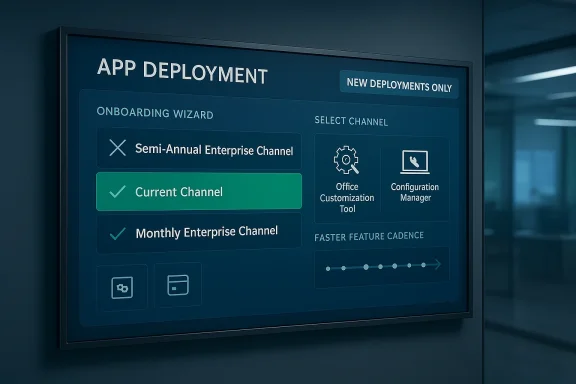
Microsoft is continuing its long-running simplification of Microsoft 365 Apps servicing, and the latest step lands squarely on a familiar fault line for enterprise admins: the Semi-Annual Enterprise Channel is being removed as a new deployment choice inside the Office Customization Tool and Configuration Manager experiences. For organizations that built their rollout strategy around slower Office feature cadence, the practical meaning is clear—new setups will now need to choose Current Channel or Monthly Enterprise Channel instead. Existing deployments are not being broken, but the message is unmistakable: Microsoft wants fewer paths, faster adoption, and less ambiguity in how Microsoft 365 apps are managed. (learn.microsoft.com)
Microsoft’s Office servicing model has always been a balancing act between stability and speed. For years, the Semi-Annual Enterprise Channel was the default answer for organizations that prioritized extensive testing, application compatibility, and change control over quick feature delivery. That made sense in heavily regulated environments, on shared workstations, and on specialized devices where even small UI or behavior changes could trigger support issues. Microsoft’s own documentation still describes Semi-Annual Enterprise Channel as suited for non-interactive devices and business-critical workloads that need extensive testing before new features are deployed. (learn.microsoft.com)
But the ecosystem around Microsoft 365 Apps has changed dramatically. Microsoft has spent the last year re-centering its update story around Current Channel and Monthly Enterprise Channel, both of which now carry more of the company’s innovation emphasis. In July 2025, Microsoft formally shifted Semi-Annual Enterprise Channel toward unattended devices, shortened feature support to six months, and introduced a rollback window, signaling that the channel was no longer the company’s primary recommendation for interactive users. The same guidance also reduced the operational gap between the channels, making the old “slow channel equals safe channel” assumption less true than it once was. (learn.microsoft.com)
That broader strategy is important because this retirement is not happening in isolation. Microsoft has already deprecated Semi-Annual Enterprise Channel Preview and has repeatedly encouraged administrators to move interactive devices to faster channels. The official guidance now states that the company recommends Monthly Enterprise Channel or Current Channel for interactive devices, while Semi-Annual remains focused on unattended endpoints that require fewer feature changes. In other words, the retirement in the customization and management tools is the next logical step after the policy shift that began in 2025. (learn.microsoft.com)
The immediate trigger, according to the Microsoft 365 admin center message reported in the coverage, is a change to what administrators can select when creating a new deployment. Existing configurations using Semi-Annual Enterprise Channel will continue to work, but the option will disappear for newly created setups during the April 6 to April 11, 2026 window. That distinction matters: Microsoft is not force-migrating every tenant at once, but it is closing the door on new deployments that would lock organizations into the older cadence.
That combination is classic Microsoft: deprecate gradually, steer firmly. It gives IT teams a grace period while ensuring the product roadmap is not held back by a legacy servicing preference.
A second thing to watch is how administrators respond in practice. If large numbers of organizations leave existing Semi-Annual deployments untouched while choosing faster channels for everything new, Microsoft may view the change as a success with minimal disruption. If the retirement creates confusion in Configuration Manager or provisioning workflows, expect more documentation updates and possibly more product messaging to smooth the transition. Microsoft usually changes the defaults first and fixes the messaging after. (learn.microsoft.com)
Source: Windows Report https://windowsreport.com/microsoft...in-office-customization-tools-starting-today/
 Background
Microsoft’s Office servicing model has always been a balancing act between stability and speed. For years, the Semi-Annual Enterprise Channel was the default answer for organizations that prioritized extensive testing, application compatibility, and change control over quick feature delivery. That made sense in heavily regulated environments, on shared workstations, and on specialized devices where even small UI or behavior changes could trigger support issues. Microsoft’s own documentation still describes Semi-Annual Enterprise Channel as suited for non-interactive devices and business-critical workloads that need extensive testing before new features are deployed. (learn.microsoft.com)But the ecosystem around Microsoft 365 Apps has changed dramatically. Microsoft has spent the last year re-centering its update story around Current Channel and Monthly Enterprise Channel, both of which now carry more of the company’s innovation emphasis. In July 2025, Microsoft formally shifted Semi-Annual Enterprise Channel toward unattended devices, shortened feature support to six months, and introduced a rollback window, signaling that the channel was no longer the company’s primary recommendation for interactive users. The same guidance also reduced the operational gap between the channels, making the old “slow channel equals safe channel” assumption less true than it once was. (learn.microsoft.com)
That broader strategy is important because this retirement is not happening in isolation. Microsoft has already deprecated Semi-Annual Enterprise Channel Preview and has repeatedly encouraged administrators to move interactive devices to faster channels. The official guidance now states that the company recommends Monthly Enterprise Channel or Current Channel for interactive devices, while Semi-Annual remains focused on unattended endpoints that require fewer feature changes. In other words, the retirement in the customization and management tools is the next logical step after the policy shift that began in 2025. (learn.microsoft.com)
The immediate trigger, according to the Microsoft 365 admin center message reported in the coverage, is a change to what administrators can select when creating a new deployment. Existing configurations using Semi-Annual Enterprise Channel will continue to work, but the option will disappear for newly created setups during the April 6 to April 11, 2026 window. That distinction matters: Microsoft is not force-migrating every tenant at once, but it is closing the door on new deployments that would lock organizations into the older cadence.
Why this matters now
The timing suggests Microsoft is trying to avoid a hard cutover while still nudging the market in a specific direction. By preserving existing deployments, it reduces the risk of immediate disruption. By removing the option from new builds, it prevents the channel from continuing to grow as a default choice in greenfield deployments.That combination is classic Microsoft: deprecate gradually, steer firmly. It gives IT teams a grace period while ensuring the product roadmap is not held back by a legacy servicing preference.
What Is Actually Changing
The key change is narrower than the headline suggests, but it is still consequential. Microsoft is retiring the Semi-Annual Enterprise Channel option from the Office Customization Tool in the Microsoft 365 apps admin center and from the Office 365 Client Management experience in Configuration Manager. The company is also removing it as a selectable installation option for unmanaged devices in the Microsoft 365 admin center, according to the message center items referenced in the reporting.New deployments lose the option
For fresh configurations, administrators will no longer be able to choose Semi-Annual Enterprise Channel. The available choices will be limited to the faster-moving update paths: Current Channel and Monthly Enterprise Channel. That means any organization onboarding new devices through those wizards will be nudged into Microsoft’s preferred update cadence from day one. (learn.microsoft.com)Existing deployments keep running
Microsoft’s official posture is reassuring on this point: existing Semi-Annual Enterprise Channel deployments are not being altered by the retirement. Devices already configured for that channel should continue receiving updates and following the channel policy already in place. This is the part that will keep the rollout manageable for large enterprises that cannot rework their Office lifecycle overnight.Managed and unmanaged scenarios are being split more clearly
The change also reinforces a pattern that Microsoft has been building for some time: unmanaged installs get more pressure to follow the company’s default choices, while managed devices are expected to be governed through more deliberate administration. The Microsoft 365 Apps admin center already supports switching devices to Current or Monthly Enterprise, while the Microsoft 365 admin center controls the default channel for unmanaged installations. (learn.microsoft.com)- New setups can no longer select Semi-Annual Enterprise Channel.
- Existing installs remain on their current channel.
- Managed device workflows still have channel-switching paths.
- Unmanaged installs are increasingly guided toward Microsoft’s faster defaults.
- Admin documentation will need to reflect the new reality. (learn.microsoft.com)
Why Microsoft Is Doing This
Microsoft’s stated rationale is straightforward: simplify update channel management and concentrate investment where it sees the most value. In practical terms, that means reducing the number of scenarios the company must support, document, test, and troubleshoot. The more channels exist, the harder it is to deliver consistent behavior, especially when customers expect uniform support but use wildly different deployment patterns.A push toward more frequent updates
The company has been explicit that most new features appear first in Monthly Enterprise Channel and Current Channel, and that features only graduate into Semi-Annual after additional release criteria are met. That means Semi-Annual Enterprise Channel is inherently downstream from Microsoft’s faster branches, not equal to them. Retiring it as a fresh choice reflects a belief that organizations should increasingly test against the channels where features actually arrive first. (learn.microsoft.com)Reducing fragmentation
From Microsoft’s perspective, fewer channel options likely means fewer support escalations, simpler documentation, and less confusion when organizations try to align feature availability across desktops, laptops, shared devices, and virtual desktops. If an enterprise keeps some users on current-like update rhythms and others on slower rhythms, help desk expectations become harder to manage. A narrower menu reduces that administrative complexity. (learn.microsoft.com)Aligning with Copilot and modern servicing
Microsoft has also tied faster channels to modern product experiences, including features and integrations that depend on more recent builds. While Microsoft is not saying Semi-Annual cannot work in any modern context, the direction of travel is obvious: the company wants the ecosystem on update paths that support rapid feature delivery, stronger validation loops, and less lag between release and availability. That is especially relevant where Microsoft 365 Copilot or related app functionality depends on newer builds. (learn.microsoft.com)- Simplify the support matrix.
- Encourage faster validation of new features.
- Reduce channel-specific documentation overhead.
- Improve alignment with Microsoft’s modern feature cadence.
- Shift customer behavior away from slow-release inertia.
The Enterprise Impact
For large organizations, the practical issue is not whether the channel still exists somewhere in the ecosystem. It is whether the deployment tooling they rely on can still express the policy they want. If a business has standardized on Semi-Annual Enterprise Channel because of application testing cycles, packaged add-ins, or compliance procedures, the retirement means that new device builds will require more deliberate handling.Change management gets harder before it gets easier
IT teams often use the Office Customization Tool to create repeatable deployment definitions. When a channel choice disappears from that workflow, it forces a decision: either preserve old XML/configuration artifacts for legacy scenarios or redesign the default posture for future devices. That is manageable, but it is not trivial in environments with multiple business units or geographically distributed deployment teams. (learn.microsoft.com)Configuration Manager users will feel it too
Microsoft’s Configuration Manager guidance already anticipates channel transitions by explaining that devices may need to download updates from both the old and new channels during migration. In other words, Microsoft has known for some time that channel movement is a real operational task, not just a checkbox. The retirement of the selection option does not remove the migration burden; it simply shifts more of that burden into existing estates. (learn.microsoft.com)Less room for “set it and forget it”
Many enterprises chose Semi-Annual Enterprise Channel because it minimized visible churn. That strategy becomes less attractive when Microsoft narrows the channel’s relevance and shortens support windows. Organizations that depended on that quiet stability will need a new operating assumption: stable does not mean static. (learn.microsoft.com)- Legacy deployment packages may need review.
- Testing teams may need shorter validation cycles.
- Support desks may need updated scripting and knowledge base articles.
- Procurement and imaging workflows may need new defaults.
- Compliance teams may need to reassess why slower servicing is being used. (learn.microsoft.com)
Consumer and Small Business Implications
The impact for consumers and smaller offices is different, but not insignificant. Most home users do not think in terms of update channels at all, yet Microsoft’s admin defaults and installation pathways increasingly shape what they experience. When a channel falls out of the selectable menu, the ecosystem around new installs becomes less customizable and more opinionated. (learn.microsoft.com)Fewer choices, fewer mistakes
For many small organizations, fewer options is a feature, not a bug. A channel selector can be confusing, especially when the differences are subtle and the consequences show up months later as compatibility or feature drift. By reducing the available choices to the ones Microsoft wants to promote, the company lowers the chance that a lightly managed environment will choose an outdated servicing model and then quietly drift out of step. (learn.microsoft.com)But also less flexibility
The downside is obvious: some small IT teams used Semi-Annual Enterprise Channel as a buffer against change. That buffer is getting thinner. If an organization has a finicky add-in or a bespoke workflow, the faster update paths may feel risky until the business invests in proper testing or modernization. The new model asks more from administrators who previously relied on slow cadence as a safety net. (learn.microsoft.com)The hidden lesson for small orgs
This change is also a reminder that Microsoft is treating Office as a continuously serviced cloud-era platform, not a once-a-year desktop product. That matters because the pace of feature and UI changes is only going to increase. Small businesses that have not built a testing routine may find themselves doing so sooner than they expected. (learn.microsoft.com)- Home users are mostly insulated, but defaults still matter.
- Small businesses get a simpler menu, but less control.
- Add-in-heavy environments may need more validation.
- Old habits of infrequent testing are becoming a liability.
- Modern Office servicing increasingly rewards proactive admins. (learn.microsoft.com)
The Tooling Story Behind the Change
The retirement is not just about a channel name. It is also about how Microsoft wants organizations to manage Office in the first place. The company has multiple paths for changing update channels, including Group Policy, the Office Deployment Tool, Microsoft Configuration Manager, Intune, the Microsoft 365 Apps admin center, and the Microsoft 365 admin center. Each tool serves a slightly different management model, but the direction is the same: make channel handling more governed and less ad hoc. (learn.microsoft.com)Office Customization Tool and Configuration Manager
The Office Customization Tool is especially significant because many administrators use it to define deployments consistently, including channel, architecture, language, and update behavior. Configuration Manager, meanwhile, is central in larger estates where compliance and phased rollout matter. Removing Semi-Annual Enterprise Channel from those new setup flows changes the baseline of what “standard” looks like for future deployments.Managed versus unmanaged paths
Microsoft’s own documentation draws a sharp line between managed and unmanaged installations. The Microsoft 365 admin center can set the default update channel for unmanaged installs, while the Microsoft 365 Apps admin center can target managed and unmanaged devices for specific channel switches. That split is important because it shows Microsoft is not just removing an option; it is redistributing where and how update policy is expressed. (learn.microsoft.com)Cloud update is becoming more relevant
Microsoft’s guidance now recommends cloud update when switching to Current or Monthly Enterprise Channel. That recommendation reinforces the idea that update orchestration should be lightweight and cloud-connected rather than heavily reliant on static, on-premises configuration patterns. For a company that wants to make channel policy simpler, cloud update is the logical companion tool. (learn.microsoft.com)- Office Deployment Tool remains important for scripted deployments.
- Configuration Manager still matters for phased enterprise rollouts.
- Intune is useful for policy-driven management.
- Cloud update increasingly fits Microsoft’s preferred story.
- The old model of perpetual Semi-Annual defaults is fading. (learn.microsoft.com)
How This Changes Upgrade Strategy
The most immediate operational question is not “what disappeared?” but “what do we do next?” For many IT departments, the answer will be to leave existing Semi-Annual devices alone for now and change only future deployments. But that is a tactical answer, not a strategic one. Microsoft’s policy shift implies that a medium-term transition plan is now unavoidable.A practical migration sequence
A sensible response is to inventory which devices are currently on Semi-Annual Enterprise Channel, identify which ones are truly unattended, and separate them from interactive endpoints. That distinction matters because Microsoft’s own guidance now treats the channel as a fit for non-interactive devices first, rather than as a universal enterprise default. From there, organizations can move pilot groups to Monthly Enterprise Channel or Current Channel and observe behavior before changing broader populations. (learn.microsoft.com)Test the add-ins, not just the apps
A lot of Office upgrade pain comes not from Word or Excel themselves, but from the ecosystem around them. COM add-ins, VBA automations, document generation tools, authentication extensions, and line-of-business plugins can all behave differently when build cadence changes. The retirement makes it even more important to test the workflow layer, not just the application layer. (learn.microsoft.com)Expect rollout overlap
Microsoft’s documentation on Configuration Manager already shows how a device can temporarily sit in one channel while fetching update content for another. That means organizations should expect mixed-state periods during transition. There is nothing unusual about that, but it does require careful communication so help desks do not misread a device’s transient state as a failure. (learn.microsoft.com)- Audit existing Semi-Annual deployments.
- Identify devices that are truly unattended.
- Pilot Monthly Enterprise Channel on representative users.
- Validate add-ins, scripts, and integrations.
- Update deployment templates and documentation. (learn.microsoft.com)
Competitive and Market Implications
This decision has implications beyond Microsoft 365 Apps itself. In the broader endpoint-management market, Microsoft is effectively arguing that modern software servicing should be faster, more centralized, and more cloud-aligned. That puts pressure on alternative management models that still depend on slow, locally governed release cycles. (learn.microsoft.com)A nudge toward Microsoft-first management
By steering administrators toward the Microsoft 365 Apps admin center, Intune, and cloud update, Microsoft is tightening the feedback loop between product engineering and endpoint management. That benefits Microsoft because it reduces the distance between a feature’s release and its deployment path. It also increases customer dependence on Microsoft’s own tooling rather than on locally controlled packaging habits. (learn.microsoft.com)A warning shot to legacy validation culture
Enterprise software has long rewarded organizations that move slowly, test heavily, and deploy conservatively. Microsoft is not eliminating that discipline, but it is narrowing the set of tools that make it the default. The result is a soft structural push toward more frequent validation cycles. Competitors in adjacent productivity and device-management spaces will likely read this as a sign that Microsoft believes continuous servicing is now the winning model. (learn.microsoft.com)More control for Microsoft, less latitude for customers
Some customers will view the retirement as sensible simplification. Others will see it as the erosion of a deployment choice that gave them breathing room. Both views can be true. The larger market reality is that Microsoft is optimizing for scale and consistency, not for the smallest number of feature-change surprises in conservative environments.- Faster channels become the new default center of gravity.
- Managed tools gain influence over deployment policy.
- Legacy change-control habits are being compressed.
- Vendors that integrate with Microsoft 365 must adapt faster.
- Customers get simpler menus but narrower tolerance for stagnation. (learn.microsoft.com)
Strengths and Opportunities
Microsoft’s move is not without merit. In fact, for many organizations, it may remove more confusion than value. The company is making a deliberate bet that the operational costs of maintaining multiple slow-moving pathways outweigh the benefits of preserving them for new deployments. That bet is especially compelling in a world where Microsoft 365 Apps are increasingly tied to ongoing feature innovation, security cadence, and cloud-connected administration. (learn.microsoft.com)- Cleaner administration with fewer channel choices.
- Faster access to features through Current or Monthly Enterprise Channel.
- Better alignment between Microsoft’s engineering cadence and deployment policy.
- Less ambiguity for new device builds and greenfield projects.
- Improved support consistency across modern management tools.
- More predictable validation for organizations already moving to monthly servicing.
- Stronger incentive to modernize packaging and testing processes. (learn.microsoft.com)
Risks and Concerns
The downside is that Microsoft is narrowing a familiar stability option at a time when many enterprises are still dependent on older validation models. Some organizations will absorb this smoothly; others will discover that their update governance was quietly built around a channel that is now being marginalized. The longer-term risk is not a single broken deployment, but the gradual accumulation of friction for teams that have not yet modernized their rollout discipline. That is the real cost of simplification. (learn.microsoft.com)- Legacy environments may struggle with the forced shift in defaults.
- Add-in compatibility issues could surface sooner on faster channels.
- Help desks may face more upgrade-related tickets during transition.
- Documentation drift is likely if old channel references remain in templates.
- Compliance teams may resist moving away from slower validation cycles.
- Mixed-state devices could cause confusion during channel migration.
- Unattended device assumptions may be wrong if inventories are outdated. (learn.microsoft.com)
What to Watch Next
The next few months will show whether this is merely a tooling change or the beginning of a broader cleanup of the Office servicing story. The biggest signal to watch is whether Microsoft continues removing Semi-Annual from additional setup surfaces, or whether it leaves some legacy paths intact for longer. If the company follows the same pattern it used in 2025, more guidance will likely shift toward Monthly Enterprise Channel as the mainstream enterprise default. (learn.microsoft.com)A second thing to watch is how administrators respond in practice. If large numbers of organizations leave existing Semi-Annual deployments untouched while choosing faster channels for everything new, Microsoft may view the change as a success with minimal disruption. If the retirement creates confusion in Configuration Manager or provisioning workflows, expect more documentation updates and possibly more product messaging to smooth the transition. Microsoft usually changes the defaults first and fixes the messaging after. (learn.microsoft.com)
Watch for these signals
- Additional removals of Semi-Annual from setup workflows.
- New guidance pushing more tenants toward cloud update.
- More explicit Microsoft 365 admin center messaging about default channels.
- Updated best practices for Configuration Manager and Intune.
- Expanded support notes for customers still retaining Semi-Annual on legacy devices. (learn.microsoft.com)
Source: Windows Report https://windowsreport.com/microsoft...in-office-customization-tools-starting-today/
Last edited:
