

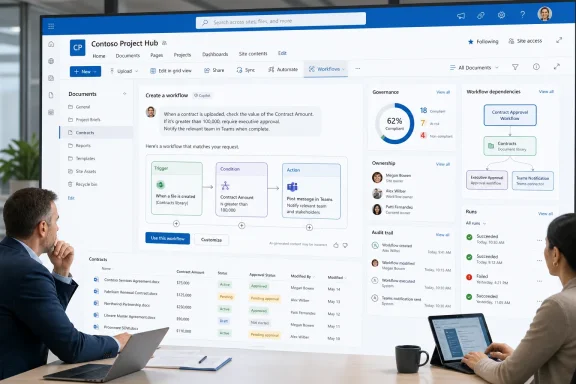
Microsoft plans to let SharePoint users create and revise live workflows by describing the automation they want to Copilot. Roadmap ID 567009 is marked In development for SharePoint on the web, with December 2026 listed as the general-availability target. Microsoft says Copilot will translate a request into the triggers, conditions, and actions needed for the workflow. The larger WindowsForum takeaway is that this is not merely natural-language flow creation: it is a governance and discoverability test because workflow authoring is moving into the SharePoint point of work.
According to the roadmap description, Copilot will assemble the workflow’s triggers, conditions, and actions from the user’s request. The underlying automation model is familiar: an event occurs, a condition is evaluated, and an action follows. The change is that the user begins by stating the desired outcome instead of manually selecting and configuring each component.
That shifts the starting point from a dedicated automation surface to SharePoint itself. A site owner, project coordinator, records manager, or department analyst could begin automation while working in the library or list associated with the process.
The roadmap does not establish that Copilot will remove every configuration decision or resolve every ambiguous term automatically. A request may refer to a column, value, destination, or business rule that needs clarification. Microsoft has not described the complete review, testing, or editing experience in this roadmap entry, so organizations should treat generated workflows as proposed implementations that still require validation.
The promise is not that workflow logic disappears. It is that users may be able to describe the business result first and let Copilot assemble the initial structure.
That placement matters because workflow authoring and workflow discovery have often been separated from the content being automated. People may know that a notification or update occurs when a document changes without knowing where the automation is managed or who is responsible for it.
Putting a Workflows command inside SharePoint could make automation more visible to the people closest to the affected files and lists. It also creates an immediate governance question: what exactly will a user, site owner, or administrator be able to see from that location?
The roadmap does not define whether the command will display only workflows associated with the current user, every relevant workflow connected to the current SharePoint location, or another subset. It also does not specify the ownership, sharing, audit, change-history, or administrative controls that will accompany the feature.
Those omissions should not be read as evidence that the controls will be absent. They simply remain outside what Roadmap ID 567009 currently promises. Administrators should wait for deployment documentation before designing policies around an assumed interface or management model.
Conversational editing deserves the same caution. Microsoft says users can return to Copilot to make changes, but the roadmap does not document the exact workflow lifecycle, how proposed modifications will be presented, or what safeguards will be available before a change affects a live process.
For planning purposes, the safest interpretation is narrow: SharePoint will provide a natural-language path for creating and revising workflows, while the precise validation and administration experience remains to be documented.
A workflow that reacts to a status change may support a project handoff, document review, publishing process, or service queue. If users can create such automations quickly from SharePoint, organizations are likely to see more of them. Some will be temporary conveniences; others may gradually become part of a department’s normal operating procedure.
That distinction is not always obvious when a workflow is first created. A notification built for one project can later become the signal that starts another team’s work. A flow initially viewed as optional can become an informal business dependency.
Copilot may reduce the effort required to build the first version, but the roadmap does not say that it will determine whether a workflow is business-critical, assign durable ownership, document its purpose, or apply an organization’s governance standards. Those responsibilities remain planning questions for customers.
Administrators should therefore focus less on predicting every technical detail and more on establishing a lightweight process for identifying workflows that have become important. The objective is not to subject every personal experiment to enterprise application governance. It is to ensure that business dependencies do not remain invisible simply because they began as a short Copilot prompt.
The roadmap also lists Worldwide Standard Multi-Tenant, GCC, and GCC High as applicable cloud instances. That identifies intended scope, but it should not be interpreted as a promise of synchronized rollout across commercial, GCC, and GCC High tenants. The entry does not provide a separate deployment sequence for each cloud instance.
The web designation is also important. The roadmap does not announce equivalent workflow creation or editing from a SharePoint mobile client, Teams, or another Microsoft 365 interface.
The entry does not provide licensing details. Administrators should not assume an entitlement model for creation, editing, management, or related services until Microsoft publishes deployment and licensing guidance for the feature.
As with any roadmap entry, the listed date is a planning target rather than an immutable release commitment. Status, scope, and timing can change while a feature remains in development.
It can also increase the number of workflows created outside a centrally managed development process. The important WindowsForum angle is therefore not another repetition of “AI makes automation easier.” It is whether organizations can discover and manage the automations created where SharePoint work happens.
Existing estates may already contain workflows with unclear ownership, overlapping purposes, or undocumented business dependencies. Adding a more accessible authoring path could amplify those conditions if administrators do not first understand what is already running.
The immediate governance task is not to speculate about features that Microsoft has not announced. It is to establish basic answers to questions that remain relevant regardless of the final interface:
Microsoft’s example uses a clear condition: a file’s status is set to Complete. That kind of request is easier to express when the relevant library has a well-defined status column and consistent values. A process represented through inconsistent filenames, loosely maintained folders, or multiple similarly named fields is harder for both users and software to describe precisely.
This does not establish how Copilot will behave when it encounters ambiguity. The roadmap provides no detailed resolution rules. It does, however, give administrators a practical reason to improve ordinary SharePoint hygiene before rollout.
Useful preparation includes reviewing:
Clean information architecture also helps with governance. When the source location, business owner, metadata, and intended outcome are clear, an organization is better positioned to decide whether a generated workflow is appropriate for continued use.
Organizations should begin with their highest-value sites and identify the workflows that support approvals, notifications, publishing, document movement, status changes, or cross-team handoffs. They should then determine whether each important automation has a known purpose and a responsible business contact.
This exercise has value even if Roadmap ID 567009 changes before release. Existing workflow ownership and discoverability problems already affect supportability. The Copilot feature merely increases the urgency by putting a simpler authoring path directly into SharePoint.
A limited pilot should follow when the feature becomes available to the organization. The pilot should use low-risk processes with clear metadata and measurable outcomes. Administrators should observe not only whether Copilot can produce a useful workflow, but also whether users and support teams can later find, understand, review, and maintain what was created.
The rollout decision should be based on that full lifecycle rather than the quality of a single demonstration prompt.
That could remove substantial friction from routine automation. It could also create more business dependencies that begin outside a formal development process.
The decisive issue will not be whether Copilot can turn one sentence into a working flow during a demonstration. It will be whether organizations can discover that flow later, identify its purpose, establish responsibility for it, and decide when it should be changed or retired.
Microsoft targets general availability in December 2026 for SharePoint on the web, with Worldwide Standard Multi-Tenant, GCC, and GCC High listed in the roadmap. Until fuller deployment documentation arrives, administrators should avoid guessing about unannounced mechanics. They should use the lead time to clean up ownership, map existing SharePoint and Power Automate dependencies, and establish a small set of governance checks that can be tested before rollout.
If Microsoft pairs natural-language creation with clear workflow visibility and manageable administration, Copilot could make SharePoint automation easier without making it harder to control. If discoverability and governance lag behind authoring, the same convenience could make an already fragmented automation estate more difficult to understand.
What this means / what to do now
Roadmap 567009 remains in development, is web-only, and targets December 2026 for general availability. Administrators should inventory existing SharePoint and Power Automate ownership, identify business processes that depend on individual makers, and test governance policies before the new authoring experience reaches production tenants.
 SharePoint Copilot Workflows: Key Facts
| Fact | Detail |
|---|---|
| Feature | Create and manage workflows with Copilot in SharePoint |
| Roadmap ID | 567009 |
| Status | In development |
| Platform | SharePoint on the web |
| Release listings | General Availability and Targeted Release |
| Cloud instances | Worldwide Standard Multi-Tenant, GCC, and GCC High |
| GA target | December 2026 |
| Separate Targeted Release date | Not provided |
Microsoft Is Moving Automation to the Point of Work
Microsoft’s example is intentionally ordinary: “when files are set to status = Complete, post a message in my Teams chat.” It represents the kind of routine handoff that often remains manual even when the surrounding content already lives in Microsoft 365.According to the roadmap description, Copilot will assemble the workflow’s triggers, conditions, and actions from the user’s request. The underlying automation model is familiar: an event occurs, a condition is evaluated, and an action follows. The change is that the user begins by stating the desired outcome instead of manually selecting and configuring each component.
That shifts the starting point from a dedicated automation surface to SharePoint itself. A site owner, project coordinator, records manager, or department analyst could begin automation while working in the library or list associated with the process.
The roadmap does not establish that Copilot will remove every configuration decision or resolve every ambiguous term automatically. A request may refer to a column, value, destination, or business rule that needs clarification. Microsoft has not described the complete review, testing, or editing experience in this roadmap entry, so organizations should treat generated workflows as proposed implementations that still require validation.
The promise is not that workflow logic disappears. It is that users may be able to describe the business result first and let Copilot assemble the initial structure.
The SharePoint Command Bar Becomes a Workflow Entry Point
Microsoft says users will be able to select Workflows from the SharePoint command bar to see their live workflow. Users will also be able to return to Copilot in SharePoint to request changes.That placement matters because workflow authoring and workflow discovery have often been separated from the content being automated. People may know that a notification or update occurs when a document changes without knowing where the automation is managed or who is responsible for it.
Putting a Workflows command inside SharePoint could make automation more visible to the people closest to the affected files and lists. It also creates an immediate governance question: what exactly will a user, site owner, or administrator be able to see from that location?
The roadmap does not define whether the command will display only workflows associated with the current user, every relevant workflow connected to the current SharePoint location, or another subset. It also does not specify the ownership, sharing, audit, change-history, or administrative controls that will accompany the feature.
Those omissions should not be read as evidence that the controls will be absent. They simply remain outside what Roadmap ID 567009 currently promises. Administrators should wait for deployment documentation before designing policies around an assumed interface or management model.
Conversational editing deserves the same caution. Microsoft says users can return to Copilot to make changes, but the roadmap does not document the exact workflow lifecycle, how proposed modifications will be presented, or what safeguards will be available before a change affects a live process.
For planning purposes, the safest interpretation is narrow: SharePoint will provide a natural-language path for creating and revising workflows, while the precise validation and administration experience remains to be documented.
A Short Prompt Can Still Represent an Important Process
Microsoft’s sample request sounds simple, but even a small notification can become operationally important if colleagues begin depending on it.A workflow that reacts to a status change may support a project handoff, document review, publishing process, or service queue. If users can create such automations quickly from SharePoint, organizations are likely to see more of them. Some will be temporary conveniences; others may gradually become part of a department’s normal operating procedure.
That distinction is not always obvious when a workflow is first created. A notification built for one project can later become the signal that starts another team’s work. A flow initially viewed as optional can become an informal business dependency.
Copilot may reduce the effort required to build the first version, but the roadmap does not say that it will determine whether a workflow is business-critical, assign durable ownership, document its purpose, or apply an organization’s governance standards. Those responsibilities remain planning questions for customers.
Administrators should therefore focus less on predicting every technical detail and more on establishing a lightweight process for identifying workflows that have become important. The objective is not to subject every personal experiment to enterprise application governance. It is to ensure that business dependencies do not remain invisible simply because they began as a short Copilot prompt.
Release Wording and Scope
Roadmap ID 567009 is marked In development and applies to SharePoint on the web. Microsoft lists General Availability and Targeted Release and gives December 2026 as the GA month; it does not provide a separate Targeted Release date.The roadmap also lists Worldwide Standard Multi-Tenant, GCC, and GCC High as applicable cloud instances. That identifies intended scope, but it should not be interpreted as a promise of synchronized rollout across commercial, GCC, and GCC High tenants. The entry does not provide a separate deployment sequence for each cloud instance.
| Deployment dimension | Roadmap information |
|---|---|
| Development status | In development |
| Authoring platform | SharePoint on the web |
| Release designations | General Availability and Targeted Release |
| Targeted Release timing | No separate date provided |
| General Availability target | December 2026 |
| Worldwide Standard Multi-Tenant | Listed |
| GCC | Listed |
| GCC High | Listed |
The entry does not provide licensing details. Administrators should not assume an entitlement model for creation, editing, management, or related services until Microsoft publishes deployment and licensing guidance for the feature.
As with any roadmap entry, the listed date is a planning target rather than an immutable release commitment. Status, scope, and timing can change while a feature remains in development.
Timeline
- July 9, 2026: Microsoft creates and last updates Roadmap ID 567009, listing the SharePoint Copilot workflow feature as in development.
- December 2026: Microsoft targets general availability for SharePoint on the web. Worldwide Standard Multi-Tenant, GCC, and GCC High are listed as applicable cloud instances, without a cloud-by-cloud delivery schedule.
Why This Is a Governance and Discoverability Test
Natural-language authoring lowers the skill barrier between recognizing a repetitive task and attempting to automate it. That can be valuable for organizations with long process-improvement backlogs, especially when the desired result is a modest notification or content-related action.It can also increase the number of workflows created outside a centrally managed development process. The important WindowsForum angle is therefore not another repetition of “AI makes automation easier.” It is whether organizations can discover and manage the automations created where SharePoint work happens.
Existing estates may already contain workflows with unclear ownership, overlapping purposes, or undocumented business dependencies. Adding a more accessible authoring path could amplify those conditions if administrators do not first understand what is already running.
The immediate governance task is not to speculate about features that Microsoft has not announced. It is to establish basic answers to questions that remain relevant regardless of the final interface:
- Which SharePoint sites and libraries support business-critical processes?
- Which existing Power Automate flows are associated with those locations?
- Is a current owner recorded for each important automation?
- Can site owners identify whom to contact when an automated process changes or stops?
- Are there agreed criteria for promoting a useful experiment into a managed business process?
- Is there a defined review point for workflows that send information from one Microsoft 365 location to another?
- Can obsolete or duplicate automations be identified and retired?
SharePoint Structure Will Shape the Results
Natural-language workflow creation will still depend on the way an organization represents its work in SharePoint.Microsoft’s example uses a clear condition: a file’s status is set to Complete. That kind of request is easier to express when the relevant library has a well-defined status column and consistent values. A process represented through inconsistent filenames, loosely maintained folders, or multiple similarly named fields is harder for both users and software to describe precisely.
This does not establish how Copilot will behave when it encounters ambiguity. The roadmap provides no detailed resolution rules. It does, however, give administrators a practical reason to improve ordinary SharePoint hygiene before rollout.
Useful preparation includes reviewing:
- Site and library names that are difficult to distinguish.
- Duplicate or unclear column names.
- Choice fields with inconsistent values.
- Libraries with no current business owner.
- Processes that exist only as undocumented conventions.
- Temporary sites that now support ongoing operations.
- Destinations described by informal names that may not be clear to every user.
Clean information architecture also helps with governance. When the source location, business owner, metadata, and intended outcome are clear, an organization is better positioned to decide whether a generated workflow is appropriate for continued use.
Practical Readiness Checklist for Administrators
Administrators do not need to wait until December 2026 to prepare. The following checklist stays within the confirmed roadmap scope while avoiding assumptions about unannounced implementation details.Inventory
- Identify existing Power Automate flows associated with important SharePoint sites, lists, and libraries.
- Record the known business purpose and current contact for important workflows.
- Flag automations whose purpose or responsible team cannot be determined.
- Identify duplicate notifications or handoffs serving the same process.
- Note temporary workflows that appear to have become permanent dependencies.
Ownership
- Require every important automation to have a documented responsible team or business function.
- Define what should happen when the original maker changes roles or leaves the organization.
- Establish a periodic ownership review for workflows supporting active business processes.
- Give site owners a clear escalation path when they discover an unfamiliar automation.
Governance
- Classify sites by risk so that workflow review can be proportionate to the information and process involved.
- Define when self-service experimentation is acceptable and when additional review is required.
- Document approved destinations for sensitive notifications and handoffs.
- Align SharePoint workflow planning with existing Power Platform and Microsoft 365 governance rather than creating a separate Copilot-only policy.
- Decide how obsolete, redundant, or unsupported workflows will be retired.
Testing
- Create a nonproduction or low-risk process for evaluating the feature when it becomes available.
- Test prompts against clearly structured libraries as well as sites with ambiguous fields or naming.
- Confirm that reviewers can determine whether the resulting workflow matches the stated business intent.
- Test changes to an existing workflow separately from initial creation.
- Record unresolved questions for Microsoft’s final deployment documentation instead of filling gaps with assumptions.
Communication
- Tell site owners that Copilot-generated automation is still an organizational asset when colleagues depend on it.
- Provide a short intake path for reporting workflows that have become business-critical.
- Explain that the December 2026 date is a GA target, not a guarantee that every listed cloud instance will receive the feature simultaneously.
- Make clear that the announced authoring platform is the SharePoint web experience.
Questions Microsoft Still Needs to Answer
Roadmap ID 567009 provides the direction of travel, not a complete operational specification. Before broad deployment, administrators will need clearer documentation on several areas:- What workflows will appear under the SharePoint Workflows command?
- What review experience will be available before a generated workflow becomes live?
- How will users understand the triggers, conditions, and actions Copilot creates?
- What visibility will site owners and Microsoft 365 administrators have?
- How will changes requested through Copilot be presented and recorded?
- Which licensing requirements will apply?
- How will rollout differ, if at all, among Worldwide Standard Multi-Tenant, GCC, and GCC High?
- What limitations will apply at preview and general availability?
- Which existing Power Platform governance controls will cover workflows created from SharePoint?
- What documentation will Microsoft provide for moving an experimental workflow into managed organizational use?
The Deployment Plan Starts With What Already Exists
The most productive preparation is an inventory of today’s SharePoint automation estate.Organizations should begin with their highest-value sites and identify the workflows that support approvals, notifications, publishing, document movement, status changes, or cross-team handoffs. They should then determine whether each important automation has a known purpose and a responsible business contact.
This exercise has value even if Roadmap ID 567009 changes before release. Existing workflow ownership and discoverability problems already affect supportability. The Copilot feature merely increases the urgency by putting a simpler authoring path directly into SharePoint.
A limited pilot should follow when the feature becomes available to the organization. The pilot should use low-risk processes with clear metadata and measurable outcomes. Administrators should observe not only whether Copilot can produce a useful workflow, but also whether users and support teams can later find, understand, review, and maintain what was created.
The rollout decision should be based on that full lifecycle rather than the quality of a single demonstration prompt.
Copilot Could Make Small Automations More Accessible—If They Remain Visible
Roadmap ID 567009 points toward a SharePoint experience in which users describe a desired process, Copilot assembles its triggers, conditions, and actions, and the resulting workflow remains accessible from the place where the content lives.That could remove substantial friction from routine automation. It could also create more business dependencies that begin outside a formal development process.
The decisive issue will not be whether Copilot can turn one sentence into a working flow during a demonstration. It will be whether organizations can discover that flow later, identify its purpose, establish responsibility for it, and decide when it should be changed or retired.
Microsoft targets general availability in December 2026 for SharePoint on the web, with Worldwide Standard Multi-Tenant, GCC, and GCC High listed in the roadmap. Until fuller deployment documentation arrives, administrators should avoid guessing about unannounced mechanics. They should use the lead time to clean up ownership, map existing SharePoint and Power Automate dependencies, and establish a small set of governance checks that can be tested before rollout.
If Microsoft pairs natural-language creation with clear workflow visibility and manageable administration, Copilot could make SharePoint automation easier without making it harder to control. If discoverability and governance lag behind authoring, the same convenience could make an already fragmented automation estate more difficult to understand.
References
- Primary source: Microsoft 365 Roadmap
Published: 2026-07-09T23:00:39.7653153Z
Loading…
www.microsoft.com - Official source: learn.microsoft.com
Loading…
learn.microsoft.com - Official source: support.microsoft.com
Get started with Workflows in Microsoft 365 Copilot | Microsoft Support
Learn how you can automate tasks with Workflows--building, testing, monitoring, and managing your flows with Microsoft 365 Copilot.support.microsoft.com - Official source: devblogs.microsoft.com
SharePoint Framework (SPFx) roadmap update – July 2026 - Microsoft 365 Developer Blog
June celebrates the announcement of upcoming SharePoint Copilot Apps, ships the quality-focused SPFx 1.23.2 release, and shares the roadmap for the AI era - shaped by your feedback.devblogs.microsoft.com - Related coverage: efficiency365.com
Loading…
efficiency365.com - Related coverage: aldridge.com
Loading…
aldridge.com
- Official source: techcommunity.microsoft.com
Loading…
techcommunity.microsoft.com - Related coverage: eservtraininghub.com
Loading…
www.eservtraininghub.com - Official source: marketingassets.microsoft.com
- Related coverage: wonderlaura.com
Loading…
wonderlaura.com - Official source: news.microsoft.com
Loading…
news.microsoft.com - Related coverage: idslogic.co.uk
Loading…
www.idslogic.co.uk - Related coverage: blog.virtosoftware.com
Loading…
blog.virtosoftware.com - Related coverage: davyntt.com
- Official source: cdn-dynmedia-1.microsoft.com