

ShareX 20.0.2 arrived publicly on April 24, 2026, followed by 20.0.4 on May 1, bringing Windows users a rebuilt Avalonia-based Image Editor, native ARM64 support through the Microsoft Store, and a grab bag of workflow, uploader, capture, and AI-provider changes. That sounds like a routine point release until you remember what ShareX actually is: not merely a screenshot tool, but a decade-plus accumulation of power-user muscle memory. Version 20 is therefore less a facelift than a stress test of how far a beloved utility can modernize before its most loyal users feel the floor move. The update is impressive, but it also exposes the bargain every serious Windows tool eventually has to make between capability, continuity, and platform survival.
ShareX has always occupied a strange and valuable corner of the Windows ecosystem. Microsoft ships Snipping Tool with Windows 11, and it has improved meaningfully over the years, but ShareX remains the app people install when screenshots are not an occasional convenience but part of daily work. It captures, annotates, uploads, records, OCRs, hashes, pins, shortens, beautifies, and automates with the slightly intimidating confidence of a tool built by people who needed all of those verbs themselves.
That is why the Image Editor matters more than the release notes might suggest. Screenshot utilities live or die on the interval between capture and communication. A user sees a bug, grabs a region, draws an arrow, blurs a token, adds a number, copies the result, and moves on. If that sequence is fast, the tool becomes invisible; if it is clumsy, the tool becomes the work.
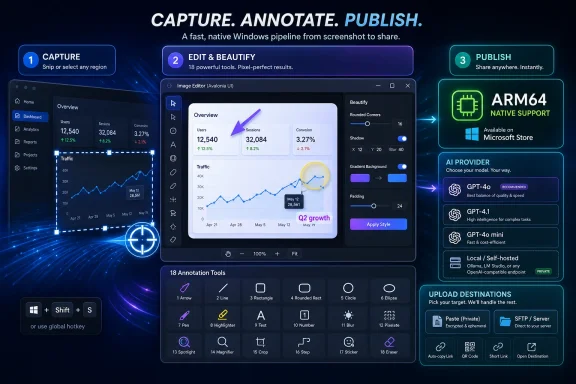
The new editor is built with Avalonia UI, a cross-platform .NET UI framework that gives ShareX a more modern foundation than its older Windows-specific interface stack. In visible terms, the editor brings a redesigned interface, 18 annotation tools, a background beautifier, and 232 image effects. In strategic terms, it signals that ShareX is not content to be a perfectly preserved Win32-era cockpit forever.
That is both the promise and the risk. ShareX users do not merely use features; they use patterns. They know where crop lives, how selection behaves, when a hotkey will commit an action, and how much visual chrome stands between them and the thing they need to send. Reworking the editor is therefore like replacing the keyboard on a sysadmin’s daily driver: even if the new one is objectively better, the first hour may feel like sabotage.
That matters because Windows utility software is facing an awkward transition. The classic desktop APIs are still powerful, still fast, and still loved by the people who depend on them. But they are also increasingly out of step with modern display scaling, theme handling, ARM devices, and the expectations users bring from newer applications. A tool like ShareX can either keep layering patches onto the old experience or begin the unpleasant work of replacing the parts that carry the most technical debt.
The new editor’s feature count is not modest. Its annotation tools include the expected rectangle, ellipse, line, arrow, freehand, text, speech balloon, highlight, blur, pixelate, magnify, spotlight, crop, and cut-out options, plus emoji support using Microsoft’s 3D Fluent emoji set. The background tooling folds in margin, padding, smart padding, rounded corners, shadow controls, ratio handling, and gradient, color, transparent, image, and wallpaper backgrounds. This is not Microsoft Paint with a ShareX logo; it is an attempt to make the post-capture stage a complete finishing environment.
But that completeness is also why the redesign is delicate. An annotation editor has a different job from a general image editor. It should be powerful, but it cannot afford to become contemplative. Its highest achievement is not letting users create beautiful images; it is letting them explain something in eight seconds.
That matters because early community reaction to major UI rewrites is almost never purely about aesthetics. Users complain about button size, crop behavior, spacing, tool placement, and icon clarity because those are the surfaces through which deeper trust is expressed. A workflow tool earns trust through predictability. When predictability changes, users interpret even neutral differences as regressions.
The crop tool is a good example of how small behavior shifts become large arguments. If a user is accustomed to drawing a crop rectangle from nothing, and the new editor starts with the whole image selected, the difference is not a philosophical design preference. It is an extra beat, an extra drag, sometimes an extra scroll, repeated dozens of times a week. A product manager might call that a discoverability change; a daily user calls it wasted motion.
The legacy toggle is an admission that power users are not wrong to value the old way. It also gives the ShareX developer room to iterate on the new editor without turning every rough edge into an ultimatum. In a commercial app, that choice might be framed as a transition period. In ShareX, it feels more like a peace treaty.
ShareX now has a cleaner answer for Store users on ARM64 devices. That does not magically make every Windows-on-ARM pain point vanish, but it does remove friction for a category of user that Microsoft desperately wants to normalize. Screenshot tools are not glamorous benchmark applications, yet they are exactly the kind of utility that exposes whether a platform feels native or merely compatible.
The Microsoft Store angle is important too. ShareX has long been available outside the Store, and many power users will keep installing it that way. But Store distribution increasingly matters for users who want automatic updates, simpler installs, and fewer warnings around unknown executables. For ARM64 in particular, the Store can become the path of least resistance if developers ship native packages there.
There is a symbolic layer as well. ShareX began as the kind of Windows utility that thrived outside Microsoft’s official app story. Now it is adapting to Microsoft’s modern hardware and packaging priorities without surrendering its identity. That is a more interesting Windows story than another built-in app getting a rounded-corner refresh.
None of these features will sell the update in a headline, but they explain why ShareX has endured. The app is not optimized for a single happy path. It is optimized for the weird, repetitive edge cases that accumulate around real work: capturing transient UI, uploading to a private endpoint, verifying a checksum, stripping friction from a handoff, or making annotations readable enough for someone in another time zone.
The uploader changes are particularly telling. PrivateBin support has been added as a text uploader, while the MEGA file uploader has been removed because of an unmaintained library. That kind of churn is part of the hidden maintenance tax for any tool that integrates with third-party services. Users notice when a destination disappears, but maintainers have to care about whether the dependency chain still deserves trust.
ShareX’s relationship with AI providers also continues to evolve. The update adds a “Load models” button to populate OpenAI models automatically, introduces an OpenAI Legacy AI Provider option for local deployments, and removes the Custom AI Provider option on the grounds that the OpenAI provider can now serve the same purpose. In January, ShareX added an opt-in Analyze Image tool requiring users to bring their own API keys, with support for services including OpenAI, Gemini, OpenRouter, and custom endpoints. Version 20 looks like the next step in making that machinery less brittle.
ShareX is not competing on default status. It is competing on depth. The difference is not that ShareX can take screenshots and Snipping Tool cannot; the difference is that ShareX can turn a capture into a programmable workflow. It can route different capture types through different after-capture tasks, upload to selected destinations, copy paths, apply effects, run tools, and retain history in ways that make sense for people who live in tickets, documentation, bug reports, forums, chat apps, and remote support sessions.
That makes ShareX feel less like an app and more like a personal capture pipeline. A sysadmin may want screenshots saved under a pattern that includes window titles or process names. A developer may want annotated images copied instantly while files are stored locally. A support technician may want uploads disabled by policy, OCR ready on demand, and metadata tools available without opening another program. ShareX’s complexity is not accidental; it is the product.
The redesign challenge is therefore sharper than it would be for a consumer screenshot app. A prettier editor is welcome only if it preserves the pipeline’s velocity. Once a user has configured ShareX into a private operating procedure, every UI change is judged by whether it respects the procedure.
But open source does not eliminate product-management tradeoffs; it merely relocates them. The maintainer still has to choose which frameworks to adopt, which uploaders to remove, which old platforms to abandon, and when to force a redesign into the public release channel. ShareX 20 shows those choices arriving in a cluster.
The move to .NET 9 in version 18 already marked a line in the sand. It made the app self-contained and modernized the runtime story, but it also ended Windows 7 support and increased setup size. For a tool with a long tail of users on older systems, that is not nothing. Yet clinging forever to legacy runtime assumptions would be its own kind of abandonment.
The same is true for the new editor. Keeping the old one indefinitely would please users who want no disruption, but it could trap the project in a UI model increasingly expensive to maintain. Replacing it too abruptly would alienate the people who made ShareX’s reputation. Version 20 tries to split the difference, and that is usually the least satisfying but most responsible path.
ShareX incorporating those tools into the editor is not just feature creep. It reflects a change in what screenshots are expected to do. In 2010, a screenshot was often evidence. In 2026, it is also communication collateral. It might appear in a GitHub issue, an internal knowledge-base article, a Teams message, a forum post, a release note, or a social feed. A utility that can move from raw capture to presentable artifact without exporting to another app saves real time.
There is an irony here. ShareX has long been loved because it is unapologetically utilitarian, sometimes almost austere. Beautification sounds like the opposite impulse. But for technical communicators, trainers, support teams, and independent developers, making a screenshot legible and presentable is not vanity. It reduces ambiguity.
The question is whether ShareX can add polish without becoming fussy. A beautifier should be one click when the user wants one click, and invisible when the user wants a red arrow and nothing else. The release’s success will depend less on the number of effects than on whether the editor lets users ignore 231 of them at any given moment.
When a library becomes unmaintained, keeping an integration alive can become irresponsible. It may still work today, but the maintenance risk shifts from inconvenience to trust. A screenshot tool that handles potentially sensitive captures cannot treat abandoned dependencies as cosmetic problems. The right call can still annoy users, especially those who built workflows around the removed service, but “it still compiles” is not a security strategy.
The addition of PrivateBin points in the opposite direction: toward privacy-conscious, self-hostable, or semi-private sharing patterns. That fits ShareX’s audience better than chasing every consumer storage service. Many of the people who use ShareX seriously are not looking for the most fashionable cloud endpoint; they are looking for a controlled place to put output with as little ceremony as possible.
This is where ShareX’s power-user DNA helps. Its users are more likely than average to understand why an uploader disappears, even if they dislike it. They also have more options for replacing it because ShareX’s destination and custom-uploader model has always been broader than a typical screenshot app’s share sheet.
That matters because screenshots are often sensitive by default. They contain admin consoles, account names, customer records, internal roadmaps, API tokens, private chats, machine names, and the accidental debris of a real desktop. Any screenshot tool that treats cloud analysis casually will quickly lose credibility with the very users most likely to need advanced capture features.
ShareX’s bring-your-own-key approach is not perfect, but it places responsibility and control closer to the user. The addition of an OpenAI Legacy AI Provider for local deployments is especially notable because it acknowledges that “OpenAI-compatible” increasingly means more than OpenAI’s hosted service. Local and self-hosted deployments matter in enterprise and enthusiast contexts, and tools that support them without drama will age better.
The removal of the old Custom AI Provider option may worry some users until they understand the replacement logic. If the OpenAI provider can now cover compatible endpoints, simplification is reasonable. The trick will be documentation and migration clarity, because “custom” is the word users look for when they are doing something nonstandard, even if the technical path has changed.
ShareX sits directly in that tension. It is modernizing its runtime, adopting a modern UI framework, supporting ARM64, and integrating current AI-provider patterns. At the same time, it remains a classic Windows power tool: configurable, local-first in spirit, automation-friendly, and willing to expose far more options than a mainstream app designer would tolerate.
That combination is valuable because Windows needs more than polished first-party apps. It needs third-party utilities that can evolve without being domesticated. The Windows enthusiast community has always been sustained by tools that fill the gaps Microsoft leaves: launchers, capture utilities, file managers, debloaters, terminals, clipboard managers, package managers, monitoring tools, and shell replacements. When those tools modernize well, the platform feels alive.
The danger is that modernization can be mistaken for simplification. ShareX should not aspire to become Snipping Tool with extra buttons. Its job is to remain the app that can be bent into shape by people whose workflows do not fit the default. Version 20 is encouraging precisely because it modernizes without removing the density that makes ShareX distinct.
For users who have years of muscle memory in the old editor, the advice is more cautious. Update when you have time to inspect the new workflow, not five minutes before filing a critical incident report. The legacy editor option exists for a reason, and there is no shame in using it while the Avalonia editor matures.
That split does not make the release a failure. It makes it a serious upgrade to a serious tool. The biggest software changes are often the ones that users first experience as inconvenience because they touch the habits that made the software valuable in the first place.
Source: Neowin My favorite screenshot-taking app for Windows updated with a reworked Image Editor and more
 ShareX Modernizes the Part Users Touch Most
ShareX has always occupied a strange and valuable corner of the Windows ecosystem. Microsoft ships Snipping Tool with Windows 11, and it has improved meaningfully over the years, but ShareX remains the app people install when screenshots are not an occasional convenience but part of daily work. It captures, annotates, uploads, records, OCRs, hashes, pins, shortens, beautifies, and automates with the slightly intimidating confidence of a tool built by people who needed all of those verbs themselves.That is why the Image Editor matters more than the release notes might suggest. Screenshot utilities live or die on the interval between capture and communication. A user sees a bug, grabs a region, draws an arrow, blurs a token, adds a number, copies the result, and moves on. If that sequence is fast, the tool becomes invisible; if it is clumsy, the tool becomes the work.
The new editor is built with Avalonia UI, a cross-platform .NET UI framework that gives ShareX a more modern foundation than its older Windows-specific interface stack. In visible terms, the editor brings a redesigned interface, 18 annotation tools, a background beautifier, and 232 image effects. In strategic terms, it signals that ShareX is not content to be a perfectly preserved Win32-era cockpit forever.
That is both the promise and the risk. ShareX users do not merely use features; they use patterns. They know where crop lives, how selection behaves, when a hotkey will commit an action, and how much visual chrome stands between them and the thing they need to send. Reworking the editor is therefore like replacing the keyboard on a sysadmin’s daily driver: even if the new one is objectively better, the first hour may feel like sabotage.
The New Editor Is a Platform Bet Disguised as a UI Refresh
The headline change is the Avalonia-based Image Editor, but the deeper story is architectural. ShareX has been steadily moving away from older foundations: version 18 shifted the project from .NET Framework 4.8 to .NET 9.0, dropped Windows 7 support, and made the app self-contained. Version 20 continues that migration by rebuilding the most user-facing component around a newer UI stack.That matters because Windows utility software is facing an awkward transition. The classic desktop APIs are still powerful, still fast, and still loved by the people who depend on them. But they are also increasingly out of step with modern display scaling, theme handling, ARM devices, and the expectations users bring from newer applications. A tool like ShareX can either keep layering patches onto the old experience or begin the unpleasant work of replacing the parts that carry the most technical debt.
The new editor’s feature count is not modest. Its annotation tools include the expected rectangle, ellipse, line, arrow, freehand, text, speech balloon, highlight, blur, pixelate, magnify, spotlight, crop, and cut-out options, plus emoji support using Microsoft’s 3D Fluent emoji set. The background tooling folds in margin, padding, smart padding, rounded corners, shadow controls, ratio handling, and gradient, color, transparent, image, and wallpaper backgrounds. This is not Microsoft Paint with a ShareX logo; it is an attempt to make the post-capture stage a complete finishing environment.
But that completeness is also why the redesign is delicate. An annotation editor has a different job from a general image editor. It should be powerful, but it cannot afford to become contemplative. Its highest achievement is not letting users create beautiful images; it is letting them explain something in eight seconds.
The Legacy Editor Is Still There Because Muscle Memory Has a Vote
The smartest detail in the release may be the option to use the legacy image editor. It is tucked under task settings for the Image Editor rather than advertised as the star of the show, but its presence changes the tone of the update. ShareX is making a forward move without forcing every user to cross the bridge at once.That matters because early community reaction to major UI rewrites is almost never purely about aesthetics. Users complain about button size, crop behavior, spacing, tool placement, and icon clarity because those are the surfaces through which deeper trust is expressed. A workflow tool earns trust through predictability. When predictability changes, users interpret even neutral differences as regressions.
The crop tool is a good example of how small behavior shifts become large arguments. If a user is accustomed to drawing a crop rectangle from nothing, and the new editor starts with the whole image selected, the difference is not a philosophical design preference. It is an extra beat, an extra drag, sometimes an extra scroll, repeated dozens of times a week. A product manager might call that a discoverability change; a daily user calls it wasted motion.
The legacy toggle is an admission that power users are not wrong to value the old way. It also gives the ShareX developer room to iterate on the new editor without turning every rough edge into an ultimatum. In a commercial app, that choice might be framed as a transition period. In ShareX, it feels more like a peace treaty.
Windows on ARM Finally Gets a Native ShareX Path
Native ARM64 support through the Microsoft Store is the other major signal in version 20. For years, Windows on ARM has been a story of hardware promise constrained by software hesitation. Emulation has improved, Qualcomm’s Snapdragon X-era machines have made the category more credible, and Microsoft has pushed Copilot+ PCs hard, but enthusiast and pro-user adoption still depends on the boring question: do my tools run properly?ShareX now has a cleaner answer for Store users on ARM64 devices. That does not magically make every Windows-on-ARM pain point vanish, but it does remove friction for a category of user that Microsoft desperately wants to normalize. Screenshot tools are not glamorous benchmark applications, yet they are exactly the kind of utility that exposes whether a platform feels native or merely compatible.
The Microsoft Store angle is important too. ShareX has long been available outside the Store, and many power users will keep installing it that way. But Store distribution increasingly matters for users who want automatic updates, simpler installs, and fewer warnings around unknown executables. For ARM64 in particular, the Store can become the path of least resistance if developers ship native packages there.
There is a symbolic layer as well. ShareX began as the kind of Windows utility that thrived outside Microsoft’s official app story. Now it is adapting to Microsoft’s modern hardware and packaging priorities without surrendering its identity. That is a more interesting Windows story than another built-in app getting a rounded-corner refresh.
The Small Changes Reveal the Real Audience
Version 20’s smaller changes read like a checklist written by people who use ShareX under pressure. There is an option to disable the capture-region crosshair. Freehand drawing gains smoothing and curve interpolation. Region capture now filters non-activatable tool windows. The hash checker displays a tick or cross icon for verification results. SFTP upload speed has been improved. “Copy folder path to clipboard” joins the after-capture tasks menu.None of these features will sell the update in a headline, but they explain why ShareX has endured. The app is not optimized for a single happy path. It is optimized for the weird, repetitive edge cases that accumulate around real work: capturing transient UI, uploading to a private endpoint, verifying a checksum, stripping friction from a handoff, or making annotations readable enough for someone in another time zone.
The uploader changes are particularly telling. PrivateBin support has been added as a text uploader, while the MEGA file uploader has been removed because of an unmaintained library. That kind of churn is part of the hidden maintenance tax for any tool that integrates with third-party services. Users notice when a destination disappears, but maintainers have to care about whether the dependency chain still deserves trust.
ShareX’s relationship with AI providers also continues to evolve. The update adds a “Load models” button to populate OpenAI models automatically, introduces an OpenAI Legacy AI Provider option for local deployments, and removes the Custom AI Provider option on the grounds that the OpenAI provider can now serve the same purpose. In January, ShareX added an opt-in Analyze Image tool requiring users to bring their own API keys, with support for services including OpenAI, Gemini, OpenRouter, and custom endpoints. Version 20 looks like the next step in making that machinery less brittle.
Snipping Tool Is Better, but ShareX Is Still Playing a Different Game
It is tempting to frame every ShareX update as a rebuke to Windows 11’s Snipping Tool. That is too easy. Snipping Tool is no longer the neglected accessory it once was; Microsoft has added screen recording, OCR-related conveniences, video trimming, and a cleaner capture experience over time. For many users, the built-in tool is now good enough, and “good enough” is a powerful distribution advantage when it ships with the OS.ShareX is not competing on default status. It is competing on depth. The difference is not that ShareX can take screenshots and Snipping Tool cannot; the difference is that ShareX can turn a capture into a programmable workflow. It can route different capture types through different after-capture tasks, upload to selected destinations, copy paths, apply effects, run tools, and retain history in ways that make sense for people who live in tickets, documentation, bug reports, forums, chat apps, and remote support sessions.
That makes ShareX feel less like an app and more like a personal capture pipeline. A sysadmin may want screenshots saved under a pattern that includes window titles or process names. A developer may want annotated images copied instantly while files are stored locally. A support technician may want uploads disabled by policy, OCR ready on demand, and metadata tools available without opening another program. ShareX’s complexity is not accidental; it is the product.
The redesign challenge is therefore sharper than it would be for a consumer screenshot app. A prettier editor is welcome only if it preserves the pipeline’s velocity. Once a user has configured ShareX into a private operating procedure, every UI change is judged by whether it respects the procedure.
The Open-Source Advantage Is Also an Open-Source Burden
ShareX benefits from being free and open source in the way many Windows utilities do: it can serve obsessive users without needing to simplify itself for a mass-market subscription funnel. Features can be added because they are useful, not because they fit a pricing tier. Contributors can sand down specific annoyances that would never rise high enough in a corporate backlog.But open source does not eliminate product-management tradeoffs; it merely relocates them. The maintainer still has to choose which frameworks to adopt, which uploaders to remove, which old platforms to abandon, and when to force a redesign into the public release channel. ShareX 20 shows those choices arriving in a cluster.
The move to .NET 9 in version 18 already marked a line in the sand. It made the app self-contained and modernized the runtime story, but it also ended Windows 7 support and increased setup size. For a tool with a long tail of users on older systems, that is not nothing. Yet clinging forever to legacy runtime assumptions would be its own kind of abandonment.
The same is true for the new editor. Keeping the old one indefinitely would please users who want no disruption, but it could trap the project in a UI model increasingly expensive to maintain. Replacing it too abruptly would alienate the people who made ShareX’s reputation. Version 20 tries to split the difference, and that is usually the least satisfying but most responsible path.
The Beautifier Trend Comes for the Power User Tool
The background beautifier deserves more attention than it will get. Screenshot beautification has become a recognizable mini-genre: add padding, a gradient background, rounded corners, a shadow, maybe a ratio suitable for social media or documentation headers. It is the visual language of product changelogs, developer blogs, and polished bug reports.ShareX incorporating those tools into the editor is not just feature creep. It reflects a change in what screenshots are expected to do. In 2010, a screenshot was often evidence. In 2026, it is also communication collateral. It might appear in a GitHub issue, an internal knowledge-base article, a Teams message, a forum post, a release note, or a social feed. A utility that can move from raw capture to presentable artifact without exporting to another app saves real time.
There is an irony here. ShareX has long been loved because it is unapologetically utilitarian, sometimes almost austere. Beautification sounds like the opposite impulse. But for technical communicators, trainers, support teams, and independent developers, making a screenshot legible and presentable is not vanity. It reduces ambiguity.
The question is whether ShareX can add polish without becoming fussy. A beautifier should be one click when the user wants one click, and invisible when the user wants a red arrow and nothing else. The release’s success will depend less on the number of effects than on whether the editor lets users ignore 231 of them at any given moment.
Removing MEGA Is a Reminder That Integrations Rot
The removal of the MEGA uploader is a small line item with a larger lesson. Integrations are promises made to users and debts owed to maintainers. Every uploader depends on external APIs, libraries, authentication flows, rate limits, branding rules, and security expectations that can change without regard for ShareX’s roadmap.When a library becomes unmaintained, keeping an integration alive can become irresponsible. It may still work today, but the maintenance risk shifts from inconvenience to trust. A screenshot tool that handles potentially sensitive captures cannot treat abandoned dependencies as cosmetic problems. The right call can still annoy users, especially those who built workflows around the removed service, but “it still compiles” is not a security strategy.
The addition of PrivateBin points in the opposite direction: toward privacy-conscious, self-hostable, or semi-private sharing patterns. That fits ShareX’s audience better than chasing every consumer storage service. Many of the people who use ShareX seriously are not looking for the most fashionable cloud endpoint; they are looking for a controlled place to put output with as little ceremony as possible.
This is where ShareX’s power-user DNA helps. Its users are more likely than average to understand why an uploader disappears, even if they dislike it. They also have more options for replacing it because ShareX’s destination and custom-uploader model has always been broader than a typical screenshot app’s share sheet.
AI Features Stay Sensible by Staying User-Controlled
The AI-related additions in ShareX 20 are restrained, which is refreshing. The app is not trying to turn every screenshot into a chatbot event or force cloud analysis into the capture flow. Instead, it is refining provider configuration and model discovery for users who have already opted into AI-backed features.That matters because screenshots are often sensitive by default. They contain admin consoles, account names, customer records, internal roadmaps, API tokens, private chats, machine names, and the accidental debris of a real desktop. Any screenshot tool that treats cloud analysis casually will quickly lose credibility with the very users most likely to need advanced capture features.
ShareX’s bring-your-own-key approach is not perfect, but it places responsibility and control closer to the user. The addition of an OpenAI Legacy AI Provider for local deployments is especially notable because it acknowledges that “OpenAI-compatible” increasingly means more than OpenAI’s hosted service. Local and self-hosted deployments matter in enterprise and enthusiast contexts, and tools that support them without drama will age better.
The removal of the old Custom AI Provider option may worry some users until they understand the replacement logic. If the OpenAI provider can now cover compatible endpoints, simplification is reasonable. The trick will be documentation and migration clarity, because “custom” is the word users look for when they are doing something nonstandard, even if the technical path has changed.
A Screenshot App Becomes a Test Case for Windows Utility Design
ShareX 20 lands at a moment when Windows itself is trying to reconcile old and new identities. Windows 11 is visually modern but still full of legacy control surfaces. Microsoft promotes Store packaging, ARM64, AI PCs, and Fluent design, while the most trusted tools for many IT pros remain unsigned-looking utilities with dense menus and decades of habits embedded in them.ShareX sits directly in that tension. It is modernizing its runtime, adopting a modern UI framework, supporting ARM64, and integrating current AI-provider patterns. At the same time, it remains a classic Windows power tool: configurable, local-first in spirit, automation-friendly, and willing to expose far more options than a mainstream app designer would tolerate.
That combination is valuable because Windows needs more than polished first-party apps. It needs third-party utilities that can evolve without being domesticated. The Windows enthusiast community has always been sustained by tools that fill the gaps Microsoft leaves: launchers, capture utilities, file managers, debloaters, terminals, clipboard managers, package managers, monitoring tools, and shell replacements. When those tools modernize well, the platform feels alive.
The danger is that modernization can be mistaken for simplification. ShareX should not aspire to become Snipping Tool with extra buttons. Its job is to remain the app that can be bent into shape by people whose workflows do not fit the default. Version 20 is encouraging precisely because it modernizes without removing the density that makes ShareX distinct.
The Upgrade Worth Taking Slowly
For users who rely on ShareX casually, version 20 is an easy recommendation. The new editor is more modern, the toolset is broad, ARM64 support is a win, and the under-the-hood improvements make the app feel better aligned with current Windows hardware. If you mostly capture, annotate, copy, and occasionally upload, the update is likely to feel like progress after a short adjustment period.For users who have years of muscle memory in the old editor, the advice is more cautious. Update when you have time to inspect the new workflow, not five minutes before filing a critical incident report. The legacy editor option exists for a reason, and there is no shame in using it while the Avalonia editor matures.
That split does not make the release a failure. It makes it a serious upgrade to a serious tool. The biggest software changes are often the ones that users first experience as inconvenience because they touch the habits that made the software valuable in the first place.
The ShareX 20 Details That Actually Change the Daily Workflow
Version 20 is easy to summarize badly as “new editor, more effects, ARM support.” The more useful reading is that ShareX is modernizing the core capture-to-output loop while keeping enough escape hatches for veteran users to survive the transition.- ShareX 20.0.2 introduced the rebuilt Avalonia-based Image Editor, and 20.0.4 followed on May 1 as the latest release visible in the project changelog.
- The new editor includes 18 annotation tools, background beautification features, 232 image effects, and options for theme behavior, window state, zoom, auto-copy, and legacy-editor use.
- Native ARM64 support through the Microsoft Store makes ShareX a better fit for Windows-on-ARM machines, especially as those devices become more common in the Copilot+ PC era.
- Workflow refinements such as disabling the region crosshair, smoothing freehand drawing, filtering non-activatable windows, and improving SFTP uploads matter most to users who capture constantly.
- The removal of the MEGA uploader shows ShareX pruning unsupported dependencies, while the addition of PrivateBin points toward privacy-aware sharing workflows.
- The AI-provider changes are evolutionary rather than flashy, improving model discovery and compatibility for users who opt into image analysis or local OpenAI-compatible deployments.
Source: Neowin My favorite screenshot-taking app for Windows updated with a reworked Image Editor and more
