

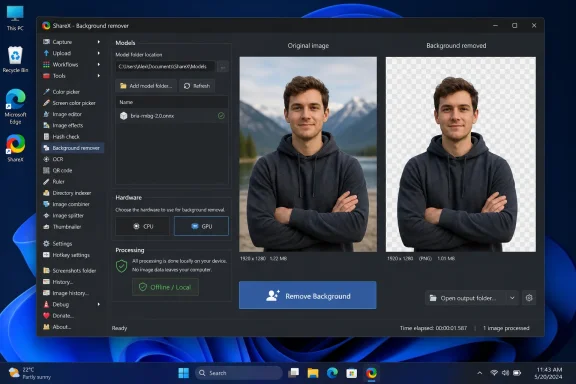
ShareX 21.0.0, released July 3, 2026, adds an AI-powered Background Remover tool for Windows that can strip backgrounds from screenshots and images after users manually download a compatible ONNX model. The feature is not just another screenshot trick; it is a sign that AI image processing is moving from cloud services and heavyweight editors into everyday desktop utilities. As Neowin highlighted in its walkthrough, the promise is brutally simple: open an image, pick a model, click a button, save the cutout. The catch is just as important: the quality, licensing, and predictability now depend on a model the user brings to the tool.
ShareX has always been the power user’s answer to the question Microsoft never quite settled: what should a screenshot tool actually be? Windows has Snipping Tool, Game Bar capture, clipboard shortcuts, and a growing set of image-editing conveniences, but ShareX built its following by treating capture as the start of a workflow rather than the end of one.
Version 21.0.0 pushes that philosophy into a new phase. According to the official ShareX changelog, the release adds a new “Background remover” tool alongside an “Image Comparer” tool and a pile of editor refinements. That sounds small until you consider what background removal used to imply: upload the image to a web service, open Photoshop, subscribe to a design suite, or run a separate AI tool.
The new ShareX feature keeps the processing local once configured. ShareX’s own documentation says the app does not bundle AI models because doing so would significantly increase installer size, so users must download a model separately. That design choice is practical, but it also makes the feature feel different from the one-click magic Windows users increasingly expect from AI-branded software.
This is not Copilot-style AI, where the vendor hides the machinery and sells the button. It is closer to a modular workbench. ShareX provides the interface, the file handling, and the execution path; the model supplies the judgment.
ShareX recommends
Once the model is installed, the actual workflow is refreshingly direct. Click Browse, select an image, choose the model and processing device, click Remove Background, preview the result, and then save it. ShareX allows CPU or GPU processing, with automatic device selection recommended for most users.
That CPU/GPU choice matters more than it looks. On a desktop with a decent GPU, background removal should feel much closer to an editing operation than a batch render. On older laptops, underpowered office PCs, or virtual desktops, users may still find that “local AI” means “local waiting.”
That changes the privacy equation. A screenshot often contains more sensitive information than a photograph: internal dashboards, customer names, browser tabs, email previews, IP addresses, admin consoles, debug traces, and licensing keys accidentally captured in the corner of a window. Sending that image to a web-based background remover may be unacceptable in a corporate environment even if the service is reputable.
With ShareX, the processing can happen on the machine after the user supplies the model. That does not automatically make every workflow compliant, but it removes one obvious data-exfiltration concern. For IT pros and security-minded users, this is the difference between “never upload that” and “maybe this can fit into our internal tooling policy.”
It also fits ShareX’s historical audience. This is not an app designed around a single large button and a marketing animation. It is a utility beloved by people who already know what destination rules, after-capture tasks, hotkeys, and uploaders are. Asking that audience to put an ONNX file into a folder is not absurd; it is almost on brand.
BRIA RMBG 2.0, the model ShareX recommends, is a serious background-removal model rather than a toy filter. Model listings and third-party summaries describe it as a dichotomous image segmentation model developed by BRIA AI and aimed at high-quality foreground-background separation. The ONNX format matters because it allows models to run efficiently outside their original training framework and inside desktop applications.
But model choice brings licensing into the foreground. ShareX’s documentation warns that models are downloaded from third parties and license terms can vary. That warning should not be skimmed over, especially in business use. Some AI models are available for non-commercial use but require separate permission or payment for commercial production workflows.
For home users making a transparent avatar or cleaning up a screenshot for a forum post, this may never become an issue. For a managed IT department preparing documentation, marketing screenshots, product training material, or customer-facing support pages, it absolutely can. The fact that ShareX is free and open-source does not automatically launder the licensing status of a model dropped into its models folder.
That limitation is not a ShareX failure so much as a reminder of what background removal actually is. The model has to infer the subject, generate a mask, and decide what belongs to the foreground. If the image itself does not make that distinction obvious, the tool cannot ask a clarifying question.
Traditional editors give users control over selections, layers, masks, feathering, edge refinement, and manual correction. ShareX’s Background Remover is intentionally simpler. It is built for speed, not art direction.
That means it will be useful for the kind of screenshot chores that waste time precisely because they are not worth opening Photoshop for. Removing the wall behind a webcam portrait, isolating a product window, cutting a mascot from a simple image, or cleaning up an illustrative graphic is a good fit. Preparing polished commercial imagery with complex edges is still a job for a proper editor.
Power users do not just take screenshots. They annotate them, crop them, compare them, upload them, copy them, OCR them, blur them, watermark them, and route them into different destinations depending on context. ShareX became popular because it understood that a screenshot is often a node in a workflow graph.
Background removal fits that pattern. In isolation, it is a nice editing trick. Inside ShareX, it becomes one more step in a capture-to-publish pipeline.
That is why the feature may matter more to WindowsForum readers than a similar button in a design app. ShareX is already installed on many machines where screenshots are part of support, documentation, bug reporting, QA, community moderation, or IT administration. Adding local background removal there reduces friction in places where friction tends to become habit.
Halos around subjects are common. Hair and fur may become clumpy. Transparent objects may be treated as solid. Shadows may be removed when they should remain, or preserved when they should vanish. In screenshots, UI panels and white space can confuse the boundary between object and background.
This matters because ShareX is often used for communication, not just decoration. A bad cutout in a support article can obscure the thing being explained. A sloppy mask in a security report can make an image look tampered with. A background removed from a screenshot may also remove context the reader needs.
So the right posture is not “AI did it.” The right posture is “AI made a draft.” ShareX has added a faster first pass, not a replacement for looking carefully at the result.
A model file is not a traditional executable in the way a
The practical answer is likely policy, not panic. If a company already permits ShareX, it can standardize on a specific model, distribute it internally, document its license, and block random alternatives. If it does not permit ShareX, this feature probably will not be the deciding factor by itself.
The bigger lesson is that desktop utilities are becoming AI hosts. That means IT governance has to move beyond the app binary and start paying attention to the external model artifacts users add after installation.
For Windows enthusiasts, this is an exciting turn. It means the PC remains a place where advanced workflows can be assembled, modified, and owned. The same machine that captures the screenshot can process it, annotate it, archive it, and publish it without handing the raw image to a web service.
For software makers, it creates a new design challenge. If the feature is too exposed, casual users get lost in model files and device options. If it is too hidden, power users lose the control and transparency that made local AI appealing in the first place.
ShareX’s answer is very ShareX: expose the machinery, document the steps, and trust users to decide how deep they want to go. That will not satisfy everyone. It will satisfy exactly the kind of user who installed ShareX in the first place.
 ShareX Turns the Screenshot Utility Into a Local AI Workbench
ShareX has always been the power user’s answer to the question Microsoft never quite settled: what should a screenshot tool actually be? Windows has Snipping Tool, Game Bar capture, clipboard shortcuts, and a growing set of image-editing conveniences, but ShareX built its following by treating capture as the start of a workflow rather than the end of one.Version 21.0.0 pushes that philosophy into a new phase. According to the official ShareX changelog, the release adds a new “Background remover” tool alongside an “Image Comparer” tool and a pile of editor refinements. That sounds small until you consider what background removal used to imply: upload the image to a web service, open Photoshop, subscribe to a design suite, or run a separate AI tool.
The new ShareX feature keeps the processing local once configured. ShareX’s own documentation says the app does not bundle AI models because doing so would significantly increase installer size, so users must download a model separately. That design choice is practical, but it also makes the feature feel different from the one-click magic Windows users increasingly expect from AI-branded software.
This is not Copilot-style AI, where the vendor hides the machinery and sells the button. It is closer to a modular workbench. ShareX provides the interface, the file handling, and the execution path; the model supplies the judgment.
The Few Clicks Come After the First Setup
The setup flow is simple enough for enthusiasts but still a little alien for ordinary Windows users. In ShareX, users open Tools, then Background remover, then use the folder button beside the Models list to open the models directory. They download an.onnx model, place it directly in that folder, return to the tool, refresh the model list, and select the model.ShareX recommends
bria-rmbg-2.0.onnx, according to its own Background Remover documentation. Neowin’s guide repeats that recommendation while noting that other models may work. This is where the feature’s “few clicks” headline needs a sober footnote: the removal itself is a few clicks, but the first run asks users to understand that a model file is not a plug-in, not an app, and not merely another image filter.Once the model is installed, the actual workflow is refreshingly direct. Click Browse, select an image, choose the model and processing device, click Remove Background, preview the result, and then save it. ShareX allows CPU or GPU processing, with automatic device selection recommended for most users.
That CPU/GPU choice matters more than it looks. On a desktop with a decent GPU, background removal should feel much closer to an editing operation than a batch render. On older laptops, underpowered office PCs, or virtual desktops, users may still find that “local AI” means “local waiting.”
Local AI Is the Real Feature, Not the Cutout
The most interesting thing about ShareX 21.0.0 is not that it removes backgrounds. Background removal is now table stakes in design tools, photo apps, e-commerce platforms, and phone galleries. The interesting part is that ShareX is making a local, model-based version available inside a free Windows screenshot utility.That changes the privacy equation. A screenshot often contains more sensitive information than a photograph: internal dashboards, customer names, browser tabs, email previews, IP addresses, admin consoles, debug traces, and licensing keys accidentally captured in the corner of a window. Sending that image to a web-based background remover may be unacceptable in a corporate environment even if the service is reputable.
With ShareX, the processing can happen on the machine after the user supplies the model. That does not automatically make every workflow compliant, but it removes one obvious data-exfiltration concern. For IT pros and security-minded users, this is the difference between “never upload that” and “maybe this can fit into our internal tooling policy.”
It also fits ShareX’s historical audience. This is not an app designed around a single large button and a marketing animation. It is a utility beloved by people who already know what destination rules, after-capture tasks, hotkeys, and uploaders are. Asking that audience to put an ONNX file into a folder is not absurd; it is almost on brand.
The Model Is Now Part of the Product, Whether ShareX Ships It or Not
ShareX’s decision not to bundle background-removal models is understandable. AI models are large, licensing terms vary, and users may want different tradeoffs between speed, quality, and usage rights. But that separation creates an uncomfortable truth: the quality of the feature users experience is no longer entirely ShareX’s feature.BRIA RMBG 2.0, the model ShareX recommends, is a serious background-removal model rather than a toy filter. Model listings and third-party summaries describe it as a dichotomous image segmentation model developed by BRIA AI and aimed at high-quality foreground-background separation. The ONNX format matters because it allows models to run efficiently outside their original training framework and inside desktop applications.
But model choice brings licensing into the foreground. ShareX’s documentation warns that models are downloaded from third parties and license terms can vary. That warning should not be skimmed over, especially in business use. Some AI models are available for non-commercial use but require separate permission or payment for commercial production workflows.
For home users making a transparent avatar or cleaning up a screenshot for a forum post, this may never become an issue. For a managed IT department preparing documentation, marketing screenshots, product training material, or customer-facing support pages, it absolutely can. The fact that ShareX is free and open-source does not automatically launder the licensing status of a model dropped into its models folder.
The Tool Works Best When the Image Has an Obvious Subject
Neowin’s hands-on testing found what most users should expect from this class of feature: good results in many ordinary cases, mixed results in harder ones. Portraits and simple subjects against clear backgrounds are the comfort zone. Complex compositions, ambiguous foregrounds, busy UI elements, translucent objects, hair, shadows, and overlapping shapes are where automated cutouts can start to fray.That limitation is not a ShareX failure so much as a reminder of what background removal actually is. The model has to infer the subject, generate a mask, and decide what belongs to the foreground. If the image itself does not make that distinction obvious, the tool cannot ask a clarifying question.
Traditional editors give users control over selections, layers, masks, feathering, edge refinement, and manual correction. ShareX’s Background Remover is intentionally simpler. It is built for speed, not art direction.
That means it will be useful for the kind of screenshot chores that waste time precisely because they are not worth opening Photoshop for. Removing the wall behind a webcam portrait, isolating a product window, cutting a mascot from a simple image, or cleaning up an illustrative graphic is a good fit. Preparing polished commercial imagery with complex edges is still a job for a proper editor.
Microsoft’s Built-In Tools Still Leave Room for ShareX
The feature also says something about Windows itself. Microsoft has steadily improved Snipping Tool, Photos, Paint, and related inbox utilities, and the company has been folding AI features into Windows at a rapid pace. Yet ShareX continues to thrive because Microsoft’s capture workflow still tends to optimize for the mainstream user, not the obsessive one.Power users do not just take screenshots. They annotate them, crop them, compare them, upload them, copy them, OCR them, blur them, watermark them, and route them into different destinations depending on context. ShareX became popular because it understood that a screenshot is often a node in a workflow graph.
Background removal fits that pattern. In isolation, it is a nice editing trick. Inside ShareX, it becomes one more step in a capture-to-publish pipeline.
That is why the feature may matter more to WindowsForum readers than a similar button in a design app. ShareX is already installed on many machines where screenshots are part of support, documentation, bug reporting, QA, community moderation, or IT administration. Adding local background removal there reduces friction in places where friction tends to become habit.
The AI Button Does Not Eliminate Editorial Judgment
The weak point in AI background removal is not merely imperfect edges. It is the false confidence that comes from a clean preview. If the output looks good at thumbnail size, users may assume the model understood the image. Zoom in, place the cutout on a different background, or export it to a slide deck, and the problems become more visible.Halos around subjects are common. Hair and fur may become clumpy. Transparent objects may be treated as solid. Shadows may be removed when they should remain, or preserved when they should vanish. In screenshots, UI panels and white space can confuse the boundary between object and background.
This matters because ShareX is often used for communication, not just decoration. A bad cutout in a support article can obscure the thing being explained. A sloppy mask in a security report can make an image look tampered with. A background removed from a screenshot may also remove context the reader needs.
So the right posture is not “AI did it.” The right posture is “AI made a draft.” ShareX has added a faster first pass, not a replacement for looking carefully at the result.
Admins Will Like the Locality and Worry About the Supply Chain
For enterprise IT, the feature lands in a familiar gray zone. Local processing is attractive because screenshots can contain sensitive data, and avoiding third-party upload services is a genuine win. But allowing users to download arbitrary ONNX files from the internet and place them into an application folder is not an automatic security victory.A model file is not a traditional executable in the way a
.exe is, but modern AI runtimes and model formats are still part of the software supply chain. Organizations will want to know where models came from, what license governs them, whether hashes are pinned, whether the model is approved for business use, and whether ShareX itself is being installed from an official source.The practical answer is likely policy, not panic. If a company already permits ShareX, it can standardize on a specific model, distribute it internally, document its license, and block random alternatives. If it does not permit ShareX, this feature probably will not be the deciding factor by itself.
The bigger lesson is that desktop utilities are becoming AI hosts. That means IT governance has to move beyond the app binary and start paying attention to the external model artifacts users add after installation.
The Open-Source Desktop Is Becoming the AI Edge
ShareX 21.0.0 is a small example of a larger shift: AI features are moving from remote platforms into ordinary desktop utilities. That shift is not happening because every user suddenly wants to manage models. It is happening because local hardware is good enough, model formats are portable enough, and users are increasingly aware that uploading everything to a cloud service has costs.For Windows enthusiasts, this is an exciting turn. It means the PC remains a place where advanced workflows can be assembled, modified, and owned. The same machine that captures the screenshot can process it, annotate it, archive it, and publish it without handing the raw image to a web service.
For software makers, it creates a new design challenge. If the feature is too exposed, casual users get lost in model files and device options. If it is too hidden, power users lose the control and transparency that made local AI appealing in the first place.
ShareX’s answer is very ShareX: expose the machinery, document the steps, and trust users to decide how deep they want to go. That will not satisfy everyone. It will satisfy exactly the kind of user who installed ShareX in the first place.
The New Screenshot Trick Comes With Old-School Responsibilities
The practical message is straightforward: ShareX can now remove backgrounds locally, but users should treat setup, model choice, and output review as part of the workflow rather than as annoyances. The feature is powerful because it is not locked to a single bundled black box. That same openness is why users need to be deliberate.- ShareX 21.0.0 added the Background Remover tool on July 3, 2026.
- The feature requires users to download a compatible ONNX background-removal model separately.
- ShareX recommends
bria-rmbg-2.0.onnx, while warning that third-party model licenses can vary. - The tool can process images on CPU or GPU, with automatic device selection recommended for most users.
- Results are strongest on images with clear foreground subjects and weaker on complex compositions.
- Business users should verify model licensing and distribution practices before using the feature in commercial workflows.