

Microsoft has folded its long‑running shopping tools into Copilot in Edge, turning the browser’s assistant into an active, AI‑driven shopping companion that can compare prices, show price history, track items, summarize reviews, and surface cashback opportunities — with the initial rollout focused on users in the United States.
Microsoft’s Edge browser previously offered shopping helpers — a blue shopping tag, checkout flyouts, and standalone price‑tracking widgets — that helped users find coupons and price history. With this new update, those features are being consolidated into Copilot in Edge, a single conversational pane designed to give shoppers context and actionable recommendations while they browse. Microsoft says the move is intended to reduce friction during product research and to centralize price comparison, price history, price tracking, product insights and cashback into one place. This change is more than a UI reshuffle. It is part of Microsoft’s broader strategy to make Copilot the primary interaction surface inside Edge — not just for productivity tasks but for transactional experiences. The shopping capabilities can be invoked from the Copilot sidebar or, when users enable the more assertive Copilot Mode, the assistant will proactively nudge shoppers if it detects a lower price or a cashback opportunity while they are on checkout pages. Microsoft documents that many of these features are live for U.S. users as part of a seasonal rollout.
Microsoft’s announcement and how‑to coverage have already been picked up across independent outlets and user forums, and the press and community threads reinforce that the change is a consolidation of familiar tools under Copilot — not a sudden invention of new shopping mechanics. For readers who care about saving money without extra extensions, Copilot in Edge is worth trying; for privacy‑minded users or organizations, the feature deserves careful configuration and policy review. Conclusion: Copilot’s shopping assistant ties together useful capabilities into a single, conversational shopping surface — a practical evolution with clear benefits and measurable risks. Users who opt in will likely find it a convenient way to compare prices and track deals; everyone else should evaluate permissions and monitor cashback redemptions before relying on it.
Source: ETV Bharat Microsoft Rolls Out AI-Powered Shopping Assistant Feature For Copilot In Edge Browser: How To Use This Functionality
 Background / Overview
Microsoft’s Edge browser previously offered shopping helpers — a blue shopping tag, checkout flyouts, and standalone price‑tracking widgets — that helped users find coupons and price history. With this new update, those features are being consolidated into Copilot in Edge, a single conversational pane designed to give shoppers context and actionable recommendations while they browse. Microsoft says the move is intended to reduce friction during product research and to centralize price comparison, price history, price tracking, product insights and cashback into one place. This change is more than a UI reshuffle. It is part of Microsoft’s broader strategy to make Copilot the primary interaction surface inside Edge — not just for productivity tasks but for transactional experiences. The shopping capabilities can be invoked from the Copilot sidebar or, when users enable the more assertive Copilot Mode, the assistant will proactively nudge shoppers if it detects a lower price or a cashback opportunity while they are on checkout pages. Microsoft documents that many of these features are live for U.S. users as part of a seasonal rollout. What Microsoft is shipping: core features
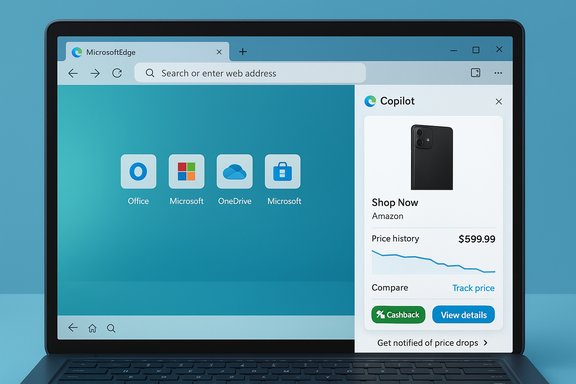
When Copilot detects a supported product page, it can present a compact, information‑dense product card inside the Copilot sidebar. The major shopping features now integrated in Copilot include:- Price Comparison — Copilot pulls prices from multiple retailers and shows them side‑by‑side so you don’t have to hop between tabs.
- Price History — A historical price chart helps judge whether the current price is a good deal or a temporary spike.
- Price Tracking / Alerts — Set a target price and have Copilot notify you when the item meets that goal (in‑app notifications and optional email).
- Product Insights — AI‑summarized review highlights, pros/cons, and aggregated sentiment streamline long review lists.
- Microsoft Cashback — Copilot will flag eligible purchases and guide you through activating cashback offers; Microsoft pays out cashback via PayPal after purchases are confirmed.
How the experience works in practice
The passive view: product cards in the sidebar
When you visit a supported store page, Copilot surfaces a product card with:- Photo, retailer and price
- Ratings and quick review snippets
- A price history graph and a “Compare” row listing other sellers
- Buttons to “View details”, “Track price”, or “Buy”
The active mode: Copilot Mode and proactive nudges
If you enable Copilot Mode and opt‑in to the more integrated Page Context permissions, Copilot may proactively notify you when:- A lower price exists on another open tab or another retailer
- A cashback offer is available for the purchase you are about to make
Step‑by‑step: how to use Copilot shopping in Edge (practical walkthrough)
- Update Microsoft Edge to the latest build. Many Copilot shopping features require the most recent Edge release.
- Sign in with your Microsoft account. Personalized shopping features (price alerts, order history, cashback) require account sign‑in.
- Enable Copilot in the sidebar (if not already visible): click the Copilot icon in the top right or the sidebar.
- Visit a supported product page and click the Copilot icon. A product insights card should appear with price, ratings and price‑history.
- To track a price: click Track Price or the alert icon on the product card, choose your price goal and duration, and enable email alerts if desired. Copilot will notify you when the price target is met.
- To enable proactive nudges (optional): toggle Copilot Mode on and permit Copilot to access Page Context. Expect visible prompts when Copilot reads current tabs. These permissions are explicit and reversible.
- For cashback: when Copilot surfaces a cashback offer, follow the prompts to activate it. Microsoft’s cashback program pays out via PayPal after purchase confirmation — keep receipts and monitor the cashback dashboard.
- Keep Edge up to date and check Settings > Privacy, search, and services > Search and connected experiences to ensure shopping features are enabled.
- If you don’t see shopping cards, confirm region availability; Microsoft has staged the rollout and the U.S. has priority in the initial release.
Why this matters: the strategic and UX case
Consolidating shopping tools into Copilot simplifies the research-to-purchase flow. For users, the benefits are immediate:- Fewer tabs and less manual searching. Copilot’s multi‑tab reasoning and conversational follow‑ups let you compare and refine options without rebuilding searches.
- Integrated alerts reduce setup friction. You no longer need third‑party extensions or separate trackers to watch price drops.
- Native checkout potential. Microsoft has signalled native checkout ambitions inside Copilot, shortening the path from discovery to purchase and creating a potentially smoother user experience.
Strengths: what Microsoft did well
- Integrated UX: Bringing price history, comparisons, review summaries and cashback into a single conversational pane reduces cognitive load and tab clutter for shoppers.
- Conversational follow‑ups: The ability to ask context‑aware follow-ups is a genuine time saver during product research.
- Opt‑in controls and visible prompts: Microsoft emphasizes permissioned access for Copilot Mode, with visible indicators when the assistant reads pages or acts on behalf of the user. This is an important user‑control design choice.
- Leverages Microsoft ecosystem: Integration with Microsoft accounts, potential ties to order history and a built-in cashback program gives Microsoft a unique pathway to a full shopping loop inside its own surfaces.
Risks, limitations and practical concerns
No product is risk‑free, and several limitations and open questions are worth calling out.Privacy and data use
Copilot’s value comes from context — browsing history, open tabs, and (optionally) order history. Centralizing these signals increases the amount of sensitive shopping metadata held by Microsoft, which raises questions about retention, profiling for advertising, and data sharing across services. Microsoft documents opt‑in toggles and says personalization/advertising controls exist, but users should carefully review settings and the privacy documentation.Cashback reliability
Microsoft states that cashback payouts are delivered via PayPal, but community reports show intermittent transfer issues and delays when redeeming cashback. Users have reported stuck redemptions, verification problems and long wait times; Microsoft community support threads highlight these operational frictions. Until these edge cases are ironed out, shoppers should treat cashback as a convenience that can sometimes require follow‑up.AI confidence and provenance
AI summarization of reviews and price‑insight judgments are only as good as their data. Copilot’s product insights may not always clearly show the provenance of claims (which retailers, which timestamps, which reviews were weighted). Without transparent provenance or confidence scores, automated recommendations can be misleading — especially on items with few reviews or where review spam is common. This is a known industry risk for automated review summarizers.Regional rollout and merchant coverage
The feature rollout is regionally gated and merchant coverage varies. Not all retailers — especially smaller, non‑verified merchants — will appear in Copilot comparisons unless they participate in Microsoft’s merchant programs and feeds. That can bias comparisons towards participating retailers. Microsoft documents merchant verification and feed requirements for Shopping placements, which can create onboarding delays.How Copilot’s shopping features compare to rivals
- Google has invested heavily in Shopping and integrated price insights into Search; Google’s advantage is deep shopping data in Search and enormous shopping ad inventory. Microsoft’s angle is a browser‑first assistant that can act on open tabs and leverage Windows distribution. The experiences are converging, but the distribution model differs: search vs. assistant in the browser.
- OpenAI and startups like Perplexity focus on chat‑centric shopping assistants that synthesize web results in conversation. Microsoft’s differentiator is tighter native integration into Edge and Windows — plus direct merchant partnerships and the existing cashback program.
- Amazon remains the dominant marketplace for transactions; none of these assistants can fully replace the convenience and trust users place in marketplace ecosystems, but assistants can influence the research and discovery phases where platform capture still matters.
Practical guidance for users, merchants and IT admins
For shoppers
- Keep Edge updated and sign into a Microsoft account to access the richest Copilot shopping features.
- Treat cashback as a helpful bonus but validate payouts in your PayPal account; save receipts until cashback is confirmed. Community reports suggest occasional issues during redemption.
- Use price tracking for items you can wait to buy; set realistic goals and durations.
- If you prefer privacy, avoid enabling Page Context or Copilot Mode so Copilot cannot read your open tabs or browsing history.
For merchants
- If you want to appear in Copilot comparison cards, ensure your product feed and merchant store are verified in Microsoft’s merchant programs and that tracking tags (UET) are properly configured; merchant onboarding can be automated or manual and may take several days.
For IT administrators
- Edge provides group policy controls for shopping features (EdgeShoppingAssistantEnabled) and Copilot behaviors. Enterprises should review these policies before wide Copilot Mode adoption to align with privacy, compliance and MDM rules. Copilot’s proactive tab‑reading and action features should be governed centrally for managed fleets.
What we still don’t know (and what to watch next)
- Exact retention windows and cross‑service usage of Copilot order history and shopping signals remain incompletely documented. Microsoft’s public docs describe opt‑in choices, but administrator and privacy teams should look for explicit retention and sharing policies.
- Native checkout details: Microsoft hints at native checkout inside Copilot, but full details on payment flows, dispute resolution and fraud protections are still emerging. How Microsoft handles chargebacks, returns and merchant liability when transactions begin inside Copilot will be important.
- Cashback operational reliability: Microsoft documents PayPal as the payout mechanism, yet community threads and support tickets show real users experiencing delays and errors. Microsoft needs to stabilize the redemption flow to avoid undermining user trust.
- Global expansion: The initial rollout prioritizes the U.S.; watch for timing, local merchant partnerships and regulatory scrutiny as Microsoft expands to other markets.
Final analysis: a pragmatic verdict
Microsoft’s move to make Copilot an active shopping assistant inside Edge is a logical evolution of previous shopping features. The consolidation into a conversational, context‑aware pane addresses real pain points: tab clutter, manual price tracking and tedious review reading. For shoppers who value convenience and are comfortable with Microsoft’s opt‑in personalization, Copilot’s shopping features can save time and money. However, the trade‑offs are meaningful. Centralizing shopping context elevates privacy considerations, and the cashback mechanics — while attractive — have shown operational fragility in user reports. Microsoft’s emphasis on visible permissions and opt‑ins is a strong design stance, but users and admins should stay vigilant, verify PayPal redemptions, and carefully manage Copilot’s access settings. This is not an instant Amazon killer — rather, it is Microsoft using its browser and account ecosystem to win the research moment and to make discovery and checkout smoother inside its own surfaces. If Microsoft stabilizes cashback flows, clarifies data retention and increases transparency about the sources behind AI judgments, Copilot could become a genuinely useful, everyday shopping companion for many Edge users. Until then, savvy shoppers should use Copilot’s tools, keep an eye on cashback payouts, and control permissions according to their privacy comfort level.Microsoft’s announcement and how‑to coverage have already been picked up across independent outlets and user forums, and the press and community threads reinforce that the change is a consolidation of familiar tools under Copilot — not a sudden invention of new shopping mechanics. For readers who care about saving money without extra extensions, Copilot in Edge is worth trying; for privacy‑minded users or organizations, the feature deserves careful configuration and policy review. Conclusion: Copilot’s shopping assistant ties together useful capabilities into a single, conversational shopping surface — a practical evolution with clear benefits and measurable risks. Users who opt in will likely find it a convenient way to compare prices and track deals; everyone else should evaluate permissions and monitor cashback redemptions before relying on it.
Source: ETV Bharat Microsoft Rolls Out AI-Powered Shopping Assistant Feature For Copilot In Edge Browser: How To Use This Functionality
