

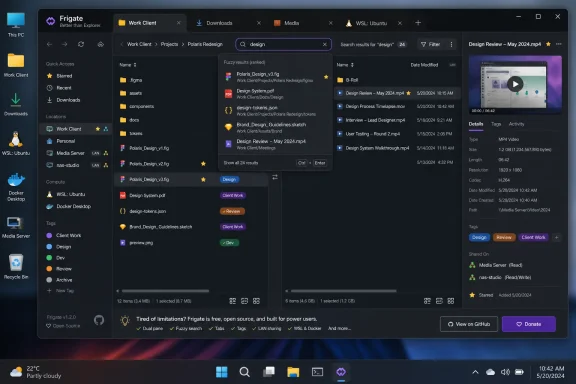
Sigma File Manager, a free and open-source file manager for Windows and Linux, has emerged as a pointed critique of Microsoft’s decade-long caution around File Explorer by bundling modern search, previews, split panes, tabs, tagging, LAN sharing, extensions, and project-oriented navigation into one aggressively evolving desktop app. It is not a drop-in replacement for every Windows workflow, and it does not need to be. Its real value is that it makes File Explorer’s modest evolution look less like prudence and more like a failure of imagination. For Windows users who live in folders all day, Sigma is less a novelty than an uncomfortable demonstration of what Microsoft could have built by now.
The charitable reading of File Explorer is that Microsoft has been careful with one of Windows’ most important surfaces. File management is not a playground feature; it is where people delete tax records, move family photos, rename project folders, and break line-of-business workflows by accident. A conservative default file manager has real value.
That argument explains some of Microsoft’s restraint, but it does not excuse the stagnation. File Explorer has gained useful Windows 11-era improvements, especially tabs, a cleaner command bar, tighter OneDrive visibility, and small visual updates that make the app less obviously out of step with the rest of the system. Those changes matter because millions of people use File Explorer without thinking about it, and boring reliability is part of the Windows bargain.
But the bargain has narrowed. File Explorer today still feels like a layered inheritance: shell history, compatibility obligations, cloud hooks, legacy panes, modern icons, and a search box that too often behaves as if it is doing the user a favor by participating. It is better than it was, but “better” is not the same as “rethought.”
The result is a strange kind of software humility. File Explorer rarely tries to infer what the user is doing, rarely surfaces context at the moment it would be useful, and rarely treats a folder as part of a broader project. It opens locations, displays items, and waits. That was enough when local disks were the center of personal computing; it feels thin in a world of WSL environments, cloud-synced workspaces, media libraries, developer repositories, NAS shares, and half-remembered filenames.
That matters because the modern desktop is not organized only by paths. A user may think in terms of “that video folder,” “the current client project,” “the WSL thing Docker created,” “the downloads I need to clean up,” or “the folder I always send files from.” Traditional file managers can represent those ideas, but usually only after the user bends them into pinned shortcuts, jump lists, favorites, or muscle memory.
Sigma’s approach is more opinionated. It places common locations and storage state in front of the user and treats navigation as a workflow rather than a side effect. That is not cosmetic. It changes the feel of the app from passive browser to active workbench.
This is where Microsoft’s restraint becomes conspicuous. Windows has spent years adding intelligence around the edges of the operating system — cloud suggestions, Start menu search, Copilot branding, contextual recommendations — while leaving the core file-management experience comparatively unambitious. Sigma shows that the obvious next step was never science fiction. It was just a file manager that understood files as work-in-progress.
This sounds small until you are sorting media. Anyone who has cleaned up a folder of recordings, screen captures, phone videos, exports, or music drafts knows the absurdity of opening file after file just to confirm which one is which. File Explorer’s Preview Pane technically exists, but its usefulness varies by file type, handler, configuration, and mood. When it works, it is helpful. When it does not, users quietly route around it.
Sigma’s version feels closer to how the task should work. A file manager should make inspection cheap. It should reduce the number of times a user has to leave the file manager, open another app, wait for that app to load, close it, and return to the folder.
The larger point is not that File Explorer lacks previews entirely. It is that the default experience still treats previewing as an accessory, while modern file work increasingly depends on fast inspection. The more files we create, duplicate, download, sync, and export, the more important it becomes to identify them without performing a tiny app-launch ceremony each time.
Sigma’s global search is designed around the way humans actually remember things. It can index large numbers of items, tolerate typos, handle imperfect casing, survive wrong word order, and still return useful matches. The point is not merely speed; it is forgiveness. Users rarely remember filenames exactly, especially for files they did not create or files generated by cameras, browsers, build systems, office suites, and chat apps.
This is the kind of intelligence that belongs in a file manager before it belongs in a chatbot. The machine does not need to write a poem about your directory tree. It needs to find the file whose name you half-remember from two weeks ago.
File Explorer’s search problem has always been bigger than performance. It is a trust problem. If users believe search may miss the thing they are looking for, they stop asking. Once that happens, the file manager loses one of its central jobs and becomes a manual browsing tool with a search-shaped decoration in the corner.
Sigma also separates quick filtering from broader indexed search in a way that respects different user intents. Sometimes you want to narrow the current folder as you type. Sometimes you want to search more deliberately across a wider scope. Those are not the same interaction, and treating them as distinct modes makes the app feel less blunt.
File Explorer’s tab support was overdue and welcome, but tabs alone do not solve the oldest file-management problem: source on one side, destination on the other. Users still end up dragging between windows, snapping layouts, alt-tabbing, or opening duplicate Explorer instances. These are normal behaviors only because Windows trained people to accept them.
A split-pane file manager acknowledges what the task actually is. Copying, comparing, sorting, and reorganizing are relational actions. They involve at least two places. Designing a file manager around one visible location at a time is a historical artifact, not a law of nature.
This is where Sigma feels less like a replacement for File Explorer and more like an indictment of its defaults. Microsoft has had decades to decide that dual-pane workflows are not just for orthodox file managers and sysadmins. The company never really made that leap in the mainstream shell.
Windows context menus, by contrast, have long been a place where shell extensions, vendor ambitions, backward compatibility, and user frustration meet. Windows 11 tried to simplify the visible right-click menu, but the split between the modern menu and “show more options” also made clear how much complexity had built up underneath. Microsoft simplified the surface without fully resolving the underlying design problem.
Sigma’s advantage is partly that it does not carry the same ecosystem burden. A third-party file manager can be cleaner because it is not the canonical Windows shell. But that does not invalidate the lesson. Users do not want context menus to be museums. They want them to be accurate predictions of what they are probably trying to do next.
The inclusion of terminal access is especially telling. Microsoft has spent years improving Windows Terminal, PowerShell, WSL, and developer workflows, but File Explorer still often feels like a tourist visiting those worlds rather than a native citizen of them. A modern file manager should understand that “open here in terminal” is not a niche request. For developers, admins, and advanced users, it is table stakes.
Sigma’s tagging and favorites features are not revolutionary in isolation. macOS Finder has had tags for years, and plenty of third-party tools have experimented with metadata-driven navigation. What matters is that Sigma brings those ideas into the file manager as ordinary tools rather than exotic database features.
The command palette pushes in the same direction. Instead of forcing users to remember where a setting or action lives, Sigma lets them summon commands through an overlay. That pattern is familiar from developer tools, editors, browsers, and productivity apps, and it makes sense in a file manager because file work often involves fast action switching.
File Explorer still leans heavily on visible chrome, menus, ribbons past and present, keyboard shortcuts, and whatever shell integration a user has learned over time. That works for continuity, but it leaves little room for discovery. Sigma’s command palette suggests a different assumption: the app has more capabilities than can comfortably fit in static interface furniture, so users need a fast way to ask for actions directly.
This is also where caution becomes more defensible. File managers sit close to sensitive data. An extension ecosystem around file access, previews, sharing, and automation needs serious attention to permissions, provenance, updates, and user trust. A bad browser extension can spy on browsing; a bad file-manager extension could potentially see the shape of a user’s life.
That is one reason Microsoft may be reluctant to turn File Explorer into an extension-forward environment. Windows already has shell extensions, preview handlers, namespace extensions, and decades of plug-in-like integration points. The problem is that this ecosystem is powerful but not especially user-comprehensible. It often feels like plumbing exposed through side effects.
Sigma has the advantage of starting fresh. Its marketplace is young, and that means it can appear cleaner before it has endured years of incentives, abandoned extensions, and compatibility edge cases. Still, the direction is right: the file manager should be extensible in ways users can see, manage, and revoke.
Windows has long supported network shares, SMB, nearby sharing, and various enterprise-grade file access patterns. But here again, capability is not the same as a good user experience. The operating system can do many things that normal users avoid because they are buried, brittle, or phrased in the language of network administration.
Sigma’s local sharing features point toward a more approachable model. The file manager is already where the user selects the file or folder. That is the natural place to say, “make this available nearby.” When the file manager owns the moment of intent, sharing can feel less like configuring infrastructure and more like completing a task.
The caveat is that network features must earn trust. Convenience around file sharing can become risk if users do not understand what is exposed, to whom, for how long, and on which network. Sigma’s direction is compelling, but the standard for clarity should be high because the feature crosses from local organization into access control.
That burden is real. A default file manager cannot chase every clever idea without risking confusion or breakage. The more central a Windows component is, the more conservative its evolution becomes.
But there is a difference between respecting compatibility and mistaking it for product vision. Microsoft has shown in other parts of Windows that it is willing to add parallel modern surfaces while keeping legacy foundations alive. Windows Terminal did not require Command Prompt to disappear. The Settings app has slowly displaced Control Panel without fully eliminating it. PowerToys exists as a proving ground for advanced utilities that later influence mainstream expectations.
File Explorer could have followed a similar path. Microsoft could have built a modern mode, a project-oriented home, a trustworthy indexed search experience, first-class dual-pane workflows, or a PowerToys-adjacent experimental file manager. Instead, the company has mostly sanded the old object.
Sigma’s significance is not that it single-handedly dethrones them. It is that it packages a modern set of expectations in a way that makes File Explorer’s inertia easy to see. Fast fuzzy search, previews that matter, split panes, command access, tagging, favorites, LAN sharing, WSL-aware locations, extensions, and richer home views are not disconnected gimmicks. They are all responses to the same pressure: people manage more files from more sources across more contexts than the classic folder browser was designed to handle.
That pressure is not going away. If anything, AI-generated output, downloaded assets, synced work folders, local development environments, screenshots, exported videos, and app-specific caches are making local file systems messier. The answer cannot simply be “search better from Start” or “put it in OneDrive.” Users still need to understand, inspect, move, compare, and clean up their files.
File Explorer’s greatest risk is not that everyone will abandon it. Most users will not. The risk is that Microsoft allows the default Windows file experience to become the least imaginative part of an increasingly complex operating system.
 File Explorer Got Better Without Becoming Modern
The charitable reading of File Explorer is that Microsoft has been careful with one of Windows’ most important surfaces. File management is not a playground feature; it is where people delete tax records, move family photos, rename project folders, and break line-of-business workflows by accident. A conservative default file manager has real value.That argument explains some of Microsoft’s restraint, but it does not excuse the stagnation. File Explorer has gained useful Windows 11-era improvements, especially tabs, a cleaner command bar, tighter OneDrive visibility, and small visual updates that make the app less obviously out of step with the rest of the system. Those changes matter because millions of people use File Explorer without thinking about it, and boring reliability is part of the Windows bargain.
But the bargain has narrowed. File Explorer today still feels like a layered inheritance: shell history, compatibility obligations, cloud hooks, legacy panes, modern icons, and a search box that too often behaves as if it is doing the user a favor by participating. It is better than it was, but “better” is not the same as “rethought.”
The result is a strange kind of software humility. File Explorer rarely tries to infer what the user is doing, rarely surfaces context at the moment it would be useful, and rarely treats a folder as part of a broader project. It opens locations, displays items, and waits. That was enough when local disks were the center of personal computing; it feels thin in a world of WSL environments, cloud-synced workspaces, media libraries, developer repositories, NAS shares, and half-remembered filenames.
Sigma Turns the File Manager Into a Workspace
Sigma File Manager’s first provocation is not any single feature. It is the fact that the app behaves as though the file manager is allowed to have a point of view. Instead of opening with the emotional texture of a municipal records office, Sigma presents a more deliberate home surface: user directories, drives, capacity indicators, and a visual sense that the app expects you to move between contexts rather than merely descend through directories.That matters because the modern desktop is not organized only by paths. A user may think in terms of “that video folder,” “the current client project,” “the WSL thing Docker created,” “the downloads I need to clean up,” or “the folder I always send files from.” Traditional file managers can represent those ideas, but usually only after the user bends them into pinned shortcuts, jump lists, favorites, or muscle memory.
Sigma’s approach is more opinionated. It places common locations and storage state in front of the user and treats navigation as a workflow rather than a side effect. That is not cosmetic. It changes the feel of the app from passive browser to active workbench.
This is where Microsoft’s restraint becomes conspicuous. Windows has spent years adding intelligence around the edges of the operating system — cloud suggestions, Start menu search, Copilot branding, contextual recommendations — while leaving the core file-management experience comparatively unambitious. Sigma shows that the obvious next step was never science fiction. It was just a file manager that understood files as work-in-progress.
The Preview Pane Should Not Feel Like a Coin Toss
One of Sigma’s strongest arguments against File Explorer is the humble information panel. Select a file, and Sigma can show the practical metadata users routinely need: type, path, size, extension, creation date, modification date, and, where supported, a direct preview. With video files, that preview can become a lightweight playback surface, turning the side panel into a triage tool rather than a decorative pane.This sounds small until you are sorting media. Anyone who has cleaned up a folder of recordings, screen captures, phone videos, exports, or music drafts knows the absurdity of opening file after file just to confirm which one is which. File Explorer’s Preview Pane technically exists, but its usefulness varies by file type, handler, configuration, and mood. When it works, it is helpful. When it does not, users quietly route around it.
Sigma’s version feels closer to how the task should work. A file manager should make inspection cheap. It should reduce the number of times a user has to leave the file manager, open another app, wait for that app to load, close it, and return to the folder.
The larger point is not that File Explorer lacks previews entirely. It is that the default experience still treats previewing as an accessory, while modern file work increasingly depends on fast inspection. The more files we create, duplicate, download, sync, and export, the more important it becomes to identify them without performing a tiny app-launch ceremony each time.
Search Is the Feature Microsoft Still Cannot Afford to Underserve
If previews are where Sigma feels more convenient, search is where File Explorer starts to look strategically weak. Windows has lived with a reputation for inconsistent local search for so long that many power users simply install Everything, lean on Start, or build their own habits around naming conventions and folder discipline. That workaround culture is damning in itself.Sigma’s global search is designed around the way humans actually remember things. It can index large numbers of items, tolerate typos, handle imperfect casing, survive wrong word order, and still return useful matches. The point is not merely speed; it is forgiveness. Users rarely remember filenames exactly, especially for files they did not create or files generated by cameras, browsers, build systems, office suites, and chat apps.
This is the kind of intelligence that belongs in a file manager before it belongs in a chatbot. The machine does not need to write a poem about your directory tree. It needs to find the file whose name you half-remember from two weeks ago.
File Explorer’s search problem has always been bigger than performance. It is a trust problem. If users believe search may miss the thing they are looking for, they stop asking. Once that happens, the file manager loses one of its central jobs and becomes a manual browsing tool with a search-shaped decoration in the corner.
Sigma also separates quick filtering from broader indexed search in a way that respects different user intents. Sometimes you want to narrow the current folder as you type. Sometimes you want to search more deliberately across a wider scope. Those are not the same interaction, and treating them as distinct modes makes the app feel less blunt.
Split Panes Are Not a Power-User Luxury
The most immediately practical Sigma feature may be split view. Open a tab, divide it into two independently navigable panes, and moving files between locations becomes a local operation rather than a window-management exercise. For anyone who regularly moves assets between project folders, downloads, cloud directories, external drives, or media libraries, this is not an exotic feature. It is basic ergonomics.File Explorer’s tab support was overdue and welcome, but tabs alone do not solve the oldest file-management problem: source on one side, destination on the other. Users still end up dragging between windows, snapping layouts, alt-tabbing, or opening duplicate Explorer instances. These are normal behaviors only because Windows trained people to accept them.
A split-pane file manager acknowledges what the task actually is. Copying, comparing, sorting, and reorganizing are relational actions. They involve at least two places. Designing a file manager around one visible location at a time is a historical artifact, not a law of nature.
This is where Sigma feels less like a replacement for File Explorer and more like an indictment of its defaults. Microsoft has had decades to decide that dual-pane workflows are not just for orthodox file managers and sysadmins. The company never really made that leap in the mainstream shell.
Context Menus Became a Battlefield Because the Default Was Weak
Sigma’s cleaner context menu is another small feature with a large shadow. Right-clicking a folder can surface sensible actions such as opening in a terminal, compressing, opening in a new tab, copying a path, sharing over the LAN, adding to favorites, or tagging. The menu feels designed around likely next actions rather than historical accumulation.Windows context menus, by contrast, have long been a place where shell extensions, vendor ambitions, backward compatibility, and user frustration meet. Windows 11 tried to simplify the visible right-click menu, but the split between the modern menu and “show more options” also made clear how much complexity had built up underneath. Microsoft simplified the surface without fully resolving the underlying design problem.
Sigma’s advantage is partly that it does not carry the same ecosystem burden. A third-party file manager can be cleaner because it is not the canonical Windows shell. But that does not invalidate the lesson. Users do not want context menus to be museums. They want them to be accurate predictions of what they are probably trying to do next.
The inclusion of terminal access is especially telling. Microsoft has spent years improving Windows Terminal, PowerShell, WSL, and developer workflows, but File Explorer still often feels like a tourist visiting those worlds rather than a native citizen of them. A modern file manager should understand that “open here in terminal” is not a niche request. For developers, admins, and advanced users, it is table stakes.
Tags, Favorites, and Commands Admit That Folders Are Not Enough
Traditional file systems are hierarchical, but human work is messier than hierarchy. A folder can belong to a client, a project, a status, a device, a trip, a media category, or an urgency level. Users work around that mismatch with folder names, shortcuts, prefixes, cloud labels, pinned locations, desktop piles, and private rituals that make sense only to them.Sigma’s tagging and favorites features are not revolutionary in isolation. macOS Finder has had tags for years, and plenty of third-party tools have experimented with metadata-driven navigation. What matters is that Sigma brings those ideas into the file manager as ordinary tools rather than exotic database features.
The command palette pushes in the same direction. Instead of forcing users to remember where a setting or action lives, Sigma lets them summon commands through an overlay. That pattern is familiar from developer tools, editors, browsers, and productivity apps, and it makes sense in a file manager because file work often involves fast action switching.
File Explorer still leans heavily on visible chrome, menus, ribbons past and present, keyboard shortcuts, and whatever shell integration a user has learned over time. That works for continuity, but it leaves little room for discovery. Sigma’s command palette suggests a different assumption: the app has more capabilities than can comfortably fit in static interface furniture, so users need a fast way to ask for actions directly.
Extensions Are a Bet Microsoft Would Find Hard to Make
Sigma’s newer extension system and open marketplace are both promising and risky. They suggest that a file manager can become a platform for workflow additions, not merely a fixed utility. In theory, that could let users add specialized previews, actions, integrations, and automations without waiting for the core app to absorb every use case.This is also where caution becomes more defensible. File managers sit close to sensitive data. An extension ecosystem around file access, previews, sharing, and automation needs serious attention to permissions, provenance, updates, and user trust. A bad browser extension can spy on browsing; a bad file-manager extension could potentially see the shape of a user’s life.
That is one reason Microsoft may be reluctant to turn File Explorer into an extension-forward environment. Windows already has shell extensions, preview handlers, namespace extensions, and decades of plug-in-like integration points. The problem is that this ecosystem is powerful but not especially user-comprehensible. It often feels like plumbing exposed through side effects.
Sigma has the advantage of starting fresh. Its marketplace is young, and that means it can appear cleaner before it has endured years of incentives, abandoned extensions, and compatibility edge cases. Still, the direction is right: the file manager should be extensible in ways users can see, manage, and revoke.
LAN Sharing Reveals the Local Network Never Went Away
One of Sigma’s more interesting features is LAN file sharing. In an era where cloud storage services dominate consumer file movement, local sharing can seem retro. In practice, it remains useful for moving large files across nearby devices, handing media to another machine, testing across systems, or avoiding the absurdity of uploading a file to the internet so it can travel six feet across a room.Windows has long supported network shares, SMB, nearby sharing, and various enterprise-grade file access patterns. But here again, capability is not the same as a good user experience. The operating system can do many things that normal users avoid because they are buried, brittle, or phrased in the language of network administration.
Sigma’s local sharing features point toward a more approachable model. The file manager is already where the user selects the file or folder. That is the natural place to say, “make this available nearby.” When the file manager owns the moment of intent, sharing can feel less like configuring infrastructure and more like completing a task.
The caveat is that network features must earn trust. Convenience around file sharing can become risk if users do not understand what is exposed, to whom, for how long, and on which network. Sigma’s direction is compelling, but the standard for clarity should be high because the feature crosses from local organization into access control.
The Default File Manager Has Different Obligations
It would be easy to turn Sigma into a blunt weapon against File Explorer: third-party developer nimble, Microsoft slow, case closed. That would miss the harder truth. Microsoft’s file manager has obligations Sigma does not. It must serve novices, enterprises, accessibility users, regulated environments, legacy shell integrations, third-party software, Group Policy realities, and decades of assumptions baked into scripts, installers, and support documents.That burden is real. A default file manager cannot chase every clever idea without risking confusion or breakage. The more central a Windows component is, the more conservative its evolution becomes.
But there is a difference between respecting compatibility and mistaking it for product vision. Microsoft has shown in other parts of Windows that it is willing to add parallel modern surfaces while keeping legacy foundations alive. Windows Terminal did not require Command Prompt to disappear. The Settings app has slowly displaced Control Panel without fully eliminating it. PowerToys exists as a proving ground for advanced utilities that later influence mainstream expectations.
File Explorer could have followed a similar path. Microsoft could have built a modern mode, a project-oriented home, a trustworthy indexed search experience, first-class dual-pane workflows, or a PowerToys-adjacent experimental file manager. Instead, the company has mostly sanded the old object.
The Real Competition Is Not Sigma, It Is User Expectation
Sigma is not the only alternative file manager on Windows, and that is part of the point. OneCommander, Files, Directory Opus, Total Commander, FreeCommander, XYplorer, and other tools have long served users who outgrew Explorer’s assumptions. Some are more mature than Sigma. Some are more configurable. Some are aimed squarely at professionals who want dense interfaces and deep automation.Sigma’s significance is not that it single-handedly dethrones them. It is that it packages a modern set of expectations in a way that makes File Explorer’s inertia easy to see. Fast fuzzy search, previews that matter, split panes, command access, tagging, favorites, LAN sharing, WSL-aware locations, extensions, and richer home views are not disconnected gimmicks. They are all responses to the same pressure: people manage more files from more sources across more contexts than the classic folder browser was designed to handle.
That pressure is not going away. If anything, AI-generated output, downloaded assets, synced work folders, local development environments, screenshots, exported videos, and app-specific caches are making local file systems messier. The answer cannot simply be “search better from Start” or “put it in OneDrive.” Users still need to understand, inspect, move, compare, and clean up their files.
File Explorer’s greatest risk is not that everyone will abandon it. Most users will not. The risk is that Microsoft allows the default Windows file experience to become the least imaginative part of an increasingly complex operating system.
The Sharpest Lessons Are Hiding in the Ordinary Work
Sigma’s challenge to Microsoft is practical rather than philosophical. It says that the file manager should reduce round trips, make context visible, and treat common power-user behaviors as mainstream enough to deserve good design. That is a modest manifesto, which is why it lands.- File Explorer has improved in Windows 11, but its core model still feels closer to a traditional directory browser than a modern workspace.
- Sigma File Manager’s strongest features are not decorative; search, previews, split panes, tagging, and cleaner context actions directly reduce everyday friction.
- Microsoft’s caution is understandable because File Explorer is a compatibility-sensitive default, but caution has become a substitute for ambition.
- Sigma’s extension marketplace and LAN sharing features are promising, but they also raise the trust and security questions any file-access platform must answer.
- The lesson for Microsoft is not to clone Sigma feature for feature, but to recognize that Windows users now expect file management to be faster, more contextual, and more forgiving.
References
- Primary source: MakeUseOf
Published: 2026-06-05T18:01:15.588111
Windows File Explorer hasn't meaningfully changed in a decade — this free app shows what it should look like
This app answers a question I didn't know I was still asking. www.makeuseof.com
- Official source: learn.microsoft.com
WinGet | Microsoft Learn
WinGet (Windows Package Manager) is a comprehensive package manager solution that consists of a command line tool and set of services for installing, managing, and configuring applications on Windows.learn.microsoft.com - Related coverage: winget.run
Download and install Sigma file manager with winget
Sigma file manager is a free, open-source, quickly evolving, modern file manager (explorer / finder) app for Windows, MacOS, and Linux.winget.run
- Official source: github.com
GitHub - aleksey-hoffman/sigma-file-manager: "Sigma File Manager" is a free, open-source, quickly evolving, modern file manager (explorer / browser) app for Windows and Linux. · GitHub
"Sigma File Manager" is a free, open-source, quickly evolving, modern file manager (explorer / browser) app for Windows and Linux. - aleksey-hoffman/sigma-file-manager github.com
- Related coverage: sigma-file-manager.vercel.app
Sigma File Manager
A free, open-source, quickly evolving, modern file manager (explorer) app for Windows and Linux. sigma-file-manager.vercel.app
- Related coverage: newreleases.io
aleksey-hoffman/sigma-file-manager v2.0.0-beta.3 on GitHub
New release aleksey-hoffman/sigma-file-manager version v2.0.0-beta.3 Sigma File Manager v2.0.0-beta.3 on GitHub. newreleases.io
- Related coverage: inside.sou.edu
