

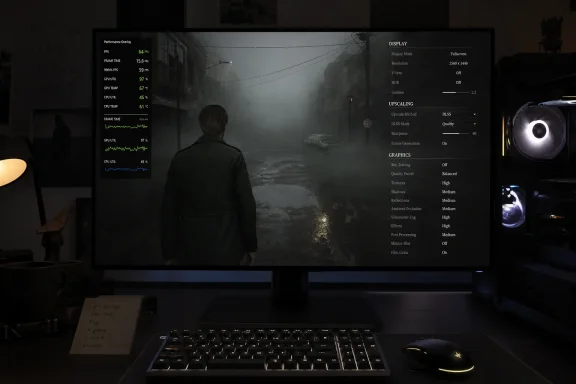
Bloober Team’s Silent Hill 2 remake, published by Konami for PlayStation 5 and Windows PCs on October 8, 2024, runs best on PC when players prioritize consistent frame delivery: disable or reduce ray tracing, lower global illumination, use DLSS or FSR, and cap performance to a sustainable target. That answer sounds disappointingly conventional, but the reason matters: the game’s most disruptive problems are not always solved by buying a faster graphics card or chasing a higher average frame rate. Its fog, reflections, lighting, and densely detailed environments make it visually persuasive, yet the PC version can undermine that atmosphere with shader-related stuttering and uneven frame pacing.
The practical goal is therefore not to turn every option to its lowest setting. It is to identify the few expensive features that consume disproportionate resources, preserve the visual systems that make Silent Hill convincing, and prevent short performance interruptions from becoming the dominant feature of the experience. Consistency matters more than the headline frame-rate number.
Bloober Team faced an unusually difficult assignment in remaking a game whose reputation depends as much on restraint as on technology. The original Silent Hill 2, released in 2001, became a psychological-horror landmark partly because its limited visibility, oppressive soundscape, and deliberately obscured environments left room for the player’s imagination.
The remake replaces many of those technical limitations with materially richer environments and more sophisticated lighting. Fog is no longer merely a curtain hiding what older hardware could not draw; it is part of a layered visual system in which light, shadow, reflections, weathered surfaces, and environmental detail interact continuously.
That transformation was commercially and critically successful. The remake received a reported Metacritic score of around 87 out of 100, while Konami announced that combined physical and digital sales exceeded one million copies in less than its first week. The figures established that Bloober Team had not merely produced a technically ambitious remake, but one capable of satisfying a large audience despite the skepticism surrounding the project before launch.
The PC edition nevertheless carried an asterisk. Players reported stuttering and inconsistent performance even when their machines appeared powerful enough for the selected settings, while technical coverage found that the game could remain demanding after conventional quality reductions. The result was a familiar but important distinction: a game could be artistically successful, commercially successful, and still arrive with a PC presentation that required active management by the player.
That distinction is especially damaging in horror. A brief interruption during a competitive shooter can cost a player an encounter; a similar interruption in Silent Hill 2 can break the tension around an approaching doorway, a distant sound, or a shape emerging through the fog. Performance does not merely determine responsiveness here. It determines whether the atmosphere remains intact.
October 8, 2024 — Bloober Team and Konami launch the remake for PlayStation 5 and PC.
Launch day — A Day 1 patch targets several performance problems in the PC version, including stuttering related to shader compilation.
First week after launch — Reported combined sales exceed one million copies, alongside a Metacritic score of around 87 out of 100.
System requirements generally describe the point at which software is expected to function under a particular combination of resolution, quality, and frame-rate assumptions. They do not guarantee perfect frame pacing, and they rarely tell players how a demanding scene will behave when the rendering workload suddenly changes.
That matters because Silent Hill 2 is not a game with one uniform performance profile. An enclosed room, a fog-heavy street, a reflective interior, and an area with several dynamic visual effects can place different pressures on a PC. A configuration that appears comfortable during one passage may expose its limitations during another.
The CPU, storage subsystem, memory configuration, graphics driver, background workload, and shader state can also influence the experience. Reducing a GPU-heavy option may raise the average frame rate but leave traversal or shader-related interruptions untouched. Conversely, a machine with a lower average frame rate can sometimes feel smoother if it delivers frames at a steadier cadence.
The two main hardware paths share the same optimization logic, although the appropriate upscaler differs.
Windows compatibility is comparatively straightforward: the game supports Windows 10 and Windows 11. That does not make the operating system irrelevant, but it means switching between those supported versions should not be treated as the first or most reliable optimization technique. The better first steps are updating the game, establishing a repeatable test scene, and tuning the graphics workload systematically.
Ray-traced effects can improve reflections, lighting behavior, and the grounding of objects within a scene. In a game built around darkness and indirect illumination, those improvements are not irrelevant. The question is whether they remain noticeable while the player is moving through fog, exploring dim interiors, and reacting to threats.
Technical testing by outlets including DSOGaming and TechPowerUp characterized Silent Hill 2 as demanding at high settings, particularly when advanced lighting and ray-traced effects were involved. Their coverage reinforces the same practical conclusion found in community optimization guides: ray tracing should be treated as an optional finishing layer, not as the foundation of a playable configuration.
Players should therefore establish their baseline with ray tracing disabled. Only after the game maintains an acceptable frame rate and relatively stable frame times should the option be reintroduced. If enabling it causes large fluctuations, the correct response is not necessarily to lower every other setting around it; disabling the feature may produce a cleaner image overall by reducing the need for more aggressive upscaling.
This is the central trade-off in modern PC graphics. A technically more accurate lighting effect can create a subjectively worse presentation if it requires a very low internal resolution or introduces unstable frame delivery. The best-looking setting is the one that survives movement.
Ray tracing also should not be evaluated in the brightest or simplest room a player can find. It needs to be tested during exploration, in reflective interiors, around fog and vegetation, and while moving rapidly between environmental zones. A feature that works only in the least demanding section of the game is not really working for the full game.
Global illumination affects how light appears to bounce through a scene rather than illuminating only the surfaces directly facing a light source. In Silent Hill 2, that contributes to the uneasy gradation between visible and obscured space. Rooms do not simply become bright or dark; they acquire pockets of indirect light, heavy corners, and surfaces that seem to absorb or return illumination differently.
Reducing that quality can therefore affect the game’s artistic presentation more than lowering an isolated effect. It should still be reduced when necessary, but preferably after ray tracing has been disabled and before broad, indiscriminate cuts are applied to every setting.
The important distinction is between preserving the structure of the lighting and maximizing its precision. Medium-quality illumination that runs consistently can communicate the intended atmosphere more effectively than a higher-quality mode interrupted by hitches. The player’s eye is highly sensitive to discontinuity, particularly during slow camera movement through dark scenes.
Bloober Team’s use of advanced lighting means there may be no completely free configuration. A player can reduce the cost, but some baseline workload remains because the environments were authored around modern illumination rather than a simple collection of optional effects. That is one reason the game can remain demanding even after the most obvious settings have been lowered.
This also explains why comparisons based only on average frames per second can mislead. Two configurations may report similar averages while producing noticeably different experiences if one regularly pauses or delivers frames unevenly. A useful optimization pass must watch motion, not merely the counter in the corner.
Upscaling is valuable, but it should not become an excuse to leave every expensive option enabled. If a system is far beyond its performance limit, selecting an aggressive upscaling mode can produce softness, instability around fine detail, or distracting behavior in motion. Fog, thin geometry, foliage, reflections, and high-contrast edges can all expose reconstruction weaknesses.
The correct sequence is to reduce ray tracing, adjust global illumination, select an appropriate output resolution, and then use DLSS or FSR to close the remaining performance gap. This preserves more image quality than asking the upscaler to compensate for an otherwise unsustainable workload.
Start with the quality-oriented mode available through the chosen technology. Test it while moving through a demanding area, not while standing still. If performance remains below the desired range, move one step toward a more performance-oriented mode and repeat the same route.
The output resolution changes the meaning of those settings. At a high monitor resolution, upscaling can reconstruct from a relatively substantial internal image. At a lower output resolution, aggressive upscaling begins with less information and its compromises may become easier to see.
Players should also resist the urge to judge the result from screenshots alone. Reconstruction quality is temporal: it uses information from multiple frames, so its success or failure becomes clearest during camera movement. A still image may hide shimmer, instability, or the gradual loss of detail around objects in motion.
Anti-aliasing should be tuned in the same context. Lowering it may produce a modest performance improvement, but visibly jagged edges or shimmering can become more distracting than the frames recovered. Upscaling and anti-aliasing are also interdependent, making it unwise to change several related options simultaneously and then guess which one caused the result.
Players should first confirm that the game is using the correct monitor resolution and aspect ratio. A typical modern display uses a 16:9 aspect ratio, and a mismatch can create stretching, black bars, distortion, or unnecessary rendering overhead without providing a useful visual benefit.
The ideal approach is to leave the desktop and display output at the monitor’s native resolution while using DLSS or FSR to reduce internal rendering cost. If that is insufficient, selecting a lower game resolution can produce another performance gain, but the resulting image may be softer because the monitor must scale it.
Resolution should not be lowered impulsively at the start of the process. At high settings, ray tracing and global illumination may consume so much of the performance budget that reducing resolution alone produces an unsatisfactory trade: the image becomes blurrier while the fundamental instability remains.
A controlled test makes the hierarchy clear. Disable ray tracing first, lower illumination if needed, engage the appropriate upscaler, and only then reduce the output resolution if the target still cannot be maintained. That ordering removes specialized costs before sacrificing the clarity of the entire frame.
Texture quality should generally be approached differently. Textures often depend more heavily on available graphics memory than on raw rendering throughput, so lowering them may not deliver the same immediate frame-rate gain as reducing ray tracing, resolution, or illumination. However, a system that exceeds its available graphics memory can exhibit severe interruptions, making texture reductions worthwhile when stuttering appears alongside heavy memory pressure.
Consider a machine that can deliver high performance in simple corridors but falls substantially during demanding outdoor scenes. Leaving it uncapped creates continuous changes in frame time, power use, temperature, and responsiveness. The player may notice the drops more strongly because the faster sections establish an expectation the difficult scenes cannot maintain.
A cap should be selected according to the game’s sustained performance, not its best moment. Find a demanding section, observe what the machine can hold without repeated collapses, and set a target near that level. This creates headroom for brief workload spikes and can reduce the sensation of instability.
Frame-rate limiting cannot repair shader-compilation or traversal stutter. Those interruptions may occur regardless of whether the game is capped. What the cap can do is remove a separate source of unevenness, making the remaining technical problems easier to identify.
It can also reduce unnecessary GPU saturation. If a system is continuously operating at its limit, a small increase in scene complexity can immediately create a visible delay. Leaving some capacity unused may allow the machine to absorb smaller spikes without crossing into an obvious hitch.
The same principle applies to thermally constrained systems. A gaming laptop or compact PC may initially produce excellent numbers and then slow as temperatures rise. A sustainable cap can prevent the machine from spending its entire performance budget during the first few minutes of play.
The cost can be additional input latency, and conventional V-Sync may produce pronounced judder when the machine cannot maintain the required refresh interval. The source material therefore reasonably suggests that players with high-refresh-rate displays may prefer to disable it.
There is no universal correct setting because the outcome depends on the monitor and the rest of the frame-delivery chain. A display with variable-refresh support may handle fluctuations more gracefully than a fixed-refresh monitor, while a tightly chosen frame cap may reduce the need for conventional V-Sync behavior.
The testing method remains the same: choose one repeatable area, pan the camera slowly, move through a doorway or environmental boundary, and compare tearing, responsiveness, and motion consistency. Do not change V-Sync, the frame cap, upscaling, and resolution simultaneously. Optimization becomes guesswork when several variables move at once.
For a slow-paced horror game, a small latency increase may be less objectionable than persistent tearing. But latency still affects camera control and combat, so the better setting is the one that removes the most distracting problem on the specific display.
Shaders are small programs used to determine how surfaces, lighting, materials, and effects are rendered. If required shader work is performed or finalized during play, the process can interrupt frame delivery. The resulting hitch may look like GPU overload even when reducing graphics options does little to eliminate it.
Traversal-related interruptions can create a similar impression when the game streams data or transitions between environmental workloads. The player experiences a pause and naturally assumes the current quality preset is too high, but lowering the preset may raise the average frame rate without preventing the interruption.
This is why performance diagnosis should begin by separating three symptoms. A continuously low frame rate points toward a sustained hardware bottleneck. Repeated oscillation suggests an unstable workload, thermal behavior, or a target that is too ambitious. Isolated hitches in particular locations may indicate shader, streaming, or traversal behavior that ordinary settings cannot fully solve.
Digital Foundry’s widely discussed technical analysis reportedly reached a related conclusion: the PC version could scale beyond the console presentation in visual quality, yet stuttering remained difficult to avoid completely. That is the uncomfortable core of the port. PC users may have access to a superior image, but the additional flexibility does not guarantee superior motion consistency.
Keeping the game patched remains essential because engine-level or content-level fixes must come from Bloober Team. Players should also expect shader behavior to change after graphics-driver updates, game updates, or other changes that invalidate previously prepared data. A temporary return of stuttering after such changes does not automatically mean the PC has developed a hardware fault.
Close unnecessary applications that can consume CPU time, memory, storage bandwidth, or graphics acceleration. Browsers with many active tabs, recording tools, hardware-monitoring suites, launchers, RGB utilities, and overlays may each appear insignificant, but their combined activity can complicate diagnosis.
Graphics drivers should be current enough to contain the vendor’s relevant game support, although blindly changing drivers during every troubleshooting session can make results harder to compare. If performance changed immediately after a driver change, record that fact rather than changing ten other variables at the same time.
The game should be installed on storage capable of handling modern asset streaming without becoming an obvious bottleneck. Storage cannot explain every hitch, particularly when engine behavior is involved, but a heavily constrained or overloaded drive adds another source of delay.
Power and thermal behavior should also be observed. A laptop running in a quiet or battery-oriented mode may not provide the performance implied by its component names. A desktop with cooling problems may benchmark well for a few minutes before reducing clock speeds during a longer session.
None of these measures transforms an underpowered GPU into a high-end one. Their value is diagnostic: they make the machine’s behavior repeatable enough that changes inside the game can be evaluated honestly.
That speed comes with risk. A mod may become incompatible with a game update, change the intended lighting, introduce instability, disable an effect without making the change obvious, or require replacement files from an untrusted source. A claimed performance fix can also move work elsewhere rather than removing it.
Community modifications should therefore come after official updates and in-game tuning, not before them. A player who begins with several altered configuration files cannot easily determine whether a crash belongs to the game, the graphics driver, or the modification.
Trusted distribution matters, but popularity alone is not proof of safety. Check the modification’s documented changes, user reports, update history, and removal procedure. Keep backups of files that will be replaced, and avoid packages that require disabling security controls or executing unrelated installers.
Managed PCs require an even stricter policy. An administrator responsible for shared systems should treat unofficial binaries and injected files as software changes, not as harmless graphics presets. Any improvement must be weighed against supportability, integrity, and the possibility that a later update will leave the installation in an inconsistent state.
That requires a balanced preset rather than a lowest-settings prescription. Ray tracing is the most logical first sacrifice because of its cost. Global illumination should then be reduced carefully, while textures can often remain relatively detailed unless graphics-memory pressure becomes apparent.
Upscaling should be used to refine an already sensible workload. A quality-oriented DLSS or FSR mode can recover performance without erasing the image, but an aggressive mode should not be expected to rescue an overloaded ray-traced configuration without visible consequences.
The frame target should reflect the weakest sustained section encountered during play. An unstable peak is not a useful target, and a cap can make the game feel more deliberate by preventing large swings between light and heavy scenes.
Most importantly, players should accept that some isolated hitches may not respond to the settings menu. Shader-compilation and traversal behavior require developer-side work, and repeated reduction of visual quality can reach a point where the game looks substantially worse without becoming completely smooth.
The practical goal is therefore not to turn every option to its lowest setting. It is to identify the few expensive features that consume disproportionate resources, preserve the visual systems that make Silent Hill convincing, and prevent short performance interruptions from becoming the dominant feature of the experience. Consistency matters more than the headline frame-rate number.
 A Successful Remake Arrived With a PC-Specific Compromise
Bloober Team faced an unusually difficult assignment in remaking a game whose reputation depends as much on restraint as on technology. The original Silent Hill 2, released in 2001, became a psychological-horror landmark partly because its limited visibility, oppressive soundscape, and deliberately obscured environments left room for the player’s imagination.The remake replaces many of those technical limitations with materially richer environments and more sophisticated lighting. Fog is no longer merely a curtain hiding what older hardware could not draw; it is part of a layered visual system in which light, shadow, reflections, weathered surfaces, and environmental detail interact continuously.
That transformation was commercially and critically successful. The remake received a reported Metacritic score of around 87 out of 100, while Konami announced that combined physical and digital sales exceeded one million copies in less than its first week. The figures established that Bloober Team had not merely produced a technically ambitious remake, but one capable of satisfying a large audience despite the skepticism surrounding the project before launch.
The PC edition nevertheless carried an asterisk. Players reported stuttering and inconsistent performance even when their machines appeared powerful enough for the selected settings, while technical coverage found that the game could remain demanding after conventional quality reductions. The result was a familiar but important distinction: a game could be artistically successful, commercially successful, and still arrive with a PC presentation that required active management by the player.
That distinction is especially damaging in horror. A brief interruption during a competitive shooter can cost a player an encounter; a similar interruption in Silent Hill 2 can break the tension around an approaching doorway, a distant sound, or a shape emerging through the fog. Performance does not merely determine responsiveness here. It determines whether the atmosphere remains intact.
Timeline
2001 — The original Silent Hill 2 is released and later becomes one of the most celebrated psychological-horror games of its era.October 8, 2024 — Bloober Team and Konami launch the remake for PlayStation 5 and PC.
Launch day — A Day 1 patch targets several performance problems in the PC version, including stuttering related to shader compilation.
First week after launch — Reported combined sales exceed one million copies, alongside a Metacritic score of around 87 out of 100.
The Minimum GPU List Is a Warning, Not a Performance Guarantee
The listed minimum graphics hardware is unusually revealing. On the NVIDIA side, the stated floor is a GeForce RTX 2080; on the AMD side, it is an RX 6800 XT. Whatever label is attached to those requirements, neither should be interpreted as a promise that every advanced effect can be enabled without compromise.System requirements generally describe the point at which software is expected to function under a particular combination of resolution, quality, and frame-rate assumptions. They do not guarantee perfect frame pacing, and they rarely tell players how a demanding scene will behave when the rendering workload suddenly changes.
That matters because Silent Hill 2 is not a game with one uniform performance profile. An enclosed room, a fog-heavy street, a reflective interior, and an area with several dynamic visual effects can place different pressures on a PC. A configuration that appears comfortable during one passage may expose its limitations during another.
The CPU, storage subsystem, memory configuration, graphics driver, background workload, and shader state can also influence the experience. Reducing a GPU-heavy option may raise the average frame rate but leave traversal or shader-related interruptions untouched. Conversely, a machine with a lower average frame rate can sometimes feel smoother if it delivers frames at a steadier cadence.
The two main hardware paths share the same optimization logic, although the appropriate upscaler differs.
| GPU path | Listed minimum GPU | Recommended upscaling path | First expensive setting to reduce |
|---|---|---|---|
| NVIDIA | GeForce RTX 2080 | DLSS | Ray tracing |
| AMD | RX 6800 XT | FSR | Ray tracing |
Ray Tracing Is the First Luxury to Cut
The most effective single change for a struggling PC is usually to lower or disable ray tracing. It is one of the game’s most expensive visual options, and its contribution must be judged against the stability it costs rather than against a static comparison image.Ray-traced effects can improve reflections, lighting behavior, and the grounding of objects within a scene. In a game built around darkness and indirect illumination, those improvements are not irrelevant. The question is whether they remain noticeable while the player is moving through fog, exploring dim interiors, and reacting to threats.
Technical testing by outlets including DSOGaming and TechPowerUp characterized Silent Hill 2 as demanding at high settings, particularly when advanced lighting and ray-traced effects were involved. Their coverage reinforces the same practical conclusion found in community optimization guides: ray tracing should be treated as an optional finishing layer, not as the foundation of a playable configuration.
Players should therefore establish their baseline with ray tracing disabled. Only after the game maintains an acceptable frame rate and relatively stable frame times should the option be reintroduced. If enabling it causes large fluctuations, the correct response is not necessarily to lower every other setting around it; disabling the feature may produce a cleaner image overall by reducing the need for more aggressive upscaling.
This is the central trade-off in modern PC graphics. A technically more accurate lighting effect can create a subjectively worse presentation if it requires a very low internal resolution or introduces unstable frame delivery. The best-looking setting is the one that survives movement.
Ray tracing also should not be evaluated in the brightest or simplest room a player can find. It needs to be tested during exploration, in reflective interiors, around fog and vegetation, and while moving rapidly between environmental zones. A feature that works only in the least demanding section of the game is not really working for the full game.
Lumen Makes Lighting a Performance Decision
After ray tracing, global illumination is the next major lever. The source guidance specifically identifies Lumen Global Illumination as visually impressive but resource-intensive, and that description captures why simplistic optimization advice can fail.Global illumination affects how light appears to bounce through a scene rather than illuminating only the surfaces directly facing a light source. In Silent Hill 2, that contributes to the uneasy gradation between visible and obscured space. Rooms do not simply become bright or dark; they acquire pockets of indirect light, heavy corners, and surfaces that seem to absorb or return illumination differently.
Reducing that quality can therefore affect the game’s artistic presentation more than lowering an isolated effect. It should still be reduced when necessary, but preferably after ray tracing has been disabled and before broad, indiscriminate cuts are applied to every setting.
The important distinction is between preserving the structure of the lighting and maximizing its precision. Medium-quality illumination that runs consistently can communicate the intended atmosphere more effectively than a higher-quality mode interrupted by hitches. The player’s eye is highly sensitive to discontinuity, particularly during slow camera movement through dark scenes.
Bloober Team’s use of advanced lighting means there may be no completely free configuration. A player can reduce the cost, but some baseline workload remains because the environments were authored around modern illumination rather than a simple collection of optional effects. That is one reason the game can remain demanding even after the most obvious settings have been lowered.
This also explains why comparisons based only on average frames per second can mislead. Two configurations may report similar averages while producing noticeably different experiences if one regularly pauses or delivers frames unevenly. A useful optimization pass must watch motion, not merely the counter in the corner.
Upscaling Works Best After the Expensive Effects Are Controlled
DLSS for NVIDIA hardware and FSR for AMD hardware are the recommended upscaling paths. Both render the game at a lower internal resolution and reconstruct the image for the monitor’s output resolution, reducing the number of pixels the GPU must process directly.Upscaling is valuable, but it should not become an excuse to leave every expensive option enabled. If a system is far beyond its performance limit, selecting an aggressive upscaling mode can produce softness, instability around fine detail, or distracting behavior in motion. Fog, thin geometry, foliage, reflections, and high-contrast edges can all expose reconstruction weaknesses.
The correct sequence is to reduce ray tracing, adjust global illumination, select an appropriate output resolution, and then use DLSS or FSR to close the remaining performance gap. This preserves more image quality than asking the upscaler to compensate for an otherwise unsustainable workload.
Start with the quality-oriented mode available through the chosen technology. Test it while moving through a demanding area, not while standing still. If performance remains below the desired range, move one step toward a more performance-oriented mode and repeat the same route.
The output resolution changes the meaning of those settings. At a high monitor resolution, upscaling can reconstruct from a relatively substantial internal image. At a lower output resolution, aggressive upscaling begins with less information and its compromises may become easier to see.
Players should also resist the urge to judge the result from screenshots alone. Reconstruction quality is temporal: it uses information from multiple frames, so its success or failure becomes clearest during camera movement. A still image may hide shimmer, instability, or the gradual loss of detail around objects in motion.
Anti-aliasing should be tuned in the same context. Lowering it may produce a modest performance improvement, but visibly jagged edges or shimmering can become more distracting than the frames recovered. Upscaling and anti-aliasing are also interdependent, making it unwise to change several related options simultaneously and then guess which one caused the result.
Resolution Is the Blunt Instrument That Still Works
When the GPU remains overloaded, reducing resolution remains one of the most dependable interventions. Fewer rendered pixels mean less work across much of the graphics pipeline, although the benefit varies according to which component is limiting performance.Players should first confirm that the game is using the correct monitor resolution and aspect ratio. A typical modern display uses a 16:9 aspect ratio, and a mismatch can create stretching, black bars, distortion, or unnecessary rendering overhead without providing a useful visual benefit.
The ideal approach is to leave the desktop and display output at the monitor’s native resolution while using DLSS or FSR to reduce internal rendering cost. If that is insufficient, selecting a lower game resolution can produce another performance gain, but the resulting image may be softer because the monitor must scale it.
Resolution should not be lowered impulsively at the start of the process. At high settings, ray tracing and global illumination may consume so much of the performance budget that reducing resolution alone produces an unsatisfactory trade: the image becomes blurrier while the fundamental instability remains.
A controlled test makes the hierarchy clear. Disable ray tracing first, lower illumination if needed, engage the appropriate upscaler, and only then reduce the output resolution if the target still cannot be maintained. That ordering removes specialized costs before sacrificing the clarity of the entire frame.
Texture quality should generally be approached differently. Textures often depend more heavily on available graphics memory than on raw rendering throughput, so lowering them may not deliver the same immediate frame-rate gain as reducing ray tracing, resolution, or illumination. However, a system that exceeds its available graphics memory can exhibit severe interruptions, making texture reductions worthwhile when stuttering appears alongside heavy memory pressure.
A Frame Cap Can Feel Faster Than an Unstable Peak
The source guidance recommends limiting the frame rate to match the monitor’s refresh behavior, and the principle is sound even when the selected cap is below the display’s maximum. A stable target can feel better than an uncapped rate that repeatedly rises and collapses.Consider a machine that can deliver high performance in simple corridors but falls substantially during demanding outdoor scenes. Leaving it uncapped creates continuous changes in frame time, power use, temperature, and responsiveness. The player may notice the drops more strongly because the faster sections establish an expectation the difficult scenes cannot maintain.
A cap should be selected according to the game’s sustained performance, not its best moment. Find a demanding section, observe what the machine can hold without repeated collapses, and set a target near that level. This creates headroom for brief workload spikes and can reduce the sensation of instability.
Frame-rate limiting cannot repair shader-compilation or traversal stutter. Those interruptions may occur regardless of whether the game is capped. What the cap can do is remove a separate source of unevenness, making the remaining technical problems easier to identify.
It can also reduce unnecessary GPU saturation. If a system is continuously operating at its limit, a small increase in scene complexity can immediately create a visible delay. Leaving some capacity unused may allow the machine to absorb smaller spikes without crossing into an obvious hitch.
The same principle applies to thermally constrained systems. A gaming laptop or compact PC may initially produce excellent numbers and then slow as temperatures rise. A sustainable cap can prevent the machine from spending its entire performance budget during the first few minutes of play.
V-Sync Solves Tearing by Introducing Another Trade-Off
V-Sync can reduce or eliminate screen tearing by coordinating frame presentation with the display’s refresh cycle. In Silent Hill 2, tearing can be particularly obvious during slow camera pans because straight architectural lines move steadily across the screen.The cost can be additional input latency, and conventional V-Sync may produce pronounced judder when the machine cannot maintain the required refresh interval. The source material therefore reasonably suggests that players with high-refresh-rate displays may prefer to disable it.
There is no universal correct setting because the outcome depends on the monitor and the rest of the frame-delivery chain. A display with variable-refresh support may handle fluctuations more gracefully than a fixed-refresh monitor, while a tightly chosen frame cap may reduce the need for conventional V-Sync behavior.
The testing method remains the same: choose one repeatable area, pan the camera slowly, move through a doorway or environmental boundary, and compare tearing, responsiveness, and motion consistency. Do not change V-Sync, the frame cap, upscaling, and resolution simultaneously. Optimization becomes guesswork when several variables move at once.
For a slow-paced horror game, a small latency increase may be less objectionable than persistent tearing. But latency still affects camera control and combat, so the better setting is the one that removes the most distracting problem on the specific display.
Shader Stutter Is Not a Settings Problem in Disguise
The Day 1 patch for the PC version addressed multiple performance concerns, including stuttering related to shader compilation. That was an important intervention, but it also exposed the limitation of conventional graphics guides: not every hitch can be removed through the settings menu.Shaders are small programs used to determine how surfaces, lighting, materials, and effects are rendered. If required shader work is performed or finalized during play, the process can interrupt frame delivery. The resulting hitch may look like GPU overload even when reducing graphics options does little to eliminate it.
Traversal-related interruptions can create a similar impression when the game streams data or transitions between environmental workloads. The player experiences a pause and naturally assumes the current quality preset is too high, but lowering the preset may raise the average frame rate without preventing the interruption.
This is why performance diagnosis should begin by separating three symptoms. A continuously low frame rate points toward a sustained hardware bottleneck. Repeated oscillation suggests an unstable workload, thermal behavior, or a target that is too ambitious. Isolated hitches in particular locations may indicate shader, streaming, or traversal behavior that ordinary settings cannot fully solve.
Digital Foundry’s widely discussed technical analysis reportedly reached a related conclusion: the PC version could scale beyond the console presentation in visual quality, yet stuttering remained difficult to avoid completely. That is the uncomfortable core of the port. PC users may have access to a superior image, but the additional flexibility does not guarantee superior motion consistency.
Keeping the game patched remains essential because engine-level or content-level fixes must come from Bloober Team. Players should also expect shader behavior to change after graphics-driver updates, game updates, or other changes that invalidate previously prepared data. A temporary return of stuttering after such changes does not automatically mean the PC has developed a hardware fault.
Windows Tuning Should Remove Variables, Not Create New Ones
Because Silent Hill 2 supports Windows 10 and Windows 11, the operating-system task is less about discovering a secret optimization switch and more about maintaining a predictable environment. The goal is to eliminate competing workloads and configuration uncertainty before modifying the game itself.Close unnecessary applications that can consume CPU time, memory, storage bandwidth, or graphics acceleration. Browsers with many active tabs, recording tools, hardware-monitoring suites, launchers, RGB utilities, and overlays may each appear insignificant, but their combined activity can complicate diagnosis.
Graphics drivers should be current enough to contain the vendor’s relevant game support, although blindly changing drivers during every troubleshooting session can make results harder to compare. If performance changed immediately after a driver change, record that fact rather than changing ten other variables at the same time.
The game should be installed on storage capable of handling modern asset streaming without becoming an obvious bottleneck. Storage cannot explain every hitch, particularly when engine behavior is involved, but a heavily constrained or overloaded drive adds another source of delay.
Power and thermal behavior should also be observed. A laptop running in a quiet or battery-oriented mode may not provide the performance implied by its component names. A desktop with cooling problems may benchmark well for a few minutes before reducing clock speeds during a longer session.
None of these measures transforms an underpowered GPU into a high-end one. Their value is diagnostic: they make the machine’s behavior repeatable enough that changes inside the game can be evaluated honestly.
Community Fixes Shift Risk From Performance to Trust
The source material points players toward community patches and enhancements, noting that some users have reported improvements in common problems such as stuttering. The PC community often moves faster than a publisher, especially when configuration-file changes can expose hidden options or revise engine behavior.That speed comes with risk. A mod may become incompatible with a game update, change the intended lighting, introduce instability, disable an effect without making the change obvious, or require replacement files from an untrusted source. A claimed performance fix can also move work elsewhere rather than removing it.
Community modifications should therefore come after official updates and in-game tuning, not before them. A player who begins with several altered configuration files cannot easily determine whether a crash belongs to the game, the graphics driver, or the modification.
Trusted distribution matters, but popularity alone is not proof of safety. Check the modification’s documented changes, user reports, update history, and removal procedure. Keep backups of files that will be replaced, and avoid packages that require disabling security controls or executing unrelated installers.
Managed PCs require an even stricter policy. An administrator responsible for shared systems should treat unofficial binaries and injected files as software changes, not as harmless graphics presets. Any improvement must be weighed against supportability, integrity, and the possibility that a later update will leave the installation in an inconsistent state.
Action checklist for admins
- Confirm that managed gaming PCs run a supported Windows 10 or Windows 11 configuration.
- Install the game’s available official patches before testing performance or deploying configuration changes.
- Establish a repeatable test route and record frame-time behavior, not only average frame rate.
- Start with ray tracing disabled, then reduce global illumination before lowering every graphics option.
- Select DLSS on compatible NVIDIA systems or FSR on AMD systems, beginning with a quality-oriented mode.
- Apply a sustainable frame cap and document any V-Sync or display-refresh configuration.
- Restrict unofficial patches and executable modifications unless they have been reviewed, tested, and approved.
- Recheck the baseline after game or graphics-driver updates because shader data and performance behavior may change.
Optimization Works When It Preserves the Horror
The wrong objective is to maximize the number displayed by a performance overlay. The right objective is to make movement through Silent Hill feel uninterrupted while retaining the fog, lighting, materials, and environmental density that define the remake.That requires a balanced preset rather than a lowest-settings prescription. Ray tracing is the most logical first sacrifice because of its cost. Global illumination should then be reduced carefully, while textures can often remain relatively detailed unless graphics-memory pressure becomes apparent.
Upscaling should be used to refine an already sensible workload. A quality-oriented DLSS or FSR mode can recover performance without erasing the image, but an aggressive mode should not be expected to rescue an overloaded ray-traced configuration without visible consequences.
The frame target should reflect the weakest sustained section encountered during play. An unstable peak is not a useful target, and a cap can make the game feel more deliberate by preventing large swings between light and heavy scenes.
Most importantly, players should accept that some isolated hitches may not respond to the settings menu. Shader-compilation and traversal behavior require developer-side work, and repeated reduction of visual quality can reach a point where the game looks substantially worse without becoming completely smooth.
The Settings That Matter Most
The practical lesson is that Silent Hill 2 does not need indiscriminate visual cuts; it needs an ordered tuning process that distinguishes sustained rendering cost from engine-level stutter.- Disable ray tracing first and restore it only if substantial performance headroom remains.
- Reduce Lumen Global Illumination when lighting remains the main sustained cost.
- Use DLSS on NVIDIA hardware or FSR on AMD hardware before making drastic output-resolution cuts.
- Match the game to the monitor’s aspect ratio, typically 16:9 on modern displays.
- Cap the frame rate at a level the PC can sustain in demanding scenes.
- Treat isolated shader or traversal hitches as a separate problem from continuously low performance.
References
- Primary source: TechnoSports Media Group
Published: 2026-07-10T16:20:11.836296
- Related coverage: game8.co
Best Settings for PC and HDR | Silent Hill 2 Remake|Game8
Here are the best settings for the Silent Hill 2 Remake. Check out optimized graphics settings for PC, the best HDR settings, and other settings in this guide!game8.co - Related coverage: dsogaming.com
Silent Hill 2 Remake - Ray Tracing, NVIDIA DLSS 3 & AMD FSR 3.0 Benchmarks
Silent Hill 2 Remake supports Ray Tracing, NVIDIA DLSS 3, AMD FSR 3.0 and Intel XeSS. As such, we've decided to benchmark these techs first.www.dsogaming.com - Related coverage: computerbase.de
Silent Hill 2 im Benchmark-Test - ComputerBase
Das Remake zu Silent Hill 2 ist auf dem PC erschienen. ComputerBase hat das Horror-Spiel im Grafikkarten-Benchmark-Test.www.computerbase.de
- Related coverage: twistedvoxel.com
Silent Hill 2 Remake Best Settings Guide For PC
The Silent Hill 2 remake is now available on PC, and we’ve put together the best settings for optimized performance on mid-end system specs.twistedvoxel.com - Related coverage: runaroundtech.com
Silent Hill 2 PC Problems and UE5 - Run Around Tech
Unfortunately, Silent Hill 2 stutters much like many Unreal Engine 5 games. Let's take a deep dive into the root causes and potential solutions. runaroundtech.com
- Related coverage: gamesradar.com
Konami says it accidentally gave Silent Hill f Steam players bonus pre-order content, players say "let us keep it" and focus on PC performance patches instead | GamesRadar+
Silent Hill f seems to run mostly fine on PS5, but Pro and PC players have complaintswww.gamesradar.com - Related coverage: metacritic.com

Silent Hill 2 critic reviews - Metacritic
www.metacritic.com
- Related coverage: comicbook.com
Silent Hill 2 Reviews Give the Remake Higher Metacritic Score Than Expected
The Silent Hill 2 remake from Bloober Team and Konami is out next week, but reviews have started dropping already to give a peek into the new version of the 2001 horror game. Given that Silent Hill is nearly up there with Resident Evil in terms of how survival-horror fans revere the franchise...comicbook.com - Related coverage: pcgamesn.com
Silent Hill 2 remake review - a respectful, overextended reimagining
Silent Hill 2 remake is overlong and lacks the impact of Team Silent's original, but Bloober's effort remains a solid, modern horror game.www.pcgamesn.com - Related coverage: gamespot.com
Silent Hill 2 Reviews - GameSpot
Read reviews and ratings of Silent Hill 2 from our experts, and see what our community says, too!www.gamespot.com - Related coverage: tomsguide.com
Silent Hill 2 review — | Tom's Guide
Silent Hill 2 is a compelling, but technically compromised, redux of one of the all-time classic horror experiences. This remake brings chills and thrills for both the right and wrong reasons.www.tomsguide.com - Related coverage: vgtimes.com
Silent Hill 2 Remake: A Worthy Successor with an 87 Metacritic Rating
The embargo on reviews for the Silent Hill 2 remake has been lifted. It seems that Bloober Team has succeeded: the reimagining of the cult horror...vgtimes.com - Related coverage: cdn.uc.assets.prezly.com
- Related coverage: techradar.com
Silent Hill 2 remake studio Bloober Team confirms Silent Hill remake has entered full production | TechRadar
Bloober Team has confirmed that its Silent Hill remake is now officially in full production.www.techradar.com - Related coverage: as.com
- Related coverage: windowscentral.com
Silent Hill F review — Gameplay oddities don't hold back this roaring return | Windows Central
I spent years salty at Konami for its handling of both Silent Hill and Metal Gear, two of the industry's most beloved franchises. But Silent Hill F is proof that the formula is timeless.www.windowscentral.com - Related coverage: techpowerup.com
RAGE 2 Benchmark Test & Performance Analysis | TechPowerUp
Bethesda's RAGE 2 returns you to the post-apocalyptic world of RAGE with new gameplay mechanics, new enemies, and fast-paced gun play. Unlike its predecessor, RAGE 2 uses the Apex Engine with Vulkan, which helps AMD cards gain performance over their NVIDIA counterparts. We tested using 18...www.techpowerup.com