

Sourcetable said on July 8, 2026, from San Francisco, California, that its AI spreadsheet scored 24/24 on the Sourcetable Benchmark, ahead of Microsoft Copilot at 19/24 and Google Sheets at 17/24 in a 24-test evaluation of real-world spreadsheet work. Windows admins, Microsoft 365 buyers, and Google Workspace owners should care because the vendor-published result points to a practical gap in AI spreadsheet workflows: test workbook-plus-file-plus-connector jobs before expanding licenses or approving new tools.
The immediate takeaway is not “replace Excel” or “abandon Sheets.” It is this: Sourcetable’s own benchmark says the differentiator is whether the AI can complete spreadsheet work that crosses files and connected data sources, so organizations should evaluate these tools on representative internal workflows, not on chat polish or staged demo prompts.
What changed is the center of the sales pitch. Sourcetable is not merely claiming the highest overall score. It is claiming a measurable lead in the tasks that often decide whether spreadsheet AI is useful in production: ingesting files, working with external systems, executing analysis, and returning a correct workbook. That matters now because buyers are being asked to approve AI spreadsheet spending before many organizations have defined what “working” actually means.
The evidence should be treated carefully. The benchmark was published by Sourcetable and promoted through Sourcetable’s own press release, so it is vendor evidence, not an independent industry verdict. Still, vendor benchmarks can be useful when they are specific enough to reproduce. If the file and connector gaps hold up under internal testing, they are more important than the headline score.
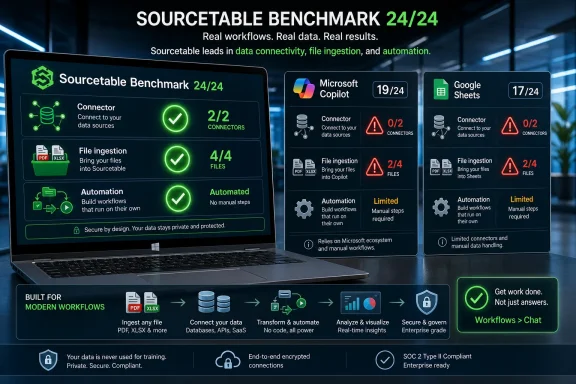
Sourcetable’s press release, distributed through EIN Presswire, says Sourcetable cleared all 24 tests, while Microsoft Copilot finished with 19/24 and Google Sheets with 17/24. Andrew Grosser framed the company’s position by saying Sourcetable was built to “actually do the job,” not merely assist with spreadsheet work.
The useful part is not the rhetoric. It is the category breakdown. Most enterprise buyers do not care whether an AI assistant can generate a tidy formula in a prepared demo. They care whether it can take an ugly workbook, a PDF, a database table, a third-party data source, and a request from a business user, then return a usable artifact without requiring a data engineer to babysit every step.
That is why the connector and file results matter. According to Sourcetable, Copilot and Google Sheets both went 0-for-2 on connector tests, while Sourcetable went 2-for-2. On file tests, Sourcetable went 4-for-4, while both Microsoft Copilot and Google Sheets went 2-for-4.
Those are not cosmetic misses. Connectors and files are the connective tissue of office work. A spreadsheet AI tool that cannot reliably fetch from approved systems or reason over the files workers actually receive is not yet a dependable analyst. It may still be useful, but its usefulness is bounded by the grid and by whatever data the user manually prepares.
The most important claim in Sourcetable’s summary is not simply the 24/24. It is the company’s assertion that the incumbent tools struggled when benchmark tasks required access beyond the current spreadsheet surface. That is a narrow observation about Sourcetable’s test, not a universal rule about either Microsoft or Google. But it lands because it matches a concern many power users already have: AI assistants can often explain spreadsheet work better than they can perform it end to end.
Sourcetable is selling a different thesis from the suite vendors. Its pitch is not that the AI lives next to the spreadsheet, but that the spreadsheet itself has been rebuilt around tool use, execution, and data access. The benchmark is designed to make that difference visible.
That does not make the results worthless. Vendor benchmarks can be useful when they describe the assumptions behind the test and publish enough material for rivals, customers, and skeptics to rerun the work. Sourcetable says the benchmark, code, and supporting materials are available through its site, and the source material describes the evaluation as a set of spreadsheet tasks with defined outputs.
That point is important because spreadsheet AI is especially vulnerable to vibes-based grading. A model can produce a plausible table, a confident explanation, or a chart that looks executive-ready while still getting the underlying workbook wrong. In a spreadsheet, a wrong value formatted beautifully is still wrong. A formula that looks right but bakes in a static value can become a future reconciliation problem. A generated workbook that impresses in the meeting but fails when refreshed is not automation; it is deferred cleanup.
The benchmark’s credibility therefore rests less on the promotional language and more on reproducibility. If Microsoft or Google can run the same tests and produce materially different results, they should say so. If the benchmark overweights tasks aligned to Sourcetable’s architecture, that also matters. But if the connector and file failures reproduce in customer environments, the story becomes less about one startup’s marketing and more about a structural gap in how spreadsheet AI is being built.
That distinction matters for WindowsForum readers because Microsoft’s advantage in spreadsheets is not simply Excel’s feature depth. It is the enormous installed base of Excel workbooks, Windows desktops, Microsoft 365 tenants, SharePoint sites, OneDrive folders, Teams workflows, Power Platform automations, and enterprise compliance policies wrapped around them. If Copilot is weak at the boundary between workbook and outside data in a given workflow, that weakness is amplified by the very ecosystem Microsoft is trying to AI-enable.
Google faces a different version of the same problem. Sheets is web-native, collaborative, and deeply embedded in Workspace. But Sourcetable’s claim is that being web-native is not the same thing as giving an AI assistant reliable, governed access to files, connectors, execution tools, and external data. A browser-based spreadsheet can feel connected without being able to complete a multi-step data job on its own.
AI changes the contest because the spreadsheet is no longer only a grid. It becomes an interface for delegation. The user does not merely ask, “What formula do I need?” The user asks, “Pull this data, clean it, reconcile it against the file I was sent, build the model, explain the variance, and leave the workbook in a state my boss can inspect.”
That is a harder product problem. Formula generation is language modeling. End-to-end spreadsheet automation is systems engineering. It requires permissions, sandboxing, connectors, file parsing, code execution, state management, repeatability, auditability, and a way to recover when one step fails without corrupting the artifact.
Sourcetable’s benchmark makes a specific accusation: when the assistant has to leave the comfort zone of the current workbook and act on outside data, Sourcetable says the incumbents fall behind. That is a sharper critique than “AI is bad at spreadsheets.” It is closer to this: AI added to a legacy spreadsheet may inherit the legacy product’s boundaries unless the execution layer is redesigned.
Sourcetable’s answer is to make the spreadsheet the surface of a broader execution environment. The supported claim here should be kept narrow: Sourcetable is positioning its product as an AI-native spreadsheet that can use tools, work with data, and return spreadsheet artifacts, while its benchmark highlights file and connector tasks as differentiators. The press material’s broader marketing language should be treated as product positioning unless customers can verify the exact capabilities in their own environments.
That has obvious appeal. It also has obvious risk. The more power an AI assistant has to connect, fetch, execute, transform, and write back, the more an organization must care about permissions, logging, data leakage, rate limits, mistaken transformations, and compliance boundaries. A spreadsheet that can do more work must also be prevented from doing the wrong work at machine speed.
The question raised by the Sourcetable results is narrower and more uncomfortable: does Copilot make Excel meaningfully capable for the workflows a given organization cares about, or does it mostly make Excel easier to talk to?
That question has to be answered in the customer’s environment. Sourcetable’s benchmark says Copilot’s overall 19/24 score suggests competence across many spreadsheet tasks, but its 0-for-2 connector result and 2-for-4 file result expose the boundary where the product stopped performing like a full workflow agent in that test.
Some boundaries may be intentional. Microsoft sells into regulated enterprises, public-sector environments, and large tenants where data access cannot be treated casually. Copilot experiences must operate within Microsoft 365 permissions, admin controls, tenant configuration, file state, and compliance commitments. A product that refuses to fetch or execute in some contexts may be frustrating, but it may also be constrained for safety, governance, or product-design reasons.
The trouble is that users do not buy outcomes by architectural excuse. If a finance analyst asks an AI assistant to ingest a document, parse a PDF, query an approved source, and build a workbook, the result either works or it does not. If it fails, the user does not care whether the failure came from licensing, tenant settings, connector design, model limits, sandbox rules, or a product team’s safety decision.
For Windows admins, the practical implication is simple: do not evaluate Copilot in Excel by polished demo prompts. Evaluate it against the workflows your users actually perform. If those workflows involve exports, attachments, SharePoint files, PDFs, DOCX files, database pulls, SaaS reports, and formula-heavy workbooks, the proof of value must include all of that.
That can be valuable. For users who live in Workspace, an assistant that helps create a tracker, analyze a table, or build a chart from a prompt can save time. But Sourcetable’s benchmark suggests that Google’s spreadsheet AI may be broad in interface while still limited at the execution boundary.
Google Sheets scored 17/24 overall, according to Sourcetable, trailing both Sourcetable and Microsoft Copilot. Like Copilot, it went 0-for-2 on connectors and 2-for-4 on file tests.
The connector result is the one Google should least want to explain away. Sheets users often rely on add-ons, Apps Script, imports, CSV workflows, Drive files, and third-party services to make the product useful beyond simple collaboration. If Gemini cannot reliably act across those boundaries in benchmark conditions, then its usefulness is narrower than broad “AI in your spreadsheet” messaging may imply.
There is also a subtle trap in Google’s browser-first advantage. Because Sheets already feels connected, users may assume the assistant can operate with the same reach. But a collaborative document running in a browser is not equivalent to an AI assistant with authenticated, audited, task-specific access to databases, SaaS systems, file types, and execution tools.
Sourcetable is trying to exploit that distinction. It is not competing with Sheets only as a nicer grid. It is competing as a data workbench with a spreadsheet face. That is why the benchmark emphasizes files and connectors rather than only formulas and charts.
For Google Workspace admins, the lesson is not to panic. It is to separate convenience features from workflow automation claims. If users are asking Gemini to help inside existing Sheets, the product may be useful. If they are expecting it to replace a data integration, transformation, and validation layer, the Sourcetable results argue for a much harder proof-of-concept.
AI assistants are supposed to reduce that chaos. In theory, they can read across formats, infer structure, reconcile inconsistencies, and produce a clean workbook. In practice, they need tools. Without file access, parsing, controlled execution, connectors, and deterministic checks, the assistant becomes another layer of commentary on top of the mess.
That is why Sourcetable’s file result matters. Sourcetable says it went 4-for-4 on file tests, while Microsoft Copilot and Google Sheets each went 2-for-4. The source material describes the category as involving the kinds of files workers handle routinely. Those are not exotic cases in a business environment; they are the inbox.
The connector result is even more revealing. A 0-for-2 score for both Copilot and Google Sheets suggests a failure, in Sourcetable’s benchmark, to operate where live business data lives: databases, SaaS systems, and third-party services. Sourcetable’s 2-for-2 connector result reflects the architecture it wants buyers to notice: spreadsheet work connected to sources beyond the current workbook.
There is a reason traditional BI tools, ETL platforms, and data warehouses exist. Connecting to data is not simply a matter of “search the web.” It involves authentication, schema understanding, rate limits, pagination, joins, type inference, incremental refresh, error handling, and governance. An AI spreadsheet that claims to do this must be judged by whether it can perform those steps reliably, not whether it can produce a plausible query or a confident explanation.
Sourcetable’s benchmark appears designed to reward products that can cross that boundary. That may advantage Sourcetable, but it also reflects where spreadsheet work is heading. The value is not in a blank grid. The value is in connecting the grid to the systems that make the business run.
For IT teams, this shifts the evaluation criteria. The old spreadsheet procurement question was compatibility: can the tool open the workbook, preserve formulas, and keep users productive? The AI spreadsheet question is operational: what can the assistant access, what can it execute, what can it change, what evidence does it leave, and how do we know the answer is correct?
Not every spreadsheet task needs the most expensive or capable model path. Simple formatting, formula generation, table creation, or cleanup may be handled by faster systems. Complex file parsing, multi-step reconciliation, external lookups, and execution may require heavier agents, more tools, or longer-running workflows.
If Sourcetable cleared the benchmark in Light mode as claimed, the implication is that the product design, not merely the model, carried the result. That matters because model quality is a moving target. Microsoft can change models. Google can change models. Sourcetable can change models. What is harder to retrofit is a workflow layer that lets the AI safely use tools, inspect outputs, and correct mistakes.
This is also where power cuts both ways. A tool-rich assistant must be governed like a junior analyst with access to business systems, not like a spellchecker. Organizations need to know whether prompts and outputs are logged, how credentials are stored, what data leaves the tenant, how generated steps are sandboxed, whether network access is constrained, and how destructive actions are approved.
This is where Sourcetable’s benchmark opens a second conversation it does not fully answer. Winning the task benchmark is one thing. Winning enterprise trust is another. Microsoft and Google can point to mature admin consoles, identity systems, compliance programs, and existing customer relationships. Sourcetable can point to capability claims and benchmark performance. Buyers will need both.
For Windows users, the benchmark is a reminder that “Copilot” is not a single magic capability spread evenly across every Microsoft surface. The experience can vary by app, license, tenant configuration, file state, and feature maturity. A user may have a Copilot button and still not have the kind of spreadsheet worker imagined from broader AI marketing.
For IT departments, the risk is a mismatch between expectations and deployment reality. Executives hear “AI in Excel” and assume analysts can now automate reporting, reconciliation, data ingestion, and modeling. Users try it, discover that some tasks work and others collapse at the file or connector boundary, and then IT is asked why the expensive AI rollout did not transform operations.
The Sourcetable results provide a useful test vocabulary. Instead of asking whether a tool “has AI,” ask whether it can handle connector tasks, file tasks, executable transformations, and deterministic verification. Ask whether the output is a workbook with formulas and formatting intact, not just a chat answer describing what the workbook should contain.
The benchmark also challenges the default procurement bias toward incumbents. Microsoft and Google own the productivity suites, but AI may create openings for specialist tools that solve painful workflows better than bundled assistants. That does not mean every company should replace Excel or Sheets. It means the spreadsheet may become a multi-tool environment: Excel for core workbooks, Sheets for collaboration, and Sourcetable or similar products for AI-native data work.
The danger is fragmentation. If teams adopt AI spreadsheet tools ad hoc, sensitive data may move into unmanaged systems. If IT bans all alternatives and relies only on incumbent assistants, users may continue doing manual work that better tools could automate. The right answer is not reflexive trust or reflexive blocking. It is structured evaluation.
For Microsoft 365 organizations, the first question should be whether Copilot in Excel can complete the workflows users actually want automated under the tenant’s real permissions, file locations, labels, and admin policies. A lab test that bypasses normal SharePoint, OneDrive, sensitivity-label, and access-control patterns will not tell IT what happens after deployment.
For Google Workspace organizations, the first question should be whether Gemini-assisted spreadsheet workflows can cross the boundary from collaborative document editing into reliable data work. If the work depends on Drive files, exports, add-ons, Apps Script, connected data, or third-party SaaS sources, the proof-of-concept should include those elements from the start.
For Sourcetable evaluators, the first question should be enterprise fit. The benchmark makes the capability argument; customers still need answers about governance, procurement, support, uptime, data handling, auditability, access controls, and administrative visibility. A tool that performs well in a benchmark still has to survive the boring realities of enterprise operations.
The strongest evaluation will be boring by design. Give each product the same workbook, the same file, the same approved data source, the same prompt, and the same expected output. Time the setup. Log the failures. Inspect the workbook. Recalculate the result. Ask whether an analyst would trust the output and whether an auditor could understand how it was produced.
But Sourcetable’s argument is cleaner because it is less burdened by legacy expectations. It does not have to preserve decades of spreadsheet behavior while inserting AI into every corner of a productivity suite. It can start with the premise that the spreadsheet is a front end for tools, data, files, execution, and verification.
That does not automatically make Sourcetable the right answer for an enterprise. A strong benchmark score does not settle questions about security, governance, support, procurement, uptime, data residency, auditability, training, or long-term platform risk. It only strengthens the case for testing.
The forward-looking lesson is that the spreadsheet AI market is no longer just about who can answer questions about a table. It is about who can safely complete real spreadsheet work across files, systems, permissions, and reviewable outputs. If Sourcetable’s benchmark proves reproducible, Microsoft and Google will need to close the file and connector gap quickly. If it does not, customers will still have gained a better evaluation framework.
Either way, Windows admins and productivity-suite owners should not wait for vendor messaging to define success. The right next move is to pick five real workflows, define the correct outputs, run the tools side by side, and let the workbook results decide.
The immediate takeaway is not “replace Excel” or “abandon Sheets.” It is this: Sourcetable’s own benchmark says the differentiator is whether the AI can complete spreadsheet work that crosses files and connected data sources, so organizations should evaluate these tools on representative internal workflows, not on chat polish or staged demo prompts.
What changed is the center of the sales pitch. Sourcetable is not merely claiming the highest overall score. It is claiming a measurable lead in the tasks that often decide whether spreadsheet AI is useful in production: ingesting files, working with external systems, executing analysis, and returning a correct workbook. That matters now because buyers are being asked to approve AI spreadsheet spending before many organizations have defined what “working” actually means.
The evidence should be treated carefully. The benchmark was published by Sourcetable and promoted through Sourcetable’s own press release, so it is vendor evidence, not an independent industry verdict. Still, vendor benchmarks can be useful when they are specific enough to reproduce. If the file and connector gaps hold up under internal testing, they are more important than the headline score.
 The Scoreboard Is Less Important Than Where Microsoft and Google Lost
Sourcetable’s press release, distributed through EIN Presswire, says Sourcetable cleared all 24 tests, while Microsoft Copilot finished with 19/24 and Google Sheets with 17/24. Andrew Grosser framed the company’s position by saying Sourcetable was built to “actually do the job,” not merely assist with spreadsheet work.The useful part is not the rhetoric. It is the category breakdown. Most enterprise buyers do not care whether an AI assistant can generate a tidy formula in a prepared demo. They care whether it can take an ugly workbook, a PDF, a database table, a third-party data source, and a request from a business user, then return a usable artifact without requiring a data engineer to babysit every step.
That is why the connector and file results matter. According to Sourcetable, Copilot and Google Sheets both went 0-for-2 on connector tests, while Sourcetable went 2-for-2. On file tests, Sourcetable went 4-for-4, while both Microsoft Copilot and Google Sheets went 2-for-4.
Those are not cosmetic misses. Connectors and files are the connective tissue of office work. A spreadsheet AI tool that cannot reliably fetch from approved systems or reason over the files workers actually receive is not yet a dependable analyst. It may still be useful, but its usefulness is bounded by the grid and by whatever data the user manually prepares.
| Product | Overall score | Connector tests | File tests | Benchmark posture |
|---|---|---|---|---|
| Sourcetable | 24/24 | 2-for-2 | 4-for-4 | AI-native spreadsheet and data platform |
| Microsoft Copilot | 19/24 | 0-for-2 | 2-for-4 | AI assistant inside the Microsoft productivity stack |
| Google Sheets | 17/24 | 0-for-2 | 2-for-4 | AI-assisted cloud spreadsheet inside Google Workspace |
Sourcetable is selling a different thesis from the suite vendors. Its pitch is not that the AI lives next to the spreadsheet, but that the spreadsheet itself has been rebuilt around tool use, execution, and data access. The benchmark is designed to make that difference visible.
This Is a Startup Benchmark, So Read It Like Evidence, Not Gospel
The first discipline is not to confuse a press release with an independent audit. The benchmark is Sourcetable’s benchmark, promoted by Sourcetable, using a framing that favors Sourcetable’s architecture. EIN Presswire’s page format identifies the item as issued content, not as a third-party product review.That does not make the results worthless. Vendor benchmarks can be useful when they describe the assumptions behind the test and publish enough material for rivals, customers, and skeptics to rerun the work. Sourcetable says the benchmark, code, and supporting materials are available through its site, and the source material describes the evaluation as a set of spreadsheet tasks with defined outputs.
That point is important because spreadsheet AI is especially vulnerable to vibes-based grading. A model can produce a plausible table, a confident explanation, or a chart that looks executive-ready while still getting the underlying workbook wrong. In a spreadsheet, a wrong value formatted beautifully is still wrong. A formula that looks right but bakes in a static value can become a future reconciliation problem. A generated workbook that impresses in the meeting but fails when refreshed is not automation; it is deferred cleanup.
The benchmark’s credibility therefore rests less on the promotional language and more on reproducibility. If Microsoft or Google can run the same tests and produce materially different results, they should say so. If the benchmark overweights tasks aligned to Sourcetable’s architecture, that also matters. But if the connector and file failures reproduce in customer environments, the story becomes less about one startup’s marketing and more about a structural gap in how spreadsheet AI is being built.
That distinction matters for WindowsForum readers because Microsoft’s advantage in spreadsheets is not simply Excel’s feature depth. It is the enormous installed base of Excel workbooks, Windows desktops, Microsoft 365 tenants, SharePoint sites, OneDrive folders, Teams workflows, Power Platform automations, and enterprise compliance policies wrapped around them. If Copilot is weak at the boundary between workbook and outside data in a given workflow, that weakness is amplified by the very ecosystem Microsoft is trying to AI-enable.
Google faces a different version of the same problem. Sheets is web-native, collaborative, and deeply embedded in Workspace. But Sourcetable’s claim is that being web-native is not the same thing as giving an AI assistant reliable, governed access to files, connectors, execution tools, and external data. A browser-based spreadsheet can feel connected without being able to complete a multi-step data job on its own.
The Spreadsheet War Has Moved From Formulas to Real Workflows
For decades, spreadsheet competition was about calculation, compatibility, collaboration, and distribution. Excel dominated the heavy end of the market: finance teams, analysts, accountants, operations managers, and anyone with a workbook that had grown into a quasi-application. Google Sheets won by making collaboration feel native and by living in the browser as more work moved into cloud documents.AI changes the contest because the spreadsheet is no longer only a grid. It becomes an interface for delegation. The user does not merely ask, “What formula do I need?” The user asks, “Pull this data, clean it, reconcile it against the file I was sent, build the model, explain the variance, and leave the workbook in a state my boss can inspect.”
That is a harder product problem. Formula generation is language modeling. End-to-end spreadsheet automation is systems engineering. It requires permissions, sandboxing, connectors, file parsing, code execution, state management, repeatability, auditability, and a way to recover when one step fails without corrupting the artifact.
Sourcetable’s benchmark makes a specific accusation: when the assistant has to leave the comfort zone of the current workbook and act on outside data, Sourcetable says the incumbents fall behind. That is a sharper critique than “AI is bad at spreadsheets.” It is closer to this: AI added to a legacy spreadsheet may inherit the legacy product’s boundaries unless the execution layer is redesigned.
Sourcetable’s answer is to make the spreadsheet the surface of a broader execution environment. The supported claim here should be kept narrow: Sourcetable is positioning its product as an AI-native spreadsheet that can use tools, work with data, and return spreadsheet artifacts, while its benchmark highlights file and connector tasks as differentiators. The press material’s broader marketing language should be treated as product positioning unless customers can verify the exact capabilities in their own environments.
That has obvious appeal. It also has obvious risk. The more power an AI assistant has to connect, fetch, execute, transform, and write back, the more an organization must care about permissions, logging, data leakage, rate limits, mistaken transformations, and compliance boundaries. A spreadsheet that can do more work must also be prevented from doing the wrong work at machine speed.
Microsoft’s Problem Is Not Excel; It Is the Gap Between Excel and Action
No serious analysis should pretend that Excel is suddenly obsolete because a startup won a startup benchmark. Excel remains the gravitational center of business computing for a reason. It is mature, scriptable, extensible, supported, familiar, and embedded in workflows that are older than many software companies.The question raised by the Sourcetable results is narrower and more uncomfortable: does Copilot make Excel meaningfully capable for the workflows a given organization cares about, or does it mostly make Excel easier to talk to?
That question has to be answered in the customer’s environment. Sourcetable’s benchmark says Copilot’s overall 19/24 score suggests competence across many spreadsheet tasks, but its 0-for-2 connector result and 2-for-4 file result expose the boundary where the product stopped performing like a full workflow agent in that test.
Some boundaries may be intentional. Microsoft sells into regulated enterprises, public-sector environments, and large tenants where data access cannot be treated casually. Copilot experiences must operate within Microsoft 365 permissions, admin controls, tenant configuration, file state, and compliance commitments. A product that refuses to fetch or execute in some contexts may be frustrating, but it may also be constrained for safety, governance, or product-design reasons.
The trouble is that users do not buy outcomes by architectural excuse. If a finance analyst asks an AI assistant to ingest a document, parse a PDF, query an approved source, and build a workbook, the result either works or it does not. If it fails, the user does not care whether the failure came from licensing, tenant settings, connector design, model limits, sandbox rules, or a product team’s safety decision.
For Windows admins, the practical implication is simple: do not evaluate Copilot in Excel by polished demo prompts. Evaluate it against the workflows your users actually perform. If those workflows involve exports, attachments, SharePoint files, PDFs, DOCX files, database pulls, SaaS reports, and formula-heavy workbooks, the proof of value must include all of that.
Google’s Problem Is That Web-Native Does Not Automatically Mean Work-Native
Google Sheets has always had a cleaner collaboration story than Excel. It was born in the browser, built around sharing, and comfortable with lightweight workflows that would have felt clumsy in desktop Office years ago. Gemini in Sheets extends that general model by bringing AI assistance closer to spreadsheet creation, analysis, and editing.That can be valuable. For users who live in Workspace, an assistant that helps create a tracker, analyze a table, or build a chart from a prompt can save time. But Sourcetable’s benchmark suggests that Google’s spreadsheet AI may be broad in interface while still limited at the execution boundary.
Google Sheets scored 17/24 overall, according to Sourcetable, trailing both Sourcetable and Microsoft Copilot. Like Copilot, it went 0-for-2 on connectors and 2-for-4 on file tests.
The connector result is the one Google should least want to explain away. Sheets users often rely on add-ons, Apps Script, imports, CSV workflows, Drive files, and third-party services to make the product useful beyond simple collaboration. If Gemini cannot reliably act across those boundaries in benchmark conditions, then its usefulness is narrower than broad “AI in your spreadsheet” messaging may imply.
There is also a subtle trap in Google’s browser-first advantage. Because Sheets already feels connected, users may assume the assistant can operate with the same reach. But a collaborative document running in a browser is not equivalent to an AI assistant with authenticated, audited, task-specific access to databases, SaaS systems, file types, and execution tools.
Sourcetable is trying to exploit that distinction. It is not competing with Sheets only as a nicer grid. It is competing as a data workbench with a spreadsheet face. That is why the benchmark emphasizes files and connectors rather than only formulas and charts.
For Google Workspace admins, the lesson is not to panic. It is to separate convenience features from workflow automation claims. If users are asking Gemini to help inside existing Sheets, the product may be useful. If they are expecting it to replace a data integration, transformation, and validation layer, the Sourcetable results argue for a much harder proof-of-concept.
The Benchmark’s Harshest Lesson Is About Data Boundaries
The spreadsheet is where data boundaries often blur. A sales export becomes a CSV. A finance packet becomes a PDF. A customer list arrives as an XLSX. A vendor sends a DOCX. Someone screenshots a table into an image. A database query becomes a pasted range. Then everyone wonders why the “single source of truth” has six versions and three owners.AI assistants are supposed to reduce that chaos. In theory, they can read across formats, infer structure, reconcile inconsistencies, and produce a clean workbook. In practice, they need tools. Without file access, parsing, controlled execution, connectors, and deterministic checks, the assistant becomes another layer of commentary on top of the mess.
That is why Sourcetable’s file result matters. Sourcetable says it went 4-for-4 on file tests, while Microsoft Copilot and Google Sheets each went 2-for-4. The source material describes the category as involving the kinds of files workers handle routinely. Those are not exotic cases in a business environment; they are the inbox.
The connector result is even more revealing. A 0-for-2 score for both Copilot and Google Sheets suggests a failure, in Sourcetable’s benchmark, to operate where live business data lives: databases, SaaS systems, and third-party services. Sourcetable’s 2-for-2 connector result reflects the architecture it wants buyers to notice: spreadsheet work connected to sources beyond the current workbook.
There is a reason traditional BI tools, ETL platforms, and data warehouses exist. Connecting to data is not simply a matter of “search the web.” It involves authentication, schema understanding, rate limits, pagination, joins, type inference, incremental refresh, error handling, and governance. An AI spreadsheet that claims to do this must be judged by whether it can perform those steps reliably, not whether it can produce a plausible query or a confident explanation.
Sourcetable’s benchmark appears designed to reward products that can cross that boundary. That may advantage Sourcetable, but it also reflects where spreadsheet work is heading. The value is not in a blank grid. The value is in connecting the grid to the systems that make the business run.
For IT teams, this shifts the evaluation criteria. The old spreadsheet procurement question was compatibility: can the tool open the workbook, preserve formulas, and keep users productive? The AI spreadsheet question is operational: what can the assistant access, what can it execute, what can it change, what evidence does it leave, and how do we know the answer is correct?
“Light” Mode Is a Marketing Flex, but Also a Product Clue
Sourcetable says it ran the benchmark in “Light” AI mode and that more powerful modes exist but were not used. That is a vendor-friendly claim, but it is also a clue about how AI spreadsheet products may segment work in practice.Not every spreadsheet task needs the most expensive or capable model path. Simple formatting, formula generation, table creation, or cleanup may be handled by faster systems. Complex file parsing, multi-step reconciliation, external lookups, and execution may require heavier agents, more tools, or longer-running workflows.
If Sourcetable cleared the benchmark in Light mode as claimed, the implication is that the product design, not merely the model, carried the result. That matters because model quality is a moving target. Microsoft can change models. Google can change models. Sourcetable can change models. What is harder to retrofit is a workflow layer that lets the AI safely use tools, inspect outputs, and correct mistakes.
This is also where power cuts both ways. A tool-rich assistant must be governed like a junior analyst with access to business systems, not like a spellchecker. Organizations need to know whether prompts and outputs are logged, how credentials are stored, what data leaves the tenant, how generated steps are sandboxed, whether network access is constrained, and how destructive actions are approved.
This is where Sourcetable’s benchmark opens a second conversation it does not fully answer. Winning the task benchmark is one thing. Winning enterprise trust is another. Microsoft and Google can point to mature admin consoles, identity systems, compliance programs, and existing customer relationships. Sourcetable can point to capability claims and benchmark performance. Buyers will need both.
Why Windows Users Should Care About a Spreadsheet Startup’s Victory Lap
At first glance, this is not a Windows story. Sourcetable is a cloud-era AI spreadsheet; Google Sheets lives in the browser; Microsoft Copilot spans Microsoft 365. But Windows remains the environment where much of the world’s spreadsheet labor actually happens, especially in businesses that standardize on Excel.For Windows users, the benchmark is a reminder that “Copilot” is not a single magic capability spread evenly across every Microsoft surface. The experience can vary by app, license, tenant configuration, file state, and feature maturity. A user may have a Copilot button and still not have the kind of spreadsheet worker imagined from broader AI marketing.
For IT departments, the risk is a mismatch between expectations and deployment reality. Executives hear “AI in Excel” and assume analysts can now automate reporting, reconciliation, data ingestion, and modeling. Users try it, discover that some tasks work and others collapse at the file or connector boundary, and then IT is asked why the expensive AI rollout did not transform operations.
The Sourcetable results provide a useful test vocabulary. Instead of asking whether a tool “has AI,” ask whether it can handle connector tasks, file tasks, executable transformations, and deterministic verification. Ask whether the output is a workbook with formulas and formatting intact, not just a chat answer describing what the workbook should contain.
The benchmark also challenges the default procurement bias toward incumbents. Microsoft and Google own the productivity suites, but AI may create openings for specialist tools that solve painful workflows better than bundled assistants. That does not mean every company should replace Excel or Sheets. It means the spreadsheet may become a multi-tool environment: Excel for core workbooks, Sheets for collaboration, and Sourcetable or similar products for AI-native data work.
The danger is fragmentation. If teams adopt AI spreadsheet tools ad hoc, sensitive data may move into unmanaged systems. If IT bans all alternatives and relies only on incumbent assistants, users may continue doing manual work that better tools could automate. The right answer is not reflexive trust or reflexive blocking. It is structured evaluation.
Action checklist for admins
- Recreate representative internal workflows as benchmark-style tasks with known correct XLSX outputs.
- Include at least one file-ingestion task using a common business file format your users already receive.
- Include at least one connector-style task that requires the tool to retrieve data from an approved test source rather than relying on manual copy-paste.
- Require the tool to return a workbook artifact, not only a chat explanation.
- Check whether the generated workbook can be reviewed, recalculated, and compared with the known correct output.
- Record where the assistant fails: file access, parsing, permissions, connector setup, transformation logic, workbook generation, or final validation.
- Run the same task across the candidate tools using the same inputs, prompts, permissions, and expected outputs.
- Review identity, credential storage, logging, data retention, and sandboxing before allowing live business data.
- Separate low-risk assistant features from workflows that can fetch, execute, transform, or write back data.
- Require admins and business owners to sign off on which connectors are allowed, which data classes can be used, and which actions require human approval.
What Happens Next
The next useful step is not another headline benchmark. It is customer-side replication. Windows admins should take Sourcetable’s categories seriously without accepting Sourcetable’s conclusions automatically. Build a small internal evaluation with known inputs and known outputs, then run Microsoft Copilot, Google Sheets or Gemini-assisted Sheets, Sourcetable, and any other candidate through the same file and connector tasks.For Microsoft 365 organizations, the first question should be whether Copilot in Excel can complete the workflows users actually want automated under the tenant’s real permissions, file locations, labels, and admin policies. A lab test that bypasses normal SharePoint, OneDrive, sensitivity-label, and access-control patterns will not tell IT what happens after deployment.
For Google Workspace organizations, the first question should be whether Gemini-assisted spreadsheet workflows can cross the boundary from collaborative document editing into reliable data work. If the work depends on Drive files, exports, add-ons, Apps Script, connected data, or third-party SaaS sources, the proof-of-concept should include those elements from the start.
For Sourcetable evaluators, the first question should be enterprise fit. The benchmark makes the capability argument; customers still need answers about governance, procurement, support, uptime, data handling, auditability, access controls, and administrative visibility. A tool that performs well in a benchmark still has to survive the boring realities of enterprise operations.
The strongest evaluation will be boring by design. Give each product the same workbook, the same file, the same approved data source, the same prompt, and the same expected output. Time the setup. Log the failures. Inspect the workbook. Recalculate the result. Ask whether an analyst would trust the output and whether an auditor could understand how it was produced.
The Incumbents Still Have the Distribution, but Sourcetable Has the Cleaner Argument
Microsoft and Google should not be underestimated. They have distribution that Sourcetable cannot match, product surfaces users already open every morning, and the ability to improve rapidly. Microsoft can evolve Copilot in Excel, deepen analysis features, expand agents, and integrate more tightly with Microsoft 365 data. Google can keep pushing Gemini deeper into Sheets and Workspace, using its web-native foundation as a launchpad.But Sourcetable’s argument is cleaner because it is less burdened by legacy expectations. It does not have to preserve decades of spreadsheet behavior while inserting AI into every corner of a productivity suite. It can start with the premise that the spreadsheet is a front end for tools, data, files, execution, and verification.
That does not automatically make Sourcetable the right answer for an enterprise. A strong benchmark score does not settle questions about security, governance, support, procurement, uptime, data residency, auditability, training, or long-term platform risk. It only strengthens the case for testing.
The forward-looking lesson is that the spreadsheet AI market is no longer just about who can answer questions about a table. It is about who can safely complete real spreadsheet work across files, systems, permissions, and reviewable outputs. If Sourcetable’s benchmark proves reproducible, Microsoft and Google will need to close the file and connector gap quickly. If it does not, customers will still have gained a better evaluation framework.
Either way, Windows admins and productivity-suite owners should not wait for vendor messaging to define success. The right next move is to pick five real workflows, define the correct outputs, run the tools side by side, and let the workbook results decide.
References
- Primary source: EIN Presswire
Published: Thu, 09 Jul 2026 00:00:00 GMT
Loading…
www.einpresswire.com - Related coverage: sourcetable.com
Loading…
sourcetable.com - Related coverage: businesswire.com
Loading…
www.businesswire.com - Related coverage: prnewswire.com
Loading…
www.prnewswire.com - Related coverage: tomsguide.com
Loading…
www.tomsguide.com - Related coverage: rows.com
Loading…
rows.com
- Related coverage: globenewswire.com
Loading…
www.globenewswire.com - Related coverage: blog.google
Loading…
blog.google - Related coverage: forbes.com
Loading…
www.forbes.com - Related coverage: 0e190a550a8c4c8c4b93-fcd009c875a5577fd4fe2f5b7e3bf4eb.ssl.cf2.rackcdn.com
Loading…
0e190a550a8c4c8c4b93-fcd009c875a5577fd4fe2f5b7e3bf4eb.ssl.cf2.rackcdn.com - Related coverage: press.spglobal.com
S&P Global Launches AI-Ready Commodities Data Integrated With Microsoft 365 Copilot - Apr 21, 2025
PDF documentpress.spglobal.com
- Official source: support.microsoft.com
Frequently asked questions about Copilot in Excel | Microsoft Support
Get answers to frequently asked questions about using Copilot in Excel.support.microsoft.com - Official source: workspace.google.com
Loading…
workspace.google.com - Official source: support.google.com
Loading…
support.google.com - Official source: microsoft.com
Loading…
www.microsoft.com - Official source: learn.microsoft.com
Microsoft 365 Copilot - Service Descriptions | Microsoft Learn
Learn about Microsoft 365 Copilot and its feature availability across plans.learn.microsoft.com - Related coverage: techradar.com
Loading…
www.techradar.com - Related coverage: workspaceupdates.googleblog.com
Loading…
workspaceupdates.googleblog.com - Related coverage: windowscentral.com
Microsoft 365 is paywalling most of Copilot in its Office apps | Windows Central
Commercial customers will soon need a Microsoft 365 Copilot license to use Copilot Chat in Word, Excel, PowerPoint, and OneNote.www.windowscentral.com - Related coverage: pcgamer.com
Microsoft launches Copilot AI function in Excel, but warns not to use it in 'any task requiring accuracy or reproducibility' | PC Gamer
You can have Copilot generate your formulas in Excel now, but it doesn't sound ready for prime time.www.pcgamer.com - Official source: techcommunity.microsoft.com
- Related coverage: amanet.org
</rdf:Alt> </dc:title> <dc:description> <rdf:Alt> <rdf:li xml:lang="x-default"/> </rdf:Alt> </dc:description> <dc:creator> <rdf:Seq> <rdf:li>Naveen
</rdf:Alt> </dc:description> <dc:creator> <rdf:Seq> <rdf:li>Naveen Murarkawww.amanet.org
- Official source: cdn-dynmedia-1.microsoft.com