

As of July 2026, Star Citizen officially requires a Windows 10 PC with a 64-bit quad-core Intel i7 Haswell-or-newer or AMD Excavator-or-newer CPU, 16 GB of RAM, a 4 GB VRAM GPU, and at least 150 GB of SSD storage. The recommended line moves quickly to Windows 11 support, an eight-core-class CPU, 8 GB of VRAM, and 32 GB of DDR4 memory. But the real answer to “Can you run it?” is less forgiving than the table suggests. Star Citizen is still an alpha, and its hardware appetite behaves like one.
Cloud Imperium Games’ published requirements do what minimum specs usually do: define the lowest bar at which the launcher and client are expected to cooperate. They do not promise that the experience beyond that point will be smooth, stable, or even especially dignified. In Star Citizen, that distinction matters more than it does in most PC games.
The official minimum spec is already unusually stern. A quad-core Intel i7 from the Haswell era or newer, or an AMD Excavator-class CPU or newer, is not exotic in 2026, but it does rule out a large amount of old hardware that still runs conventional esports titles and older AAA games. The GPU requirement is also explicit: DirectX 11.1 compatibility, 4 GB of VRAM, current drivers, and support for the necessary rendering stack.
Then comes the storage line, which is where the game stops pretending to be a normal install. CIG lists 150 GB or more of SSD space as required. Not recommended, not “strongly preferred,” but required. That is a meaningful declaration for anyone still trying to stretch an older gaming desktop with a large mechanical hard drive and a small boot SSD.
The operating system story is just as narrow. Star Citizen is a Windows PC game. There is no official macOS build, no official Linux build, and no console version to fall back on. If your machine is not running a supported Windows environment, you are already outside the developer’s intended lane before CPU, GPU, or RAM enter the conversation.
The most important jump is memory. A 16 GB machine may launch the game, pass the checklist, and technically qualify as supported. But Star Citizen has long been one of the clearest examples of a PC game where “minimum RAM” and “enough RAM” are not the same sentence.
In busy landing zones, during long sessions, or after patches that alter streaming and asset behavior, memory pressure can become the defining performance problem. Once Windows begins leaning heavily on the page file, the issue stops looking like low frame rate and starts looking like stutter, hitching, delayed asset loading, and the miserable sense that the whole machine is trying to catch its breath. A faster GPU cannot solve that.
That is why the recommended 32 GB figure should be treated less like a comfort upgrade and more like the practical spec for anyone planning to spend real time in the Persistent Universe. In many games, extra RAM sits idle. In Star Citizen, it is often the difference between tolerating the alpha and fighting it.
A mechanical hard drive is the wrong tool for this job. It may have the capacity, but it lacks the responsiveness needed when the engine is pulling large assets into memory while the player is moving through dense environments. The result is the familiar cocktail of texture pop-in, prolonged loading, hitching, and delayed scene construction.
A SATA SSD is a workable floor, but an NVMe drive is the more sensible destination. CIG’s official requirement does not split hairs between SATA and NVMe, yet anyone building or upgrading a PC for this game should. The price gap has narrowed enough that treating NVMe as the default is reasonable, especially when the rest of the system is already being asked to clear a relatively high bar.
There is also a practical Windows angle here. You do not want to install the game on a nearly full SSD and then leave Windows with little breathing room for caches, updates, shader data, and the page file. A system that technically has 150 GB free today may become an unstable mess after a major patch, a driver update, and a few months of normal PC use.
This is an increasingly common divide in PC gaming. Modern engines often assume instruction sets and platform capabilities that older enthusiast hardware lacks, even when clock speeds and core counts look respectable on paper. The launcher error is not necessarily telling you that your PC is slow. It may be telling you that your CPU does not speak the language the game now requires.
For WindowsForum readers running older workstations, recycled office towers, or beloved Sandy Bridge-era gaming rigs, this matters. A machine can be perfectly serviceable for Windows 10, browsing, media, and light gaming while still being a non-starter for Star Citizen. The game’s hardware floor is defined by feature support, not nostalgia.
The recommended CPU language is also revealing. CIG names Intel i7 Haswell or later and AMD Ryzen 5 or later for the higher tier, with quad- or eight-core phrasing. That is broad enough to avoid prescribing one ideal chip, but the direction is obvious: more cores, newer platforms, and better memory subsystems help.
But the recommended 8 GB VRAM target is the safer reading of the game’s direction. Star Citizen is visually ambitious, asset-heavy, and still evolving. A 4 GB card may satisfy the minimum, but it is not where a player should want to be in 2026 if the goal is a stable experience across landing zones, space combat, planetary environments, and future patches.
The DirectX and Vulkan support language also matters. CIG requires a GPU driver with support for Direct3D 11.1 and Vulkan 1.2, while the recommended tier calls for DirectX 12 compatibility. That means old driver branches and abandoned GPUs are liabilities, even if raw shader performance once seemed adequate.
The practical advice is simple: do not build a Star Citizen machine around the bare minimum GPU unless you are prepared to compromise heavily. For a broader Windows gaming PC, 8 GB of VRAM is already a more comfortable floor. For this game, it should be treated as the serious entry point.
That has consequences for administrators and power users who keep lean Windows installs, debloated images, or custom configurations. A stripped-down Windows build may be attractive for general performance, but missing media components, outdated frameworks, aggressive security tools, or broken update states can become launcher problems. In that sense, the game is a stress test not only for hardware, but for Windows maintenance habits.
Windows 11 is now part of the recommended environment, but Windows 10 remains listed in the official minimum and recommended rows. That gives players with stable Windows 10 gaming systems a path forward, at least for now. Still, anyone planning a new build in 2026 should assume Windows 11 is the more future-proof target.
The lack of official macOS and Linux support also narrows the usual enthusiast escape routes. Proton, virtual machines, dual-boot experiments, and compatibility layers may be interesting projects, but they are not supported answers. If the question is whether your PC can run Star Citizen as intended, the PC in question is a Windows PC.
Windows can compensate for insufficient RAM by paging data to disk, but it cannot make that process feel like real memory. Even on a fast SSD, paging under pressure introduces latency. On a cramped or slower drive, the penalty becomes more visible, and Star Citizen is exactly the kind of workload that exposes it.
This is why the RAM and SSD requirements should be read together. A 16 GB machine with a fast, spacious NVMe drive may be survivable. A 16 GB machine with a nearly full SATA SSD is asking for trouble. A 16 GB machine installed on a hard drive is a museum exhibit with a launcher icon.
For players who cannot upgrade everything at once, RAM is often the first sensible move. A new graphics card may raise average frame rates in GPU-bound scenes, but more memory can reduce the stutters and collapses that make the game feel broken. In an alpha MMO-scale simulation, consistency often matters more than a benchmark peak.
That makes generic “can I run it?” tools less definitive than usual. CIG’s Telemetry Dashboard is useful because it draws from real player hardware data, but even that cannot fully account for server state, location, patch behavior, background apps, or the particular weirdness of a given Windows install. The dashboard can tell you what similar systems tend to see. It cannot promise what your next session will feel like.
This is also why player reports often sound contradictory. One user with 16 GB insists the game is playable; another says 32 GB is mandatory; a third argues for 64 GB. All three may be describing real experiences shaped by different locations, expectations, Windows configurations, background tasks, and tolerance for stutter.
The honest answer is tiered. Minimum means the game should launch. Recommended means the game has a fighting chance of behaving. Comfortable means 32 GB or more of RAM, a modern multi-core CPU, an 8 GB-or-better GPU, current drivers, and a fast SSD with enough free space that Windows is not constantly negotiating with itself.
Reducing graphics quality can help, particularly with shadows, volumetrics, and other expensive visual effects. Upscaling technologies such as FSR or TSR-style rendering paths can also reduce GPU load, depending on the build and options available. Frame caps can improve perceived smoothness by reducing wild pacing swings.
But no graphics setting creates more physical RAM. No resolution slider turns a hard drive into an SSD. No driver update adds missing AVX2 support to an old CPU. The game’s hardest requirements are not merely preferences hidden behind a config file.
The best low-end strategy is therefore operational. Close browsers before launch, keep overlays to a minimum, make sure the page file has room to function, install the game on the fastest available SSD, and avoid judging performance during first-launch shader compilation. Many apparent hangs after installation or major patches are not crashes; they are the machine grinding through work it must finish before the game settles down.
A PC that runs today’s build acceptably may run a future build differently. That can mean improvements, regressions, or simply a new bottleneck. A patch that changes streaming behavior can make storage more visible. A rendering update can shift pressure toward VRAM. A new city, ship interior, or event can turn a previously comfortable machine into a stutter lab.
This is the central consumer problem with buying hardware “for Star Citizen.” You are not buying for a finished, static workload. You are buying for a moving target. That does not mean players should never upgrade for it, but it does mean the upgrade should make sense for the wider PC, not just one alpha build.
For most users, the safest investments are the least exotic ones: 32 GB of RAM, a good NVMe SSD, a current Windows installation, and a GPU with enough VRAM to remain useful across modern games. Those upgrades help Star Citizen, but they also improve the rest of the Windows gaming library.
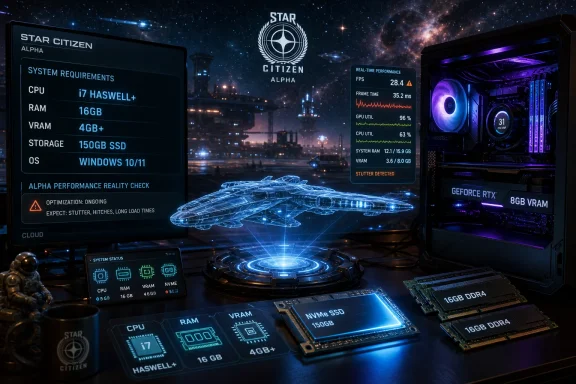 The Minimum Spec Is a Door, Not a Promise
Cloud Imperium Games’ published requirements do what minimum specs usually do: define the lowest bar at which the launcher and client are expected to cooperate. They do not promise that the experience beyond that point will be smooth, stable, or even especially dignified. In Star Citizen, that distinction matters more than it does in most PC games.The official minimum spec is already unusually stern. A quad-core Intel i7 from the Haswell era or newer, or an AMD Excavator-class CPU or newer, is not exotic in 2026, but it does rule out a large amount of old hardware that still runs conventional esports titles and older AAA games. The GPU requirement is also explicit: DirectX 11.1 compatibility, 4 GB of VRAM, current drivers, and support for the necessary rendering stack.
Then comes the storage line, which is where the game stops pretending to be a normal install. CIG lists 150 GB or more of SSD space as required. Not recommended, not “strongly preferred,” but required. That is a meaningful declaration for anyone still trying to stretch an older gaming desktop with a large mechanical hard drive and a small boot SSD.
The operating system story is just as narrow. Star Citizen is a Windows PC game. There is no official macOS build, no official Linux build, and no console version to fall back on. If your machine is not running a supported Windows environment, you are already outside the developer’s intended lane before CPU, GPU, or RAM enter the conversation.
The Recommended Spec Is Where the Game Starts to Make Sense
The recommended tier is the more honest starting point for most players in 2026. CIG advises Windows 10 with the latest service pack or Windows 11, a quad- or eight-core Intel i7 Haswell-or-newer or AMD Ryzen 5-or-newer processor, a DirectX 12 GPU with 8 GB of VRAM, 32 GB of DDR4 memory, and the same 150 GB-plus SSD requirement. That is not a luxury spec so much as a baseline for avoiding obvious pain.The most important jump is memory. A 16 GB machine may launch the game, pass the checklist, and technically qualify as supported. But Star Citizen has long been one of the clearest examples of a PC game where “minimum RAM” and “enough RAM” are not the same sentence.
In busy landing zones, during long sessions, or after patches that alter streaming and asset behavior, memory pressure can become the defining performance problem. Once Windows begins leaning heavily on the page file, the issue stops looking like low frame rate and starts looking like stutter, hitching, delayed asset loading, and the miserable sense that the whole machine is trying to catch its breath. A faster GPU cannot solve that.
That is why the recommended 32 GB figure should be treated less like a comfort upgrade and more like the practical spec for anyone planning to spend real time in the Persistent Universe. In many games, extra RAM sits idle. In Star Citizen, it is often the difference between tolerating the alpha and fighting it.
Storage Is the Requirement Players Most Often Underestimate
The SSD requirement is not bureaucratic padding. Star Citizen streams a vast amount of world data: cities, stations, ships, interiors, planetary surfaces, textures, shaders, and mission spaces. The game’s world is built around constant traversal, and that makes storage performance a live gameplay variable rather than a loading-screen-only concern.A mechanical hard drive is the wrong tool for this job. It may have the capacity, but it lacks the responsiveness needed when the engine is pulling large assets into memory while the player is moving through dense environments. The result is the familiar cocktail of texture pop-in, prolonged loading, hitching, and delayed scene construction.
A SATA SSD is a workable floor, but an NVMe drive is the more sensible destination. CIG’s official requirement does not split hairs between SATA and NVMe, yet anyone building or upgrading a PC for this game should. The price gap has narrowed enough that treating NVMe as the default is reasonable, especially when the rest of the system is already being asked to clear a relatively high bar.
There is also a practical Windows angle here. You do not want to install the game on a nearly full SSD and then leave Windows with little breathing room for caches, updates, shader data, and the page file. A system that technically has 150 GB free today may become an unstable mess after a major patch, a driver update, and a few months of normal PC use.
The CPU Requirement Is About Instructions as Much as Cores
The CPU line in the requirement table looks simple, but it hides a sharper compatibility issue. Star Citizen requires support for AVX, AVX2, and FMA3 instructions. That means some processors that still feel “fast enough” for everyday Windows use or older games may simply fail the gate.This is an increasingly common divide in PC gaming. Modern engines often assume instruction sets and platform capabilities that older enthusiast hardware lacks, even when clock speeds and core counts look respectable on paper. The launcher error is not necessarily telling you that your PC is slow. It may be telling you that your CPU does not speak the language the game now requires.
For WindowsForum readers running older workstations, recycled office towers, or beloved Sandy Bridge-era gaming rigs, this matters. A machine can be perfectly serviceable for Windows 10, browsing, media, and light gaming while still being a non-starter for Star Citizen. The game’s hardware floor is defined by feature support, not nostalgia.
The recommended CPU language is also revealing. CIG names Intel i7 Haswell or later and AMD Ryzen 5 or later for the higher tier, with quad- or eight-core phrasing. That is broad enough to avoid prescribing one ideal chip, but the direction is obvious: more cores, newer platforms, and better memory subsystems help.
The GPU Spec Is Modest on Paper, but VRAM Is the Trap
The minimum GPU examples include cards such as NVIDIA’s GTX 1060 and several AMD and Intel options with at least 4 GB of VRAM. That makes the minimum graphics line look less frightening than the memory and storage requirements. A surprising number of budget gaming PCs can still clear it.But the recommended 8 GB VRAM target is the safer reading of the game’s direction. Star Citizen is visually ambitious, asset-heavy, and still evolving. A 4 GB card may satisfy the minimum, but it is not where a player should want to be in 2026 if the goal is a stable experience across landing zones, space combat, planetary environments, and future patches.
The DirectX and Vulkan support language also matters. CIG requires a GPU driver with support for Direct3D 11.1 and Vulkan 1.2, while the recommended tier calls for DirectX 12 compatibility. That means old driver branches and abandoned GPUs are liabilities, even if raw shader performance once seemed adequate.
The practical advice is simple: do not build a Star Citizen machine around the bare minimum GPU unless you are prepared to compromise heavily. For a broader Windows gaming PC, 8 GB of VRAM is already a more comfortable floor. For this game, it should be treated as the serious entry point.
Windows Is Not Just the Platform; It Is Part of the Troubleshooting Surface
Because Star Citizen is Windows-only, the health of the Windows installation itself becomes part of the system requirement. CIG’s support documentation repeatedly points players toward current graphics drivers, fully installed Windows updates, required Windows components, and launcher troubleshooting steps. This is not the kind of game where a neglected OS image is harmless background noise.That has consequences for administrators and power users who keep lean Windows installs, debloated images, or custom configurations. A stripped-down Windows build may be attractive for general performance, but missing media components, outdated frameworks, aggressive security tools, or broken update states can become launcher problems. In that sense, the game is a stress test not only for hardware, but for Windows maintenance habits.
Windows 11 is now part of the recommended environment, but Windows 10 remains listed in the official minimum and recommended rows. That gives players with stable Windows 10 gaming systems a path forward, at least for now. Still, anyone planning a new build in 2026 should assume Windows 11 is the more future-proof target.
The lack of official macOS and Linux support also narrows the usual enthusiast escape routes. Proton, virtual machines, dual-boot experiments, and compatibility layers may be interesting projects, but they are not supported answers. If the question is whether your PC can run Star Citizen as intended, the PC in question is a Windows PC.
The Page File Is the Unofficial Co-Star
The 16 GB minimum creates one of the game’s most common traps. A player checks the table, sees that their PC qualifies, installs the client, and then discovers that the game’s actual behavior can push the system into heavy virtual memory use. At that point, the SSD stops being just a storage device and becomes part of the memory safety net.Windows can compensate for insufficient RAM by paging data to disk, but it cannot make that process feel like real memory. Even on a fast SSD, paging under pressure introduces latency. On a cramped or slower drive, the penalty becomes more visible, and Star Citizen is exactly the kind of workload that exposes it.
This is why the RAM and SSD requirements should be read together. A 16 GB machine with a fast, spacious NVMe drive may be survivable. A 16 GB machine with a nearly full SATA SSD is asking for trouble. A 16 GB machine installed on a hard drive is a museum exhibit with a launcher icon.
For players who cannot upgrade everything at once, RAM is often the first sensible move. A new graphics card may raise average frame rates in GPU-bound scenes, but more memory can reduce the stutters and collapses that make the game feel broken. In an alpha MMO-scale simulation, consistency often matters more than a benchmark peak.
“Can You Run It?” Depends on Where You Stand in the ’Verse
The cruel thing about Star Citizen performance is that there is no single workload. Empty space is not a city. A quiet hangar is not a crowded landing zone. A first launch after a patch is not the same as a later session after shaders and caches have settled.That makes generic “can I run it?” tools less definitive than usual. CIG’s Telemetry Dashboard is useful because it draws from real player hardware data, but even that cannot fully account for server state, location, patch behavior, background apps, or the particular weirdness of a given Windows install. The dashboard can tell you what similar systems tend to see. It cannot promise what your next session will feel like.
This is also why player reports often sound contradictory. One user with 16 GB insists the game is playable; another says 32 GB is mandatory; a third argues for 64 GB. All three may be describing real experiences shaped by different locations, expectations, Windows configurations, background tasks, and tolerance for stutter.
The honest answer is tiered. Minimum means the game should launch. Recommended means the game has a fighting chance of behaving. Comfortable means 32 GB or more of RAM, a modern multi-core CPU, an 8 GB-or-better GPU, current drivers, and a fast SSD with enough free space that Windows is not constantly negotiating with itself.
Lower-End PCs Need Discipline, Not Magic Settings
There are settings worth adjusting if your machine sits near the minimum line, but players should not expect miracles. Star Citizen is not a lightweight competitive shooter with a dozen toggles that can turn an old laptop into a viable rig. It is a heavy simulation client attached to a live service, and some bottlenecks are structural.Reducing graphics quality can help, particularly with shadows, volumetrics, and other expensive visual effects. Upscaling technologies such as FSR or TSR-style rendering paths can also reduce GPU load, depending on the build and options available. Frame caps can improve perceived smoothness by reducing wild pacing swings.
But no graphics setting creates more physical RAM. No resolution slider turns a hard drive into an SSD. No driver update adds missing AVX2 support to an old CPU. The game’s hardest requirements are not merely preferences hidden behind a config file.
The best low-end strategy is therefore operational. Close browsers before launch, keep overlays to a minimum, make sure the page file has room to function, install the game on the fastest available SSD, and avoid judging performance during first-launch shader compilation. Many apparent hangs after installation or major patches are not crashes; they are the machine grinding through work it must finish before the game settles down.
The Alpha Label Still Carries Real Hardware Risk
The system requirements carry a warning that many players read too quickly: the game is still in development, and the specs may change. That is not boilerplate in Star Citizen’s case. This is a long-running alpha whose engine, renderer, networking model, assets, and gameplay systems continue to evolve.A PC that runs today’s build acceptably may run a future build differently. That can mean improvements, regressions, or simply a new bottleneck. A patch that changes streaming behavior can make storage more visible. A rendering update can shift pressure toward VRAM. A new city, ship interior, or event can turn a previously comfortable machine into a stutter lab.
This is the central consumer problem with buying hardware “for Star Citizen.” You are not buying for a finished, static workload. You are buying for a moving target. That does not mean players should never upgrade for it, but it does mean the upgrade should make sense for the wider PC, not just one alpha build.
For most users, the safest investments are the least exotic ones: 32 GB of RAM, a good NVMe SSD, a current Windows installation, and a GPU with enough VRAM to remain useful across modern games. Those upgrades help Star Citizen, but they also improve the rest of the Windows gaming library.
The Spec Sheet Says Yes, but the Build Sheet Says Maybe
The official requirements answer the narrow compatibility question. The practical build advice answers the experience question.- A PC with 16 GB of RAM can meet the minimum requirement, but 32 GB should be treated as the realistic target for regular play.
- A 150 GB SSD is not optional, and an NVMe drive is the sensible choice for anyone installing the game in 2026.
- A GPU with 4 GB of VRAM may clear the minimum bar, but 8 GB or more is the safer practical floor.
- Windows 10 remains supported in the listed requirements, while Windows 11 is part of the recommended environment.
- Older CPUs can fail because they lack required instruction sets, not merely because they are slow.
- The Telemetry Dashboard is useful for expectations, but server state, location, patches, and Windows configuration can still swing performance.
References
- Primary source: Sam Lover
Published: 2026-07-02T11:20:08.369552
Star Citizen System Requirements (2026): Can You Run It?
Star Citizen system requirements are steeper than almost any other PC game on the market, and that’s before you factor in the alpha’s habit of eating far more RAM than the official numbers suggest. Cloud Imperium Games lists a 64-bit quad-core CPU, 16 GB of RAM, a 4 GB VRAM graphics...samlover.com - Related coverage: support.robertsspaceindustries.com
RSI Launcher Error - System Requirements Not Met – Roberts Space Industries Knowledge Base
This error means that the computer being used to access the game is incompatible and will either have difficulty running the game in a...support.robertsspaceindustries.com - Related coverage: starcitizen.au
Star Citizen System Requirements 2026: Real Specs You Need
Official minimum is 16GB RAM. The truth: you need 32GB. Honest 2026 system requirements for Star Citizen, what to upgrade first, and what runs Squadron 42 well.starcitizen.au - Related coverage: starcitizencoupon.app
Star Citizen System Requirements 2026. What Your PC Actually Needs.
The honest 2026 spec sheet for Star Citizen. Official minimum, what actually runs well in big cities, the CPU-bound truth nobody mentions, real FPS numbers on current chips, and the 150GB SSD rule.starcitizencoupon.app - Related coverage: star-citizen.wiki
Systemanforderungen – Star Citizen Wiki
Denkt daran, dass dies die derzeitigen Angaben für die Star Citizen Alpha Version sind und diese Systemanforderungen bis zum finalen Veröffentlichungsdatum verändern… star-citizen.wiki
- Related coverage: lukesplaygrounds.com
【Star Citizen】システム要件と推奨スペックについて | Luke's Playgrounds
Star Citizen(スターシチズン)のシステム要件と、快適に遊ぶために必要なPCスペックについて解説しますlukesplaygrounds.com
- Related coverage: morele.net
Star Citizen – wymagania sprzętowe - Morele.net
Star Citizen nie wybacza słabych PC! Poznaj zaktualizowane wymagania sprzętowe. Sprawdź, jakie GPU i SSD zagwarantują płynny lot.www.morele.net - Related coverage: starcitizen.fandom.com
Star Citizen | Star Citizen Wiki | Fandom
Star Citizen is an upcoming space living simulator video game for Microsoft Windows and GNU/Linux[1] in development by Chris Roberts and Cloud Imperium Games. Star Citizen involves first person space combat and trading in an MMO-style Persistent Universe. Separately, Squadron 42. is a branching...starcitizen.fandom.com
- Related coverage: pcgamer.com
Look, 16 GB of RAM is absolutely fine for PC gaming in 2026. Though there are some caveats to that... | PC Gamer
If it's good enough for consoles, surely it's good enough for a gaming PC?www.pcgamer.com - Related coverage: hone.gg
Star Citizen
Check the official PC system requirements for Star Citizen. View minimum and recommended specs, storage size, GPU, CPU, and performance details before you download.hone.gg
