

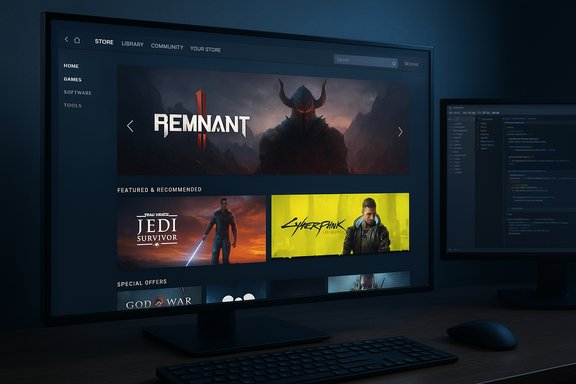
Valve has quietly pushed a design refresh to the Steam store that, while subtle at first glance, changes how pages render on larger screens and gives developers more room and tools to showcase their games — most notably by widening the main store column from 940 pixels to 1200 pixels and upgrading the trailer/screenshot presentation to support theater and full‑screen viewing.
Steam’s storefront has been under steady, incremental refinement for the past few years. What began as targeted experiments in beta channels and Steam Labs has matured into broader client updates, including a revamped trailer player earlier this year and several visual and accessibility improvements rolled out across desktop and handheld clients. Valve’s iterative approach—test in Labs or beta, collect feedback, then expand—continues to be the ticket for larger UI changes. The latest change is not a wholesale redesign; it is a focused layout and media overhaul intended to make store pages feel more modern and to better use the horizontal real estate of contemporary monitors. The company describes 1200 pixels as a balance point: large enough to showcase art, trailers, and developer-controlled content while still scaling down reliably on tablets and handhelds. Independent reporting confirms the shift from 940px to 1200px as Valve’s chosen new width.
Source: Windows Report Steam Store Pages Just Become Wider and More Cleaner
 Background
Steam’s storefront has been under steady, incremental refinement for the past few years. What began as targeted experiments in beta channels and Steam Labs has matured into broader client updates, including a revamped trailer player earlier this year and several visual and accessibility improvements rolled out across desktop and handheld clients. Valve’s iterative approach—test in Labs or beta, collect feedback, then expand—continues to be the ticket for larger UI changes. The latest change is not a wholesale redesign; it is a focused layout and media overhaul intended to make store pages feel more modern and to better use the horizontal real estate of contemporary monitors. The company describes 1200 pixels as a balance point: large enough to showcase art, trailers, and developer-controlled content while still scaling down reliably on tablets and handhelds. Independent reporting confirms the shift from 940px to 1200px as Valve’s chosen new width. What changed — the visible details
Wider main column: 940 → 1200 pixels
The most obvious front‑end change is the expanded width of the store’s main content column. This affects the canonical game page layout where capsule art, trailers, developer descriptions, and system requirements live.- The main column is now 1200px wide at its intended maximum layout size.
- On narrower viewports the layout remains responsive and will scale to fit tablets, Steam Decks, and smaller browser windows. Valve says content “shrinks appropriately” when the viewport is smaller than the design target.
Revamped trailer and screenshot carousel
The media strip on game pages received a functional upgrade:- A new carousel now supports clearer navigation with side arrows and progressive loading.
- Users can toggle between default, theater, and full‑screen modes for video and imagery.
- Images and trailers are offered at higher resolutions, and Valve reprocessed many existing assets to better fit the updated player.
“About the Game” and formatting improvements
Valve added developer-facing tools and richer formatting options for the “About the Game” section. The net effect for shoppers is cleaner paragraphs, consistent headings, and an improved placement for feature lists and callouts.- Developers now have clearer controls for how description blocks display, which reduces layout quirks and improves legibility.
- Image handling in description sections is improved: larger previews, better alignment, and higher fidelity rendering of artwork.
Subtle background changes and unified visual language
The update introduces more permissive background layering that allows more of a game’s art to “bleed through” the chrome, subtly shifting store pages from purely functional to more atmospheric. Similarly, search results, bundle pages, and tag hubs were given spacing and sizing tweaks for a uniform look and feel.- Search result rows are slightly taller and use larger artwork.
- Bundle pages and recommendation hubs (e.g., Popular Among Friends) received spacing updates for visual consistency.
- Steam Charts and the News Hub were adjusted to share more consistent platform colors and sizing.
Why Valve chose 1200px (design rationale)
The decision to center on 1200px appears rooted in practical UX and conversion considerations:- Most modern desktop monitors give ample horizontal room, and 1200px is a common content width in modern web design that balances readability and visual impact.
- Larger media increases the perceived production value of a store page — an important lever for conversion, especially for higher‑budget or cinematic titles.
- Valve intentionally kept the layout responsive to ensure smaller devices still get a usable UI rather than forcing a fixed desktop template.
For developers: what to expect and what to do
Asset sizes and formats
The update coincided with broader asset template updates announced in Steamworks documentation and developer channels. Developers should pay attention to these practical changes:- Some capsule and library asset templates were expanded in size; developers should re‑check Steamworks’ graphical asset rules and templates to ensure images render crisply at larger display sizes.
- The trailer/description player changes mean re‑encoded video may look better. If trailers were uploaded long ago, re‑encoding to modern bitrates and formats (e.g., H.264/MP4 at higher resolutions) is prudent. Community reports and Steamworks messaging indicated that some reprocessing happened automatically, but manual verification is recommended.
Review and QA checklist for teams
- Verify capsule and header assets match updated dimension requirements.
- Preview the store page at 1200px width and at common narrower widths (1366×768, 1920×1080, and Steam Deck resolution) to ensure text and calls‑to‑action remain legible.
- Re‑encode trailers at modern bitrates and confirm they play correctly in theater/full‑screen modes.
- Validate in‑description images: file formats, alignment, and alt text where applicable.
- Use Steamworks preview tools and the partner site to test how assets are reprocessed and rendered.
Opportunities for conversion optimization
- Larger art and video windows lead to higher visual fidelity; teams should use better lighting, cleaner fonts, and tighter trailer edits to take advantage of this.
- Descriptions can be restructured into scannable blocks: a short elevator pitch, 3–5 bullet features, then screenshots and a trailer in theater mode.
- Updated background bleed allows for mood setting; subtle color shifts or vignette art can reinforce brand identity without obscuring text.
UX and accessibility considerations
Larger layouts present both benefits and pitfalls for accessibility.- Benefits: Bigger images can improve engagement and make key visuals easier to parse from a distance; better formatting tools reduce text‑overflow and truncation issues.
- Risks: Wider columns can increase horizontal reading width for long paragraphs, which can hurt comprehension for some readers. Valve’s continued support for UI scaling, high‑contrast themes, and reduced motion toggles remains essential to address this.
- Screen magnification and high‑contrast modes enabled.
- Text scaling at extreme settings.
- Keyboard navigation and screen reader flows — especially around the new carousel and theater player UI.
Performance, bandwidth, and client implications
Larger imagery and higher‑resolution videos inevitably increase bandwidth demands. Valve appears to have taken that into account by reprocessing assets and delivering them responsively, but developers and sysadmins should remain mindful:- The client and web store will serve scaled variants; however, very large hero images and trailers still require appropriate compression and modern codecs for efficient delivery.
- Users on metered connections or older hardware might see slower page loads if developers ship oversized uncompressed assets.
- For the Steam client specifically, Valve’s move is incremental: the underlying runtime and embedded Chromium/CEF upgrades that power the store have already migrated in recent months, and Valve continues to iterate on video playback performance.
Business and discoverability implications
A wider page and richer media area can subtly shift discoverability and conversion dynamics.- Games with polished trailers and large, clear screenshots will likely benefit more from the new layout.
- Smaller indie titles that rely on concise text or unique UI hooks may need to reframe their store presence to take fuller advantage of the available space (e.g., stronger lead hooks, better feature bullets, cleaner aesthetic).
- Bundles, tag hubs, and friend‑driven recommendation panes that received spacing updates may improve faceted browsing and make related content easier to find.
Community response and rollout dynamics
Community reaction has been broadly positive with the usual caveats. Players appreciate clearer visuals and larger trailers, while some vocal users worry about whether the design will scale well across all devices or create visual bloat on certain pages. Early adopters in beta channels reported the change for months before wider rollout, so many community testers already provided feedback that shaped the final release. Valve’s long‑standing approach — test in beta, collect feedback, and then broaden the rollout — appears to have worked here. That said, community threads flag a handful of edge cases where layout changes interact poorly with older store assets or unusually formatted descriptions. Developers should check for accidental layout regressions on their own pages.Risks and remaining unknowns
No software update is risk‑free. The major risks and open areas to watch:- Performance regressions: Larger media may lead to slower perceived page loads for users on slower connections; this depends heavily on how assets are served and cached.
- Accessibility regressions: If developers do not adapt content to the wider width, long text lines and poor contrast can harm users relying on assistive tech. Valve’s accessibility suite helps but is not a substitute for good content structure.
- Compatibility with third‑party tools: Community tools and plugins that modify store pages may need updates to avoid layout breakage. The native customization Valve added reduces the need for some community plugins, but it does not fully replace the convenience and scale those tools provide.
- Unclear migration timelines for all asset types: While Valve reprocessed many assets, developers should explicitly verify all critical screenshots, trailers, and capsule art in the partner preview to avoid surprises. Some community reports suggest automated reprocessing handled most cases, but manual checks are still prudent.
Practical checklist for immediate next steps
- For developers and publishers:
- Preview your store page at 1200px and common breakpoint widths.
- Re‑encode and reupload trailers at higher quality and balanced bitrates.
- Replace any low‑resolution screenshots with crisp, properly sized images.
- Reformat long description blocks into smaller, scannable sections.
- Run quick accessibility checks (text scaling, keyboard nav, screen reader).
- For players:
- If you’re in the beta channel you may already see these changes; opt out if you prefer the prior layout.
- Report broken pages or badly formatted descriptions through Steam’s feedback mechanisms.
- For users on metered or slow networks, consider disabling preloading of trailers or lowering page media settings where available.
Conclusion
This update is an iterative but meaningful push toward a cleaner, more cinematic Steam storefront. By expanding the main column to 1200px, improving the trailer/screenshot carousel, and giving developers better formatting tools, Valve has made the store more adaptable to modern displays and higher‑quality promotional assets. The change is well‑timed: it leverages prior trailer improvements and aligns with updated asset rules and templates surfaced through Steamworks. The net effect should be smoother browsing and a higher visual bar for store pages — a welcome shift for users with larger screens and for developers who invest in high‑quality media. The flip side is the responsibility this places on content creators: larger canvas sizes reveal mediocre assets quickly, and teams that do not refresh their storefronts risk looking dated. The rollout demonstrates Valve’s incremental, data‑driven approach to platform UX, but it also underscores a simple truth for store owners: polish matters, and the storefront rewards it.Source: Windows Report Steam Store Pages Just Become Wider and More Cleaner
