

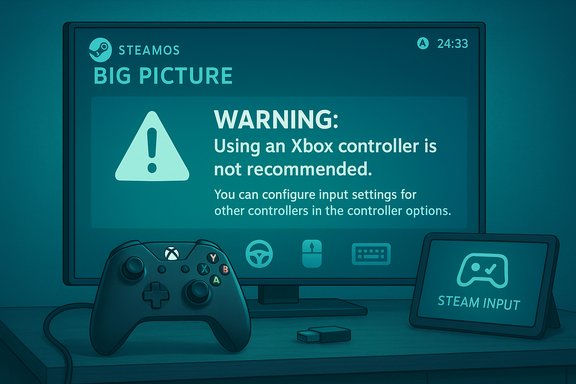
Valve’s SteamOS is rolling out a small but meaningful user-safety tweak: the system will now display an explicit warning when an Xbox-branded controller that SteamOS deems “incompatible” is connected, aiming to reduce frustrating input problems and misreported device behavior for Deck and SteamOS users.
SteamOS has evolved from a niche experiment into a mainstream platform for Valve’s handheld and living‑room efforts, and with that growth has come a steady stream of interface-level safeguards designed to help players avoid obvious hardware/software mismatches. Valve has already been expanding compatibility metadata across the Steam ecosystem — adding SteamOS compatibility labels, surfacing controller support icons on game pages, and improving Steam Input recognition for a wider variety of devices — and the new incompatible‑controller warning is the latest UX control in that trajectory. This update is narrower in scope than headline OS upgrades: it’s a user prompt tied to controller enumeration and driver/descriptor checks rather than a deep firmware or kernel change. Still, it reflects a broader recognition at Valve that input devices are a common source of confusing edge cases on SteamOS (and on Linux gaming in general), particularly when peripheral vendors ship variants that present differing USB/Bluetooth descriptors or rely on proprietary wireless stacks. Community bug reports and vendor issues — for example, long‑running threads about Xbox wireless adapter behaviour on SteamOS — created the kind of telemetry and user friction this warning aims to cut down.
The downside is that a UI warning can only do so much. Many long‑standing compatibility gaps require vendor engagement or kernel/driver work. Valve’s choice to warn rather than to ship speculative drivers is defensible: it keeps the client lightweight and avoids the security and maintenance costs associated with broad driver support without vendor buy‑in.
The pragmatic, transparency‑first pattern we see here — compatibility badges, controller‑specific messaging, and better Steam Input tooling — is the right direction. For users, the best short‑term move is to heed the warning by testing wired connections and consulting the SteamOS troubleshooting prompts. For vendors, the clear path is fewer surprises: publish testable firmware and document compatibility modes.
Valve’s warning will not solve every controller oddity, but it will take many of the most common “why won’t my controller work?” scenarios off the table before they even become support threads. That’s a meaningful UX win for a platform still building out its hardware and compatibility story.
The landscape of controllers, wireless adapters, and the subtleties of Linux input stacks will continue to produce corner cases. Valve’s new SteamOS warning is a modest, user‑centric measure that improves transparency and shortens the path from confusion to solution — a practical, low‑risk improvement that aligns with broader efforts to make SteamOS a more approachable, predictable gaming platform.
Source: TechPowerUp SteamOS Will Now Warn Users About Incompatible Xbox Controllers | TechPowerUp}
 Background
SteamOS has evolved from a niche experiment into a mainstream platform for Valve’s handheld and living‑room efforts, and with that growth has come a steady stream of interface-level safeguards designed to help players avoid obvious hardware/software mismatches. Valve has already been expanding compatibility metadata across the Steam ecosystem — adding SteamOS compatibility labels, surfacing controller support icons on game pages, and improving Steam Input recognition for a wider variety of devices — and the new incompatible‑controller warning is the latest UX control in that trajectory. This update is narrower in scope than headline OS upgrades: it’s a user prompt tied to controller enumeration and driver/descriptor checks rather than a deep firmware or kernel change. Still, it reflects a broader recognition at Valve that input devices are a common source of confusing edge cases on SteamOS (and on Linux gaming in general), particularly when peripheral vendors ship variants that present differing USB/Bluetooth descriptors or rely on proprietary wireless stacks. Community bug reports and vendor issues — for example, long‑running threads about Xbox wireless adapter behaviour on SteamOS — created the kind of telemetry and user friction this warning aims to cut down. What Valve changed — the headline details
- SteamOS will now present an on‑screen warning when it detects a controller that looks like an Xbox device but exposes characteristics known to be problematic on SteamOS (driver mismatches, unsupported wireless dongles, or missing feature descriptors).
- The warning is informational: it tells you why the device may not function correctly, suggests next steps (switching modes, using a wired connection, or installing a specific driver), and points users to a troubleshooting page inside the Big Picture / Deck UI.
- The change is being deployed through SteamOS updates and was first reported in coverage of recent SteamOS client changes; it appears alongside other controller and Steam Input improvements that Valve has been rolling out in recent betas.
Why this matters: the practical problem SteamOS is trying to solve
- Many controllers present themselves in different “modes” (XInput vs. generic HID vs. vendor‑specific profiles) or require different drivers depending on whether they connect via Bluetooth, USB, or a proprietary wireless adapter. When a controller reveals a descriptor SteamOS doesn't fully support, games can see ghost buttons, duplicate axes, disabled rumble, or no inputs at all.
- On Linux-based SteamOS, vendor drivers and firmware layers are less consistent than on Windows; Bluetooth stacks and kernel versions can change how a controller is exposed to the system. That variability is why a modest UX tutor — a warning shown at connection time — can save hours of user frustration.
Which Xbox controllers are likely to trigger the warning?
Valve’s notes around the change do not publish an exhaustive list of model numbers. However, the classes of devices most often implicated in SteamOS controller issues — and therefore the ones most likely to trigger a compatibility warning — are:- Older Xbox controllers (pre‑Bluetooth models) relying on the Microsoft Xbox Wireless Adapter that require non‑standard driver paths on Linux.
- Some third‑party controllers and dongles that claim XInput compatibility but expose partial or conflicting USB descriptors (double‑mapped buttons, nonstandard axis order).
- Wireless adapters/dongles that depend on a Windows‑specific stack for audio, headset passthrough, or special features that are not available or are unsupported under SteamOS.
How the warning works (technical details)
- Detection: When a device is enumerated, SteamOS examines USB/Bluetooth descriptors, reported capabilities (axes, buttons, haptics), and whether the device is being presented through an adapter/dongle that historically causes issues.
- Heuristics: The warning is rule‑based rather than heuristic‑AI: known mismatch patterns (e.g., adapter reporting Xbox audio functions without the kernel driver to support them) are flagged.
- Messaging: The prompt appears within the Steam Big Picture / Deck interface and includes concise advice — try a wired USB cable, switch adapter modes, check a drivers page, or opt into a SteamOS beta channel for wider driver support.
- No hard block: Users can ignore the warning and continue — Valve’s goal is to reduce confusion, not to prevent usage. This keeps the environment flexible for power users who know how to configure devices at the OS/driver level.
Immediate user impact and recommended workflows
If you see the warning, here’s a short, practical checklist to get a controller working reliably:- Try a wired USB connection first — wired enumeration is the most consistent path and will often bypass Bluetooth/adapter oddities.
- If you’re using a third‑party wireless dongle, look for a physical mode switch (PC/XInput vs console mode) and set it to the vendor‑recommended PC mode.
- For GameCube/adapter ecosystems or non‑Microsoft dongles, follow the community‑recommended driver replacement guidance (for example, using libusb/WinUSB via Zadig on Windows or the equivalent on Linux where required) only if you’re comfortable with driver changes.
- Optionally opt into the SteamOS or Steam client beta channels if the vendor or community notes a recent fix included in those builds.
- If all else fails, consult Valve’s Steam Input device management page in Big Picture mode or the SteamOS support documentation for model‑specific steps.
Broader context: why Valve is doing more device‑level messaging
Valve has been steadily improving Steam Input and platform signals for two reasons:- The SteamOS ecosystem is diversifying. More OEMs ship SteamOS devices, and customers expect plug‑and‑play parity with Windows.
- Controller complexity has increased. Controllers now include gyros, adaptive triggers, haptics, multi‑radio stacks, and audio passthrough. Each feature adds a potential mismatch with Linux stacks and drivers.
Strengths: why this is a positive change
- Faster troubleshooting: Users get immediate feedback so they can quickly decide whether to switch cables, modes, or consult documentation.
- Reduced community noise: Fewer “controller not working” support threads will be opened for cases where the hardware was never going to function properly without vendor drivers.
- Preserves flexibility: Because the warning is informational, advanced users retain the ability to proceed with custom driver setups or experimental adapters.
- Low engineering cost, high UX payoff: Implementing a warning is far cheaper and lower‑risk than deep driver support. It reduces friction without expanding Valve’s maintenance surface area.
Risks, caveats and potential downsides
- False positives: Conservative heuristics risk flagging devices that would actually work fine; over‑warning can frustrate users and erode trust.
- Fragmentation of messaging: If Valve’s warning text lacks concrete remediation steps (e.g., “this device may not support audio passthrough”), users may still escalate support requests, generating the same noise the warning seeks to prevent.
- Anti‑cheat and competitive play: Any change in input handling has to be validated against anti‑cheat systems; a user who ignores the warning and applies Steam Input remapping might still face anti‑cheat flags in certain games. Valve’s UI should be clear that the warning is about compatibility, not about fair play.
- Vendor coordination: The warning is a stopgap. Long‑term resolution for many devices requires vendor firmware or driver updates, and some third‑party vendors may not prioritize Linux/SteamOS patches.
Verification and independent corroboration
Multiple independent touchpoints corroborate the direction of Valve’s work on input and compatibility:- Community and issue trackers show recurrent problems with Xbox wireless adapters on SteamOS, indicating why a compatibility warning is useful.
- Coverage of Steam client and SteamOS updates documents a series of input‑focused fixes and UX additions (Steam Input improvements, SteamOS compatibility labels) consistent with a new controller warning being introduced as part of that ongoing effort.
- Reports from mainstream gaming outlets describe Valve’s broader push to make non‑Steam controllers more configurable inside Steam, a complementary effort that reduces the number of cases where a warning would be required in the first place.
Recommendations for end users, vendors and IT admins
For end users:- When connecting controllers to a SteamOS device, try wired USB first. It is the most consistent mode and will quickly indicate whether a device is fundamentally supported.
- If you see the warning, follow the on‑screen steps before changing drivers or performing advanced fixes.
- Keep a test machine or dual‑boot option for multiplayer titles that require strict anti‑cheat compatibility (many competitive games still have Windows‑only anti‑cheat paths).
- Publish Linux/SteamOS‑friendly firmware updates and clear compatibility notes. That reduces false positive warnings and improves user experience.
- Test devices against the common SteamOS distributions and document known limitations (headset audio, proprietary radio stacks, Bluetooth variants).
- If you run SteamOS fleets (kiosks, exhibition machines), adopt a whitelist approach: pre‑validate permitted controller models and disable or hide the warning in controlled environments where you manage drivers centrally.
- Plan for edge cases where a legacy wireless dongle will not work and have supported wired alternatives on hand.
Final analysis — incremental change, measurable gains
On its face this change is small: a connection‑time prompt. But it’s well targeted. SteamOS’ strength for players comes from removing friction — from “plug and play” experiences to community‑shared controller configs. A targeted warning for a historically troublesome class of peripherals directly supports that strength. It reduces mystery support tickets, shortens troubleshooting cycles, and makes SteamOS a friendlier platform for newcomers who may otherwise assume the system is broken.The downside is that a UI warning can only do so much. Many long‑standing compatibility gaps require vendor engagement or kernel/driver work. Valve’s choice to warn rather than to ship speculative drivers is defensible: it keeps the client lightweight and avoids the security and maintenance costs associated with broad driver support without vendor buy‑in.
The pragmatic, transparency‑first pattern we see here — compatibility badges, controller‑specific messaging, and better Steam Input tooling — is the right direction. For users, the best short‑term move is to heed the warning by testing wired connections and consulting the SteamOS troubleshooting prompts. For vendors, the clear path is fewer surprises: publish testable firmware and document compatibility modes.
Valve’s warning will not solve every controller oddity, but it will take many of the most common “why won’t my controller work?” scenarios off the table before they even become support threads. That’s a meaningful UX win for a platform still building out its hardware and compatibility story.
The landscape of controllers, wireless adapters, and the subtleties of Linux input stacks will continue to produce corner cases. Valve’s new SteamOS warning is a modest, user‑centric measure that improves transparency and shortens the path from confusion to solution — a practical, low‑risk improvement that aligns with broader efforts to make SteamOS a more approachable, predictable gaming platform.
Source: TechPowerUp SteamOS Will Now Warn Users About Incompatible Xbox Controllers | TechPowerUp}
