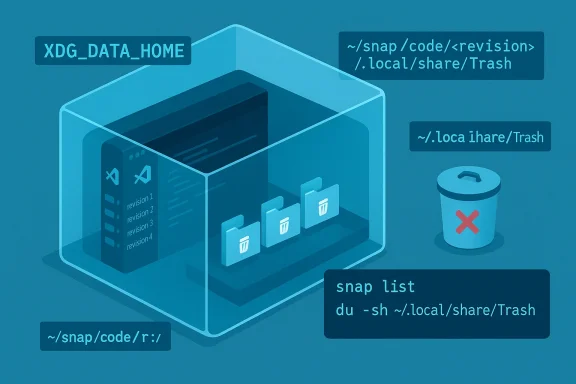
Microsoft’s Visual Studio Code is quietly eating Linux disk space for some users — and the culprit isn’t your project files, it’s where the Snap package hides deleted files. What looks like an innocent “Move to Trash” from the VS Code file explorer can end up in a Snap-specific trash folder that’s never emptied by the desktop’s system trash, and because Snap keeps older revisions, those per-revision trash folders can accumulate into tens or hundreds of gigabytes over time.
Snap packages run applications inside a confined environment with their own runtime and user-data layout. That confinement is useful for compatibility and transactional updates, but it also changes environment variables like XDG_DATA_HOME inside the snap. When VS Code (the Microsoft build shipped as the snap named code) sets XDG_DATA_HOME to point into the snap’s user-data area, deleted files sent to “Trash” are placed in the snap-local Trash directory rather than the user’s ~/.local/share/Trash. Emptying the GNOME/KDE trash does not affect those files because they are outside the system-managed trash location.
This has been reported publicly since November 2024, with multiple independent users discovering large caches of “deleted” files inside their snap data (for example, ~/snap/code/<revision>/.local/share/Trash). The problem is easiest to trigger on Ubuntu where the Snap ecosystem is the default channel inside the Software app, but it is not unique to Ubuntu — it's a behavior of the snap packaging environment interacting with how VS Code chooses its XDG directories.
Why this matters: files you intentionally removed can remain on disk indefinitely and — worse — silently. That can fill a small SSD and cause surprise failures, VM corruption during low-space conditions, and frustrated users trying to figure out where their storage disappeared to.
Note: some users like Snaps for ease of installation, sandboxing, or canonical support; the tradeoff is that snaps have altered environment and filesystem semantics that can surprise desktop users when apps expect system-level behavior.
For Windows users, storage problems look different — Windows exposes tools (Storage Sense, Disk Cleanup, DISM) to analyze and remove large system artifacts — but the common theme is the same: hidden data can accumulate and tools or packaging choices create unintuitive storage islands. Community troubleshooting resources have long recommended visual disk analyzers (WinDirStat, WizTree) to find such offenders.
Conclusion
A small packaging choice — where XDG_DATA_HOME points inside a sandbox — has a big practical impact: invisible, persistent trash inside snapshots that silently consumes storage. The fix for most users is straightforward: inspect your snap-local trash, clean it safely, and switch to a non-snap install if you want the desktop-managed trash experience. For the maintainers and packagers involved, this incident is a reminder that desktop integration details matter: when an app’s environment is altered for sandboxing, behaviors users take for granted (like where “Move to Trash” goes) must be explicitly tested and preserved. Until that coordination is in place, check your ~/snap folders — and reclaim your disk.
Source: Windows Central VS Code is gobbling up storage space on Ubuntu, but there's a fix
 Background / Overview
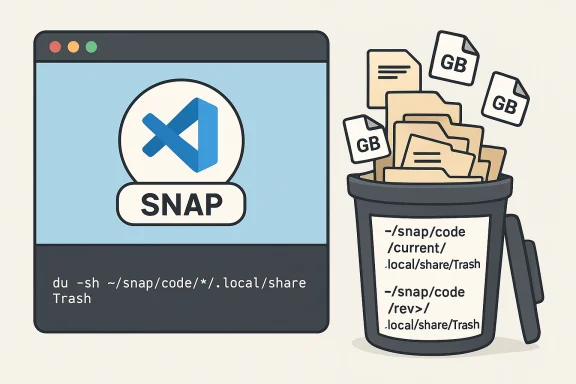
Snap packages run applications inside a confined environment with their own runtime and user-data layout. That confinement is useful for compatibility and transactional updates, but it also changes environment variables like XDG_DATA_HOME inside the snap. When VS Code (the Microsoft build shipped as the snap named code) sets XDG_DATA_HOME to point into the snap’s user-data area, deleted files sent to “Trash” are placed in the snap-local Trash directory rather than the user’s ~/.local/share/Trash. Emptying the GNOME/KDE trash does not affect those files because they are outside the system-managed trash location. This has been reported publicly since November 2024, with multiple independent users discovering large caches of “deleted” files inside their snap data (for example, ~/snap/code/<revision>/.local/share/Trash). The problem is easiest to trigger on Ubuntu where the Snap ecosystem is the default channel inside the Software app, but it is not unique to Ubuntu — it's a behavior of the snap packaging environment interacting with how VS Code chooses its XDG directories.
Why this matters: files you intentionally removed can remain on disk indefinitely and — worse — silently. That can fill a small SSD and cause surprise failures, VM corruption during low-space conditions, and frustrated users trying to figure out where their storage disappeared to.
What’s happening, in plain terms
- VS Code’s “Move to Trash” uses the desktop’s trash concept, which on Linux maps to a folder under XDG_DATA_HOME/.local/share/Trash (or the system default ~/.local/share/Trash when XDG_DATA_HOME is unset).
- When VS Code runs inside a Snap, the snap runtime sets environment variables so the app sees a different home/data location. In this case, XDG_DATA_HOME has been implemented (or overridden) such that the trash location lands inside the snap’s own user-data directory (examples: ~/snap/code/current/.local/share/Trash or ~/snap/code/184/.local/share/Trash).
- Snap also maintains previous revisions of installed snaps by default (to allow rollbacks). Each revision can carry its own user-data subtree under ~/snap/code/<revision> or ~/snap/code/current, so an accumulation effect occurs when every revision holds its own Trash directory. The snap retention policy typically keeps multiple revisions (commonly three by default), which multiplies the leftover deleted data.
Evidence and reporting
Multiple independent outlets and community threads have covered the problem:- How-To Geek (widely rehosted by aggregator sites) produced a practical explainer describing the Snap-local Trash behavior and showing where to look for the files. That piece reproduces the core symptom (deleted files in ~/snap/code/current/.local/share/Trash) and recommends switching to non-Snap installs if you want to avoid this behavior.
- The Register reproduced reporting from the original bug thread and quoted a Microsoft engineer’s diagnosis that a change made on Oct 11, 2024 caused XDG_DATA_HOME to point at $SNAP_USER_DATA/.local/share, which effectively creates a “bogus Trash” insulated from the system trash.
- Community troubleshooting on StackOverflow and Ask Ubuntu shows real users locating files in ~/snap/code/<revision>/.local/share/Trash/files and reporting that the snap retains older versions containing old deleted files. These community reports provide concrete example paths and sizes — some users have reported tens or hundreds of gigabytes of space reclaimed after cleaning the snap-local trash.
A responsible diagnostic checklist (what you should check right now)
Before you start deleting anything, confirm what’s on your system and how big it is. These commands are safe reads:- Confirm VS Code is installed as a Snap:
snap list | grep -i 'code|codium'— if output containscodeorcodiumand shows an installed revision, you’re likely on the snap version.which codeorcode --versioncan also help; the snap usually shows a snap-specific runtime incode --versionoutput and thesnapcommand shows revision numbers.- Inspect snap-local Trash directories and sizes:
- Run this loop to get human-readable sizes per revision:
for d in ~/snap/code/*; do printf "\n$d\n"; du -sh "$d/.local/share/Trash" 2>/dev/null || true; done- Or a quick one-liner to list all trash file sizes:
du -sh ~/snap/code/*/.local/share/Trash/files 2>/dev/null | sort -h
These commands report what’s actually consuming space in the Snap’s per-revision directories. Community posts show users finding hundreds of gigabytes in those Trash folders in extreme cases.- Check total snap storage usage:
du -sh ~/snap/code/*will show you the total per-revision footprint so you can see whether the snap itself is the large consumer.- Don’t rely on your file manager’s system Trash: it won’t show the snap-local Trash contents, because that lives under a different path.
How to reclaim that space safely (recommended sequence)
Use caution: deleting things is irreversible unless you have a backup. If files are important, copy them out of the snap trash first.- Backup (if you’re unsure)
- If you find suspicious files you might need, copy them to a safe location before deleting:
mkdir -p ~/snap-trash-backup && cp -av ~/snap/code/[I]/.local/share/Trash/files/[/I] ~/snap-trash-backup/(adjust paths to what you actually find).- Empty the snap-local Trash
- Once you’ve validated contents, remove them. The per-revision trash paths are safe to clear because they’re copies of things you intentionally deleted earlier. Examples:
rm -rf ~/snap/code/[I]/.local/share/Trash/[/I]- or, more conservatively:
find ~/snap/code -type d -path '[I]/.local/share/Trash/[/I]' -print -exec rm -rf {} +- Warning: These are destructive commands. Triple-check paths before you press Enter. If you want to be safer, move files to a backup folder and then periodically purge that backup after confirming everything is fine.
- Clean up old snap revisions (optional but advisable)
- Snap retains old revisions and can be instructed to keep fewer copies:
sudo snap set system refresh.retain=2(sets retention to two revisions — minimum of two is required).- To remove currently disabled (old) revisions:
sudo snap list --all | awk '/disabled/{print $1, $3}' | while read snapname rev; do sudo snap remove "$snapname" --revision="$rev"; done- There are community scripts that automate this cleanup; read them before use. Reducing retained revisions prevents future re-creation of identical per-revision trash directories.
- Remove the Snap package and switch to an alternate install (recommended)
- If you prefer to avoid Snap's confinement issues entirely for VS Code, uninstall the snap and install the officially supported .deb (or .rpm) from Microsoft. The .deb installs into the system layout and uses the normal XDG paths, so deleted files land in the system trash the desktop manages. Steps:
sudo snap remove code(orsudo snap remove codiumfor VSCodium).- Follow the VS Code Linux install docs to add the Microsoft apt repository and install the .deb, or download the .deb and run:
sudo apt install ./code_<version>.debor use the official setup instructions that add the apt repo so future updates come via apt.- Verify
- After cleanup & switching packages, test by deleting a small test file from the VS Code Explorer and confirm it appears in
~/.local/share/Trash/filesand that emptying the desktop trash actually frees the space.
Why switching to .deb (or .rpm) is the practical fix
Microsoft publishes official .deb and .rpm packages for Visual Studio Code. Those packages install to the system filesystem and respect the desktop’s XDG variables as set outside a snap sandbox; as a result, deleting files from the VS Code explorer uses the regular system Trash and is managed by your file manager’s “Empty Trash” action. The official install instructions spell out the .deb installation and repository setup for automatic updates via apt. If you value predictable behavior with desktop integration (system trash, launcher, MIME handling) the non-snap packages give you that experience.Note: some users like Snaps for ease of installation, sandboxing, or canonical support; the tradeoff is that snaps have altered environment and filesystem semantics that can surprise desktop users when apps expect system-level behavior.
Technical analysis and root cause (what broke and why it lingers)
Based on the bug report timeline and public commentary, the technical chain looks like this:- A VS Code change (reported to have occurred in October 2024) explicitly set XDG_DATA_HOME inside the app environment to
$SNAP_USER_DATA/.local/share. That causes the “trash” resolution used by VS Code to point into the snap, not the system path. The result: deletion flows into the snap-local Trash folder. - Snap confinement inherently isolates $HOME and XDG variables for the app environment. Unless the snap is explicitly granted or configured to mirror the host’s XDG locations (which is non-trivial and usually avoided for confinement reasons), the app will only see the snap’s own view. The Snapcraft community has documented these subtle XDG differences and the workarounds for app authors.
- Snap retention of revisions means older revisions retain their own per-revision data directories, so once a trash folder is created inside a revision it can persist across updates unless cleaned or the revision removed. Snap automatically keeps previous revisions by default to provide rollback capability. That behavior can flood disk when combined with large deleted payloads.
Risks, trade-offs, and long-term options
- Risk to users: running out of root or user-disk space can degrade system stability and cause cryptic failures. On laptops with small SSDs this is a non-trivial risk. The issue is worst for users who habitually delete large files within VS Code (e.g., generated build artifacts, large test data), because those deletions are treated as “trashed” rather than permanently removed — and then hidden from the normal emptying mechanism.
- Trade-offs if you move away from Snap:
- Pros: better desktop integration, predictable system trash behavior, simpler debugging of file locations.
- Cons: losing snap-specific confinement and atomic update semantics; depending on your distribution you may need to manage updates through apt/dnf instead of Snapstore.
- If you must keep the snap for policy or distribution reasons, add a periodic maintenance step (cron/weekly cleanup) to purge ~/snap/code/*/.local/share/Trash/files or set up a script that logs and prunes old snapshots. Also reduce snap retention with
sudo snap set system refresh.retain=2to limit how many revisions are held.
Quick mitigation checklist (copy-pasteable)
- Confirm snap install:
snap list | grep -i code- Find snap-local trash sizes:
du -sh ~/snap/code/*/.local/share/Trash/files 2>/dev/null | sort -h- If large, back up then delete:
mkdir -p ~/snaav ~/snap/code/[I]/.local/share/Trash/files/[/I] ~/snap-trash-backup/rm -rf ~/snap/code/[I]/.local/share/Trash/[/I](dangerous — double-check)- Limit snap revision retention and remove disabled revisions:
sudo snap set system refresh.retain=2sudo snap list --all | awk '/disabled/{print $1, $3}' | while read snapname rev; do sudo snap remove "$snapname" --revision="$rev"; done- Switch to .deb:
sudo snap remove code- Follow Microsoft’s Linux install instructions or
sudo apt install ./<file>.deb.
Broader context: packaging vs desktop integration
This is not the only time sandboxed packaging formats (Snap, Flatpak) have interacted poorly with desktop expectations. Other apps packaged in sandboxed formats have historically needed special handling for XDG variables and per-app data locations (examples include Flatpak/Obsidian and other sandboxed apps). Snap’s environment intentionally isolates apps to improve reproducibility and safety, but the compromise is that some desktop semantics must be explicitly preserved by the packager or application. The canonical guidance is that app authors and packagers must be aware of XDG variable behavior inside confined runtimes and test desktop integration. When that coordination fails, the user sees surprising behavior like this storage leak.For Windows users, storage problems look different — Windows exposes tools (Storage Sense, Disk Cleanup, DISM) to analyze and remove large system artifacts — but the common theme is the same: hidden data can accumulate and tools or packaging choices create unintuitive storage islands. Community troubleshooting resources have long recommended visual disk analyzers (WinDirStat, WizTree) to find such offenders.
Final verdict and recommendations
- Short term: If you’re on Ubuntu (or any Linux distro) and installed VS Code via Snap, check
~/snap/code/*/.local/share/Trashtoday. Many users have reclaimed tens to hundreds of gigabytes by clearing those folders. Use the diagnostic commands above and back up before deleting. - Medium term: If you need predictable desktop behavior, uninstall the snap and install the official .deb (or .rpm) package from Microsoft; that restores system-trash semantics and avoids the per-revision trap.
- Long term: Canonical, Microsoft, and the VS Code packaging maintainers should coordinate: either change how XDG_DATA_HOME is set inside the snap, or ensure VS Code uses the system trash via an explicit host-exposed path, or make the snap’s trash integrated with the system’s trash lifecycle. Until that happens, this bug remains a risk for Snap users who delete large amounts of data from within VS Code. Community reporting indicates the issue persisted into early 2026; if you manage many Linux machines, consider standardizing on the non-snap package to reduce operational surprises.
Conclusion
A small packaging choice — where XDG_DATA_HOME points inside a sandbox — has a big practical impact: invisible, persistent trash inside snapshots that silently consumes storage. The fix for most users is straightforward: inspect your snap-local trash, clean it safely, and switch to a non-snap install if you want the desktop-managed trash experience. For the maintainers and packagers involved, this incident is a reminder that desktop integration details matter: when an app’s environment is altered for sandboxing, behaviors users take for granted (like where “Move to Trash” goes) must be explicitly tested and preserved. Until that coordination is in place, check your ~/snap folders — and reclaim your disk.
Source: Windows Central VS Code is gobbling up storage space on Ubuntu, but there's a fix