

Microsoft's Surface Go is now available to pre-order in many markets, marking the company's deliberate move to put a true Windows 10-powered 2-in-1 into the hands of price-conscious buyers who want a tablet-sized device that can still behave like a laptop when needed. The entry configuration starts at $399 and ships with Windows 10 in S mode on a 10-inch PixelSense display, while optional configurations and accessories push the real-world purchase price higher.
Microsoft positioned the Surface Go as “the smallest, lightest, and most affordable Surface yet,” designed to deliver the Surface experience in a truly portable package. The product announcement emphasized a blend of portability, productivity, and premium design: a 10-inch PixelSense display, a fanless Intel Pentium Gold 4415Y processor, a built-in kickstand, and compatibility with Surface Pen and Type Cover accessories. The device became available for pre-order on July 10 with retail availability beginning August 2. That framing sets the expectation: this is not a flagship Surface Pro replacement but a small, flexible Windows PC for students, road warriors, and anyone who needs a compact device that can run full Windows applications when required. Microsoft’s messaging intentionally positions the Go as bridging the gap between tablets and laptops rather than competing directly with Android or iPadOS slates.
That said, the device’s true value depends on configuration and expectations. The 4 GB / 64 GB model keeps the price low but compromises the experience when users attempt heavy multitasking or keep many background processes active. The 8 GB / 128 GB model and the addition of the Type Cover provide a much more usable experience but narrow the price gap between the Go and small, full-powered laptops—making comparative shopping essential.
In short, the Surface Go is an ideal second device or a primary device for light-to-moderate workloads. It’s a smart pick for students, frequent travelers, and organizations that prioritize manageability and form factor. For power users, video editors, and heavy multitaskers, larger Surface models or traditional laptops remain the better choice. The pre-order window gives interested buyers the opportunity to secure a unit at launch, but the best returns come from matching the device configuration to the true workload demands rather than the headline price alone.
Conclusion: Microsoft’s Surface Go is a thoughtful addition to the Surface lineup—a compact, well-built Windows tablet that brings pen and keyboard productivity to a new price tier. It is a carefully engineered compromise: excellent display and design, reasonable battery under controlled tests, and sensible enterprise-ready features, but limited by a low-power CPU and small base memory. Buyers who understand those trade-offs will find it a powerful little tool for the right tasks; buyers who expect a laptop-class experience at an entry-level price will likely come away underwhelmed.
Source: BetaNews Microsoft Surface Go now available to pre-order
 Background / Overview
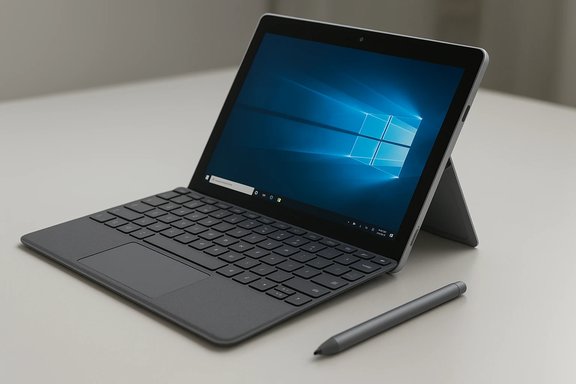
Microsoft positioned the Surface Go as “the smallest, lightest, and most affordable Surface yet,” designed to deliver the Surface experience in a truly portable package. The product announcement emphasized a blend of portability, productivity, and premium design: a 10-inch PixelSense display, a fanless Intel Pentium Gold 4415Y processor, a built-in kickstand, and compatibility with Surface Pen and Type Cover accessories. The device became available for pre-order on July 10 with retail availability beginning August 2. That framing sets the expectation: this is not a flagship Surface Pro replacement but a small, flexible Windows PC for students, road warriors, and anyone who needs a compact device that can run full Windows applications when required. Microsoft’s messaging intentionally positions the Go as bridging the gap between tablets and laptops rather than competing directly with Android or iPadOS slates. Design and build: premium small format
The Surface Go retains the Surface family’s signature design language: a magnesium unibody, clean chamfers, and a built-in kickstand with a full-friction hinge that opens to 165 degrees. At 9.65" x 6.90" x 0.33" (245 × 175 × 8.3 mm) and starting weight of 1.15 lbs (522 g), the Go is highly pocketable compared with 12–13-inch ultraportables. The chassis includes the Surface Connect port alongside a full-function USB-C port, a microSDXC slot, and a 3.5 mm audio jack—an excellent connectivity mix for a device this size.- Material: magnesium casing (solid, light)
- Kickstand: multi-position, 165° hinge
- Ports: USB-C, Surface Connect, microSDXC, 3.5 mm jack
Display and input: PixelSense in a 10-inch shell
The Surface Go uses a 10-inch PixelSense display with a 1800 × 1200 resolution (217 PPI) and a 3:2 aspect ratio—meaning taller viewing when reading documents or webpages compared to standard 16:9 tablets. The panel supports 10-point multi-touch, Surface Pen inking with low latency and 4,096 levels of pressure sensitivity, and is protected by Corning Gorilla Glass 3. For a device of its price and size, the display is one of the strongest assets. The optional Surface Go Signature Type Cover (available in Alcantara and other finishes) provides a mechanical keyset and a Windows Precision touchpad in a compact form factor. The Type Cover transforms the Go into a more productive laptop-like device, though buyers should note the keyboard’s reduced size compared to Surface Pro Type Covers. Typical accessory pricing at launch was $99 for the standard Type Cover and $129 for the Alcantara Signature variant—costs that significantly increase the package price beyond the $399 base.Internal specs and expandability
Under the hood, the base Surface Go ships with Windows 10 in S mode and the following core hardware options:- Processor: Intel Pentium Gold 4415Y (fanless, 1.6 GHz)
- Memory: 4 GB or 8 GB LPDDR3
- Storage: 64 GB eMMC (entry model) or 128 GB SSD (higher-tier)
- Graphics: Intel HD Graphics 615
- Security: TPM 2.0 and Windows Hello camera for face sign-in
- Battery: Microsoft rates up to 9 hours of video playback (real-world varies)
The processor explained: Pentium Gold 4415Y
The Surface Go’s CPU is the low-power Intel Pentium Gold 4415Y—a dual-core, four-thread Kaby Lake-Y part designed for thermal efficiency rather than raw performance. Typical characteristics:- Base clock: 1.6 GHz (no Turbo)
- TDP: around 6 W (fanless designs)
- Integrated GPU: Intel HD Graphics 615
Software: Windows 10 S mode and ecosystem implications
Surface Go ships with Windows 10 in S mode for the consumer configuration—an environment that limits app installs to the Microsoft Store but preserves full Windows 10 functionality otherwise. Schools and security-conscious customers might appreciate S mode for its lock-down and simplicity, and Microsoft allows users to switch out of S mode to standard Windows 10 Home for free if broader app compatibility is needed. Commercial SKUs shipped with Windows 10 Pro for enterprise deployments. This software approach reinforces Microsoft’s intent: provide a safe, familiar Windows experience that’s easy to manage in education and business deployments while offering the option to expand into full Windows when desired.Battery life and real-world performance: the nuance
Microsoft’s battery claim—up to 9 hours of local video playback—is a standard manufacturer metric and was verified under specific conditions. Independent reviews and hands-on testing showed wide variance depending on the workload:- Some lab-style battery loop tests recorded nearly 10 hours when looping video under controlled conditions.
- Real-world productivity testing often yielded 4–7 hours, particularly under heavier multi-app use, multitasking, or with S mode disabled. Reviewers who used the Surface Go as a productivity device sometimes reported needing a midday top-up.
Pricing, accessories, and the true purchase cost
The headline price of $399 grabs attention, but the actual cost of a fully functional Surface Go often exceeds this number once essential accessories are added:- Base Surface Go (4 GB / 64 GB eMMC): $399.
- Surface Go Signature Type Cover: typically $99 (standard) or $129 (Alcantara Signature), at launch.
- Surface Pen: commonly priced around $99 (sold separately).
Who should buy the Surface Go?
The Surface Go is compelling for specific audiences:- Students who need a lightweight Windows device for note-taking, Office, and web research. The 3:2 display and pen support make it a natural fit for reading and annotating documents.
- Travelers and commuters who prioritize minimal weight and pocketable dimensions over brute-force performance. The magnesium body and fanless design keep it quiet and portable.
- Enterprise and education deployments where manageability, TPM 2.0 hardware security, and Windows Hello face authentication are required. The S mode option simplifies app control and can limit attack surface in managed environments.
- Users who edit video, run heavy Photoshop workloads, or maintain dozens of browser tabs and background apps at once. The Pentium Gold 4415Y and 4 GB RAM entry model will feel constrained in those scenarios; the 8 GB/128 GB model less so, but still not a performance powerhouse.
- Buyers seeking long, all-day battery endurance under mixed productivity loads should consider larger Surface models or competing ultrabooks with higher-capacity batteries. Real-world results on the Go skew towards the moderate side.
Enterprise and education considerations
From an IT perspective, Surface Go offers several features that make it attractive for managed deployments:- TPM 2.0 and Windows Hello provide hardware-level security and biometric sign-in.
- Windows 10 in S mode simplifies app distribution and reduces risk, while Windows 10 Pro commercial SKUs provide the management capabilities enterprises expect.
- The small form factor lowers per-device shipping costs and makes classroom or field use less burdensome for students and staff.
Strengths, weaknesses, and risk assessment
Notable strengths
- Portability: extremely light and compact for a full Windows device.
- Display and inking: high-resolution PixelSense panel with solid pen support at this price point.
- Build quality: magnesium unibody and a precise kickstand deliver a premium feel uncommon at this price level.
Potential risks and downsides
- Performance ceiling: Pentium Gold 4415Y is a low-power chip; users should be realistic about multitasking and heavy workloads. Overloading the device can create a poor user experience.
- Accessory-driven cost creep: the base price is attractive, but required accessories (Type Cover, Pen) push the final price substantially higher. Buyers who don’t account for these extras risk disappointment.
- Battery variance: manufacturer claims are tied to specific test profiles. Expect shorter battery life during mixed, networked productivity usage.
Practical buying checklist
- Decide your primary use: note-taking/reading vs. productivity multitasking.
- Choose memory/storage carefully: 4 GB / 64 GB is fine for light use; 8 GB / 128 GB is strongly recommended for heavier multitasking.
- Budget for accessories: add the Type Cover and Surface Pen prices to your total.
- Consider S mode vs. full Windows: if you need legacy Win32 apps, plan to leave S mode (free) or buy a Pro SKU.
- Check education or government discounts if eligible—those can meaningfully reduce the outlay.
Final analysis: where Surface Go fits in the market
The Surface Go represents Microsoft’s pragmatic attempt to expand the Surface family downward in price without stripping away the core Surface attributes—premium materials, a great display, inking, and a convertible form factor. For buyers who want a compact Windows device that can double as a laptop with a proper keyboard and run desktop-class Windows apps when needed, the Go succeeds in delivering that promise at an accessible entry price.That said, the device’s true value depends on configuration and expectations. The 4 GB / 64 GB model keeps the price low but compromises the experience when users attempt heavy multitasking or keep many background processes active. The 8 GB / 128 GB model and the addition of the Type Cover provide a much more usable experience but narrow the price gap between the Go and small, full-powered laptops—making comparative shopping essential.
In short, the Surface Go is an ideal second device or a primary device for light-to-moderate workloads. It’s a smart pick for students, frequent travelers, and organizations that prioritize manageability and form factor. For power users, video editors, and heavy multitaskers, larger Surface models or traditional laptops remain the better choice. The pre-order window gives interested buyers the opportunity to secure a unit at launch, but the best returns come from matching the device configuration to the true workload demands rather than the headline price alone.
Conclusion: Microsoft’s Surface Go is a thoughtful addition to the Surface lineup—a compact, well-built Windows tablet that brings pen and keyboard productivity to a new price tier. It is a carefully engineered compromise: excellent display and design, reasonable battery under controlled tests, and sensible enterprise-ready features, but limited by a low-power CPU and small base memory. Buyers who understand those trade-offs will find it a powerful little tool for the right tasks; buyers who expect a laptop-class experience at an entry-level price will likely come away underwhelmed.
Source: BetaNews Microsoft Surface Go now available to pre-order
