

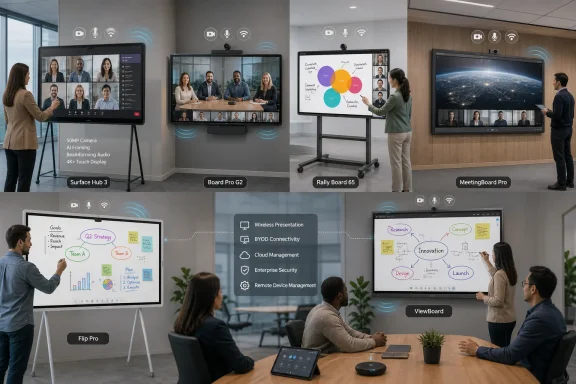
Digital whiteboard displays have matured from oversized touchscreens into complete collaboration systems, but the best choice in 2026 depends less on raw display specifications than on the platform, room design, security model, and meeting experience surrounding the panel. Microsoft Surface Hub 3 remains the natural premium choice for Microsoft-centric organizations, Cisco Board Pro G2 excels in managed enterprise communications, Logitech Rally Board 65 offers exceptional deployment flexibility, and Yealink MeetingBoard Pro brings strong all-in-one capabilities to larger rooms. Samsung Flip Pro and ViewSonic ViewBoard remain attractive when interactive presentation and annotation matter more than running a fully integrated conferencing room.
The earliest interactive whiteboards typically depended on a projector, a connected PC, and a touch-sensitive surface. They made classroom and meeting-room presentations more dynamic, but calibration problems, shadows, complicated cabling, and weak software integration limited their usefulness.
Large-format commercial touch displays removed many of those problems. By combining a high-resolution LCD panel with touch sensors, embedded computing, wireless sharing, speakers, and network connectivity, manufacturers created a more reliable replacement for projectors and conventional whiteboards.
An interactive flat panel emphasizes writing, presentation, and classroom-style collaboration. An all-in-one meeting board integrates the display with cameras, microphones, speakers, and conferencing software. A collaboration appliance adds tightly controlled enterprise management, platform certification, identity integration, and room-resource functionality.
The least expensive product may satisfy the first category while failing completely at the other two. That mismatch is one of the most common causes of disappointing meeting-room deployments.
Similarly, Cisco Board Pro G2 and Logitech Rally Board 65 place substantially more emphasis on camera intelligence and meeting-room audio than many conventional interactive panels. Their value becomes clearer when remote participation is a core requirement rather than an occasional activity.
The standard configuration prioritizes the shared meeting-room experience. Administrators can also configure supported systems for Windows 11 Pro or Enterprise, although doing so changes the operational model and requires appropriate software licensing and deployment planning.
The 50-inch model uses a 3:2 PixelSense display with a 3840-by-2560 resolution, while the 85-inch version uses a conventional 16:9 4K panel. Both support active pens, but the larger model accommodates more simultaneous touch points and provides substantially more workspace for boardrooms.
The integration can reduce meeting friction. Employees already familiar with Teams can walk into a room, join a scheduled meeting, present content, and open a collaborative canvas without learning a separate room-control interface.
Microsoft has also continued adding AI-enhanced Teams Rooms capabilities, including features intended to identify enrolled speakers and improve the attribution of meeting contributions. Such features can become increasingly valuable as organizations rely on transcripts, meeting summaries, and automated follow-up tasks.
Its greatest strength can also be a limitation. Organizations centered on Zoom, Webex, or Google Meet may find that Surface Hub’s tightly integrated Microsoft experience delivers less value than a more platform-neutral product.
Recommended for: Large Microsoft 365 customers, executive collaboration spaces, design teams using Microsoft Whiteboard, and organizations with mature Teams Rooms management.
RoomOS adds whiteboarding, content sharing, meeting controls, device administration, and Cisco’s collaboration intelligence. The device can also be configured for Microsoft Teams Rooms on Android, giving organizations more deployment flexibility than older Webex-focused room systems.
Support for third-party meetings is broader than the product name may imply. Depending on configuration and licensing, the Board Pro G2 can connect to Microsoft Teams, Google Meet, and Zoom through supported interoperability methods.
Financial services, legal firms, healthcare organizations, government departments, and multinational enterprises may find that this management framework matters more than the difference between two similar-looking 4K panels.
However, buyers should avoid assuming that the device itself guarantees regulatory compliance. Compliance depends on the selected cloud service, account configuration, retention settings, network architecture, administrative controls, and organizational policy.
Recommended for: Webex environments, security-conscious enterprises, premium hybrid meeting rooms, and organizations needing centrally managed audio-video endpoints.
This flexibility is useful in multipurpose offices where a room may host a formal video meeting in the morning and an informal workshop in the afternoon. It also makes the product suitable for open collaboration areas that do not justify permanent construction.
Logitech supports appliance configurations for Microsoft Teams Rooms on Android and Zoom Rooms. A bring-your-own-device mode allows a connected laptop to use other meeting services, including Google Meet, subject to the capabilities of the selected configuration.
Its microphone system has a specified pickup range of up to approximately 23 feet, making the board viable for more than small huddle spaces. The motorized privacy shutter is also an important trust feature because users can see when the camera is physically covered.
Logitech’s Sync management platform gives IT teams visibility into device status and room utilization. Newer CollabOS releases have expanded occupancy features and maintained current Teams Rooms and Zoom Rooms application support.
It is also not a Windows-based Teams Rooms device. Organizations that require Teams Rooms on Windows should account for that distinction rather than assuming all Teams-certified room products behave identically.
Recommended for: Flexible offices, multi-platform organizations, Zoom Rooms or Teams Rooms on Android deployments, and companies prioritizing fast installation.
Those specifications make MeetingBoard Pro more credible in larger rooms than panels designed primarily for huddle spaces. The 75-inch model is especially notable because it fills the gap between common 65-inch displays and very large 85- or 86-inch installations.
Yealink offers native Teams and Zoom options alongside a general-use mode. Some configurations support both Android- and Windows-oriented meeting-room approaches, giving larger customers room to standardize while preserving deployment flexibility.
That simplicity can lower installation costs, but IT departments should assess management tools, regional support, security documentation, firmware practices, replacement-part availability, and reseller expertise. Hardware savings can disappear quickly if a failed room remains out of service while administrators wait for support.
Recommended for: Medium and large rooms, organizations seeking an integrated Teams or Zoom board, and buyers wanting multiple display sizes under one product family.
The 55-inch model can be paired with a rotating stand, allowing it to move between landscape and portrait modes. Portrait orientation is useful for reviewing web layouts, long documents, process flows, social-media campaigns, and mobile-interface prototypes.
A USB-C connection can simplify laptop use by combining video, touch data, and device charging where supported. Optional trays and connection modules add front-facing ports, reducing the temptation to leave cables hanging from the rear of the display.
This is not necessarily a weakness. A business may already own a certified Teams Rooms or Zoom Rooms kit and simply need a high-quality interactive display. Separating the display from the conferencing computer can also make future upgrades easier.
The limitation appears when a buyer expects a single-box hybrid meeting experience. Adding the missing conferencing components, mounting hardware, compute device, and management tools may narrow the apparent price advantage.
Recommended for: Creative teams, workshops, training rooms, design reviews, interactive presentations, and businesses that already have separate conferencing equipment.
The ability to add an OPS-format Windows computer is particularly useful. A company can run the panel’s embedded operating system for lightweight whiteboarding, then switch to Windows when employees need full desktop applications or specialized corporate software.
ViewSonic’s myViewBoard ecosystem supports whiteboarding, content distribution, and presentation workflows. Businesses should nevertheless verify exactly which software services, cloud features, and management tools are included with the selected model.
Buyers should record the full model number and hardware revision before requesting quotes. They should also confirm how long the embedded operating system will receive updates and whether the optional Windows module is included, available separately, or supported in their region.
Recommended for: Budget-conscious businesses, training rooms, education-style collaboration, and organizations that want optional Windows computing without paying for a premium all-in-one appliance.
Interactive displays usually prioritize touch performance and durability over the brightness of commercial signage panels. Businesses should test the display under actual room lighting rather than judging it in a dim showroom.
The coating also affects writing feel. Some surfaces offer more pen friction and resist fingerprints, while others feel smoother but reveal reflections or smudges more readily.
Projected capacitive and in-cell touch technologies can feel more immediate and precise. They typically provide a closer pen-to-pixel relationship, although they may require active pens and add cost.
The practical evaluation should include:
Guest access is equally important. If an external client cannot join a board without creating an account, the system may become a barrier instead of a collaboration tool.
However, a shared-room Windows installation must be secured differently from an employee laptop. Automatic sign-out, credential protection, application restrictions, data cleanup, patching, and peripheral control all require deliberate policies.
The disadvantage is reduced flexibility. Unsupported applications cannot necessarily be installed, and features may arrive at different times on Teams Rooms on Android, Teams Rooms on Windows, and each manufacturer’s firmware.
Buyers should confirm that a single USB-C connection can expose the board’s camera, microphones, speakers, display, and touch input to a laptop. They should also test macOS and Windows systems separately because feature support can differ.
Security therefore includes more than encryption. Administrators must know what happens to cached content, whiteboard exports, browser sessions, meeting credentials, logs, and files left behind by connected USB devices.
A clearly visible camera shutter can also strengthen user trust. Software indicators are useful, but physical privacy mechanisms offer reassurance when devices sit in offices throughout the day.
Conversely, a busy consulting firm may save time with an all-in-one Logitech, Yealink, Cisco, or Microsoft system. One-touch meeting joins and reliable room audio can eliminate repeated delays that become expensive across hundreds of meetings.
The best small-business purchase is often the product requiring the fewest support calls. An intuitive interface and dependable USB-C connection may deliver more value than an extensive feature list.
Businesses should estimate the cost per room over three to five years and include expected downtime. They should also confirm whether support provides on-site service, depot repair, or replacement hardware, because shipping a very large panel is rarely simple.
This shift increases the value of high-quality microphones and cameras. A transcription or summary system cannot compensate for poorly captured speech, excessive echo, or a camera that cannot see participants clearly.
It also raises governance questions. Organizations will need rules for consent, retention, access, and the use of AI-generated meeting records.
Interoperability will remain equally important. Businesses want a room that joins the scheduled meeting regardless of which company supplied the invitation, and products that make external calls difficult will face growing resistance.
For most Windows-focused enterprises, Surface Hub 3 is the strongest premium collaboration display when Teams and Microsoft 365 define the workplace. Cisco Board Pro G2 is better suited to organizations prioritizing enterprise video communications and centralized control, while Logitech Rally Board 65 offers the most attractive balance of mobility, platform choice, and integrated hardware. Yealink MeetingBoard Pro deserves attention for larger rooms, and Samsung Flip Pro or ViewSonic ViewBoard can deliver better value when annotation and presentation matter more than a native meeting-room appliance. The winning purchase will not be the board with the longest specification sheet, but the one employees can enter, understand, and use confidently without calling IT.
 Background
The earliest interactive whiteboards typically depended on a projector, a connected PC, and a touch-sensitive surface. They made classroom and meeting-room presentations more dynamic, but calibration problems, shadows, complicated cabling, and weak software integration limited their usefulness.Large-format commercial touch displays removed many of those problems. By combining a high-resolution LCD panel with touch sensors, embedded computing, wireless sharing, speakers, and network connectivity, manufacturers created a more reliable replacement for projectors and conventional whiteboards.
From presentation screen to collaboration endpoint
A modern digital whiteboard may perform several distinct roles:- It can operate as a touch-enabled display for a connected Windows PC.
- It can provide a built-in whiteboarding application without requiring another device.
- It can function as a complete Microsoft Teams Rooms, Zoom Rooms, or Webex endpoint.
- It can accept wireless presentations from employee laptops and mobile devices.
- It can save meeting content to cloud services or send it to participants.
- It can support digital signage and room-utilization features between meetings.
Why the distinction matters
The phrase digital whiteboard is now applied to three broad product categories. Buyers should identify the category they need before comparing screen sizes or advertised touch-point counts.An interactive flat panel emphasizes writing, presentation, and classroom-style collaboration. An all-in-one meeting board integrates the display with cameras, microphones, speakers, and conferencing software. A collaboration appliance adds tightly controlled enterprise management, platform certification, identity integration, and room-resource functionality.
The least expensive product may satisfy the first category while failing completely at the other two. That mismatch is one of the most common causes of disappointing meeting-room deployments.
How the Leading Displays Compare
No single display is best for every organization. The strongest products target different software ecosystems, budgets, room sizes, and operational priorities.| Product | Typical sizes | Primary platform | Integrated conferencing | Best fit |
|---|---|---|---|---|
| Microsoft Surface Hub 3 | 50 and 85 inches | Teams Rooms on Windows | Yes | Microsoft 365 enterprises |
| Cisco Board Pro G2 | 55 and 75 inches | Cisco RoomOS or Teams Rooms on Android | Yes | Managed hybrid meeting rooms |
| Logitech Rally Board 65 | 65 inches | Teams Rooms on Android, Zoom Rooms, or BYOD | Yes | Flexible multi-platform deployments |
| Yealink MeetingBoard Pro | 65, 75, and 86 inches | Teams, Zoom, or general-use modes | Yes | Medium and large conference rooms |
| Samsung Flip Pro | 55, 65, 75, and 85 inches | Samsung embedded platform | Not fully integrated on every configuration | Interactive presentation rooms |
| ViewSonic ViewBoard | Approximately 55 to 86 inches, depending on series | Android with optional Windows computing | Configuration-dependent | Cost-conscious and education-style collaboration |
A shortlist rather than a universal ranking
A numerical ranking can be misleading because these products do not all solve the same problem. Surface Hub 3 is a sophisticated Windows and Teams collaboration appliance, while Samsung Flip Pro is primarily an interactive display with strong annotation tools.Similarly, Cisco Board Pro G2 and Logitech Rally Board 65 place substantially more emphasis on camera intelligence and meeting-room audio than many conventional interactive panels. Their value becomes clearer when remote participation is a core requirement rather than an occasional activity.
Microsoft Surface Hub 3
Surface Hub 3 is the most deeply integrated option for organizations standardized on Microsoft 365, Microsoft Teams, Microsoft Whiteboard, Entra ID, and Microsoft’s device-management ecosystem. It is available in 50-inch and 85-inch versions, with the smaller model supporting rotation between landscape and portrait orientations.Best for Microsoft-first enterprises
The current Surface Hub experience runs on Windows 11 IoT Enterprise with Microsoft Teams Rooms on Windows. This is an important clarification because older descriptions may refer to Windows Team OS or treat Surface Hub as an ordinary large-format Windows PC.The standard configuration prioritizes the shared meeting-room experience. Administrators can also configure supported systems for Windows 11 Pro or Enterprise, although doing so changes the operational model and requires appropriate software licensing and deployment planning.
The 50-inch model uses a 3:2 PixelSense display with a 3840-by-2560 resolution, while the 85-inch version uses a conventional 16:9 4K panel. Both support active pens, but the larger model accommodates more simultaneous touch points and provides substantially more workspace for boardrooms.
Where Surface Hub 3 stands out
Surface Hub 3 combines Microsoft Whiteboard, Teams meetings, casting, room-resource sign-in, and Windows-based management in one device. Its 4K smart camera, microphone arrays, speakers, occupancy sensors, and modular compute cartridge reinforce its role as an enterprise endpoint rather than a simple touchscreen.The integration can reduce meeting friction. Employees already familiar with Teams can walk into a room, join a scheduled meeting, present content, and open a collaborative canvas without learning a separate room-control interface.
Microsoft has also continued adding AI-enhanced Teams Rooms capabilities, including features intended to identify enrolled speakers and improve the attribution of meeting contributions. Such features can become increasingly valuable as organizations rely on transcripts, meeting summaries, and automated follow-up tasks.
Limitations and cost considerations
Surface Hub 3 is expensive, particularly in its 85-inch configuration. The display, stand or mounting system, room license, deployment labor, warranty options, and ongoing management should be evaluated as a complete package.Its greatest strength can also be a limitation. Organizations centered on Zoom, Webex, or Google Meet may find that Surface Hub’s tightly integrated Microsoft experience delivers less value than a more platform-neutral product.
Recommended for: Large Microsoft 365 customers, executive collaboration spaces, design teams using Microsoft Whiteboard, and organizations with mature Teams Rooms management.
Cisco Board Pro G2
Cisco Board Pro G2 is one of the strongest choices for organizations that treat video collaboration as critical infrastructure. Offered in 55-inch and 75-inch versions, it combines a 4K multitouch display with two high-resolution cameras, a 14-element beamforming microphone array, integrated speakers, a woofer, and active pens.A conferencing system first
Cisco’s design starts with the remote meeting experience. The dual-camera system can frame rooms intelligently and present participants more effectively than the basic webcams attached to many interactive displays.RoomOS adds whiteboarding, content sharing, meeting controls, device administration, and Cisco’s collaboration intelligence. The device can also be configured for Microsoft Teams Rooms on Android, giving organizations more deployment flexibility than older Webex-focused room systems.
Support for third-party meetings is broader than the product name may imply. Depending on configuration and licensing, the Board Pro G2 can connect to Microsoft Teams, Google Meet, and Zoom through supported interoperability methods.
Security and administration
Cisco’s enterprise networking and communications background is a major advantage. Centralized administration, device analytics, encrypted communications, identity controls, and managed software updates make Board Pro G2 suitable for organizations that cannot treat meeting-room hardware as an unmanaged consumer appliance.Financial services, legal firms, healthcare organizations, government departments, and multinational enterprises may find that this management framework matters more than the difference between two similar-looking 4K panels.
However, buyers should avoid assuming that the device itself guarantees regulatory compliance. Compliance depends on the selected cloud service, account configuration, retention settings, network architecture, administrative controls, and organizational policy.
The trade-off
Cisco Board Pro G2 makes the most sense when Cisco Webex or enterprise video communications already play a substantial role. Smaller businesses that mainly want a screen for occasional annotation may struggle to justify its capabilities and total cost.Recommended for: Webex environments, security-conscious enterprises, premium hybrid meeting rooms, and organizations needing centrally managed audio-video endpoints.
Logitech Rally Board 65
Logitech Rally Board 65 is a particularly compelling 2026 option because it addresses one of the hardest collaboration-room problems: deploying a sophisticated system without making every room a custom integration project. The 65-inch 4K display includes 20-point infrared touch, a large camera sensor, beamforming microphones, substantial integrated audio, environmental sensors, and an automatic privacy shutter.Flexible installation is the headline feature
The board can sit on a credenza, attach to a wall, or operate on a purpose-built mobile cart. Its design can place the camera above or below the screen, and a supported cart arrangement allows the board to rotate so the camera remains at a more natural eye level for different meeting layouts.This flexibility is useful in multipurpose offices where a room may host a formal video meeting in the morning and an informal workshop in the afternoon. It also makes the product suitable for open collaboration areas that do not justify permanent construction.
Logitech supports appliance configurations for Microsoft Teams Rooms on Android and Zoom Rooms. A bring-your-own-device mode allows a connected laptop to use other meeting services, including Google Meet, subject to the capabilities of the selected configuration.
Strong audio-video engineering
The integrated 4K camera uses a one-inch imaging sensor and provides automatic motorized tilt based on orientation. A separate depth-mapping camera helps the system understand the room, while radar and environmental sensors support occupancy and workspace analytics.Its microphone system has a specified pickup range of up to approximately 23 feet, making the board viable for more than small huddle spaces. The motorized privacy shutter is also an important trust feature because users can see when the camera is physically covered.
Logitech’s Sync management platform gives IT teams visibility into device status and room utilization. Newer CollabOS releases have expanded occupancy features and maintained current Teams Rooms and Zoom Rooms application support.
The whiteboard caveat
Rally Board 65 has capable touch hardware, but the actual whiteboarding experience depends on the conferencing service and application. Buyers should test pen behavior, palm rejection, export workflows, multi-user annotation, and guest access under the exact platform configuration they plan to deploy.It is also not a Windows-based Teams Rooms device. Organizations that require Teams Rooms on Windows should account for that distinction rather than assuming all Teams-certified room products behave identically.
Recommended for: Flexible offices, multi-platform organizations, Zoom Rooms or Teams Rooms on Android deployments, and companies prioritizing fast installation.
Yealink MeetingBoard Pro
Yealink MeetingBoard Pro targets medium and large rooms with 65-inch, 75-inch, and 86-inch models. It combines a 4K multitouch display with a triple-camera system, integrated audio, AI-assisted framing, wireless content sharing, and collaborative whiteboarding.Built for larger meeting spaces
The triple-camera system uses three 50-megapixel sensors and supports intelligent participant views, tracking, and video-fence features. The audio system is designed for full-duplex communication across a claimed range of up to approximately 39 feet, although real-world performance will depend heavily on room acoustics.Those specifications make MeetingBoard Pro more credible in larger rooms than panels designed primarily for huddle spaces. The 75-inch model is especially notable because it fills the gap between common 65-inch displays and very large 85- or 86-inch installations.
Yealink offers native Teams and Zoom options alongside a general-use mode. Some configurations support both Android- and Windows-oriented meeting-room approaches, giving larger customers room to standardize while preserving deployment flexibility.
Value beyond the specification sheet
Yealink frequently competes by delivering a broad set of hardware features at a lower acquisition cost than premium first-party platforms. The all-in-one design can reduce the number of separate cameras, speakers, microphones, controllers, and cables required in a room.That simplicity can lower installation costs, but IT departments should assess management tools, regional support, security documentation, firmware practices, replacement-part availability, and reseller expertise. Hardware savings can disappear quickly if a failed room remains out of service while administrators wait for support.
Recommended for: Medium and large rooms, organizations seeking an integrated Teams or Zoom board, and buyers wanting multiple display sizes under one product family.
Samsung Flip Pro
Samsung Flip Pro remains an appealing interactive display for teams that prioritize brainstorming, design reviews, annotation, and content presentation. Current configurations cover common meeting-room sizes, with 55-inch and 65-inch models particularly suitable for close-range interaction.Excellent interactive presentation hardware
The 4K display supports responsive writing with passive pens, multi-touch input, document annotation, and wireless content sharing. Users can import office documents, PDFs, images, and other content into collaborative sessions, then export or distribute the resulting material.The 55-inch model can be paired with a rotating stand, allowing it to move between landscape and portrait modes. Portrait orientation is useful for reviewing web layouts, long documents, process flows, social-media campaigns, and mobile-interface prototypes.
A USB-C connection can simplify laptop use by combining video, touch data, and device charging where supported. Optional trays and connection modules add front-facing ports, reducing the temptation to leave cables hanging from the rear of the display.
Not a complete meeting room by default
Flip Pro should not be evaluated as though it were equivalent to Surface Hub 3, Cisco Board Pro G2, or Logitech Rally Board 65. Depending on size and configuration, it may require an external camera, microphone, speaker system, conferencing computer, or room controller.This is not necessarily a weakness. A business may already own a certified Teams Rooms or Zoom Rooms kit and simply need a high-quality interactive display. Separating the display from the conferencing computer can also make future upgrades easier.
The limitation appears when a buyer expects a single-box hybrid meeting experience. Adding the missing conferencing components, mounting hardware, compute device, and management tools may narrow the apparent price advantage.
Recommended for: Creative teams, workshops, training rooms, design reviews, interactive presentations, and businesses that already have separate conferencing equipment.
ViewSonic ViewBoard
ViewSonic offers a broad family of ViewBoard interactive displays rather than one universal model. Screen sizes commonly range from approximately 55 inches to 86 inches, while features vary across series and regional configurations.A practical value proposition
ViewBoard models generally provide 4K resolution, multi-touch input, built-in Android functionality, wireless presentation, speakers, whiteboarding software, and support for optional Windows computing modules. This combination can deliver strong value to mid-sized businesses, training centers, schools, and organizations deploying many rooms at once.The ability to add an OPS-format Windows computer is particularly useful. A company can run the panel’s embedded operating system for lightweight whiteboarding, then switch to Windows when employees need full desktop applications or specialized corporate software.
ViewSonic’s myViewBoard ecosystem supports whiteboarding, content distribution, and presentation workflows. Businesses should nevertheless verify exactly which software services, cloud features, and management tools are included with the selected model.
Why model numbers matter
Two ViewBoards of the same size may use different touch systems, embedded processors, Android versions, port selections, speakers, microphones, or management capabilities. A generic recommendation for “ViewSonic ViewBoard” is therefore insufficient for a purchase order.Buyers should record the full model number and hardware revision before requesting quotes. They should also confirm how long the embedded operating system will receive updates and whether the optional Windows module is included, available separately, or supported in their region.
Recommended for: Budget-conscious businesses, training rooms, education-style collaboration, and organizations that want optional Windows computing without paying for a premium all-in-one appliance.
Screen Size, Resolution, and Room Design
A large display is not automatically a better display. The correct size depends on viewing distance, room depth, content type, and whether users will frequently stand close enough to write on the screen.Matching size to space
A practical starting point is:- Choose 50 to 55 inches for small huddle rooms where participants sit close to the display and two to six people collaborate.
- Choose 65 inches for standard conference rooms where the screen must balance writing reach with visibility from the back of the room.
- Choose 75 inches for medium-to-large rooms where spreadsheets, diagrams, and participant galleries need more space.
- Choose 85 or 86 inches for boardrooms and training spaces with long viewing distances or large audiences.
- Consider dual displays when meetings dominate because one screen can show remote participants while the other displays shared content.
Brightness and surface treatment
Resolution alone does not determine image quality. A meeting room with large windows may expose weaknesses in panel brightness, anti-glare treatment, viewing angles, and contrast.Interactive displays usually prioritize touch performance and durability over the brightness of commercial signage panels. Businesses should test the display under actual room lighting rather than judging it in a dim showroom.
The coating also affects writing feel. Some surfaces offer more pen friction and resist fingerprints, while others feel smoother but reveal reflections or smudges more readily.
Touch and Inking Technology
Touch specifications are among the most heavily marketed and least consistently interpreted features. A claim of 20, 40, or more touch points says little about whether writing will feel natural.Infrared versus capacitive touch
Infrared touch uses sensors around the display bezel to detect objects crossing an invisible grid. It supports multiple users, works with passive pens, and is cost-effective for large panels, but the writing point may sit slightly above the displayed ink because of the protective glass.Projected capacitive and in-cell touch technologies can feel more immediate and precise. They typically provide a closer pen-to-pixel relationship, although they may require active pens and add cost.
The practical evaluation should include:
- Ink should appear immediately without distracting lag.
- Diagonal lines should remain smooth rather than visibly stair-stepped.
- Palm rejection should work when a user rests a hand on the display.
- Fine writing should remain legible at normal presentation scale.
- Multiple users should be able to write without the software becoming confused.
- Erasing and switching tools should require minimal interaction.
The software determines the outcome
Good touch hardware cannot rescue weak whiteboarding software. Teams should test object selection, shape recognition, handwriting conversion, infinite canvas behavior, templates, document import, and export formats.Guest access is equally important. If an external client cannot join a board without creating an account, the system may become a barrier instead of a collaboration tool.
Windows, Android, and Platform Compatibility
The operating system printed on a specification sheet does not necessarily describe how employees will use the board. Many products combine an embedded Android layer, optional Windows compute hardware, and a separate conferencing appliance mode.When Windows is the priority
Windows-based systems make sense when organizations need full Microsoft 365 applications, line-of-business software, Windows security controls, or conventional peripheral support. Surface Hub 3 provides the most integrated Microsoft experience, while some interactive displays support optional Windows OPS modules.However, a shared-room Windows installation must be secured differently from an employee laptop. Automatic sign-out, credential protection, application restrictions, data cleanup, patching, and peripheral control all require deliberate policies.
When appliance mode is better
Android-based Teams Rooms, Zoom Rooms, Webex RoomOS, and manufacturer-specific appliances provide a more controlled experience. Users generally see a simplified meeting interface rather than a desktop, reducing training requirements and accidental configuration changes.The disadvantage is reduced flexibility. Unsupported applications cannot necessarily be installed, and features may arrive at different times on Teams Rooms on Android, Teams Rooms on Windows, and each manufacturer’s firmware.
Bring-your-own-device support
BYOD mode remains valuable because no organization operates in a perfect single-platform world. A supplier may invite employees to Google Meet, a customer may use Zoom, and an internal meeting may run in Teams.Buyers should confirm that a single USB-C connection can expose the board’s camera, microphones, speakers, display, and touch input to a laptop. They should also test macOS and Windows systems separately because feature support can differ.
Enterprise Deployment and Management
A successful digital whiteboard rollout depends as much on IT operations as on meeting-room design. Ten independently configured panels can be managed manually; hundreds cannot.Essential administrative capabilities
Enterprise buyers should look for:- Remote firmware and application updates.
- Central configuration and policy enforcement.
- Device health, peripheral status, and connection monitoring.
- Room account and calendar integration.
- Network certificate and proxy support.
- Secure log collection and troubleshooting.
- Remote restart and recovery controls.
- Occupancy and room-utilization reporting.
- Defined support lifecycles and update commitments.
Security is a lifecycle issue
Meeting-room displays handle sensitive data. They may display financial reports, customer records, product plans, legal documents, or confidential video calls.Security therefore includes more than encryption. Administrators must know what happens to cached content, whiteboard exports, browser sessions, meeting credentials, logs, and files left behind by connected USB devices.
A clearly visible camera shutter can also strengthen user trust. Software indicators are useful, but physical privacy mechanisms offer reassurance when devices sit in offices throughout the day.
Consumer and Small-Business Impact
Small companies face a different buying decision from global enterprises. They may not need advanced fleet management, but they are more vulnerable to hidden installation and subscription costs.Avoid buying more platform than necessary
A small firm that holds two hybrid meetings per week may achieve better value by pairing a quality ViewBoard or Samsung Flip Pro with an existing laptop and external conferencing bar. Spending heavily on an enterprise appliance may not improve the actual workflow.Conversely, a busy consulting firm may save time with an all-in-one Logitech, Yealink, Cisco, or Microsoft system. One-touch meeting joins and reliable room audio can eliminate repeated delays that become expensive across hundreds of meetings.
The best small-business purchase is often the product requiring the fewest support calls. An intuitive interface and dependable USB-C connection may deliver more value than an extensive feature list.
Total Cost of Ownership
The panel price is only the beginning. A realistic budget should cover the entire expected service life, typically several years.Costs commonly omitted from quotes
Businesses should account for:- Wall reinforcement, professional mounting, or a mobile stand.
- Freight, inside delivery, and installation labor.
- Conferencing cameras, microphones, speakers, and controllers.
- Windows compute modules or external room computers.
- Teams Rooms, Zoom Rooms, Webex, cloud storage, or management licenses.
- Extended warranties and advance replacement services.
- Network changes, power outlets, and cable routing.
- Staff training and administrator onboarding.
- Replacement pens, cables, remotes, and mounting accessories.
- End-of-life removal, recycling, or migration.
Calculate cost per usable room
The lowest initial price does not guarantee the lowest operating cost. A room that frequently fails, takes several minutes to start, or cannot join external meetings wastes employee time.Businesses should estimate the cost per room over three to five years and include expected downtime. They should also confirm whether support provides on-site service, depot repair, or replacement hardware, because shipping a very large panel is rarely simple.
Strengths and Opportunities
Digital whiteboards can produce measurable benefits when the technology matches the workflow.- Persistent collaboration preserves institutional knowledge. Notes, diagrams, and decisions can remain available after the meeting rather than disappearing when someone erases a conventional board.
- Hybrid meetings can become more inclusive. Intelligent cameras, participant framing, speaker attribution, and shared digital canvases give remote workers more ways to contribute.
- One-touch joining reduces wasted time. Properly configured room appliances can turn a recurring technical setup exercise into a predictable meeting experience.
- Interactive content improves workshops. Teams can manipulate diagrams, annotate documents, and reorganize ideas rather than passively watching slides.
- Central management lowers support overhead. IT teams can monitor room health and deploy updates without visiting every office.
- Room analytics can guide property decisions. Occupancy data may reveal whether conference rooms are undersized, underused, or routinely booked but empty.
- Flexible carts can convert open spaces into meeting areas. Mobile systems are useful when office layouts change frequently.
- Modular computing can extend display life. Replaceable compute cartridges or OPS modules may allow the screen to remain in service after its original processor becomes outdated.
Risks and Concerns
The technology also introduces costs and unintended consequences that buyers should not overlook.- Platform lock-in can shape future purchasing. A board optimized for one conferencing ecosystem may become inconvenient if the company later standardizes on another.
- Cloud dependence can interrupt basic workflows. Authentication failures, service outages, or poor connectivity may prevent meetings or access to saved content.
- Embedded operating systems can age quickly. A high-quality panel may remain usable long after its built-in Android or appliance software stops receiving updates.
- Privacy concerns increase with room sensors. Cameras, radar, microphones, and occupancy analytics require transparent policies and appropriate access controls.
- Feature availability varies by mode. A capability supported in native Zoom Rooms may be unavailable in BYOD or Teams Rooms mode on the same hardware.
- Large displays are difficult to repair or relocate. Weight, wall requirements, proprietary stands, and shipping costs can complicate maintenance.
- Licensing may grow over time. Meeting-room subscriptions, management portals, cloud storage, and AI features can increase recurring expenditure.
- Poor training can undermine adoption. Employees may continue photographing conventional whiteboards if saving or sharing a digital board feels confusing.
- AI meeting features can create false confidence. Speaker identification, transcription, framing, and summaries remain imperfect and should not be treated as authoritative records without review.
What to Watch Next
The digital whiteboard market is moving toward smarter rooms rather than merely larger touchscreens. Camera intelligence, environmental sensing, automated meeting notes, and cross-platform interoperability will increasingly determine which systems remain competitive.AI becomes part of the room
Meeting-room AI is expanding beyond noise suppression and automatic framing. Vendors are developing features that distinguish speakers, create individual participant views, summarize discussions, identify action items, and connect meeting content with productivity assistants.This shift increases the value of high-quality microphones and cameras. A transcription or summary system cannot compensate for poorly captured speech, excessive echo, or a camera that cannot see participants clearly.
It also raises governance questions. Organizations will need rules for consent, retention, access, and the use of AI-generated meeting records.
Longer support lifecycles will matter
Displays are expected to last longer than the computers built into them. Manufacturers that provide modular compute upgrades, transparent software-support schedules, and replaceable components will hold an advantage as buyers become more skeptical of sealed appliances.Interoperability will remain equally important. Businesses want a room that joins the scheduled meeting regardless of which company supplied the invitation, and products that make external calls difficult will face growing resistance.
For most Windows-focused enterprises, Surface Hub 3 is the strongest premium collaboration display when Teams and Microsoft 365 define the workplace. Cisco Board Pro G2 is better suited to organizations prioritizing enterprise video communications and centralized control, while Logitech Rally Board 65 offers the most attractive balance of mobility, platform choice, and integrated hardware. Yealink MeetingBoard Pro deserves attention for larger rooms, and Samsung Flip Pro or ViewSonic ViewBoard can deliver better value when annotation and presentation matter more than a native meeting-room appliance. The winning purchase will not be the board with the longest specification sheet, but the one employees can enter, understand, and use confidently without calling IT.
References
- Primary source: Analytics Insight
Published: 2026-07-21T17:45:00+00:00
Best Digital Whiteboard Displays for Business Collaboration
Explore the best digital whiteboard displays for business collaboration. Compare top interactive whiteboards, features, and buying tips for smarter workplace meetings.www.analyticsinsight.net