

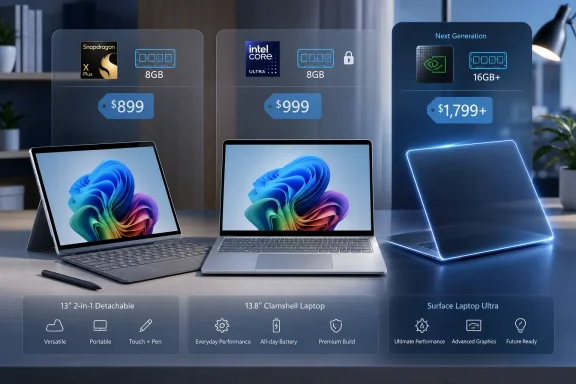
The final ranking is straightforward:
- Surface Laptop, 13.8-inch: Best Surface for most people.
- Surface Pro, 13-inch: Best for tablet, touch-first, and pen-centered work.
- Surface Laptop, 13-inch: Best budget Surface, with an important 8GB warning.
- Intel Surface for Business: Best for verified compatibility requirements.
- Surface Laptop Ultra: Wait rather than preorder or plan a purchase around untested hardware.
Microsoft’s current Surface catalog is narrower than it once was. PCMag describes Surface Go, Surface Laptop Studio, Surface Studio, Surface Book, and the Surface-branded phones as discontinued. The practical choice has contracted to two mainstream designs—Surface Pro and Surface Laptop—plus business configurations and the forthcoming Surface Laptop Ultra.
That simpler catalog does not automatically make buying easier. Buyers still have to account for form factor, included accessories, memory, processor architecture, software dependencies, procurement channel, and whether waiting for the Ultra makes more sense than buying an available machine.
The Surface Decision Tree
Use this sequence before comparing individual specifications:
- Choose Surface Pro only if you genuinely need tablet use, pen input, drawing, handwriting, annotation, or the kickstand’s flexible positioning.
- Price the exact keyboard you intend to use.
- Add the Slim Pen if pen input is part of the reason for buying it.
- Compare that complete configuration—not the tablet-only advertised price—with a Surface Laptop.
- Choose Surface Laptop if you primarily type, work on your lap, or want the keyboard included in the purchase.
- The 13.8-inch model is the strongest general recommendation.
- The 15-inch model is for buyers who prioritize a larger screen enough to accept its higher starting price.
- Choose a Surface for Business with Intel only after identifying a concrete requirement.
- Check the exact legacy application, driver, printer, scanner, audio interface, specialist peripheral, security tool, plug-in, or management platform.
- Do not pay the Intel premium merely because Intel feels familiar.
- Do not assume Snapdragon compatibility merely because the application’s basic functions appear ordinary.
- Do not buy an 8GB Surface for long-lived multitasking needs.
- The cheaper 12-inch Surface Pro and 13-inch Surface Laptop are better suited to constrained workloads than to years of increasingly busy browser, productivity, communication, security, and cloud-sync use.
- The 8GB 12-inch Surface Pro is not Copilot+ qualified.
- Wait for Surface Laptop Ultra if your purchase depends on Nvidia graphics, up to 128GB of memory, or higher-end local AI work.
- Microsoft has not announced pricing.
- Performance, battery life, cooling, software support, and real-world value still require independent testing.
Microsoft Simplified Surface by Moving the Decisions Inside
Surface once covered small tablets, detachable notebooks, hinged performance machines, an all-in-one desktop, conventional laptops, and phones. According to PCMag’s description of the current portfolio, many of those experiments have ended.
What remains is centered on two established designs. Surface Pro is the detachable tablet with a kickstand and optional keyboard. Surface Laptop is the conventional clamshell with its keyboard included. Surface for Business then adds configurations and purchasing choices not offered through the standard consumer lineup.
Processor architecture is one of the most consequential distinctions. The current mainstream consumer Surface Pro and Surface Laptop configurations described by PCMag use Qualcomm Snapdragon processors. Current Intel Core Ultra Series 3 options sit in the Surface for Business catalog and carry higher starting prices.
That does not make every consumer Surface the wrong choice for compatibility-sensitive users, nor does it make every Intel business configuration necessary. It means buyers should validate their own dependencies rather than treating the Surface name as a guarantee that every Windows application, driver, peripheral, or deployment process will behave identically across processor architectures.
For a typical buyer without a known specialist requirement, the form-factor decision should come first. A detachable is worthwhile when its tablet and pen functions will be used regularly. Otherwise, Surface Laptop provides the more direct path to a complete notebook.
Surface Pro Is the Best Surface Only When Its Flexibility Matters
The 13-inch Surface Pro, now described as being in its 12th generation, continues Microsoft’s defining detachable design. It is a Windows tablet with an integrated kickstand, an optional keyboard cover, and support for the optional Slim Pen.
Its hinge moves through 165 degrees, allowing the screen to stand upright, recline for drawing or annotation, or sit close to flat. That range is the clearest reason to buy Surface Pro instead of Surface Laptop.
For someone who marks up documents, writes notes by hand, draws, presents from a compact tablet, or changes frequently between desk and touch-first use, Surface Pro can justify its compromises. For someone who will leave the keyboard attached almost permanently and rarely use the pen, the detachable design may add cost without delivering much practical benefit.
The key pricing mistake is comparing a bare Surface Pro with a complete Surface Laptop. The tablet’s advertised starting price does not necessarily represent the configuration a buyer will carry and use.
Before choosing a Pro, build the exact package:
- Select the Surface Pro configuration.
- Add the specific keyboard required.
- Add the Slim Pen if handwriting, drawing, or annotation is part of the plan.
- Include any other accessory that the buyer already knows is necessary.
- Compare that final price with a Surface Laptop that includes its keyboard.
The Slim Pen should not be added automatically. If the buyer does not expect to use it, Surface Pro has lost part of its strongest justification. Conversely, someone choosing the Pro specifically for pen work should not omit the pen merely to make the initial price comparison appear more favorable.
The 13-inch consumer Surface Pro starts at $1,499.99 with Snapdragon X2 processors. The Surface Pro for Business with Snapdragon starts at $1,649.99, while the Intel Core Ultra Series 3 business model starts at $1,949.99.
At those prices, Surface Pro is not the automatic flagship recommendation. It is the specialized recommendation for buyers who can explain why a detachable Windows tablet is better for their work than an included-keyboard clamshell.
Snapdragon Is the Consumer Default, but Compatibility Still Requires a Checklist
Microsoft’s current Surface lineup places Snapdragon in the mainstream consumer channel. Intel has not disappeared, but the current Core Ultra Series 3 options described in the supplied product information are sold through Surface for Business.
For the 13-inch Surface Pro for Business, the Intel model begins $300 above the corresponding Snapdragon business model. Similar differences appear in parts of the Surface Laptop for Business range.
That premium should buy the resolution of a verified requirement, not a vague sense of reassurance.
A browser-and-productivity buyer may have no specialized dependency to investigate. A business, technician, musician, designer, developer, healthcare office, or industrial user may have one particular program or device that determines the entire purchase.
Before buying Snapdragon, verify:
- The exact version of any essential legacy Windows application.
- Drivers for required printers, scanners, label printers, audio devices, measurement tools, or specialist peripherals.
- Plug-ins, extensions, security components, and hardware licensing tools.
- VPN, endpoint protection, deployment, and device-management requirements.
- Internally developed applications and any external components they require.
- Vendor support statements, not merely whether an installer opens.
Before paying for Intel, perform the same review. If all essential software and hardware are supported on the chosen Snapdragon configuration, the Intel premium may solve a problem the buyer does not actually have.
The safest rule is specific: buy Intel only when a named requirement points to Intel or x86 compatibility. If the compatibility review is inconclusive and the application or peripheral is essential, delay the purchase or obtain confirmation from its vendor or administrator.
The Cheapest Surface Pro Is a Budget Tablet, Not a Copilot+ Shortcut
Microsoft has re-released a previous 12-inch Surface Pro with a Snapdragon X Plus processor and 8GB of memory. Its $849.99 starting price brings the Surface Pro family below $1,000.
The supplied facts establish an important limit: the 8GB 12-inch Surface Pro is not Copilot+ qualified.
That does not make it unusable. It may suit web browsing, documents, communication, media playback, light applications, and buyers who value a compact detachable design more than broad multitasking headroom.
The concern is longevity. An 8GB Windows PC has less margin when browsers, productivity tools, communication clients, security software, cloud synchronization, and background services operate together. A tightly controlled workload may fit. A general-purpose workload that grows over several years may not.
Buy the 12-inch model if all of the following are true:
- The compact tablet form is a priority.
- The workload is known and relatively light.
- The buyer understands that it is not Copilot+ qualified.
- The complete price with the desired keyboard and pen still makes sense.
- The buyer does not expect heavy or expanding multitasking.
Avoid it if the plan is to keep the device for years while steadily adding applications, browser tabs, communication tools, or background services. In that situation, the lower initial price can become poor value if memory pressure forces an early replacement.
The Surface Recommendation Table
The catalog is most useful when treated as a set of purchasing scenarios rather than a list of products.
| Device | Starting price | Buy if | Avoid if | Required cost check | Copilot+ status | Compatibility-risk check |
|---|---|---|---|---|---|---|
| Surface Pro, 12-inch | $849.99 | You want the lowest-cost compact Surface tablet and have a light, predictable workload | You need long-lived multitasking, expect workload growth, or are buying specifically for Copilot+ | Price the exact keyboard and add the Slim Pen if needed | Not Copilot+ qualified | Verify essential apps, drivers, printers, peripherals, and plug-ins |
| Surface Pro, 13-inch, 12th Edition | $1,499.99 | Tablet mode, handwriting, drawing, annotation, or flexible kickstand positions are central requirements | You mostly type with the keyboard attached and rarely use touch or pen input | Compare the tablet plus chosen keyboard and Slim Pen against a complete Surface Laptop | Not verified in the supplied facts | Verify any specialist Windows dependency before choosing Snapdragon |
| Surface Pro for Business, 13-inch, Snapdragon | $1,649.99 | You need the Pro form factor through a business purchasing channel and your requirements pass a Snapdragon review | You need a confirmed Intel-specific application, driver, peripheral, or deployment component | Add keyboard and pen costs before comparing it with business laptops | Not verified in the supplied facts | Test the organization’s exact software, peripherals, security tools, and management stack |
| Surface Pro for Business, 13-inch, Intel | $1,949.99 | A specific compatibility or management requirement makes Intel necessary | You have no identified dependency that justifies the premium | Add keyboard and pen costs to the $1,949.99 starting price | Not verified in the supplied facts | Confirm that Intel actually resolves the named requirement |
| Surface Laptop, 13-inch | $949.99 | You need an included keyboard, conventional lap use, and a lower Surface price for a modest workload | You want substantial multitasking headroom or a long-lived general-purpose system | No detachable keyboard purchase is needed; compare memory before price alone | Not verified in the supplied facts | Verify required apps, drivers, printers, and peripherals |
| Surface Laptop, 13.8-inch, 8th Edition | $1,599.99 | You want the best overall Surface balance for ordinary laptop use | You require tablet-first use, regular handwriting, or a verified Intel dependency | Keyboard is included; compare the complete price directly with a fully equipped Pro | Not verified in the supplied facts | Check specialist software and hardware before committing to Snapdragon |
| Surface Laptop, 15-inch, 8th Edition | $1,699.99 | You want a larger-screen Surface Laptop and accept the price increase | Portability and minimum cost matter more than screen size | Keyboard is included | Not verified in the supplied facts | Perform the same Snapdragon review as for the 13.8-inch model |
| Surface Laptop for Business, 13-inch, Intel | $1,499.99 | You need a smaller clamshell and have a verified reason to select Intel | The 8GB-class budget machines would meet the need or no Intel requirement exists | Keyboard is included | Not verified in the supplied facts | Validate the exact legacy or management dependency |
| Surface Laptop for Business, 13.8-inch, Snapdragon or Intel | $1,649.99 or $1,949.99 | You need the business channel and want to choose architecture after compatibility testing | You are selecting Intel solely out of habit or Snapdragon solely on price | Keyboard is included | Not verified in the supplied facts | Compare both processors against the organization’s actual application and peripheral list |
| Surface Laptop for Business, 15-inch, Snapdragon or Intel | $1,949.99 or $2,149.99 | You need a larger business Surface and have completed an architecture review | You do not need the larger screen or business purchasing features | Keyboard is included | Not verified in the supplied facts | Confirm software, drivers, peripherals, deployment, security, and support requirements |
| Surface Laptop Ultra | Price unannounced | You can wait for Nvidia-based hardware, up to 128GB of memory, and independent reviews | You need a computer now or require a firm budget and proven performance | Wait for configuration prices before comparing value | Not verified in the supplied facts | Wait for application, driver, and workflow testing on shipping hardware |
Surface Laptop Is the Best Choice for Most Buyers
Surface Laptop has been Microsoft’s conventional clamshell Surface family since 2018 and is now described as being in its eighth generation. Its purchasing argument is simple: it is already a laptop.
The keyboard is included and permanently attached. The machine is intended for conventional notebook positioning, including regular lap use. Buyers do not have to assemble a tablet, keyboard cover, and optional pen into the system they expected to purchase.
That makes the 13.8-inch Surface Laptop the best Surface for most people. It avoids the incomplete price comparison surrounding Surface Pro and aligns more directly with the way most buyers use a primary PC: typing, browsing, communicating, and running desktop applications from a clamshell.
The consumer 13.8-inch Surface Laptop starts at $1,599.99. The 15-inch model begins at $1,699.99. Those prices make both premium purchases, so buyers should still compare them with non-Surface Windows laptops before deciding that Microsoft’s design and configuration are worth the cost.
The 15-inch version is not automatically better. Its larger screen may be valuable for buyers who spend long periods in documents, spreadsheets, browser windows, or side-by-side applications. The 13.8-inch model remains the stronger default because it is the less expensive route into the current premium Surface Laptop line and does not ask the buyer to pay for screen size that may not be necessary.
Surface Laptop should not be chosen over Surface Pro merely because its model number or processor is newer. It should be chosen because the buyer wants a clamshell, expects to type regularly, and values an included keyboard more than tablet flexibility.
The $949.99 Surface Laptop Is the Budget Pick With a Lifecycle Warning
Microsoft has also revived a previous 13-inch Snapdragon Surface Laptop with 8GB of memory. At $949.99, it is the lowest-priced current Surface clamshell in the supplied lineup.
It is the best budget Surface recommendation because the keyboard is included and the complete notebook price is easier to understand than the price of a Surface Pro that may still need a keyboard. That recommendation comes with a strict limit: it is for constrained workloads, not ambitious long-term multitasking.
The budget Surface Laptop can make sense for:
- A student with primarily browser and document work.
- A household computer with a narrow set of tasks.
- A lightly equipped office role.
- A secondary computer rather than the user’s most demanding system.
- A buyer who has tested or confirmed every essential application and peripheral.
It is harder to recommend as a long-lived general-purpose PC. An 8GB configuration leaves less room for changing requirements, more simultaneous applications, heavier web use, and additional background services.
IT buyers should treat memory as a lifecycle choice. Saving at deployment may not be a saving if routine use later causes frustration, support work, or premature replacement.
The advice is therefore not “never buy 8GB.” It is more precise: do not buy 8GB for a user whose multitasking needs are already substantial or likely to expand over the expected life of the machine.
Copilot+ Status Must Be Verified Model by Model
Surface Pro helped introduce Microsoft’s Copilot+ PC program with Qualcomm in 2024. The current catalog nevertheless includes machines that do not share the same qualification.
The verified example in the supplied facts is the re-released 12-inch Surface Pro with 8GB of memory: it is not Copilot+ qualified.
No broader Copilot+ claim should be inferred from a Surface name, processor family, screen size, or price alone. Buyers who consider Copilot+ status important should check the exact configuration at the point of purchase rather than assuming every current Surface participates equally.
That distinction matters most at the budget end. A lower-priced Surface may still perform the ordinary Windows tasks for which it was purchased, but it should not be represented as a discounted version of every capability advertised with more expensive Surface configurations.
Copilot+ should also remain one purchasing factor rather than replacing the basic questions. Form factor, memory, application compatibility, accessory cost, and expected device life may matter more to a particular buyer than the AI label.
Timeline
2018 — Microsoft begins the Surface Laptop line, adding a conventional clamshell family alongside Surface Pro.
2023 — PCMag identifies this as the last year in which consumer Surface Laptop models were offered with Intel processors before current retail choices moved toward Snapdragon.
2024 — Surface Pro helps launch Microsoft’s Copilot+ PC program with Qualcomm.
2026 — The current supplied lineup includes the 12th-generation Surface Pro, eighth-generation Surface Laptop, lower-cost re-released models, and Snapdragon and Intel choices in the business catalog.
Later in 2026 — Surface Laptop Ultra is due, while other reporting describes its launch window as later this fall. Until Microsoft provides a firm date, price, and order details, buyers should treat it as forthcoming rather than available.
Surface Laptop Ultra Could Change the High End, but It Is Not Yet a Recommendation
Surface Laptop Ultra is being developed by Microsoft and Nvidia for release later in 2026. It is described as a 15-inch Windows 11 machine using Nvidia’s RTX Spark system-on-a-chip, code-named N1X.
According to the product information attributed to Nvidia by PCMag, the processor combines a 20-core CPU with graphics described as “GeForce RTX 5070-grade.” Configurations are expected to offer up to 128GB of memory.
The machine is also described as weighing 4.5 pounds, measuring less than 0.71 inch thick, and including a mini-LED touch screen.
Those specifications place it outside the ordinary Surface Laptop comparison, but they do not yet establish whether it will be a good purchase. Microsoft has not announced a price, and independent testing has not established its performance, cooling behavior, battery life, software support, or value.
The reference to AI models with up to 120 billion parameters is similarly incomplete as purchasing evidence. The ability to accommodate a model does not, by itself, reveal how responsively it runs, how much power it consumes, whether the relevant software is fully supported, or whether the resulting workflow is practical on a laptop.
Ultra should therefore be treated as an option to monitor, not as the new best Surface by default.
Wait for it if:
- Nvidia-based capabilities are central to the intended workload.
- More memory than ordinary Surface configurations provide is a real requirement.
- The purchase can be delayed until pricing and independent reviews appear.
- The buyer is willing to validate software and driver support on the shipping system.
- A higher-end Surface is more attractive than an available conventional workstation or creator laptop.
Do not wait if:
- The workload is ordinary productivity and browsing.
- Tablet and pen use make Surface Pro the better form factor.
- A computer is needed now.
- The budget is fixed.
- The required applications and peripherals need a proven platform today.
Microsoft and Nvidia may have produced a compelling high-end Windows machine. Until reviewers test production hardware and Microsoft reveals configuration prices, that remains a possibility rather than a buying conclusion.
Administrator and Business Buyer Checklist
Before approving any Surface purchase, record the following:
- Form factor: Does the user require a detachable tablet and pen, or would a clamshell be more appropriate?
- Complete price: For Surface Pro, are the exact keyboard and Slim Pen included in the comparison?
- Memory: Is 8GB adequate for the full expected service life, not merely the first deployment image?
- Applications: Have exact application versions been checked?
- Drivers: Are required device drivers available and supported?
- Printers and peripherals: Have specific models been confirmed rather than general device categories?
- Plug-ins and extensions: Do required add-ons support the selected architecture?
- Management: Do deployment, policy, endpoint security, VPN, and update processes work with the configuration?
- Support: Will the relevant software and hardware vendors support the selected system?
- Copilot+ status: Has the exact model’s qualification been verified rather than inferred?
- Intel premium: Is there a documented dependency that justifies paying more?
- Ultra timing: Can the organization wait for pricing, availability, and independent testing without disrupting its refresh plan?
Which Microsoft Surface Should You Buy?
Buy the 13.8-inch Surface Laptop now if you want the best Surface for most people. It delivers the conventional laptop format most buyers need, includes the keyboard, and avoids the accessory calculations surrounding Surface Pro.
Buy the 13-inch Surface Pro now if tablet and pen use are genuine requirements. Build the complete price with the exact keyboard and Slim Pen before deciding that it is competitive with Surface Laptop.
Buy the $949.99 13-inch Surface Laptop if budget is the priority and the workload is light and stable. Do not choose its 8GB configuration for substantial or expanding multitasking.
Buy an Intel Surface for Business only when a named application, driver, printer, peripheral, plug-in, security component, or management requirement justifies it. Compatibility-sensitive buyers should perform that review before purchase rather than relying on general architecture assumptions.
Wait for Surface Laptop Ultra if you specifically need what its Nvidia collaboration and up-to-128GB configurations may offer. Everyone else should make the decision from the products that are priced and available rather than postponing a purchase for an unpriced machine whose real-world results remain unknown.
Microsoft may have reduced Surface to fewer recognizable families, but the best choice is no longer difficult once the decision is made in the correct order: choose the form factor, calculate the complete cost, reject 8GB where longevity matters, validate compatibility, and wait for Ultra only when its prospective high-end capabilities address a requirement that today’s Surface Pro and Surface Laptop cannot.
References
- Which Is the Best Microsoft Surface? How to Choose the Right One for You PCMag UK · 2026-07-09T21:52:07.877385
- cdn-dynmedia-1.microsoft.com cdn-dynmedia-1.microsoft.com
- blogs.windows.com blogs.windows.com