

A used Microsoft Type Cover 2 for the original Surface RT, Surface 2, Surface Pro, and Surface Pro 2 has appeared in a listing from santoandre.biz. The black keyboard cover is described as tested and fully functional, with normal cosmetic wear and a possible small tear in the fabric that reportedly does not affect operation.
The accessory matters chiefly to owners keeping Microsoft’s first-generation 10.6-inch Surface hardware in service. A working cover turns those tablets back into more practical ultraportable machines for light typing, remote administration, legacy application access, or basic document work—without needing to rely on the increasingly scarce original bundled keyboard.
The compatibility claim is appropriately narrow. Microsoft’s Surface Pro 2 documentation lists the 10.6-inch display and dedicated cover port used by the early Surface line, while Microsoft support material describes Type Covers as both keyboards and protective covers.
That does not mean the Type Cover 2 is a safe purchase for newer Surface tablets. Buyers should not assume it will work with Surface Go, Surface Pro X, Surface Pro 8 and later models, or current Surface Pro hardware. Physical fit, connector generations, and keyboard support vary substantially across the Surface range.
For owners of the intended devices, the Surface RT, Surface 2, original Surface Pro, and Surface Pro 2 shared the early cover format. The Type Cover 2 attaches magnetically through the tablet’s lower-edge connector and folds over the display when closed. It offers physical keys and a touchpad rather than the pressure-sensitive key surface used by Microsoft’s older Touch Cover designs.
A buyer should also test it on the target Surface before treating it as a spare: attach the cover, restart the tablet if it is not immediately detected, test every key row, and verify touchpad clicks and cursor movement. Microsoft’s current troubleshooting guidance still recommends checking the connector and restarting a Surface when a compatible keyboard is not recognized.
The listing is relevant only to owners of the original 10.6-inch Surface generation who need a replacement cover rather than a keyboard for a newer device.
The accessory matters chiefly to owners keeping Microsoft’s first-generation 10.6-inch Surface hardware in service. A working cover turns those tablets back into more practical ultraportable machines for light typing, remote administration, legacy application access, or basic document work—without needing to rely on the increasingly scarce original bundled keyboard.
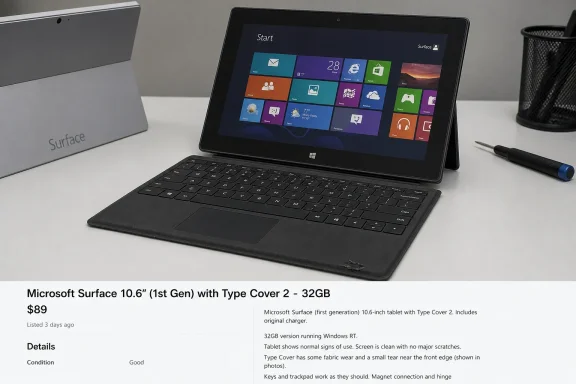 Correct device family, not every Surface
The compatibility claim is appropriately narrow. Microsoft’s Surface Pro 2 documentation lists the 10.6-inch display and dedicated cover port used by the early Surface line, while Microsoft support material describes Type Covers as both keyboards and protective covers.That does not mean the Type Cover 2 is a safe purchase for newer Surface tablets. Buyers should not assume it will work with Surface Go, Surface Pro X, Surface Pro 8 and later models, or current Surface Pro hardware. Physical fit, connector generations, and keyboard support vary substantially across the Surface range.
For owners of the intended devices, the Surface RT, Surface 2, original Surface Pro, and Surface Pro 2 shared the early cover format. The Type Cover 2 attaches magnetically through the tablet’s lower-edge connector and folds over the display when closed. It offers physical keys and a touchpad rather than the pressure-sensitive key surface used by Microsoft’s older Touch Cover designs.
Used-accessory checks
The seller’s “tested” description is useful, but a Type Cover is old enough that condition matters more than the model name. Check the listing’s return terms and inspect the connector area carefully on arrival. Fabric separation near the hinge, missing key response, intermittent touchpad input, and magnetic alignment problems are the common practical concerns with a heavily used cover.A buyer should also test it on the target Surface before treating it as a spare: attach the cover, restart the tablet if it is not immediately detected, test every key row, and verify touchpad clicks and cursor movement. Microsoft’s current troubleshooting guidance still recommends checking the connector and restarting a Surface when a compatible keyboard is not recognized.
The listing is relevant only to owners of the original 10.6-inch Surface generation who need a replacement cover rather than a keyboard for a newer device.
References
- Primary source: santoandre.biz
Published: Fri, 17 Jul 2026 01:37:02 GMT
Loading…
santoandre.biz - Official source: support.microsoft.com
Loading…
support.microsoft.com - Official source: answers.microsoft.com
Loading…
answers.microsoft.com - Official source: learn.microsoft.com
Loading…
learn.microsoft.com - Official source: download.microsoft.com
Loading…
download.microsoft.com - Official source: microsoft.com
Surface Pro for Business Fact Sheet May 2024
</rdf:Alt> </dc:description> <dc:creator><rdf:Seq><rdf:li>Joseph Galbraith (MBO Partners, Inc.)www.microsoft.com