
Microsoft has started rolling Surveys Agent into Microsoft 365 Copilot, moving a long‑promised, end‑to‑end survey workflow from preview into broad rollout and offering users a chat‑first way to create, distribute, monitor and export Forms surveys without leaving the Copilot pane.
Surveys Agent is a pre‑built Copilot agent designed to collapse the multi‑step mechanics of survey work—question drafting, distribution planning, response tracking and basic analysis—into a single conversational experience inside Microsoft 365 Copilot. The agent generates a preview survey (backed by Microsoft Forms), recommends distribution channels and timelines, sends invitations and reminders, watches response rates, and can export both raw responses and summarized insights into Excel for deeper analysis. Microsoft published getting‑started and rollout notes describing the flow and admin controls, and published message center guidance (MC1134742) documents the public preview and staged general availability timeline. Surveys Agent joins a growing catalog of domain‑specific Copilot agents available from the in‑product Agent Store. Microsoft frames these agents as “digital teammates” that are discoverable in the Copilot rail, manageable by IT, and publishable via Copilot Studio—part of a broader push to standardize agent discovery, governance and lifecycle inside Microsoft 365. Industry summaries and community threads have been tracking the Agent Store, Agent Mode, and related governance surfaces as Microsoft transitions Copilot from a helper into a platform for agentic workflows.
For more rigorous research programs that require rigorous sampling, statistical validity, or protected data handling, Surveys Agent should be treated as a productivity accelerator for low‑risk phases (drafting, lightweight data collection) rather than a replacement for established research workflows. Use templates, human review, and a compliance sign‑off for higher‑stakes surveys.
Organizations that balance a pragmatic pilot rollout with strong governance and training will likely realize rapid productivity gains; those that skip the policy steps risk exposure from poorly designed surveys, unintended data collection, and operational surprise when agent behaviors evolve. Treat Surveys Agent as a powerful tool in the enterprise toolkit—useful, efficient, and worth adopting, provided its adoption is paired with the same controls and oversight that already govern other Microsoft 365 services.
Source: Windows Report Surveys Agent is Now Generally Available in Microsoft 365 Copilot
 Background / Overview
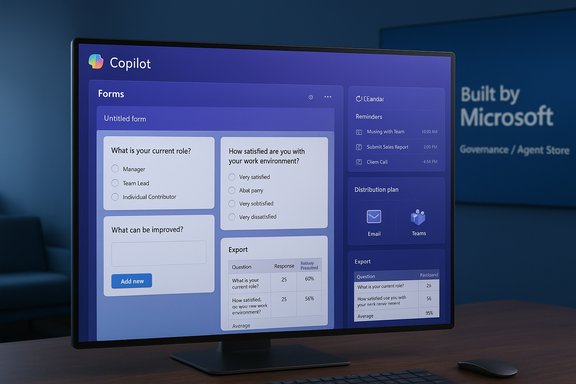
Surveys Agent is a pre‑built Copilot agent designed to collapse the multi‑step mechanics of survey work—question drafting, distribution planning, response tracking and basic analysis—into a single conversational experience inside Microsoft 365 Copilot. The agent generates a preview survey (backed by Microsoft Forms), recommends distribution channels and timelines, sends invitations and reminders, watches response rates, and can export both raw responses and summarized insights into Excel for deeper analysis. Microsoft published getting‑started and rollout notes describing the flow and admin controls, and published message center guidance (MC1134742) documents the public preview and staged general availability timeline. Surveys Agent joins a growing catalog of domain‑specific Copilot agents available from the in‑product Agent Store. Microsoft frames these agents as “digital teammates” that are discoverable in the Copilot rail, manageable by IT, and publishable via Copilot Studio—part of a broader push to standardize agent discovery, governance and lifecycle inside Microsoft 365. Industry summaries and community threads have been tracking the Agent Store, Agent Mode, and related governance surfaces as Microsoft transitions Copilot from a helper into a platform for agentic workflows.What Surveys Agent does — capability snapshot
Surveys Agent is built to cover the full survey lifecycle for typical workplace needs. The capabilities Microsoft documents and early adopters describe include:- Survey drafting and refinement: Ask Copilot to “draft a post‑training feedback survey” or “improve these questions for clarity” and the agent returns a Forms survey skeleton with questions, response types, and suggested wording.
- Preview & edit flow: The agent surfaces a preview of the generated survey and lets you edit questions side‑by‑side before publishing.
- Distribution planning: Surveys Agent will propose a rollout plan—recommended channels (email, Teams, direct link), sending cadence, and reminder schedules—to help maximize response rates.
- Send invitations & reminders: From the same Copilot thread you can instruct the agent to send invites and schedule reminders; the agent can use Outlook to reach recipients and can follow the distribution cadence it suggested.
- Automated response tracking: The agent monitors survey progress, flags low response rates, and can re‑trigger reminders or suggest follow‑ups.
- Grounding to files & historic surveys: Users can ground the agent to existing Word, Excel or PowerPoint files, or link older Microsoft Forms surveys for reuse or augmentation. This lets Surveys Agent reuse prior question sets or context from project files.
- Export to Excel for analysis: When responses reach a threshold, Surveys Agent can export both raw responses and summarized insights into an Excel workbook, including prebuilt summaries for further pivoting and visualization.
- Interactive tutorial and onboarding prompt: Microsoft has added an in‑conversation walkthrough to guide first‑time users through agent capabilities and recommended workflows.
Availability, rollout and admin controls
Microsoft introduced Surveys Agent in the Frontier preview program in mid‑August 2025, then moved to a staged general availability rollout beginning in mid‑October 2025 and completing through early November for most tenants, according to the message center guidance and product posts. The rollout is tenant‑scoped, off by default, and requires admin configuration and a valid Microsoft 365 Copilot license for users who need access. Important deployment details for administrators:- The agent is listed under the Agent Store inside Microsoft 365 Copilot and appears in the Built by Microsoft section; organizations can deploy it to users or allow users to install it themselves if tenant policies permit.
- Microsoft’s admin center introduces a request/approval flow so users can request access to Microsoft‑built agents; admins can approve or deny on a user or group basis. That governance surface is rolling out in the Microsoft 365 admin center alongside agent availability.
- The Surveys Agent relies on Microsoft Forms for survey hosting and adheres to existing Forms admin policies and tenant DLP/Purview controls; because the agent produces Forms surveys and exports to Excel, standard Forms and Excel governance applies.
Why this matters — strengths and practical value
Surveys Agent delivers several practical advantages for everyday teams and IT organizations:- Fewer context switches: Creating a Forms survey, planning distribution, and monitoring responses often requires hopping between Forms, Outlook/Teams and Excel. Surveys Agent keeps the workflow inside Copilot, reducing friction and time spent managing tools.
- Faster, better‑formed surveys: Natural‑language drafting and question refinement capabilities can improve clarity and increase response quality, particularly for non‑experts who don’t design surveys frequently.
- Built‑in distribution intelligence: The agent’s suggested rollout plans and automated reminders address the most common operational cause of poor survey yields—insufficient or poorly timed outreach.
- Exportable, auditable artifacts: Because surveys are backed by Forms and exports land in Excel, outputs are ordinary Office artifacts that can be audited, shared, and analyzed with standard Excel tools. This avoids opaque proprietary formats.
- Enterprise governance integration: Surveys Agent leverages existing admin controls—tenant settings for agents, Forms policies, DLP and Purview—so IT teams can apply familiar controls rather than invent new ones. The Agent Store and admin request flows also provide discoverability and lifecycle management for agents.
Risks, limitations and governance concerns
No single feature erases the need for policy and human oversight. The Surveys Agent also introduces new operational and compliance considerations that IT and compliance teams must address.Accuracy and intent drift
AI‑led question drafting can introduce subtle bias, ambiguous wording, or leading questions if prompts are vague or unchecked. AI suggestions can be helpful starting points but are not a substitute for a survey design review—especially for surveys intended for research, regulated feedback, or legally sensitive data collection. Always review question wording and response scales before sending.Data residency, telemetry and third‑party routing
Surveys Agent uses Microsoft Forms and Microsoft 365 infrastructure; however, where processing occurs and how telemetry is stored can matter for regulated industries. Administrators must verify whether any parts of the flow (for example, analysis steps or model calls) route data to different model endpoints or cross‑regional storage. Treat claims about in‑tenant processing as conditional until verified against tenant telemetry and Microsoft documentation. Flag any unresolved or ambiguous processing locale claims for legal review.Privileged or sensitive data collection
Surveys often collect names, employee IDs, health or compensation data. Using Surveys Agent to collect sensitive categories increases the stakes for DLP, retention and consent. Ensure Forms and Copilot usage align with internal data classification and retention policies; do not collect regulated or protected data in an ad‑hoc survey. Use conditional access and shared mailbox safeguards when sending invitations to large distribution lists.Change management and update risk
Agents operate as software that may update behavior over time. When Surveys Agent changes planning heuristics or question templates, survey outputs could shift. Treat the agent as a managed service: include it in change logs, define owners and approvals for surveys used in formal processes, and maintain sample templates under version control. Microsoft’s Entra Agent identity, admin request flows, and telemetry can help but require proper configuration.Licensing and cost implications
While the agent is included in the Copilot agent catalog, access requires the correct Copilot licensing for users. Admins should confirm which seats have access, whether Agent Store installs will be tenant‑wide or user‑scoped, and whether any downstream services (e.g., premium Forms features) are billed separately. The MC message and admin guidance make clear the feature is off by default and subject to licensing rules.Practical rollout checklist for IT (recommended)
- Verify licensing:
- Confirm which users have Microsoft 365 Copilot seats and whether your tenant has agent access enabled.
- Audit Forms policy and retention:
- Map Forms storage location, retention settings, and review DLP/Purview mappings for potential sensitive fields.
- Configure agent access:
- Use Copilot > Agents & connectors in the Microsoft 365 admin center to allow or block the Surveys Agent, and enable the request/approval flow if you prefer user requests.
- Pilot with a controlled group:
- Start with HR/training/product teams that understand survey design. Run 2–3 pilot surveys, verify exports, and test the reminder cadence.
- Define governance:
- Assign an owner, require review for surveys collecting PII or regulated data, and add survey templates to a centrally managed library.
- Train users:
- Educate on prompt quality, question review, and what not to collect. Use Microsoft’s interactive tutorial inside the agent as part of onboarding.
- Monitor and audit:
- Track agent usage, distribution sends, and export events. Tie logs back to Purview and SIEM where required.
Best practices for survey designers using Surveys Agent
- Start with a clear objective: tell the agent who the respondents are, why you’re asking, and what decisions the results will inform. This produces tighter, more usable question sets.
- Use iterative refinement: ask the agent to “shorten” or “remove double‑barreled questions” and to suggest neutral wording options.
- Confirm response types: verify which questions Microsoft Forms maps to multiple‑choice, rating, or text responses before sending.
- Limit personal data collection: avoid collecting sensitive PII, health, or compensation details unless you have explicit consent and DLP controls in place.
- Test distribution on a small sample: confirm link behavior, reminder cadence, and Excel export formatting before wide release.
- Keep an editable canonical copy: export templates to a centrally managed SharePoint/OneDrive folder so team members can reuse audited survey templates.
Developer, API and automation considerations
Surveys Agent is a pre‑built Copilot agent and not a developer SDK; it builds Forms surveys and uses existing Microsoft Forms APIs and Excel export mechanics. Organizations wanting deeper automation (for example, programmatic aggregation across multiple Forms surveys or a custom reporting pipeline) should continue to rely on Microsoft Forms APIs and Power Automate flows or use Copilot Studio to create tenant‑specific agents that integrate with back‑end systems. Use the agent for rapid survey cycles and the API/automation stack for productionized pipelines.Cross‑source verification and what remains to be confirmed
Multiple Microsoft channels document the Surveys Agent feature set and staged rollout: the Microsoft Support “Get started with Surveys Agent” article outlines the user flows and export behavior; Microsoft’s Forms blog and Microsoft 365 community posts confirmed Frontier preview timing and October rollout; and message center entries (MC1134742) document the public preview and GA schedule and include admin‑level prerequisites. These independent Microsoft posts consistently describe the same features and staged availability. However, a few operational claims should be treated cautiously until confirmed in your tenant:- Exact processing locality and telemetry retention for model‑driven analysis steps (if any) were not exhaustively documented in public posts; verify whether analysis steps are performed strictly within tenant region boundaries for regulated workloads. Flagged as a verification item.
- The wording “general availability to all Microsoft 365 Copilot commercial users worldwide” can be misleading in practice; availability is rolling out globally but remains tenant‑gated and off by default until admins enable it. Treat any headline claiming immediate, universal enablement as simplified messaging rather than a technical guarantee. Flagged as a caution.
Realistic expectations for adoption and ROI
For teams that regularly run short surveys (training feedback, NPS snippets, event follow‑ups), Surveys Agent will likely reduce administrative overhead and increase response rates through recommended cadence and automated reminders. Expect immediate time savings for authorship and distribution planning.For more rigorous research programs that require rigorous sampling, statistical validity, or protected data handling, Surveys Agent should be treated as a productivity accelerator for low‑risk phases (drafting, lightweight data collection) rather than a replacement for established research workflows. Use templates, human review, and a compliance sign‑off for higher‑stakes surveys.
Conclusion
Surveys Agent represents a concrete example of Microsoft’s agent‑first strategy: taking a common multi‑app workflow and unifying it inside Copilot as a conversational, guided experience. The feature is designed to reduce friction in survey creation, boost response rates with built‑in distribution advice, and simplify downstream analysis by exporting into familiar Office formats like Excel. Administrators and compliance teams must approach the rollout deliberately—confirm licensing, apply Forms and DLP controls, pilot with controlled groups, and manage agent access through the Microsoft 365 admin center—because the convenience of a single‑pane agentic experience comes with new governance obligations.Organizations that balance a pragmatic pilot rollout with strong governance and training will likely realize rapid productivity gains; those that skip the policy steps risk exposure from poorly designed surveys, unintended data collection, and operational surprise when agent behaviors evolve. Treat Surveys Agent as a powerful tool in the enterprise toolkit—useful, efficient, and worth adopting, provided its adoption is paired with the same controls and oversight that already govern other Microsoft 365 services.
Source: Windows Report Surveys Agent is Now Generally Available in Microsoft 365 Copilot
