

If you’re fed up with forced Windows upgrades, the end of free Windows 10 support, and the creeping telemetry-and-reboots routine of Windows 11, there’s a surprising—and practical—alternative you should seriously consider: an immutable KDE Linux desktop built around Flatpak apps, most notably Fedora Kinoite. It’s not just another distro; Kinoite is an opinionated, atomic approach to the desktop that addresses the exact migration pain points Windows users complain about: brittle system updates, accidental breakage from third‑party installs, and the steep learning curve around package management and terminal “landmines.”
Microsoft ended mainstream free support for Windows 10 on October 14, 2025—no more free security patches, no more routine bug fixes. That alone pushed a wave of users to consider alternatives: upgrade to Windows 11 (often blocked by strict hardware requirements), pay for Extended Security Updates, or move off Windows entirely. For many, Linux is now a viable option not because it’s niche, but because distributions and desktop environments have matured into dependable, feature-rich platforms.
But switching operating systems is still scary for everyday users. Two recurring blockers are:
Key technical pillars behind this approach include:
Caveat: proprietary GPU drivers and certain low-level kernel modules (especially NVIDIA) can be trickier on immutable platforms because of how kernel module rebuilds and packaging interact with an image‑based model. Documentation and community guides exist, but this is one area where people switching from Windows should plan and test carefully.
1.) Backup everything first
Fedora Kinoite doesn’t promise “Windows, but exactly the same.” It offers a pragmatic, safer path away from problematic Windows update cycles—one that keeps the desktop metaphors Windows users rely on while protecting the system from common breakage modes. For Windows users who are tired of forced upgrades, telemetry tradeoffs, and brittle patching, Kinoite is more than a novelty: it’s a credible first stop on a migration strategy that balances familiarity, security, and maintainability. If you decide to try it, start with a live USB, back up your data, and use toolbox/distrobox for anything that would otherwise require invasive system changes. That combination—KDE comfort, Flatpak apps, and an immutable base—makes the leap from Windows far less abrupt than it used to be.
Source: How-To Geek Forget Linux Mint. These distros are the only way to switch
 Background: why people are leaving Windows right now
Microsoft ended mainstream free support for Windows 10 on October 14, 2025—no more free security patches, no more routine bug fixes. That alone pushed a wave of users to consider alternatives: upgrade to Windows 11 (often blocked by strict hardware requirements), pay for Extended Security Updates, or move off Windows entirely. For many, Linux is now a viable option not because it’s niche, but because distributions and desktop environments have matured into dependable, feature-rich platforms.But switching operating systems is still scary for everyday users. Two recurring blockers are:
- The fear of "breaking" the system by installing the wrong thing or running a bad command.
- The struggle to get familiar apps and files working—especially software that expects Windows-only libraries or installers.
Overview: what an immutable distro actually is
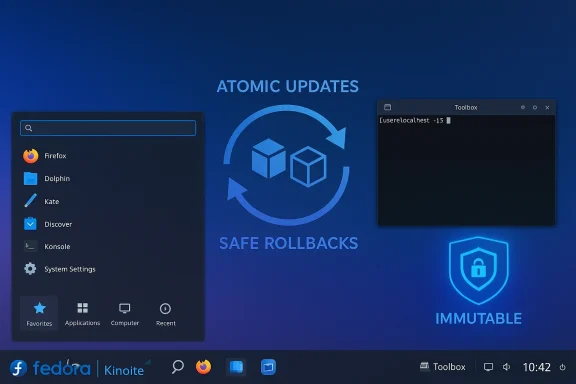
An immutable Linux desktop presents the core operating system as a read‑only image: the base OS is versioned and swapped atomically. Instead of applying dozens of package-level changes in-place, the system composes a new image and switches to it at reboot. That model makes updates transactional: either the new image deploys fully, or the system remains on the previous known-good image and can roll back easily. That atomic model reduces “half-updated” failure modes and makes the OS much harder to break by accident.Key technical pillars behind this approach include:
- OSTree (image versioning) and rpm‑ostree (a hybrid image/package system used by Fedora’s atomic desktops).
- Flatpak for delivering user applications in sandboxed bundles that carry their dependencies.
- Container tools (Toolbox or Distrobox) for mutable development and heavyweight tooling that shouldn’t be layered into the immutable base.
Why Fedora Kinoite? The short, practical pitch
Fedora Kinoite is Fedora’s KDE Plasma atomic desktop: a KDE Plasma desktop built on rpm‑ostree and designed to use Flatpaks for applications. In plain language, that means:- The base OS is largely read-only and updated atomically (reboot to switch to the new image).
- Desktop apps are primarily delivered as Flatpaks from Flathub (or other Flatpak remotes), reducing dependency hell.
- KDE Plasma gives you a highly configurable desktop that can mimic Windows 7 or Windows 11 layouts, with a powerful file manager (Dolphin) and traditional desktop metaphors (taskbar, start menu, system tray).
How Kinoite protects you from common migration hazards
Atomic updates and reliable rollbacks
Traditional distros update individual RPMs or DEBs in place; if something fails mid‑transaction you can end up with a partially broken system. Kinoite (via rpm‑ostree and OSTree) composes a complete filesystem tree server-side or locally and swaps it in as a unit. If an update fails, you can boot back to the previous deployment or run a rollback command—your user data in /home remains untouched. That makes updates safer and more predictable than desktop environments where half-installed updates can brick the system.Sandboxed applications via Flatpak
Flatpaks bundle most app dependencies and run apps in a sandboxed environment using bubblewrap and portal-based permissions. That dramatically reduces the chance that a badly packaged installer will scatter files across the system or break other apps. For everyday desktop software—browsers, editors, media players—Flatpaks usually “just work” and update independently. On Kinoite, Flathub acts as the primary catalog for these Flatpaks, making app discovery and installation straightforward for non-technical users.A safe CLI and mutable containers
Kinoite doesn’t ban the terminal, but it encourages safe workflows. If you need package-level control, use a toolbox or Distrobox container—mutable, full‑featured shells that isolate development tools and packages from the immutable OS image. That means you can install developer toolchains, compilers, or even Wine inside a container without polluting the base image. The result: you keep the convenience of a Linux terminal without risking core system stability.Apps, compatibility, and the “Windows problem”
One of the biggest questions for migrating Windows users is: can I run my apps? The good news is that modern Linux desktops offer multiple practical approaches:- Native Linux apps via Flatpak (Chrome/Firefox, LibreOffice, VS Code, Spotify, Slack, many games).
- Sandboxed wrappers like Bottles or PlayOnLinux (available as Flatpaks) to run Wine-based Windows apps.
- Proton (Steam Play) for many Windows games when using Steam; Proton builds can be handled inside a container or via Flatpak Steam builds depending on your setup.
- Virtual machines for full Windows compatibility when you need an exact Windows runtime.
Caveat: proprietary GPU drivers and certain low-level kernel modules (especially NVIDIA) can be trickier on immutable platforms because of how kernel module rebuilds and packaging interact with an image‑based model. Documentation and community guides exist, but this is one area where people switching from Windows should plan and test carefully.
KDE Plasma: the desktop Windows users will recognize (and love)
KDE Plasma is one of Linux’s most customizable desktops. For Windows migrants that means:- You can configure a taskbar and Application Menu that behave like Windows 10/11, and pin often-used apps to the panel.
- System tray, notifications, and workspace switching are all familiar metaphors that can be tuned to match your mental model.
- Dolphin, KDE’s file manager, offers features like split view, an embedded terminal, advanced batch rename, network protocol support (SFTP/SMB), and deep customization—arguably more power than Windows File Explorer for advanced users.
Real-world risks and technical trade-offs
No solution is perfect. Here are the trade-offs you need to weigh before switching:- Flatpak is safer by default, but sandboxing depends on correct permissions. Some Flathub packages request broad filesystem access for convenience; that reduces the sandbox’s effectiveness. There have also been specific Flatpak/portal vulnerabilities in the past that required patches. You still need to be mindful about which Flatpaks you grant broad permissions to.
- Containerized solutions (toolbox/distrobox) reintroduce mutability. They’re excellent for development and running complex software, but if you give a container wide mounts and freedoms, you can defeat the immutability safety net. Use them deliberately: keep the base OS clean and confine risky installs to containers.
- Proprietary drivers (NVIDIA) and some proprietary third‑party software can be more involved to install and maintain on an image-based system. Guides exist—sometimes requiring akmods, special RPM layers, or signed kmods—but these are the most common sources of headache. If your workflow depends on the latest proprietary GPU features, budget extra time to research the required steps.
- Learning curve: Kinoite reduces many risks, but it introduces new idioms (rebase, rpm‑ostree layering, Flatpak-centric installs) that differ from apt/apt-get or Windows installers. It’s less “point-and-click” than a polished consumer OS when you need to tweak system-level components.
Step-by-step: how to switch from Windows to Fedora Kinoite (practical guide)
Below is a practical migration checklist that balances safety and speed. Treat it as a tested path rather than a tutorial for edge cases.1.) Backup everything first
- Export documents, photos, browser profiles, and any application-specific data (Outlook PSTs, game saves if not cloud-synced).
- Use an external disk, cloud backup, or both. Don’t skip this.
- Use Fedora Media Writer or a USB imaging tool to write the Kinoite ISO to a USB drive and try the live session before installing. This tests hardware compatibility (Wi‑Fi, GPU, keyboards) without touching Windows. Fedora Media Writer is the recommended tool for Fedora images.
- Decide whether to replace Windows, dual‑boot, or repurpose the machine. If you plan to keep Windows for some apps, dual‑boot carefully and back up the Windows boot partition.
- Run the standard Fedora installer from the live media. Kinoite uses the same Anaconda installer used by Fedora Workstation; installation flow is familiar for Fedora users. After install, reboot into Kinoite.
- Add Flathub as your Flatpak remote: flatpak remote-add --if-not-exists flathub <flathub-repo>. (Flathub is the primary Flatpak app source.)
- Install your essentials as Flatpaks: browsers, code editors, media players, and productivity tools. For apps that aren’t on Flathub, consider containerized installs in toolbox/distrobox or look for vendor RPMs that can be layered carefully.
- Install and use Toolbox or Distrobox for development tools, package-building, or Wine-based setups. They let you run a mutable Fedora/Ubuntu/Arch environment without altering the immutable base. Use distro containers for heavy or bespoke packages.
- Try Bottles (Flatpak) for Wine-based Windows apps; use Proton via Steam for many games. For stubborn apps, spin up a container with Wine or run a Windows VM. Expect to invest troubleshooting time for very niche or DRM-heavy Windows software.
- If you need proprietary GPU drivers (NVIDIA), consult the Kinoite/Silverblue guides and RPM Fusion’s instructions. Plan for a slightly more complex setup process than a typical mutable Fedora Workstation—this is the most common "thorn" for new Kinoite users. Test before committing entirely.
- Configure KDE’s Application Launcher, panel, and widgets to match a Windows layout (taskbar on bottom, pinned apps). Use system settings to set keyboard shortcuts and panel behavior so your daily workflow is familiar.
- When you must install system packages, prefer Flatpaks or containerized installs. If you must layer an rpm via rpm‑ostree, document the change so you can reverse it. Use the rpm‑ostree rollback command if an update misbehaves.
Migration checklist (quick reference)
- Backup: full image + user data.
- Try live USB.
- Confirm critical hardware (Wi‑Fi, GPU).
- Install Kinoite.
- Add Flathub and install apps as Flatpaks.
- Set up Toolbox/Distrobox for developer tools and Wine.
- Plan NVIDIA or other proprietary driver steps if needed.
- Customize KDE to taste.
- Read community posts for game-specific Proton/Wine tweaks.
Final verdict: who should pick Kinoite, and who should not
Pick Fedora Kinoite if:- You want an OS that is hard to break by mistake and prefers atomic, rollbackable updates.
- You value a highly configurable desktop that can mimic Windows behavior.
- You prefer installing mainstream apps from a centralized, curated store (Flathub) and appreciate sandboxing.
- You are willing to learn a few new idioms (rpm‑ostree, Flatpak, toolbox) for a safer, more predictable experience.
- You rely on exotic Windows-only software that resists containerization or Wine and cannot be virtualized.
- You need immediate, worry-free, proprietary GPU driver installs and don’t want to engage in occasional troubleshooting.
- You want a completely identical Windows experience with zero learning curve—Kinoite still requires new habits.
Strengths, weaknesses, and the realistic trade-off
Strengths:- Atomic safety: fewer partial updates and straightforward rollbacks make it forgiving for new users.
- Safer app installs: Flatpaks reduce dependency hell and make upgrading apps independent of the base system.
- Familiar desktop: KDE Plasma’s configurability helps Windows users migrate with less friction.
- Flatpak caveats: sandboxing can be weakened by overly broad declared permissions; there have been real-world vulnerabilities in portal/Flatpak interactions that needed fixes. Be conservative with permissions.
- Proprietary drivers: NVIDIA and other closed-source kernel modules require special handling on immutable images and may not be as plug-and-play as on traditional installs. Plan for extra setup time.
- Different maintenance model: learning rpm‑ostree, rebase/rollback workflows, and containerized development are different from apt/dnf workflows and may require a mindset shift.
Fedora Kinoite doesn’t promise “Windows, but exactly the same.” It offers a pragmatic, safer path away from problematic Windows update cycles—one that keeps the desktop metaphors Windows users rely on while protecting the system from common breakage modes. For Windows users who are tired of forced upgrades, telemetry tradeoffs, and brittle patching, Kinoite is more than a novelty: it’s a credible first stop on a migration strategy that balances familiarity, security, and maintainability. If you decide to try it, start with a live USB, back up your data, and use toolbox/distrobox for anything that would otherwise require invasive system changes. That combination—KDE comfort, Flatpak apps, and an immutable base—makes the leap from Windows far less abrupt than it used to be.
Source: How-To Geek Forget Linux Mint. These distros are the only way to switch
