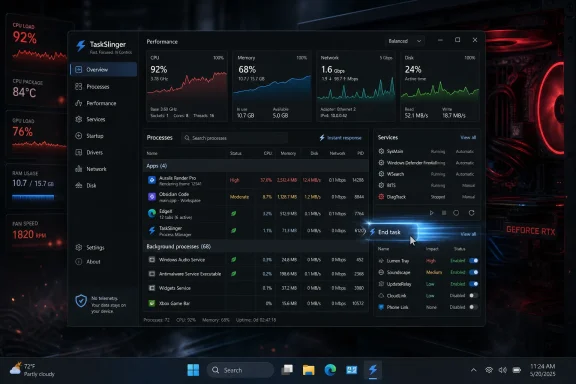
TaskSlinger entered open beta in May 2026 as a native Windows 10 and Windows 11 x64 system-monitoring utility that positions itself as a faster, cleaner replacement for Microsoft’s built-in Task Manager. Its pitch is simple: the tool Windows users reach for when the machine feels slow should not itself feel slow. That makes TaskSlinger less a curiosity than a pointed critique of where Windows 11’s modernized system apps have landed. Microsoft has been improving Task Manager, but a third-party challenger is arguing that the foundation matters as much as the feature checklist.
Task Manager occupies a strange place in Windows culture. It is both a safety valve and a dashboard, the utility people summon when something has gone wrong and the utility power users leave open because something is always worth watching. If Notepad is Windows’ plain-text conscience, Task Manager is its pulse oximeter.
That is why complaints about sluggishness land differently here than they do with, say, a redesigned settings page. A system monitor is not supposed to feel ornamental. When a game is hung, a browser tab is eating memory, or a background updater is pinning a CPU core, the difference between instant and merely acceptable is the difference between a tool and another annoyance.
TaskSlinger’s developer is making precisely that argument. The app’s public beta describes a native C++ implementation, a custom UI framework, and Direct3D rendering rather than a web wrapper or heavy cross-platform shell. In enthusiast terms, this is not just “another modern UI.” It is a bet that performance-sensitive Windows utilities should be engineered like performance-sensitive Windows utilities.
That pitch explains why the app is getting attention even before it has the institutional trust of Microsoft’s own inbox tools. Windows users have a long memory for fast native utilities. They also have a growing skepticism of modern app stacks that look polished but occasionally feel as though they arrived from a design system before they arrived from a profiler.
That matters. Task Manager has to keep pace with the platform, and the platform is changing. A machine with a CPU, integrated GPU, discrete GPU, NPU, multiple storage devices, virtualization features, sandboxed app containers, and increasingly opaque background services is not the same system Windows 7’s Task Manager was designed to explain.
The problem is that Task Manager’s job is not merely to expose more counters. Its job is to make Windows legible under stress. Every additional column, graph, process group, and hardware category increases the burden on the interface to stay responsive, searchable, and comprehensible.
This is where modern Windows has often struggled. Microsoft’s redesigns can be visually coherent yet uneven in perceived performance. Users forgive a slow launch in a photo app or a store page; they are less forgiving when a diagnostic tool takes its time appearing while the desktop is already misbehaving.
TaskSlinger is exploiting that tension. It does not need to prove Microsoft has done nothing. It only needs to persuade power users that the built-in tool no longer feels like the fastest way to answer the urgent question: what is my PC doing right now?
Native C++ does not automatically make software good, and web technologies do not automatically make software bad. Windows history is littered with fast native disasters and surprisingly capable hybrid apps. But implementation choices create performance ceilings and failure modes, and TaskSlinger is trying to reassure its audience that the ceiling is high.
Direct3D rendering is also an interesting signal. It suggests the developer is treating the interface as a real-time surface rather than a conventional forms application with a prettier coat of paint. For a tool built around scrolling process tables, live metrics, and frequent tab switching, smooth rendering is not just a cosmetic benefit.
The custom UI framework is the riskier part. Microsoft’s own UI frameworks, for all their flaws, carry years of accessibility, localization, input, scaling, and edge-case work. A custom framework can be lean and fast, but it can also become a private operating system inside the operating system, with every checkbox, keyboard shortcut, screen reader behavior, and high-DPI quirk needing its own care.
That is the bargain TaskSlinger is asking users to accept in beta form. It may feel faster because it is less encumbered. It may also reveal, over time, why inbox Windows utilities accumulate so much complexity in the first place.
What Task Manager has, however, is a privileged position in muscle memory. Ctrl+Shift+Esc is not a product funnel. It is a reflex. Any replacement has to overcome not just feature parity but decades of habit.
That makes TaskSlinger’s “replacement” language ambitious. A more realistic early role is daily companion: the tool developers, support engineers, overclockers, and Windows enthusiasts keep open because it is more pleasant and responsive than the default. That is a narrower market, but it is also the market that shapes reputation.
The inclusion of views for processes, performance, services, startup apps, connections, and system information shows that TaskSlinger is not merely trying to clone the first tab of Task Manager. The network connections view is particularly notable because it edges toward territory that Windows often spreads across Resource Monitor, netstat, PowerShell, and third-party tools. If TaskSlinger can make that information fast and readable, it has a clearer reason to exist.
Still, “replacement” is a heavy word. Task Manager is integrated into Windows, trusted by policy, familiar to support desks, and available on every clean install. A beta utility from an independent developer can be faster and still not be the thing an administrator tells 5,000 users to install.
That does not mean TaskSlinger is unsafe. It means the category is inherently sensitive. The more useful a system monitor becomes, the more context it can expose about the machine and the person using it.
For home enthusiasts, the privacy promise is likely to be read as a welcome contrast with the telemetry-heavy reputation of modern platforms. For enterprise IT, it is only the beginning of the conversation. Administrators will want to know how the app updates, whether binaries are signed, how it handles elevated actions, what permissions it requests, whether it can be managed, and how the developer communicates security fixes.
There is also a subtle distinction between not collecting telemetry and not making network connections. A beta app may need update checks, feedback links, crash-report options, or community integration. None of those are inherently bad, but in a system utility the boundary should be explicit.
The larger point is that trust is a feature. Microsoft gets a certain amount of it by being the platform owner. An independent utility has to earn it through transparency, consistency, code-signing hygiene, and a track record of handling bugs without drama.
Task Manager has to survive that warehouse. It must behave on low-end laptops, gaming desktops, domain-joined workstations, virtual machines, Arm devices, remote sessions, and machines with years of accumulated OEM software. A third-party beta can impress on a clean enthusiast box and still find trouble in the long tail.
This is not a knock against TaskSlinger. It is the difference between a promising utility and an operating-system component. Beta testers should expect bugs, missing features, behavioral differences, and occasional surprises. That is what the beta label is for.
The developer’s request for feedback is therefore more than community engagement. It is how a tool like this becomes real. The hard part is not building a fast process table for the happy path; it is learning which unhappy paths matter enough to shape the product.
If TaskSlinger’s audience is honest, it can help the developer avoid the trap of building only for screenshot appeal. The best system utilities feel boring after the first week because they keep working. That is the bar.
Microsoft has also been making visible attempts to improve performance and responsiveness across Windows. That includes work on native system experiences, hardware visibility, and under-the-hood behavior. The company understands that Windows 11 cannot simply be prettier than Windows 10; it has to feel dependable.
But perception is sticky. Once power users decide a built-in tool is sluggish, every pause confirms the story. Third-party alternatives thrive in that gap between vendor roadmap and user patience.
Files, the third-party file manager often mentioned in the same breath as File Explorer frustrations, shows the pattern. It did not become interesting merely because File Explorer lacked features. It became interesting because users wanted a different philosophy: more modern, more customizable, and in some areas more responsive to enthusiast expectations than the inbox app.
TaskSlinger is making the same play for Task Manager. It is not arguing that Microsoft’s utility is useless. It is arguing that one of Windows’ most important tools can be sharper.
The app’s public materials point to process modules and tokens, service and startup management, process dumping, customizable views, filtering, live graphs, and connection visibility. Those are not casual-user features. They are aimed at people who want to move quickly from “something is wrong” to “this process, this module, this service, this endpoint.”
If those features are implemented cleanly, TaskSlinger can occupy a valuable middle ground. Task Manager is approachable but sometimes shallow. Sysinternals tools are powerful but can feel intimidating to less experienced users. A modern, fast interface that exposes deeper inspection without overwhelming the user would have a legitimate niche.
The danger is bloat. Every successful utility faces the same temptation: add enough knobs to satisfy every power user until the tool becomes the thing it originally replaced. TaskSlinger’s challenge will be to keep its interface disciplined while expanding its capabilities.
That is harder than it sounds. Process management attracts edge cases. One user wants GPU engine columns; another wants per-process network history; another wants service dependency graphs; another wants driver views; another wants VirusTotal-style integration; another wants portable mode; another wants enterprise deployment controls. A fast tool can become slow by saying yes too often.
Microsoft also has access to platform internals and the ability to evolve Task Manager alongside Windows itself. When new hardware categories become important, Microsoft can add them as part of the operating system story. NPU visibility is a good example: as AI accelerators become more common, the inbox tool becomes part of how Microsoft teaches users that the hardware exists.
That does not mean Microsoft will always build the best experience. Platform owners often optimize for broad safety and consistency rather than enthusiast speed. They carry compatibility obligations that independent developers can sidestep.
But the default tool can improve quickly when Microsoft decides a category matters. If TaskSlinger gains traction, it may function as both alternative and pressure. Windows utilities have often improved when third-party tools demonstrated what users actually wanted.
In that sense, TaskSlinger does not need to “beat” Task Manager to matter. It only needs to make Microsoft’s version look less inevitable.
The first question is provenance. Administrators should verify the source, inspect signing details, test update behavior, and run the app in controlled conditions before placing it anywhere near sensitive fleets. A process-management utility sits too close to the center of the system to be treated like a wallpaper app.
The second question is privilege. Many useful actions in a task manager require elevation or interact with processes owned by other users and services. How TaskSlinger handles elevation boundaries, prompts, failures, and protected processes will matter as much as how pretty its graphs look.
The third question is supportability. If a help desk technician uses TaskSlinger to diagnose a problem, will the next technician understand the output? Can findings be exported? Are views stable across versions? Does the app behave predictably under standard user accounts?
These concerns should not scare people away. They are the normal path by which a promising tool becomes part of a professional toolkit. Enthusiasts discover; administrators validate.
TaskSlinger belongs to that lineage if it can maintain its focus. Its premise is not radical. It says a task manager should open quickly, render smoothly, filter instantly, show enough detail for serious work, and avoid phoning home. The fact that this feels like a distinctive pitch says something about the state of Windows utility design.
Microsoft’s challenge is structural. Windows must serve novice users, enterprise administrators, developers, gamers, accessibility needs, regulatory pressure, hardware partners, security boundaries, and design consistency across a sprawling platform. Independent developers can aim at a smaller target and hit it harder.
That smaller target is precisely why tools like TaskSlinger can feel refreshing. They do not have to be everything to everyone on day one. They can be excellent for the users who notice latency in a tab switch and care about whether a utility uses a web view.
The risk, again, is durability. Windows enthusiasts have seen many promising utilities arrive with a clean website, a snappy beta, and a burst of social attention. The ones that last do the unglamorous work: bug fixes, release notes, compatibility testing, crash handling, accessibility, documentation, and trust-building.
That impulse is not anti-Microsoft. In many ways, it is deeply Windows. The platform’s greatest strength has always been that users could replace, augment, inspect, script, and work around the default experience. Windows became the world’s PC platform partly because it tolerated this kind of tinkering.
TaskSlinger is interesting because it aims at a sacred utility rather than a peripheral annoyance. Replacing a notes app or launcher is one thing. Replacing the tool people use to kill hung processes and inspect system load is a stronger claim.
The app’s success will depend on whether it can convert first impressions into reliability. “Faster” gets the download. “Cleaner” gets the screenshot. Trust gets the second month.
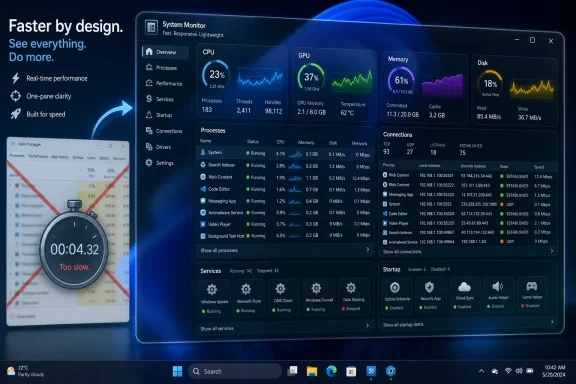 TaskSlinger Turns Task Manager’s Biggest Weakness Into Its Opening
Task Manager occupies a strange place in Windows culture. It is both a safety valve and a dashboard, the utility people summon when something has gone wrong and the utility power users leave open because something is always worth watching. If Notepad is Windows’ plain-text conscience, Task Manager is its pulse oximeter.That is why complaints about sluggishness land differently here than they do with, say, a redesigned settings page. A system monitor is not supposed to feel ornamental. When a game is hung, a browser tab is eating memory, or a background updater is pinning a CPU core, the difference between instant and merely acceptable is the difference between a tool and another annoyance.
TaskSlinger’s developer is making precisely that argument. The app’s public beta describes a native C++ implementation, a custom UI framework, and Direct3D rendering rather than a web wrapper or heavy cross-platform shell. In enthusiast terms, this is not just “another modern UI.” It is a bet that performance-sensitive Windows utilities should be engineered like performance-sensitive Windows utilities.
That pitch explains why the app is getting attention even before it has the institutional trust of Microsoft’s own inbox tools. Windows users have a long memory for fast native utilities. They also have a growing skepticism of modern app stacks that look polished but occasionally feel as though they arrived from a design system before they arrived from a profiler.
Microsoft Modernized Task Manager, but Modern Is Not the Same as Fast
To be fair, Microsoft has not abandoned Task Manager. The Windows 11 version has received a significant visual refresh, new navigation, efficiency-mode controls, improved details in some hardware views, and, more recently, expanded visibility for AI-era hardware such as NPUs. On Copilot+ PCs and other systems with neural processors, Task Manager is increasingly expected to show more than CPU, GPU, memory, disk, and network activity.That matters. Task Manager has to keep pace with the platform, and the platform is changing. A machine with a CPU, integrated GPU, discrete GPU, NPU, multiple storage devices, virtualization features, sandboxed app containers, and increasingly opaque background services is not the same system Windows 7’s Task Manager was designed to explain.
The problem is that Task Manager’s job is not merely to expose more counters. Its job is to make Windows legible under stress. Every additional column, graph, process group, and hardware category increases the burden on the interface to stay responsive, searchable, and comprehensible.
This is where modern Windows has often struggled. Microsoft’s redesigns can be visually coherent yet uneven in perceived performance. Users forgive a slow launch in a photo app or a store page; they are less forgiving when a diagnostic tool takes its time appearing while the desktop is already misbehaving.
TaskSlinger is exploiting that tension. It does not need to prove Microsoft has done nothing. It only needs to persuade power users that the built-in tool no longer feels like the fastest way to answer the urgent question: what is my PC doing right now?
A Native Utility Is a Statement, Not Just an Implementation Detail
The most important line in TaskSlinger’s pitch may be the least glamorous one: it is not an embedded web view. In 2026, that sounds almost reactionary, but for Windows utilities it is a meaningful distinction. A system monitor that wraps dense tables, live graphs, context menus, and rapid refresh cycles inside a heavyweight UI stack is always going to invite suspicion from the very users most likely to inspect its resource footprint.Native C++ does not automatically make software good, and web technologies do not automatically make software bad. Windows history is littered with fast native disasters and surprisingly capable hybrid apps. But implementation choices create performance ceilings and failure modes, and TaskSlinger is trying to reassure its audience that the ceiling is high.
Direct3D rendering is also an interesting signal. It suggests the developer is treating the interface as a real-time surface rather than a conventional forms application with a prettier coat of paint. For a tool built around scrolling process tables, live metrics, and frequent tab switching, smooth rendering is not just a cosmetic benefit.
The custom UI framework is the riskier part. Microsoft’s own UI frameworks, for all their flaws, carry years of accessibility, localization, input, scaling, and edge-case work. A custom framework can be lean and fast, but it can also become a private operating system inside the operating system, with every checkbox, keyboard shortcut, screen reader behavior, and high-DPI quirk needing its own care.
That is the bargain TaskSlinger is asking users to accept in beta form. It may feel faster because it is less encumbered. It may also reveal, over time, why inbox Windows utilities accumulate so much complexity in the first place.
The Real Competition Is Not Task Manager Alone
TaskSlinger’s obvious comparison is Task Manager, but its actual competitive set is broader. Windows power users already have Sysinternals Process Explorer, Resource Monitor, Performance Monitor, Event Viewer, PowerShell, Windows Terminal, third-party hardware monitors, vendor GPU overlays, and full observability stacks in enterprise environments. Nobody serious about diagnosis relies on one tool forever.What Task Manager has, however, is a privileged position in muscle memory. Ctrl+Shift+Esc is not a product funnel. It is a reflex. Any replacement has to overcome not just feature parity but decades of habit.
That makes TaskSlinger’s “replacement” language ambitious. A more realistic early role is daily companion: the tool developers, support engineers, overclockers, and Windows enthusiasts keep open because it is more pleasant and responsive than the default. That is a narrower market, but it is also the market that shapes reputation.
The inclusion of views for processes, performance, services, startup apps, connections, and system information shows that TaskSlinger is not merely trying to clone the first tab of Task Manager. The network connections view is particularly notable because it edges toward territory that Windows often spreads across Resource Monitor, netstat, PowerShell, and third-party tools. If TaskSlinger can make that information fast and readable, it has a clearer reason to exist.
Still, “replacement” is a heavy word. Task Manager is integrated into Windows, trusted by policy, familiar to support desks, and available on every clean install. A beta utility from an independent developer can be faster and still not be the thing an administrator tells 5,000 users to install.
Privacy Claims Matter More When the Tool Sees Everything
TaskSlinger’s developer says the app does not collect telemetry, analytics, or usage data. That is the right promise for a process monitor, and it should not be treated as a decorative line in the marketing copy. A task manager replacement can see process names, executable paths, startup entries, local services, network endpoints, usernames, and potentially sensitive application behavior.That does not mean TaskSlinger is unsafe. It means the category is inherently sensitive. The more useful a system monitor becomes, the more context it can expose about the machine and the person using it.
For home enthusiasts, the privacy promise is likely to be read as a welcome contrast with the telemetry-heavy reputation of modern platforms. For enterprise IT, it is only the beginning of the conversation. Administrators will want to know how the app updates, whether binaries are signed, how it handles elevated actions, what permissions it requests, whether it can be managed, and how the developer communicates security fixes.
There is also a subtle distinction between not collecting telemetry and not making network connections. A beta app may need update checks, feedback links, crash-report options, or community integration. None of those are inherently bad, but in a system utility the boundary should be explicit.
The larger point is that trust is a feature. Microsoft gets a certain amount of it by being the platform owner. An independent utility has to earn it through transparency, consistency, code-signing hygiene, and a track record of handling bugs without drama.
The Beta Label Is Doing Real Work Here
The open beta status should temper the hype. TaskSlinger may be fast, but system utilities become credible through months of weird machines, driver combinations, corporate lockdowns, multi-monitor arrangements, non-English locales, high-DPI scaling, accessibility tools, and security software conflicts. The Windows ecosystem is not one target; it is a warehouse full of targets wearing the same logo.Task Manager has to survive that warehouse. It must behave on low-end laptops, gaming desktops, domain-joined workstations, virtual machines, Arm devices, remote sessions, and machines with years of accumulated OEM software. A third-party beta can impress on a clean enthusiast box and still find trouble in the long tail.
This is not a knock against TaskSlinger. It is the difference between a promising utility and an operating-system component. Beta testers should expect bugs, missing features, behavioral differences, and occasional surprises. That is what the beta label is for.
The developer’s request for feedback is therefore more than community engagement. It is how a tool like this becomes real. The hard part is not building a fast process table for the happy path; it is learning which unhappy paths matter enough to shape the product.
If TaskSlinger’s audience is honest, it can help the developer avoid the trap of building only for screenshot appeal. The best system utilities feel boring after the first week because they keep working. That is the bar.
Windows 11’s Performance Moment Creates the Opening
TaskSlinger is arriving at a convenient time. Microsoft has been under sustained pressure from users who believe Windows 11 feels heavier than it should, particularly on older supported hardware and on systems burdened by background services, shell changes, and modern app layers. Even when those complaints are imprecise, they form a real perception problem.Microsoft has also been making visible attempts to improve performance and responsiveness across Windows. That includes work on native system experiences, hardware visibility, and under-the-hood behavior. The company understands that Windows 11 cannot simply be prettier than Windows 10; it has to feel dependable.
But perception is sticky. Once power users decide a built-in tool is sluggish, every pause confirms the story. Third-party alternatives thrive in that gap between vendor roadmap and user patience.
Files, the third-party file manager often mentioned in the same breath as File Explorer frustrations, shows the pattern. It did not become interesting merely because File Explorer lacked features. It became interesting because users wanted a different philosophy: more modern, more customizable, and in some areas more responsive to enthusiast expectations than the inbox app.
TaskSlinger is making the same play for Task Manager. It is not arguing that Microsoft’s utility is useless. It is arguing that one of Windows’ most important tools can be sharper.
The Feature Race Will Decide Whether Speed Is Enough
Speed is the hook, but it cannot remain the whole product. Users may download a task manager replacement because it launches quickly; they keep it because it answers more questions with less friction. That is where TaskSlinger’s richer inspection features will matter.The app’s public materials point to process modules and tokens, service and startup management, process dumping, customizable views, filtering, live graphs, and connection visibility. Those are not casual-user features. They are aimed at people who want to move quickly from “something is wrong” to “this process, this module, this service, this endpoint.”
If those features are implemented cleanly, TaskSlinger can occupy a valuable middle ground. Task Manager is approachable but sometimes shallow. Sysinternals tools are powerful but can feel intimidating to less experienced users. A modern, fast interface that exposes deeper inspection without overwhelming the user would have a legitimate niche.
The danger is bloat. Every successful utility faces the same temptation: add enough knobs to satisfy every power user until the tool becomes the thing it originally replaced. TaskSlinger’s challenge will be to keep its interface disciplined while expanding its capabilities.
That is harder than it sounds. Process management attracts edge cases. One user wants GPU engine columns; another wants per-process network history; another wants service dependency graphs; another wants driver views; another wants VirusTotal-style integration; another wants portable mode; another wants enterprise deployment controls. A fast tool can become slow by saying yes too often.
Microsoft Still Has the Distribution Advantage
No matter how good TaskSlinger becomes, Microsoft controls the default. Task Manager ships with Windows, launches from system shortcuts, appears in support documentation, and can be invoked even when a user has installed nothing else. That distribution advantage is enormous.Microsoft also has access to platform internals and the ability to evolve Task Manager alongside Windows itself. When new hardware categories become important, Microsoft can add them as part of the operating system story. NPU visibility is a good example: as AI accelerators become more common, the inbox tool becomes part of how Microsoft teaches users that the hardware exists.
That does not mean Microsoft will always build the best experience. Platform owners often optimize for broad safety and consistency rather than enthusiast speed. They carry compatibility obligations that independent developers can sidestep.
But the default tool can improve quickly when Microsoft decides a category matters. If TaskSlinger gains traction, it may function as both alternative and pressure. Windows utilities have often improved when third-party tools demonstrated what users actually wanted.
In that sense, TaskSlinger does not need to “beat” Task Manager to matter. It only needs to make Microsoft’s version look less inevitable.
Administrators Should Be Interested, Not Reckless
For IT pros, TaskSlinger is worth watching but not blindly deploying. A fast system monitor can be useful on support workstations, lab machines, and technician toolkits, especially if it consolidates process, service, startup, connection, and hardware views in a more responsive interface. But production environments have different standards than enthusiast desktops.The first question is provenance. Administrators should verify the source, inspect signing details, test update behavior, and run the app in controlled conditions before placing it anywhere near sensitive fleets. A process-management utility sits too close to the center of the system to be treated like a wallpaper app.
The second question is privilege. Many useful actions in a task manager require elevation or interact with processes owned by other users and services. How TaskSlinger handles elevation boundaries, prompts, failures, and protected processes will matter as much as how pretty its graphs look.
The third question is supportability. If a help desk technician uses TaskSlinger to diagnose a problem, will the next technician understand the output? Can findings be exported? Are views stable across versions? Does the app behave predictably under standard user accounts?
These concerns should not scare people away. They are the normal path by which a promising tool becomes part of a professional toolkit. Enthusiasts discover; administrators validate.
The Best Windows Utilities Have Always Come From Impatience
There is a long tradition of Windows users building tools because the built-in option was too slow, too shallow, too hidden, or too cautious. Sysinternals itself became indispensable because it exposed truths Windows did not make easy to see. Shell replacements, file managers, uninstallers, terminal emulators, hardware monitors, and automation tools have all grown from the same impatience.TaskSlinger belongs to that lineage if it can maintain its focus. Its premise is not radical. It says a task manager should open quickly, render smoothly, filter instantly, show enough detail for serious work, and avoid phoning home. The fact that this feels like a distinctive pitch says something about the state of Windows utility design.
Microsoft’s challenge is structural. Windows must serve novice users, enterprise administrators, developers, gamers, accessibility needs, regulatory pressure, hardware partners, security boundaries, and design consistency across a sprawling platform. Independent developers can aim at a smaller target and hit it harder.
That smaller target is precisely why tools like TaskSlinger can feel refreshing. They do not have to be everything to everyone on day one. They can be excellent for the users who notice latency in a tab switch and care about whether a utility uses a web view.
The risk, again, is durability. Windows enthusiasts have seen many promising utilities arrive with a clean website, a snappy beta, and a burst of social attention. The ones that last do the unglamorous work: bug fixes, release notes, compatibility testing, crash handling, accessibility, documentation, and trust-building.
The Task Manager Wars Are Really About Control
The concrete news is that TaskSlinger is available as a free beta for Windows 10 and Windows 11 x64 systems. The bigger story is that Windows power users continue to look outside the operating system for tools that make the operating system feel more under their control.That impulse is not anti-Microsoft. In many ways, it is deeply Windows. The platform’s greatest strength has always been that users could replace, augment, inspect, script, and work around the default experience. Windows became the world’s PC platform partly because it tolerated this kind of tinkering.
TaskSlinger is interesting because it aims at a sacred utility rather than a peripheral annoyance. Replacing a notes app or launcher is one thing. Replacing the tool people use to kill hung processes and inspect system load is a stronger claim.
The app’s success will depend on whether it can convert first impressions into reliability. “Faster” gets the download. “Cleaner” gets the screenshot. Trust gets the second month.
The Snappy Beta Has Five Tests Ahead
TaskSlinger’s early promise is easy to understand, but the next phase will be less about buzz and more about evidence. A system utility earns its place by behaving well when Windows does not.- TaskSlinger is a native C++ beta for Windows 10 and Windows 11 x64 that presents itself as a faster, cleaner alternative to the built-in Task Manager.
- Its strongest technical pitch is the combination of a custom UI framework and Direct3D rendering, which is meant to keep dense live system views responsive.
- Its most important product promise is not speed alone, but a deeper single-pane view of processes, performance, services, startup apps, connections, and system information.
- Its privacy claim matters because a task manager replacement can expose sensitive process, path, service, user, and network information.
- Its beta status should be taken seriously, especially by administrators who need predictable behavior, signed binaries, clear update practices, and supportable workflows.
- Its broader impact may be to pressure Microsoft to keep improving Task Manager’s responsiveness, not necessarily to displace the inbox tool outright.
References
- Primary source: Neowin
Published: 2026-05-23T22:14:07.768547
A "faster, cleaner replacement" for one of Windows 11's most useful native tools is here - Neowin
For anyone looking for it, a "faster, cleaner," and more responsive "replacement" for one of Windows 11's most essential built-in productivity and system tools is here. www.neowin.net
- Related coverage: techolay.net
Windows Görev Yöneticisi Alternatifi TaskSlinger, Açık Beta Sürecine Giriyor - Techolay
TaskSlinger, gelişmiş analiz araçları ve performans odaklı mimarisiyle Windows Görev Yöneticisi’ne alternatif olarak açık beta sürecine giriyor.techolay.net - Related coverage: chalfontsu3a.org.uk
- Related coverage: apcug2.org