

Microsoft plans to add a Security Detection Report to the Teams admin center in August 2026 for worldwide standard multi-tenant customers, giving administrators a single web-based view of messaging detections such as impersonation, malicious URLs, and weaponizable file types. The feature is small on paper but large in implication. Teams is no longer just where work happens; it is now one of the places where attackers expect work to be trusted. Microsoft’s new report is an admission that collaboration security has outgrown scattered alerts and policy toggles.
For years, Teams security has been partly visible and partly inferred. Admins could configure messaging safety, review user reports, lean on Defender for Office 365, and police external access, but the operational picture often depended on knowing which portal held which clue. The new Security Detection Report in the Teams admin center attempts to make that picture less fragmented.
The report is designed to centralize detections for messaging scenarios, including impersonation, malicious links, and file types that can be weaponized for malware delivery. It also includes exportable detail, which matters more than it sounds. A dashboard is useful for triage; exported records are what incident handlers use to correlate, preserve, escalate, and explain.
Microsoft’s roadmap entry lists the feature as in development, with general availability targeted for August 2026. That timing places the report after a broader wave of Teams safety work, including default protections for malicious URLs and dangerous file types. The pattern is clear: Microsoft is moving Teams security from optional hardening toward managed hygiene.
That shift is overdue. Teams has become a de facto front door for business communication, particularly in organizations that have normalized external collaboration with vendors, contractors, customers, and partner tenants. The attacker does not need to defeat email filtering if the target is willing to trust a chat bubble with a familiar name and a plausible link.
That is why impersonation matters in Teams. A spoofed or misleading identity inside a collaboration tool can compress the distance between reconnaissance and action. If an attacker can appear to be a partner, executive assistant, recruiter, support technician, or vendor contact, the victim’s first instinct may be to respond rather than verify.
Malicious URLs are equally potent in chat. A link sent in a real-time conversation often feels more contextual than a link in email, especially when wrapped in a thread about an invoice, HR document, shared folder, or urgent meeting recording. Security teams have spent decades teaching users to distrust unsolicited email; they have spent far less time teaching them to distrust collaboration messages that look like work.
Weaponizable file types add the old malware problem to the new collaboration surface. Executables, scripts, archives, and other high-risk formats do not become safe simply because they travel through Teams rather than an inbox. If anything, collaboration tools can make unsafe attachments feel more legitimate because they sit next to ordinary business documents and internal chatter.
The new report does not eliminate these risks. What it does is give admins a more coherent way to see them.
That center is shifting. Microsoft has been layering security controls into Teams administration in ways that blur the line between collaboration management and threat response. Messaging safety settings, user-reported security signals, external access controls, domain blocking, and now detection reporting all point in the same direction.
This is not Microsoft replacing the Defender portal. Defender remains the broader security operations plane for Microsoft 365 threats. But Teams admin center is becoming the place where collaboration-specific security context is surfaced in language and workflows that Teams administrators already understand.
That matters in real organizations because the person responsible for Teams is not always the same person staring at a SOC queue. In a smaller company, one admin may wear both hats. In a larger enterprise, Teams operations, identity, messaging security, endpoint security, and incident response may all be separate functions. A centralized Teams detection report gives those groups a common operational artifact.
The best version of this feature is not merely a table of detections. It is a bridge between service administration and security operations. If Microsoft gets that bridge right, Teams incidents become easier to validate, easier to assign, and easier to explain to stakeholders who do not live in advanced hunting queries.
Exported detection data can be compared against user activity, sign-in logs, message reports, conditional access events, Defender incidents, endpoint telemetry, and help desk tickets. It can also be used for management reporting, after-action reviews, and compliance documentation. In practical terms, export turns a report from an interface into evidence.
That is particularly important for Teams because the timeline of an incident may involve multiple systems. An external user sends a suspicious link in Teams. A user clicks it. The browser redirects. Credentials may be entered. A sign-in attempt occurs from an unusual location. A mailbox rule appears. A file is downloaded. Each step may leave evidence in a different place.
Centralized Teams detections help anchor that story. They tell investigators what Teams saw, when it saw it, and what kind of behavior triggered detection. That does not remove the need for deeper telemetry, but it gives responders a better starting point than “someone said they saw something weird in chat.”
Export also helps with false positives. Security tools that cannot be audited or sampled tend to become either ignored or blindly trusted. Neither outcome is healthy. Admins need enough detail to understand whether detections reflect genuine risk, noisy policy behavior, or user workflows that need adjustment.
That strategy has obvious advantages. Microsoft controls the productivity surface, the identity layer, the device-management hooks, the cloud security products, and the administrative portals. When those pieces work together, detections can be richer than what a standalone security tool sees from the outside.
The drawback is dependency. The more Teams security becomes native to Microsoft 365, the more organizations must understand Microsoft’s licensing, portal boundaries, retention behavior, role-based access controls, and roadmap cadence. A useful report can still leave gaps if the underlying data is incomplete, delayed, unavailable in some clouds, or gated behind adjacent products.
There is also the perennial Microsoft admin problem: features arrive as part of a larger moving platform, not as isolated events. A Teams security report may depend on policy defaults, user reporting settings, Defender integration, external access configuration, and organizational readiness. The roadmap item says “general availability,” but operational maturity will vary tenant by tenant.
That is not a reason to dismiss the feature. It is a reason to treat it as part of a security program rather than a checkbox.
Organizations should decide who reviews the report, how often it is reviewed, and what happens when detections appear. That responsibility may sit with Teams administrators in some environments and security operations in others. In many cases, it should be shared, because Teams admins understand the collaboration topology while security teams understand incident handling.
The report should also force a review of external collaboration. Many Teams tenants have accumulated guest users, federated domains, partner access rules, and legacy exceptions over years of remote-work expansion. Detection data can help reveal whether those collaboration paths are cleanly governed or merely tolerated.
Training should change as well. Users have been conditioned to report suspicious email, but Teams messages may not trigger the same caution. If Microsoft is surfacing user reports and security detections in Teams admin workflows, organizations should make sure employees know that chat messages can be reported, challenged, and investigated just like email.
The policy conversation is equally important. If weaponizable file protections are blocking legitimate workflows, admins need a documented exception process rather than a reflexive disablement. If malicious URL detections are noisy, teams need to measure the noise. If impersonation alerts cluster around certain external interactions, the answer may be supplier governance as much as threat blocking.
The design challenge is context. A detection without user impact, message metadata, action status, policy source, and related activity is a breadcrumb, not a case. Microsoft has not yet provided enough public detail to judge how rich the report will be at launch. The difference between “centralized view” and “investigation-ready view” will determine how much practical value admins extract from it.
There is also a timing issue. Security teams care not only that something was detected, but when it was detected, when it was blocked or delivered, when an admin saw it, and whether a user interacted with it. If the report is primarily retrospective, it will help investigations and trend analysis. If it is closer to operational monitoring, it may become part of active response.
The roadmap language leans toward review and export rather than real-time enforcement. That is fine, as long as organizations understand what they are getting. A report is not a substitute for prevention, incident response, user education, or least-privilege collaboration controls.
Admins should inventory current Teams messaging safety settings, external access rules, guest collaboration policies, and user reporting configuration. They should also identify who has permission to view relevant reports in the Teams admin center and who has authority to export data. Role design becomes more important when a report contains security-sensitive information about users, messages, domains, and detections.
Security teams should decide how exported data will be handled. If exports are used for incident response, they may need to be stored in a controlled location with retention expectations. If they are used for trend reporting, the organization should define metrics that matter before the first CSV appears on someone’s desktop.
The report also creates an opportunity to test escalation paths. A Teams admin may see a detection that looks like executive impersonation. Does that go to the SOC, the identity team, the messaging team, legal, or the business unit? The answer should not be invented during an active incident.
This is where many Microsoft 365 security features succeed or fail. The technology arrives broadly, but the operating model is local. A centralized report is only as useful as the tenant’s ability to turn detection into decision.
The concrete implications are straightforward:
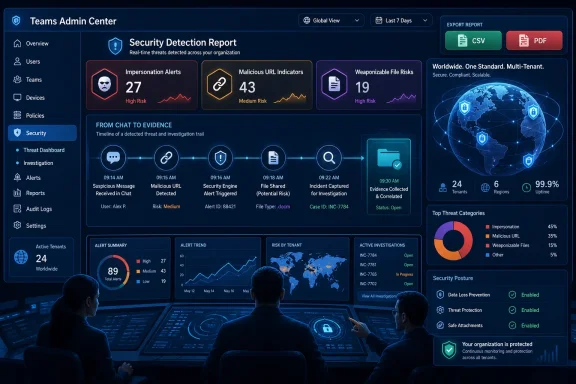 Teams Security Finally Gets a Place to Live
For years, Teams security has been partly visible and partly inferred. Admins could configure messaging safety, review user reports, lean on Defender for Office 365, and police external access, but the operational picture often depended on knowing which portal held which clue. The new Security Detection Report in the Teams admin center attempts to make that picture less fragmented.The report is designed to centralize detections for messaging scenarios, including impersonation, malicious links, and file types that can be weaponized for malware delivery. It also includes exportable detail, which matters more than it sounds. A dashboard is useful for triage; exported records are what incident handlers use to correlate, preserve, escalate, and explain.
Microsoft’s roadmap entry lists the feature as in development, with general availability targeted for August 2026. That timing places the report after a broader wave of Teams safety work, including default protections for malicious URLs and dangerous file types. The pattern is clear: Microsoft is moving Teams security from optional hardening toward managed hygiene.
That shift is overdue. Teams has become a de facto front door for business communication, particularly in organizations that have normalized external collaboration with vendors, contractors, customers, and partner tenants. The attacker does not need to defeat email filtering if the target is willing to trust a chat bubble with a familiar name and a plausible link.
The Collaboration Layer Became the New Phishing Surface
Email remains the classic phishing channel, but Teams has a social advantage that email often lacks. Messages arrive in a workspace associated with meetings, projects, approvals, and colleagues. The interface itself encourages immediacy, and immediacy is the oxygen of social engineering.That is why impersonation matters in Teams. A spoofed or misleading identity inside a collaboration tool can compress the distance between reconnaissance and action. If an attacker can appear to be a partner, executive assistant, recruiter, support technician, or vendor contact, the victim’s first instinct may be to respond rather than verify.
Malicious URLs are equally potent in chat. A link sent in a real-time conversation often feels more contextual than a link in email, especially when wrapped in a thread about an invoice, HR document, shared folder, or urgent meeting recording. Security teams have spent decades teaching users to distrust unsolicited email; they have spent far less time teaching them to distrust collaboration messages that look like work.
Weaponizable file types add the old malware problem to the new collaboration surface. Executables, scripts, archives, and other high-risk formats do not become safe simply because they travel through Teams rather than an inbox. If anything, collaboration tools can make unsafe attachments feel more legitimate because they sit next to ordinary business documents and internal chatter.
The new report does not eliminate these risks. What it does is give admins a more coherent way to see them.
Microsoft Is Turning Teams Admin Center Into a Security Console by Degrees
The Teams admin center began life primarily as a service-management console. It was where administrators handled policies, meetings, calling, users, devices, and tenant-wide settings. Security was present, but it was not the center of gravity.That center is shifting. Microsoft has been layering security controls into Teams administration in ways that blur the line between collaboration management and threat response. Messaging safety settings, user-reported security signals, external access controls, domain blocking, and now detection reporting all point in the same direction.
This is not Microsoft replacing the Defender portal. Defender remains the broader security operations plane for Microsoft 365 threats. But Teams admin center is becoming the place where collaboration-specific security context is surfaced in language and workflows that Teams administrators already understand.
That matters in real organizations because the person responsible for Teams is not always the same person staring at a SOC queue. In a smaller company, one admin may wear both hats. In a larger enterprise, Teams operations, identity, messaging security, endpoint security, and incident response may all be separate functions. A centralized Teams detection report gives those groups a common operational artifact.
The best version of this feature is not merely a table of detections. It is a bridge between service administration and security operations. If Microsoft gets that bridge right, Teams incidents become easier to validate, easier to assign, and easier to explain to stakeholders who do not live in advanced hunting queries.
The Export Button Is the Serious Part
It is tempting to focus on the visual report because dashboards are the part vendors like to show. But the export capability may be the more important feature for security teams. Investigations rarely begin and end inside a single admin page.Exported detection data can be compared against user activity, sign-in logs, message reports, conditional access events, Defender incidents, endpoint telemetry, and help desk tickets. It can also be used for management reporting, after-action reviews, and compliance documentation. In practical terms, export turns a report from an interface into evidence.
That is particularly important for Teams because the timeline of an incident may involve multiple systems. An external user sends a suspicious link in Teams. A user clicks it. The browser redirects. Credentials may be entered. A sign-in attempt occurs from an unusual location. A mailbox rule appears. A file is downloaded. Each step may leave evidence in a different place.
Centralized Teams detections help anchor that story. They tell investigators what Teams saw, when it saw it, and what kind of behavior triggered detection. That does not remove the need for deeper telemetry, but it gives responders a better starting point than “someone said they saw something weird in chat.”
Export also helps with false positives. Security tools that cannot be audited or sampled tend to become either ignored or blindly trusted. Neither outcome is healthy. Admins need enough detail to understand whether detections reflect genuine risk, noisy policy behavior, or user workflows that need adjustment.
The Report Also Reveals Microsoft’s Security Philosophy
Microsoft’s approach to Teams security increasingly follows a familiar pattern: detect risky collaboration behavior, surface it to admins, let users report suspicious content, and connect the resulting signals to broader Microsoft 365 security controls. This is the same ecosystem logic that made Defender for Office 365 central to email security. Now it is being extended deeper into chat and channels.That strategy has obvious advantages. Microsoft controls the productivity surface, the identity layer, the device-management hooks, the cloud security products, and the administrative portals. When those pieces work together, detections can be richer than what a standalone security tool sees from the outside.
The drawback is dependency. The more Teams security becomes native to Microsoft 365, the more organizations must understand Microsoft’s licensing, portal boundaries, retention behavior, role-based access controls, and roadmap cadence. A useful report can still leave gaps if the underlying data is incomplete, delayed, unavailable in some clouds, or gated behind adjacent products.
There is also the perennial Microsoft admin problem: features arrive as part of a larger moving platform, not as isolated events. A Teams security report may depend on policy defaults, user reporting settings, Defender integration, external access configuration, and organizational readiness. The roadmap item says “general availability,” but operational maturity will vary tenant by tenant.
That is not a reason to dismiss the feature. It is a reason to treat it as part of a security program rather than a checkbox.
Admins Should Read This as a Process Change, Not a Portal Change
The worst outcome for the Security Detection Report would be for admins to glance at it once, admire the new page, and then leave it orphaned. A report that nobody owns is not visibility; it is decoration. Microsoft is giving tenants another signal source, and signal sources create obligations.Organizations should decide who reviews the report, how often it is reviewed, and what happens when detections appear. That responsibility may sit with Teams administrators in some environments and security operations in others. In many cases, it should be shared, because Teams admins understand the collaboration topology while security teams understand incident handling.
The report should also force a review of external collaboration. Many Teams tenants have accumulated guest users, federated domains, partner access rules, and legacy exceptions over years of remote-work expansion. Detection data can help reveal whether those collaboration paths are cleanly governed or merely tolerated.
Training should change as well. Users have been conditioned to report suspicious email, but Teams messages may not trigger the same caution. If Microsoft is surfacing user reports and security detections in Teams admin workflows, organizations should make sure employees know that chat messages can be reported, challenged, and investigated just like email.
The policy conversation is equally important. If weaponizable file protections are blocking legitimate workflows, admins need a documented exception process rather than a reflexive disablement. If malicious URL detections are noisy, teams need to measure the noise. If impersonation alerts cluster around certain external interactions, the answer may be supplier governance as much as threat blocking.
The Risk Is Alert Sprawl in a Friendlier Interface
Microsoft’s report promises consolidation, but consolidation can become another flavor of sprawl if it is not integrated into daily operations. Admins already have the Microsoft 365 admin center, Teams admin center, Entra admin center, Defender portal, Purview portal, Intune admin center, and assorted service dashboards. A new report is only progress if it reduces uncertainty rather than adding another tab to check.The design challenge is context. A detection without user impact, message metadata, action status, policy source, and related activity is a breadcrumb, not a case. Microsoft has not yet provided enough public detail to judge how rich the report will be at launch. The difference between “centralized view” and “investigation-ready view” will determine how much practical value admins extract from it.
There is also a timing issue. Security teams care not only that something was detected, but when it was detected, when it was blocked or delivered, when an admin saw it, and whether a user interacted with it. If the report is primarily retrospective, it will help investigations and trend analysis. If it is closer to operational monitoring, it may become part of active response.
The roadmap language leans toward review and export rather than real-time enforcement. That is fine, as long as organizations understand what they are getting. A report is not a substitute for prevention, incident response, user education, or least-privilege collaboration controls.
The August Rollout Will Reward Tenants That Prepare Before It Lands
Because Microsoft lists the feature for general availability in August 2026, administrators have time to prepare. That preparation should not wait until the new report appears. The tenants that benefit most will be the ones that already know what they expect to see.Admins should inventory current Teams messaging safety settings, external access rules, guest collaboration policies, and user reporting configuration. They should also identify who has permission to view relevant reports in the Teams admin center and who has authority to export data. Role design becomes more important when a report contains security-sensitive information about users, messages, domains, and detections.
Security teams should decide how exported data will be handled. If exports are used for incident response, they may need to be stored in a controlled location with retention expectations. If they are used for trend reporting, the organization should define metrics that matter before the first CSV appears on someone’s desktop.
The report also creates an opportunity to test escalation paths. A Teams admin may see a detection that looks like executive impersonation. Does that go to the SOC, the identity team, the messaging team, legal, or the business unit? The answer should not be invented during an active incident.
This is where many Microsoft 365 security features succeed or fail. The technology arrives broadly, but the operating model is local. A centralized report is only as useful as the tenant’s ability to turn detection into decision.
This Is the Part of Teams Security Admins Should Not Sleep Through
Microsoft’s Security Detection Report is not a dramatic product launch, but it is a meaningful signal about where Teams administration is going. The collaboration platform is becoming a security surface with its own telemetry, reports, policies, and response loops. That deserves attention before the feature becomes just another item in the admin center navigation.The concrete implications are straightforward:
- Microsoft is targeting August 2026 for general availability of the Teams admin center Security Detection Report in worldwide standard multi-tenant environments.
- The report is expected to centralize Teams messaging detections for impersonation, malicious URLs, and weaponizable file types.
- Exportable detection data should make the feature more useful for investigation, escalation, and post-incident review.
- Admins should review Teams messaging safety, external access, guest collaboration, and reporting permissions before rollout.
- Security teams should decide in advance how Teams detection data will flow into incident response and evidence handling.
- The feature improves visibility, but it does not replace Defender, user training, policy governance, or active response processes.
References
- Primary source: Microsoft 365 Roadmap
Published: 2026-06-29T23:02:39.0286478Z
Microsoft 365 Roadmap | Microsoft 365
The Microsoft 365 Roadmap lists updates that are currently planned for applicable subscribers. Check here for more information on the status of new features and updates.www.microsoft.com
- Official source: mrmicrosoft.com
Security Detection Report in Teams Admin Center - Mezba Uddin
A new Security Detection Report is coming to the Microsoft Teams admin center, giving admins centralized visibility into messaging-based threats.mrmicrosoft.com - Official source: learn.microsoft.com
Weaponizable file protection in Microsoft Teams - Microsoft Teams | Microsoft Learn
Learn about weaponizable file protection in Microsoft Teams.learn.microsoft.com - Official source: support.microsoft.com
Make sure chats, links, and files are secure in Microsoft Teams | Microsoft Support
Your organization can apply a security policy to protect you from potential threats in Teams chats with Microsoft Defender for 365. Shared files and links are automatically checked for suspicious or unsafe activity.support.microsoft.com - Related coverage: itpro.com
These Microsoft Teams security features will be turned on by default this month – here's what admins need to know and why you should update | IT Pro
A raft of security features for Microsoft Teams will be automatically enabled this month as the firm looks to bolster cyber capabilities for enterprise admins.www.itpro.com - Related coverage: techradar.com
Microsoft announces new security features to boost Teams defenses | TechRadar
Expect new protections against malicious contentwww.techradar.com
- Official source: download.microsoft.com
