

Every professional services engagement collapses or thrives on one thing: clean, persistent context — and Microsoft Teams is rapidly being positioned as the operating layer that keeps that context intact from pitch to delivery. The UC Today feature lays out how consultancies, law firms, and delivery teams are moving beyond “meetings and files” to create secure, outcome-driven client workspaces in Teams, accelerated by Copilot, analytics, and standardized governance.
The professional services sector faces a structural shift: clients demand faster outcomes, transparent value, and lower friction in day-to-day delivery. That trend — often described as a move from billable hours to outcome-based value — elevates collaboration from a convenience to a core delivery capability. Firms that keep proposals, approvals, project artifacts, and client conversations scattered across email, personal drives, and ad-hoc tools quickly lose billable time and client trust. UC Today argues that Microsoft Teams can be the single pane of glass for client collaboration, and that the platform’s AI and governance features now make that proposition credible for regulated, high-value work.
This is not just product marketing. Several customers and vendor documents confirm measurable productivity gains and feature capabilities that transform how client work is done. At the same time, these gains are conditional: governance, measurement, and role-based adoption are the operational decisions that convert platform potential into finance-grade outcomes.
Practical takeaways for firms wanting to centralize collaboration:
That opportunity comes with non-trivial operational responsibilities. To secure value and limit risk, professional services leaders should treat Teams as a business platform — design before deploy, pilot with measurement, and govern with FinOps and legal rigor. The payoff is not automatic, but when executed deliberately, Teams can become the professional services “operating system” that sustains faster, more transparent, and more secure client delivery.
Source: UC Today From Pitch to Delivery: Client Collaboration with Microsoft Teams for Professional Services
 Background / Overview
The professional services sector faces a structural shift: clients demand faster outcomes, transparent value, and lower friction in day-to-day delivery. That trend — often described as a move from billable hours to outcome-based value — elevates collaboration from a convenience to a core delivery capability. Firms that keep proposals, approvals, project artifacts, and client conversations scattered across email, personal drives, and ad-hoc tools quickly lose billable time and client trust. UC Today argues that Microsoft Teams can be the single pane of glass for client collaboration, and that the platform’s AI and governance features now make that proposition credible for regulated, high-value work.This is not just product marketing. Several customers and vendor documents confirm measurable productivity gains and feature capabilities that transform how client work is done. At the same time, these gains are conditional: governance, measurement, and role-based adoption are the operational decisions that convert platform potential into finance-grade outcomes.
Why now: market forces pushing Teams into the delivery workflow
Clients expect the speed and transparency of digital-native vendors. That expectation compresses project cycles and raises utilization targets for professional services firms. As UC Today describes, Teams is now being used not only to host meetings but to:- Create a single digital home for each client or engagement.
- Embed project management, CRM and dashboards inside the same workspace.
- Apply security, retention, and audit controls from day one.
- Automate routine preparation and post-meeting follow-up with Copilot agents.
- Reduced context-switching and fewer lost decisions.
- Faster onboarding and clearer client transparency.
- Measurable time reclaimed through automation and AI.
Centralizing project communication and client collaboration
Anyone who has delivered a large engagement knows the worst waste is “archaeology” — reconstructing what was decided and when. The operating model being adopted now flips that dynamic:- Each client or project gets a governed Teams workspace or shared channel configured with standardized templates and naming conventions.
- Meetings, transcripts, documents, and task boards live in that workspace so the single source of truth is discoverable.
- External users can be onboarded rapidly with guest or link-based access while IT controls external sharing and retention.
Practical takeaways for firms wanting to centralize collaboration:
- Standardize workspace templates (delivery, finance, legal, client-exec).
- Use shared channels for client access and control external permissions from the outset.
- Embed CRM and task management (Dynamics 365, Planner, Asana) as Tabs to keep client context visible during calls.
Secure client collaboration spaces: maintaining openness without sacrificing control
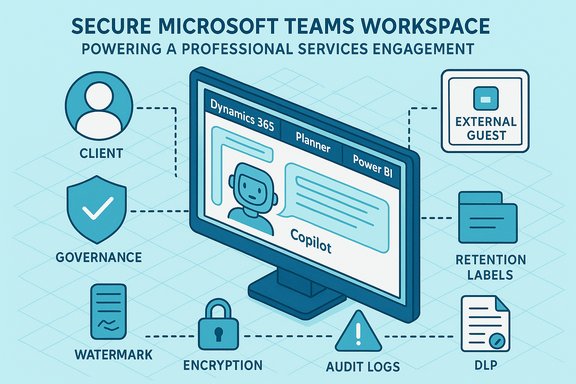
Client-facing work is frequently regulated or confidential. The tension between openness and compliance has historically slowed collaboration tools’ adoption in professional services. Microsoft has responded with Teams features designed for both transparency and strict control:- End-to-end encryption, sensitivity labels, and watermarking inside Teams Premium for sensitive meetings and documents.
- Retention and DLP policies via Microsoft Purview to prevent unintended data leakage.
- Advanced audit logs and watermarking that create traceable evidence trails for compliance reviews.
- Recording and transcription can trigger GDPR/HIPAA requirements; define consent and retention policies before enabling tenant-wide features.
- Not all intelligent recap functionality is automatically available to every meeting participant — licensing and tenant configuration matter in practice. Test scenarios that include external guests and cross-tenant collaborators to validate behavior.
- Watermarking and E2EE mitigate data leakage risk but do not eliminate the need for strict access controls and least-privilege team creation.
Boosting productivity: embedding project management & CRM into Teams
When Teams becomes the hub, the seams between collaborative conversation and operational systems vanish:- CRM data from Dynamics 365 can be surfaced as a tab during calls so sales and delivery teams never lose client context.
- Planner, Asana, or Project tabs expose tasks and milestones directly in the client workspace.
- Live Power BI dashboards in a tab provide real-time progress and client sentiment signals.
- Faster status updates and fewer preparation hours.
- Better handoffs between sales, delivery, and support.
- More defensible billing and utilization because the work trail is easier to reconstruct.
Improving billable efficiency through automation & AI
Professional services firms don’t lose billable hours because staff are slow — they lose them to administrative repetition. AI and automation reclaim those hours in three practical ways:- Automating meeting capture and summaries (Copilot in Teams).
- Drafting first-pass documents, proposals, and standard correspondence.
- Orchestrating task creation and CRM updates as discussions occur.
- Treat Copilot outputs as drafts that require human verification — especially for legal, regulatory, or client-facing materials.
- Model FinOps: Copilot and Teams Premium seats carry incremental costs and agent usage may be metered; tie expansion to measured time-saved evidence.
- Build human-in-the-loop checkpoints for high-risk outputs and log prompts and model versions for auditability.
Unlocking value with analytics & insights
Data is the leverage point for converting collaboration into measurable outcomes. When Teams telemetry is combined with Microsoft 365 logs, Dynamics 365, and Power BI or Fabric analytics, leaders can see:- Project progress against milestones and utilization trends.
- Signals of client disengagement or churn risk.
- Underutilized expertise that can be redeployed across accounts.
- Define CFO-grade KPIs (hours reclaimed, license utilization, telephony savings) before large-scale procurement.
- Use time-and-motion sampling and telemetry to validate pilot claims.
- Build role-based dashboards (partners, project managers, delivery teams) that show only the metrics they need to act.
The future: agentic AI, Copilot Studio, and integrated client experience
The next large shift is agentic AI — custom agents that anticipate needs, summarize progress, and perform routine orchestration across systems without constant human direction.- Copilot Studio is Microsoft’s product for building custom copilots and agents that can be deployed across Teams, web channels, and enterprise apps.
- Agents can range from “project status summarizers” to autonomous workflows that update CRM, prepare status decks, or triage support tickets.
- Start with a bounded agent pilot (e.g., project status agent in a single practice area).
- Define explicit ownership, audit trails, and escalation handles for each agent.
- Measure actual hours reclaimed, not just agent actions.
Tips for success: governance, change management, and adoption
Technology is the easy part; culture and governance are the hard part. UC Today’s playbook — mirrored in independent best practices — prescribes a staged approach:- Design before deployment: map project structures, data owners, and access requirements.
- Standardize workspace templates and naming conventions to limit sprawl.
- Make adoption visible: partners and senior staff should use Teams publicly and consistently.
- Build a CoE (Centre of Excellence) and a champions network rather than relying on email reminders.
- Discovery & baseline (0–45 days): inventory Teams, SharePoint, telephony, and integrations; define CFO-grade KPIs.
- Pilot high-value micro-use cases (30–120 days): meeting recaps for legal/executive workflows, CRM-in-Teams for sales deal rooms, and a contact-center wallboard integration.
- Scale, govern & FinOps (60–180 days): operationalize DLP, retention, Copilot access gating, and license reclamation processes.
Critical analysis: strengths, limits, and risk profile
Strengths- Platform convergence: Teams consolidates chat, meetings, files, telephony, CRM embeds, and AI agents into one platform — reducing app switching and preserving context.
- AI that lives where work happens: Copilot and collaborative agents embedded in Teams can shave recurring minutes off high-volume tasks, which compound across firms.
- Enterprise governance tooling: Teams Premium, Purview, and Azure AD provide the necessary controls for regulated client work.
- Overstated ROI risk: Vendor-commissioned ROI figures often depend on modeling assumptions; firms must run instrumented pilots. UC Today flags this point and recommends CFO-grade modelling before procurement.
- Compliance and privacy: Transcription, agent access to documents, and tenant-wide Copilot use can trigger GDPR, HIPAA, and other regulatory obligations. Implement legal sign-off before broad enabling.
- FinOps and license creep: Copilot and Teams Premium seats scale cost rapidly; enforce license reclamation and stage enablement by role.
- AI hallucinations and human oversight: Generative outputs must be verified for high-stakes client deliverables. Build human review gates and log prompts for auditability.
- Vendor lock-in and portability: Consolidating metadata, identity and telephony into a single vendor increases migration cost and regulatory scrutiny; keep exportable APIs and documented data flows to avoid brittle dependencies.
Practical checklist for firms starting the journey
- 1. Define two or three high-value micro-use cases and baseline current time/costs.
- 2. Run a time-boxed pilot (6–12 weeks) with manager-verified samples and telemetry.
- 3. Build workspace templates with preconfigured channels (delivery, finance, client).
- 4. Enforce Zero Trust identity (MFA, conditional access) and enable DLP/sensitivity labels before transcribing or enabling Copilot broadly.
- 5. Create a FinOps rule: reclaim unused licenses quarterly and gate expansion on measured outcomes.
- 6. Launch a champions network and role-based microlearning; make partner-level usage visible.
Conclusion
Microsoft Teams has matured from a meetings client into a platform that can power the full lifecycle of professional services engagements — from the first pitch to final delivery. When combined with Copilot, Copilot Studio agents, Dynamics 365 embeds, and Teams Premium governance, delivery teams can reduce friction, reclaim billable time, and create defensible, auditable client collaboration spaces. The evidence from multiple customer stories — and the UC Today feature summarizing them — is compelling: firms can save hours per user, automate low-value work, and produce clearer outcomes for clients.That opportunity comes with non-trivial operational responsibilities. To secure value and limit risk, professional services leaders should treat Teams as a business platform — design before deploy, pilot with measurement, and govern with FinOps and legal rigor. The payoff is not automatic, but when executed deliberately, Teams can become the professional services “operating system” that sustains faster, more transparent, and more secure client delivery.
Source: UC Today From Pitch to Delivery: Client Collaboration with Microsoft Teams for Professional Services
