

Microsoft is rolling out Teams controls in June 2026 that detect external third-party meeting bots, label them in the lobby, and require explicit organizer approval before they can join meetings hosted by an organization. The move is not merely a feature tweak; it is Microsoft acknowledging that AI note-takers have become a new class of unmanaged meeting participant. Teams is turning the lobby from a courtesy screen into a governance boundary. For administrators, the message is blunt: collaboration software can no longer assume that every attendee-shaped object is a person.
The modern Teams meeting has always had a weak spot hiding in plain sight. People arrive through calendar invites, forwarded links, external domains, guest identities, phone dial-ins, and increasingly through services that behave like participants while functioning as recorders, transcribers, summarizers, and data processors. That last category is where Microsoft is now drawing a harder line.
The new Teams behavior is aimed at external third-party bots, especially AI meeting assistants that join calls to capture audio, produce transcripts, and generate summaries. When Teams detects one of these bots attempting to join a meeting hosted by an organization, the bot is held in the lobby and shown to organizers as a distinct kind of participant. Admission is no longer supposed to be a casual click bundled with the rest of the waiting room.
That sounds small until you consider how meetings actually work. In a busy sales call, an executive review, or a webinar with external attendees, organizers often admit a batch of people without scrutinizing every display name. Microsoft is trying to interrupt that muscle memory. A bot should not slide into a confidential conversation because its name looked enough like a human attendee or because the organizer was trying to start on time.
The lobby has existed for years as a meeting-access feature. What is changing is its role. It is becoming a place where Teams tries to classify the nature of a participant before human beings make the final call. That is a more ambitious use of the lobby, and it fits the broader direction of Microsoft 365 security: fewer invisible defaults, more visible prompts, and more policy hooks for administrators.
A user connects a service, authorizes access, and suddenly a bot can appear in meetings that include customers, partners, lawyers, investors, candidates, or internal leadership. Sometimes everyone knows it is there. Sometimes the bot’s presence is visible but socially ignored. Sometimes the host organization did not approve the tool at all.
That is the governance nightmare Microsoft is addressing. A third-party bot is not just another guest. It may capture audio, produce a transcript, summarize sensitive claims, store that output in another cloud, and make the data available to a user outside the host organization’s retention, eDiscovery, and compliance controls. Even when the bot vendor is reputable, the host may have no contractual relationship with that vendor and no practical visibility into what happens after the meeting ends.
This is why the issue lands differently from ordinary external access. Enterprises already know how to think about users from another company. They can reason about domains, guest identities, federation, and conditional access. Bots blur that model because they enter through the social surface of a meeting while operating as software infrastructure.
Microsoft’s framing is careful: Teams is not banning AI assistants as a category. It is trying to make their presence explicit and administratively manageable. That distinction matters because many organizations genuinely rely on these tools, while others consider them unacceptable in legal, financial, healthcare, government, or product-strategy conversations.
Meeting consent used to be relatively legible. If a person joined, participants could see the person. If recording started, Teams displayed recording indicators. If transcription was enabled by the host, the organization’s own policies could govern the transcript. Third-party AI bots complicated that chain by arriving as attendees but acting as recorders and processors.
The result has been an etiquette gap. A customer may bring a note-taker to a vendor call without realizing the vendor’s confidential roadmap will be stored elsewhere. A candidate may send an assistant into an interview. An employee may use a personal productivity tool inside a meeting that includes regulated data. In each case, the problem is not simply that AI is present; it is that the meeting host may not have made an informed decision about that presence.
Microsoft’s approach tries to restore the meeting host’s authority. If a bot is in the lobby, the organizer can decide whether it belongs. If the organization sets stricter policies, administrators can move the default closer to “no.” If a bot is misclassified, Microsoft’s documentation indicates that organizers can correct the classification, which is a necessary escape hatch in a world where detection systems will not be perfect.
There is an obvious tension here. The more friction Microsoft adds, the more it may irritate users who have come to depend on automated notes. But friction is the point. In security and compliance, a little friction at the boundary can prevent a large mess later.
Some bots will identify themselves clearly. Some will use obvious names. Some will operate through known service patterns. Others may be harder to distinguish from external users, meeting-room systems, or accessibility tooling. A detection system aggressive enough to catch everything risks false positives; one conservative enough to avoid annoyance risks letting unwanted bots through.
That is why the administrative model matters as much as the detection itself. A visible label in the lobby helps only if organizers are trained to care. A policy that restricts who can admit lobby participants helps only if the right people are assigned organizer and co-organizer roles. A future option to automatically block identified external bots will help only for bots that Teams actually identifies.
This is the classic enterprise security trade-off: product controls reduce risk, but operational discipline determines the final outcome. Teams can place a suspected bot in the lobby. It cannot know whether the discussion is a harmless project stand-up or a board-level acquisition review. It cannot decide whether a particular vendor’s assistant is covered by an agreement with the host. Human and administrative judgment remain part of the system.
That also means organizations should resist treating this feature as a complete AI governance program. It is a meeting-access control. It does not answer every question about transcripts, storage, retention, model training, vendor contracts, data residency, or user behavior. It is a necessary layer, not the whole stack.
That does not make the Teams change cynical. It makes it predictable. Platform vendors tend to become more security-conscious when third-party innovation starts colonizing high-value workflows. The same openness that lets external tools grow quickly can begin to look like liability when those tools touch regulated conversations and executive decision-making.
For Microsoft, the neat answer is to distinguish between sanctioned in-platform intelligence and external participant-style bots. Copilot can be positioned as an integrated feature governed by Microsoft 365 policies. Third-party bots can be treated as external actors that need disclosure and control. Customers may find that distinction persuasive, self-serving, or both.
Administrators should be clear-eyed about the incentives. Microsoft is solving a real customer problem, but the solution also strengthens the value of staying inside Microsoft’s ecosystem. If an organization already pays for Copilot, Teams Premium, compliance tooling, and Microsoft Purview, the argument for an external note-taker becomes harder to make unless that tool offers a specific capability Microsoft does not.
Third-party vendors will adapt. Some will pursue formal integration paths and clearer identification. Some will market themselves as compliant, enterprise-ready, or bot-free. Others may try to avoid detection, especially in the lower end of the market. The serious vendors should welcome clearer rules because they separate legitimate integrations from opportunistic meeting scrapers.
The Teams control is an opportunity to turn scattered concern into policy. Security teams can define which categories of meetings should permit external bots, which should never permit them, and which require organizer approval. Legal can specify how third-party transcription interacts with confidentiality obligations. Compliance can decide whether bot-generated records belong in retention and discovery workflows.
The hardest part will be user education. Many employees do not think of an AI note-taker as a third-party data processor. They think of it as a convenience feature, like spellcheck for meetings. That mental model is wrong, and Microsoft’s visible lobby treatment may help correct it.
Organizations should also revisit meeting defaults. If anyone can admit anyone from the lobby, a bot warning may still be bypassed by the least-informed participant with admit privileges. Sensitive meetings should restrict lobby admission to organizers and co-organizers. External meetings should have a clear norm: no recording or AI note-taking unless the host explicitly approves it.
This is one of those changes where the technical toggle is less important than the behavior it enables. A Teams admin can configure policy in minutes. Changing meeting culture takes longer.
That matters in contexts where metadata is sensitive. A meeting between a company and a potential acquisition target can be revealing. A call involving outside counsel, finance leaders, or product executives can imply more than participants intend. The attendance list itself may be a breadcrumb.
There is also a social-engineering dimension. Teams has become a place where external communication feels normal, and attackers have noticed. Microsoft and the broader security community have repeatedly warned that collaboration platforms can be abused for impersonation, helpdesk scams, and trust-based attacks. Bot controls do not solve that entire problem, but they fit the same pattern: Teams is no longer a safe internal room by default.
The more organizations depend on Teams as their workplace front door, the more every participant type needs scrutiny. Users, guests, federated identities, meeting-room devices, PSTN callers, apps, and bots all have different risk profiles. Treating them as visually similar tiles in a meeting roster was never going to scale.
AI makes that failure more visible because software can now participate in human workflows with very little ceremony. The fix is not to ban software from meetings. The fix is to make the software’s role visible, governable, and revocable.
Those complaints deserve more than a shrug. AI note-takers became popular because they filled gaps. People want searchable meeting memory, action items, summaries, follow-up drafts, and relief from the exhausting ritual of pretending to listen while typing notes. If IT simply blocks everything without providing a sanctioned alternative, employees will route around the policy.
The better answer is substitution, not just prohibition. If a company bans external bots, it should offer approved ways to capture meeting outcomes. That may be Teams transcription, Copilot, a vetted third-party vendor, human note-taking for sensitive meetings, or a combination of controls based on meeting type. A blanket “no AI” rule may be easy to announce and hard to enforce.
Microsoft’s lobby controls can support a nuanced policy because they create a decision point. But nuance requires governance maturity. The organization has to know which meetings are sensitive, which tools are trusted, and who is allowed to make exceptions.
The real target is not productivity software. It is invisible data movement. If users understand that distinction, they are more likely to accept the friction.
AI note-takers sit exactly at that point of maximum sensitivity. They capture raw conversation, often before anyone has classified, reviewed, or sanitized it. That makes them useful. It also makes them risky.
The Teams update reflects a larger truth about hybrid work: the calendar is not just a scheduling tool. It is an access-control surface. Whoever can join the meeting can observe the organization in motion. Whoever can process the meeting can build a memory of that motion.
This is why administrators should avoid treating the bot lobby feature as a niche AI setting. It belongs in the same conversation as external collaboration, data-loss prevention, information barriers, privileged meetings, sensitivity labels, and retention. Meetings are not outside the compliance boundary. They are often where the boundary is tested first.
Microsoft is late to some aspects of this problem, but not uniquely so. The whole industry has spent the last two years racing to add AI assistance to collaboration tools while retrofitting consent and governance after the fact. Teams’ bot controls are one of the clearer signs that the retrofit phase has begun.
A bouncer knows the policy because the venue sets it. In Teams, policy may vary by tenant, meeting type, organizer, and future admin configuration. A bouncer checks IDs; Teams infers identity from signals and labels. A bouncer can keep someone out physically; Teams can only enforce the rules Microsoft has built and admins have enabled.
That distinction matters because overconfidence is dangerous. If executives hear “Teams blocks bad bots,” they may assume the problem is solved. It is not. The safer interpretation is that Teams is adding a new control point where previously there was too much ambiguity.
The roadmap also matters. Microsoft has been moving from identification and explicit admission toward stronger admin controls, including the ability to automatically block identified external bots. That progression is typical: first visibility, then manual control, then policy enforcement. Organizations should plan for that direction rather than assuming the June experience is the final form.
For now, the most defensible posture is measured. Use the detection, tighten lobby admission for sensitive meetings, publish rules for AI note-takers, and review approved vendors. Do not assume every bot is malicious. Do not assume every bot is safe.
The concrete next steps are not glamorous, but they are practical.
Microsoft’s external-bot controls will not end the messy politics of AI in the workplace, but they mark an important shift from enthusiasm to governance. The first wave of AI meeting tools treated the calendar as open terrain; the next wave will have to prove it belongs in the room. For Windows admins and Microsoft 365 tenants, the lesson is simple enough: the future of collaboration will include AI participants, but the right to listen in must be earned, governed, and revocable.
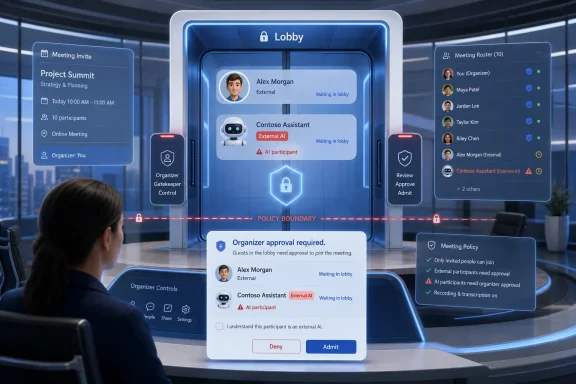 Microsoft Turns the Meeting Lobby Into a Security Control
The modern Teams meeting has always had a weak spot hiding in plain sight. People arrive through calendar invites, forwarded links, external domains, guest identities, phone dial-ins, and increasingly through services that behave like participants while functioning as recorders, transcribers, summarizers, and data processors. That last category is where Microsoft is now drawing a harder line.The new Teams behavior is aimed at external third-party bots, especially AI meeting assistants that join calls to capture audio, produce transcripts, and generate summaries. When Teams detects one of these bots attempting to join a meeting hosted by an organization, the bot is held in the lobby and shown to organizers as a distinct kind of participant. Admission is no longer supposed to be a casual click bundled with the rest of the waiting room.
That sounds small until you consider how meetings actually work. In a busy sales call, an executive review, or a webinar with external attendees, organizers often admit a batch of people without scrutinizing every display name. Microsoft is trying to interrupt that muscle memory. A bot should not slide into a confidential conversation because its name looked enough like a human attendee or because the organizer was trying to start on time.
The lobby has existed for years as a meeting-access feature. What is changing is its role. It is becoming a place where Teams tries to classify the nature of a participant before human beings make the final call. That is a more ambitious use of the lobby, and it fits the broader direction of Microsoft 365 security: fewer invisible defaults, more visible prompts, and more policy hooks for administrators.
The AI Note-Taker Became Shadow IT With a Calendar Invite
The AI note-taking boom did not wait for enterprise governance to catch up. Tools such as Otter.ai, Fireflies, Read AI, and a long tail of meeting assistants spread because they solved an obvious problem: people hate taking notes, and meetings generate more information than anyone wants to manually process. The pitch was productivity. The deployment model often looked like shadow IT.A user connects a service, authorizes access, and suddenly a bot can appear in meetings that include customers, partners, lawyers, investors, candidates, or internal leadership. Sometimes everyone knows it is there. Sometimes the bot’s presence is visible but socially ignored. Sometimes the host organization did not approve the tool at all.
That is the governance nightmare Microsoft is addressing. A third-party bot is not just another guest. It may capture audio, produce a transcript, summarize sensitive claims, store that output in another cloud, and make the data available to a user outside the host organization’s retention, eDiscovery, and compliance controls. Even when the bot vendor is reputable, the host may have no contractual relationship with that vendor and no practical visibility into what happens after the meeting ends.
This is why the issue lands differently from ordinary external access. Enterprises already know how to think about users from another company. They can reason about domains, guest identities, federation, and conditional access. Bots blur that model because they enter through the social surface of a meeting while operating as software infrastructure.
Microsoft’s framing is careful: Teams is not banning AI assistants as a category. It is trying to make their presence explicit and administratively manageable. That distinction matters because many organizations genuinely rely on these tools, while others consider them unacceptable in legal, financial, healthcare, government, or product-strategy conversations.
Consent Is Becoming a Product Feature
The most important word in this rollout is not “AI.” It is explicit. Microsoft wants organizers to make a separate, deliberate decision before an external bot enters the meeting. That is a product-design answer to a consent problem.Meeting consent used to be relatively legible. If a person joined, participants could see the person. If recording started, Teams displayed recording indicators. If transcription was enabled by the host, the organization’s own policies could govern the transcript. Third-party AI bots complicated that chain by arriving as attendees but acting as recorders and processors.
The result has been an etiquette gap. A customer may bring a note-taker to a vendor call without realizing the vendor’s confidential roadmap will be stored elsewhere. A candidate may send an assistant into an interview. An employee may use a personal productivity tool inside a meeting that includes regulated data. In each case, the problem is not simply that AI is present; it is that the meeting host may not have made an informed decision about that presence.
Microsoft’s approach tries to restore the meeting host’s authority. If a bot is in the lobby, the organizer can decide whether it belongs. If the organization sets stricter policies, administrators can move the default closer to “no.” If a bot is misclassified, Microsoft’s documentation indicates that organizers can correct the classification, which is a necessary escape hatch in a world where detection systems will not be perfect.
There is an obvious tension here. The more friction Microsoft adds, the more it may irritate users who have come to depend on automated notes. But friction is the point. In security and compliance, a little friction at the boundary can prevent a large mess later.
Detection Is Useful, but It Is Not Magic
Microsoft says Teams uses built-in detection mechanisms and signals from the meeting join process to identify external bots. That language is intentionally broad, and it should be read with caution. Bot detection is a probabilistic control, not a perfect truth machine.Some bots will identify themselves clearly. Some will use obvious names. Some will operate through known service patterns. Others may be harder to distinguish from external users, meeting-room systems, or accessibility tooling. A detection system aggressive enough to catch everything risks false positives; one conservative enough to avoid annoyance risks letting unwanted bots through.
That is why the administrative model matters as much as the detection itself. A visible label in the lobby helps only if organizers are trained to care. A policy that restricts who can admit lobby participants helps only if the right people are assigned organizer and co-organizer roles. A future option to automatically block identified external bots will help only for bots that Teams actually identifies.
This is the classic enterprise security trade-off: product controls reduce risk, but operational discipline determines the final outcome. Teams can place a suspected bot in the lobby. It cannot know whether the discussion is a harmless project stand-up or a board-level acquisition review. It cannot decide whether a particular vendor’s assistant is covered by an agreement with the host. Human and administrative judgment remain part of the system.
That also means organizations should resist treating this feature as a complete AI governance program. It is a meeting-access control. It does not answer every question about transcripts, storage, retention, model training, vendor contracts, data residency, or user behavior. It is a necessary layer, not the whole stack.
Microsoft Is Protecting Teams From the Ecosystem It Helped Enable
There is a competitive subtext here that Microsoft will not emphasize too loudly. Teams is both a collaboration platform and a strategic surface for Microsoft 365 Copilot. The company wants AI assistance inside meetings, but it would strongly prefer that assistance to run through Microsoft’s own compliance, identity, and licensing rails rather than through unmanaged external bots.That does not make the Teams change cynical. It makes it predictable. Platform vendors tend to become more security-conscious when third-party innovation starts colonizing high-value workflows. The same openness that lets external tools grow quickly can begin to look like liability when those tools touch regulated conversations and executive decision-making.
For Microsoft, the neat answer is to distinguish between sanctioned in-platform intelligence and external participant-style bots. Copilot can be positioned as an integrated feature governed by Microsoft 365 policies. Third-party bots can be treated as external actors that need disclosure and control. Customers may find that distinction persuasive, self-serving, or both.
Administrators should be clear-eyed about the incentives. Microsoft is solving a real customer problem, but the solution also strengthens the value of staying inside Microsoft’s ecosystem. If an organization already pays for Copilot, Teams Premium, compliance tooling, and Microsoft Purview, the argument for an external note-taker becomes harder to make unless that tool offers a specific capability Microsoft does not.
Third-party vendors will adapt. Some will pursue formal integration paths and clearer identification. Some will market themselves as compliant, enterprise-ready, or bot-free. Others may try to avoid detection, especially in the lower end of the market. The serious vendors should welcome clearer rules because they separate legitimate integrations from opportunistic meeting scrapers.
Admins Now Have to Treat Meeting Bots Like a Policy Domain
For IT departments, the practical work begins with inventory. Which AI note-taking tools are employees using? Which ones are approved? Which ones have contracts, data-processing terms, and retention guarantees? Which ones are personal subscriptions expensing their way into corporate meetings?The Teams control is an opportunity to turn scattered concern into policy. Security teams can define which categories of meetings should permit external bots, which should never permit them, and which require organizer approval. Legal can specify how third-party transcription interacts with confidentiality obligations. Compliance can decide whether bot-generated records belong in retention and discovery workflows.
The hardest part will be user education. Many employees do not think of an AI note-taker as a third-party data processor. They think of it as a convenience feature, like spellcheck for meetings. That mental model is wrong, and Microsoft’s visible lobby treatment may help correct it.
Organizations should also revisit meeting defaults. If anyone can admit anyone from the lobby, a bot warning may still be bypassed by the least-informed participant with admit privileges. Sensitive meetings should restrict lobby admission to organizers and co-organizers. External meetings should have a clear norm: no recording or AI note-taking unless the host explicitly approves it.
This is one of those changes where the technical toggle is less important than the behavior it enables. A Teams admin can configure policy in minutes. Changing meeting culture takes longer.
The Security Case Is Broader Than Transcripts
The obvious risk is unauthorized transcription, but the broader issue is meeting presence. A bot inside a meeting may gain access to participant names, chat content, shared links, screen-shared material, and timing information. Even if it records nothing, its attendance can disclose that a conversation occurred.That matters in contexts where metadata is sensitive. A meeting between a company and a potential acquisition target can be revealing. A call involving outside counsel, finance leaders, or product executives can imply more than participants intend. The attendance list itself may be a breadcrumb.
There is also a social-engineering dimension. Teams has become a place where external communication feels normal, and attackers have noticed. Microsoft and the broader security community have repeatedly warned that collaboration platforms can be abused for impersonation, helpdesk scams, and trust-based attacks. Bot controls do not solve that entire problem, but they fit the same pattern: Teams is no longer a safe internal room by default.
The more organizations depend on Teams as their workplace front door, the more every participant type needs scrutiny. Users, guests, federated identities, meeting-room devices, PSTN callers, apps, and bots all have different risk profiles. Treating them as visually similar tiles in a meeting roster was never going to scale.
AI makes that failure more visible because software can now participate in human workflows with very little ceremony. The fix is not to ban software from meetings. The fix is to make the software’s role visible, governable, and revocable.
The User Backlash Will Be Real, and Not Entirely Wrong
There will be complaints. Some users will argue that Microsoft is making meetings clunkier. Some will say their note-taker is harmless. Some will point out that Teams’ own transcription and Copilot features are not free, not universally licensed, and not always as flexible as specialist tools.Those complaints deserve more than a shrug. AI note-takers became popular because they filled gaps. People want searchable meeting memory, action items, summaries, follow-up drafts, and relief from the exhausting ritual of pretending to listen while typing notes. If IT simply blocks everything without providing a sanctioned alternative, employees will route around the policy.
The better answer is substitution, not just prohibition. If a company bans external bots, it should offer approved ways to capture meeting outcomes. That may be Teams transcription, Copilot, a vetted third-party vendor, human note-taking for sensitive meetings, or a combination of controls based on meeting type. A blanket “no AI” rule may be easy to announce and hard to enforce.
Microsoft’s lobby controls can support a nuanced policy because they create a decision point. But nuance requires governance maturity. The organization has to know which meetings are sensitive, which tools are trusted, and who is allowed to make exceptions.
The real target is not productivity software. It is invisible data movement. If users understand that distinction, they are more likely to accept the friction.
The Calendar Has Become a Data Perimeter
Enterprise security used to focus heavily on files, mailboxes, endpoints, and networks. Meetings now deserve the same attention because they are where unstructured, high-value information appears before it becomes a document. A product roadmap may be spoken before it is written. A legal strategy may be debated before it is filed. A pricing concession may be offered before it is reflected in a contract.AI note-takers sit exactly at that point of maximum sensitivity. They capture raw conversation, often before anyone has classified, reviewed, or sanitized it. That makes them useful. It also makes them risky.
The Teams update reflects a larger truth about hybrid work: the calendar is not just a scheduling tool. It is an access-control surface. Whoever can join the meeting can observe the organization in motion. Whoever can process the meeting can build a memory of that motion.
This is why administrators should avoid treating the bot lobby feature as a niche AI setting. It belongs in the same conversation as external collaboration, data-loss prevention, information barriers, privileged meetings, sensitivity labels, and retention. Meetings are not outside the compliance boundary. They are often where the boundary is tested first.
Microsoft is late to some aspects of this problem, but not uniquely so. The whole industry has spent the last two years racing to add AI assistance to collaboration tools while retrofitting consent and governance after the fact. Teams’ bot controls are one of the clearer signs that the retrofit phase has begun.
The Small Print Behind the “Bouncer” Metaphor
Calling this a digital bouncer is convenient, and it is not entirely wrong. Teams is standing at the door and checking whether a participant looks like a bot. But the metaphor can oversimplify what is actually happening.A bouncer knows the policy because the venue sets it. In Teams, policy may vary by tenant, meeting type, organizer, and future admin configuration. A bouncer checks IDs; Teams infers identity from signals and labels. A bouncer can keep someone out physically; Teams can only enforce the rules Microsoft has built and admins have enabled.
That distinction matters because overconfidence is dangerous. If executives hear “Teams blocks bad bots,” they may assume the problem is solved. It is not. The safer interpretation is that Teams is adding a new control point where previously there was too much ambiguity.
The roadmap also matters. Microsoft has been moving from identification and explicit admission toward stronger admin controls, including the ability to automatically block identified external bots. That progression is typical: first visibility, then manual control, then policy enforcement. Organizations should plan for that direction rather than assuming the June experience is the final form.
For now, the most defensible posture is measured. Use the detection, tighten lobby admission for sensitive meetings, publish rules for AI note-takers, and review approved vendors. Do not assume every bot is malicious. Do not assume every bot is safe.
The Teams Bot Crackdown Gives IT a Rare Chance to Get Ahead of Users
The useful thing about this change is that it creates a teachable moment before the next embarrassing incident. Administrators can point to a visible Teams behavior and explain why it exists. That is more effective than circulating another policy PDF that nobody reads.The concrete next steps are not glamorous, but they are practical.
- Organizations should identify which third-party AI meeting assistants are already being used before deciding what to block or approve.
- Sensitive meetings should restrict lobby admission to organizers and co-organizers so bot decisions are not delegated accidentally.
- Approved AI note-taking tools should be documented with clear rules for storage, retention, access, and external sharing.
- Employees should be told that an AI note-taker is a meeting participant and a data processor, not a harmless personal convenience.
- Administrators should monitor Microsoft’s rollout of automatic external-bot blocking and test the policy impact before enabling it broadly.
- Meeting hosts should make consent explicit when recording, transcription, or AI summarization is in use, especially with customers and partners.
Microsoft’s external-bot controls will not end the messy politics of AI in the workplace, but they mark an important shift from enthusiasm to governance. The first wave of AI meeting tools treated the calendar as open terrain; the next wave will have to prove it belongs in the room. For Windows admins and Microsoft 365 tenants, the lesson is simple enough: the future of collaboration will include AI participants, but the right to listen in must be earned, governed, and revocable.
References
- Primary source: TechRadar
Published: Tue, 30 Jun 2026 10:05:00 GMT
Microsoft Teams is getting wants to block bad bots for good | TechRadar
"Smarter bot protection" is coming to Microsoft Teamswww.techradar.com - Independent coverage: UC Today
Published: Tue, 30 Jun 2026 10:31:20 GMT
Teams to Block External AI Bots - UC Today
Microsoft Teams will let admins automatically block all detected external AI bots from meetings, with rollout starting August 2026www.uctoday.com - Independent coverage: streamlinefeed.co.ke
Published: 2026-06-30T09:42:10.287202
Microsoft Deploys 'Bouncer' to Block Unwanted AI Bots in Teams | Streamline
Microsoft has introduced a mandatory verification lobby in Teams to block unauthorized AI transcription bots from recording sensitive corporate meetings.streamlinefeed.co.ke - Official source: learn.microsoft.com
Manage external bots and their access to meetings hosted in your organization - Microsoft Teams | Microsoft Learn
Learn how to configure the access that external bots get to Teams meetings hosted in your organizationlearn.microsoft.com - Official source: support.microsoft.com
Using the lobby in Microsoft Teams meetings | Microsoft Support
In Teams, the meeting lobby keeps participants from joining a meeting until they’re admitted by an organizer, co-organizer, or presenter. When people are in the lobby, organizers, co-organizers, and presenters are notified and can choose when to admit them to the meeting.support.microsoft.com - Related coverage: windowsforum.com
Microsoft Teams 2026 Bot Detection: Lobby Approval as AI Assistant Governance | Windows Forum
Microsoft Teams is rolling out an admin-controlled external bot detection system in 2026 that routes suspected third-party meeting bots into the lobby...windowsforum.com
- Related coverage: basilai.app
Bot vs Bot-Free AI Notetakers: Why the 2026 Platform Crackdown Changes Your Buying Decision | Basil AI
Google Meet now flags AI notetaker bots as 'potential risk.' Microsoft Teams MC1251206 routes them to a 'Suspected threats' lobby. Here's how the bot vs bot-free split should drive your 2026 AI notetaker decision.basilai.app - Related coverage: blog-en.topedia.com
Meeting Bot Detection in Microsoft Teams | Topedia Blog
Microsoft is rolling out bot detection for Teams Meetings, requiring an additional approval step before external meeting assistant bots can be admitted from the lobby. Administrators can configure a new policy setting to control bot access tenant-wide, including blocking detected bots entirely.blog-en.topedia.com - Related coverage: windowscentral.com
Microsoft Teams will block unwanted bots from meetings | Windows Central
That silent "AI Assistant" in the corner isn't always a company tool. Microsoft is finally giving you a way to lock the door on data-scraping hitchhikers.www.windowscentral.com - Related coverage: northernstar.co.uk
Securing Your Microsoft Teams Meetings Against External AI Bots - Northern Star
Microsoft Teams is rolling out native detection for external AI meeting bots across commercial and GCC tenants in June 2026. If your business has not made a clear policy decision about what should happen when an external AI notetaker tries to join one of your meetings, now is the time to make...northernstar.co.uk
- Official source: microsoft.com
Microsoft 365 Roadmap | Microsoft 365
The Microsoft 365 Roadmap lists updates that are currently planned for applicable subscribers. Check here for more information on the status of new features and updates.www.microsoft.com
- Related coverage: labs.cloudsecurityalliance.org
Microsoft Teams as Phishing Infrastructure: The A0Backdoor Campaign and the Industrialization of Collaboration-Platform Attacks
PDF documentlabs.cloudsecurityalliance.org
- Official source: techcommunity.microsoft.com
- Related coverage: uncovai.com
- Related coverage: docs.pexip.com