

TensorRT engine building is often treated as a short setup operation, but that assumption breaks down quickly with large ONNX models, strongly typed networks, aggressive tactic selection, new GPU architectures, or an empty timing cache. A build that runs for several minutes with no visible feedback is not merely inconvenient: it can strand CI jobs, waste GPU capacity, block interactive development, and leave AI-driven workflows unable to distinguish productive work from a hung process.
NVIDIA TensorRT’s
The important detail is that this is not a polling workaround or a log-scraping technique. TensorRT calls the monitor directly as optimizer phases begin, advance, and finish. The application can then translate those callbacks into progress bars, structured telemetry, build events, or cancellation decisions.
TensorRT’s core job is to optimize a network for fast inference on a particular NVIDIA GPU and configuration. That can include selecting tactics, profiling candidate kernels, resolving layer implementations, working with precision constraints, and consulting or extending a timing cache.
For compact models and warm caches, this work may complete in seconds. For more demanding workloads, it may take long enough that a silent command-line process becomes an operational problem.
Common scenarios include:
The
The TensorRT progress-monitor API is intentionally small. In both Python and C++, an implementation responds to three lifecycle events:
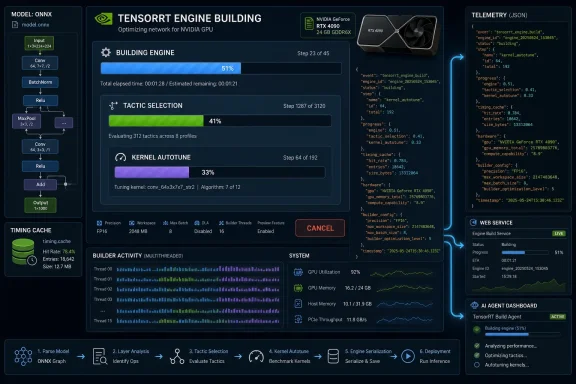
The underlying model is more sophisticated than a single percentage counter. TensorRT optimization work is divided into hierarchically nested phases. A top-level phase may open one or more child phases, and a monitor receives the parent-phase relationship when each child begins.
That hierarchy enables useful output such as:
The child phases are particularly important because a plain “building engine” status is not enough to explain why a build is taking time. An application that can identify a tactic-selection or timing-related phase can show that work is progressing even when the user perceives a long pause.
Returning
That distinction is central to a correct design:
This is one of the easiest ways to introduce subtle defects.
An unsafe Python implementation can corrupt a dictionary of active phases, produce scrambled ANSI output, or race with a user-interface thread. An unsafe C++ implementation can create undefined behavior in
A practical design separates state into two categories:
The monitor should also avoid holding a mutex while performing slow work such as network I/O, file writes, or blocking UI calls. A good pattern is to capture a small immutable progress snapshot under the lock, release the lock, and then publish the snapshot elsewhere.
The empty
This separation is more robust than placing terminal-specific rendering logic directly into the callback implementation.
The monitor must remain alive for as long as TensorRT may use it. In a straightforward synchronous Python build, keeping it in a local variable through the
If TensorRT returns
That distinction matters in CI logs, IDE diagnostics, and service APIs. A cancellation is usually a valid user or scheduler decision; a build failure requires debugging.
The essential approach is:
The
A rendering function should also avoid assuming that phase names are permanent identifiers. TensorRT phase names are human-readable and useful for display, but applications should not hard-code automation decisions around particular strings. Those names and phase hierarchies can evolve between TensorRT versions.
ANSI escape sequences are useful when
For example:
Structured events are easier to aggregate, search, display in dashboards, and preserve in long-running build records.
When a user presses Ctrl+C, clicks Stop in an IDE, cancels an HTTP request, or exceeds an agent time budget, the application marks the monitor as cancelled. The next call to
The cancellation path looks like this:
On Windows, Python console applications can receive Ctrl+C through Python’s signal handling model. The exact console behavior can vary when the process is hosted by another application, launched in a service context, or run under tooling that captures console events. That is another reason to provide a programmatic
A safer architecture is:
Attach the monitor through
The monitor object must outlive the builder configuration and the complete engine-build call. A stack-allocated monitor is fine only when the build occurs synchronously within the same scope.
TensorRT can finish a phase early during error handling, internal optimization shortcuts, or cancellation. The
Avoid presenting the step percentage as a precise ETA unless the application has reliable historical timing data. A better user experience is to show:
The application should report this honestly:
That message is far better than appearing frozen after a user has explicitly cancelled the build.
Use bounded queues, non-blocking event dispatch, or a lightweight producer-consumer design. If a telemetry system is unavailable, dropping redundant progress updates is generally better than blocking TensorRT’s optimizer.
A Stop button should call the same application-level cancellation method used by Ctrl+C. This keeps the cancellation semantics consistent regardless of how the user initiated the request.
A practical API design includes:
Instead of allowing an agent tool call to go silent for several minutes, emit compact status chunks:
If an outer orchestration deadline expires, the runtime requests cancellation and communicates that the build is unwinding rather than pretending the operation vanished.
The practical benefits are substantial:
TensorRT engine building will sometimes remain expensive, especially for complex models and fresh hardware environments. But with a thread-safe
NVIDIA TensorRT’s
IProgressMonitor interface addresses that visibility gap. It gives applications a supported callback boundary for observing engine-build phases, reporting nested progress, and requesting clean cancellation. For Python and C++ developers, it is the missing link between TensorRT’s internal optimizer and the user-facing environment around it—whether that environment is a terminal, a Windows desktop application, an IDE extension, an HTTP service, or an agent runtime.The important detail is that this is not a polling workaround or a log-scraping technique. TensorRT calls the monitor directly as optimizer phases begin, advance, and finish. The application can then translate those callbacks into progress bars, structured telemetry, build events, or cancellation decisions.
 Why TensorRT Build Progress Matters
TensorRT’s core job is to optimize a network for fast inference on a particular NVIDIA GPU and configuration. That can include selecting tactics, profiling candidate kernels, resolving layer implementations, working with precision constraints, and consulting or extending a timing cache.For compact models and warm caches, this work may complete in seconds. For more demanding workloads, it may take long enough that a silent command-line process becomes an operational problem.
Common scenarios include:
- First-time builds on a new GPU SKU, where useful timing-cache entries may not yet exist.
- Large transformer, vision, or multimodal models with many optimization opportunities.
- Strongly typed TensorRT networks, where type constraints can influence the optimizer’s search space.
- Dynamic shapes and multiple optimization profiles, which can increase build complexity.
- Build servers and CI pipelines, where a stalled job may consume expensive GPU resources.
- Interactive Windows development workflows, where a developer expects Ctrl+C, a Stop button, or a task cancellation command to work predictably.
- AI agent orchestration, where the surrounding system needs observable milestones and a firm time budget.
IProgressMonitor provides a cleaner approach. It makes the engine-building process observable by design and allows the application to request cancellation at a safe TensorRT-defined boundary.The IProgressMonitor Model
The TensorRT progress-monitor API is intentionally small. In both Python and C++, an implementation responds to three lifecycle events:| Event | Python | C++ | Purpose |
|---|---|---|---|
| A phase starts | phase_start(...) | phaseStart(...) | Register the phase and its total number of steps |
| A step completes | step_complete(...) | stepComplete(...) | Update progress and decide whether the build continues |
| A phase ends | phase_finish(...) | phaseFinish(...) | Remove or finalize the phase |
That hierarchy enables useful output such as:
Code:
Building Engine                 [██████████················]  9/24
  Tactic Selection              [████████████████··········] 41/64
    Kernel Autotune             [████████··················]  8/25
The callback that controls cancellation
Only one callback returns a value:step_complete(phase_name, step) -> boolbool stepComplete(char const* phaseName, int32_t step) noexceptReturning
True or true tells TensorRT to continue. Returning False or false asks TensorRT to stop the build cleanly.That distinction is central to a correct design:
phase_startis informational.phase_finishis informational.step_completeis both informational and actionable.
Thread Safety Is a Requirement, Not a Nice-to-Have
TensorRT may invoke a singleIProgressMonitor instance from multiple internal threads. Any implementation that stores phase state, renders progress, emits events, or checks cancellation must account for concurrent access.This is one of the easiest ways to introduce subtle defects.
An unsafe Python implementation can corrupt a dictionary of active phases, produce scrambled ANSI output, or race with a user-interface thread. An unsafe C++ implementation can create undefined behavior in
std::unordered_map, emit malformed logs, or crash under load.A practical design separates state into two categories:
- Shared progress state
- Active phase names
- Parent relationships
- Total steps
- Completed steps
- Event sequence numbers
- Cancellation state
- A simple requested/not-requested flag
- Read during
step_complete - Written by a command handler, timeout controller, or UI action
threading.Lock. In C++, protect phase structures with std::mutex and use std::atomic<bool> for cancellation requests originating from another normal application thread.The monitor should also avoid holding a mutex while performing slow work such as network I/O, file writes, or blocking UI calls. A good pattern is to capture a small immutable progress snapshot under the lock, release the lock, and then publish the snapshot elsewhere.
A Practical Python Progress Monitor
A minimal Python monitor can track phases, preserve parent relationships, and expose a cancellation request method.
Code:
import threading
from dataclasses import dataclass

import tensorrt as trt

@dataclass
class PhaseState:
    total_steps: int
    current_step: int = -1
    parent: str | None = None

class BuildProgressMonitor(trt.IProgressMonitor):
    def __init__(self):
        super().__init__()
        self._lock = threading.Lock()
        self._phases: dict[str, PhaseState] = {}
        self._cancel_requested = False

    def request_cancel(self) -> None:
        with self._lock:
            self._cancel_requested = True

    def is_cancel_requested(self) -> bool:
        with self._lock:
            return self._cancel_requested

    def phase_start(self, phase_name, parent_phase, num_steps):
        with self._lock:
            self._phases[phase_name] = PhaseState(
                total_steps=num_steps,
                parent=parent_phase,
            )
            snapshot = self._snapshot_locked()

        self._publish(snapshot)

    def step_complete(self, phase_name, step) -> bool:
        with self._lock:
            phase = self._phases.get(phase_name)
            if phase is not None:
                phase.current_step = step

            should_continue = not self._cancel_requested
            snapshot = self._snapshot_locked()

        self._publish(snapshot)
        return should_continue

    def phase_finish(self, phase_name):
        with self._lock:
            self._phases.pop(phase_name, None)
            snapshot = self._snapshot_locked()

        self._publish(snapshot)

    def _snapshot_locked(self):
        return {
            name: {
                "parent": state.parent,
                "step": state.current_step,
                "total": state.total_steps,
            }
            for name, state in self._phases.items()
        }

    def _publish(self, snapshot) -> None:
pass_publish() method is deliberate. It is the application boundary. A terminal tool can render ANSI progress rows there; a web service can enqueue JSON events; an IDE extension can send a protocol notification; and an agent workflow can emit a structured status chunk.This separation is more robust than placing terminal-specific rendering logic directly into the callback implementation.
Attaching the monitor in Python
The monitor is attached through the builder configuration:
Code:
builder = trt.Builder(logger)

network = builder.create_network(
    1 << int(trt.NetworkDefinitionCreationFlag.STRONGLY_TYPED)
)

parser = trt.OnnxParser(network, logger)

with open(onnx_path, "rb") as model_file:
    if not parser.parse(model_file.read()):
        raise RuntimeError("Unable to parse the ONNX model")

config = builder.create_builder_config()

monitor = BuildProgressMonitor()
config.progress_monitor = monitor

serialized_engine = builder.build_serialized_network(network, config)build_serialized_network() call is sufficient.If TensorRT returns
None, the application should distinguish between an intentional cancellation and a genuine build failure:
Code:
if serialized_engine is None:
    if monitor.is_cancel_requested():
        print("TensorRT engine build cancelled.")
    else:
print("TensorRT engine build failed.")Rendering Live Progress in a Windows Terminal or Linux Shell
A terminal renderer can turn monitor callbacks into nested progress bars. ANSI virtual-terminal escape sequences make this possible in modern shells, including Windows Terminal and most current Linux terminal emulators.The essential approach is:
- Record how many rows were printed in the previous render.
- Move the cursor upward by that previous count.
- Rewrite all active progress rows.
- Clear any stale rows left behind when child phases finish.
Code:
completed = min(state.current_step + 1, state.total_steps)
percentage = completed / max(state.total_steps, 1)+ 1 matters because TensorRT reports the completed step index in a zero-based range. If the current step is 0, the application normally wants to display 1/total, not 0/total.A rendering function should also avoid assuming that phase names are permanent identifiers. TensorRT phase names are human-readable and useful for display, but applications should not hard-code automation decisions around particular strings. Those names and phase hierarchies can evolve between TensorRT versions.
Do not write ANSI progress output into ordinary logs
Interactive terminal rendering and normal log output are different products.ANSI escape sequences are useful when
stdout points to an interactive console. They become noise when output is redirected into:- A plain text log file
- A CI artifact
- A JSON log collector
- A Windows Event Log bridge
- A pipe consumed by another process
For example:
Code:
{
  "event": "tensorrt_build_progress",
  "phase": "Tactic Selection",
  "parent": "Building Engine",
  "step": 41,
  "total_steps": 64,
  "cancel_requested": false
}Cancellation: Clean, Cooperative, and Not Instantaneous
The most valuable feature ofIProgressMonitor is that it gives the application a supported cancellation route. But it must be understood as cooperative cancellation, not a hard kill switch.When a user presses Ctrl+C, clicks Stop in an IDE, cancels an HTTP request, or exceeds an agent time budget, the application marks the monitor as cancelled. The next call to
step_complete() returns False, and TensorRT begins unwinding the build.The cancellation path looks like this:
- The outer application receives a stop request.
- It records the cancellation request in monitor state.
- TensorRT completes its active optimizer step.
- TensorRT calls
step_complete(). - The monitor returns
False. - TensorRT stops issuing further work and finishes active phases early.
- The build call returns without a serialized engine.
Python Ctrl+C handling
For a command-line Python tool, a SIGINT handler can request cancellation:
Code:
import signal

def install_ctrl_c_handler(monitor: BuildProgressMonitor):
    def on_sigint(signum, frame):
        monitor.request_cancel()
        print("\nCancellation requested; waiting for TensorRT step boundary...")

signal.signal(signal.SIGINT, on_sigint)request_cancel() method rather than making Ctrl+C the only cancellation path.C++ cancellation requires signal discipline
C++ applications should be more cautious about directly calling complex monitor methods from low-level signal or console-control handlers. Mutex locking, terminal rendering, memory allocation, logging, and many standard-library operations are not appropriate inside a generic asynchronous signal handler.A safer architecture is:
- Let the platform-specific interrupt or console handler set a minimal stop indicator.
- Have a normal application thread observe that indicator.
- Call
monitor.requestCancel()from the normal thread. - Let
stepComplete()returnfalsewhen the cancellation flag is set.
A C++ Implementation Pattern
The C++ interface follows the same lifecycle as Python, with different naming conventions.
Code:
#include <NvInfer.h>

#include <atomic>
#include <cstdint>
#include <mutex>
#include <string>
#include <unordered_map>

class BuildProgressMonitor : public nvinfer1::IProgressMonitor
{
public:
    void phaseStart(
        char const* phaseName,
        char const* parentPhase,
        int32_t nbSteps) noexcept override
    {
        ProgressSnapshot snapshot;

        {
            std::lock_guard<std::mutex> lock(m_mutex);

            m_phases[phaseName] = Phase{
                nbSteps,
                -1,
                parentPhase ? parentPhase : ""
            };

            snapshot = makeSnapshotLocked();
        }

        publish(snapshot);
    }

    bool stepComplete(
        char const* phaseName,
        int32_t step) noexcept override
    {
        ProgressSnapshot snapshot;

        {
            std::lock_guard<std::mutex> lock(m_mutex);

            auto it = m_phases.find(phaseName);
            if (it != m_phases.end())
            {
                it->second.currentStep = step;
            }

            snapshot = makeSnapshotLocked();
        }

        publish(snapshot);
        return !m_cancelRequested.load(std::memory_order_relaxed);
    }

    void phaseFinish(char const* phaseName) noexcept override
    {
        ProgressSnapshot snapshot;

        {
            std::lock_guard<std::mutex> lock(m_mutex);
            m_phases.erase(phaseName);
            snapshot = makeSnapshotLocked();
        }

        publish(snapshot);
    }

    void requestCancel() noexcept
    {
        m_cancelRequested.store(true, std::memory_order_relaxed);
    }

    bool cancelRequested() const noexcept
    {
        return m_cancelRequested.load(std::memory_order_relaxed);
    }

private:
    struct Phase
    {
        int32_t totalSteps;
        int32_t currentStep;
        std::string parent;
    };

    using ProgressSnapshot =
        std::unordered_map<std::string, Phase>;

    std::mutex m_mutex;
    std::unordered_map<std::string, Phase> m_phases;
    std::atomic<bool> m_cancelRequested{false};

    ProgressSnapshot makeSnapshotLocked()
    {
        return m_phases;
    }

    void publish(ProgressSnapshot const&) noexcept
    {
        // Send terminal, UI, telemetry, or service events here.
    }
};IBuilderConfig:
Code:
BuildProgressMonitor monitor;

auto* config = builder->createBuilderConfig();
config->setProgressMonitor(&monitor);Important Edge Cases That Production Code Must Handle
A polished TensorRT progress system must account for more than a happy-path sequence of start, complete, and finish callbacks.A phase may finish before every step is reported
Applications should not assume that a phase always reachescurrent_step == total_steps - 1.TensorRT can finish a phase early during error handling, internal optimization shortcuts, or cancellation. The
phase_finish callback should therefore be treated as authoritative. A UI may show the phase as completed, cancelled, or interrupted based on surrounding monitor state, but it should not invent missing steps.Phase names can be reused
Within one active hierarchy, phase names are intended for tracking. However, names can be reused after an earlier phase instance has ended. A monitor should remove old state inphase_finish() and avoid accumulating lifetime-global assumptions about a phase name.Progress is not a wall-clock estimate
A bar showing42/64 steps is useful, but it does not guarantee that 66% of the elapsed time has passed. One tactic-selection step may finish quickly; another may spend significantly longer evaluating options.Avoid presenting the step percentage as a precise ETA unless the application has reliable historical timing data. A better user experience is to show:
- Current phase
- Completed and total steps
- Elapsed time
- Cancellation status
- Optional recent progress rate
Cancellation latency varies
TensorRT checks the monitor’s decision at step boundaries. If the current step performs lengthy work, users may see a delay after pressing Stop.The application should report this honestly:
Cancellation requested. TensorRT is finishing the current optimization step.That message is far better than appearing frozen after a user has explicitly cancelled the build.
Avoid blocking in callbacks
The monitor runs on TensorRT-controlled execution paths. Blocking on a slow network connection, waiting on a full queue, writing megabytes of logs, or synchronously updating a heavy GUI can damage build performance.Use bounded queues, non-blocking event dispatch, or a lightweight producer-consumer design. If a telemetry system is unavailable, dropping redundant progress updates is generally better than blocking TensorRT’s optimizer.
Where to Surface TensorRT Build Events
The strongest architectural advantage ofIProgressMonitor is that it decouples TensorRT build internals from application presentation.Terminal tools
For local Python scripts or C++ command-line utilities, render nested progress bars when an interactive terminal is detected. Fall back to line-oriented status updates or JSON logs when output is redirected.IDE integrations
An IDE extension can map each TensorRT phase into its own progress notification. The parent-child relationship can become nested UI progress, whilestep_complete() produces incremental reports.A Stop button should call the same application-level cancellation method used by Ctrl+C. This keeps the cancellation semantics consistent regardless of how the user initiated the request.
HTTP services
A build service can run TensorRT in a dedicated worker thread or worker process while publishing events through Server-Sent Events, WebSockets, or a job-status endpoint.A practical API design includes:
POST /buildsto begin a buildGET /builds/{id}for current statusGET /builds/{id}/eventsfor progress streamingPOST /builds/{id}/cancelto request cooperative cancellation
running to cancelling before a final cancelled state. That reflects the real behavior of TensorRT’s step-boundary cancellation model.AI agents and automation systems
Agent runtimes benefit from structured build events because they can report intermediate status, enforce budgets, and choose whether to wait or cancel.Instead of allowing an agent tool call to go silent for several minutes, emit compact status chunks:
Code:
{
  "kind": "progress",
  "operation": "tensorrt_engine_build",
  "phase": "Tactic Selection",
  "step": 47,
  "total": 64
}The Operational Payoff
IProgressMonitor does not make TensorRT tactic selection faster by itself. It does something almost as important in real deployments: it makes long-running optimizer work understandable and controllable.The practical benefits are substantial:
- Developers can see that an engine build is alive.
- Users can cancel builds without resorting to forceful termination.
- CI systems can preserve meaningful build-state information.
- Services can expose accurate progress and cancellation states.
- Agent runtimes can enforce time budgets without abandoning opaque GPU work.
- Teams can collect phase-level telemetry to identify recurring build bottlenecks.
TensorRT engine building will sometimes remain expensive, especially for complex models and fresh hardware environments. But with a thread-safe
IProgressMonitor, an application no longer has to make users choose between waiting blindly and killing the process. It can show what TensorRT is doing, explain when cancellation is pending, and stop work cleanly at the next supported checkpoint.References
- Primary source: NVIDIA Developer
Published: 2026-07-22T16:35:04+00:00
Make Long-Running NVIDIA TensorRT Engine Builds Observable and Cancelable in Python or C++ | NVIDIA Technical Blog
A TensorRT engine build can take seconds to many minutes. Large strongly typed models, deep tactic search, and a cold timing cache on a brand-new GPU SKU can…developer.nvidia.com
- Related coverage: docs.nvidia.com
Engine Tools and Debugging — NVIDIA TensorRT
docs.nvidia.com
- Official source: github.com
GitHub - NVIDIA/TensorRT: NVIDIA® TensorRT™ is an SDK for high-performance deep learning inference on NVIDIA GPUs. This repository contains the open source components of TensorRT. · GitHub
NVIDIA® TensorRT™ is an SDK for high-performance deep learning inference on NVIDIA GPUs. This repository contains the open source components of TensorRT. - NVIDIA/TensorRT github.com