

Tesla Turns a Blue Line Into a Trust Signal
For years, the Tesla app has been a remote-control surface for the car: lock it, precondition it, locate it, summon it in limited contexts, check charging, and increasingly view camera-related features. But it has not been a reliable remote indicator of whether Full Self-Driving, now formally branded FSD (Supervised), is doing the driving at a given moment. That distinction matters because FSD is not a background feature; it changes the entire operating mode of the vehicle.
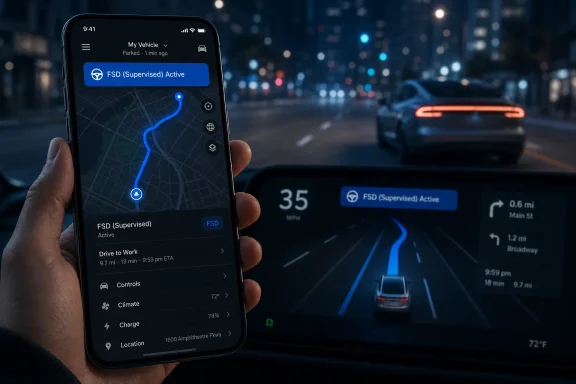
The new blue route in the mobile app mirrors the blue route shown on the in-car display when FSD is active. On the surface, that sounds like a synchronization tweak between two screens. In practice, it gives the account holder a real-time clue that the car is in supervised automation rather than merely being driven along a navigated route.
That is useful in exactly the messy household scenarios where Tesla ownership already lives. A spouse borrows the car, a teenager takes it out, a friend uses it for an errand, or a valet moves it across a property. The owner may not need a second-by-second intervention feed, but seeing whether the vehicle is actively following an FSD route changes the relationship between remote monitoring and blind trust.
The feature also narrows a long-running gap between Tesla’s software ambition and its interface discipline. Tesla has often moved faster on capability than on explanatory context, leaving owners to infer states from icons, release-note language, and forum chatter. A blue route is simple, but in safety-adjacent software, simple state indicators are not trivial.
The Real Feature Is Not the Route, It Is the Disclosure
Tesla did not need to invent a new visual language here. The blue FSD route already exists inside the car, where it tells the driver that the system has plotted and is following a path under supervised control. Extending that language to the phone makes the app a more faithful representation of the vehicle’s current behavior.
That makes this less of a mapping update than a disclosure update. The owner is not merely seeing where the vehicle is. The owner is seeing what kind of driving mode is being used to get there.
The distinction is easy to understate because consumer apps have trained users to treat map lines as decoration. In Tesla’s case, the color and context encode system state. The app now gives the remote user a hint that the vehicle is not simply moving; it is moving with FSD engaged and the in-car driver still responsible for supervision.
That last part remains essential. Tesla’s current FSD product remains supervised, not autonomous in the legal or operational sense. The person in the driver’s seat remains responsible, and the mobile app’s blue route should not be read as an invitation for the owner to supervise from afar.
Still, the owner-awareness angle is meaningful. The company has made FSD a household product, a subscription product, a resale-value argument, and a central part of its brand mythology. If Tesla wants FSD to be used routinely by ordinary families, then ordinary families need better ways to understand when it is actually in use.
FSD v14 Lite Gives the App Change a Bigger Shadow
The timing is what turns this from a minor app improvement into a more interesting product signal. The blue-route behavior appeared alongside vehicle software 2026.20.6.1, the same family of updates associated with FSD v14 Lite reaching older Hardware 3 vehicles. Electrek reported on June 29 that Tesla’s AI chief Ashok Elluswamy confirmed the rollout of FSD v14 Lite to early-access AI3 owners, using Tesla’s internal label for Hardware 3.
That matters because Hardware 3 is no longer the shiny edge of Tesla autonomy. It is the installed base, the legacy promise, and the technical constraint all at once. Millions of Tesla owners bought cars during years when the company aggressively marketed future autonomy, only to watch newer Hardware 4 cars become the preferred target for the latest FSD stack.
FSD v14 Lite is Tesla’s attempt to square that circle. According to reporting from Electrek and other Tesla-focused outlets, the Lite build is designed to distill behavior from the newer Hardware 4 FSD v14 series into the older AI3 compute and camera configuration. That framing is careful: it promises continuity and learning transfer, not hardware equivalence.
The app’s blue route therefore lands as part of a broader softening strategy. Tesla is not only delivering another build to older vehicles; it is making the experience around supervised driving more visible. For HW3 owners who have waited through long gaps in FSD progress, visibility is part of reassurance.
But reassurance cuts both ways. A blue route may help an owner know when FSD is active, yet it also makes FSD usage more observable and therefore more open to scrutiny. If a family member is using FSD in a context the owner considers inappropriate, the app may now surface that tension. If the system behaves strangely, the remote visual state becomes part of the post-drive discussion.
Hardware 3 Owners Get Progress, Not a Time Machine
The phrase “v14 Lite” does a lot of work. It tells HW3 owners they are being brought forward, while also telling them not to expect the same thing newer cars get. In Tesla’s world, that is both a technical necessity and a political problem.
Hardware 3 vehicles were sold into an era of larger promises about future autonomy. Tesla has since had to acknowledge, directly and indirectly, that compute limits matter. If newer AI4 hardware is the baseline for the company’s most advanced FSD work, then AI3 cannot simply be wished into parity by branding.
The result is a bifurcated fleet. Some owners are on the frontier build; others get a distilled version. Tesla’s task is to make the older fleet feel supported without pretending the silicon gap does not exist.
FSD v14 Lite appears to be the compromise. It can bring newer behavior models and features to HW3 while preserving the supervised nature of the product. It can reduce the sense of abandonment without resolving every old promise about autonomy.
That is why the mobile app cue matters. Older vehicles receiving a “Lite” build need clear indicators of what the system is doing, when it is active, and how its behavior can be reviewed. Tesla is not just managing code paths; it is managing trust across hardware generations.
The Dashcam Changes Point Toward a More Evidentiary Tesla
The same 2026.20 branch also includes Dashcam Viewer changes that deserve more attention than they will probably get. Teslascope’s release-note tracking shows that recent Dashcam footage can now extend up to 24 hours, and clips downloaded to a phone can include speed, steering wheel angle, and Self-Driving state when the required app version and connectivity conditions are met.
That is not just a convenience feature. It turns Tesla’s camera system into a richer evidentiary record. If a driver wants to understand what happened during a disputed maneuver, a near miss, or a confusing FSD moment, the clip can carry more context than raw video alone.
The inclusion of Self-Driving state is especially important. Video can show where the car went, but it may not answer who or what was commanding the vehicle at the time. By preserving whether the self-driving stack was active, Tesla gives owners a more useful artifact for insurance conversations, safety reviews, or plain old household accountability.
This is also where privacy and control become harder. The same software family brings encrypted Dashcam clips saved to USB storage, with Tesla saying only the vehicle can view them unless decrypted through supported methods. That is a sensible privacy move in a world where cars are covered in cameras and USB drives are easy to lose.
Yet encryption also introduces friction. Who can decrypt clips? What happens when there are multiple drivers? How does this work in a family, fleet, or service context? Tesla’s answer may be technically clean, but usability will determine whether owners see it as protection or lock-in.
Automatic Updates Are Becoming Less Optional in Practice
Another documented change in the 2026.20.6.1 cycle is the ability to automatically install software updates overnight while the car is parked. Tesla has long treated over-the-air updates as one of its defining advantages, but the more features move between vehicle firmware, mobile app versions, server-side switches, and connectivity requirements, the harder it becomes for owners to stay aligned manually.
The blue-route feature illustrates the problem. It appears to be app-side, but tied in practice to vehicles running 2026.20.6.1 or later. Owners may update the app and see nothing, or update the vehicle and still need a server-side enablement or app refresh before the behavior appears.
This is normal in modern software. It is also frustrating in cars, because drivers expect vehicle features to be more deterministic than social-media A/B tests. Tesla lives at the intersection of those worlds, and that intersection is not always comfortable.
Automatic overnight installation is Tesla’s answer: keep the fleet moving, reduce fragmentation, and avoid leaving owners stranded on old builds. For enthusiasts, that is convenient. For cautious users, it can feel like surrendering change control over a machine that moves at highway speed.
Enterprise IT people will recognize the pattern immediately. Tesla is converging on the logic of managed endpoints: staged rollouts, telemetry, app dependencies, server-side gates, and security patches wrapped into feature releases. The difference is that the endpoint weighs two tons.
The App Is Becoming the Second Instrument Cluster
Tesla’s mobile app used to be an accessory. It is now becoming a second instrument cluster, one that happens to live outside the vehicle. That shift changes expectations.
If the app can show whether FSD is active, owners will reasonably expect it to show more useful operational state over time. If it can display a self-driving route, why not clearer information about route confidence, recent disengagements, driver attention warnings, or whether an FSD session ended manually or automatically? Tesla may not want to expose all of that, but the precedent is now there.
The company has to be careful. Too much remote detail could imply a level of remote supervisory responsibility that Tesla does not want and regulators would not accept. Too little detail, however, makes FSD feel like a black box in exactly the moments when users most want transparency.
The blue route is a restrained compromise. It says enough to inform the owner without pretending the phone is a remote safety console. It is informational, not operational.
But Tesla rarely stops at informational. The app has gradually accumulated controls that once belonged only to the vehicle, from climate and charging to camera access and service workflows. The more FSD becomes a mainstream feature rather than a beta-club obsession, the more pressure there will be to make the app a true companion to autonomous and semi-autonomous behavior.
The Naming Still Does Tesla No Favors
The feature arrives under the umbrella of FSD (Supervised), a name that continues to carry tension inside itself. “Full Self-Driving” suggests completeness. “Supervised” pulls the promise back to Level 2 driver assistance.
Tesla has spent years trying to have both. The brand power of FSD is enormous, but so is the confusion it creates for casual observers and some buyers. Adding more explicit supervised language helps, but it does not erase the original semantic overreach.
The blue route could help reduce that ambiguity if Tesla uses it consistently as a state indicator rather than a marketing flourish. It can teach users that FSD engagement is a specific condition, not a general aura surrounding the vehicle. The more precise the interface becomes, the less room there is for magical thinking.
Still, interface clarity cannot fully compensate for product naming. A family member seeing a blue route in the app may understand that FSD is active, but they may not automatically understand the boundaries of that system. Tesla’s documentation and in-car prompts still have to do the hard work of reinforcing that the driver is responsible.
This is why small UI decisions matter in assisted-driving systems. The best safety language is not buried in a release note. It is repeated through the product experience until the user cannot miss it.
Regulators Will Care About the Trail, Not the Color
For regulators and safety investigators, the blue route itself is unlikely to be the headline. What matters is the data trail behind it. If the app can know FSD is active, then the vehicle is already maintaining and communicating a state that may be relevant in incident review.
Tesla has long collected rich vehicle telemetry. The question for outsiders is not whether the company has data, but how much of it is exposed to owners, insurers, investigators, or courts when something goes wrong. The Dashcam changes suggest Tesla is willing to make at least some driving-context data more owner-visible.
That is a meaningful step, but it is not the same as full transparency. A clip with speed, steering angle, and Self-Driving state is useful, yet it does not reveal the model’s internal uncertainty, perception stack, planning alternatives, or why a maneuver occurred. Owners get a better receipt, not the source code of the decision.
In the near term, that is probably the right balance. Most drivers do not need a neural-network audit log. They need enough context to understand whether the car, the driver, or the environment was most relevant to a given event.
But as driver-assistance systems become more capable and more widely used, the pressure for standardized logs will grow. Tesla is ahead of many automakers in software deployment, but that also means it is often first to encounter the governance questions that follow.
A Tiny App Cue Carries the Weight of Tesla’s Autonomy Strategy
The most concrete reading of this update is simple: if FSD (Supervised) is active, the Tesla app can now show the blue route. Owners should check vehicle software, keep the mobile app current, and understand that availability may depend on staged rollout behavior. But the bigger story is that Tesla is building more connective tissue between the car’s autonomy stack and the owner’s remote view of the vehicle.
That connective tissue matters because Tesla’s autonomy strategy is no longer just about the best demo drive. It is about fleet management, legacy hardware support, household trust, safety evidence, and the slow normalization of supervised automation. A blue line on a phone sits at the center of all of that.
The Blue Route Is the Smallest Visible Part of a Larger Reset
Tesla owners trying to make sense of 2026.20.6.1 should look past the modest UI change and see the product direction underneath. The update is less about a map line than about Tesla making FSD status more observable at the same time it pushes newer supervised-driving behavior to older cars.
- The Tesla app can now show a blue route when FSD (Supervised) is actively driving, matching the visual language used on the in-car touchscreen.
- The feature appears alongside the 2026.20.6.1 vehicle software cycle, though the app-side change may not appear in the car’s official release notes.
- FSD v14 Lite is rolling out first to early-access Hardware 3, or AI3, vehicles after confirmation from Tesla AI executive Ashok Elluswamy in late June.
- Dashcam Viewer improvements add more useful context to saved clips, including speed, steering angle, and Self-Driving state when the required app and connectivity conditions are met.
- Dashcam clip encryption improves privacy, but it may also create new workflow questions for households, secondary drivers, and fleets.
- Automatic overnight software installation reflects Tesla’s broader move toward treating cars like managed software endpoints, with all the convenience and control tradeoffs that implies.
Tesla’s blue FSD route in the app will not make a car more autonomous, and it should not be mistaken for remote supervision. But it does make supervised autonomy more visible, and visibility is the currency Tesla now needs as much as raw capability. The company’s next challenge is to turn these scattered signals — route state, Dashcam metadata, encrypted clips, automatic updates, and HW3 catch-up builds — into a coherent trust architecture for a fleet that is growing older, more complex, and more dependent on software every month.