

Analog Obsession’s TheBus is a free bus-compressor plugin for Windows 10 and Windows 11 users who work in DAWs that support VST3 or AAX. If you produce, mix, stream, edit podcasts, or run a small Windows-based studio and need a simple compressor for drums, percussion, mix-bus control, parallel compression, or sidechain-driven ducking, TheBus is worth testing. Windows users should get it from Analog Obsession’s Patreon page, choose the VST3 build for most DAWs, and choose the AAX Native/Audiosuite build only if they use Pro Tools.
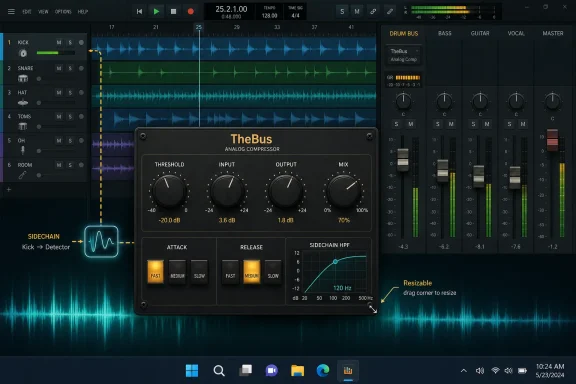
That practical answer matters more than the usual freeware excitement. TheBus is not a giant bundle, not a paid product in disguise, and not a plugin that asks users to learn a new ecosystem before compressing a drum bus. It is a compact analog-style compressor with a focused control set: Threshold, Input, Output, Mix, three Attack settings, three Release settings, a sidechain high-pass filter up to 500 Hz, and external sidechain support where the host DAW allows it. According to Tomislav Zlatic’s July 8, 2026 report for Bedroom Producers Blog, the plugin is available for macOS and Windows through Analog Obsession’s Patreon page and is distributed at no cost.
For WindowsForum readers, the key point is specific: TheBus gives Windows 10 and Windows 11 audio users another no-cost dynamics option in the formats that matter today. VST3 covers the broad Windows DAW world. AAX Native/Audiosuite covers Pro Tools users. There is no need to hunt for an old VST2 build, no reason to install AU on Windows because AU is a macOS format, and no reason to choose AAX unless the system actually runs Pro Tools.
The most useful thing about TheBus is not that it is free. Free audio plugins are everywhere, and many of them are either experiments, novelty effects, abandoned utilities, or entry points into paid product lines. TheBus is more interesting because it appears designed for a common job that Windows producers and engineers repeat constantly: making grouped sounds behave like one performance without spending ten minutes tuning a compressor.
Bus compression is often described with the word glue, and although that term is overused, the workflow need is real. On a drum bus, the goal might be to make the kick, snare, toms, overheads, and room channels feel less like disconnected tracks and more like one kit. On a percussion bus, the goal might be density and movement. On a mix bus, the goal might be gentle level control without making the whole production feel flattened. On a podcast or streaming session, the goal might be keeping a music bed or effects stem controlled while preserving enough energy to sound finished.
TheBus is built around that middle ground. Its controls are limited, but they are not toy-like. The plugin gives users direct access to the decisions that usually matter most: how hard the signal hits the compressor, where the compression begins, how fast it reacts, how fast it recovers, whether low frequencies dominate the detector, whether an external signal controls the compression, and how much compressed signal is blended back with the dry sound.
That is a practical design. A compressor with dozens of parameters can be powerful, but it can also slow down a session. A compressor with too few controls can be fast but inflexible. TheBus sits in the useful middle: simple enough to move quickly, but not so simple that users are locked out of common bus-compression techniques.
For Windows users working in crowded sessions, that matters. A typical production machine may already be running a DAW, virtual instruments, sample libraries, metering, reference players, browser tabs, cloud sync tools, interface software, and control-panel utilities. A compressor that can be understood at a glance has value because it reduces session friction. The point is not minimalism for its own sake. The point is getting from “this drum bus needs control” to “this drum bus works” with fewer detours.
That distinction is helpful for Windows producers who may not have the hardware reference points that plugin marketing often assumes. Many users working in FL Studio, Ableton Live, Cubase, Studio One, Reaper, Cakewalk, Pro Tools, or other Windows DAWs are not asking whether a free compressor reproduces a historically accurate circuit. They are asking whether it improves the drum bus, controls a mix bus without wrecking it, or gives a parallel-compression path without extra routing.
TheBus gives them a straightforward way to answer that question. Insert it on a bus, set the timing, bring down Threshold until gain reduction is audible, adjust Input if more drive or density is desired, use the sidechain high-pass filter if the low end is pulling the compressor too hard, and use Mix if full-wet compression is too much. That workflow is testable. If it helps the source faster than a generic stock compressor, keep it. If the source needs surgical control, advanced metering, detailed ratio choices, lookahead, multiband behavior, or transparent mastering-grade dynamics, use a different tool.
That is where TheBus can outperform a generic bus compressor: when the job calls for quick group control, simple timing choices, built-in parallel blending, sidechain filtering, and a bit of analog-style behavior from the Input stage. It is less likely to be the best choice when the job requires exact parameter recall across many ratios, highly transparent corrective compression, detailed mastering workflows, or complex dynamic shaping. In other words, TheBus is most interesting when speed, feel, and bus workflow matter more than surgical feature depth.
A 0.1 ms attack setting points toward immediate transient control. On a drum bus, that can clamp the front edge of hits and create a denser, more controlled sound. It can also reduce punch if pushed too hard, especially if the threshold is low and the compressor is working aggressively. This setting is worth trying when peaks are jumping out, when a percussion loop feels too spiky, or when parallel compression is the plan and the dry signal will be blended back in with the Mix knob.
The 10 ms and 30 ms attack options give transients more time to pass before the compressor fully reacts. Those settings are often better starting points when the user wants punch to remain intact. On drums, a slower attack can let the stick hit, kick click, or snare crack survive while the body of the sound gets controlled. On a mix bus, the slower settings are generally safer starting points because full-mix compression can become obvious quickly when the attack is too fast.
The release choices are similarly practical. A 50 ms release recovers quickly and can create more audible movement. It may suit rhythmic compression, parallel drum work, and sources where the compressor needs to reset rapidly. A 400 ms release sits in the middle and is a sensible first stop for many bus applications. An 800 ms release recovers more slowly and may work better when the goal is smooth, less obvious gain control.
The value of three-position controls is not that they are automatically better than continuous knobs. The value is that they enforce a fast listening workflow. Pick a timing family, adjust Threshold and Input, then decide whether the source improves. If it does not, move to the next clear timing choice. The design reduces fake precision, which is easy to fall into on a screen. A user can spend five minutes deciding between 11.6 ms and 13.2 ms without improving the mix. TheBus discourages that kind of drift.
That is especially relevant on Windows laptops and compact home-studio systems where screen space is already at a premium. A compressor that can be set quickly and left alone is more useful than a deeper processor that constantly pulls the user’s attention away from the track.
Threshold sets when compression starts. Input controls how hard the signal feeds the processor. Output lets the user level-match after compression. That last step is not glamorous, but it is essential. Compression can seem better simply because it is louder. Windows users auditioning TheBus against a DAW stock compressor should match output level before deciding which one actually helps the source.
The Input control is where users should be intentional. Analog-style compressors often become more interesting when driven, but drive is not automatically better. On drums, a little extra Input may add density and excitement. On a full mix, too much Input may make the compressor too active or make saturation artifacts more noticeable. On spoken-word material, heavy drive may exaggerate consonants, room tone, or background noise. The practical approach is simple: start conservatively, level-match with Output, and increase Input only when the added density improves the source rather than merely making it louder.
The sidechain high-pass filter is one of the most important controls on the plugin. A bus compressor reacts to what its detector hears. If the detector hears too much low-frequency energy, a kick, bass note, or floor tom can cause the whole bus to duck. Sometimes that is the desired effect. Often it is not. By raising the sidechain high-pass filter, users can reduce the influence of low frequencies on the compression behavior while leaving the audible signal path intact.
That is useful on Windows systems used for beat production, electronic music, rock, metal, podcast beds, livestream cues, and video editing. In all of those contexts, low-end energy can be disproportionate. A sidechain filter gives the user a way to keep the compressor from being dragged around by the biggest bass events in the session.
External sidechain support adds another layer, but Windows users should remember that routing depends on the DAW. A plugin can support external sidechain input and still require host-specific setup. In some DAWs, enabling a sidechain input is a button in the plugin wrapper. In others, it requires sends, bus routing, or track I/O configuration. Pro Tools users working with the AAX build will use Pro Tools sidechain workflows. VST3 users will use whatever their host exposes for VST3 sidechain routing.
The Mix knob completes the core bus-compression toolkit. Instead of duplicating tracks or building parallel routes, users can blend compressed and uncompressed signal inside the plugin. On drums, that can preserve transient snap while adding body. On a mix bus, it can make heavier compression usable by backing it away from full wet. On a podcast music bed, it can help maintain apparent density without making the bed feel crushed.
That is the shape of a practical tool: not every possible parameter, but the right ones for common bus work.
Oversampling is often used in plugins that involve nonlinear behavior because saturation and other nonlinear processing can generate harmonics above the available digital bandwidth. If those harmonics fold back into the audible range, users may hear aliasing artifacts. Oversampling can reduce that risk by running internal processing at a higher rate, but it usually costs more CPU and can sometimes add latency or complexity.
TheBus takes a simpler route: no oversampling, but embedded lightweight anti-aliasing. For a free bus compressor that may be used across multiple groups in a Windows session, that can be a reasonable priority. Low CPU use and low friction matter when a system is running virtual instruments, real-time monitoring, interface drivers, video playback, or livestream software.
The practical recommendation is straightforward. Keep Input conservative when TheBus is on a full mix, a bright drum bus, cymbal-heavy material, distorted guitars, aggressive synths, or anything with sharp transients. If the plugin is being used mainly for gentle glue, there is little reason to drive it hard. Let the compressor work, level-match the output, and avoid treating Input as an automatic “better” knob.
Audition more carefully when pushing Input for saturated compression. Listen for brittle high-frequency edges, gritty cymbal decay, unnatural fizz, or artifacts that appear only when the plugin is driven. If the artifacts help the production, they may be part of the sound. If they make the source feel smaller, harsher, or less stable, back off Input, use more Mix blending, or choose a processor with oversampling options for that specific task.
That framing is more useful than turning oversampling into a checklist item. The absence of oversampling does not automatically mean a plugin sounds bad. It means users should treat TheBus as a fast, musical bus compressor rather than a processor designed around multiple render-quality modes and deep technical configuration.
Display scaling on Windows can vary widely. One user may be running a 1080p laptop. Another may be using a 4K monitor at 150% scaling. Another may have a dual-monitor setup where the DAW lives on one display and meters, video, chat, or reference material live on another. Fixed-size plugin interfaces can become annoying quickly in those environments. A resizable GUI is easier to fit into dense sessions and easier to read on high-resolution screens.
TheBus also has enough controls that layout clarity matters. Threshold, Input, Output, Mix, sidechain filtering, external sidechain behavior, attack, and release all have to fit into a small visual space. Users should not expect a giant mastering-console interface. The appeal is the opposite: a compact processor that can sit on a bus and be adjusted quickly.
For accessibility and workflow, Windows users should verify that the plugin scales comfortably in their DAW before committing it to a template. Open it at the DAW’s normal display scaling, resize it, close and reopen the session, and confirm the interface remains usable. This is especially important for shared lab machines, teaching studios, or production rooms where multiple users may work at different monitor sizes.
The Windows choice is simple. Most Windows DAW users should install the VST3 build. That applies to common VST3-capable production workflows, including music production, mixing, podcast editing, and sound-design sessions in DAWs that scan VST3 plugins. VST3 is the normal choice unless the DAW specifically requires something else.
Pro Tools users should install the AAX build. AAX Native is the format used for real-time native Pro Tools plugin operation. Audiosuite support matters when users want offline processing inside Pro Tools. If a Windows system does not run Pro Tools, AAX is usually unnecessary and only adds clutter.
Windows users should not look for AU. Audio Units are for macOS, not Windows. They should also avoid assuming that every older DAW will load TheBus. If the DAW does not support VST3 or AAX, TheBus may not appear. Before installing, users should verify three things: the machine is running Windows 10 or Windows 11, the DAW supports VST3 or Pro Tools AAX, and the user has permission to install plugins into the relevant system or user plugin location.
That last point matters in managed environments. Schools, churches, production labs, podcast studios, and shared edit suites often run Windows accounts without full administrative access. A free plugin can still require approval, scanning, documentation, and backup. If a session later depends on TheBus, the team needs to know where the installer came from, which format was installed, and how to restore the setup on another machine.
The absence of a Windows CPU-support row in the table is intentional. The verified release information identifies Windows 10 and Windows 11 support and the plugin formats, but it does not need a speculative CPU claim. Windows users should simply verify compatibility on the actual target machine and DAW before using TheBus in mission-critical sessions.
TheBus fits that pattern. It is free, compact, and available in modern Windows plugin formats. It is not positioned as a demo. It is not limited to a novelty use case. It belongs to the class of freeware that can reasonably be tested beside paid tools, provided users keep expectations clear.
That does not make commercial plugins irrelevant. Paid dynamics processors may offer deeper metering, oversampling choices, multiple detector modes, mid-side operation, preset libraries, more extensive documentation, formal support, and predictable update policies. Those things matter in professional environments. But not every session needs that level of complexity. Sometimes the better tool is the one that delivers useful bus control quickly and gets out of the way.
For WindowsForum readers, this is where the operating-system angle becomes sharper. Windows audio rigs vary more than many users admit. A tuned desktop with an RME or Focusrite interface, large buffer options, and a dedicated audio drive is not the same as a laptop running a USB mic, Bluetooth peripherals, cloud storage, Wi-Fi, and several background apps. Lightweight plugins can make a real difference on the second kind of system. A small compressor that does not invite heavy CPU overhead is useful when the goal is stable playback, low-latency monitoring, or a smooth livestream.
TheBus should still be handled like any other production dependency. Download it from the developer’s Patreon page, keep a copy of the installer or archive if licensing and distribution terms allow, document the installed format, and test it in the DAW before relying on it in a paid session or classroom image. Freeware can be excellent, but deployment should be boring and repeatable.
On a drum bus, TheBus is worth trying when the kit feels disconnected or too spiky. Start with a slower attack such as 10 ms or 30 ms if punch matters, then try 400 ms release as a middle-ground recovery setting. Lower Threshold until the bus starts to pull together, then use Output to level-match. If the low end makes the compressor pump too much, raise the sidechain high-pass filter. If the compressed sound is exciting but too heavy, use Mix to blend it back.
On a percussion loop, TheBus may work well when the source needs density and movement. A faster attack and faster release can create a more controlled, energetic feel, especially when the dry signal remains present through the Mix control. This is a good case for parallel compression because the user can push the compressor harder without committing to a fully crushed sound.
On a mix bus, TheBus should be approached more conservatively. Start with a slower attack, moderate or slow release, low gain reduction, and restrained Input. The goal is not to make the plugin obvious. The goal is to find out whether it makes the mix feel slightly more unified without reducing impact or changing the balance in an unwanted way. If level-matched bypass does not make the processed version clearly preferable, remove it. A mix-bus compressor should earn its place.
For parallel compression, TheBus has an advantage over stock compressors that lack a built-in wet/dry control. Users can drive the compressor harder, then blend the result to taste without duplicating tracks or building a separate return path. That is especially useful for drums, percussion, room mics, aggressive synth groups, and sound-design buses.
For ducking and sidechain movement, TheBus is useful only if the DAW makes external sidechain routing accessible. Windows users should test this before planning a session around it. If the host exposes sidechain input cleanly, TheBus can be used for music-under-voice ducking, kick-triggered bass movement, or rhythmic gain control. If the host does not expose sidechain routing clearly, a DAW-native compressor may be faster for that job.
Sometimes that pump is desirable. In dance music and stylized production, obvious movement can be part of the arrangement. But on a drum bus or mix bus, uncontrolled low-end triggering can make compression feel unstable. The sidechain high-pass filter gives the user a way to tell the compressor not to overreact to the bottom end.
The upper range of 500 Hz is broad enough to matter. It lets users move beyond simply ignoring sub-bass and into shaping how much lower-mid energy drives compression. Used carefully, it can keep a bus compressor from being dragged around by the thickest elements in a mix.
A practical starting method is simple. Insert TheBus on the drum bus or mix bus with conservative compression. If each kick hit makes the entire bus dip too much, raise the sidechain high-pass filter until the compression reacts more evenly. If the result becomes too detached from the groove, back the filter down. The point is not to remove low-frequency influence completely. The point is to stop the loudest low-end events from making every compression decision.
For Windows creators working across music, podcasting, streaming, and video production, that flexibility matters. The same compressor might glue drums in one session, tame a music bed under narration in another, and add parallel density to a percussion loop in a third.
For most Windows users, VST3 is the correct build. It is the format to choose for most modern DAWs that support third-party VST3 plugins. Install AAX only for Pro Tools. Installing both is not usually harmful, but it can create unnecessary clutter, especially on shared machines.
After installation, open the DAW and force a plugin rescan if TheBus does not appear automatically. Then load it on an audio track or bus, not just on an empty project where no signal reaches it. Confirm that audio passes, the interface opens correctly, resizing works, the plugin can be saved in a session, and the session reloads with settings intact.
If using external sidechain, test that separately. Create a simple routing scenario, such as a kick track feeding the sidechain input of TheBus on a bass or music-bed track. Confirm that the compressor reacts to the external signal rather than only to the inserted track. Because sidechain workflows vary by DAW, this should be verified before relying on TheBus for a livestream, client mix, class demonstration, or template.
For managed Windows environments, treat TheBus like any other production tool. Record the plugin version if visible, the download source, the installed format, and the DAWs where it was tested. If machines are imaged or restored regularly, make sure the plugin is included in the deployment plan or documented as a post-install step.
A second test is parallel compression. Push Threshold and Input harder than usual on a drum or percussion bus, then lower Mix until the compressed signal adds density without swallowing the original transient impact. This is one of the fastest ways to hear whether TheBus brings something useful that a generic compressor does not.
A third test is gentle mix-bus control. Use a slower attack, moderate or slow release, conservative Input, and small amounts of gain reduction. Match Output carefully. If the mix feels slightly more cohesive without losing punch, TheBus may deserve a spot. If the result is simply louder, flatter, or harsher, remove it.
For sidechain work, test with a clear use case: music ducking under narration, bass ducking around kick, or rhythmic compression from a ghost trigger. If the DAW’s routing is quick and reliable, TheBus can serve as a simple creative sidechain compressor. If routing is cumbersome, a native DAW compressor may still be the better practical choice.
Windows audio users should avoid installing every available format just because it is there. Install VST3 for VST3-capable DAWs. Install AAX for Pro Tools. Do not install macOS formats on Windows. Do not assume an older DAW will see the plugin unless it supports one of the listed Windows formats. If the plugin does not appear after installation, the first troubleshooting steps are to confirm the correct format, rescan the plugin database, check the DAW’s plugin paths, and verify that the operating system is Windows 10 or Windows 11.
Users should also test session recall. Insert TheBus, adjust controls, save the project, close the DAW, reopen the project, and confirm that the settings return correctly. That simple step can prevent problems later, especially before adding the plugin to templates or shared sessions.
For streamers and live users, stability testing matters even more. A compressor used in a live chain should be tested at the intended sample rate and buffer size, with the same interface and background applications used during production. TheBus may be lightweight, but the full system still determines reliability. A Windows machine running OBS, a DAW, browser sources, chat tools, virtual instruments, and interface software can behave differently than a clean offline mixing session.
For educators and lab admins, the guidance is similar: test once, document clearly, deploy consistently. Freeware should not mean undocumented. If a class project or shared template uses TheBus, every machine should have the same format installed and the same DAW scan behavior confirmed.
That makes it a good candidate for repeated, practical tasks. Drum bus needs cohesion? Try TheBus. Percussion loop needs density? Try TheBus. Mix bus needs a small amount of movement? Try TheBus carefully. Music bed needs ducking under narration and the DAW supports sidechain routing? Try TheBus. Need exact ratio control, deep metering, oversampling options, or highly transparent corrective compression? Reach for something else.
That is a healthy place for a free plugin to live. The best freeware does not have to do everything. It has to do enough of one useful thing that users keep it installed.
For Windows users, TheBus is also a reminder that the Windows production environment has matured into a broad, flexible audio platform. The important releases are not only expensive instruments, giant sample libraries, or subscription effects bundles. Sometimes the meaningful release is a small utility that fits the way people actually work: insert, listen, adjust, level-match, move on.
TheBus deserves attention for that reason. It gives Windows 10 and Windows 11 users a no-cost bus-compression option in VST3 and AAX formats, with a compact control set that maps to real mixing tasks. It is not the answer to every dynamics problem, and users should test it carefully before putting it into critical templates. But for drums, mix-bus glue, parallel compression, and sidechain-controlled movement, it is exactly the kind of focused freeware tool that can make a Windows DAW setup more capable without making it more complicated.
That practical answer matters more than the usual freeware excitement. TheBus is not a giant bundle, not a paid product in disguise, and not a plugin that asks users to learn a new ecosystem before compressing a drum bus. It is a compact analog-style compressor with a focused control set: Threshold, Input, Output, Mix, three Attack settings, three Release settings, a sidechain high-pass filter up to 500 Hz, and external sidechain support where the host DAW allows it. According to Tomislav Zlatic’s July 8, 2026 report for Bedroom Producers Blog, the plugin is available for macOS and Windows through Analog Obsession’s Patreon page and is distributed at no cost.
For WindowsForum readers, the key point is specific: TheBus gives Windows 10 and Windows 11 audio users another no-cost dynamics option in the formats that matter today. VST3 covers the broad Windows DAW world. AAX Native/Audiosuite covers Pro Tools users. There is no need to hunt for an old VST2 build, no reason to install AU on Windows because AU is a macOS format, and no reason to choose AAX unless the system actually runs Pro Tools.
 TheBus Is a Free Compressor, but Its Real Product Is Decision Speed
The most useful thing about TheBus is not that it is free. Free audio plugins are everywhere, and many of them are either experiments, novelty effects, abandoned utilities, or entry points into paid product lines. TheBus is more interesting because it appears designed for a common job that Windows producers and engineers repeat constantly: making grouped sounds behave like one performance without spending ten minutes tuning a compressor.Bus compression is often described with the word glue, and although that term is overused, the workflow need is real. On a drum bus, the goal might be to make the kick, snare, toms, overheads, and room channels feel less like disconnected tracks and more like one kit. On a percussion bus, the goal might be density and movement. On a mix bus, the goal might be gentle level control without making the whole production feel flattened. On a podcast or streaming session, the goal might be keeping a music bed or effects stem controlled while preserving enough energy to sound finished.
TheBus is built around that middle ground. Its controls are limited, but they are not toy-like. The plugin gives users direct access to the decisions that usually matter most: how hard the signal hits the compressor, where the compression begins, how fast it reacts, how fast it recovers, whether low frequencies dominate the detector, whether an external signal controls the compression, and how much compressed signal is blended back with the dry sound.
That is a practical design. A compressor with dozens of parameters can be powerful, but it can also slow down a session. A compressor with too few controls can be fast but inflexible. TheBus sits in the useful middle: simple enough to move quickly, but not so simple that users are locked out of common bus-compression techniques.
For Windows users working in crowded sessions, that matters. A typical production machine may already be running a DAW, virtual instruments, sample libraries, metering, reference players, browser tabs, cloud sync tools, interface software, and control-panel utilities. A compressor that can be understood at a glance has value because it reduces session friction. The point is not minimalism for its own sake. The point is getting from “this drum bus needs control” to “this drum bus works” with fewer detours.
Analog Obsession Keeps the Design Focused
Analog Obsession describes TheBus as a custom compressor rather than a clone or variation of a specific hardware unit. That is useful information, but it does not need to become mythology. The important part is not that TheBus avoids one famous reference box. The important part is that users should judge it by what it does in a session rather than by whether its faceplate hints at a specific piece of vintage gear.That distinction is helpful for Windows producers who may not have the hardware reference points that plugin marketing often assumes. Many users working in FL Studio, Ableton Live, Cubase, Studio One, Reaper, Cakewalk, Pro Tools, or other Windows DAWs are not asking whether a free compressor reproduces a historically accurate circuit. They are asking whether it improves the drum bus, controls a mix bus without wrecking it, or gives a parallel-compression path without extra routing.
TheBus gives them a straightforward way to answer that question. Insert it on a bus, set the timing, bring down Threshold until gain reduction is audible, adjust Input if more drive or density is desired, use the sidechain high-pass filter if the low end is pulling the compressor too hard, and use Mix if full-wet compression is too much. That workflow is testable. If it helps the source faster than a generic stock compressor, keep it. If the source needs surgical control, advanced metering, detailed ratio choices, lookahead, multiband behavior, or transparent mastering-grade dynamics, use a different tool.
That is where TheBus can outperform a generic bus compressor: when the job calls for quick group control, simple timing choices, built-in parallel blending, sidechain filtering, and a bit of analog-style behavior from the Input stage. It is less likely to be the best choice when the job requires exact parameter recall across many ratios, highly transparent corrective compression, detailed mastering workflows, or complex dynamic shaping. In other words, TheBus is most interesting when speed, feel, and bus workflow matter more than surgical feature depth.
The Three-Position Timing Controls Are the Point, Not a Compromise
TheBus’s most opinionated design choice is its simplified Attack and Release section. Attack offers 0.1 ms, 10 ms, and 30 ms. Release offers 50 ms, 400 ms, and 800 ms. That is not a lot of numbers, but it covers the basic timing vocabulary most users need when compressing a bus.A 0.1 ms attack setting points toward immediate transient control. On a drum bus, that can clamp the front edge of hits and create a denser, more controlled sound. It can also reduce punch if pushed too hard, especially if the threshold is low and the compressor is working aggressively. This setting is worth trying when peaks are jumping out, when a percussion loop feels too spiky, or when parallel compression is the plan and the dry signal will be blended back in with the Mix knob.
The 10 ms and 30 ms attack options give transients more time to pass before the compressor fully reacts. Those settings are often better starting points when the user wants punch to remain intact. On drums, a slower attack can let the stick hit, kick click, or snare crack survive while the body of the sound gets controlled. On a mix bus, the slower settings are generally safer starting points because full-mix compression can become obvious quickly when the attack is too fast.
The release choices are similarly practical. A 50 ms release recovers quickly and can create more audible movement. It may suit rhythmic compression, parallel drum work, and sources where the compressor needs to reset rapidly. A 400 ms release sits in the middle and is a sensible first stop for many bus applications. An 800 ms release recovers more slowly and may work better when the goal is smooth, less obvious gain control.
The value of three-position controls is not that they are automatically better than continuous knobs. The value is that they enforce a fast listening workflow. Pick a timing family, adjust Threshold and Input, then decide whether the source improves. If it does not, move to the next clear timing choice. The design reduces fake precision, which is easy to fall into on a screen. A user can spend five minutes deciding between 11.6 ms and 13.2 ms without improving the mix. TheBus discourages that kind of drift.
That is especially relevant on Windows laptops and compact home-studio systems where screen space is already at a premium. A compressor that can be set quickly and left alone is more useful than a deeper processor that constantly pulls the user’s attention away from the track.
The Control Set Is Small, but It Covers the Real Bus-Compression Jobs
TheBus does not stop at timing. The reported control set includes Threshold, Input, Output, a sidechain high-pass filter up to 500 Hz, external sidechain support, and a Mix knob. That is a concise list, but it covers the decisions that matter in everyday bus work.Threshold sets when compression starts. Input controls how hard the signal feeds the processor. Output lets the user level-match after compression. That last step is not glamorous, but it is essential. Compression can seem better simply because it is louder. Windows users auditioning TheBus against a DAW stock compressor should match output level before deciding which one actually helps the source.
The Input control is where users should be intentional. Analog-style compressors often become more interesting when driven, but drive is not automatically better. On drums, a little extra Input may add density and excitement. On a full mix, too much Input may make the compressor too active or make saturation artifacts more noticeable. On spoken-word material, heavy drive may exaggerate consonants, room tone, or background noise. The practical approach is simple: start conservatively, level-match with Output, and increase Input only when the added density improves the source rather than merely making it louder.
The sidechain high-pass filter is one of the most important controls on the plugin. A bus compressor reacts to what its detector hears. If the detector hears too much low-frequency energy, a kick, bass note, or floor tom can cause the whole bus to duck. Sometimes that is the desired effect. Often it is not. By raising the sidechain high-pass filter, users can reduce the influence of low frequencies on the compression behavior while leaving the audible signal path intact.
That is useful on Windows systems used for beat production, electronic music, rock, metal, podcast beds, livestream cues, and video editing. In all of those contexts, low-end energy can be disproportionate. A sidechain filter gives the user a way to keep the compressor from being dragged around by the biggest bass events in the session.
External sidechain support adds another layer, but Windows users should remember that routing depends on the DAW. A plugin can support external sidechain input and still require host-specific setup. In some DAWs, enabling a sidechain input is a button in the plugin wrapper. In others, it requires sends, bus routing, or track I/O configuration. Pro Tools users working with the AAX build will use Pro Tools sidechain workflows. VST3 users will use whatever their host exposes for VST3 sidechain routing.
The Mix knob completes the core bus-compression toolkit. Instead of duplicating tracks or building parallel routes, users can blend compressed and uncompressed signal inside the plugin. On drums, that can preserve transient snap while adding body. On a mix bus, it can make heavier compression usable by backing it away from full wet. On a podcast music bed, it can help maintain apparent density without making the bed feel crushed.
That is the shape of a practical tool: not every possible parameter, but the right ones for common bus work.
No Oversampling Is the Trade-Off Windows Users Should Notice
TheBus does not use oversampling, while Analog Obsession says it includes embedded lightweight anti-aliasing. That is not a reason to panic, and it is not a reason to ignore the detail. It is a practical engineering trade-off that users should understand.Oversampling is often used in plugins that involve nonlinear behavior because saturation and other nonlinear processing can generate harmonics above the available digital bandwidth. If those harmonics fold back into the audible range, users may hear aliasing artifacts. Oversampling can reduce that risk by running internal processing at a higher rate, but it usually costs more CPU and can sometimes add latency or complexity.
TheBus takes a simpler route: no oversampling, but embedded lightweight anti-aliasing. For a free bus compressor that may be used across multiple groups in a Windows session, that can be a reasonable priority. Low CPU use and low friction matter when a system is running virtual instruments, real-time monitoring, interface drivers, video playback, or livestream software.
The practical recommendation is straightforward. Keep Input conservative when TheBus is on a full mix, a bright drum bus, cymbal-heavy material, distorted guitars, aggressive synths, or anything with sharp transients. If the plugin is being used mainly for gentle glue, there is little reason to drive it hard. Let the compressor work, level-match the output, and avoid treating Input as an automatic “better” knob.
Audition more carefully when pushing Input for saturated compression. Listen for brittle high-frequency edges, gritty cymbal decay, unnatural fizz, or artifacts that appear only when the plugin is driven. If the artifacts help the production, they may be part of the sound. If they make the source feel smaller, harsher, or less stable, back off Input, use more Mix blending, or choose a processor with oversampling options for that specific task.
That framing is more useful than turning oversampling into a checklist item. The absence of oversampling does not automatically mean a plugin sounds bad. It means users should treat TheBus as a fast, musical bus compressor rather than a processor designed around multiple render-quality modes and deep technical configuration.
The Interface Is Resizable, Which Matters on Windows
Zlatic’s Bedroom Producers Blog report notes that TheBus has a resizable interface from 50% to 200% using the handle in the bottom-right corner. That is a practical Windows feature, not a cosmetic footnote.Display scaling on Windows can vary widely. One user may be running a 1080p laptop. Another may be using a 4K monitor at 150% scaling. Another may have a dual-monitor setup where the DAW lives on one display and meters, video, chat, or reference material live on another. Fixed-size plugin interfaces can become annoying quickly in those environments. A resizable GUI is easier to fit into dense sessions and easier to read on high-resolution screens.
TheBus also has enough controls that layout clarity matters. Threshold, Input, Output, Mix, sidechain filtering, external sidechain behavior, attack, and release all have to fit into a small visual space. Users should not expect a giant mastering-console interface. The appeal is the opposite: a compact processor that can sit on a bus and be adjusted quickly.
For accessibility and workflow, Windows users should verify that the plugin scales comfortably in their DAW before committing it to a template. Open it at the DAW’s normal display scaling, resize it, close and reopen the session, and confirm the interface remains usable. This is especially important for shared lab machines, teaching studios, or production rooms where multiple users may work at different monitor sizes.
Windows Gets the Formats That Matter, but Users Still Need to Choose Correctly
For Windows users, TheBus is available for Windows 10 and Windows 11 in VST3 and AAX Native/Audiosuite formats. For macOS users, it is available for macOS 10.11 or higher in VST3, AU, and AAX Native/Audiosuite formats, with Intel and Apple Silicon support. The download is reported to be around 10 MB and is distributed through Analog Obsession’s Patreon page.| Platform | Supported OS | Plugin formats | Distribution | Download size |
|---|---|---|---|---|
| Windows | Windows 10 and Windows 11 | VST3, AAX Native/Audiosuite | Analog Obsession’s Patreon page | Around 10 MB |
| macOS | macOS 10.11 or higher | VST3, AU, AAX Native/Audiosuite | Analog Obsession’s Patreon page | Around 10 MB |
Pro Tools users should install the AAX build. AAX Native is the format used for real-time native Pro Tools plugin operation. Audiosuite support matters when users want offline processing inside Pro Tools. If a Windows system does not run Pro Tools, AAX is usually unnecessary and only adds clutter.
Windows users should not look for AU. Audio Units are for macOS, not Windows. They should also avoid assuming that every older DAW will load TheBus. If the DAW does not support VST3 or AAX, TheBus may not appear. Before installing, users should verify three things: the machine is running Windows 10 or Windows 11, the DAW supports VST3 or Pro Tools AAX, and the user has permission to install plugins into the relevant system or user plugin location.
That last point matters in managed environments. Schools, churches, production labs, podcast studios, and shared edit suites often run Windows accounts without full administrative access. A free plugin can still require approval, scanning, documentation, and backup. If a session later depends on TheBus, the team needs to know where the installer came from, which format was installed, and how to restore the setup on another machine.
The absence of a Windows CPU-support row in the table is intentional. The verified release information identifies Windows 10 and Windows 11 support and the plugin formats, but it does not need a speculative CPU claim. Windows users should simply verify compatibility on the actual target machine and DAW before using TheBus in mission-critical sessions.
Freeware Has Become Part of the Windows Audio Stack
There was a time when free audio plugins were treated as disposable. Users downloaded them, tried them, kept one or two oddities, and moved on. That era has changed. Freeware now occupies a real place in Windows audio workflows, especially for independent musicians, bedroom producers, streamers, educators, podcast teams, and small studios.TheBus fits that pattern. It is free, compact, and available in modern Windows plugin formats. It is not positioned as a demo. It is not limited to a novelty use case. It belongs to the class of freeware that can reasonably be tested beside paid tools, provided users keep expectations clear.
That does not make commercial plugins irrelevant. Paid dynamics processors may offer deeper metering, oversampling choices, multiple detector modes, mid-side operation, preset libraries, more extensive documentation, formal support, and predictable update policies. Those things matter in professional environments. But not every session needs that level of complexity. Sometimes the better tool is the one that delivers useful bus control quickly and gets out of the way.
For WindowsForum readers, this is where the operating-system angle becomes sharper. Windows audio rigs vary more than many users admit. A tuned desktop with an RME or Focusrite interface, large buffer options, and a dedicated audio drive is not the same as a laptop running a USB mic, Bluetooth peripherals, cloud storage, Wi-Fi, and several background apps. Lightweight plugins can make a real difference on the second kind of system. A small compressor that does not invite heavy CPU overhead is useful when the goal is stable playback, low-latency monitoring, or a smooth livestream.
TheBus should still be handled like any other production dependency. Download it from the developer’s Patreon page, keep a copy of the installer or archive if licensing and distribution terms allow, document the installed format, and test it in the DAW before relying on it in a paid session or classroom image. Freeware can be excellent, but deployment should be boring and repeatable.
Where TheBus Is Likely to Beat a Generic Bus Compressor
TheBus is most likely to outperform a generic bus compressor when the user needs fast, musical bus control rather than detailed corrective dynamics. Its advantage is the combination of simple timing, Input drive, sidechain filtering, external sidechain support, and Mix blending.On a drum bus, TheBus is worth trying when the kit feels disconnected or too spiky. Start with a slower attack such as 10 ms or 30 ms if punch matters, then try 400 ms release as a middle-ground recovery setting. Lower Threshold until the bus starts to pull together, then use Output to level-match. If the low end makes the compressor pump too much, raise the sidechain high-pass filter. If the compressed sound is exciting but too heavy, use Mix to blend it back.
On a percussion loop, TheBus may work well when the source needs density and movement. A faster attack and faster release can create a more controlled, energetic feel, especially when the dry signal remains present through the Mix control. This is a good case for parallel compression because the user can push the compressor harder without committing to a fully crushed sound.
On a mix bus, TheBus should be approached more conservatively. Start with a slower attack, moderate or slow release, low gain reduction, and restrained Input. The goal is not to make the plugin obvious. The goal is to find out whether it makes the mix feel slightly more unified without reducing impact or changing the balance in an unwanted way. If level-matched bypass does not make the processed version clearly preferable, remove it. A mix-bus compressor should earn its place.
For parallel compression, TheBus has an advantage over stock compressors that lack a built-in wet/dry control. Users can drive the compressor harder, then blend the result to taste without duplicating tracks or building a separate return path. That is especially useful for drums, percussion, room mics, aggressive synth groups, and sound-design buses.
For ducking and sidechain movement, TheBus is useful only if the DAW makes external sidechain routing accessible. Windows users should test this before planning a session around it. If the host exposes sidechain input cleanly, TheBus can be used for music-under-voice ducking, kick-triggered bass movement, or rhythmic gain control. If the host does not expose sidechain routing clearly, a DAW-native compressor may be faster for that job.
The Sidechain Filter Is the Quiet Professional Feature
Among TheBus’s controls, the sidechain high-pass filter up to 500 Hz may be the easiest to overlook and the easiest to appreciate once used. In bus compression, low-frequency energy can dominate the detector circuit. A kick drum, bass note, or floor tom can trigger gain reduction that affects the entire bus, causing cymbals, guitars, vocals, ambience, or room sound to dip in sympathy.Sometimes that pump is desirable. In dance music and stylized production, obvious movement can be part of the arrangement. But on a drum bus or mix bus, uncontrolled low-end triggering can make compression feel unstable. The sidechain high-pass filter gives the user a way to tell the compressor not to overreact to the bottom end.
The upper range of 500 Hz is broad enough to matter. It lets users move beyond simply ignoring sub-bass and into shaping how much lower-mid energy drives compression. Used carefully, it can keep a bus compressor from being dragged around by the thickest elements in a mix.
A practical starting method is simple. Insert TheBus on the drum bus or mix bus with conservative compression. If each kick hit makes the entire bus dip too much, raise the sidechain high-pass filter until the compression reacts more evenly. If the result becomes too detached from the groove, back the filter down. The point is not to remove low-frequency influence completely. The point is to stop the loudest low-end events from making every compression decision.
For Windows creators working across music, podcasting, streaming, and video production, that flexibility matters. The same compressor might glue drums in one session, tame a music bed under narration in another, and add parallel density to a percussion loop in a third.
What Windows 10 and Windows 11 Users Should Verify Before Installing
Before installing TheBus, Windows users should verify the basics. First, confirm the machine is running Windows 10 or Windows 11. Second, confirm the DAW supports VST3 or Pro Tools AAX. Third, decide which format is actually needed. Fourth, confirm that the user account has permission to install plugins and that the DAW is configured to scan the relevant plugin location.For most Windows users, VST3 is the correct build. It is the format to choose for most modern DAWs that support third-party VST3 plugins. Install AAX only for Pro Tools. Installing both is not usually harmful, but it can create unnecessary clutter, especially on shared machines.
After installation, open the DAW and force a plugin rescan if TheBus does not appear automatically. Then load it on an audio track or bus, not just on an empty project where no signal reaches it. Confirm that audio passes, the interface opens correctly, resizing works, the plugin can be saved in a session, and the session reloads with settings intact.
If using external sidechain, test that separately. Create a simple routing scenario, such as a kick track feeding the sidechain input of TheBus on a bass or music-bed track. Confirm that the compressor reacts to the external signal rather than only to the inserted track. Because sidechain workflows vary by DAW, this should be verified before relying on TheBus for a livestream, client mix, class demonstration, or template.
For managed Windows environments, treat TheBus like any other production tool. Record the plugin version if visible, the download source, the installed format, and the DAWs where it was tested. If machines are imaged or restored regularly, make sure the plugin is included in the deployment plan or documented as a post-install step.
What to Do Now
Windows users who want to try TheBus should take a straightforward path.- Go to Analog Obsession’s Patreon page and download TheBus from the developer’s official distribution post.
- Choose the Windows VST3 build for most DAWs.
- Choose the Windows AAX Native/Audiosuite build only for Pro Tools.
- Install the selected format.
- Open the DAW, rescan plugins if needed, and confirm TheBus appears in the compressor or dynamics list.
- Insert it on a bus with real audio passing through it.
- Level-match Output against bypass before deciding whether it improves the source.
A second test is parallel compression. Push Threshold and Input harder than usual on a drum or percussion bus, then lower Mix until the compressed signal adds density without swallowing the original transient impact. This is one of the fastest ways to hear whether TheBus brings something useful that a generic compressor does not.
A third test is gentle mix-bus control. Use a slower attack, moderate or slow release, conservative Input, and small amounts of gain reduction. Match Output carefully. If the mix feels slightly more cohesive without losing punch, TheBus may deserve a spot. If the result is simply louder, flatter, or harsher, remove it.
For sidechain work, test with a clear use case: music ducking under narration, bass ducking around kick, or rhythmic compression from a ghost trigger. If the DAW’s routing is quick and reliable, TheBus can serve as a simple creative sidechain compressor. If routing is cumbersome, a native DAW compressor may still be the better practical choice.
The Windows Installation Question Is Boring, Which Is Why It Matters
TheBus is distributed directly from Analog Obsession’s Patreon page and is reported as a small download of around 10 MB. That is refreshingly light in a market where installers and content libraries can become huge. But small does not mean operationally trivial.Windows audio users should avoid installing every available format just because it is there. Install VST3 for VST3-capable DAWs. Install AAX for Pro Tools. Do not install macOS formats on Windows. Do not assume an older DAW will see the plugin unless it supports one of the listed Windows formats. If the plugin does not appear after installation, the first troubleshooting steps are to confirm the correct format, rescan the plugin database, check the DAW’s plugin paths, and verify that the operating system is Windows 10 or Windows 11.
Users should also test session recall. Insert TheBus, adjust controls, save the project, close the DAW, reopen the project, and confirm that the settings return correctly. That simple step can prevent problems later, especially before adding the plugin to templates or shared sessions.
For streamers and live users, stability testing matters even more. A compressor used in a live chain should be tested at the intended sample rate and buffer size, with the same interface and background applications used during production. TheBus may be lightweight, but the full system still determines reliability. A Windows machine running OBS, a DAW, browser sources, chat tools, virtual instruments, and interface software can behave differently than a clean offline mixing session.
For educators and lab admins, the guidance is similar: test once, document clearly, deploy consistently. Freeware should not mean undocumented. If a class project or shared template uses TheBus, every machine should have the same format installed and the same DAW scan behavior confirmed.
TheBus Is Not a Replacement for Every Compressor, and That Is Fine
TheBus should not be treated as a universal dynamics solution. It does not need to replace a DAW’s stock compressor, a transparent mastering compressor, a multiband dynamics processor, a limiter, or a surgical utility compressor. Its likely role is narrower and more useful: fast bus compression with simple timing, blend control, sidechain filtering, and optional external sidechain behavior.That makes it a good candidate for repeated, practical tasks. Drum bus needs cohesion? Try TheBus. Percussion loop needs density? Try TheBus. Mix bus needs a small amount of movement? Try TheBus carefully. Music bed needs ducking under narration and the DAW supports sidechain routing? Try TheBus. Need exact ratio control, deep metering, oversampling options, or highly transparent corrective compression? Reach for something else.
That is a healthy place for a free plugin to live. The best freeware does not have to do everything. It has to do enough of one useful thing that users keep it installed.
For Windows users, TheBus is also a reminder that the Windows production environment has matured into a broad, flexible audio platform. The important releases are not only expensive instruments, giant sample libraries, or subscription effects bundles. Sometimes the meaningful release is a small utility that fits the way people actually work: insert, listen, adjust, level-match, move on.
TheBus deserves attention for that reason. It gives Windows 10 and Windows 11 users a no-cost bus-compression option in VST3 and AAX formats, with a compact control set that maps to real mixing tasks. It is not the answer to every dynamics problem, and users should test it carefully before putting it into critical templates. But for drums, mix-bus glue, parallel compression, and sidechain-controlled movement, it is exactly the kind of focused freeware tool that can make a Windows DAW setup more capable without making it more complicated.
References
- Primary source: Bedroom Producers Blog
Published: 2026-07-08T14:38:08.375586
Loading…
bedroomproducersblog.com