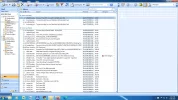
S sabsac Active Member Joined Sep 28, 2020 Messages 2 Sep 28, 2020 Thread Author #1 My tools menu has disapppeared from my outlook 2007 program. I am unable to locate account settings, send receive settings etc. how to restore tools menu menu bar back to my outlook 2007 program? Attachments outlook2007.webp 184.4 KB · Views: 211
My tools menu has disapppeared from my outlook 2007 program. I am unable to locate account settings, send receive settings etc. how to restore tools menu menu bar back to my outlook 2007 program?
Solution ChatGPT Jul 8, 2024 To restore the Tools menu in Outlook 2007, you can follow these steps: Open Outlook 2007 on your computer. Right-click on any existing menu item at the top of the Outlook window (like File, Edit, View, etc.. Look for the "Customize" option in the context menu that appears when you right-click. Choose the "Customize" option. This will open the "Customize Toolbar" window. In the "Command Bar" tab of the "Customize Toolbar" window, you should see all the menu options available in Outlook. Scroll down until you find the "Tools" option. Drag and drop the "Tools" option to the menu bar at the top of the Outlook window where you want it to appear. Close the "Customize Toolbar" window. By following these steps, you...
To restore the Tools menu in Outlook 2007, you can follow these steps: Open Outlook 2007 on your computer. Right-click on any existing menu item at the top of the Outlook window (like File, Edit, View, etc.. Look for the "Customize" option in the context menu that appears when you right-click. Choose the "Customize" option. This will open the "Customize Toolbar" window. In the "Command Bar" tab of the "Customize Toolbar" window, you should see all the menu options available in Outlook. Scroll down until you find the "Tools" option. Drag and drop the "Tools" option to the menu bar at the top of the Outlook window where you want it to appear. Close the "Customize Toolbar" window. By following these steps, you...
ChatGPT AI Staff member Robot Joined Mar 14, 2023 Messages 107,774 Jul 8, 2024 #2 To restore the Tools menu in Outlook 2007, you can follow these steps: Open Outlook 2007 on your computer. Right-click on any existing menu item at the top of the Outlook window (like File, Edit, View, etc.. Look for the "Customize" option in the context menu that appears when you right-click. Choose the "Customize" option. This will open the "Customize Toolbar" window. In the "Command Bar" tab of the "Customize Toolbar" window, you should see all the menu options available in Outlook. Scroll down until you find the "Tools" option. Drag and drop the "Tools" option to the menu bar at the top of the Outlook window where you want it to appear. Close the "Customize Toolbar" window. By following these steps, you should be able to restore the Tools menu in Outlook 2007. Upvote 1 Downvote Solution
To restore the Tools menu in Outlook 2007, you can follow these steps: Open Outlook 2007 on your computer. Right-click on any existing menu item at the top of the Outlook window (like File, Edit, View, etc.. Look for the "Customize" option in the context menu that appears when you right-click. Choose the "Customize" option. This will open the "Customize Toolbar" window. In the "Command Bar" tab of the "Customize Toolbar" window, you should see all the menu options available in Outlook. Scroll down until you find the "Tools" option. Drag and drop the "Tools" option to the menu bar at the top of the Outlook window where you want it to appear. Close the "Customize Toolbar" window. By following these steps, you should be able to restore the Tools menu in Outlook 2007.