

Gartner’s warning that Microsoft 365 Copilot carries five specific security risks arrived as a stark reminder that the promise of embedded, enterprise-grade AI does not erase long‑standing data governance problems — it magnifies them. The research, published by Gartner in August 2025 and reiterated in conference sessions through 2026, identifies a compact set of failure modes where Copilot’s deep integration with Microsoft Graph, Teams, SharePoint, OneDrive and Outlook can turn convenience into exposure if organizations don’t act now.
Microsoft 365 Copilot is sold as an embedded productivity assistant that leverages organizational data and Microsoft Graph to summarize documents, draft messages, generate insights and, increasingly, run agentic workflows on behalf of users. That tight integration is what makes Copilot powerful — and what creates unique attack surfaces that differ materially from traditional SaaS or desktop tooling. Gartner’s “Top 5 Microsoft 365 Copilot Security Risks and Mitigation Controls” distills those surfaces into focused categories security teams should prioritize before broad rollouts.
The advisory is not theoretical. Over the past 18 months security incidents and researcher disclosures have illustrated many of the very risks Gartner highlights: a zero‑click exfiltration chain called “EchoLeak” (CVE‑2025‑32711) demonstrated how prompt injection and retrieval‑augmented generation (RAG) components can be abused to leak data without user interaction; and a configuration/logic bug (tracked by Microsoft as CW1226324) allowed Copilot Chat to summarize emails that organizations had explicitly labeled confidential, effectively bypassing DLP and sensitivity labels for a window of time. These are real, documented failures that underline Gartner’s urgency.
Below I unpack each risk, link the categories to real incidents or research when available, and provide practical mitigation steps enterprises can adopt immediately.
Forum and community telemetry also tracked these incidents closely, with thread‑level breakdowns, timelines and vendor advisory references preserved in community archives and incident timelines. Those community artifacts are useful for practitioners reconciling incident windows, remediation status and detection guidance.
Two notes of caution:
If your organization is deploying Copilot, prioritize a three‑week sprint: lock indexing, inventory permissions, quarantine external content, and enforce label inheritance. Then shift to a longer program to vet connectors, segment automation, and instrument detection. The technical fixes from vendors are necessary but insufficient; true safety requires tenant governance, tooling and continuous testing.
Gartner’s warning is not a call to abandon Copilot — it’s a call to stop treating AI as an app you turn on and forget. Well‑designed AI can accelerate work, but only if security teams treat these assistants as new, persistent attack surfaces that demand the same rigor and investment we apply to identity, data protection and supply‑chain security.
Conclusion: rapid adoption without governance will compound exposure. The prudent path is not to delay AI indefinitely, but to pair acceleration with immediate, prioritized security work — exactly the posture Gartner says organizations must take now.
Source: WinBuzzer Gartner Flags Five Microsoft 365 Copilot Security Risks
 Background
Microsoft 365 Copilot is sold as an embedded productivity assistant that leverages organizational data and Microsoft Graph to summarize documents, draft messages, generate insights and, increasingly, run agentic workflows on behalf of users. That tight integration is what makes Copilot powerful — and what creates unique attack surfaces that differ materially from traditional SaaS or desktop tooling. Gartner’s “Top 5 Microsoft 365 Copilot Security Risks and Mitigation Controls” distills those surfaces into focused categories security teams should prioritize before broad rollouts.The advisory is not theoretical. Over the past 18 months security incidents and researcher disclosures have illustrated many of the very risks Gartner highlights: a zero‑click exfiltration chain called “EchoLeak” (CVE‑2025‑32711) demonstrated how prompt injection and retrieval‑augmented generation (RAG) components can be abused to leak data without user interaction; and a configuration/logic bug (tracked by Microsoft as CW1226324) allowed Copilot Chat to summarize emails that organizations had explicitly labeled confidential, effectively bypassing DLP and sensitivity labels for a window of time. These are real, documented failures that underline Gartner’s urgency.
Overview: the five risks Gartner flags
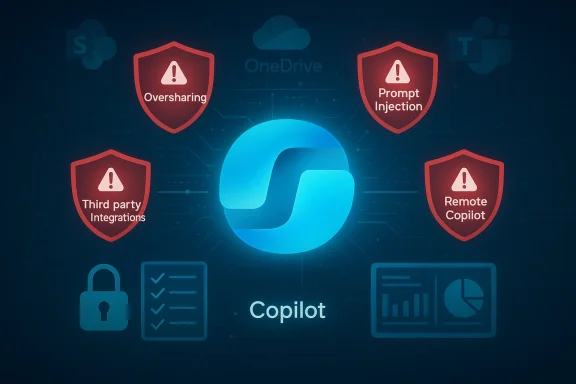
Gartner frames the Copilot problem set around five interrelated risks. The research itself sits behind Gartner’s paywall, but its core themes have been corroborated by public briefings and conference summaries: Oversharing / Over‑permissioned content, Prompt injection and RAG abuse (including zero‑click chains), Remote Copilot execution and automation misuse, Data sprawl and new-content protection gaps, and Third‑party/telemetry and integration supply‑chain risk. Each risk amplifies the others in real deployments, and Gartner and practitioners advise treating them as a combined program of controls rather than isolated fixes.Below I unpack each risk, link the categories to real incidents or research when available, and provide practical mitigation steps enterprises can adopt immediately.
1. Oversharing: the permission model mismatch
What Gartner means by “oversharing”
Copilot accesses content the same way a signed‑in user can: it follows links, reads documents, and synthesizes content across SharePoint, OneDrive and Teams. This is functionally sensible — the assistant should be able to surface files the user can already access — but it exposes an uncomfortable truth: many tenants have large volumes of over‑permissioned content (broad‑shared files, stale external links, broken inheritance) that are discoverable by an AI that can crawl a mailbox or a team channel. Gartner calls this the oversharing risk: AI makes latent permission errors visible and actionable at scale.Why it matters now
When Copilot synthesizes a mailbox or project folder it can quickly aggregate fragments from many sources. If even one of those sources is overly permissive, sensitive material can be surfaced in summarized outputs. Vendors and analysts documented the same dynamic when Microsoft’s Copilot bug returned content marked “Confidential” from Drafts and Sent items — the tool adhered to the user’s access surface rather than to an organization’s desired protective posture.Practical mitigations
- Inventory and remediate permission sprawl: run automated discovery to find guest‑accessible sites, broadly shared links, and broken inheritance. Prioritize high‑risk libraries (finance, HR, legal).
- Apply least privilege and reduce default sharing; limit external sharing at tenancy and site levels.
- Use sensitivity labeling and enforce labeling inheritance for Copilot‑created content where possible.
- Require Copilot‑related prompts to be constrained by tenant‑level guardrails (policy blocks for broad scans).
2. Prompt injection, RAG abuse and zero‑click exfiltration
The risk in plain language
Copilot’s ability to ingest context from documents and then generate answers depends on RAG: the model retrieves relevant documents and uses them to ground outputs. If an attacker can influence that retrieval pipeline — by embedding malicious instructions in documents or by crafting content that bypasses filters — they can induce Copilot to leak secrets, reveal unrelated content, or execute flows that reveal data. EchoLeak is an exemplar of this class: a chained, zero‑click attack that exploited retrieval behavior and content handling to extract data without victim interaction.Real‑world corroboration
Security researchers and multiple news outlets documented EchoLeak and other prompt‑injection patterns. Windows Central, Tom’s Guide and other outlets have covered follow‑on exploits and vendor patches that prove these are not hypothetical. Microsoft patched several classes of these vulnerabilities and updated its content‑fetching and XPIA classifiers, but researchers keep finding bypasses, underlining the pragmatic difficulty of securing RAG at scale.Mitigations and engineering controls
- Harden retrieval: ensure strict link redaction, validate document sources before indexing, and implement aggressive IOCs for content that includes executable or instruction‑like payloads.
- Enforce administrative controls: restrict Copilot indexing to explicitly approved content collections and block indexing of external guest or public files.
- Use runtime prompt sanitization and add an independent policy engine to evaluate outputs for exfiltration risk.
- Treat RAG content as a first‑class threat vector in threat modeling and red‑team exercises.
3. Remote Copilot execution (RCE redefined)
What Gartner is spotlighting
Traditionally “remote code execution” (RCE) is an attacker‑initiated exploit that runs arbitrary code on a target host. Gartner warns that with agentic assistants, a functional analogue appears: remote Copilot execution — the ability for an external actor or a crafted input to cause Copilot to take actions across systems (trigger flows, send messages, or run connectors) that lead to data leakage or unauthorized operations. In environments where Copilot is connected to Power Automate, Copilot Studio, or custom connectors, an exploitation chain can have the reach of an RCE.Evidence and examples
Vendor advisories and security advisories from 2025–2026 repeatedly note that connectors and automation frameworks expanded the attack surface. Research into “Reprompt” and “RoguePilot” style exploits shows how malformed inputs can cause Copilot to take actions that were not intended by administrators, especially when connectors expose elevated privileges. Community telemetry and red‑team findings also show attacker creativity in using social engineering and API parameters to feed malicious prompts to Copilot instances.Recommended countermeasures
- Apply least privilege to connectors and bot/service accounts used by Copilot agents.
- Implement explicit allowlists for actions Copilot can perform via automation (deny by default).
- Separate sensitive automation (payroll, HR workflows) into isolated tenants or conditional access zones not reachable by Copilot.
- Monitor and alert on anomalous Copilot‑initiated flows and history of agent actions.
4. Data sprawl and newly created content lacking protection
The problem
Copilot doesn’t just read data — it writes it. Generated content (summaries, draft documents, meeting notes) may not automatically inherit sensitivity labels, retention settings, or DLP policies in the same way human‑created documents do. Gartner warns that new content generation without inherited protections creates a persistent, invisible increase in exposure: Copilot can create derivative documents that leak sensitive facts, and those derivatives can proliferate without governance.Why this is a governance failure, not a feature bug
Even when source documents are labeled, downstream outputs can escape the protection model — either because labels aren’t applied on generation, metadata isn’t persisted, or automation pipelines publish to unscoped locations. This gap is visible in incident post‑mortems where Copilot‑created summaries ended up in places unprotected by DLP or retention policies.Mitigations
- Require label inheritance: configure Copilot and associated connectors to apply sensitivity labels to generated artifacts automatically.
- Force generated content into designated, monitored containers (e.g., a secure SharePoint library) that enforce DLP and retention.
- Treat Copilot outputs as regulated artifacts in compliance workflows: require human review for outputs that reference regulated data categories.
- Expand audit logging to include generation metadata (who asked, what data was retrieved, what was created).
5. Third‑party integrations, telemetry and supply‑chain risks
The risk surface
Copilot’s ecosystem includes connectors, plugins, Copilot Studio extensions and telemetry pipelines that carry logs, routing data and usage metadata. Gartner highlights the danger that third‑party integrations or overly‑broad telemetry collection can exfiltrate or reveal sensitive metadata — or introduce code with weaker security practices. Misconfigured connectors or compromised plugins effectively extend the tenant trust boundary beyond organizational control.Real examples and cautionary notes
Industry reporting and practitioner commentary have repeatedly warned about plugin and connector risk. Even when the core Copilot service is secure, an insecure third‑party connector or a misconfigured Power Platform connector can provide an entry point. Organizations should also be aware that metadata (audit logs, routing records, prompts) can be as revealing as the content itself. Several vendor advisories encourage careful vetting of Copilot connectors and stricter telemetry controls.Actions to take
- Enforce a strict supply‑chain review for any connector, plugin or Copilot Studio component before approval.
- Limit telemetry fields sent to the cloud; anonymize or truncate where compliance requires.
- Use managed identity and certificate‑based authentication for connectors; avoid long‑lived secrets embedded in connectors.
- Maintain a hard denylist for third‑party code or connectors that request elevated Graph scopes.
Cross‑validation: what the incidents prove
Gartner’s five risks are not academic: incidents and research over the past year map directly to them. The EchoLeak research demonstrates prompt injection plus RAG abuse (risk #2) leading to zero‑click exfiltration. Microsoft’s CW1226324 advisory — where Copilot Chat summarized confidential emails in Drafts and Sent Items — is a clear example of oversharing/permission mismatch and content protection gaps (risks #1 and #4). Public reporting from multiple outlets and independent research groups corroborate those events; Microsoft acknowledged the bugs and issued patches and configuration updates.Forum and community telemetry also tracked these incidents closely, with thread‑level breakdowns, timelines and vendor advisory references preserved in community archives and incident timelines. Those community artifacts are useful for practitioners reconciling incident windows, remediation status and detection guidance.
Critical analysis: strengths, limits and residual risk
Where Gartner’s framing helps
Gartner’s value here is practical focus. By packaging Copilot risk into five clear areas, the research gives CISOs a tractable playbook: fix permissions, harden retrieval, segment automation, enforce labeling, and vet integrations. Those priorities align with broader zero‑trust and least‑privilege principles and map cleanly to operational controls security teams already use. The research’s continued coverage at Gartner conferences shows the firm sees these controls as urgent priorities for 2025–2026.Where the recommendations may fall short
- Paywall and practitioner access: the full Gartner research is behind subscription walls, which limits direct access for many frontline engineers. Summaries and conference sessions help, but there’s a knowledge‑equity problem for smaller teams.
- The adversary moves faster than policy: incident research demonstrates creative bypasses of classifiers and redaction logic. Technical fixes on Microsoft’s side can mitigate classes of issues, but attackers and researchers find new chains. That means residual risk remains high unless organizations adopt layered, tenant‑local mitigations.
- Operational complexity: many mitigation recommendations (permission inventories, automated label inheritance, connector hardening) require significant time and tooling investment. Smaller IT shops will struggle unless Microsoft provides simpler admin experience or partners offer turnkey solutions.
Residual risk and what keeps me up at night
Even with aggressive mitigations, some residual risk persists:- Legacy content with unknown sharing posture will be discoverable by an assistant unless quarantined.
- Agentic workflows with broad scopes are fundamentally attractive to attackers because they can act autonomously and at scale.
- Telemetry and metadata leakage remain underappreciated as attack vectors: logs, prompt histories and agent routing can reveal business secrets.
A practical 10‑point Copilot security checklist for IT teams
- Run a permissions audit focused on SharePoint, Teams and OneDrive; fix external guest and broad share links first.
- Restrict Copilot indexing to approved content collections only.
- Apply mandatory sensitivity labeling to Copilot‑generated artifacts; enforce label inheritance.
- Harden retrieval pipeline: enable link redaction and sanitize external content before indexing.
- Apply least‑privilege scopes to connectors and managed identities used by Copilot agents.
- Implement a policy engine to scan Copilot outputs for regulated data types before publishing.
- Isolate critical automation (HR/payroll) from Copilot‑driven agent access.
- Vet and approve third‑party connectors with a formal supply‑chain checklist.
- Expand audit logging to capture prompt provenance, retrieved sources and agent actions; feed these logs to SIEM.
- Red‑team Copilot workflows regularly and include RAG/prompt‑injection tests in tabletop exercises.
What vendors (including Microsoft) are doing and where gaps remain
Microsoft has moved quickly to address several concrete failures: patches for EchoLeak‑class vulnerabilities, updates to Copilot’s content fetching and XPIA classifiers, and administrative controls for indexing and connector scopes. Microsoft also publishes Copilot security guidance and a set of responsible AI controls that aim to map risk to mitigation. However, architecture-level limitations — tenant permission sprawl, third‑party integrations, and operational adoption — remain customer responsibilities. That’s precisely why Gartner’s research insists on a tenant‑side program of controls.Two notes of caution:
- Fixes at the cloud provider level can’t retroactively correct poor tenant governance.
- Even where vendor patches close a particular vulnerability, the underlying pattern (RAG + prompt injection + automation connectors) continues to present future attack vectors that require continuous monitoring.
How to prioritize remediation in your organization
- Triage by data sensitivity: Start with the repositories that house regulated and high‑value content. Fix sharing and apply labeling there first.
- Lock down indexing: Disable tenant‑wide Copilot indexing until you’ve scanned and remediated your top‑risk content areas.
- Harden connectors and automation: Apply defaults that deny high‑impact actions and require explicit admin approvals.
- Implement monitoring and detection: Add SIEM rules to detect unusual Copilot‑initiated flows, sudden bulk retrievals, or creation of new content in unprotected folders.
- Educate users: Train employees on what not to ask Copilot (no secret keys, no PII queries) and publish a simple internal Copilot use policy.
Final assessment and next steps
Gartner’s “Top 5” characterization is valuable because it compresses an otherwise sprawling attack surface into operational priorities: permissions, retrieval, execution, generation and integrations. The last 18 months of research and incidents show the guidance is grounded in reality — EchoLeak and the CW1226324 behavior are textbook examples of the risks Gartner names. Practitioners should treat those five risk categories as a combined, strategic program: each control strengthens the others and reduces the avenues an attacker can use to weaponize Copilot in a tenant.If your organization is deploying Copilot, prioritize a three‑week sprint: lock indexing, inventory permissions, quarantine external content, and enforce label inheritance. Then shift to a longer program to vet connectors, segment automation, and instrument detection. The technical fixes from vendors are necessary but insufficient; true safety requires tenant governance, tooling and continuous testing.
Gartner’s warning is not a call to abandon Copilot — it’s a call to stop treating AI as an app you turn on and forget. Well‑designed AI can accelerate work, but only if security teams treat these assistants as new, persistent attack surfaces that demand the same rigor and investment we apply to identity, data protection and supply‑chain security.
Conclusion: rapid adoption without governance will compound exposure. The prudent path is not to delay AI indefinitely, but to pair acceleration with immediate, prioritized security work — exactly the posture Gartner says organizations must take now.
Source: WinBuzzer Gartner Flags Five Microsoft 365 Copilot Security Risks
