Windows 10 Troubleshooting Access to Data on an Old Time Computer's Hard Drives

NettleWarbler

Banned
Joined
Mar 25, 2016
Messages
636
I have an old Time (make computer ) , i put it in the old cupboard downstairs . It was working , i tried it yesterday and couldn't load windows . How can i see whats on the hard drives they are ribbon fitting's which i removed .
 

Solution
I don’t know what make of computer you mean but assuming it’s not damaged and working, you‘d need to plug it into a compatible interface in order to try and receive data. There are IDE to USB adapters (I’m assuming that’s the cable type you’re talking about, if not you’d need to look into something else) that you can use to open it on a more modern computer. I have never used this myself though.

Meowkatt

Member
Joined
Dec 12, 2021
Messages
47
I don’t know what make of computer you mean but assuming it’s not damaged and working, you‘d need to plug it into a compatible interface in order to try and receive data. There are IDE to USB adapters (I’m assuming that’s the cable type you’re talking about, if not you’d need to look into something else) that you can use to open it on a more modern computer. I have never used this myself though.
 

Solution

ussnorway

Windows Forum Team
Staff member
Joined
May 22, 2012
Messages
4,597
in a worse case senario you can remove the harddrive and plug that into another working system to read the files... most computer shops will do this for you if you don't know how
 

NettleWarbler

Banned
Joined
Mar 25, 2016
Messages
636
Time PCs were pretty popular in the uk 20 years ago , lots of computer mags sold them . My hard drive was 40GB ( i think that was the size , it was the largest around , the price was £14-50 pretty dear ) .
 

Meowkatt

Member
Joined
Dec 12, 2021
Messages
47
So, like i said I don’t think it’ll be compatible with a modern motherboard. I don’t believe motherboard manufacturers still add old port compatibility from something that old. So you’l need an adapter to act as an interface to use it on a newer system as the current ones wouldn’t be compatible. Or you can do as Norway said and bring it to a computer shop, they should be able to help you out.

I did have a look just to confirm the hard-drive type, so I can tell you definitely what cable you’d need but I couldn’t find details on the models of these computers online.
 

NettleWarbler

Banned
Joined
Mar 25, 2016
Messages
636
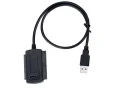
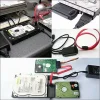
Something like that

(ide cables, Only Cable) Usb 2.0 To 2.5" 3.5" Cable For Hard Drive Disk Pata Ide Drive Converter Adapter , it is a bad photo though .​


Attachments

  • Capture.webp
    Capture.webp
    11.9 KB · Views: 85

Meowkatt

Member
Joined
Dec 12, 2021
Messages
47
Check the port on the storage. Or send a picture of the label on the storage. This should let you use it on a modern device, providing its working.
 

NettleWarbler

Banned
Joined
Mar 25, 2016
Messages
636
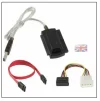
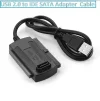
How about that USB 2.0 to IDE SATA 5.25 S-ATA/3.5/2.5 Adapter Cable UK seller, there's a few cheap one's from China . i'll give them a miss it'll be the dark night's again before that get's here .
 

Attachments

  • Capture.webp
    Capture.webp
    11.2 KB · Views: 79

NettleWarbler

Banned
Joined
Mar 25, 2016
Messages
636
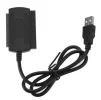
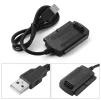
Or this , USB 2.0 to SATA/IDE Converter HDD Cable for 2.5''/3.5'' Hard Drive CD DVD RW Rom
 

Attachments

  • usb 1.webp
    usb 1.webp
    46.3 KB · Views: 77
  • usb 2.webp
    usb 2.webp
    69.7 KB · Views: 86
  • usb 3.webp
    usb 3.webp
    123.1 KB · Views: 87
  • usb.webp
    usb.webp
    68.6 KB · Views: 78

NettleWarbler

Banned
Joined
Mar 25, 2016
Messages
636
It does mention 3.5'' Hard Drive port on the storage , i'll chance it . I don't know when that will be though .
 

krunker

New Member
Joined
Jan 24, 2022
Messages
1
Hello. You can double-click the hard drive's letter from the right pane's Hard Disk Drives section to view the drive's contents. To view files within folders, double-click the folder.

krunker
 

ussnorway

Windows Forum Team
Staff member
Joined
May 22, 2012
Messages
4,597
In both cases the plug is designed to only go in one way
A serial drive (older type) has two rows of plugs but the middle hole is blocked so a pin can't go in if you have it upside down

A sata plug is L shaped

Usb plugs have a plastic tag to stop them being upside down until someone realised that was dum and now type 3 Usb plugs can just be pushed in either way

Sent from my Nokia X20 using Windows Forums mobile app
 

NettleWarbler

Banned
Joined
Mar 25, 2016
Messages
636
I don't know what you mean it's all foriegn to me type 3 Usb plugs can just be pushed in either way .
 

NettleWarbler

Banned
Joined
Mar 25, 2016
Messages
636
I have a l'esprit digital camera , i got with the time computer I did like it it was very easy to use . The camera is here but i must have mislaid the cd , The time computer system & driver cd is here would i be able to take the software from that .
 

ussnorway

Windows Forum Team
Staff member
Joined
May 22, 2012
Messages
4,597
have a look on their webpage for a driver \ software if its not on your cd
 

NettleWarbler

Banned
Joined
Mar 25, 2016
Messages
636
I tried a while ago got a site with drivers , its the desktop app I need . This site could be helpful .https://archive.org/details/digitaldream-for-lesprit-digital-cameras
 

Back
Top