

TWM Solicitors has rolled out roughly 240 10ZiG Windows IoT LTSC thin clients across three Surrey offices as part of a migration from Microsoft Remote Desktop Services to Azure Virtual Desktop, pairing cloud-hosted desktops with centrally managed endpoint hardware for its 240 staff. The move is not just another customer win in the virtual desktop market. It is a useful snapshot of where mid-sized professional services IT is heading: away from locally significant PCs, but not away from endpoints that matter. The desktop may now live in Azure, but the device on the desk still decides whether Monday morning feels modern or miserable.
For years, the desktop modernization pitch has implied a kind of vanishing act. Move applications into the cloud, centralize the operating environment, and the endpoint becomes little more than glass, keyboard, and network card. That idea is attractive because it removes the messiest part of Windows support: hundreds of individual machines, each with its own patch history, driver drift, local data risk, and mysterious user-installed oddities.
TWM’s deployment shows the more complicated truth. The endpoint becomes less important as a compute platform, but more important as the reliable doorway into everything else. If Azure Virtual Desktop is the office, the thin client is the front door; nobody praises it when it opens smoothly, but everyone notices when it sticks.
That is why the firm’s choice of Windows IoT LTSC thin clients rather than generic PCs or a pure zero-client model matters. TWM needed devices that could run Windows drivers for SpeechWrite digital dictation software, support dual 24-inch monitors at full resolution, and handle collaboration traffic for Microsoft Teams and Zoom. In other words, the endpoint was being stripped of user data and local desktop complexity, not of operational responsibility.
This distinction is especially important in legal IT, where the user experience is shaped by details that rarely appear in cloud architecture diagrams. Dictation peripherals, video calls, multi-monitor document review, remote access, and line-of-business practice management tools all need to work together. If any one of those breaks, the cloud migration is judged not by its architecture but by the solicitor who cannot dictate a note or join a client call.
TWM’s project was broader than a device refresh. The firm moved from Microsoft Remote Desktop Services to Azure Virtual Desktop, shifted back-end infrastructure into Azure, upgraded to Microsoft 365, introduced new practice management software, and standardized dual-monitor desks. That is not a thin-client rollout with a bit of cloud attached; it is a desktop and infrastructure redesign in which the endpoint was one component of a larger bet.
The appeal is easy to understand. On-premises Remote Desktop Services has served many organizations well, but it carries the familiar burdens of capacity planning, hardware refresh cycles, resilience engineering, and maintenance windows that land heavily on small IT teams. Azure Virtual Desktop changes the center of gravity by making session hosts, images, scaling, and access part of a cloud operating model.
But AVD does not make complexity disappear. It moves complexity into identity, networking, image management, storage, licensing, monitoring, application compatibility, and cost control. TWM’s four-person IT team spent months on the overhaul, which is a useful corrective to any vendor slide that suggests virtual desktop transformation is mostly a matter of turning on a service.
TWM is a textbook example of that gravitational pull. The firm’s software stack was already largely Microsoft-oriented, and the migration to Microsoft 365 and Azure made AVD the natural desktop virtualization platform. Once identity, productivity, and infrastructure are already in Microsoft’s orbit, keeping the desktop there reduces the number of strategic seams IT has to manage.
That does not mean AVD is a simple replacement for every RDS estate. The economics are different, the operational model is different, and performance tuning becomes a cloud discipline rather than a server-room habit. Costs that were once hidden inside depreciating hardware and sunk capital expenditure become visible as monthly consumption.
For finance directors, that visibility is both a feature and a warning. TWM wanted to reduce capital spending and move toward predictable operating costs, but cloud predictability is earned through governance. Session hosts left running unnecessarily are not an abstraction; they are a bill.
Microsoft provides the platform, but many organizations still want additional tooling to make AVD practical at scale. Nerdio has built a business around that gap, giving administrators more direct control over image handling, automation, scaling, cost management, and day-to-day operations. For a four-person IT team supporting a full legal practice, that kind of operational leverage is often the difference between a clever architecture and a survivable one.
This is not a criticism of AVD so much as a recognition of reality. Enterprise platforms create ecosystems precisely because the platform owner cannot solve every workflow at the level every customer wants. The same pattern has played out across security, endpoint management, backup, observability, and cloud governance.
In TWM’s case, the goal was to avoid paying for unused compute while still giving staff responsive desktops during working hours. That is the cloud bargain in miniature. You gain elasticity, but only if something is watching demand closely enough to turn elasticity into savings.
The 10ZiG devices are configured to launch AVD sessions and hold no local user data. That matters in a legal environment where lost data, compromised endpoints, and uncontrolled local storage are not merely inconveniences. If a device fails, it can be replaced without recovering user data or reinstalling a full software stack.
That model reduces one class of endpoint risk, though it does not eliminate endpoint security as a discipline. A thin client still has firmware, an operating system, network exposure, peripheral access, and a management plane. If anything, central management becomes more important because a fleet of “simple” devices can still become a fleet of unmanaged liabilities if patching and configuration drift are neglected.
The choice of Windows IoT LTSC reflects this trade-off. A Linux-based endpoint might be leaner, but Windows IoT gives organizations better compatibility with Windows-only drivers and peripherals. TWM’s SpeechWrite requirement is exactly the kind of edge case that turns theoretical endpoint minimalism into a practical compatibility decision.
TWM’s deployment of dual monitors across desks is more than a comfort upgrade. Legal work often involves comparing documents, reviewing correspondence, checking case management records, and participating in calls while taking notes. A single-screen setup can technically function, but it imposes a productivity tax that users feel every day.
The thin client, then, is not a retreat from rich workspaces. It is an attempt to deliver a rich workspace through a more controlled device. Local resources still matter for video and audio optimization, and the endpoint has to handle enough of the collaboration load to keep calls from becoming a virtual desktop horror show.
This is where cloud desktop projects often succeed or fail in perception. Users do not care whether Teams optimization is architecturally elegant; they care whether the call works. They do not care whether profiles roam correctly in theory; they care whether their documents, settings, and applications are where they expect them to be when they log in.
The firm worked with 10ZiG before shipment to create a standard image with the required software, drivers, and settings. The devices arrived ready to connect to the network, reducing the amount of configuration work during installation. That kind of preparation is unglamorous, but it is the difference between a weekend migration and a week of user disruption.
There is a lesson here for any IT team tempted to see endpoint replacement as the easy part of cloud desktop migration. The physical work is real: unpacking machines, fitting monitor arms, assembling bases, connecting peripherals, removing old kit, and dealing with packaging and recycling. Cloud architecture does not lift monitors onto desks.
Alan Barrett’s remark about changing so many computers over a weekend and having everything work on Monday captures the credibility prize every IT team wants. Users may never understand the image pipeline or the host pool design. They will understand arriving after a major change and being able to work.
The more meaningful claim is not simply that the devices are inexpensive over their lifespan. It is that they require little day-to-day management, can be powered on and off remotely, patched centrally, and kept consistent across sites. Reduced engineer travel matters, especially for a small IT team spread across multiple offices.
Still, the full economics of AVD have to include more than thin-client amortization. Azure compute, storage, networking, identity licensing, Microsoft 365 licensing, backup, monitoring, third-party management tooling, support, and migration effort all sit somewhere in the model. A cheap endpoint does not automatically make a cloud desktop cheap.
What it can do is make the endpoint portion of the model more predictable. Traditional PCs age unevenly, accumulate support baggage, and often force refresh decisions around operating-system requirements or local performance. A locked-down thin client tied to a cloud desktop can have a longer and less eventful service life, assuming the vendor support window and peripheral requirements hold.
Endpoint management used to be a deeply physical activity for many regional organizations. Someone drove to a site, touched a machine, checked a setting, replaced a unit, installed a driver, or dealt with a local oddity that never quite matched the documentation. Remote management turns that into a central workflow, at least for the problems that can be solved remotely.
The strongest endpoint strategy is one that makes failure boring. If a unit dies, swap it. If a configuration needs changing, push it. If a device is out of policy, correct it. The less personality each endpoint has, the more time IT can spend on higher-value work.
That is the hidden promise behind Barrett’s comment that the burden of desktop management has “simply disappeared.” It has not disappeared in a metaphysical sense; someone still maintains images, policies, patches, and the cloud desktop stack. But the most tedious layer of individual PC babysitting has been compressed into something more standardized.
But the project succeeded, at least as described, because of old-fashioned IT discipline: clear requirements, hardware trials, standard images, preconfiguration, phased preparation, and careful cutover planning. Cloud did not replace those practices. It punished the project less because the team followed them.
This matters because mid-sized organizations often approach cloud desktop projects with either excessive fear or excessive optimism. The fearful view sees AVD as a complex service that will swamp a small IT team. The optimistic view sees it as a turnkey replacement for years of desktop and server sprawl. TWM’s deployment suggests a more realistic middle ground.
A small team can execute a major modernization if it narrows variation and uses the right partners. But it cannot skip the work of understanding applications, peripherals, user behavior, identity, and operational support. The cloud rewards standardization; it does not create it from nothing.
That gap between strategic language and operational reality is not a problem unique to 10ZiG, Microsoft, Nerdio, or TWM. It is the central tension in enterprise IT marketing. Vendors sell platforms; IT departments buy a reduction in pain.
The most persuasive part of this case study is not that it claims transformation. It is that the technical requirements were specific enough to be credible. Dual monitors. Windows drivers. Remote management. No local data. AVD sessions. Teams and Zoom support. A large weekend swap-out. These are the details that separate a real deployment from a glossy migration narrative.
For WindowsForum readers, that specificity is also where the practical value lies. The story is less about whether every organization should buy 10ZiG devices and more about how endpoint selection changes when the desktop is virtualized. The endpoint becomes a compatibility, security, manageability, and user-experience decision rather than a raw computing decision.
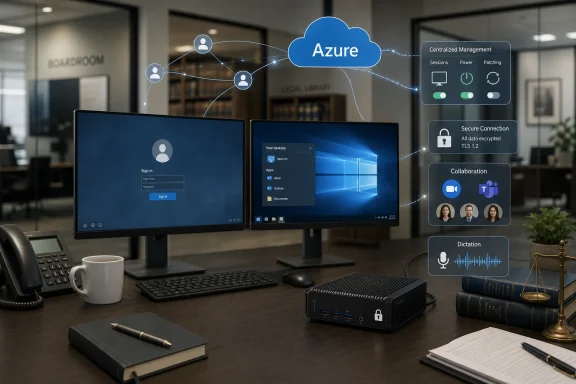 The Endpoint Did Not Disappear; It Changed Jobs
For years, the desktop modernization pitch has implied a kind of vanishing act. Move applications into the cloud, centralize the operating environment, and the endpoint becomes little more than glass, keyboard, and network card. That idea is attractive because it removes the messiest part of Windows support: hundreds of individual machines, each with its own patch history, driver drift, local data risk, and mysterious user-installed oddities.TWM’s deployment shows the more complicated truth. The endpoint becomes less important as a compute platform, but more important as the reliable doorway into everything else. If Azure Virtual Desktop is the office, the thin client is the front door; nobody praises it when it opens smoothly, but everyone notices when it sticks.
That is why the firm’s choice of Windows IoT LTSC thin clients rather than generic PCs or a pure zero-client model matters. TWM needed devices that could run Windows drivers for SpeechWrite digital dictation software, support dual 24-inch monitors at full resolution, and handle collaboration traffic for Microsoft Teams and Zoom. In other words, the endpoint was being stripped of user data and local desktop complexity, not of operational responsibility.
This distinction is especially important in legal IT, where the user experience is shaped by details that rarely appear in cloud architecture diagrams. Dictation peripherals, video calls, multi-monitor document review, remote access, and line-of-business practice management tools all need to work together. If any one of those breaks, the cloud migration is judged not by its architecture but by the solicitor who cannot dictate a note or join a client call.
A Law Firm Becomes a Cloud Case Study Because the Use Case Is Unforgiving
Law firms make good tests for desktop virtualization because their requirements are both ordinary and stubborn. Staff need Microsoft 365, document management, practice management software, secure access, printing, voice tools, and predictable performance across office and home working. None of that is exotic, but almost all of it is business-critical.TWM’s project was broader than a device refresh. The firm moved from Microsoft Remote Desktop Services to Azure Virtual Desktop, shifted back-end infrastructure into Azure, upgraded to Microsoft 365, introduced new practice management software, and standardized dual-monitor desks. That is not a thin-client rollout with a bit of cloud attached; it is a desktop and infrastructure redesign in which the endpoint was one component of a larger bet.
The appeal is easy to understand. On-premises Remote Desktop Services has served many organizations well, but it carries the familiar burdens of capacity planning, hardware refresh cycles, resilience engineering, and maintenance windows that land heavily on small IT teams. Azure Virtual Desktop changes the center of gravity by making session hosts, images, scaling, and access part of a cloud operating model.
But AVD does not make complexity disappear. It moves complexity into identity, networking, image management, storage, licensing, monitoring, application compatibility, and cost control. TWM’s four-person IT team spent months on the overhaul, which is a useful corrective to any vendor slide that suggests virtual desktop transformation is mostly a matter of turning on a service.
Microsoft Wins When the Desktop Becomes a Managed Pattern
The Microsoft logic behind Azure Virtual Desktop is straightforward: Windows remains the enterprise desktop standard, but the place where Windows runs is increasingly negotiable. AVD gives Microsoft a way to keep Windows central in organizations that are moving applications, files, identity, and management into cloud services. It also gives customers a route away from traditional Remote Desktop Services without abandoning the Windows ecosystem.TWM is a textbook example of that gravitational pull. The firm’s software stack was already largely Microsoft-oriented, and the migration to Microsoft 365 and Azure made AVD the natural desktop virtualization platform. Once identity, productivity, and infrastructure are already in Microsoft’s orbit, keeping the desktop there reduces the number of strategic seams IT has to manage.
That does not mean AVD is a simple replacement for every RDS estate. The economics are different, the operational model is different, and performance tuning becomes a cloud discipline rather than a server-room habit. Costs that were once hidden inside depreciating hardware and sunk capital expenditure become visible as monthly consumption.
For finance directors, that visibility is both a feature and a warning. TWM wanted to reduce capital spending and move toward predictable operating costs, but cloud predictability is earned through governance. Session hosts left running unnecessarily are not an abstraction; they are a bill.
Nerdio Is the Quiet Admission That Native Cloud Still Needs Operators
One of the more revealing details in the deployment is TWM’s use of Nerdio to manage session-host scaling during the day. Scaling is central to the AVD value proposition because the ability to match compute to demand is what separates cloud-hosted desktops from simply renting always-on servers in someone else’s data center. Yet the presence of a third-party management layer says something important about the state of the market.Microsoft provides the platform, but many organizations still want additional tooling to make AVD practical at scale. Nerdio has built a business around that gap, giving administrators more direct control over image handling, automation, scaling, cost management, and day-to-day operations. For a four-person IT team supporting a full legal practice, that kind of operational leverage is often the difference between a clever architecture and a survivable one.
This is not a criticism of AVD so much as a recognition of reality. Enterprise platforms create ecosystems precisely because the platform owner cannot solve every workflow at the level every customer wants. The same pattern has played out across security, endpoint management, backup, observability, and cloud governance.
In TWM’s case, the goal was to avoid paying for unused compute while still giving staff responsive desktops during working hours. That is the cloud bargain in miniature. You gain elasticity, but only if something is watching demand closely enough to turn elasticity into savings.
The Thin Client Revival Is Really a Security Story
Thin clients have been declared dead and reborn more times than most endpoint categories. Their pitch has shifted over the years from hardware cost savings to manageability, from manageability to energy use, and now increasingly to security. TWM’s rollout sits firmly in the security-and-operations phase of that evolution.The 10ZiG devices are configured to launch AVD sessions and hold no local user data. That matters in a legal environment where lost data, compromised endpoints, and uncontrolled local storage are not merely inconveniences. If a device fails, it can be replaced without recovering user data or reinstalling a full software stack.
That model reduces one class of endpoint risk, though it does not eliminate endpoint security as a discipline. A thin client still has firmware, an operating system, network exposure, peripheral access, and a management plane. If anything, central management becomes more important because a fleet of “simple” devices can still become a fleet of unmanaged liabilities if patching and configuration drift are neglected.
The choice of Windows IoT LTSC reflects this trade-off. A Linux-based endpoint might be leaner, but Windows IoT gives organizations better compatibility with Windows-only drivers and peripherals. TWM’s SpeechWrite requirement is exactly the kind of edge case that turns theoretical endpoint minimalism into a practical compatibility decision.
Hybrid Work Made the Desk Device More Political
Before the pandemic-era normalization of hybrid work, endpoint standardization was often treated as an internal IT efficiency project. Now it is also part of the employee experience. Staff expect the office setup, the home setup, and the remote desktop environment to behave consistently enough that work can move between them without ceremony.TWM’s deployment of dual monitors across desks is more than a comfort upgrade. Legal work often involves comparing documents, reviewing correspondence, checking case management records, and participating in calls while taking notes. A single-screen setup can technically function, but it imposes a productivity tax that users feel every day.
The thin client, then, is not a retreat from rich workspaces. It is an attempt to deliver a rich workspace through a more controlled device. Local resources still matter for video and audio optimization, and the endpoint has to handle enough of the collaboration load to keep calls from becoming a virtual desktop horror show.
This is where cloud desktop projects often succeed or fail in perception. Users do not care whether Teams optimization is architecturally elegant; they care whether the call works. They do not care whether profiles roam correctly in theory; they care whether their documents, settings, and applications are where they expect them to be when they log in.
The Weekend Swap-Out Is the Part Users Remember
TWM’s largest office in Guildford reportedly saw more than 100 machines and monitors replaced in a single day. That detail is easy to treat as project-color, but it may be the most important operational fact in the story. Infrastructure transformations are judged by their cutovers.The firm worked with 10ZiG before shipment to create a standard image with the required software, drivers, and settings. The devices arrived ready to connect to the network, reducing the amount of configuration work during installation. That kind of preparation is unglamorous, but it is the difference between a weekend migration and a week of user disruption.
There is a lesson here for any IT team tempted to see endpoint replacement as the easy part of cloud desktop migration. The physical work is real: unpacking machines, fitting monitor arms, assembling bases, connecting peripherals, removing old kit, and dealing with packaging and recycling. Cloud architecture does not lift monitors onto desks.
Alan Barrett’s remark about changing so many computers over a weekend and having everything work on Monday captures the credibility prize every IT team wants. Users may never understand the image pipeline or the host pool design. They will understand arriving after a major change and being able to work.
The £1-a-Week Desktop Is a Useful Number, Not the Whole Equation
TWM puts the device cost at about £450 per unit and estimates an eight- or nine-year lifespan, translating to roughly £50 a year, or about £1 a week. It is a tidy number, and it will resonate with anyone who has tried to justify endpoint refresh spending against the rising price of business laptops and small-form-factor PCs. But hardware cost is only one part of the endpoint equation.The more meaningful claim is not simply that the devices are inexpensive over their lifespan. It is that they require little day-to-day management, can be powered on and off remotely, patched centrally, and kept consistent across sites. Reduced engineer travel matters, especially for a small IT team spread across multiple offices.
Still, the full economics of AVD have to include more than thin-client amortization. Azure compute, storage, networking, identity licensing, Microsoft 365 licensing, backup, monitoring, third-party management tooling, support, and migration effort all sit somewhere in the model. A cheap endpoint does not automatically make a cloud desktop cheap.
What it can do is make the endpoint portion of the model more predictable. Traditional PCs age unevenly, accumulate support baggage, and often force refresh decisions around operating-system requirements or local performance. A locked-down thin client tied to a cloud desktop can have a longer and less eventful service life, assuming the vendor support window and peripheral requirements hold.
Central Management Is the Real Labor-Saving Device
The phrase “thin client” invites attention to hardware, but TWM’s most important operational gain may be management. The firm now uses 10ZiG Manager to power devices on and off remotely, deploy patches, and maintain common configurations across offices. For a small IT team, that is not a convenience; it is force multiplication.Endpoint management used to be a deeply physical activity for many regional organizations. Someone drove to a site, touched a machine, checked a setting, replaced a unit, installed a driver, or dealt with a local oddity that never quite matched the documentation. Remote management turns that into a central workflow, at least for the problems that can be solved remotely.
The strongest endpoint strategy is one that makes failure boring. If a unit dies, swap it. If a configuration needs changing, push it. If a device is out of policy, correct it. The less personality each endpoint has, the more time IT can spend on higher-value work.
That is the hidden promise behind Barrett’s comment that the burden of desktop management has “simply disappeared.” It has not disappeared in a metaphysical sense; someone still maintains images, policies, patches, and the cloud desktop stack. But the most tedious layer of individual PC babysitting has been compressed into something more standardized.
The Cloud Desktop Still Depends on Old-Fashioned Discipline
There is a temptation to read TWM’s migration as a clean break with on-premises thinking. In some ways, it is. Infrastructure moved into Azure, desktops moved to AVD, and endpoints became centrally managed access devices rather than mini data islands. The organization also shifted toward software-as-a-service and operating expenditure.But the project succeeded, at least as described, because of old-fashioned IT discipline: clear requirements, hardware trials, standard images, preconfiguration, phased preparation, and careful cutover planning. Cloud did not replace those practices. It punished the project less because the team followed them.
This matters because mid-sized organizations often approach cloud desktop projects with either excessive fear or excessive optimism. The fearful view sees AVD as a complex service that will swamp a small IT team. The optimistic view sees it as a turnkey replacement for years of desktop and server sprawl. TWM’s deployment suggests a more realistic middle ground.
A small team can execute a major modernization if it narrows variation and uses the right partners. But it cannot skip the work of understanding applications, peripherals, user behavior, identity, and operational support. The cloud rewards standardization; it does not create it from nothing.
Vendors Sell Transformation, but IT Buys Fewer Bad Mondays
The vendor language around this deployment is familiar: modernization, cloud transformation, secure endpoints, operational efficiency, long-term strategy. None of those phrases is wrong, but they are not the vocabulary of the people who feel the project. Staff experience the outcome as working monitors, responsive sessions, usable dictation, functioning calls, and fewer interruptions.That gap between strategic language and operational reality is not a problem unique to 10ZiG, Microsoft, Nerdio, or TWM. It is the central tension in enterprise IT marketing. Vendors sell platforms; IT departments buy a reduction in pain.
The most persuasive part of this case study is not that it claims transformation. It is that the technical requirements were specific enough to be credible. Dual monitors. Windows drivers. Remote management. No local data. AVD sessions. Teams and Zoom support. A large weekend swap-out. These are the details that separate a real deployment from a glossy migration narrative.
For WindowsForum readers, that specificity is also where the practical value lies. The story is less about whether every organization should buy 10ZiG devices and more about how endpoint selection changes when the desktop is virtualized. The endpoint becomes a compatibility, security, manageability, and user-experience decision rather than a raw computing decision.
The Guildford Lesson for the Next AVD Project
TWM’s deployment offers a compact set of lessons for organizations considering a similar move. The most important is that virtual desktop projects should be designed from the user’s desk backward as well as from the cloud architecture forward. AVD can centralize the desktop, but it cannot wish away monitors, headsets, drivers, dictation tools, and Monday morning expectations.- The endpoint should be chosen for the peripherals and collaboration tools users actually rely on, not for the cleanest theoretical architecture.
- A standard image and preconfigured shipment can save more disruption than a heroic on-site installation effort.
- Session-host scaling is a cost-control discipline, not a feature to assume will manage itself.
- Removing local user data from endpoints can reduce recovery work and lower risk, but it increases the importance of centralized management and cloud resilience.
- A small IT team can run a major desktop transformation if it reduces variation, uses automation, and plans the physical rollout as carefully as the Azure design.
- The financial case should include the whole desktop service, not just the appealing amortized cost of the device on the desk.
References
- Primary source: IT Brief UK
Published: 2026-06-16T07:30:10.716261
TWM Solicitors rolls out 10ZiG thin clients for Azure AVD
The Surrey law firm cut desktop management overheads by moving 240 staff to cloud-based virtual desktops and centrally managed thin clients. itbrief.co.uk
- Related coverage: 10zig.com
10ZiG Operating Systems | NOS, PeakOS & Windows IoT
10ZiG offers centrally managed OS options for endpoints and repurposing. Availalbe license-free, no-subscription 10ZiG Manager™.www.10zig.com - Official source: learn.microsoft.com
Deploy Azure Virtual Desktop - Azure Virtual Desktop | Microsoft Learn
Learn how to deploy Azure Virtual Desktop by creating a host pool, workspace, application group, and session hosts, and then assign users.learn.microsoft.com - Related coverage: thinclients.10zig.com
Thin Clients - 10ZiG Technology
 thinclients.10zig.com
- Related coverage: digitalitnews.com
TWM Solicitors Deploys 10ZiG Thin Clients for Azure Migration | Digital IT News
TWM Solicitors adopts 10ZiG thin clients to support Azure Virtual Desktop, improving security, management, and efficiency. digitalitnews.com
- Related coverage: manuals.plus
- Official source: azure.microsoft.com
- Related coverage: colva-it.com
10ZiG | Colva
www.colva-it.com - Related coverage: docs.azure.cn
What is Azure Virtual Desktop? - Azure - Azure Virtual Desktop | Azure Docs
Azure Virtual Desktop is a desktop and app virtualization service that runs on Azure. Deliver a full Windows experience with Windows 11 or Windows 10. Offer full desktops or use RemoteApp to deliver individual apps to users.docs.azure.cn - Related coverage: einpresswire.com
10zig modernized endpoints are the thin client market solution for secure flexible windows 11 iot ltsc updates support
PDF documentwww.einpresswire.com
- Related coverage: amd.com
