

Overview
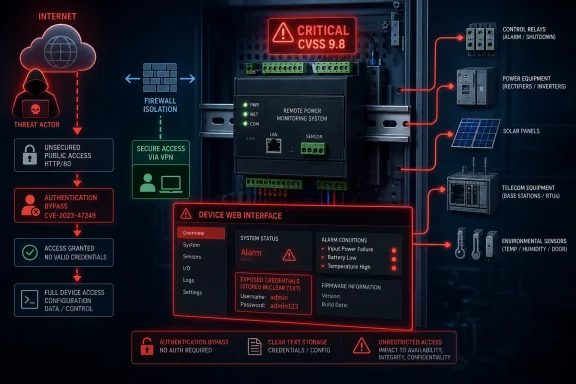
The TPDIN-Monitor-WEB2 is a DIN-rail-mounted remote monitoring and control appliance intended for distributed infrastructure. It sits at the intersection of physical operations and IP networking, allowing operators to observe voltage, current, temperature, and related conditions while using onboard relays to alter the state of connected equipment.
That combination is useful in remote and difficult-to-service installations. It is also why the latest advisory deserves immediate attention. A device that can report a low battery, send alerts, collect telemetry, and remotely power-cycle equipment is valuable to administrators; a compromised device with those same capabilities can become an attacker’s foothold into a sensitive site or a mechanism for service disruption.
The U.S. Cybersecurity and Infrastructure Security Agency has categorized the affected product in the Critical Manufacturing sector and noted worldwide deployment. The advisory says no known public exploitation specifically targeting these vulnerabilities had been reported to CISA at the time of publication. That is reassuring only in the narrowest sense: public reporting has not identified active abuse. It is not evidence that vulnerable devices are safe to leave exposed or that opportunistic discovery has not occurred.
The key facts at a glance
The advisory’s practical message is clear:
- TPDIN-Monitor-WEB2 firmware 2.3.9 is identified as affected.
- The reported flaws include authentication bypass and cleartext storage of sensitive information.
- The combined severity is critical, with a CVSS v3 base score of 9.8.
- Potential consequences include credential exposure, disruption of connected infrastructure, and manipulation of physical equipment.
- CISA recommends minimizing network exposure, isolating control networks, and using securely maintained VPN access where remote connectivity is necessary.
For Windows administrators, facilities teams, managed service providers, and OT engineers, the first task is not theoretical vulnerability analysis. It is asset identification: determine whether this hardware exists in the environment, what firmware it runs, whether it is reachable from business networks or the internet, and what relays or dependent systems it controls.
Background
The TPDIN product family reflects a long-running trend in industrial and remote-site technology: equipment once managed locally through a physical panel is now administered using browser-based interfaces, email alerts, mobile applications, SNMP, discovery tools, and remote network access.
That shift delivers genuine operational benefits. A technician can inspect measurements at a remote solar installation, telecommunications enclosure, mobile surveillance deployment, or distributed power site without driving hours to the location. A watchdog function can restart unresponsive equipment. Automated thresholds can trigger alerts before a battery failure or temperature excursion becomes an outage.
Remote control changes the threat model
The same remote-management capability also changes the security model fundamentally. In a conventional IT environment, a compromised web dashboard may expose records or administrative settings. In an operational setting, the dashboard may control the electrical state of attached equipment.
The distinction matters because the consequences can be physical and time-sensitive. A relay operation might restart a network component, interrupt a charging system, shut down supporting electronics, affect environmental controls, or remove power from a device that is functioning correctly. The advisory explicitly recognizes that exploitation could pose a physical safety risk.
Legacy firmware is a recurring OT challenge
Tycon’s published firmware history shows that the WEB2 platform has been in service for years, and version 2.3.9 was part of a legacy software generation. The company’s firmware page lists later releases, including versions 2.4.1 through 2.4.4, with 2.4.4 dated June 2021.
That historical detail is important, but it should not lead administrators to make unsafe assumptions. The presence of a newer firmware release does not automatically prove that it remediates the vulnerabilities described in the new advisory. Organizations should obtain confirmation from Tycon Systems or the advisory’s remediation information before treating an upgrade as a verified security fix.
Why old devices remain deployed
Embedded operational devices frequently remain in production far longer than laptops, servers, and smartphones. They are installed in cabinets, shelters, trailers, remote solar systems, elevated structures, or geographically isolated locations. Replacing or updating them can require scheduled maintenance, a site visit, change-control approval, and contingency planning.
As a result, a firmware version released years ago may remain active in a surprising number of environments. The core risk is not merely that an old device exists; it is that an old device may have accumulated network connectivity, remote-access exceptions, undocumented dependencies, and administrative credentials over a long operational life.
The Vulnerabilities in Context
The two vulnerability classes identified in the advisory are individually serious and particularly concerning when combined. Authentication bypass means security boundaries that should prevent unauthorized access can reportedly be circumvented through an alternate path or channel. Cleartext storage of sensitive information means credentials or other secrets may not receive adequate protection at rest.
Together, they can collapse both sides of the usual access-control model: the system may inadequately prevent entry, and it may inadequately protect credentials that could be used elsewhere.
Authentication bypass through an alternate path or channel
Authentication bypass is not necessarily the same as guessing a weak password or exploiting a default credential. It generally refers to a condition in which an attacker reaches protected functionality without satisfying the intended authentication process, often through an overlooked endpoint, alternate interface, legacy route, or inconsistent authorization check.
In a web-managed industrial device, the result could be access to functions that administrators assume require a valid session. Depending on the specific implementation and device capabilities, that could include viewing status information, modifying settings, accessing administrative functions, or invoking control actions.
The phrase “alternate path or channel” is especially relevant to appliance-style products because they may expose more than a single visible management page. A unit can have a primary web interface while also supporting recovery paths, service features, discovery mechanisms, diagnostic pages, embedded application endpoints, or protocol interfaces used for integration and support.
Cleartext storage of sensitive information
Cleartext storage is a quieter flaw than a visible login bypass, but it can have a wider operational impact. When passwords, configuration secrets, email credentials, SNMP community strings, API data, or network settings are stored without appropriate cryptographic protection, anyone who gains sufficient access to the device, backup, configuration export, or storage medium may be able to recover them.
The danger grows when credentials are reused. A password stored on a monitoring appliance may also work on a router, cellular gateway, switch, cloud account, email relay, remote desktop gateway, or shared maintenance workstation. Even if the WEB2 itself is isolated, exposed credentials can become a stepping stone to other systems.
Why the combined CVSS score is 9.8
A 9.8 CVSS v3 score indicates a critical issue with a highly severe potential impact profile. It is not a prediction that every installation will be compromised, nor does it establish that an exploit is circulating publicly. It does, however, signal that the vulnerability combination warrants urgent prioritization in patching and exposure-management programs.
For OT teams, the score should inform urgency but not replace engineering judgment. A control device in a segmented, access-controlled network with no external route presents a different immediate exposure than one forwarded through a firewall, placed behind a consumer-grade router with remote management enabled, or connected through a shared corporate VLAN. Both need remediation; the internet-facing or poorly segmented deployment needs it first.
What the Device Can Control
The operational significance of this advisory follows directly from the kind of work remote monitor-and-control equipment performs. These devices are not passive sensors. Their value proposition includes observing conditions and changing equipment behavior using relay control and automation logic.
A modern successor in the same product family illustrates the kinds of capabilities associated with this category: monitoring voltage, current, and temperature; supporting SNMP-based data collection and control; generating alerts; logging measurements; and controlling relays according to conditions such as time, voltage, temperature, current, or watchdog status. The WEB2 should be assessed in the context of those operational patterns, while administrators avoid assuming feature parity between generations.
Relay control is the most consequential function
Relays turn logical decisions into electrical actions. A command issued through a management interface can be used to energize, de-energize, cycle, or alter the state of a connected load, depending on the wiring and configuration.
This is why a remote-monitoring appliance should be included in the same risk conversation as programmable controllers, power distribution management devices, smart UPS systems, remotely managed switches, and building-automation gateways. Its physical footprint may be small, but its control authority can be significant.
Monitoring data can be sensitive too
The monitoring side of the appliance should not be dismissed as harmless. Telemetry can reveal the presence, health, usage patterns, capacity, and operating schedule of remote equipment. Voltage readings can indicate battery state; temperature data can identify environmental behavior; alarm thresholds may reveal service tolerances; and device labels may expose site names or operational roles.
For an attacker conducting reconnaissance, a monitoring dashboard can provide an unusually precise picture of an environment. Even read-only access can help identify high-value targets, time an outage, or select a system whose restart would have disproportionate impact.
Automation magnifies configuration risk
Automation is useful precisely because it reduces the need for human intervention. But automated thresholds, scheduled events, ping watchdogs, and power-cycle behavior also mean that a malicious configuration change can persist after an attacker disconnects.
An unauthorized operator may not need to continuously command a relay if they can alter the conditions that govern it. A modified schedule, inverted threshold, changed watchdog target, or disabled alert rule can create failures that appear intermittent or accidental. This makes configuration integrity as important as the immediate control interface.
Why Windows Administrators Should Care
At first glance, a DIN-rail monitor running embedded firmware may seem outside the remit of a Windows-focused administrator. In practice, Windows systems often sit directly beside this device in the operational workflow: they host monitoring software, run SNMP management platforms, provide remote administration, store configuration backups, support field technicians, and act as jump hosts for industrial networks.
The advisory is therefore a reminder that Windows security and OT security are not separate disciplines in many real deployments. The boundary between them is often a Windows Server, a Hyper-V host, a remote desktop gateway, a laptop used for commissioning, or a management workstation with browser access to field equipment.
Browser access is still privileged access
The convenience of a local web interface can obscure its importance. A technician may visit a device’s IP address from Edge, Chrome, Firefox, or another browser and regard the interaction as routine. But when that browser page can read sensitive settings or control electrical equipment, the workstation becomes part of the control system’s trusted computing base.
Administrators should ensure that access to OT browser interfaces occurs from managed, hardened systems. Shared local administrator accounts, unrestricted browser extensions, saved passwords, insecure remote-support tools, and broadly accessible bookmarks can all create paths to equipment that were never intended to be broadly available.
Discovery tools can widen visibility
Tycon publishes a cross-platform discovery tool intended to locate supported devices on connected networks, including scenarios where an operator does not know the appliance’s IP address. That is useful in commissioning and support, but it also underscores why network segmentation and endpoint governance matter.
A discovery utility should not be casually deployed across a large corporate environment. Organizations should know who uses it, from which workstation, on which network segments, and under what change-control process. Discovery traffic and broadcast-capable utilities can be valuable troubleshooting tools, but they can also unintentionally map or reveal device populations.
Windows-based monitoring platforms need credential hygiene
Many organizations collect telemetry through Windows-hosted network management systems, custom dashboards, database services, or PowerShell-driven operations scripts. If any passwords, SNMP strings, email relay credentials, or configuration files associated with the WEB2 are stored on those systems, the vulnerability response must include a credential review.
Rotating a web-interface password alone may not be enough. Administrators should identify whether the appliance shares credentials with network infrastructure, monitoring platforms, email services, VPNs, or field-service accounts. The goal is to prevent a device-level breach from becoming a broader identity compromise.
Immediate Actions for Affected Organizations
The proper response should be urgent but disciplined. Industrial equipment should not be rebooted, upgraded, isolated, or reconfigured without understanding operational impact. A rushed change can cause the very outage security teams are trying to avoid.
That said, the severity and potential for physical manipulation justify beginning the response process immediately.
A practical first-day response plan
Organizations that suspect they operate a TPDIN-Monitor-WEB2 should follow a structured sequence:
- Identify all TPDIN-Monitor-WEB2 units and document their locations, IP addresses, owners, firmware versions, and business functions.
- Determine whether any unit is internet-facing, reachable through port forwarding, exposed through remote-management services, or accessible from general corporate networks.
- Map every connected relay output and establish what equipment could be disrupted by a state change or power cycle.
- Restrict access to approved management networks and authorized jump hosts while maintaining necessary operational continuity.
- Contact Tycon Systems or an authorized support channel to validate the approved remediation path for version 2.3.9.
- Plan firmware work with backups, rollback procedures, maintenance windows, and on-site support where a failed update could affect operations.
- Rotate potentially exposed credentials after containment, especially credentials reused across systems.
- Review logs, firewall records, remote-access histories, and device configuration changes for indications of unexpected access.
This process deliberately begins with inventory and exposure reduction rather than an indiscriminate upgrade. Firmware updates are important, but the first security win is ensuring that a critical web-managed device is not readily reachable by unauthorized users.
Verify, do not merely assume, firmware versions
Asset-management databases are often incomplete for embedded appliances. A spreadsheet may list a device as “Tycon monitor,” while firmware version, serial number, site role, and network configuration exist only in a field engineer’s notes or on the device itself.
Where possible, verify the version directly through an authorized management session or physical inspection. Capture the evidence in the asset record. This is essential because the advisory specifically identifies version 2.3.9, and the remediation decision depends on knowing what is actually deployed rather than what procurement records suggest.
Treat external exposure as an emergency priority
If the unit’s management interface is reachable from the public internet, move it to the top of the incident queue. CISA’s guidance is unequivocal: minimize exposure of control system devices and do not make them directly accessible from the internet.
Removing a public route can often reduce risk faster than a firmware update can be scheduled. Disable unnecessary port forwards, remove cloud-router publishing rules, restrict inbound firewall policies, and confirm that upstream network changes have taken effect. Do not assume that lack of a public DNS name means lack of exposure; internet scanning routinely finds devices by address and service fingerprint.
Network Segmentation and Secure Remote Access
The advisory’s recommended practices emphasize a familiar principle that remains unevenly implemented: control system networks and remote devices should sit behind firewalls and be isolated from business networks. This is not simply a checklist item. Segmentation limits how far an attacker can travel after compromising an office endpoint or obtaining credentials from another system.
A monitoring-and-control appliance should not be treated as just another IoT node on a flat LAN. Its network location should reflect its authority over infrastructure.
Build a management enclave
A sound design places management interfaces in a dedicated OT or infrastructure-management segment. Access should originate from specific administrator workstations or hardened jump hosts, traverse narrowly defined firewall rules, and be logged.
The segment should deny unsolicited connections from user VLANs, guest Wi-Fi, printers, conferencing devices, and general-purpose servers. Outbound access should also be evaluated carefully. A device that requires email alerts or time synchronization may need limited, explicitly controlled access rather than unrestricted internet connectivity.
VPN is a control, not a cure-all
CISA recommends more secure remote-access methods such as VPNs when remote access is required, while cautioning that a VPN is only as secure as the devices connected to it. That distinction matters.
A VPN should not become a broad extension of the corporate network into a remote cabinet. It should enforce strong authentication, ideally multifactor authentication, restrict users to the minimum required networks and ports, and direct access through monitored administrative systems. Split tunneling, unmanaged endpoints, shared accounts, and overly broad network routes weaken the value of the VPN layer.
Use allowlists and deny-by-default rules
The strongest practical firewall policies are often simple:
- Permit management access only from known administrator hosts or a designated jump server.
- Permit only the specific protocols and ports required for operational management.
- Block direct access from general corporate user networks.
- Block inbound internet access unless there is a documented and unavoidable business requirement.
- Log denied and allowed connections to support investigation and ongoing exposure review.
This approach prevents a single insecure endpoint from becoming a universal control console. It also makes anomalous access more visible, because legitimate management traffic is expected to come from a small and well-defined set of systems.
Firmware Remediation Requires Operational Discipline
The existence of later WEB2 firmware releases may offer a potential route forward, but a critical warning applies: administrators need vendor-confirmed vulnerability remediation information, not inference based on version numbers. A release can contain feature enhancements, bug fixes, infrastructure changes, or update-process modifications without addressing every security issue discovered later.
Before deploying firmware, establish whether the release is explicitly approved for the advisory’s vulnerabilities and whether the hardware revision, current version, and upgrade path are supported.
Understand the update path
Tycon’s published guidance describes WEB2 firmware updates as an over-the-air process performed by downloading a firmware file and uploading it through the device’s web interface. That workflow is convenient, but it makes pre-change validation essential.
A failed or interrupted embedded-device update can leave a remote site in an uncertain state. Administrators should confirm power stability, network stability, device accessibility, compatibility requirements, and the availability of a rollback option. If the unit controls critical loads, field personnel should know what default relay states mean during reboot or recovery.
Preserve configuration and evidence
Before any update, export or record the existing configuration where supported. Capture relay assignments, threshold values, alert recipients, IP settings, DNS settings, device labels, scheduled actions, SNMP settings, and email configuration. Record the current firmware version and device status.
This information serves two purposes. First, it supports recovery if an update resets settings or produces unexpected behavior. Second, it creates an evidentiary baseline if a later investigation needs to determine whether a configuration was changed before, during, or after remediation.
Test representative systems first
Where an organization operates multiple units, it should avoid simultaneous fleet-wide changes unless the risk of immediate exploitation clearly outweighs the risk of update failure. A staged approach is safer:
- Select a noncritical or representative unit.
- Confirm the vendor-approved firmware and upgrade steps.
- Validate telemetry, alerts, relay states, network access, and integration behavior after the update.
- Document issues and refine the runbook.
- Roll out in controlled waves, prioritizing externally exposed and high-consequence sites.
This sequencing is particularly important in environments with customized wiring, unique relay logic, or remote accessibility constraints. A small variation in deployment can produce a large difference in operational outcome.
Detection, Monitoring, and Incident Response
The advisory states that CISA had received no reports of public exploitation specifically targeting these vulnerabilities at publication time. Organizations should not interpret that as a reason to wait for confirmed attack signatures. The appropriate posture is heightened monitoring and a targeted review of exposure and access records.
In embedded OT environments, evidence may be sparse. Logs can be limited, timestamps may be inaccurate, and configuration changes may not generate enterprise-grade audit trails. That makes surrounding telemetry—firewall logs, VPN records, DNS data, switch logs, remote-management histories, and Windows event logs—especially valuable.
Look for abnormal management patterns
Security teams should examine whether management traffic to the device originates from unusual addresses, occurs outside normal maintenance windows, or follows failed authentication attempts. They should also look for unexpected access from systems that do not normally perform OT administration.
Network behavior can reveal more than device logs. A sudden connection from a workstation in a finance VLAN, a new inbound route through a firewall, or a short-lived remote-support session immediately before a relay event may provide the strongest evidence available.
Monitor changes with operational context
A configuration change is not automatically malicious. Engineers legitimately adjust thresholds, recipients, schedules, and watchdog targets. The goal is to distinguish normal maintenance from unexplained modifications.
Establish a simple change record for each device that includes who made the change, when it occurred, why it was made, and how it was validated. Pair this with periodic screenshots or exports of key configuration pages. In lower-budget environments, this modest discipline can substantially improve accountability.
Prepare for the possibility of credential exposure
Because the advisory includes cleartext storage of sensitive information, incident responders should plan for credential rotation even if they find no confirmed compromise. Prioritize secrets that may have been stored in the device or associated configuration:
- Administrative passwords should be unique to the device and changed after remediation.
- SNMP community strings or credentials should be replaced if they enable broader monitoring-system access.
- Email relay credentials should be reviewed and rotated if the device used authenticated mail delivery.
- VPN, router, switch, cloud, or shared service credentials should be changed if reuse is possible.
- Saved browser passwords and Windows Credential Manager entries on support workstations should be audited.
Credential rotation can create its own operational interruptions, particularly for alerting and monitoring integrations. It should be planned, but it should not be deferred indefinitely merely because it is inconvenient.
Enterprise and Consumer Impact
The primary concern is enterprise and industrial deployment, especially in critical manufacturing and distributed infrastructure. These environments typically rely on availability, predictable behavior, and remotely managed field equipment. A vulnerability that can affect both confidentiality and physical control has a different consequence profile from a flaw in a typical office application.
Still, the issue is relevant to smaller organizations and technically sophisticated consumers who use remote power, solar, surveillance, wireless networking, or off-grid infrastructure. A small installation may have fewer security controls and rely more heavily on direct remote access through a router or cellular gateway.
Enterprise environments face scale and ownership problems
Large organizations may struggle with unclear ownership. The network team may own the firewall, facilities may own the cabinet, an integrator may have installed the monitor, an operations group may depend on the alerts, and IT may manage the supporting Windows systems. This fragmentation is a common reason why embedded devices remain unpatched.
The response should therefore have an accountable owner. Someone must coordinate the inventory, decide on temporary access restrictions, obtain vendor guidance, approve the maintenance plan, and verify completion. Security can identify risk, but operational owners must validate safe remediation.
Smaller sites face exposure and support problems
Smaller organizations may not have an OT security team, a dedicated jump host, or central logging. Their biggest immediate risk is often direct exposure through a broadband router, a cellular connection, or a “temporary” port-forwarding rule that became permanent.
For these operators, the most effective near-term action may be to remove direct public access, require VPN-based administration from a managed computer, and ensure the device is on a separate network from personal computers and general office devices. Those steps can materially reduce risk before a full modernization project is possible.
Strengths and Opportunities
The advisory creates disruption, but it also presents an opportunity for organizations to improve long-neglected parts of their OT security posture.
- A focused asset inventory can uncover undocumented remote-control devices before they become future incident points.
- Network segmentation can reduce risk not only for the WEB2, but for routers, switches, cameras, UPS systems, and other embedded equipment on the same site.
- Credential rotation can eliminate years of password reuse and undocumented shared-access practices.
- A controlled firmware program can establish repeatable maintenance procedures for other legacy devices.
- Improved monitoring can connect Windows security operations with facilities and OT teams that previously worked in isolation.
- Relay-impact mapping can reveal hidden dependencies and improve outage planning even after the immediate vulnerability is addressed.
The most mature response is not to treat this as a one-device exception. It is to use the event to identify every system where a web page, mobile application, or remote protocol can influence physical operations.
Risks and Concerns
The critical severity should prompt action, but remediation itself must be handled carefully. Several risks deserve explicit management.
- A poorly planned firmware upgrade could interrupt monitoring or alter control behavior at a remote site.
- Blocking access without understanding dependencies could prevent operators from responding to legitimate alarms.
- Assuming that any later firmware is a confirmed security fix could leave a vulnerable device in service.
- Rotating credentials without updating integrations could break alert delivery, SNMP collection, or scheduled maintenance workflows.
- Flattened networks may allow an attacker who compromises one ordinary endpoint to reach control equipment.
- Inadequate logs may make it difficult to prove whether unauthorized access or configuration changes occurred.
- Temporary port forwards and vendor-support exceptions may remain active after the remediation project appears complete.
The answer is not paralysis. It is controlled change management: assess the safety and availability implications, make compensating controls quickly, and then execute vendor-confirmed remediation in a staged manner.
Looking Ahead
The most important next development will be clear, authoritative remediation guidance for affected TPDIN-Monitor-WEB2 version 2.3.9 deployments. Administrators should watch for vendor confirmation of fixed firmware, supported upgrade paths, any hardware or configuration prerequisites, and guidance on whether credential changes are required after updating.
Organizations should also track whether the advisory is revised with additional technical details, affected-version clarification, exploit information, or mitigation recommendations. Because the advisory was initially published on July 21, 2026, the information picture may evolve as vendors, researchers, and operators complete their own assessments.
Questions every operator should answer
By the end of the initial response, each organization should be able to answer the following:
- Do we operate any TPDIN-Monitor-WEB2 units, and are any running version 2.3.9?
- Which physical systems, relays, alarms, and remote sites depend on each unit?
- Can any unit be reached from the internet, a corporate user network, a vendor remote-support connection, or an unmanaged device?
- Which identities, credentials, SNMP settings, email accounts, and integrations could be affected by cleartext storage?
- What temporary network restrictions can be implemented safely today?
- What vendor-confirmed update or replacement path will be used, and who owns the work?
- How will the organization validate that the device, alerts, telemetry, and relay functions remain safe after remediation?
These questions turn an abstract critical CVSS score into an actionable operating plan. They also establish the documentation required to make better security decisions when the next embedded-device advisory arrives.
The TPDIN-Monitor-WEB2 advisory is a sharp reminder that remote monitoring hardware is often remote control hardware in disguise. The affected version may be old, but the operational stakes are current: credentials can unlock broader access, web interfaces can become control paths, and a small DIN-rail appliance can influence equipment far beyond its physical size. Organizations that rapidly identify version 2.3.9 deployments, eliminate unnecessary exposure, isolate management access, validate a vendor-approved remediation path, and treat credential hygiene as part of the fix will be in a far stronger position—not only for this advisory, but for the wider security reality of connected infrastructure.
References
- Tycon Systems TPDIN-Monitor-WEB2 CISA · 2026-07-21T12:00:00+00:00