

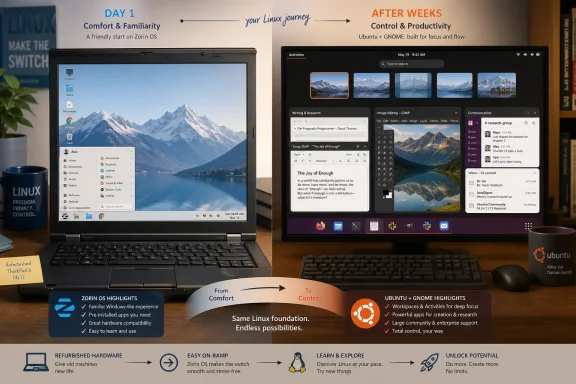
A How-To Geek writer who installed Zorin OS on older Windows 10-era PCs early this year has now revisited Ubuntu and found that Ubuntu’s GNOME workspaces, software ecosystem, and extension model may better fit a maturing Linux workflow. The point is not that Zorin OS failed. It is that a Linux desktop that feels reassuring on day one may not be the same one that feels efficient after the user stops needing Windows as a reference point. For WindowsForum readers, that is the more interesting migration lesson: the first successful Linux switch is often about familiarity, but the second decision is about control.
The account is small in scale — a user, a couple of older PCs, and a distribution comparison — but it captures a much larger tension in the desktop Linux world. Zorin OS has long been one of the easier recommendations for Windows users because it smooths the culture shock. Ubuntu, by contrast, asks users to accept GNOME’s workflow on its own terms, with workspaces and the Activities Overview sitting closer to the center of the experience. The surprise in the How-To Geek piece is that once the author no longer needed Linux to impersonate Windows, Ubuntu stopped looking like the harder option and started looking like the more capable one.
The original move to Zorin OS worked because it solved the first problem Windows users usually have when they approach Linux: disorientation. The How-To Geek author says they installed Zorin OS on a couple of older PCs that originally ran Windows 10 early this year, and the distribution gave them a desktop familiar enough to start using Linux without feeling as if everything had to be relearned. That is exactly the pitch that makes Zorin OS attractive to Windows switchers: it lowers the cost of the first week.
That first week matters. A new operating system can lose a user not because it lacks capability, but because basic orientation feels expensive. Where are apps? How do windows behave? How do I switch tasks? How do I get back to what I was doing? Zorin OS answers those questions in a language a Windows user already understands.
But the How-To Geek piece is really about what happens after that anxiety fades. The author writes that Zorin OS stopped feeling like an experiment and became something they actually enjoyed using. That is the success case. Yet it also created the conditions for a second question: if Linux no longer had to feel like Windows, what else might be possible?
That is the inflection point many Windows-to-Linux migration stories skip. They treat the first stable distribution choice as the destination. In practice, the first successful distribution may be more like scaffolding: essential while the user is climbing, less important once they can stand.
Instead, Ubuntu asks the user to organize work around a different center of gravity. The How-To Geek account says the author stopped judging Ubuntu by how closely it resembled Windows and began assessing whether it made it easier to move between writing, research, communication, and other daily tasks. Once the test changed, Ubuntu’s design made more sense.
This is where the story becomes more than a personal preference note. Zorin OS and Ubuntu are not simply two skins over the same technical base, even though Zorin OS is based on Ubuntu. They represent two different answers to the question of what a Windows user needs next. Zorin OS says: make the new system approachable. Ubuntu says: make the workflow coherent enough that the old desktop metaphor matters less.
Neither answer is universally right. A household PC, a refurbished laptop for a family member, or an office machine used for a narrow set of tasks may benefit more from Zorin OS’s familiar presentation. A user who spends the day juggling drafts, research tabs, GIMP, Slack, and email may eventually value a desktop that treats workspace separation as a first-class habit rather than a hidden option.
The comparison is not a verdict so much as a maturity curve. Zorin OS helped the author get comfortable with Linux. Ubuntu became tempting once comfort was no longer the scarce resource.
That distinction will sound familiar to anyone who has used virtual desktops on Windows and then tried GNOME for more than a few minutes. On Windows, virtual desktops can be powerful, but they often feel like an extra layer you summon when the normal desktop becomes overloaded. GNOME, especially through the Activities Overview, puts open windows and workspaces together in a way that encourages users to think spatially about tasks.
The author’s example is concrete: one workspace for a draft and research tabs, another for GIMP and image editing, a third for Slack and email. That is not an exotic power-user setup. It is ordinary knowledge work, split into zones. The difference is that Ubuntu made those zones feel easier to access than a crowded taskbar or a pile of minimized windows.
For Windows users, this is the part of the Linux desktop that is easiest to underestimate. The question is not whether Windows virtual desktops and Ubuntu workspaces are conceptually similar. They are. The question is whether the interface makes the feature feel like a fallback or a default behavior.
GNOME’s Activities Overview is important because it makes the cost of switching contexts visible. Instead of forcing the user to remember which application is buried where, the desktop presents windows and workspaces together. That changes the mental model from “find the app” to “go to the workspace where that kind of work lives.”
That sounds subtle until the machine is being used for real work. A writing session with research tabs open is fragile. Add image editing, Slack, and email, and the desktop becomes a constant negotiation between attention and interruption. Ubuntu’s workspace model does not remove that complexity, but it gives it a shape.
The How-To Geek author’s shift is telling. They did not say they wanted a prettier desktop or a more Linux-pure desktop. They wanted to move more easily between writing, research, communication, and other open work. That is an attention-management problem, not a theming problem.
In that frame, Ubuntu’s GNOME desktop is not merely different from Windows. It is arguing with Windows. It suggests that a modern desktop should be organized around activities and workspaces, not just application icons and window stacks. For a user who has already accepted Linux, that argument may become more persuasive over time.
This is where WindowsForum readers should resist the easy “which distro is best?” framing. The better question is: what job is the desktop being hired to do? If the job is to make an older Windows 10-era PC feel usable without retraining the user, Zorin OS has a clear advantage. If the job is to support a user who now wants Linux to structure a multi-app workflow, Ubuntu’s defaults start to look less alien.
There is also a psychological element. Early in a migration, every difference feels like a tax. Later, differences can become features. GNOME’s workspace-centric design is exactly the kind of thing that can feel off-putting during a trial boot and then become difficult to give up once the user’s habits adapt.
This is one of Ubuntu’s most durable advantages, and it is easy to underrate because it is not a feature visible in a screenshot. When a user searches for how to install an application, fix a setting, or understand an error, the probability that the answer was written for Ubuntu is unusually high. That does not make Ubuntu technically superior in every case. It makes Ubuntu easier to match against the instructions in front of you.
The How-To Geek example is GNOME extensions. The author searched for instructions and found guides written specifically for Ubuntu, including how to install Extension Manager, find compatible extensions, and enable them. The steps matched the system on the screen. That means fewer translation layers and fewer moments where a new Linux user has to ask whether “Ubuntu instructions” also apply to their Ubuntu-based distribution.
This matters more as users become ambitious. A brand-new switcher may mostly need a browser, updates, and a few familiar applications. A more confident user starts changing the desktop, installing tools, experimenting with extensions, and troubleshooting edge cases. At that point, documentation fit becomes part of the user experience.
For IT pros, this is the hidden cost center in desktop Linux choice. A distribution can be friendly, polished, and technically excellent, but if every support document has to be mentally adapted, the operational burden rises. Ubuntu’s advantage is not that it eliminates troubleshooting. It is that troubleshooting more often begins with instructions that assume the same baseline.
But “based on Ubuntu” is not the same as “is Ubuntu.” The author’s point is not that Zorin OS lacks access to Ubuntu knowledge. It is that Ubuntu removes a layer of interpretation. If an instruction says to do something on Ubuntu, and the screen in front of you is Ubuntu, confidence rises.
That confidence is not trivial for users coming from Windows. Windows users are accustomed to a large, relatively unified support universe, even when the advice itself is uneven. They expect instructions to match labels, menus, app names, and screenshots. The moment a Linux user must mentally map one distribution’s guidance onto another distribution’s curated desktop, the system starts to feel more expert-oriented.
This does not mean Zorin OS is the wrong choice for those users. It means Zorin OS’s greatest strength — its curated familiarity — can become a mild abstraction layer once the user begins following Ubuntu-first guidance. For many people, that tradeoff is worth it. For the How-To Geek author, Ubuntu’s larger ecosystem became more attractive as they immersed themselves further in Linux.
That is a mature Linux user’s problem, and it is a good problem to have. The first question is “Can I use this?” The second is “Can I grow with this?” Ubuntu’s ecosystem gives it a strong answer to the second question.
That is an important distinction. Customization is not just about whether a feature exists. It is about whether the desktop nudges users toward discovering it. Ubuntu already uses extensions for parts of its default desktop, including the Dock and app indicators, which makes the extension model less like an obscure hack and more like part of the system’s everyday reality.
The author’s examples are practical rather than cosmetic. A clipboard manager can help move text between research, drafts, and email. A panel tweak can keep important apps visible. A tiling extension can arrange a browser, document, and reference material without repeated manual dragging. These are workflow repairs, not theme-party tricks.
This is where Ubuntu’s appeal becomes more nuanced. The author is not trying to turn Ubuntu into Windows. In fact, they explicitly frame the attraction as shaping Ubuntu around the way they already use the PC. That is a different kind of customization from making Linux look familiar. It is customization in service of work.
For Windows users, this is a useful dividing line. Some customization is about reducing migration shock: move the panel, mimic a Start menu, restore familiar window controls. Other customization is about improving the workflow beyond what the old system encouraged. Ubuntu, in the author’s retest, became compelling because GNOME extensions supported the second kind.
For a new Linux user, Zorin OS may stay out of the way precisely because it resembles what came before. It reduces surprise. It avoids forcing a philosophical argument about how desktops should work. It lets the user get on with using the machine.
For a more experienced user, Ubuntu may stay out of the way because its workspace model, Activities Overview, ecosystem, and extensions reduce context switching costs. It does not vanish by imitating Windows. It vanishes by making the user’s current work easier to reach.
This is why Linux desktop recommendations age poorly when they are treated as permanent identities. “Use the Windows-like one” is sensible advice for a nervous first migration. It is not necessarily the best advice six months later, once the user knows what they like, what annoys them, and which tasks dominate the day.
The How-To Geek author did not immediately replace Zorin OS. They eventually returned the PC to Zorin OS because it was already configured the way they wanted. That is the real-world detail that keeps the story honest. In operating systems, inertia is not failure; a working configuration has value.
But the decision was less automatic than it would have been before the Ubuntu test. That is the crack in the wall. Ubuntu had moved from “distribution I should probably understand someday” to “distribution that may fit how I work now.”
Zorin OS’s appeal on those machines is obvious. It gives a Windows user a softer landing. A person trying to keep useful hardware productive does not necessarily want to become a desktop Linux hobbyist. They want the machine to boot, update, browse, write, communicate, and run the tools they need.
Ubuntu’s appeal is different. It becomes more compelling when the user stops treating the machine as a rescued Windows box and starts treating it as a Linux workstation. That is the transition the How-To Geek article documents. The hardware did not change. The user’s expectations did.
For IT departments, schools, nonprofits, repair shops, and technically inclined households, that distinction is useful. A Linux deployment strategy for older Windows 10-era PCs should not assume one distribution solves every phase of adoption. A familiar desktop may be best for first contact. A more ecosystem-standard desktop may be better for users who will troubleshoot, customize, and grow into the platform.
This also suggests a staged approach to Linux evaluation. Start with the distribution that gets the user productive fastest. Then, once basic confidence exists, test the distribution that offers the stronger long-term workflow and support model. The How-To Geek author’s path from Zorin OS to a serious Ubuntu reconsideration is not indecision. It is a reasonable sequence.
Zorin OS still comes out well in the How-To Geek account. It did exactly what it was supposed to do. It turned Linux from an experiment into something enjoyable on older PCs that had originally run Windows 10. The author is not ready to leave it behind yet, which is a stronger endorsement than any tidy winner-loser conclusion.
Ubuntu comes out well for a different reason. It became attractive after the user’s criteria changed. Its GNOME desktop, especially the Activities Overview, made workspaces feel central. Its software ecosystem made instructions easier to find and apply. Its extension model opened a path to shape the desktop without simply recreating Windows.
That is the adult version of the Linux desktop conversation. The question is not which distribution has the best screenshots or the friendliest first impression. The question is which one matches the user’s current tolerance for difference, need for support, and preferred way of organizing work.
The answer can change. In fact, a healthy migration path may almost require it to change. A user who never moves beyond the first familiar setup may still be successful. But a user who begins asking whether the desktop can better support their daily flow is engaging with Linux on stronger terms.
Ubuntu may perform better in a later test. Once the user is comfortable with Linux basics, the question becomes how efficiently the desktop handles recurring work. That is when GNOME workspaces, the Activities Overview, and extensions deserve a serious look. They are not always obvious advantages on day one because their value compounds with habit.
For admins, the practical test should be task-based. Ask how many windows users keep open. Ask whether they separate communication from production work. Ask whether they frequently move text between research, drafts, and email. Ask whether image editing in GIMP interrupts writing or can live cleanly in a separate workspace.
The How-To Geek author’s setup is a useful model because it is ordinary. A draft and research tabs in one workspace, GIMP in another, Slack and email in a third: that is not a developer fantasy or a Linux influencer’s rice build. It is a normal multitasking load. If Ubuntu makes that load feel calmer, it deserves credit.
The opposite is also true. If a user never thinks in workspaces, rarely customizes the desktop, and mostly wants a machine that resembles the Windows environment they already know, Zorin OS may remain the better choice. The mistake is pretending that the same answer must apply to both users.
That is a valuable migration pattern. It respects the emotional reality of switching away from Windows while still leaving room for growth. A user can begin with a desktop that feels safe and later move toward one that feels more powerful. The distributions are not just competitors; they can be stages in the same user’s Linux education.
For WindowsForum readers watching older Windows 10-era hardware become Linux candidates, the lesson is to avoid one-size-fits-all advice. The best distribution is not merely the one that looks least scary. It is the one that matches the user’s current work habits and support needs.
The account is small in scale — a user, a couple of older PCs, and a distribution comparison — but it captures a much larger tension in the desktop Linux world. Zorin OS has long been one of the easier recommendations for Windows users because it smooths the culture shock. Ubuntu, by contrast, asks users to accept GNOME’s workflow on its own terms, with workspaces and the Activities Overview sitting closer to the center of the experience. The surprise in the How-To Geek piece is that once the author no longer needed Linux to impersonate Windows, Ubuntu stopped looking like the harder option and started looking like the more capable one.
 The First Linux Win Was Familiarity, Not Finality
The original move to Zorin OS worked because it solved the first problem Windows users usually have when they approach Linux: disorientation. The How-To Geek author says they installed Zorin OS on a couple of older PCs that originally ran Windows 10 early this year, and the distribution gave them a desktop familiar enough to start using Linux without feeling as if everything had to be relearned. That is exactly the pitch that makes Zorin OS attractive to Windows switchers: it lowers the cost of the first week.That first week matters. A new operating system can lose a user not because it lacks capability, but because basic orientation feels expensive. Where are apps? How do windows behave? How do I switch tasks? How do I get back to what I was doing? Zorin OS answers those questions in a language a Windows user already understands.
But the How-To Geek piece is really about what happens after that anxiety fades. The author writes that Zorin OS stopped feeling like an experiment and became something they actually enjoyed using. That is the success case. Yet it also created the conditions for a second question: if Linux no longer had to feel like Windows, what else might be possible?
That is the inflection point many Windows-to-Linux migration stories skip. They treat the first stable distribution choice as the destination. In practice, the first successful distribution may be more like scaffolding: essential while the user is climbing, less important once they can stand.
Ubuntu Wins Attention Once Windows Stops Being the Template
The author had tried Ubuntu before but had not spent enough time with it to understand why so many users stick with it. After returning for a more serious attempt, Ubuntu “clicked.” That wording matters because GNOME-based Ubuntu is not always the obvious emotional landing place for a Windows user. It does not primarily sell itself as a Windows-like shell with Linux underneath.Instead, Ubuntu asks the user to organize work around a different center of gravity. The How-To Geek account says the author stopped judging Ubuntu by how closely it resembled Windows and began assessing whether it made it easier to move between writing, research, communication, and other daily tasks. Once the test changed, Ubuntu’s design made more sense.
This is where the story becomes more than a personal preference note. Zorin OS and Ubuntu are not simply two skins over the same technical base, even though Zorin OS is based on Ubuntu. They represent two different answers to the question of what a Windows user needs next. Zorin OS says: make the new system approachable. Ubuntu says: make the workflow coherent enough that the old desktop metaphor matters less.
Neither answer is universally right. A household PC, a refurbished laptop for a family member, or an office machine used for a narrow set of tasks may benefit more from Zorin OS’s familiar presentation. A user who spends the day juggling drafts, research tabs, GIMP, Slack, and email may eventually value a desktop that treats workspace separation as a first-class habit rather than a hidden option.
| Area | Zorin OS | Ubuntu |
|---|---|---|
| Role in the story | First successful Linux desktop on older Windows 10-era PCs | Distribution revisited after gaining Linux confidence |
| User appeal | Familiar, polished, easier starting point | More workflow-driven once Windows familiarity matters less |
| Technical relationship | Based on Ubuntu | Upstream reference point for much Linux desktop guidance |
| Workflow emphasis | Curated familiarity | GNOME workspaces through the Activities Overview |
| Customization path discussed | Not the focus of this test | GNOME extensions via tools such as Extension Manager |
| Author’s current stance | Not ready to leave it behind yet | Tempting enough to rethink the preferred desktop |
GNOME’s Workspaces Turn Multitasking Into the Desktop’s Spine
The strongest part of the How-To Geek account is not the distribution branding. It is the workflow description. The author says they have long liked Windows virtual desktops, so Ubuntu’s workspace system was not a completely new idea. The difference, they argue, is that Ubuntu’s GNOME desktop makes workspaces feel more central.That distinction will sound familiar to anyone who has used virtual desktops on Windows and then tried GNOME for more than a few minutes. On Windows, virtual desktops can be powerful, but they often feel like an extra layer you summon when the normal desktop becomes overloaded. GNOME, especially through the Activities Overview, puts open windows and workspaces together in a way that encourages users to think spatially about tasks.
The author’s example is concrete: one workspace for a draft and research tabs, another for GIMP and image editing, a third for Slack and email. That is not an exotic power-user setup. It is ordinary knowledge work, split into zones. The difference is that Ubuntu made those zones feel easier to access than a crowded taskbar or a pile of minimized windows.
For Windows users, this is the part of the Linux desktop that is easiest to underestimate. The question is not whether Windows virtual desktops and Ubuntu workspaces are conceptually similar. They are. The question is whether the interface makes the feature feel like a fallback or a default behavior.
GNOME’s Activities Overview is important because it makes the cost of switching contexts visible. Instead of forcing the user to remember which application is buried where, the desktop presents windows and workspaces together. That changes the mental model from “find the app” to “go to the workspace where that kind of work lives.”
That sounds subtle until the machine is being used for real work. A writing session with research tabs open is fragile. Add image editing, Slack, and email, and the desktop becomes a constant negotiation between attention and interruption. Ubuntu’s workspace model does not remove that complexity, but it gives it a shape.
The Old Windows Taskbar Habit Starts to Look Like a Bottleneck
The Windows taskbar is one of the most durable interface ideas in personal computing because it compresses open apps, pinned apps, notifications, and muscle memory into one strip. Zorin OS benefits from that familiarity because it can make a Linux system feel immediately legible to someone coming from Windows 10. But familiarity can become friction when the user’s work is less about launching apps and more about moving between contexts.The How-To Geek author’s shift is telling. They did not say they wanted a prettier desktop or a more Linux-pure desktop. They wanted to move more easily between writing, research, communication, and other open work. That is an attention-management problem, not a theming problem.
In that frame, Ubuntu’s GNOME desktop is not merely different from Windows. It is arguing with Windows. It suggests that a modern desktop should be organized around activities and workspaces, not just application icons and window stacks. For a user who has already accepted Linux, that argument may become more persuasive over time.
This is where WindowsForum readers should resist the easy “which distro is best?” framing. The better question is: what job is the desktop being hired to do? If the job is to make an older Windows 10-era PC feel usable without retraining the user, Zorin OS has a clear advantage. If the job is to support a user who now wants Linux to structure a multi-app workflow, Ubuntu’s defaults start to look less alien.
There is also a psychological element. Early in a migration, every difference feels like a tax. Later, differences can become features. GNOME’s workspace-centric design is exactly the kind of thing that can feel off-putting during a trial boot and then become difficult to give up once the user’s habits adapt.
Ubuntu’s Real Advantage Is Being the Default Answer on the Internet
The author’s second major argument for Ubuntu is not about aesthetics. It is about support gravity. Ubuntu is often the default reference point for desktop Linux instructions, software vendor guidance, tutorials, forum posts, and troubleshooting material. Zorin OS is based on Ubuntu, so much of that information still applies, but the How-To Geek author notes that using Ubuntu removes some guesswork.This is one of Ubuntu’s most durable advantages, and it is easy to underrate because it is not a feature visible in a screenshot. When a user searches for how to install an application, fix a setting, or understand an error, the probability that the answer was written for Ubuntu is unusually high. That does not make Ubuntu technically superior in every case. It makes Ubuntu easier to match against the instructions in front of you.
The How-To Geek example is GNOME extensions. The author searched for instructions and found guides written specifically for Ubuntu, including how to install Extension Manager, find compatible extensions, and enable them. The steps matched the system on the screen. That means fewer translation layers and fewer moments where a new Linux user has to ask whether “Ubuntu instructions” also apply to their Ubuntu-based distribution.
This matters more as users become ambitious. A brand-new switcher may mostly need a browser, updates, and a few familiar applications. A more confident user starts changing the desktop, installing tools, experimenting with extensions, and troubleshooting edge cases. At that point, documentation fit becomes part of the user experience.
For IT pros, this is the hidden cost center in desktop Linux choice. A distribution can be friendly, polished, and technically excellent, but if every support document has to be mentally adapted, the operational burden rises. Ubuntu’s advantage is not that it eliminates troubleshooting. It is that troubleshooting more often begins with instructions that assume the same baseline.
Zorin’s Ubuntu Base Helps, but It Does Not Erase the Translation Layer
The fact that Zorin OS is based on Ubuntu is central to the story because it complicates the comparison. The How-To Geek author is not choosing between an Ubuntu ecosystem and a completely unrelated system. Much of the Ubuntu-oriented knowledge base remains relevant to Zorin OS. That is one reason Zorin OS can offer a Windows-friendly experience without cutting users off from the broader Linux support world.But “based on Ubuntu” is not the same as “is Ubuntu.” The author’s point is not that Zorin OS lacks access to Ubuntu knowledge. It is that Ubuntu removes a layer of interpretation. If an instruction says to do something on Ubuntu, and the screen in front of you is Ubuntu, confidence rises.
That confidence is not trivial for users coming from Windows. Windows users are accustomed to a large, relatively unified support universe, even when the advice itself is uneven. They expect instructions to match labels, menus, app names, and screenshots. The moment a Linux user must mentally map one distribution’s guidance onto another distribution’s curated desktop, the system starts to feel more expert-oriented.
This does not mean Zorin OS is the wrong choice for those users. It means Zorin OS’s greatest strength — its curated familiarity — can become a mild abstraction layer once the user begins following Ubuntu-first guidance. For many people, that tradeoff is worth it. For the How-To Geek author, Ubuntu’s larger ecosystem became more attractive as they immersed themselves further in Linux.
That is a mature Linux user’s problem, and it is a good problem to have. The first question is “Can I use this?” The second is “Can I grow with this?” Ubuntu’s ecosystem gives it a strong answer to the second question.
GNOME Extensions Make Ubuntu Feel Less Like a Fixed Opinion
GNOME has a reputation for being opinionated, and that reputation is deserved. But the How-To Geek piece highlights the counterweight: GNOME extensions. The author says extensions are not exclusive to Ubuntu, but Ubuntu’s more visible GNOME workflow encouraged them to explore extensions in a way they had not on Zorin OS.That is an important distinction. Customization is not just about whether a feature exists. It is about whether the desktop nudges users toward discovering it. Ubuntu already uses extensions for parts of its default desktop, including the Dock and app indicators, which makes the extension model less like an obscure hack and more like part of the system’s everyday reality.
The author’s examples are practical rather than cosmetic. A clipboard manager can help move text between research, drafts, and email. A panel tweak can keep important apps visible. A tiling extension can arrange a browser, document, and reference material without repeated manual dragging. These are workflow repairs, not theme-party tricks.
This is where Ubuntu’s appeal becomes more nuanced. The author is not trying to turn Ubuntu into Windows. In fact, they explicitly frame the attraction as shaping Ubuntu around the way they already use the PC. That is a different kind of customization from making Linux look familiar. It is customization in service of work.
For Windows users, this is a useful dividing line. Some customization is about reducing migration shock: move the panel, mimic a Start menu, restore familiar window controls. Other customization is about improving the workflow beyond what the old system encouraged. Ubuntu, in the author’s retest, became compelling because GNOME extensions supported the second kind.
The Best Desktop Is the One That Lets the User Stop Thinking About the Desktop
The most revealing sentence in the How-To Geek account comes near the end: the better choice may be the distribution that stays out of the way and gives the user more room to shape the desktop around their workflow. That is a quiet but significant reversal. The desktop that “stays out of the way” is no longer necessarily the one that looks most familiar.For a new Linux user, Zorin OS may stay out of the way precisely because it resembles what came before. It reduces surprise. It avoids forcing a philosophical argument about how desktops should work. It lets the user get on with using the machine.
For a more experienced user, Ubuntu may stay out of the way because its workspace model, Activities Overview, ecosystem, and extensions reduce context switching costs. It does not vanish by imitating Windows. It vanishes by making the user’s current work easier to reach.
This is why Linux desktop recommendations age poorly when they are treated as permanent identities. “Use the Windows-like one” is sensible advice for a nervous first migration. It is not necessarily the best advice six months later, once the user knows what they like, what annoys them, and which tasks dominate the day.
The How-To Geek author did not immediately replace Zorin OS. They eventually returned the PC to Zorin OS because it was already configured the way they wanted. That is the real-world detail that keeps the story honest. In operating systems, inertia is not failure; a working configuration has value.
But the decision was less automatic than it would have been before the Ubuntu test. That is the crack in the wall. Ubuntu had moved from “distribution I should probably understand someday” to “distribution that may fit how I work now.”
The Windows 10-Era PC Is Becoming Linux’s Most Interesting Test Bed
The machines in the story originally ran Windows 10, and that context matters even without turning the piece into another operating-system migration panic. Older Windows 10-era PCs are exactly the sort of hardware where Linux experiments often begin. They are familiar, already owned, and often good enough for writing, browsing, communication, image editing, and general productivity if the operating system does not get in the way.Zorin OS’s appeal on those machines is obvious. It gives a Windows user a softer landing. A person trying to keep useful hardware productive does not necessarily want to become a desktop Linux hobbyist. They want the machine to boot, update, browse, write, communicate, and run the tools they need.
Ubuntu’s appeal is different. It becomes more compelling when the user stops treating the machine as a rescued Windows box and starts treating it as a Linux workstation. That is the transition the How-To Geek article documents. The hardware did not change. The user’s expectations did.
For IT departments, schools, nonprofits, repair shops, and technically inclined households, that distinction is useful. A Linux deployment strategy for older Windows 10-era PCs should not assume one distribution solves every phase of adoption. A familiar desktop may be best for first contact. A more ecosystem-standard desktop may be better for users who will troubleshoot, customize, and grow into the platform.
This also suggests a staged approach to Linux evaluation. Start with the distribution that gets the user productive fastest. Then, once basic confidence exists, test the distribution that offers the stronger long-term workflow and support model. The How-To Geek author’s path from Zorin OS to a serious Ubuntu reconsideration is not indecision. It is a reasonable sequence.
The Distribution Debate Is Really a Workflow Debate
Linux discussions often collapse into distribution loyalty, but this story is not best understood as Zorin OS versus Ubuntu in the abstract. It is a comparison between two workflows. One workflow privileges continuity with Windows. The other privileges GNOME’s workspace-centered model and Ubuntu’s support gravity.Zorin OS still comes out well in the How-To Geek account. It did exactly what it was supposed to do. It turned Linux from an experiment into something enjoyable on older PCs that had originally run Windows 10. The author is not ready to leave it behind yet, which is a stronger endorsement than any tidy winner-loser conclusion.
Ubuntu comes out well for a different reason. It became attractive after the user’s criteria changed. Its GNOME desktop, especially the Activities Overview, made workspaces feel central. Its software ecosystem made instructions easier to find and apply. Its extension model opened a path to shape the desktop without simply recreating Windows.
That is the adult version of the Linux desktop conversation. The question is not which distribution has the best screenshots or the friendliest first impression. The question is which one matches the user’s current tolerance for difference, need for support, and preferred way of organizing work.
The answer can change. In fact, a healthy migration path may almost require it to change. A user who never moves beyond the first familiar setup may still be successful. But a user who begins asking whether the desktop can better support their daily flow is engaging with Linux on stronger terms.
Action checklist for admins
- Test both a familiar Windows-style Linux desktop and a more workflow-driven Ubuntu GNOME setup before standardizing older Windows 10-era PCs.
- Evaluate user tasks by workspace: writing and research, image editing in GIMP, communications in Slack and email, and other recurring work zones.
- Confirm that installation and troubleshooting instructions match the distribution users will actually see on screen.
- If Ubuntu is under consideration, document how to install Extension Manager, find compatible GNOME extensions, and enable only the extensions users need.
- Treat GNOME extensions as managed workflow changes, not casual decoration, especially on shared or supported machines.
- Do not replace a stable Zorin OS setup automatically; factor in the value of an already configured, working desktop.
Admins Should Measure Friction After the First Week, Not During the Install
A common mistake in desktop evaluation is to judge the operating system at the moment of installation. That is when Zorin OS is most likely to shine for Windows users. The layout feels familiar, the conceptual gap is smaller, and the user can begin doing normal work without negotiating every interface decision.Ubuntu may perform better in a later test. Once the user is comfortable with Linux basics, the question becomes how efficiently the desktop handles recurring work. That is when GNOME workspaces, the Activities Overview, and extensions deserve a serious look. They are not always obvious advantages on day one because their value compounds with habit.
For admins, the practical test should be task-based. Ask how many windows users keep open. Ask whether they separate communication from production work. Ask whether they frequently move text between research, drafts, and email. Ask whether image editing in GIMP interrupts writing or can live cleanly in a separate workspace.
The How-To Geek author’s setup is a useful model because it is ordinary. A draft and research tabs in one workspace, GIMP in another, Slack and email in a third: that is not a developer fantasy or a Linux influencer’s rice build. It is a normal multitasking load. If Ubuntu makes that load feel calmer, it deserves credit.
The opposite is also true. If a user never thinks in workspaces, rarely customizes the desktop, and mostly wants a machine that resembles the Windows environment they already know, Zorin OS may remain the better choice. The mistake is pretending that the same answer must apply to both users.
The Real Upgrade Is Knowing What You No Longer Need
The most concrete lesson from the How-To Geek test is that Linux users should periodically re-evaluate their first successful choice. Not because the first choice was wrong, but because it may have solved a problem they no longer have. Zorin OS solved the author’s need for familiarity. Ubuntu is now testing whether workflow, ecosystem, and customization matter more.That is a valuable migration pattern. It respects the emotional reality of switching away from Windows while still leaving room for growth. A user can begin with a desktop that feels safe and later move toward one that feels more powerful. The distributions are not just competitors; they can be stages in the same user’s Linux education.
For WindowsForum readers watching older Windows 10-era hardware become Linux candidates, the lesson is to avoid one-size-fits-all advice. The best distribution is not merely the one that looks least scary. It is the one that matches the user’s current work habits and support needs.
- Zorin OS remains a strong first landing place when Windows familiarity is still important.
- Ubuntu becomes more compelling when the user wants GNOME workspaces to organize daily work.
- The Activities Overview is not just visual polish; it changes how windows and workspaces are managed.
- Ubuntu’s ecosystem advantage reduces guesswork because many guides already assume Ubuntu.
- GNOME extensions can improve workflow without turning Ubuntu into a Windows clone.
- A configured Zorin OS machine still has real value, even if Ubuntu looks better in a fresh test.
References
- Primary source: How-To Geek
Published: 2026-07-08T11:20:08.372727
Loading…
www.howtogeek.com