Microsoft 365 security baselines are moving from consultant checklists to operating doctrine in 2026, as Microsoft, CISA, and security practitioners converge on a simple message: tenants must be configured, monitored, and reviewed as living security systems, not as default SaaS subscriptions. That is the real significance of the latest Security Boulevard syndicated guidance aimed at UK SMEs. The advice is familiar in parts—MFA, Conditional Access, audit logging, guest controls—but its deeper point is more uncomfortable. Microsoft 365 has become the control plane for modern work, and many organizations are still treating it like a bundle of productivity apps.
The baseline is not the glamorous part of security. It does not produce a dramatic dashboard, and it rarely maps neatly to a single budget line. But it is where many Microsoft 365 compromises are either stopped early or quietly enabled: a permissive sharing link here, an unreviewed OAuth consent grant there, an admin account that still lives like an ordinary mailbox user. The tenant’s default state is now a security decision.
The old perimeter failed slowly, then all at once. For small and mid-sized businesses, the practical perimeter is no longer the office firewall or even the managed laptop. It is the identity system, the mailbox, the file-sharing fabric, and the collaboration graph that sit inside Microsoft 365.
That is why a secure baseline matters more than a one-time hardening pass. A hardening project says, “We fixed this tenant in March.” A baseline says, “This is the minimum safe state of the tenant, and we can prove when it drifts.” The difference sounds bureaucratic until an incident responder asks who granted an application access to mailboxes, when an external sharing link was created, or why a privileged role was active at 2:14 a.m.
Microsoft’s own direction reinforces the point. The company has been making more security controls accessible through admin-center experiences, pushing customers away from legacy authentication, and nudging tenants toward stronger identity controls. CISA’s SCuBA work has also given agencies and private organizations a vocabulary for Microsoft 365 baselines that reaches beyond vendor marketing. The result is a rare moment of alignment: Microsoft wants tenants configured more safely, government security agencies want measurable baselines, and insurers and customers increasingly want evidence.
For UK SMEs, the stakes are especially sharp. Many rely heavily on Microsoft 365 because it is cheaper and simpler than building a patchwork of separate identity, mail, storage, and collaboration platforms. That consolidation is rational. It also means a single badly governed tenant can become the attacker’s map, filing cabinet, switchboard, and launchpad.
A good baseline therefore starts with questions rather than settings. Who can sign in, from where, and with what assurance? Who can administer the tenant, and for how long? How is email authenticated and filtered? How can data leave through sharing, forwarding, guests, apps, or sync? What telemetry is retained long enough to reconstruct events?
That framing is important because many organizations confuse configuration with security posture. A tenant may have MFA enabled and still allow weak methods, excessive exceptions, or legacy flows. It may have audit logging available but not retained or exported in a way that helps after the fact. It may restrict anonymous sharing at the top level while allowing site owners to create operational workarounds that become permanent.
The baseline is not supposed to be perfect. It is supposed to be defensible. If the business needs a weaker setting, the exception should have an owner, a reason, a compensating control, and an expiry date. Without that discipline, the exception becomes the real policy and the baseline becomes decorative paperwork.
Multifactor authentication remains the first obvious step, but “MFA enabled” is no longer a sufficient sentence. The baseline needs to distinguish between ordinary users, privileged users, finance staff, contractors, service accounts, and emergency accounts. It should also distinguish between stronger authentication methods and legacy or phishable ones. A tenant that treats every account class the same is not simpler; it is merely hiding complexity until an attacker finds it.
Conditional Access is where the baseline becomes more than a login prompt. Properly designed policies can factor in user risk, sign-in risk, location, device compliance, app sensitivity, and session conditions. Poorly designed policies create gaps, prompt fatigue, and a growing graveyard of exclusions that nobody wants to touch.
The uncomfortable truth is that many SMEs have Conditional Access only in the loosest sense. They have a few broad rules, a few emergency exclusions, and a few mystery accounts that predate current administrators. That is not a strategy. It is a negotiation with the past.
The baseline should be ruthless here. If a protocol cannot meet the organization’s authentication and monitoring expectations, it should not survive because one scanner, copier, mail relay, or line-of-business application is inconvenient to migrate. Exceptions may be necessary, but they should be narrow, documented, monitored, and temporary.
This is where baseline work often becomes political. The device that “must” keep using an old mail flow belongs to a department that does not own the risk. The administrator who wants to disable the protocol owns the outage. The attacker, naturally, owns neither and benefits from both.
A mature baseline changes that conversation. It puts the burden on the exception, not on the secure default. If a business process depends on an unsafe authentication path, the baseline does not pretend otherwise. It records the risk and forces the business to decide whether convenience is worth the exposure.
Privileged Identity Management exists to make admin access time-bound and deliberate. But PIM is not magic. It only helps if role assignments are reviewed, activation requires appropriate assurance, and administrators use separate privileged accounts instead of doing daily work inside accounts that also hold tenant-wide power.
Separate admin accounts should not have mailboxes used for normal correspondence. They should not browse the web casually. They should not become the identity equivalent of a master key left on a desk. If that sounds obvious, incident history suggests it is not obvious enough.
Break-glass accounts deserve similar seriousness. They are emergency controls, not convenience accounts for when Conditional Access is annoying. They should be few, monitored, protected by strong credentials or hardware-backed methods where appropriate, and tested under controlled conditions. A break-glass account that nobody monitors is not resilience. It is an unguarded side door with a reassuring name.
A baseline should treat Exchange Online as a layered control environment. Domain authentication through SPF, DKIM, and DMARC reduces spoofing and improves trust in legitimate mail. Anti-phishing and anti-spam policies reduce commodity abuse. Defender for Office 365, where licensed, adds Safe Links, Safe Attachments, detonation, impersonation protection, and richer detection.
But email controls are only as good as their tuning and review. Transport rules can become hidden bypasses. Mailbox forwarding can quietly exfiltrate data. Inbox rules can hide replies, suppress warnings, and help attackers maintain business email compromise operations after the initial login is discovered.
The baseline should therefore watch for the configuration changes attackers actually make. New external forwarding rules, suspicious inbox rules, changed mail flow rules, unexpected connectors, and spoofing exceptions deserve attention. A tenant that blocks a phishing message but misses the forwarding rule created after compromise has only solved the first half of the problem.
External sharing is where many organizations discover that Microsoft 365 security is not just an IT problem. Sales wants easy client collaboration. HR wants controlled document exchange. Finance wants supplier access. Project teams want guests added quickly. Security wants expiry, review, and auditability. All of them are right in their own local context.
A baseline reconciles those demands by making the safe path the easy path. Anonymous links should not be the default unless the business has a clear need. Specific-people links, expiry periods, guest reviews, domain restrictions, and site-level governance give users room to collaborate without turning every document library into an unmanaged publication system.
Teams deserves particular care because it feels conversational and temporary even when it is neither. Guest access, federation, channel creation, app permissions, meeting artifacts, and shared files create a durable collaboration footprint. Left unmanaged, Teams can become a parallel access-control universe where business urgency routinely outruns governance.
Attackers know this. OAuth abuse can produce persistent access that does not look like a simple password compromise. A user may approve an application once, and the resulting permissions can survive password resets or evade the mental model that help desks use for account cleanup.
The baseline should restrict user consent to low-risk, verified scenarios or require admin approval for sensitive permissions. It should also require periodic review of enterprise applications, app registrations, service principals, and granted permissions. “We do not know what this app does” should not be an acceptable long-term state.
This area is a good example of why baseline work needs ownership. Business units often adopt SaaS tools faster than central IT can review them. If the tenant allows broad self-service consent, the organization has effectively delegated part of its access-control model to user judgment under time pressure. That is not empowerment. It is uncontrolled risk with a friendly prompt.
Unified audit logging should be enabled and verified. Sign-in logs and audit logs should be retained long enough to match the organization’s incident-response reality. If investigations commonly begin weeks after suspicious activity starts, seven-day visibility is a false economy. If logs stay only inside portals that administrators check after something goes wrong, detection remains reactive.
Exporting Microsoft 365 signals to Sentinel or another SIEM is not simply an enterprise luxury. It is how identity, endpoint, mail, and data activity become one investigation rather than five disconnected searches. A mailbox forwarding rule after an anomalous sign-in means more than either signal alone. A mass download after an OAuth consent grant means more still.
Detection engineering should follow common abuse patterns, not just product categories. Impossible travel, risky sign-ins, suspicious consent grants, new privileged role assignments, mailbox rule creation, external forwarding, unusual file sharing, and mass downloads are all concrete patterns that map to real attacker behavior. The baseline should make those events visible and actionable.
That is why monitoring for drift is as important as implementing the baseline in the first place. Configuration export, policy comparison, scripted checks, change control, and periodic review are not bureaucratic flourishes. They are how administrators distinguish the tenant they think they run from the tenant they actually run.
PowerShell and Microsoft Graph remain essential here because portals are poor memory. A portal shows the current state. Automation can show change over time, compare tenants, flag deviations, and produce evidence for auditors, insurers, or boards. Intune can enforce device compliance and configuration. Conditional Access can express access policy. Scripts can validate mailbox forwarding, guest users, role assignments, and app permissions.
The lesson is not that every SME needs a DevSecOps pipeline for Microsoft 365. The lesson is that manual settings do not scale as governance. Even a small tenant benefits from repeatable checks and a written expectation of what “secure enough” means.
This is not an excuse for weak security. Security Defaults, legacy authentication blocking, basic admin hygiene, domain authentication, sharing restrictions, and audit review can still deliver meaningful risk reduction. But it is intellectually dishonest to pretend that every tenant can implement the same control set without cost, licensing changes, or operational trade-offs.
The right question for SMEs is not “Do we have every Microsoft security feature turned on?” It is “Have we made deliberate decisions about the risks our licenses can and cannot cover?” If the organization cannot use PIM, how will it review standing privilege? If it lacks advanced Defender capabilities, what compensating mail security and monitoring exist? If log retention is limited, where is evidence preserved?
This is where consultants can add value, but also where they can do damage. A tenant-specific hardening plan should prioritize attack paths and business impact, not dump a generic control spreadsheet on an overstretched administrator. The best baseline is one the organization can actually maintain.
That strategy is not inherently bad. In many organizations, consolidation reduces complexity and improves coverage. A single identity provider, security portal, endpoint stack, mail filter, and SIEM path can be more manageable than a patchwork of tools that only one departed engineer understood.
But Microsoft’s incentives are not identical to the customer’s. Some security improvements arrive as defaults. Others arrive as premium licenses. Some controls are simplified for broad adoption. Others require expertise that SMEs do not have in-house. A baseline should take advantage of Microsoft’s integrated controls while maintaining an independent view of risk.
This is why CISA’s work matters. Government baseline projects are not perfect, and federal assumptions do not map cleanly to every SME. Still, they provide a counterweight to purely vendor-defined security posture. They encourage organizations to ask whether the tenant is measurably configured against a known security model, not merely whether a dashboard score has improved.
Those controls are not glamorous. They also address the failure modes that appear again and again in real incidents. A compromised user creates forwarding rules. A phished administrator has excessive standing privilege. An app grant persists after a password reset. A guest account remains long after a supplier engagement ends. A suspicious sign-in cannot be investigated because logs aged out.
The baseline is where security becomes mundane enough to work. It turns “we should probably review guests” into a scheduled control. It turns “admins should use separate accounts” into a tenant rule. It turns “we think audit logging is on” into a checked fact. It turns “that exception was temporary” into a reviewable promise.
For smaller organizations, this discipline may be the difference between a contained account compromise and a full business email compromise case with regulatory, financial, and reputational consequences. The baseline does not eliminate risk. It makes the common path of compromise narrower, noisier, and easier to reconstruct.
A secure Microsoft 365 baseline is ultimately a statement about operational maturity, not just security tooling. It says the organization understands that identity, mail, collaboration, files, devices, and telemetry are one connected attack surface, and that safe defaults must be maintained after the consultant leaves and after the portal names change again. The next phase of Microsoft 365 security will not be won by tenants with the longest checklist; it will be won by tenants that can prove their defaults are safe, their exceptions are intentional, and their drift is caught before an attacker turns it into a foothold.
The baseline is not the glamorous part of security. It does not produce a dramatic dashboard, and it rarely maps neatly to a single budget line. But it is where many Microsoft 365 compromises are either stopped early or quietly enabled: a permissive sharing link here, an unreviewed OAuth consent grant there, an admin account that still lives like an ordinary mailbox user. The tenant’s default state is now a security decision.
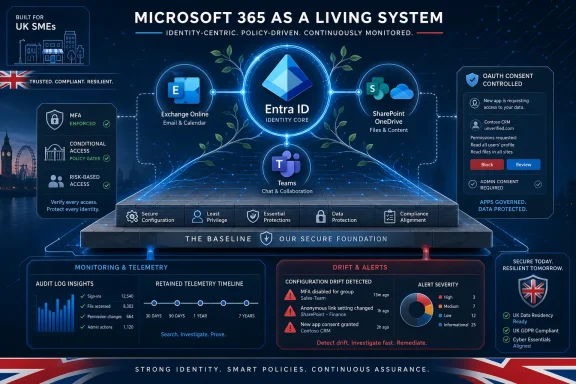 Microsoft 365 Is the New Perimeter, Whether SMEs Admit It or Not
The old perimeter failed slowly, then all at once. For small and mid-sized businesses, the practical perimeter is no longer the office firewall or even the managed laptop. It is the identity system, the mailbox, the file-sharing fabric, and the collaboration graph that sit inside Microsoft 365.That is why a secure baseline matters more than a one-time hardening pass. A hardening project says, “We fixed this tenant in March.” A baseline says, “This is the minimum safe state of the tenant, and we can prove when it drifts.” The difference sounds bureaucratic until an incident responder asks who granted an application access to mailboxes, when an external sharing link was created, or why a privileged role was active at 2:14 a.m.
Microsoft’s own direction reinforces the point. The company has been making more security controls accessible through admin-center experiences, pushing customers away from legacy authentication, and nudging tenants toward stronger identity controls. CISA’s SCuBA work has also given agencies and private organizations a vocabulary for Microsoft 365 baselines that reaches beyond vendor marketing. The result is a rare moment of alignment: Microsoft wants tenants configured more safely, government security agencies want measurable baselines, and insurers and customers increasingly want evidence.
For UK SMEs, the stakes are especially sharp. Many rely heavily on Microsoft 365 because it is cheaper and simpler than building a patchwork of separate identity, mail, storage, and collaboration platforms. That consolidation is rational. It also means a single badly governed tenant can become the attacker’s map, filing cabinet, switchboard, and launchpad.
The Baseline Is a Floor, Not a Badge
The most useful idea in the Security Boulevard piece is that a baseline should be expressed as control objectives rather than a brittle list of portal clicks. Microsoft changes names, portals, licensing boundaries, and defaults. Attackers do not care whether a setting lives under Entra, Defender, Purview, Exchange, or the Microsoft 365 admin center. They care whether it blocks them.A good baseline therefore starts with questions rather than settings. Who can sign in, from where, and with what assurance? Who can administer the tenant, and for how long? How is email authenticated and filtered? How can data leave through sharing, forwarding, guests, apps, or sync? What telemetry is retained long enough to reconstruct events?
That framing is important because many organizations confuse configuration with security posture. A tenant may have MFA enabled and still allow weak methods, excessive exceptions, or legacy flows. It may have audit logging available but not retained or exported in a way that helps after the fact. It may restrict anonymous sharing at the top level while allowing site owners to create operational workarounds that become permanent.
The baseline is not supposed to be perfect. It is supposed to be defensible. If the business needs a weaker setting, the exception should have an owner, a reason, a compensating control, and an expiry date. Without that discipline, the exception becomes the real policy and the baseline becomes decorative paperwork.
Identity Still Carries the First Blast
Every Microsoft 365 baseline begins with identity because nearly every meaningful Microsoft 365 compromise becomes an identity problem. Phishing, token theft, password spraying, OAuth abuse, session hijacking, and admin misuse all converge on Entra ID. If identity controls are weak, the rest of the tenant’s controls become softer than they look.Multifactor authentication remains the first obvious step, but “MFA enabled” is no longer a sufficient sentence. The baseline needs to distinguish between ordinary users, privileged users, finance staff, contractors, service accounts, and emergency accounts. It should also distinguish between stronger authentication methods and legacy or phishable ones. A tenant that treats every account class the same is not simpler; it is merely hiding complexity until an attacker finds it.
Conditional Access is where the baseline becomes more than a login prompt. Properly designed policies can factor in user risk, sign-in risk, location, device compliance, app sensitivity, and session conditions. Poorly designed policies create gaps, prompt fatigue, and a growing graveyard of exclusions that nobody wants to touch.
The uncomfortable truth is that many SMEs have Conditional Access only in the loosest sense. They have a few broad rules, a few emergency exclusions, and a few mystery accounts that predate current administrators. That is not a strategy. It is a negotiation with the past.
Legacy Authentication Is Not Legacy If It Still Works
Blocking legacy authentication has been security advice for so long that it risks sounding stale. It is not stale if the protocol path still exists. Legacy authentication remains dangerous because it bypasses or weakens modern controls and has historically been useful in password-spraying and credential attacks.The baseline should be ruthless here. If a protocol cannot meet the organization’s authentication and monitoring expectations, it should not survive because one scanner, copier, mail relay, or line-of-business application is inconvenient to migrate. Exceptions may be necessary, but they should be narrow, documented, monitored, and temporary.
This is where baseline work often becomes political. The device that “must” keep using an old mail flow belongs to a department that does not own the risk. The administrator who wants to disable the protocol owns the outage. The attacker, naturally, owns neither and benefits from both.
A mature baseline changes that conversation. It puts the burden on the exception, not on the secure default. If a business process depends on an unsafe authentication path, the baseline does not pretend otherwise. It records the risk and forces the business to decide whether convenience is worth the exposure.
Admin Accounts Should Not Live Like Normal Users
Standing privilege is one of the great quiet failures of Microsoft 365 administration. It is easy to grant an admin role for a migration, a support ticket, a vendor engagement, or a long-forgotten project. It is much harder to remove it six months later, especially when nobody is sure what might break.Privileged Identity Management exists to make admin access time-bound and deliberate. But PIM is not magic. It only helps if role assignments are reviewed, activation requires appropriate assurance, and administrators use separate privileged accounts instead of doing daily work inside accounts that also hold tenant-wide power.
Separate admin accounts should not have mailboxes used for normal correspondence. They should not browse the web casually. They should not become the identity equivalent of a master key left on a desk. If that sounds obvious, incident history suggests it is not obvious enough.
Break-glass accounts deserve similar seriousness. They are emergency controls, not convenience accounts for when Conditional Access is annoying. They should be few, monitored, protected by strong credentials or hardware-backed methods where appropriate, and tested under controlled conditions. A break-glass account that nobody monitors is not resilience. It is an unguarded side door with a reassuring name.
Email Security Is Still Where Reality Enters the Tenant
For all the talk of collaboration suites and identity fabrics, email remains the daily attack surface most users actually experience. Exchange Online is both a communications platform and a rich source of attacker opportunity. It carries phishing, business email compromise, credential harvesting, invoice fraud, malicious attachments, spoofing, and post-compromise mailbox manipulation.A baseline should treat Exchange Online as a layered control environment. Domain authentication through SPF, DKIM, and DMARC reduces spoofing and improves trust in legitimate mail. Anti-phishing and anti-spam policies reduce commodity abuse. Defender for Office 365, where licensed, adds Safe Links, Safe Attachments, detonation, impersonation protection, and richer detection.
But email controls are only as good as their tuning and review. Transport rules can become hidden bypasses. Mailbox forwarding can quietly exfiltrate data. Inbox rules can hide replies, suppress warnings, and help attackers maintain business email compromise operations after the initial login is discovered.
The baseline should therefore watch for the configuration changes attackers actually make. New external forwarding rules, suspicious inbox rules, changed mail flow rules, unexpected connectors, and spoofing exceptions deserve attention. A tenant that blocks a phishing message but misses the forwarding rule created after compromise has only solved the first half of the problem.
Collaboration Defaults Are Security Policy in Disguise
SharePoint, OneDrive, and Teams are often framed as productivity systems. In practice, they are data movement systems. Their defaults determine whether sensitive documents stay inside the organization, travel to named partners, or drift into the public internet through links that outlive the project that created them.External sharing is where many organizations discover that Microsoft 365 security is not just an IT problem. Sales wants easy client collaboration. HR wants controlled document exchange. Finance wants supplier access. Project teams want guests added quickly. Security wants expiry, review, and auditability. All of them are right in their own local context.
A baseline reconciles those demands by making the safe path the easy path. Anonymous links should not be the default unless the business has a clear need. Specific-people links, expiry periods, guest reviews, domain restrictions, and site-level governance give users room to collaborate without turning every document library into an unmanaged publication system.
Teams deserves particular care because it feels conversational and temporary even when it is neither. Guest access, federation, channel creation, app permissions, meeting artifacts, and shared files create a durable collaboration footprint. Left unmanaged, Teams can become a parallel access-control universe where business urgency routinely outruns governance.
OAuth Consent Is the Backdoor That Looks Like a Login Screen
Application consent is one of the most underappreciated Microsoft 365 risks for SMEs. Users understand passwords. Many understand MFA. Far fewer understand what it means to grant an application permission to read mail, access files, maintain offline access, or act on their behalf.Attackers know this. OAuth abuse can produce persistent access that does not look like a simple password compromise. A user may approve an application once, and the resulting permissions can survive password resets or evade the mental model that help desks use for account cleanup.
The baseline should restrict user consent to low-risk, verified scenarios or require admin approval for sensitive permissions. It should also require periodic review of enterprise applications, app registrations, service principals, and granted permissions. “We do not know what this app does” should not be an acceptable long-term state.
This area is a good example of why baseline work needs ownership. Business units often adopt SaaS tools faster than central IT can review them. If the tenant allows broad self-service consent, the organization has effectively delegated part of its access-control model to user judgment under time pressure. That is not empowerment. It is uncontrolled risk with a friendly prompt.
Logging Is Where Security Claims Meet Evidence
A baseline without logging is a belief system. It may describe intended controls, but it cannot prove what happened when those controls fail, are bypassed, or are changed. Microsoft 365 produces valuable telemetry across Entra ID, Exchange Online, SharePoint, OneDrive, Teams, Defender, and Purview, but value depends on retention, accessibility, and correlation.Unified audit logging should be enabled and verified. Sign-in logs and audit logs should be retained long enough to match the organization’s incident-response reality. If investigations commonly begin weeks after suspicious activity starts, seven-day visibility is a false economy. If logs stay only inside portals that administrators check after something goes wrong, detection remains reactive.
Exporting Microsoft 365 signals to Sentinel or another SIEM is not simply an enterprise luxury. It is how identity, endpoint, mail, and data activity become one investigation rather than five disconnected searches. A mailbox forwarding rule after an anomalous sign-in means more than either signal alone. A mass download after an OAuth consent grant means more still.
Detection engineering should follow common abuse patterns, not just product categories. Impossible travel, risky sign-ins, suspicious consent grants, new privileged role assignments, mailbox rule creation, external forwarding, unusual file sharing, and mass downloads are all concrete patterns that map to real attacker behavior. The baseline should make those events visible and actionable.
Drift Is the Enemy That Looks Like Operations
Most tenants do not become insecure in one dramatic change. They drift. A vendor needs access for a week. A Conditional Access policy breaks an executive’s travel workflow. A project site opens external sharing. A service account receives extra permissions. A mail rule is created to solve a delivery issue. Each change may be reasonable. Together, they rewrite the baseline.That is why monitoring for drift is as important as implementing the baseline in the first place. Configuration export, policy comparison, scripted checks, change control, and periodic review are not bureaucratic flourishes. They are how administrators distinguish the tenant they think they run from the tenant they actually run.
PowerShell and Microsoft Graph remain essential here because portals are poor memory. A portal shows the current state. Automation can show change over time, compare tenants, flag deviations, and produce evidence for auditors, insurers, or boards. Intune can enforce device compliance and configuration. Conditional Access can express access policy. Scripts can validate mailbox forwarding, guest users, role assignments, and app permissions.
The lesson is not that every SME needs a DevSecOps pipeline for Microsoft 365. The lesson is that manual settings do not scale as governance. Even a small tenant benefits from repeatable checks and a written expectation of what “secure enough” means.
The Licensing Problem Cannot Be Wished Away
Microsoft 365 security advice often assumes a neat stack of licenses that many SMEs do not have. Conditional Access granularity, PIM, Defender capabilities, advanced auditing, endpoint integration, and richer SIEM workflows may depend on specific Entra ID, Microsoft 365, Defender, or Purview plans. The baseline must therefore separate “minimum acceptable control” from “ideal implementation.”This is not an excuse for weak security. Security Defaults, legacy authentication blocking, basic admin hygiene, domain authentication, sharing restrictions, and audit review can still deliver meaningful risk reduction. But it is intellectually dishonest to pretend that every tenant can implement the same control set without cost, licensing changes, or operational trade-offs.
The right question for SMEs is not “Do we have every Microsoft security feature turned on?” It is “Have we made deliberate decisions about the risks our licenses can and cannot cover?” If the organization cannot use PIM, how will it review standing privilege? If it lacks advanced Defender capabilities, what compensating mail security and monitoring exist? If log retention is limited, where is evidence preserved?
This is where consultants can add value, but also where they can do damage. A tenant-specific hardening plan should prioritize attack paths and business impact, not dump a generic control spreadsheet on an overstretched administrator. The best baseline is one the organization can actually maintain.
Microsoft’s Baseline Push Is Also a Product Strategy
There is a vendor story underneath all of this. Microsoft benefits when customers treat Microsoft 365 as the security hub. Baseline Security Mode, Secure Score, Conditional Access templates, Defender integration, Sentinel connectors, and Purview controls all reinforce the idea that the Microsoft cloud is not merely where work happens but where work is governed.That strategy is not inherently bad. In many organizations, consolidation reduces complexity and improves coverage. A single identity provider, security portal, endpoint stack, mail filter, and SIEM path can be more manageable than a patchwork of tools that only one departed engineer understood.
But Microsoft’s incentives are not identical to the customer’s. Some security improvements arrive as defaults. Others arrive as premium licenses. Some controls are simplified for broad adoption. Others require expertise that SMEs do not have in-house. A baseline should take advantage of Microsoft’s integrated controls while maintaining an independent view of risk.
This is why CISA’s work matters. Government baseline projects are not perfect, and federal assumptions do not map cleanly to every SME. Still, they provide a counterweight to purely vendor-defined security posture. They encourage organizations to ask whether the tenant is measurably configured against a known security model, not merely whether a dashboard score has improved.
The UK SME Reality Is Less About Zero Trust Than Basic Discipline
Security vendors love to describe this entire conversation as Zero Trust. That phrase is not wrong, but it can obscure the simpler operational truth. Many SMEs do not need a grand architectural slogan first. They need MFA that actually covers the right accounts, old protocols disabled, admin roles reviewed, external sharing governed, OAuth consent controlled, and logs retained.Those controls are not glamorous. They also address the failure modes that appear again and again in real incidents. A compromised user creates forwarding rules. A phished administrator has excessive standing privilege. An app grant persists after a password reset. A guest account remains long after a supplier engagement ends. A suspicious sign-in cannot be investigated because logs aged out.
The baseline is where security becomes mundane enough to work. It turns “we should probably review guests” into a scheduled control. It turns “admins should use separate accounts” into a tenant rule. It turns “we think audit logging is on” into a checked fact. It turns “that exception was temporary” into a reviewable promise.
For smaller organizations, this discipline may be the difference between a contained account compromise and a full business email compromise case with regulatory, financial, and reputational consequences. The baseline does not eliminate risk. It makes the common path of compromise narrower, noisier, and easier to reconstruct.
The Controls That Make the Baseline Real
A Microsoft 365 baseline succeeds when it becomes part of operations rather than a document stored in the same tenant it is supposed to protect. The concrete controls are familiar, but their value comes from being applied consistently and reviewed honestly.- MFA should apply to all users, with stronger and preferably phishing-resistant methods required for privileged and high-risk roles.
- Conditional Access should be designed by user population, device state, location, risk, and application sensitivity rather than as one broad rule for everyone.
- Legacy authentication, unsafe mail flows, anonymous sharing, broad user consent, and unnecessary federation should be disabled or tightly exception-managed.
- Privileged access should use separate admin accounts, time-bound activation where available, regular role reviews, and closely monitored emergency accounts.
- Microsoft 365 logs should be retained and exported in a way that supports investigations across identity, email, endpoint, file access, and collaboration activity.
- Configuration drift should be measured through scheduled reviews, automation, and documented exceptions with owners and expiry dates.
A secure Microsoft 365 baseline is ultimately a statement about operational maturity, not just security tooling. It says the organization understands that identity, mail, collaboration, files, devices, and telemetry are one connected attack surface, and that safe defaults must be maintained after the consultant leaves and after the portal names change again. The next phase of Microsoft 365 security will not be won by tenants with the longest checklist; it will be won by tenants that can prove their defaults are safe, their exceptions are intentional, and their drift is caught before an attacker turns it into a foothold.
References
- Primary source: Security Boulevard
Published: Wed, 24 Jun 2026 08:44:52 GMT
Secure baseline configurations for Microsoft 365 - Security Boulevard
Secure baseline configurations for Microsoft 365 Microsoft 365 is often the centre of identity, email, collaboration, and document sharing for UK SMEs. That makes it one of the highest-value places to establish a secure baseline. A baseline is not a one-off hardening exercise. It is the minimum...securityboulevard.com - Official source: learn.microsoft.com
Baseline security mode settings | Microsoft Learn
Discover how to configure Baseline Security Mode settings in Microsoft 365 to enhance security, protect data, and ensure safe collaboration.learn.microsoft.com - Security advisory: cisa.gov
- Related coverage: legistorm.com
CISA Finalizes Microsoft 365 Secure Configuration Baselines - Cybersecurity and Infrastructure Security Agency | LegiStorm
CISA Finalizes Microsoft 365 Secure Configuration Baselines ReleasedDecember 21, 2023By: Michael Duffy, Associate Director, CISA And Chad Poland, S...www.legistorm.com - Related coverage: windowscentral.com
Microsoft plans to end SMS two-factor authentication, potentially setting the pace for a passwordless Windows 11 future: "SMS as MFA is horribly vulnerable on multiple fronts." | Windows Central
Microsoft is scrapping SMS 2FA because it is a leading source of fraud.www.windowscentral.com - Official source: download.microsoft.com
PDF_MSFT_Cloud_architecture_information protection for GDPR.vsdx
PDF documentdownload.microsoft.com