

Universal Media Server’s maintenance cadence continues to pay dividends for power users and home-theater hobbyists: version 15.3.0 lands as a focused quality-and‑UX update that sharpens the web player, fixes an important Windows binary-update bug, accelerates scanning by avoiding unsupported files, and adds several small but useful content‑management conveniences — a release that was announced in the project’s news stream and appears to have been distributed to early supporters before wider rollout.
Universal Media Server (UMS) is a long‑running, Java‑based DLNA/UPnP media server designed to stream and transcode a wide range of audio and video formats to TVs, streaming boxes, consoles and mobile devices. It relies on a collection of well‑known third‑party tools — notably FFmpeg, MediaInfo, MEncoder, VLC and yt‑dlp — to handle decoding and container work, and continues to position itself as a zero‑configuration, cross‑platform solution for home media libraries. UMS development has been unusually transparent in recent months: the project documented an active v15 development stream (alpha → beta → stable) and published a sequence of 15.x news items throughout 2025 as it reshaped the web player and account features that underpin the new UI mode and multi‑user features introduced in the v15 cycle. That roadmap and the "what’s new in v15" documentation help explain why the 15.3.0 release focuses more on experience and reliability than on headline format support.
UMS’ 15.3.0 is neither a seismic shift nor a maintenance‑only update — it sits squarely in the pragmatic center: meaningful day‑to‑day improvements that reduce friction for Windows hosts and the many devices they serve, coupled with the necessary plumbing fixes that keep a complex, multi‑binary media server healthy and resilient.
Source: Neowin https://www.neowin.net/software/universal-media-server-1530/
 Background
Universal Media Server (UMS) is a long‑running, Java‑based DLNA/UPnP media server designed to stream and transcode a wide range of audio and video formats to TVs, streaming boxes, consoles and mobile devices. It relies on a collection of well‑known third‑party tools — notably FFmpeg, MediaInfo, MEncoder, VLC and yt‑dlp — to handle decoding and container work, and continues to position itself as a zero‑configuration, cross‑platform solution for home media libraries. UMS development has been unusually transparent in recent months: the project documented an active v15 development stream (alpha → beta → stable) and published a sequence of 15.x news items throughout 2025 as it reshaped the web player and account features that underpin the new UI mode and multi‑user features introduced in the v15 cycle. That roadmap and the "what’s new in v15" documentation help explain why the 15.3.0 release focuses more on experience and reliability than on headline format support. What’s new in 15.3.0 — headline changes
Web player and UX improvements
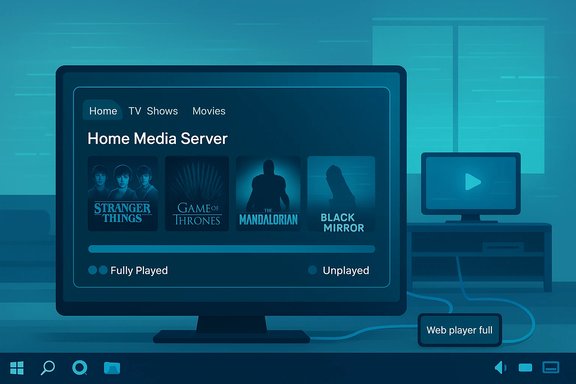
- A series of visual and functional upgrades to the web player are the release's core story: the web UI gets more room for thumbnails on TV-series pages and new controls to mark whole directories as "fully played" or "unplayed" for the current user. This addresses a long‑standing pain point for users who manage large, serialized collections and want quick progress tracking without editing metadata files.
- The release also introduces a new system‑tray entry that opens a “Web player (full)” view and exposes settings more directly — a small integration tweak that improves discoverability on desktop systems where a browser tab may be forgotten.
Platform and maintenance fixes
- A Windows updater bug that could prevent bundled binaries (FFmpeg, MediaInfo, yt‑dlp and others) from updating correctly has been fixed. For a server that depends on external helper binaries to transcode and fetch metadata, ensuring these tools can self‑update reliably is important; this fix reduces the risk of mismatch between the server core and the runtime helpers.
- Scanning performance received attention: UMS now skips parsing files that are not supported, which in some real‑world folder trees can substantially reduce a scan’s CPU and IO overhead and speed up library updates. The practical effect is faster readiness after adding or modifying large mixed‑content folders.
Content‑management niceties and internationalization
- New content controls (mark‑directory as played/unplayed), and improved translation coverage (Crowdin updates pushing several languages to high completeness), focus the release on day‑to‑day usability for multi‑user households and international audiences. The project also performed dependency and build hygiene work (JavaScript, React, Jetty, and assorted build tools), which reduces long‑term maintenance risk and helps platform parity.
Release timing, distribution and availability — the facts (verified)
- The project’s official news page lists 15.3.0 as a news item dated 2025/12/14, indicating an official announcement of the release.
- A community/GitHub‑facing summary and pre‑release notes for 15.3.0 were published publicly (the release text documents the web player changes, the tray icon, ignored‑extensions feature and binary update fix), but the project also indicated that 15.3.0 was available to Patreon supporters earlier and that wider availability would follow the usual release channel cadence. That means there is a short window where supporters and backers may see builds before they appear on the main downloads page.
- As of this article the main download page still lists the 15.2.0 installer prominently for Windows and other platforms, which suggests either a staggered rollout or that distribution mirrors are still syncing. If you rely on centrally‑managed downloads (for example, corporate deployment or curated NAS app stores), treat 15.3.0 as a forthcoming update until the official downloads listings and package repositories uniformly show it.
Why these changes matter for Windows users
Faster scans, lower CPU and I/O noise
UMS' decision to skip parsing unsupported files improves responsiveness on Windows machines that store mixed content (office documents, installers, images) alongside media. In practice, this reduces the file‑system churn and the transient CPU spikes commonly observed during library refreshes on large volumes. For Windows users running UMS on NAS boxes or low‑power mini‑PCs, this ought to be a measurable improvement.Updated bundled binaries and safer transcodes
Fixing the updater for critical helper binaries reduces the maintenance burden for Windows installations. Since UMS uses these external binaries to transcode or extract metadata, ensuring they can be updated in a coordinated fashion reduces failure modes where the server core expects a newer FFmpeg behavior but an older binary remains in place. Nonetheless, admins should still perform checksum and binary provenance checks for any updated helper tools (advice below).Desktop integration
The system tray change is small but practical for many Windows setups: instead of hunting for a browser tab, you can open the “full” web player or jump straight to settings from the tray — a small UX win for desktop‑first users hosting UMS on a Windows PC.Technical verification and cross‑checks (what was verified and where)
- Official announcement of 15.3.0 and the short changelog: corroborated on Universal Media Server’s official news page.
- Detailed release notes and developer commentary describing web player changes, tray item, "ignore file extensions" logic, scanning improvements and the Windows updater fix: visible in the GitHub/newreleases entry and release commentary for 15.3.0.
- Packaging and distribution state (stable downloads page still showing 15.2.0 for direct download): confirmed on the project’s downloads page and cross‑checked against a third‑party mirror listing. This indicates a staggered rollout or mirror propagation delay.
Strengths — what UMS 15.3.0 does well
- User‑facing polish: The web player work is targeted at real, repeated workflows — marking directories played, better series pages and clearer thumbnails reduce friction for families and collectors. These are quality‑of‑life changes that matter every day.
- Performance pragmatism: Skipping unsupported files during scans is a practical optimization that reduces CPU and disk load, especially for diverse storage pools. This is a clear engineering win for constrained hosts.
- Repair to updater logic: Fixing the bundled binary updater removes a class of hard‑to‑diagnose errors when helper tools fall out of sync, improving overall system resilience.
- Maintenance and dependency hygiene: The project’s attention to dependency updates (JS, build tools, Jetty) is low‑visibility but important for long‑term security and maintainability.
Risks and caveats — what to watch for
- Staggered availability and mirrors: Because downloads and package indexes sometimes lag announcements, early adopters may get Patreon builds or pre‑releases inadvertently. If you manage multiple machines, wait for the canonical download page and package‑manager updates before mass deployment.
- Potential for UI regressions: Any change to the web UI and account/session code can create regressions in browser compatibility or in integrations used by HTPC front ends. Test critical playback and control flows after upgrading.
- Binary provenance: UMS depends on third‑party binaries. While updating these improves functionality, it also brings the usual concerns around binary provenance and supply‑chain trust. Verify checksums, vendor signatures and, where possible, use package manager installations for helper tools to ensure you obtain vetted builds.
- Metadata semantics: Introducing a "mark directory as played" convenience is useful, but it can diverge from embedded or external metadata (e.g., watched flags in Plex or Kodi). If you use multiple servers/clients against the same library, confirm how watched state is shared or reconciled. This is a UX interoperability risk, not a bug per se.
Practical upgrade checklist for Windows hosts
- Back up the UMS configuration directory and any customizations (web player themes, plugins, custom binary paths).
- If you rely on automated deployments, do a staged rollout: one test host → small pilot group → full roll‑out.
- After install, verify that bundled helpers updated correctly: run the UMS settings page that lists binary versions, and confirm FFmpeg/MediaInfo/yt‑dpl versions.
- Run a full scan on a representative folder set and time the scan; verify CPU/IO behavior and whether the “skip unsupported files” optimization materially improves responsiveness.
- Test multi‑user web player behavior (switch users, mark directories played/unplayed) and verify watched states are persistent and visible as expected across browsers and sessions.
- If you depend on third‑party package managers (Chocolatey/Homebrew/AppImage/Docker) wait for those repositories to reflect 15.3.0 or pin to a vetted build. The main downloads page and package mirrors can lag.
Community and distribution model notes
UMS continues its hybrid distribution pattern: public releases appear on GitHub and the official site, while Patreon/backer channels occasionally receive early builds and pre‑releases. This sponsorship model funds development but also produces a short window where backers have early access to builds that wider audiences will receive mildly later. The project is clear about this workflow; it’s a common model for open‑source projects that sustain continuous engineering through patronage. Admins managing critical systems should avoid elevating early builds to production until broader mirror propagation and community smoke tests complete.A technical lens: transcodes, Java, and helper tools
UMS remains Java‑based and delegates heavy media work to platform binaries. That architecture is pragmatic: Java provides cross‑platform portability and a consistent server runtime, while specialized native binaries (FFmpeg, MEncoder, tsMuxeR, yt‑dpl, etc. provide the format support and performance that a pure‑Java stack would struggle to match. This hybrid approach keeps the core small and maintainable while allowing the project to benefit from upstream improvements in codec libraries. The trade‑off is dependency management: changes in helper binary behavior can manifest as server bugs unless the updater and packaging are rock solid — exactly the class of problem the 15.3.0 Windows fix is designed to reduce.Final assessment and recommendations
Universal Media Server 15.3.0 is a practical, quality‑focused update that advances the daily usability of the product more than it expands codec coverage or adds blockbuster features. The release shows mature engineering discipline: UX polish where users feel it, targeted performance work that helps constrained hosts, and attention to dependency upgrades that lower long‑term maintenance costs. For home users and hobbyists who rely on the UMS web player and local desktop hosting, 15.3.0 is a valuable step forward. Recommendations:- Home users who enjoy being on the cutting edge and who support the project can adopt 15.3.0 promptly, but should verify helper‑binary versions after install.
- Administrators, NAS operators and users with large libraries should stage the upgrade, validate scan behavior and metadata handling on a test host, and ensure backups of settings are available for quick rollback if necessary.
- Anyone managing multiple players or cross‑server syncs should pay special attention to the new "mark directory as played" semantics and test interoperability with external clients.
UMS’ 15.3.0 is neither a seismic shift nor a maintenance‑only update — it sits squarely in the pragmatic center: meaningful day‑to‑day improvements that reduce friction for Windows hosts and the many devices they serve, coupled with the necessary plumbing fixes that keep a complex, multi‑binary media server healthy and resilient.
Source: Neowin https://www.neowin.net/software/universal-media-server-1530/
