

UniGetUI’s latest 2026.1.3 coverage lands at an interesting moment for the Windows package-management ecosystem: the project has moved under Devolutions’ stewardship, its GitHub repository now emphasizes both consumer usability and enterprise readiness, and the most recent public release train has been focused on stability, install workflow polish, and release automation. That makes this more than just another point update; it is a useful snapshot of where the project is heading and why it still matters to Windows 10 and Windows 11 power users. The bigger story is that UniGetUI continues to sit at the intersection of convenience, trust, and orchestration, which is exactly where modern Windows software distribution has become increasingly complex. (github.com)
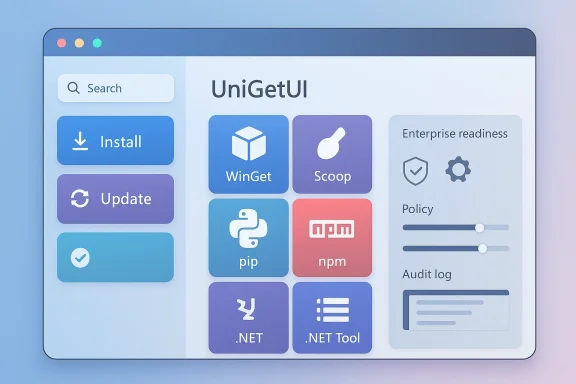
UniGetUI began life as a graphical front end for Windows package managers, a tool designed to make WinGet, Scoop, Chocolatey, pip, npm, and other ecosystems easier to browse and operate from one place. Its appeal has always been obvious: instead of juggling multiple CLIs and remembering incompatible syntax, users get a single interface to discover, install, update, and uninstall software. That lowers the barrier for casual users while also saving time for administrators who already know what they need but do not want to spend the day typing commands. (github.com)
The project’s current repository makes clear that it is now maintained by Devolutions, which is a meaningful change in ownership and governance. The repository states that UniGetUI remains free, open source, MIT-licensed, and standalone, while Devolutions adds long-term investment, structured governance, stronger security processes, and a roadmap that leans more clearly toward enterprise readiness. In practical terms, that suggests a future where the tool is expected to be more than a hobbyist-friendly GUI; it is becoming a serious desktop-management layer. (github.com)
This matters because Windows software distribution has fragmented rather than simplified over the past few years. Microsoft’s WinGet is now central to the Windows package story, but it is not the whole story; many users still rely on Chocolatey, Scoop, language-specific package ecosystems, or vendor-specific installers. A tool like UniGetUI becomes valuable precisely because it reduces the friction of that fragmentation. It does not replace the package managers themselves, but it makes their differences less painful for humans. (github.com)
Recent releases show a clear pattern: the project has been polishing core workflows instead of chasing flashy redesigns. The 3.3.6 and 3.3.7 lines focused on startup speed, deadlock fixes, installation reliability, version handling, update checking, NPM detection, and installer improvements. Those are the sorts of changes that matter when the software is used repeatedly on real machines, especially in environments where package errors, stale metadata, or UI freezes quickly become support tickets. (github.com)
A second advantage is discoverability. CLI package managers are powerful, but they are not especially welcoming for users who do not already know package IDs, scopes, flags, or compatibility quirks. UniGetUI turns package operations into a visual workflow, which makes it easier to spot available updates, compare entries, and perform bulk maintenance without memorizing command syntax. (github.com)
There is also a credibility dimension. Devolutions is a recognizable name in remote access and credential-management circles, so its involvement sends a signal to enterprise users that UniGetUI is not only for hobbyists. That matters because package-management tools increasingly sit inside software supply-chain conversations, where provenance, integrity, and repeatability are more important than a pretty interface. (github.com)
Version 3.3.5 focused on reliability issues affecting 3.3.4, including crashes caused by XamlException, while also downgrading AppSdk from 1.8 to 1.7. Then 3.3.7 rolled back to .NET 8 and AppSdk 1.7 after a beta path, while adding autoupdate controls for specific packages, improving handling for “Unknown” versions, refining .NET Tool update checks, and improving the installer. That sequence suggests a team willing to reverse course when needed, which is reassuring. (github.com)
It also helps bridge a cultural gap. Some Windows users are comfortable with scripting and package IDs, while others still prefer point-and-click workflows. UniGetUI meets both groups halfway by exposing package-manager functionality through an interface without hiding the underlying ecosystems entirely. That is pragmatic abstraction, and it is usually a winning design choice. (github.com)
The work on packages with Unknown version labels is also more important than it might sound. Version metadata problems can cause false positives, missed updates, or confusing UI states, and those problems erode trust fast. In a package manager, the correctness of version handling is part of the product’s credibility, not just a backend detail. (github.com)
The Devolutions stewardship announcement also matters here because stronger security processes can improve confidence in future release management. That does not eliminate risk, but it does create a better context for handling signing, workflow hardening, and release discipline. It is a meaningful step up from a purely informal maintenance model. (github.com)
It also improves maintenance discipline. When updates are visible and easy to trigger, users are more likely to keep software current, which has obvious security and stability benefits. The tool’s bulk and selective update handling makes that process less tedious, which is often the hidden reason people fall behind on patching. (github.com)
The enterprise case also depends on how much policy control can be layered on top of the UI. Selective auto-updates, improved installer behavior, and stable queue handling are all helpful, but the real test is whether UniGetUI can fit into controlled endpoints without creating support headaches. That is the kind of question that only operational deployment can answer. (github.com)
There is also a broader market implication. Windows already has more package-management options than most users realize, but very few tools make those options feel coherent. UniGetUI’s future will depend on whether it can remain the cleanest bridge between ecosystems without becoming bloated or overcomplicated. That is a difficult balance, but it is also where the project’s strongest opportunity lies.
Source: Neowin UniGetUI 2026.1.3
 Background
UniGetUI began life as a graphical front end for Windows package managers, a tool designed to make WinGet, Scoop, Chocolatey, pip, npm, and other ecosystems easier to browse and operate from one place. Its appeal has always been obvious: instead of juggling multiple CLIs and remembering incompatible syntax, users get a single interface to discover, install, update, and uninstall software. That lowers the barrier for casual users while also saving time for administrators who already know what they need but do not want to spend the day typing commands. (github.com)The project’s current repository makes clear that it is now maintained by Devolutions, which is a meaningful change in ownership and governance. The repository states that UniGetUI remains free, open source, MIT-licensed, and standalone, while Devolutions adds long-term investment, structured governance, stronger security processes, and a roadmap that leans more clearly toward enterprise readiness. In practical terms, that suggests a future where the tool is expected to be more than a hobbyist-friendly GUI; it is becoming a serious desktop-management layer. (github.com)
This matters because Windows software distribution has fragmented rather than simplified over the past few years. Microsoft’s WinGet is now central to the Windows package story, but it is not the whole story; many users still rely on Chocolatey, Scoop, language-specific package ecosystems, or vendor-specific installers. A tool like UniGetUI becomes valuable precisely because it reduces the friction of that fragmentation. It does not replace the package managers themselves, but it makes their differences less painful for humans. (github.com)
Recent releases show a clear pattern: the project has been polishing core workflows instead of chasing flashy redesigns. The 3.3.6 and 3.3.7 lines focused on startup speed, deadlock fixes, installation reliability, version handling, update checking, NPM detection, and installer improvements. Those are the sorts of changes that matter when the software is used repeatedly on real machines, especially in environments where package errors, stale metadata, or UI freezes quickly become support tickets. (github.com)
What UniGetUI Actually Does
At the most basic level, UniGetUI is a package manager manager. That slightly awkward phrase is actually an accurate description of the product’s role: it aggregates multiple package managers into one interface, letting users search, install, update, and remove applications from a central dashboard. The repository explicitly lists WinGet, Scoop, Chocolatey, pip, npm, .NET Tool, and PowerShell Gallery among the supported back ends. (github.com)The value proposition
The value proposition is not just convenience. It is also consistency. Different package managers expose different metadata, update behavior, repository trust models, and command syntaxes. UniGetUI smooths over those differences enough that users can focus on the software they want rather than the package ecosystem they are forced to use. That is especially useful on Windows, where software management has historically been a mix of installer EXEs, Microsoft Store apps, scripts, and command-line tooling. (github.com)A second advantage is discoverability. CLI package managers are powerful, but they are not especially welcoming for users who do not already know package IDs, scopes, flags, or compatibility quirks. UniGetUI turns package operations into a visual workflow, which makes it easier to spot available updates, compare entries, and perform bulk maintenance without memorizing command syntax. (github.com)
Why Windows users care
For consumer users, the appeal is obvious: fewer clicks, fewer downloads, and less searching across random vendor websites. For advanced users, the appeal is different but just as strong: one front end for multi-source software management, faster triage when a package is missing or misbehaving, and a simpler way to keep a mixed Windows environment under control. That dual audience is one reason UniGetUI has remained relevant instead of becoming yet another niche utility. (github.com)- It centralizes package management across multiple ecosystems.
- It reduces reliance on command-line syntax.
- It improves discovery of available updates.
- It supports both everyday users and power users.
- It helps users compare sources and package states more efficiently.
Why the Devolutions Transition Matters
The most consequential recent development is not a single changelog item but the project’s transition to Devolutions. The repository now explicitly states that UniGetUI is maintained by Devolutions, while also preserving the project’s open-source identity and standalone nature. That combination is important because it reassures existing users that the project is not being closed off, even as it becomes more professionally governed. (github.com)Stewardship versus ownership
Stewardship is not the same thing as control in the most restrictive sense. In this case, the public-facing language emphasizes continuity: same product identity, broader backing, and better process. That is the ideal outcome for an open-source desktop utility that has grown beyond a one-person project but still needs to feel community-driven. If handled well, this can reduce the risk of burnout, release stagnation, and security shortcuts. (github.com)There is also a credibility dimension. Devolutions is a recognizable name in remote access and credential-management circles, so its involvement sends a signal to enterprise users that UniGetUI is not only for hobbyists. That matters because package-management tools increasingly sit inside software supply-chain conversations, where provenance, integrity, and repeatability are more important than a pretty interface. (github.com)
Enterprise implications
For enterprises, stewardship under a known vendor can be a real difference-maker. It creates a stronger argument for internal adoption, especially where IT teams want a GUI layer over WinGet or other package sources without sacrificing oversight. It also suggests that future development may prioritize security workflows, release discipline, and compatibility stability rather than purely consumer-facing polish. (github.com)- Better governance can improve release predictability.
- Structured security processes can reduce trust concerns.
- Long-term backing can help with maintenance and support.
- Enterprise teams are more likely to evaluate tools with recognizable stewardship.
- Open-source continuity still matters to existing community users.
The Release Pattern Behind 2026.1.3
Even though the 2026.1.3 Neowin coverage is the headline that sparked attention, the best way to interpret it is through the recent release pattern around UniGetUI. The GitHub release history shows a steady flow of maintenance-oriented improvements, especially in the 3.3.6 and 3.3.7 releases. That points to a mature project that is refining core operations rather than trying to reinvent itself every cycle. (github.com)Stability first
Version 3.3.6, described as UniGetUI’s 100th release, introduced a startup speed improvement, a fix for duplicate update operations in the queue, and a fix for a self-deadlock that could hang the application during icon fetch. Those are not glamorous features, but they are exactly the kind of fixes that improve daily confidence. In desktop software, confidence is often the product. (github.com)Version 3.3.5 focused on reliability issues affecting 3.3.4, including crashes caused by XamlException, while also downgrading AppSdk from 1.8 to 1.7. Then 3.3.7 rolled back to .NET 8 and AppSdk 1.7 after a beta path, while adding autoupdate controls for specific packages, improving handling for “Unknown” versions, refining .NET Tool update checks, and improving the installer. That sequence suggests a team willing to reverse course when needed, which is reassuring. (github.com)
What that signals
A project that repeatedly addresses reliability, deadlocks, and version-handling logic is signaling that it understands its users’ pain points. In package managers, users do not just care whether an update exists; they care whether the tool can detect it accurately, queue it correctly, and finish the job without hanging the machine. Those are the hidden quality metrics that decide whether a utility becomes trusted. (github.com)- Startup performance has been a target.
- Queue correctness has been a target.
- Deadlock prevention has been a target.
- Package-version interpretation has been a target.
- Installer quality has been a target.
Package Management in the Windows Ecosystem
UniGetUI sits on top of a broader Windows package-management stack that has become much more important over time. WinGet in particular has helped normalize package-based software installation on Windows, but it has not eliminated the complexity of Windows software distribution. Many users still have to deal with vendor installers, multiple repositories, and inconsistent packaging quality. (github.com)Why a GUI layer still wins
A GUI layer is valuable because it lowers the cost of discovery and maintenance. A user can visually scan for updates, compare package states, and perform actions without looking up exact command names or worrying about syntax errors. For many organizations, that matters more than raw command-line power because it broadens the set of people who can safely handle routine software maintenance. (github.com)It also helps bridge a cultural gap. Some Windows users are comfortable with scripting and package IDs, while others still prefer point-and-click workflows. UniGetUI meets both groups halfway by exposing package-manager functionality through an interface without hiding the underlying ecosystems entirely. That is pragmatic abstraction, and it is usually a winning design choice. (github.com)
Competitive context
The broader competitive landscape includes native package managers, third-party GUI tools, and vendor-specific software centers. UniGetUI’s advantage is that it is not trying to own every layer of the stack; it is trying to unify them. That positioning is strong because it avoids a direct feature war with the package managers themselves and instead competes on usability, workflow, and trust. (github.com)- WinGet gives Windows a standard package pipeline.
- Scoop and Chocolatey remain important to many users.
- Language ecosystems still matter for development environments.
- A unified GUI reduces workflow fragmentation.
- Centralized visibility makes audits and updates simpler.
What’s New in the Current Release Line
The most recent public changelog items around UniGetUI show an emphasis on making the application feel smoother under real-world use. In 3.3.7, the project added the ability to automatically update only specific packages, improved handling of packages with an Unknown version, fixed issues with .NET Tool update checking, and refined the installer experience. That mix is a clue: the project is tuning the edges where users feel friction most sharply. (github.com)Smarter update handling
Selective auto-updating is especially interesting because it reflects the reality that not every package should be treated equally. Some users want a conservative approach where only critical or trusted packages update automatically, while others prefer a broader automated policy. Letting users narrow the scope is a practical enhancement that makes the tool fit into more administrative styles. (github.com)The work on packages with Unknown version labels is also more important than it might sound. Version metadata problems can cause false positives, missed updates, or confusing UI states, and those problems erode trust fast. In a package manager, the correctness of version handling is part of the product’s credibility, not just a backend detail. (github.com)
Installer and workflow polish
Installer improvements may seem mundane, but they affect first impressions and deployment friction. The release notes mention crash fixes, dark mode support, and better iconography in the installer path, which suggests the maintainers are aware that setup quality influences adoption. A cleaner installer is often the difference between a tool people test once and a tool they actually keep. (github.com)- Selective autoupdate controls reduce unnecessary risk.
- Better Unknown-version handling improves trust in the UI.
- Improved .NET Tool update checking helps developers.
- Installer fixes reduce onboarding friction.
- Dark mode and iconography matter for perceived polish.
Security, Trust, and Supply-Chain Concerns
A package manager interface is not just another desktop app; it sits directly in the software supply chain. That means the stakes are higher than the average utility because a mistaken action or a bad source can install the wrong software, the wrong version, or the wrong dependency set. UniGetUI’s repository makes a point of warning users that packages come from third parties and that sources and publishers should be reviewed before installation. (github.com)Why this matters more now
Windows users increasingly think about supply-chain trust, even outside enterprise environments. A GUI that makes installs easier must also make trust boundaries obvious, or it risks encouraging users to click through warnings they do not understand. UniGetUI’s positioning is therefore healthiest when it acts as a trust clarifier rather than a blind automation layer. (github.com)The Devolutions stewardship announcement also matters here because stronger security processes can improve confidence in future release management. That does not eliminate risk, but it does create a better context for handling signing, workflow hardening, and release discipline. It is a meaningful step up from a purely informal maintenance model. (github.com)
User behavior remains the weak link
No package manager can protect users from all mistakes, especially when users install software from unfamiliar sources or trust package names without checking provenance. The UI can reduce errors, but it cannot fully replace judgment. That is why package trust education is still essential, even when the tool itself is competent and polished. (github.com)- Third-party packages carry inherent trust risk.
- Source verification remains necessary.
- Automated updates must be scoped carefully.
- Installer signing and release processes matter.
- User education is part of security.
Consumer and Enterprise Impact
UniGetUI’s appeal splits cleanly into consumer and enterprise value, and that split helps explain why the project has such staying power. Consumers want convenience and fewer manual steps, while IT teams want repeatability, visibility, and less time spent hand-holding installs. The same interface can serve both, but the reasons for using it are not identical. (github.com)Consumer impact
For home users, the most important benefit is simplification. UniGetUI lets people find and update common apps in one place, which can replace a messy mix of browser downloads and ad-laden vendor sites. That is a clear quality-of-life improvement, especially for users who want Windows to feel less like an installation scavenger hunt. (github.com)It also improves maintenance discipline. When updates are visible and easy to trigger, users are more likely to keep software current, which has obvious security and stability benefits. The tool’s bulk and selective update handling makes that process less tedious, which is often the hidden reason people fall behind on patching. (github.com)
Enterprise impact
For enterprises, the story is more nuanced. UniGetUI is attractive because it can simplify package browsing and reduce the need for raw CLI exposure, but IT teams will care more about governance, repeatability, and source trust than about pretty UI details. The Devolutions stewardship angle helps here because it suggests a more mature path for the project’s future. (github.com)The enterprise case also depends on how much policy control can be layered on top of the UI. Selective auto-updates, improved installer behavior, and stable queue handling are all helpful, but the real test is whether UniGetUI can fit into controlled endpoints without creating support headaches. That is the kind of question that only operational deployment can answer. (github.com)
- Consumers benefit from easier software discovery.
- Consumers benefit from fewer manual downloads.
- Enterprises benefit from a friendlier front end.
- Enterprises need predictable update behavior.
- Both groups benefit from better package visibility.
Strengths and Opportunities
UniGetUI’s biggest strengths come from the fact that it solves a real, persistent problem rather than inventing a new category. Windows software management remains fragmented, and the tool’s value lies in bringing order to that fragmentation while staying close to the package managers people already trust. The Devolutions transition adds a second layer of opportunity because it could translate into more security rigor and broader adoption.- Cross-ecosystem support gives the tool immediate relevance.
- GUI accessibility lowers the barrier for non-technical users.
- Selective update controls improve safety and flexibility.
- Maintenance-focused releases build trust over time.
- Open-source licensing preserves community confidence.
- Enterprise stewardship can broaden deployment potential.
- Installer polish improves first-run adoption.
Risks and Concerns
The same qualities that make UniGetUI useful also create a set of risks that should not be ignored. Because it sits in the software supply chain, any trust lapse, packaging error, or update-handling bug can have outsized consequences. There is also a balancing act between making the tool easy enough for consumers and rigorous enough for administrators.- Third-party package trust remains an unavoidable exposure.
- Metadata inconsistency can confuse users and break confidence.
- Automation features can create unintended update behavior.
- Enterprise expectations may outpace policy controls.
- Dependency on upstream package managers limits total control.
- UI abstraction can hide important source details if not designed carefully.
- Rapid stewardship change can unsettle longtime contributors if communication is weak.
Looking Ahead
The most important thing to watch is whether the Devolutions era produces more than cosmetic continuity. The current release pattern suggests the maintainers understand that package-management tools earn loyalty through stability, not novelty, and that is a healthy sign. If that continues, UniGetUI could become even more central to how Windows users manage software across mixed ecosystems.There is also a broader market implication. Windows already has more package-management options than most users realize, but very few tools make those options feel coherent. UniGetUI’s future will depend on whether it can remain the cleanest bridge between ecosystems without becoming bloated or overcomplicated. That is a difficult balance, but it is also where the project’s strongest opportunity lies.
- Continued release hardening will be a positive signal.
- Expanded enterprise-friendly controls could broaden adoption.
- Better package metadata reliability will matter a lot.
- Stronger security and signing discipline could improve trust.
- Broader platform polish may convert more casual users.
Source: Neowin UniGetUI 2026.1.3
