

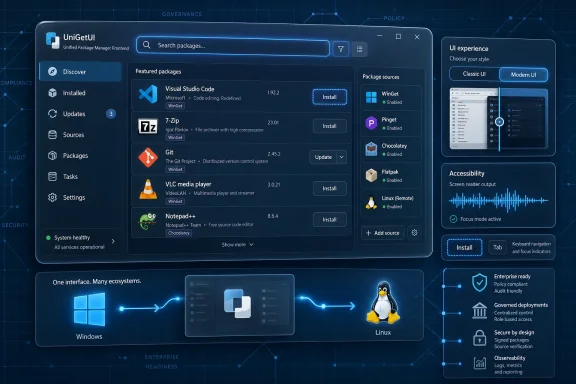
UniGetUI 2026.1.8 arrived on May 5, 2026, as a Devolutions-branded release of the open-source Windows package-manager front end, adding a portable WinGet fallback called Pinget, a modern Avalonia interface for Windows, Flatpak support, and fixes across Chocolatey, Fedora RPM installs, accessibility, and navigation. The release looks, at first glance, like a routine utility update. It is not. It is a sign that one of the Windows power-user community’s most useful convenience tools is being pushed toward something larger: a cross-platform, more enterprise-conscious software management layer for people who do not want to live in terminals.
Windows package management has always lived in an awkward middle ground. Microsoft has WinGet, Chocolatey has years of community gravity, Scoop has a loyal developer audience, and language ecosystems such as Python, Node.js, and .NET bring their own package managers along for the ride. The result is powerful, but fragmented: a machine can be “managed” by half a dozen tools, each with its own syntax, repository model, quirks, and failure modes.
UniGetUI’s pitch has always been simple enough to sound almost boring: put a graphical interface over the package managers people already use. Search for apps, inspect metadata, install them, update them, remove them, export a setup, and repeat the process on another machine. That is not glamorous software, but it is the kind of utility that becomes sticky because it removes friction from work people already do every week.
Version 2026.1.8 matters because it sharpens that role. The release does not merely add another polish pass to the interface; it changes how UniGetUI thinks about its dependency on WinGet, expands its ambitions beyond Windows-only tooling, and brings the Avalonia-based UI closer to being a real user-facing path rather than a future-looking experiment.
That is the through-line here. UniGetUI is no longer just a friendlier window wrapped around command-line tools. Under Devolutions, it is being shaped into a product that wants to make package management legible, portable, and governable without giving up the flexibility that made the original project attractive.
That move says a lot about the tension in Windows package management. WinGet is the closest thing modern Windows has to a default package manager, but its presence and health cannot always be assumed across every machine, image, policy environment, or edition. Some systems have it. Some have broken App Installer components. Some are locked down. Some are running in conditions where Microsoft Store plumbing, packaged app dependencies, or enterprise restrictions make WinGet less predictable than its central role would suggest.
A GUI that depends on WinGet cannot simply shrug when WinGet is absent or unavailable. To ordinary users, a missing backend looks like a broken app. To admins, it looks like one more variable in a deployment chain that already has too many of them.
Pinget is UniGetUI’s answer to that problem. The idea is not merely to provide a spare executable. It is to make WinGet-style operations less dependent on the state of the Windows install underneath. That is a subtle but important distinction. If UniGetUI can present a consistent experience even when Microsoft’s official WinGet client is missing, unavailable, or unreliable, it becomes less of a decorative shell and more of an abstraction layer.
There is also a trust question here. Bundling package-manager binaries can be convenient, but it raises maintenance, provenance, update, and validation concerns. A portable fallback designed for this role gives Devolutions a clearer place to put that complexity. For a tool now operating under a company that publicly talks about security and enterprise readiness, that matters.
But the Avalonia work is bigger than a fresh coat of paint. Avalonia is a cross-platform UI framework, and UniGetUI has already been moving in that direction across recent Devolutions-era releases. In 2026.1.8, the modern interface is described as fully featured on Windows, with parity work between Avalonia and WinUI, navigation improvements, maximization fixes, and Linux window behavior improvements.
That is the kind of changelog language that sounds pedestrian until you consider what it enables. A GUI that began as a Windows helper can only become a serious multi-platform management tool if its interface layer is no longer welded to Windows-specific assumptions. The Flatpak addition in the same release makes that direction harder to miss.
For Windows users, the immediate benefit is a more modern UI option. For Devolutions, the longer-term benefit is architectural leverage. One codebase, or at least one design system, can increasingly serve users across Windows and Linux rather than forcing the project to maintain separate front ends or treat non-Windows support as a side quest.
The risk is that cross-platform ambition can dilute the original promise. Windows users adopted UniGetUI because it made the Windows package-manager mess easier. If the app becomes too generic, or if the modern interface prioritizes framework consistency over Windows-native practicality, Devolutions could alienate the very audience that made the project valuable. The toggle between classic and modern modes is therefore not just a comfort feature. It is a pressure valve.
That distinction matters. Developers, sysadmins, homelab users, and enthusiasts increasingly live across operating systems. A Windows desktop may sit next to a Fedora laptop, a WSL-heavy workstation, a Linux VM, or a fleet of mixed endpoints. The tools that win in those environments are not always the purest or most elegant. They are the ones that reduce the number of mental models an operator needs to keep in active memory.
Flatpak is also philosophically aligned with the problem UniGetUI tries to solve. It is a packaging and distribution system that abstracts software installation away from the traditional Linux distribution repository model. It has its own commands, remotes, permissions, update logic, and desktop integration concerns. In other words, it is another powerful package ecosystem that benefits from a clear management surface.
Adding Flatpak does not suddenly make UniGetUI a mature Linux software center. It does, however, mark a boundary crossing. The project’s name has always implied a unifying interface, but historically the practical center of gravity was Windows. With Flatpak in the matrix, the “Uni” part starts to look less like branding and more like strategy.
That may make some Windows purists nervous. But it should not. If anything, cross-platform expansion can improve the Windows version by forcing the application to separate core package-management concepts from platform-specific assumptions. The better UniGetUI gets at modeling packages, sources, updates, metadata, and user intent abstractly, the less brittle it should become when any single backend changes.
The 2026.1.8 release is notable because it looks like Devolutions is moving on several fronts at once. Branding and documentation have been updated. The WinGet dependency story is changing. The Avalonia port is becoming more usable. Accessibility fixes are landing. Linux packaging issues are being addressed. Chocolatey validation is being tightened.
That is not the pattern of a project in maintenance mode. It is the pattern of a tool being normalized into a company’s development and release machinery.
There are benefits to that. Independent open-source utilities often live or die by maintainer energy, and package-management software has a particularly unforgiving maintenance burden. Backends change. Repositories break. Installers alter behavior. Signing expectations evolve. Package metadata is inconsistent. Users blame the front end even when the underlying package manager caused the failure.
Corporate backing can help absorb that grind. It can fund boring work: accessibility, translations, signing, packaging, regression fixes, infrastructure, documentation, test coverage, and release validation. Those improvements do not always produce viral screenshots, but they are precisely what separate a beloved tool from dependable infrastructure.
The trade-off is cultural. Users will watch closely for signs that UniGetUI’s open-source character is being narrowed, that enterprise ambitions are steering priorities away from individuals, or that Devolutions branding is the start of a funnel rather than a sponsorship model. The company’s public commitment that UniGetUI remains open source under the MIT license is important, but trust in open source is earned release by release. Version 2026.1.8 is one of those releases.
A package manager GUI exists because command-line tools are not the right interface for everyone or every situation. If the GUI itself is hard to navigate by keyboard, confusing to screen readers, or inconsistent in focus behavior, it fails its own argument. It becomes a nicer interface only for users whose needs match the assumptions of the designer.
That is especially relevant in IT environments. Accessibility is not just about individual accommodation, though that would be enough on its own. It is also about predictable keyboard flows, clear focus order, descriptive controls, and interfaces that can be operated under stress, remotely, or on systems with display scaling and input constraints. The same discipline that helps a screen reader user often helps an admin working quickly over a remote session.
The Avalonia transition makes this work even more important. Replatforming a UI can easily create accessibility regressions, because controls that look equivalent may expose different semantics to assistive technologies. If Devolutions wants the modern interface to become the default over time, accessibility parity is not optional. It is part of the migration cost.
This is where UniGetUI’s evolution from hobbyist utility to serious tool becomes visible. A polished package browser is nice. A package manager that can be operated consistently by more users, in more contexts, is infrastructure.
A unified GUI inherits the complexity of every backend it supports. When Chocolatey changes behavior, UniGetUI has to cope. When WinGet behaves differently depending on system state, UniGetUI has to explain or route around it. When Linux packaging dependencies differ across distributions or versions, UniGetUI has to decide whether cross-platform support is real or merely aspirational.
This is why the “package manager manager” idea is harder than it sounds. A shallow GUI can shell out to commands and display output. A useful GUI has to understand enough of each backend’s semantics to present meaningful options without lying to the user. It has to know what can be installed silently, what can be upgraded safely, what metadata is trustworthy, what operations require elevation, and what failures are recoverable.
The more backends UniGetUI supports, the more valuable it becomes, but also the more exposed it is to edge cases. WinGet, Chocolatey, Scoop, Pip, Npm, .NET Tool, and now Flatpak are not interchangeable pipes. They are different ecosystems with different expectations. UniGetUI’s job is not to pretend they are the same. Its job is to make their differences manageable.
That is why fixes like Chocolatey validation matter. They tell users whether the abstraction is being maintained carefully or just expanded recklessly.
WinGet improved the picture by creating a Microsoft-backed command-line path for discovering and installing many applications. But command-line package management and mainstream Windows UX have never fully converged. For enthusiasts, that gap is tolerable. For ordinary users, it is a nonstarter. For admins, it is another layer to automate, secure, and audit.
UniGetUI sits in that gap. It gives WinGet and its peers a visual surface, but it also acknowledges that no single package manager owns the Windows desktop. That is the practical insight. The Windows ecosystem is too decentralized for one repository to capture everything, and too historically messy for one package format to sweep the board overnight.
This is why UniGetUI’s support for multiple managers is more than a checklist feature. It mirrors reality. Many users already have software installed through different channels, whether intentionally or accidentally. A tool that can at least display, update, and remove across several of those channels has a better chance of matching the actual state of a working PC.
But the same realism creates danger. When an interface makes everything look equally manageable, users may assume a level of consistency that does not exist underneath. Silent installs may fail. Package manifests may lag vendor releases. Update detection may be imperfect. Some installers may bundle prompts or change behavior without warning. The GUI can reduce complexity, but it cannot repeal it.
That is not an argument against bulk operations. It is an argument for treating them with the seriousness usually reserved for admin tools. A package list is effectively a machine profile. An exported UniGetUI configuration can become a repeatable software baseline. A backup of installed packages can accelerate migration to a new PC. These are consumer-friendly features with enterprise-adjacent consequences.
For power users, this is liberating. Rebuilding a Windows machine has historically meant a grim ritual of browser downloads, installer prompts, license dialogs, and vendor-specific update checks. With a package-management front end, much of that becomes declarative: here are the applications I use, here are the sources, here are the install parameters, now recreate the environment.
For IT pros, the same model raises governance questions. Which packages are approved? Which repositories are trusted? Who controls update timing? How do you handle software that exists in both WinGet and Chocolatey? What happens when a package disappears, changes publisher metadata, or shifts licensing? UniGetUI does not answer all of those questions today, but Devolutions’ enterprise-oriented framing makes them unavoidable.
That is where the product could become more than a convenience utility. If UniGetUI evolves toward centrally defined catalogs, policy-aware updates, and auditable package actions while preserving the local GUI experience, it could occupy an interesting space between consumer package helpers and full endpoint management platforms.
This dual-track approach can be messy for developers. Supporting two interfaces means duplicated bug reports, parity work, and potential confusion when a feature behaves slightly differently depending on the selected mode. But for a project with a loyal user base, it is often the least bad option.
The alternative would be a hard cutover, which almost always turns a UI release into a referendum on taste. Users who came to install updates suddenly find themselves litigating spacing, navigation, and muscle memory. That is a losing move for utility software. Nobody wants their package manager to become a design manifesto on patch day.
The better approach is to let the modern UI earn its place. Give users the new path, keep the old one functional, and move features into parity until the classic mode becomes a fallback rather than a refuge. Version 2026.1.8 appears to be somewhere in that middle period.
The challenge for Devolutions will be knowing when to consolidate. Maintaining two front ends indefinitely can slow development and increase inconsistency. But forcing the issue too early can fracture trust. The right answer depends less on visual polish than on boring metrics: crash rates, completed operations, accessibility results, support volume, and user retention.
Devolutions’ involvement can strengthen that trust if the company uses its resources to make the project more transparent and durable. Better release integrity, clearer documentation, consistent changelogs, signed binaries, and responsive issue handling all reinforce the case for a company-backed open-source model. The acquisition only becomes a problem if the project’s center of gravity shifts from community utility to lead-generation asset.
The early Devolutions-branded releases suggest a company trying to professionalize rather than bury the project. The first 2026.1 release focused on transition work, update infrastructure, validation, packaging, and branding. Subsequent releases have moved the Avalonia port forward and now add Pinget fallback and Flatpak support. That is a coherent progression.
Still, the community will judge outcomes, not intentions. If the app becomes more reliable, more accessible, and more capable without closing off its source or nagging users into commercial products, the Devolutions era will be seen as a win. If it becomes heavier, noisier, or less transparent, users will remember that package managers are optional until they are trusted.
This is the paradox of infrastructure software. The better it gets, the less users want to think about it. UniGetUI’s success will not be measured by how often people admire its interface. It will be measured by how rarely they have to wonder whether the update they just triggered will do what it said it would do.
For WindowsForum readers, the practical read is straightforward:
UniGetUI 2026.1.8 is not the final answer to Windows software management, but it is a meaningful step toward a world where users can treat application installation and updates as a coherent workflow rather than a scavenger hunt across installers, stores, scripts, and vendor updaters. The interesting question now is whether Devolutions can keep the tool light enough for enthusiasts, trustworthy enough for admins, and open enough for the community while building the governance features that larger environments will inevitably demand.
Source: Neowin UniGetUI 2026.1.8
 UniGetUI Is Becoming the Missing Front End Microsoft Never Quite Built
Windows package management has always lived in an awkward middle ground. Microsoft has WinGet, Chocolatey has years of community gravity, Scoop has a loyal developer audience, and language ecosystems such as Python, Node.js, and .NET bring their own package managers along for the ride. The result is powerful, but fragmented: a machine can be “managed” by half a dozen tools, each with its own syntax, repository model, quirks, and failure modes.UniGetUI’s pitch has always been simple enough to sound almost boring: put a graphical interface over the package managers people already use. Search for apps, inspect metadata, install them, update them, remove them, export a setup, and repeat the process on another machine. That is not glamorous software, but it is the kind of utility that becomes sticky because it removes friction from work people already do every week.
Version 2026.1.8 matters because it sharpens that role. The release does not merely add another polish pass to the interface; it changes how UniGetUI thinks about its dependency on WinGet, expands its ambitions beyond Windows-only tooling, and brings the Avalonia-based UI closer to being a real user-facing path rather than a future-looking experiment.
That is the through-line here. UniGetUI is no longer just a friendlier window wrapped around command-line tools. Under Devolutions, it is being shaped into a product that wants to make package management legible, portable, and governable without giving up the flexibility that made the original project attractive.
Removing Bundled WinGet Is a Small Line With Big Implications
The most consequential item in the 2026.1.8 changelog may be the least flashy: UniGetUI has removed the bundled WinGet CLI. In the old model, shipping WinGet alongside the application could help ensure the tool had something usable to call when the host system’s package-manager state was messy. In the new model, UniGetUI is stepping back from bundling Microsoft’s command-line client and instead falling back to Pinget, described as a portable WinGet alternative.That move says a lot about the tension in Windows package management. WinGet is the closest thing modern Windows has to a default package manager, but its presence and health cannot always be assumed across every machine, image, policy environment, or edition. Some systems have it. Some have broken App Installer components. Some are locked down. Some are running in conditions where Microsoft Store plumbing, packaged app dependencies, or enterprise restrictions make WinGet less predictable than its central role would suggest.
A GUI that depends on WinGet cannot simply shrug when WinGet is absent or unavailable. To ordinary users, a missing backend looks like a broken app. To admins, it looks like one more variable in a deployment chain that already has too many of them.
Pinget is UniGetUI’s answer to that problem. The idea is not merely to provide a spare executable. It is to make WinGet-style operations less dependent on the state of the Windows install underneath. That is a subtle but important distinction. If UniGetUI can present a consistent experience even when Microsoft’s official WinGet client is missing, unavailable, or unreliable, it becomes less of a decorative shell and more of an abstraction layer.
There is also a trust question here. Bundling package-manager binaries can be convenient, but it raises maintenance, provenance, update, and validation concerns. A portable fallback designed for this role gives Devolutions a clearer place to put that complexity. For a tool now operating under a company that publicly talks about security and enterprise readiness, that matters.
The Avalonia Interface Is the Product Strategy Hiding in Plain Sight
The modern Avalonia UI for Windows is the release’s most visible change, and it arrives with an important caveat: users can toggle between the classic and modern interfaces. That is the right call. A package manager is not a photo editor or a social app; its users prize reliability over novelty, and a redesign that gets in the way of patching software will be punished quickly.But the Avalonia work is bigger than a fresh coat of paint. Avalonia is a cross-platform UI framework, and UniGetUI has already been moving in that direction across recent Devolutions-era releases. In 2026.1.8, the modern interface is described as fully featured on Windows, with parity work between Avalonia and WinUI, navigation improvements, maximization fixes, and Linux window behavior improvements.
That is the kind of changelog language that sounds pedestrian until you consider what it enables. A GUI that began as a Windows helper can only become a serious multi-platform management tool if its interface layer is no longer welded to Windows-specific assumptions. The Flatpak addition in the same release makes that direction harder to miss.
For Windows users, the immediate benefit is a more modern UI option. For Devolutions, the longer-term benefit is architectural leverage. One codebase, or at least one design system, can increasingly serve users across Windows and Linux rather than forcing the project to maintain separate front ends or treat non-Windows support as a side quest.
The risk is that cross-platform ambition can dilute the original promise. Windows users adopted UniGetUI because it made the Windows package-manager mess easier. If the app becomes too generic, or if the modern interface prioritizes framework consistency over Windows-native practicality, Devolutions could alienate the very audience that made the project valuable. The toggle between classic and modern modes is therefore not just a comfort feature. It is a pressure valve.
Flatpak Support Turns UniGetUI Into a Broader Argument
Flatpak support is easy to misunderstand if you view UniGetUI strictly through a Windows lens. Why should a Windows utility care about Linux desktop packaging? Because the real product category is not “WinGet GUI.” It is “unified software acquisition and update management for people who use multiple package ecosystems.”That distinction matters. Developers, sysadmins, homelab users, and enthusiasts increasingly live across operating systems. A Windows desktop may sit next to a Fedora laptop, a WSL-heavy workstation, a Linux VM, or a fleet of mixed endpoints. The tools that win in those environments are not always the purest or most elegant. They are the ones that reduce the number of mental models an operator needs to keep in active memory.
Flatpak is also philosophically aligned with the problem UniGetUI tries to solve. It is a packaging and distribution system that abstracts software installation away from the traditional Linux distribution repository model. It has its own commands, remotes, permissions, update logic, and desktop integration concerns. In other words, it is another powerful package ecosystem that benefits from a clear management surface.
Adding Flatpak does not suddenly make UniGetUI a mature Linux software center. It does, however, mark a boundary crossing. The project’s name has always implied a unifying interface, but historically the practical center of gravity was Windows. With Flatpak in the matrix, the “Uni” part starts to look less like branding and more like strategy.
That may make some Windows purists nervous. But it should not. If anything, cross-platform expansion can improve the Windows version by forcing the application to separate core package-management concepts from platform-specific assumptions. The better UniGetUI gets at modeling packages, sources, updates, metadata, and user intent abstractly, the less brittle it should become when any single backend changes.
Devolutions Is Turning a Power-User Tool Into a Governed Project
The Devolutions acquisition changed the stakes around UniGetUI. Before the transition, UniGetUI could be judged mostly as a community tool: useful, open source, imperfect, and impressive given its origins. After the transition, it becomes fair to ask harder questions about roadmap, governance, reliability, enterprise use, and whether a company-backed open-source utility can preserve the community trust that made it popular.The 2026.1.8 release is notable because it looks like Devolutions is moving on several fronts at once. Branding and documentation have been updated. The WinGet dependency story is changing. The Avalonia port is becoming more usable. Accessibility fixes are landing. Linux packaging issues are being addressed. Chocolatey validation is being tightened.
That is not the pattern of a project in maintenance mode. It is the pattern of a tool being normalized into a company’s development and release machinery.
There are benefits to that. Independent open-source utilities often live or die by maintainer energy, and package-management software has a particularly unforgiving maintenance burden. Backends change. Repositories break. Installers alter behavior. Signing expectations evolve. Package metadata is inconsistent. Users blame the front end even when the underlying package manager caused the failure.
Corporate backing can help absorb that grind. It can fund boring work: accessibility, translations, signing, packaging, regression fixes, infrastructure, documentation, test coverage, and release validation. Those improvements do not always produce viral screenshots, but they are precisely what separate a beloved tool from dependable infrastructure.
The trade-off is cultural. Users will watch closely for signs that UniGetUI’s open-source character is being narrowed, that enterprise ambitions are steering priorities away from individuals, or that Devolutions branding is the start of a funnel rather than a sponsorship model. The company’s public commitment that UniGetUI remains open source under the MIT license is important, but trust in open source is earned release by release. Version 2026.1.8 is one of those releases.
Accessibility Fixes Are Not a Side Quest
Accessibility appears in the changelog as a set of fixes for screen reader users and focus management, including navigation bar improvements. In many software announcements, those lines are treated as compliance housekeeping. For UniGetUI, they are more central than that.A package manager GUI exists because command-line tools are not the right interface for everyone or every situation. If the GUI itself is hard to navigate by keyboard, confusing to screen readers, or inconsistent in focus behavior, it fails its own argument. It becomes a nicer interface only for users whose needs match the assumptions of the designer.
That is especially relevant in IT environments. Accessibility is not just about individual accommodation, though that would be enough on its own. It is also about predictable keyboard flows, clear focus order, descriptive controls, and interfaces that can be operated under stress, remotely, or on systems with display scaling and input constraints. The same discipline that helps a screen reader user often helps an admin working quickly over a remote session.
The Avalonia transition makes this work even more important. Replatforming a UI can easily create accessibility regressions, because controls that look equivalent may expose different semantics to assistive technologies. If Devolutions wants the modern interface to become the default over time, accessibility parity is not optional. It is part of the migration cost.
This is where UniGetUI’s evolution from hobbyist utility to serious tool becomes visible. A polished package browser is nice. A package manager that can be operated consistently by more users, in more contexts, is infrastructure.
Chocolatey, Fedora, and the Cost of Being the Middle Layer
The fixes in 2026.1.8 also show the unglamorous burden UniGetUI carries as a middle layer. Chocolatey installer validation needed a fix. RPM installation failed on Fedora 38 and newer because of dependency problems involving liblttng-ust.so.0. Navigation behavior needed cleanup. These are not the kind of issues that define a product vision, but they are the issues that determine whether users keep the tool installed.A unified GUI inherits the complexity of every backend it supports. When Chocolatey changes behavior, UniGetUI has to cope. When WinGet behaves differently depending on system state, UniGetUI has to explain or route around it. When Linux packaging dependencies differ across distributions or versions, UniGetUI has to decide whether cross-platform support is real or merely aspirational.
This is why the “package manager manager” idea is harder than it sounds. A shallow GUI can shell out to commands and display output. A useful GUI has to understand enough of each backend’s semantics to present meaningful options without lying to the user. It has to know what can be installed silently, what can be upgraded safely, what metadata is trustworthy, what operations require elevation, and what failures are recoverable.
The more backends UniGetUI supports, the more valuable it becomes, but also the more exposed it is to edge cases. WinGet, Chocolatey, Scoop, Pip, Npm, .NET Tool, and now Flatpak are not interchangeable pipes. They are different ecosystems with different expectations. UniGetUI’s job is not to pretend they are the same. Its job is to make their differences manageable.
That is why fixes like Chocolatey validation matter. They tell users whether the abstraction is being maintained carefully or just expanded recklessly.
The Windows Software Update Problem Still Has Not Been Solved
The reason tools like UniGetUI resonate is that Windows still lacks a universal, trusted, user-friendly software update model for traditional desktop applications. Microsoft Store apps update one way. Win32 apps often update themselves. Enterprise agents do their own thing. Vendors ship background services, scheduled tasks, pop-up updaters, and sometimes nothing at all. The system works well enough until you need to understand it.WinGet improved the picture by creating a Microsoft-backed command-line path for discovering and installing many applications. But command-line package management and mainstream Windows UX have never fully converged. For enthusiasts, that gap is tolerable. For ordinary users, it is a nonstarter. For admins, it is another layer to automate, secure, and audit.
UniGetUI sits in that gap. It gives WinGet and its peers a visual surface, but it also acknowledges that no single package manager owns the Windows desktop. That is the practical insight. The Windows ecosystem is too decentralized for one repository to capture everything, and too historically messy for one package format to sweep the board overnight.
This is why UniGetUI’s support for multiple managers is more than a checklist feature. It mirrors reality. Many users already have software installed through different channels, whether intentionally or accidentally. A tool that can at least display, update, and remove across several of those channels has a better chance of matching the actual state of a working PC.
But the same realism creates danger. When an interface makes everything look equally manageable, users may assume a level of consistency that does not exist underneath. Silent installs may fail. Package manifests may lag vendor releases. Update detection may be imperfect. Some installers may bundle prompts or change behavior without warning. The GUI can reduce complexity, but it cannot repeal it.
Bulk Operations Are Powerful Because They Are Dangerous
One of UniGetUI’s strongest appeals is bulk management. Selecting multiple packages and installing, updating, or removing them in one operation is exactly the kind of feature that turns a tedious afternoon into a short maintenance window. It is also the kind of feature that can make a bad assumption propagate quickly.That is not an argument against bulk operations. It is an argument for treating them with the seriousness usually reserved for admin tools. A package list is effectively a machine profile. An exported UniGetUI configuration can become a repeatable software baseline. A backup of installed packages can accelerate migration to a new PC. These are consumer-friendly features with enterprise-adjacent consequences.
For power users, this is liberating. Rebuilding a Windows machine has historically meant a grim ritual of browser downloads, installer prompts, license dialogs, and vendor-specific update checks. With a package-management front end, much of that becomes declarative: here are the applications I use, here are the sources, here are the install parameters, now recreate the environment.
For IT pros, the same model raises governance questions. Which packages are approved? Which repositories are trusted? Who controls update timing? How do you handle software that exists in both WinGet and Chocolatey? What happens when a package disappears, changes publisher metadata, or shifts licensing? UniGetUI does not answer all of those questions today, but Devolutions’ enterprise-oriented framing makes them unavoidable.
That is where the product could become more than a convenience utility. If UniGetUI evolves toward centrally defined catalogs, policy-aware updates, and auditable package actions while preserving the local GUI experience, it could occupy an interesting space between consumer package helpers and full endpoint management platforms.
The Classic UI Toggle Buys Time for a Risky Transition
Allowing users to toggle between the classic and modern UIs is a pragmatic admission that interface migrations are dangerous. The classic UniGetUI experience is familiar to the existing user base. The modern Avalonia interface is strategically important but still has to prove itself across workflows, display configurations, accessibility tools, and edge cases.This dual-track approach can be messy for developers. Supporting two interfaces means duplicated bug reports, parity work, and potential confusion when a feature behaves slightly differently depending on the selected mode. But for a project with a loyal user base, it is often the least bad option.
The alternative would be a hard cutover, which almost always turns a UI release into a referendum on taste. Users who came to install updates suddenly find themselves litigating spacing, navigation, and muscle memory. That is a losing move for utility software. Nobody wants their package manager to become a design manifesto on patch day.
The better approach is to let the modern UI earn its place. Give users the new path, keep the old one functional, and move features into parity until the classic mode becomes a fallback rather than a refuge. Version 2026.1.8 appears to be somewhere in that middle period.
The challenge for Devolutions will be knowing when to consolidate. Maintaining two front ends indefinitely can slow development and increase inconsistency. But forcing the issue too early can fracture trust. The right answer depends less on visual polish than on boring metrics: crash rates, completed operations, accessibility results, support volume, and user retention.
Open Source Gives UniGetUI Its Credibility, but Operations Will Define Its Future
UniGetUI’s MIT-licensed open-source status is not a footnote. It is central to why many Windows enthusiasts trust it. Package-management software touches installation, updates, removal, and sometimes elevated operations. Users are right to care who controls it, how it changes, and whether the community can inspect what it does.Devolutions’ involvement can strengthen that trust if the company uses its resources to make the project more transparent and durable. Better release integrity, clearer documentation, consistent changelogs, signed binaries, and responsive issue handling all reinforce the case for a company-backed open-source model. The acquisition only becomes a problem if the project’s center of gravity shifts from community utility to lead-generation asset.
The early Devolutions-branded releases suggest a company trying to professionalize rather than bury the project. The first 2026.1 release focused on transition work, update infrastructure, validation, packaging, and branding. Subsequent releases have moved the Avalonia port forward and now add Pinget fallback and Flatpak support. That is a coherent progression.
Still, the community will judge outcomes, not intentions. If the app becomes more reliable, more accessible, and more capable without closing off its source or nagging users into commercial products, the Devolutions era will be seen as a win. If it becomes heavier, noisier, or less transparent, users will remember that package managers are optional until they are trusted.
This is the paradox of infrastructure software. The better it gets, the less users want to think about it. UniGetUI’s success will not be measured by how often people admire its interface. It will be measured by how rarely they have to wonder whether the update they just triggered will do what it said it would do.
The 2026.1.8 Release Tells Admins Where the Project Is Heading
UniGetUI 2026.1.8 is worth installing for the immediate improvements, but its real value is as a roadmap signal. The project is becoming less dependent on a single Windows component, more serious about cross-platform UI, more inclusive through accessibility fixes, and more attentive to the messy reality of package-manager backends.For WindowsForum readers, the practical read is straightforward:
- UniGetUI 2026.1.8 removes the bundled WinGet CLI and adds Pinget as an automatic fallback when the official WinGet client is missing or unavailable.
- The modern Avalonia-based interface is now available on Windows, while the classic interface remains available for users who prefer the established workflow.
- Flatpak support expands UniGetUI’s scope beyond the traditional Windows package-manager stack and points toward a broader cross-platform future.
- Accessibility and focus-management fixes matter because a GUI package manager must be usable by more than mouse-first power users.
- Chocolatey validation and Fedora RPM fixes show that backend reliability remains the project’s hardest and least glamorous responsibility.
- The Devolutions era is turning UniGetUI from a handy enthusiast app into a more structured open-source project with enterprise-adjacent ambitions.
UniGetUI 2026.1.8 is not the final answer to Windows software management, but it is a meaningful step toward a world where users can treat application installation and updates as a coherent workflow rather than a scavenger hunt across installers, stores, scripts, and vendor updaters. The interesting question now is whether Devolutions can keep the tool light enough for enthusiasts, trustworthy enough for admins, and open enough for the community while building the governance features that larger environments will inevitably demand.
Source: Neowin UniGetUI 2026.1.8
